





- About
- Installing
- Using in plain Python scripts
- Authentication
- Using in Jupyter
- Serving data from a local Kamu workspace
- Using with Spark
About
Python client library for Kamu.
Start with kamu-cli repo if you are not familiar with the project.
Installing
Install the library:
pip install kamu
Consider installing with extra features:
pip install kamu[jupyter-autoviz,jupyter-sql,spark]
Extras
jupyter-autoviz- Jupyter auto-viz for Pandas data framesjupyter-sql- Jupyter%%sqlcell magicspark- extra libraries temporarily required to communicate with Spark engine
Using in plain Python scripts
import kamu

con = kamu.connect("grpc+tls://node.demo.kamu.dev:50050")

# Executes query on the node and returns result as Pandas DataFrame
df = con.query(
    """
    select
        event_time, open, close, volume
    from 'kamu/co.alphavantage.tickers.daily.spy'
    where from_symbol = 'spy' and to_symbol = 'usd'
    order by event_time
    """
)

print(df)
By default the connection will use DataFusion engine with Postgres-like SQL dialect.
The client library is based on modern ADBC standard and the underlying connection can be used directly with other libraries supporting ADBC data sources:
import kamu
import pandas

con = kamu.connect("grpc+tls://node.demo.kamu.dev:50050")

df = pandas.read_sql_query(
    "select 1 as x",
    con.as_adbc(),
)
Authentication
You can supply an access token via token parameter:
kamu.connect("grpc+tls://node.demo.kamu.dev:50050", token="<access-token>")
When token is not provided the library will authenticate as anonymous user. If node allows anonymous access the client will get a session token assigned during the handshake procedure and will use it for all subsequent requests.
Using in Jupyter
Load the extension in your notebook:
%load_ext kamu
Create connection:
con = kamu.connect("grpc+tls://node.demo.kamu.dev:50050")
Extension provides a convenience %%sql magic:
%%sql
select
    event_time, open, close, volume
from 'kamu/co.alphavantage.tickers.daily.spy'
where from_symbol = 'spy' and to_symbol = 'usd'
order by event_time
The above is equivalent to:
con.query("...")
To save the query result into a variable use:
%%sql -o df
select * from x
The above is equivalent to:
df = con.query("...")
df
To silence the output add -q:
%%sql -o df -q
select * from x
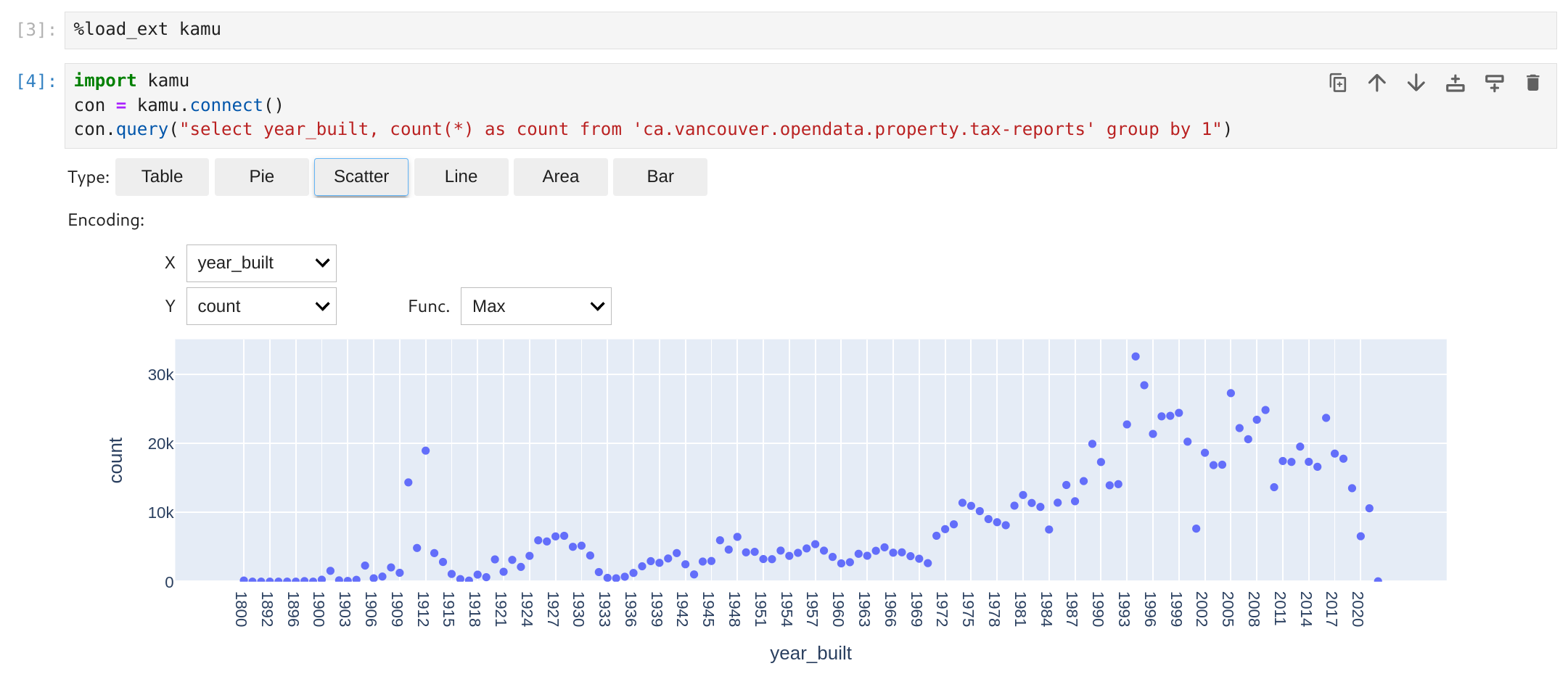
The kamu extension automatically registers autovizwidget to offer some options to visualize your data frames.
Other Notebook Environmnets
This library should work with most Python-based notebook environments.
Here's an example Google Colab Notebook.
Serving data from a local Kamu workspace
If you have kamu-cli you can serve data directly from a local workspace like so:
con = kamu.connect("file:///path/to/workspace")
This will automatically start a kamu sql server sub-process and connect to it using an appropriate protocol.
Use file:// to start the server in the current directory.
Using with Spark
You can specify a different engine when connecting:
con = kamu.connect("http://livy:8888", engine="spark")
Note that currently Spark connectivity relies on Livy HTTP gateway but in future will be unified under ADBC.
You can also provide extra configuration to the connection:
con = kamu.connect(
    "http://livy:8888",
    engine="spark",
    connection_params=dict(
        driver_memory="1000m",
        executor_memory="2000m",
    ),
)
1 maintainer

Metadata
1 maintainer
Release files for kamu 0.7.0
For a detailed explanation of source distributions (sdists) and built distributions (wheels), please see the package formats documentation.
Source distribution (sdist)
| File | Size | Uploaded | Provenance | Actions |
|---|---|---|---|---|
| kamu-0.7.0.tar.gz | 23.0 kB | Without provenance | Details for kamu-0.7.0.tar.gz |
Built distribution (wheel)
| File | Interpreter | ABI | Platform | Actions Reset |
|---|---|---|---|---|
| kamu-0.7.0-py3-none-any.whl | Python 3 | none | any | Details for kamu-0.7.0-py3-none-any.whl |
Total release size: 42.6 kB
Release files / kamu-0.7.0.tar.gz
| Download URL | kamu-0.7.0.tar.gz |
|---|---|
| Size | 23.0 kB |
| Tags | Source |
|
SHA-256 checksum How to use checksums |
d6515a6023329986b64c86c2e1bc3602b656939b9b707188a203e10df605b0e4
|
|
BLAKE2b-256 checksum How to use checksums |
8409fa1d76ed56f7233ad9b23d39ebc417789516c1edeb8e57911e66d8f78af5
|
| Upload date | |
|
Uploaded using Trusted Publishing? What is trusted publishing? |
No |
| Uploaded via |
twine/6.1.0 CPython/3.12.2
|
Release files / kamu-0.7.0-py3-none-any.whl
| Download URL | kamu-0.7.0-py3-none-any.whl |
|---|---|
| Size | 19.6 kB |
| Tags | Python 3 |
|
SHA-256 checksum How to use checksums |
0ebaa26f07be11279542d11fe5ed054455caa0a475ab6aac1b7a5e08ac590e15
|
|
BLAKE2b-256 checksum How to use checksums |
323742d7fa4c6840e7a6df9a045a6e1038affa4b32d232bbde116bc48cfac07d
|
| Upload date | |
|
Uploaded using Trusted Publishing? What is trusted publishing? |
No |
| Uploaded via |
twine/6.1.0 CPython/3.12.2
|
Security for kamu 0.7.0
Provenance
Provenance describes where a file came from. On PyPI, provenance is shared via attestations, which provide a verifiable record of the build or publishing details. View details, limitations and caveats.
No provenance found
None of the files in this release were uploaded with provenance metadata.
A note on package security
PyPI is a repository for distributing packages, not a service for auditing them. While third-party security researchers and our staff do their best to detect and remove malicious packages, PyPI cannot guarantee the quality, security or suitability of any given package.
To learn more about protecting yourself from malicious actors, visit our package security documentation.














