





- About
- Installing
- Using in plain Python scripts
- Authentication
- Using in Jupyter
- Serving data from a local Kamu workspace
- Using with Spark
About
Python client library for Kamu.
Start with kamu-cli repo if you are not familiar with the project.
Installing
Install the library:
pip install kamu
Consider installing with extra features:
pip install kamu[jupyter-autoviz,jupyter-sql,spark]
Extras
jupyter-autoviz- Jupyter auto-viz for Pandas data framesjupyter-sql- Jupyter%%sqlcell magicspark- extra libraries temporarily required to communicate with Spark engine
Using in plain Python scripts
import kamu

con = kamu.connect("grpc+tls://node.demo.kamu.dev:50050")

# Executes query on the node and returns result as Pandas DataFrame
df = con.query(
    """
    select
        event_time, open, close, volume
    from 'kamu/co.alphavantage.tickers.daily.spy'
    where from_symbol = 'spy' and to_symbol = 'usd'
    order by event_time
    """
)

print(df)
By default the connection will use DataFusion engine with Postgres-like SQL dialect.
The client library is based on modern ADBC standard and the underlying connection can be used directly with other libraries supporting ADBC data sources:
import kamu
import pandas

con = kamu.connect("grpc+tls://node.demo.kamu.dev:50050")

df = pandas.read_sql_query(
    "select 1 as x",
    con.as_adbc(),
)
Authentication
You can supply an access token via token parameter:
kamu.connect("grpc+tls://node.demo.kamu.dev:50050", token="<access-token>")
When token is not provided the library will authenticate as anonymous user. If node allows anonymous access the client will get a session token assigned during the handshake procedure and will use it for all subsequent requests.
Using in Jupyter
Load the extension in your notebook:
%load_ext kamu
Create connection:
con = kamu.connect("grpc+tls://node.demo.kamu.dev:50050")
Extension provides a convenience %%sql magic:
%%sql
select
    event_time, open, close, volume
from 'kamu/co.alphavantage.tickers.daily.spy'
where from_symbol = 'spy' and to_symbol = 'usd'
order by event_time
The above is equivalent to:
con.query("...")
To save the query result into a variable use:
%%sql -o df
select * from x
The above is equivalent to:
df = con.query("...")
df
To silence the output add -q:
%%sql -o df -q
select * from x
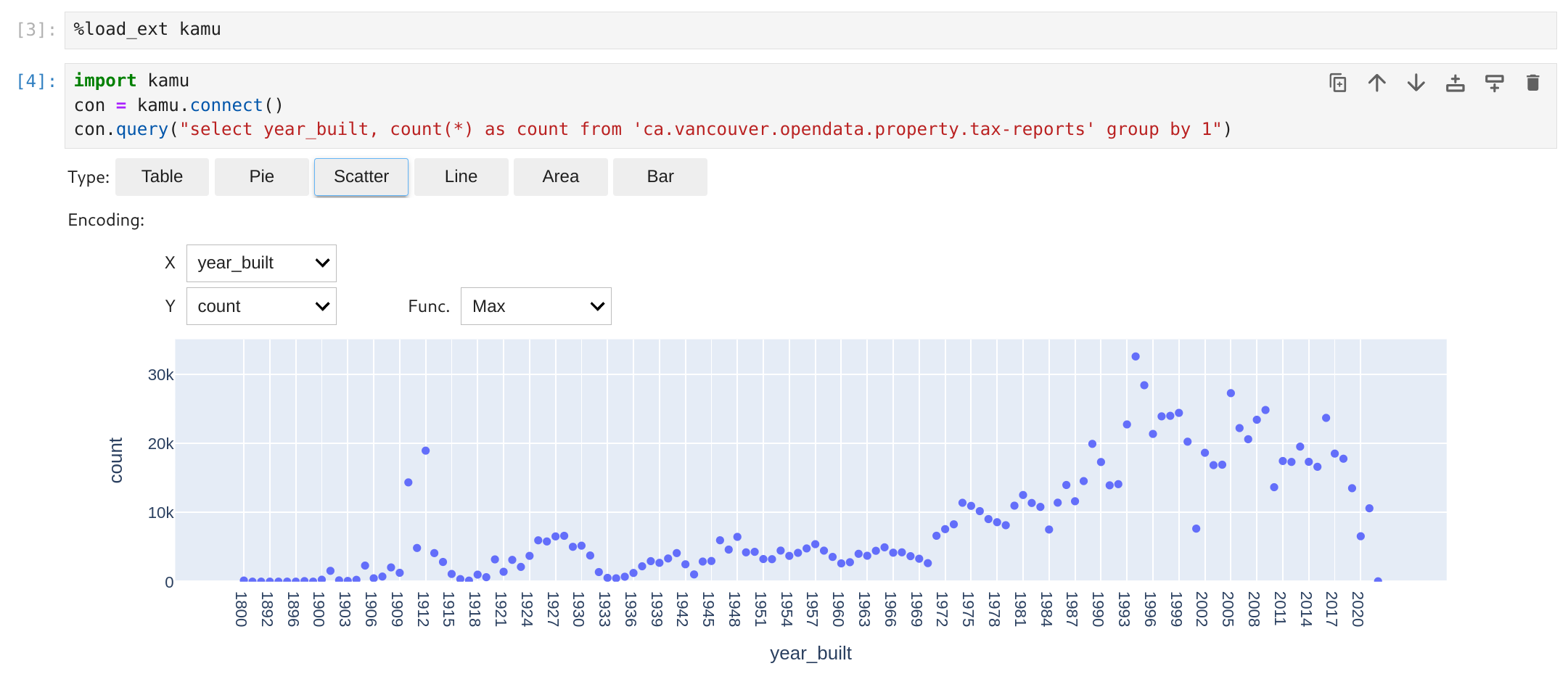
The kamu extension automatically registers autovizwidget to offer some options to visualize your data frames.
Other Notebook Environmnets
This library should work with most Python-based notebook environments.
Here's an example Google Colab Notebook.
Serving data from a local Kamu workspace
If you have kamu-cli you can serve data directly from a local workspace like so:
con = kamu.connect("file:///path/to/workspace")
This will automatically start a kamu sql server sub-process and connect to it using an appropriate protocol.
Use file:// to start the server in the current directory.
Using with Spark
You can specify a different engine when connecting:
con = kamu.connect("http://livy:8888", engine="spark")
Note that currently Spark connectivity relies on Livy HTTP gateway but in future will be unified under ADBC.
You can also provide extra configuration to the connection:
con = kamu.connect(
    "http://livy:8888",
    engine="spark",
    connection_params=dict(
        driver_memory="1000m",
        executor_memory="2000m",
    ),
)
1 maintainer

Download files
Download the file for your platform. If you're not sure which to choose, learn more about installing packages.
Source Distribution
Built Distribution
Filter files by name, interpreter, ABI, and platform.
If you're not sure about the file name format, learn more about wheel file names.
Copy a direct link to the current filters
File details
Details for the file kamu-0.7.0.tar.gz.
File metadata
- Download URL: kamu-0.7.0.tar.gz
- Upload date:
- Size: 23.0 kB
- Tags: Source
- Uploaded using Trusted Publishing? No
- Uploaded via:
twine/6.1.0 CPython/3.12.2
File hashes
| Algorithm | Hash digest | |
|---|---|---|
| SHA256 |
d6515a6023329986b64c86c2e1bc3602b656939b9b707188a203e10df605b0e4
|
|
| MD5 |
c69fdffc95090d8755c383f66f7a7f02
|
|
| BLAKE2b-256 |
8409fa1d76ed56f7233ad9b23d39ebc417789516c1edeb8e57911e66d8f78af5
|
File details
Details for the file kamu-0.7.0-py3-none-any.whl.
File metadata
- Download URL: kamu-0.7.0-py3-none-any.whl
- Upload date:
- Size: 19.6 kB
- Tags: Python 3
- Uploaded using Trusted Publishing? No
- Uploaded via:
twine/6.1.0 CPython/3.12.2
File hashes
| Algorithm | Hash digest | |
|---|---|---|
| SHA256 |
0ebaa26f07be11279542d11fe5ed054455caa0a475ab6aac1b7a5e08ac590e15
|
|
| MD5 |
376ead710910be31071c2fab72d67d2c
|
|
| BLAKE2b-256 |
323742d7fa4c6840e7a6df9a045a6e1038affa4b32d232bbde116bc48cfac07d
|














