
KanbAI





A file-based Kanban board that lives in your repo, built for Claude Code and other AI
coding harnesses (and humans too). The board is plain Markdown files under .kanbai/,
driven by a simple kanbai CLI and a local web UI. Installed and invoked as kanbai.
📖 Full documentation: www.r3ck.com.br/kanbai
Why
- The board lives in your repo. One Markdown card per task, one folder per column — git-friendly, diffable, no external service, no database.
- Claude drives it.
kanbai initinstalls a rule + skills so Claude picks the next task, implements it, and moves it across the board while you review. - You stay in control. Finished work waits in
reviewfor your approval, and a friendly local web UI lets you watch and manage everything live.
How it works
kanbai init creates a .kanbai/ folder — one directory per column, one Markdown card
per task:
.kanbai/
├── config.toml
├── backlog/
│   └── 004-add-oauth-login.md
├── todo/
├── doing/
├── review/
├── done/
└── archive/
Each card is Markdown with YAML frontmatter (managed by the CLI — don't edit by hand):
---
id: "004"
title: Add OAuth login
status: backlog
priority: high
order: 1
labels: [auth, backend]
deps: []
---

## Description
Support "Sign in with Google".

## Acceptance criteria
- [ ] OAuth flow works end to end
The sprint workflow
Cards flow through five columns:
| Column | Meaning |
|---|---|
backlog |
Everything to do eventually. New cards land here. |
todo |
The current sprint — what's planned for now. |
doing |
In progress. |
review |
Finished, awaiting your approval. |
done |
Approved and complete. |
kanbai next only reads the sprint (todo), respecting card order and blocking
dependencies — so the backlog stays out of the way until you plan work into the sprint.
When work is finished it goes to review; you approve it into done.
Install
uv add --dev kanbai          # add to your project as a dev dependency
# or
pip install kanbai

# for the web UI, install the extra:
uv add --dev 'kanbai[ui]'    # or: pip install 'kanbai[ui]'

# for the AI command input (Anthropic and/or OpenAI), add the `ai` extra too:
uv add --dev 'kanbai[ui,ai]'    # or: pip install 'kanbai[ui,ai]'
Quick start
kanbai init                              # scaffold .kanbai/ + Claude integration
kanbai add "Build the login screen" -p high   # lands in the backlog
kanbai move 001 todo                     # plan it into the sprint
kanbai list                              # show the board
Then open a Claude Code session and ask it to "work through the KanbAI board".
Working with Claude Code
kanbai init installs the integration into .claude/:
.claude/rules/kanbai.md— teaches Claude the board convention, loaded every session.- Skills —
kanbai-next(work one card and stop),kanbai-sprint(work the whole sprint), andkanbai-status(summarize the board).
Claude then works one card at a time:
kanbai next --json— pick the next actionable sprint task.kanbai start <id>— move it todoing.- Implement it (reading
kanbai show <id> --jsonfor the details). kanbai review <id>— send it toreview, on its own initiative, then stop.- You review it: approve and Claude runs
kanbai done <id>(and commits) right away; ask for a change and it moves the card back todoingand repeats from step 3.
Allow the CLI without prompts by adding Bash(kanbai *) to your .claude/settings.json.
Using another assistant (Cursor, Windsurf, Aider, Copilot, …)? The board is harness-agnostic — see docs/other-harnesses.md.
Web UI
kanbai ui                    # serves the board and opens your browser
kanbai ui --reload           # auto-restart on code changes (development)
kanbai ui --poll             # for sandboxes/containers without OS file events
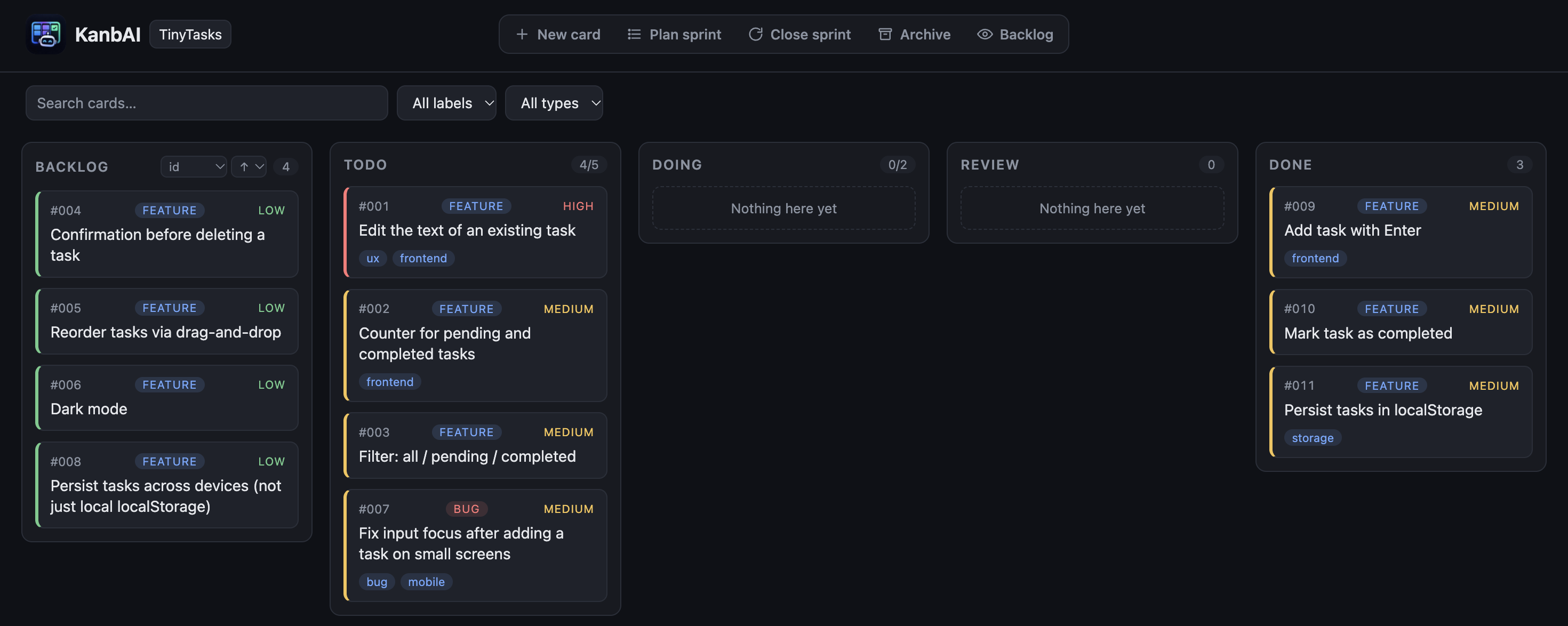
The UI (FastAPI + HTMX, assets vendored so it works offline) lets you:
- View the board and create, edit, move, archive, or delete cards.
- Drag-and-drop between columns (with persisted reordering) or move from a card's modal.
- Plan a sprint (move several backlog cards to
todoat once) and start a new sprint (archive done cards, optionally reset the active columns). - Search cards and filter by label.
- Browse and restore archived cards.
- See WIP-limit and blocked-by-dependency indicators, and live updates as Claude moves cards from the CLI (via Server-Sent Events).
AI command input
Type a natural-language instruction — "add a bug card about the login timeout" — and it pre-fills the "New card" form for you to review and confirm (it never creates the card directly). Works with Anthropic or OpenAI, whichever you have an API key for:
uv add --dev 'kanbai[ui,ai]'    # or: pip install 'kanbai[ui,ai]'
export ANTHROPIC_API_KEY=sk-ant-...     # or OPENAI_API_KEY=sk-...
kanbai ui                                # the input appears in the topbar
The input only appears when a key is set — no configuration required, and no error if
you don't want to use it. Auto-detection order: ANTHROPIC_API_KEY first, then
OPENAI_API_KEY (if both are set, Anthropic wins). Override with:
KANBAI_AI_PROVIDER(anthropicoropenai) — picks precedence between providers whose keys are already set; it does not work without that provider's own key present.KANBAI_AI_MODEL— a specific model ID, for either provider.
In the hub, the instruction can also name which board the card belongs to; in a single board's UI, the board is implicit.
Multi-board hub
Working across several projects? The hub serves all of them from one place, on a single port, with a board switcher — no more one server per project.
Since the hub spans projects, install KanbAI globally (or run it with uvx):
pipx install 'kanbai[ui]'
# or run without installing:
uvx --from 'kanbai[ui]' kanbai hub
Register your boards (each must already have a .kanbai/ — run kanbai init there), then
start the hub:
kanbai hub add ~/projects/api        # register a board (named after its config.toml)
kanbai hub list                      # show registered boards
kanbai hub                           # serve them all; opens a landing to pick a board
Each board is served at /b/<name>/ and the registry lives in ~/.kanbai/boards.toml.
Remove one with kanbai hub remove <name>. Hitting an unregistered or misspelled board
URL shows a themed 404 page (with the registered boards as suggestions) instead of a bare
JSON error.
Running the hub in the background
kanbai hub blocks the terminal it's run in. To keep the hub always available without
tying up a terminal, run it as a background daemon instead:
kanbai hub start --port 8000   # start it, detached
kanbai hub status              # check whether it's running
kanbai hub logs -f             # follow its log
kanbai hub stop                # stop it
The daemon's PID and log file live under ~/.kanbai/ (hub.pid / hub.log), alongside
the registry.
Configuration
.kanbai/config.toml is created by init and can be edited:
[board]
name = "my-project"
columns = ["backlog", "todo", "doing", "review", "done"]

# Skip the review stage: `kanbai review` finalizes cards straight to `done`, and the
# review column (if present) is hidden from the UI and the workflow skills.
# bypass_review = true

[defaults]
priority = "medium"

# Optional work-in-progress limits per column (the CLI and UI warn when exceeded).
[wip]
doing = 3
With bypass_review = true, there's no approval step — kanbai review <id> (and the
Claude workflow skills) send a card straight to done, and the review column disappears
from the web UI even if it's still present in columns.
Commands
| Command | Description |
|---|---|
kanbai --version |
Print the installed kanbai version. |
kanbai init |
Scaffold .kanbai/ and install the Claude Code integration. |
kanbai add "title" |
Create a card in backlog (use -c todo for the sprint). |
kanbai list [column] |
Show the board, a single column, or the archive. |
kanbai next |
Print the next actionable card in the sprint (todo). |
kanbai show <id> |
Show full details of a card. |
kanbai move <id> <column> |
Move a card to a column. |
kanbai start <id> |
Move a card to doing. |
kanbai review <id> / kanbai done <id> |
Send a card to review / approve it to done. |
kanbai edit <id> |
Update fields of a card. |
kanbai archive <id> / kanbai restore <id> |
Archive a card / restore it from the archive. |
kanbai rm <id> |
Delete a card permanently. |
kanbai close-sprint |
Archive done cards (optionally reset active columns to the backlog). |
kanbai ui |
Serve the board in a local web UI (needs the ui extra). |
kanbai hub add/list/remove |
Manage the multi-board hub registry. |
kanbai hub |
Serve all registered boards on one port (needs the ui extra). |
kanbai hub start/stop/status |
Run the hub as a background daemon instead. |
kanbai hub logs [-f] |
Show (or follow) the hub daemon's log. |
Add --json to read-only commands for machine-readable output.
Changelog
See CHANGELOG.md.
License
MIT
1 maintainer

Metadata
1 maintainer
Release files for kanbai 0.10.0
For a detailed explanation of source distributions (sdists) and built distributions (wheels), please see the package formats documentation.
Source distribution (sdist)
| File | Size | Uploaded | |
|---|---|---|---|
| kanbai-0.10.0.tar.gz | 5.9 MB | Details |
Built distribution (wheel)
| File | Interpreter | ABI | Platform | Reset |
|---|---|---|---|---|
| kanbai-0.10.0-py3-none-any.whl | Python 3 | none | any | Details |
Total release size: 6.3 MB
Release files / kanbai-0.10.0.tar.gz
| Download URL | kanbai-0.10.0.tar.gz |
|---|---|
| Size | 5.9 MB |
| Tags | Source |
|
SHA-256 checksum How to use checksums |
a8e336d52120dc3716459254dd071416c8ac0e9017910ca2ef29c3fe18f8df04
|
|
BLAKE2b-256 checksum How to use checksums |
632b0b0fcefe7e89a78702dcba54cdb5f3adf6591c5f5d26ee38cae23c476496
|
| Upload date | |
|
Uploaded using Trusted Publishing? What is trusted publishing? |
Yes |
| Uploaded via |
twine/7.0.0 CPython/3.13.14
|
Provenance
Provenance describes where a file came from. On PyPI, provenance is shared via attestations, which provide a verifiable record of the build or publishing details. View details, limitations and caveats.


PyPI Publish Attestation
PyPI verified that this artifact, at this checksum, originated from the publisher listed below.
Signed by GitHub Actions, verified by PyPI on Oct 13, 2026.
Transparency logRelease files / kanbai-0.10.0-py3-none-any.whl
| Download URL | kanbai-0.10.0-py3-none-any.whl |
|---|---|
| Size | 398.0 kB |
| Tags | Python 3 |
|
SHA-256 checksum How to use checksums |
8a0b78a79733e9f11dddffcc250b66ac947e90792c89ca316e204e7d65a9f319
|
|
BLAKE2b-256 checksum How to use checksums |
e29318755adaf27c387b1d40988d748bcc85f6b07b046ec9c5b6b29071eea73d
|
| Upload date | |
|
Uploaded using Trusted Publishing? What is trusted publishing? |
Yes |
| Uploaded via |
twine/7.0.0 CPython/3.13.14
|
Provenance
Provenance describes where a file came from. On PyPI, provenance is shared via attestations, which provide a verifiable record of the build or publishing details. View details, limitations and caveats.
PyPI Publish Attestation
PyPI verified that this artifact, at this checksum, originated from the publisher listed below.
Signed by GitHub Actions, verified by PyPI on Oct 13, 2026.
Transparency log













