
🔥 Kanby
A Beautiful Terminal-Based Kanban Board
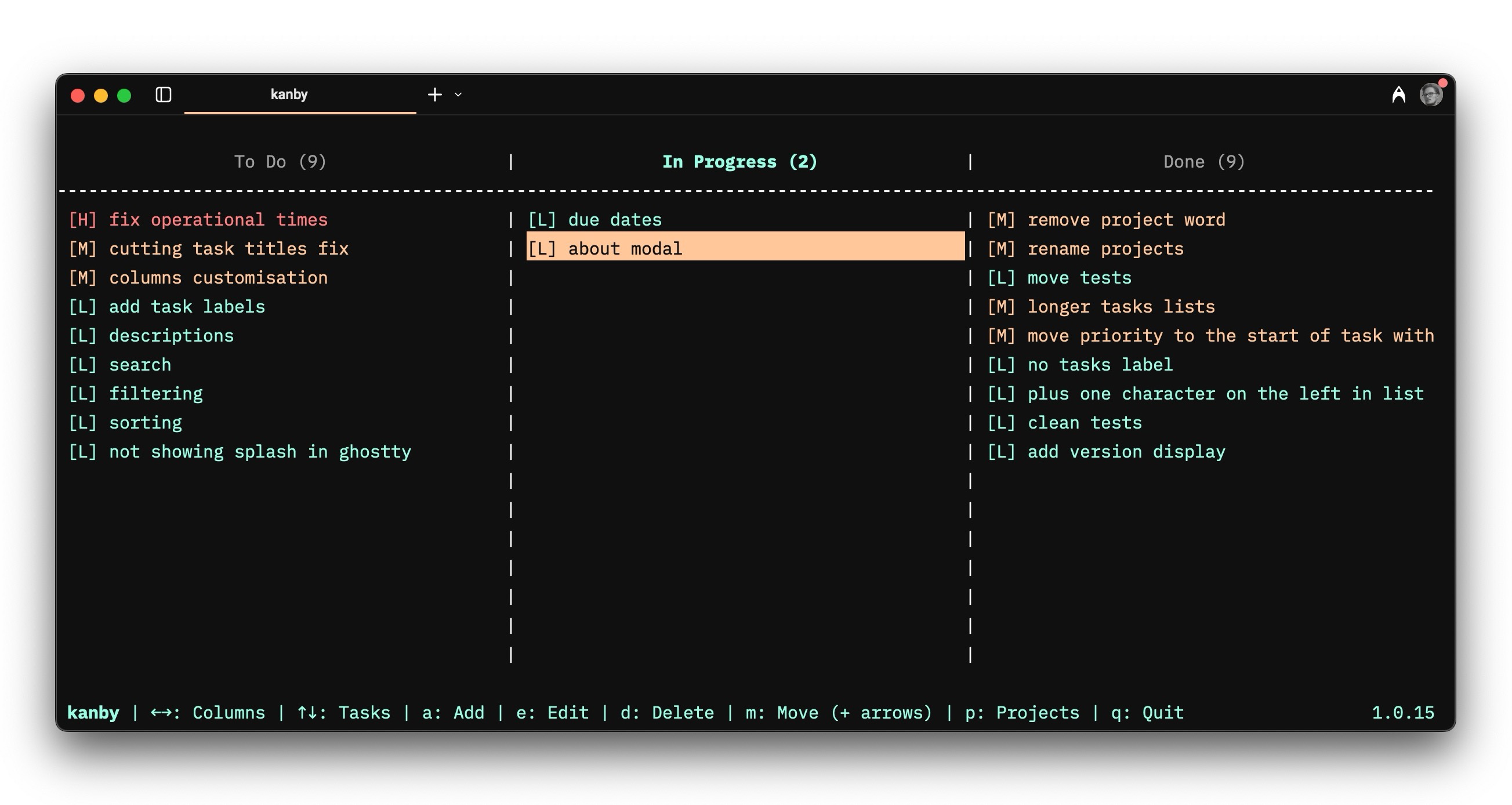
Kanby brings the power of Kanban boards directly to your terminal with a clean, intuitive interface built using Python's curses library.
✨ Features
- 🎯 Multiple Projects: Organize different projects separately
- 📊 Customizable Columns: Default "To Do", "In Progress", "Done"
- 🎨 Priority Levels: Low, Mid, High priority tasks with color coding
- 💾 Persistent Storage: All data saved locally in JSON format
- ⌨️ Keyboard Navigation: Full keyboard control for efficiency
- 🎭 Beautiful UI: Clean, colorful terminal interface with splash screen
- 🚀 Fast & Lightweight: Minimal dependencies (Windows curses auto-installed on Windows)
- 🌍 Cross-Platform: Works on Linux, macOS, and Windows with proper curses support
- 🔧 CLI Options: Custom data file locations and more
📦 Installation
Using pip
pip install kanby
Windows Users: The windows-curses dependency will be automatically installed on Windows systems.
Using uv
uv add kanby
From source
git clone https://github.com/vladzima/kanby
cd kanby
pip install -e .
Windows Compatibility
Kanby automatically handles Windows curses compatibility. If you encounter issues on Windows, ensure you have:
- Python 3.7 or later
- The
windows-cursespackage (installed automatically)
🚀 Usage
Simply run:
kanby
Or with custom data file:
kanby --data-file /path/to/your/kanban.json
For help:
kanby --help
⌨️ Keyboard Controls
Navigation
| Key | Action |
|---|---|
← → |
Navigate between columns |
↑ ↓ |
Navigate between tasks |
Task Management
| Key | Action |
|---|---|
a |
Add new task |
e |
Edit selected task |
d |
Delete selected task |
m |
Move task (+ arrow keys) |
Project Management
| Key | Action |
|---|---|
p |
Open project manager |
In Project Manager
| Key | Action |
|---|---|
↑ ↓ |
Navigate projects |
Enter |
Select project |
n |
New project |
r |
Rename project |
d |
Delete project |
q |
Cancel/Exit |
Application
| Key | Action |
|---|---|
q |
Quit application |
🎯 Task Management
Creating Tasks
- Press
ato add a new task - Enter the task title
- Choose priority (L/M/H for Low/Mid/High)
- Task appears in current column
Editing Tasks
- Navigate to a task using arrow keys
- Press
eto edit - Modify title and/or priority
- Changes are saved automatically
Moving Tasks
- Select a task with arrow keys
- Press
mto enter move mode - Use arrow keys to move:
←→: Move between columns↑↓: Reorder within current column
- Press
Enterto confirm orEscto cancel
Task Visibility & Scrolling
Column headers show task counts and visibility information:
- All visible:
To Do (5)- shows total count when all tasks fit - Scrolling needed:
To Do (3-7/15)- shows visible range when scrolling - Empty column:
To Do (0)- indicates no tasks in column
Navigate through long task lists with ↑ ↓ arrows. Headers automatically update to show which tasks are currently visible on screen.
Priority Levels
Tasks display with compact priority indicators on the same line:
- [H] Task title: High priority (red color coding)
- [M] Task title: Mid priority (yellow color coding)
- [L] Task title: Low priority (green color coding)
This space-efficient format allows 3x more tasks to be visible on screen compared to the previous multi-line format.
📁 Project Management
Multiple Projects
- Press
pto open the project manager - Navigate with
↑↓arrow keys - Press
Enterto switch to selected project
Creating Projects
- In project manager, press
n - Enter new project name
- Project is created with default columns
Renaming Projects
- In project manager, select project to rename
- Press
rto rename - Enter new project name
- All tasks and data are preserved
- Cannot rename to an existing project name
Deleting Projects
- In project manager, select project
- Press
dto delete - Confirm with
y - Cannot delete the last remaining project
🔧 Configuration
Data Storage
Kanby stores data in kanby_data.json in your current directory by default.
Custom Data File
Specify a custom location:
kanby --data-file ~/.config/kanby/my-projects.json
Data Format
The JSON file contains all projects and tasks:
{
  "Project Name": {
    "To Do": [
      {
        "id": "abc123",
        "title": "Task title",
        "priority": "High"
      }
    ],
    "In Progress": [],
    "Done": []
  }
}
🎨 Color Scheme
Kanby uses a carefully designed color scheme:
- Project names: Cyan
- Column headers: Blue (active: Green)
- Task priorities: Green (Low), Yellow (Mid), Red (High)
- Selected items: Yellow background
- Messages: Green (info), Red (error)
- Borders: White
💻 System Requirements
- Python 3.7 or higher
- Terminal with curses support
- Unix-like system (Linux, macOS) or Windows with proper terminal
🛠️ Development
Setup
git clone https://github.com/vladzima/kanby
cd kanby
pip install -e .
Running Tests
python -m pytest
Code Structure
kanby/
├── kanby/
│   ├── __init__.py    # Package initialization
│   └── main.py        # Main application logic
├── pyproject.toml     # Package configuration
├── README.md          # This file
└── LICENSE           # MIT License
🐛 Troubleshooting
Terminal Issues
If your terminal becomes corrupted after an error:
reset
Color Issues
If colors don't display properly, your terminal may not support them. Kanby will fall back to a monochrome display.
Size Issues
Kanby adapts to your terminal size, but works best with at least 80x24 characters.
📝 License
MIT License - see LICENSE file for details.
🤝 Contributing
Contributions are welcome! Please feel free to submit a Pull Request.
How to Contribute
- Fork the repository
- Create a feature branch
- Make your changes
- Add tests if applicable
- Submit a pull request
Reporting Issues
Please use the GitHub issue tracker to report bugs or request features.
Made with ❤️ for terminal enthusiasts and productivity lovers
1 maintainer

Metadata
1 maintainer
Release files for kanby 1.0.23
For a detailed explanation of source distributions (sdists) and built distributions (wheels), please see the package formats documentation.
Source distribution (sdist)
| File | Size | Uploaded | Provenance | |
|---|---|---|---|---|
| kanby-1.0.23.tar.gz | 29.4 kB | Without provenance | Details |
Built distribution (wheel)
| File | Interpreter | ABI | Platform | Reset |
|---|---|---|---|---|
| kanby-1.0.23-py3-none-any.whl | Python 3 | none | any | Details |
Total release size: 49.4 kB
Release files / kanby-1.0.23.tar.gz
| Download URL | kanby-1.0.23.tar.gz |
|---|---|
| Size | 29.4 kB |
| Tags | Source |
|
SHA-256 checksum How to use checksums |
bba386c3f8daddd7644bfe6432a50d96a20a86e1cd0aa7f69220ae0dd6f0bcb0
|
|
BLAKE2b-256 checksum How to use checksums |
dcd33ce56b1cdde76dc2c2f2b91c9c767e9e106f092aa9063b3c30cbbd9d6c0a
|
| Upload date | |
|
Uploaded using Trusted Publishing? What is trusted publishing? |
No |
| Uploaded via |
twine/6.1.0 CPython/3.12.4
|
Release files / kanby-1.0.23-py3-none-any.whl
| Download URL | kanby-1.0.23-py3-none-any.whl |
|---|---|
| Size | 20.1 kB |
| Tags | Python 3 |
|
SHA-256 checksum How to use checksums |
823c3964e50dbf7a5b6cf3633ed96cc92270998aa187eda29362972f4f2ae691
|
|
BLAKE2b-256 checksum How to use checksums |
3d9837a81f68a71a238e9ff253ccdf3910878b06b5d87e060b22d77621bfa77e
|
| Upload date | |
|
Uploaded using Trusted Publishing? What is trusted publishing? |
No |
| Uploaded via |
twine/6.1.0 CPython/3.12.4
|
Security for kanby 1.0.23
Provenance
Provenance describes where a file came from. On PyPI, provenance is shared via attestations, which provide a verifiable record of the build or publishing details. View details, limitations and caveats.
No provenance found
None of the files in this release were uploaded with provenance metadata.
A note on package security
PyPI is a repository for distributing packages, not a service for auditing them. While third-party security researchers and our staff do their best to detect and remove malicious packages, PyPI cannot guarantee the quality, security or suitability of any given package.
To learn more about protecting yourself from malicious actors, visit our package security documentation.














