








Kangas: Explore Multimedia Datasets at Scale :kangaroo:
Kangas is a tool for exploring, analyzing, and visualizing large-scale multimedia data. It provides a straightforward Python API for logging large tables of data, along with an intuitive visual interface for performing complex queries against your dataset.
The key features of Kangas include:
- Scalability. Kangas DataGrid, the fundamental class for representing datasets, can easily store millions of rows of data.
- Performance. Group, sort, and filter across millions of data points in seconds with a simple, fast UI.
- Interoperability. Any data, any environment. Kangas can run in a notebook or as a standalone app, both locally and remotely.
- Integrated computer vision support. Visualize and filter bounding boxes, labels, and metadata without any extra setup.
You can access a live demo of Kangas at kangas.comet.com.
Getting Started
Kangas is accessible as a Python library via pip
pip install kangas
Once installed, there are many ways to load or create a DataGrid.
Without writing any code, you can even download a DataGrid and begin exploring the data. At the console:
kangas server https://github.com/caleb-kaiser/kangas_examples/raw/master/coco-500.datagrid.zip
That's it!
In the next example, we load a publicly available DataGrid file, but the Kangas API also provides methods for ingesting CSVs, Pandas DataFrames, and for manually constructing a new DataGrid:
import kangas as kg

# Load an existing DataGrid
dg = kg.read_datagrid("https://github.com/caleb-kaiser/kangas_examples/raw/master/coco-500.datagrid.zip")
After your DataGrid is initialized, you can render it within the Kangas Viewer directly from Python:
dg.show()
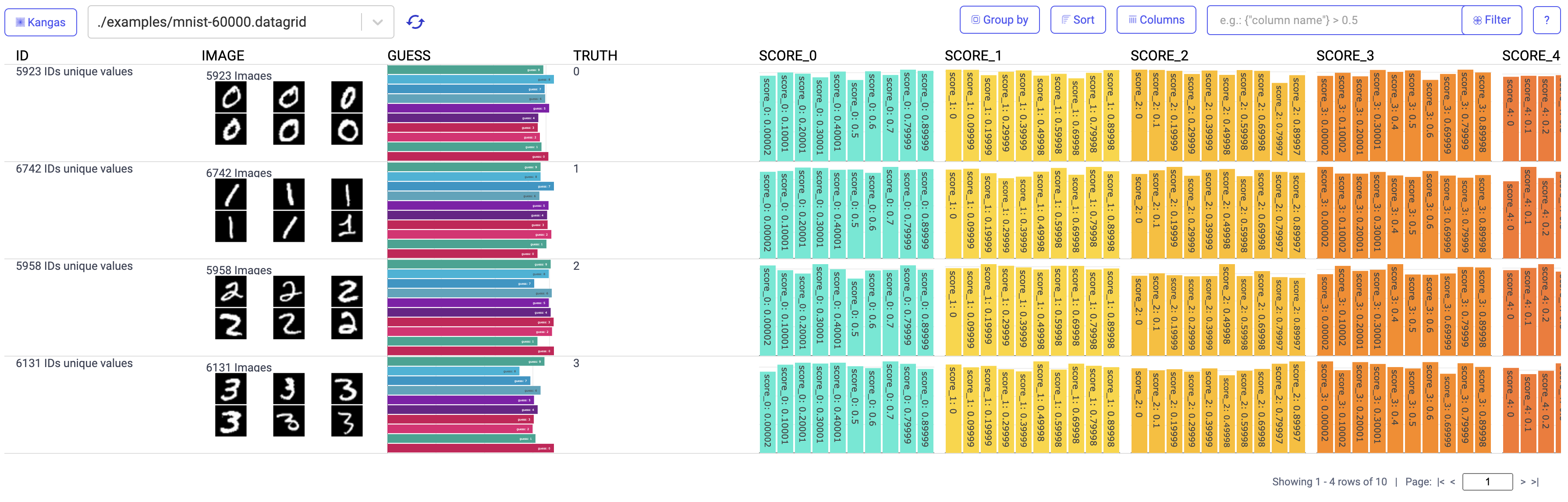
From the Kangas Viewer, you can group, sort, and filter data. In addition, Kangas will do its best to parse any metadata attached to your assets. For example, if you're using the COCO-500 DataGrid from the quickstart above, Kangas will automatically parse labels and scores for each image:

And voilà! Now you're started using Kangas.
Pandas DataFrames
Kangas can also read Pandas DataFrame objects directly:
import kangas as kg
import pandas as pd

df = pd.DataFrame({"hidden_layer_size": [8, 16, 64], "loss": [0.97, 0.53, 0.12]})
dg = kg.read_dataframe(df)
HuggingFace Datasets
HuggingFace's datasets can also be loaded into DataGrid directly because they use rows of dictionaries, and images are represented by PIL images. DataGrid will automatically convert PIL images into a Kangas Image:
import kangas as kg
from datasets import load_dataset

dataset = load_dataset("beans", split="train")
dg = kg.DataGrid(dataset)
Parquet files
Note: You will need to have pyarrow installed to read parquet files.
import kangas as kg

dg = kg.read_parquet("https://github.com/Teradata/kylo/raw/master/samples/sample-data/parquet/userdata5.parquet")
If you'd like to explore further, take a look at our example notebooks below:
Documentation
FAQ
Is Kangas ready for public use?
Kangas is currently in an open beta. We stress test Kangas heavily and often, and are confident in sharing with the public. That being said, it is a very young project, and there will be bugs and rough edges. Additionally, new features will be added at a fast pace, so if you find a bug or have a request, please do not hesitate to open a ticket or start a discussion.
Does Kangas support _____ system?
Kangas can be run as a standalone application on newer versions of Windows, MacOS, and most popular Linux distributions. In addition, Kangas can run remotely via Google Colab, or within any Jupyter notebook environment.
When should I use Kangas instead of _____?
Pandas
Kangas and Pandas are complimentary tools. When you've wrangled your data into a Pandas DataFrame, Kangas can ingest that DataFrame via the DataGrid.read_dataframe() method, making it easy to visualize and explore your tabular data. Additionally, if your data is too large to process in Pandas or involves multimedia assets, Kangas is a strong alternative.
Tensorboard
TensorBoard is one of several tools (including Kangas parent organization, Comet that specializes in experiment management and monitoring). Like Kangas, it provides charting and visualizations out of the box, but is specifically designed for analyzing training workflows. Kangas, in contrast, is designed to analyze any dataset. For example, even if you use a tool like TensorBoard for analyzing training runs, you may still use Kangas before training for exploratory data analysis, or for prediction analysis post-deployment.
What is Kangas relationship with Comet?
Kangas is developed and maintained by the Research team at Comet. It began life as a prototype for Comet users who needed to visualize large computer vision datasets, and was later spun out into a standalone open source project. Kangas is and always will be free and open source software, and we are more than happy to accept community contributions.
Contributing
Kangas has only recently been released, and as such, we don't have much of a formal process for contributions. If you have an idea or would like to make a contribution, we recommend opening a ticket describing your proposed contribution so that we can collaborate directly. We love working with community contributors.
1 maintainer

Metadata
1 maintainer
Release files for kangas 2.4.11
For a detailed explanation of source distributions (sdists) and built distributions (wheels), please see the package formats documentation.
Source distribution (sdist)
| File | Size | Uploaded | |
|---|---|---|---|
| kangas-2.4.11.tar.gz | 15.5 MB | Details |
Built distribution (wheel)
| File | Interpreter | ABI | Platform | Reset |
|---|---|---|---|---|
| kangas-2.4.11-py3-none-any.whl | Python 3 | none | any | Details |
Total release size: 31.3 MB
Release files / kangas-2.4.11.tar.gz
| Download URL | kangas-2.4.11.tar.gz |
|---|---|
| Size | 15.5 MB |
| Tags | Source |
|
SHA-256 checksum How to use checksums |
a9440d4db3cd6beb2851c51b8e23c9d75f4edad0a22a249630c3c098ca4ca650
|
|
BLAKE2b-256 checksum How to use checksums |
921721274ec4f78cb2883432feb60f1e451a868cad8784212c770e15cdc5c8c5
|
| Upload date | |
|
Uploaded using Trusted Publishing? What is trusted publishing? |
No |
| Uploaded via |
twine/4.0.2 CPython/3.10.13
|
Release files / kangas-2.4.11-py3-none-any.whl
| Download URL | kangas-2.4.11-py3-none-any.whl |
|---|---|
| Size | 15.9 MB |
| Tags | Python 3 |
|
SHA-256 checksum How to use checksums |
4205594b12048983978f7478dc122e2cb32550e09b176bc07ce1bf2da06760a6
|
|
BLAKE2b-256 checksum How to use checksums |
9a6589f5ae55fcc8731fcb7a00fa2399c89862136d79a4ca1d35ad7e8703b2ef
|
| Upload date | |
|
Uploaded using Trusted Publishing? What is trusted publishing? |
No |
| Uploaded via |
twine/4.0.2 CPython/3.10.13
|














