
Unpacker Karton Service




A modular Karton Framework service that unpacks common packers like UPX and others using the Qiling Framework.
This project is FREE as in FREE :beer:, use it commercially, privately or however you see fit.
If you like this project and wish to donate :moneybag: to support the fight against malware...
Buy me a :tea:, as I don't drink :beer:, by sending me some ₿ to 16oXesi7uv3jdPZxxwarHSD2f3cNMpaih9
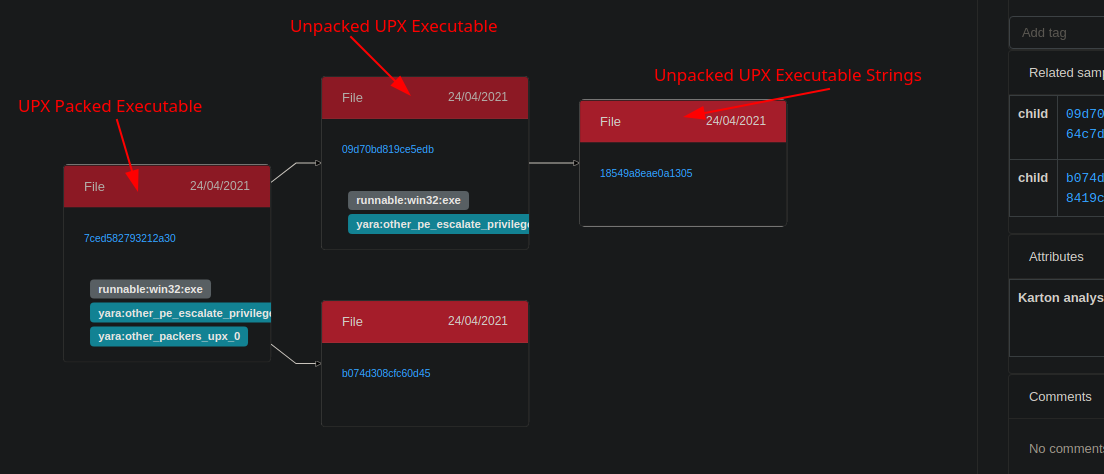
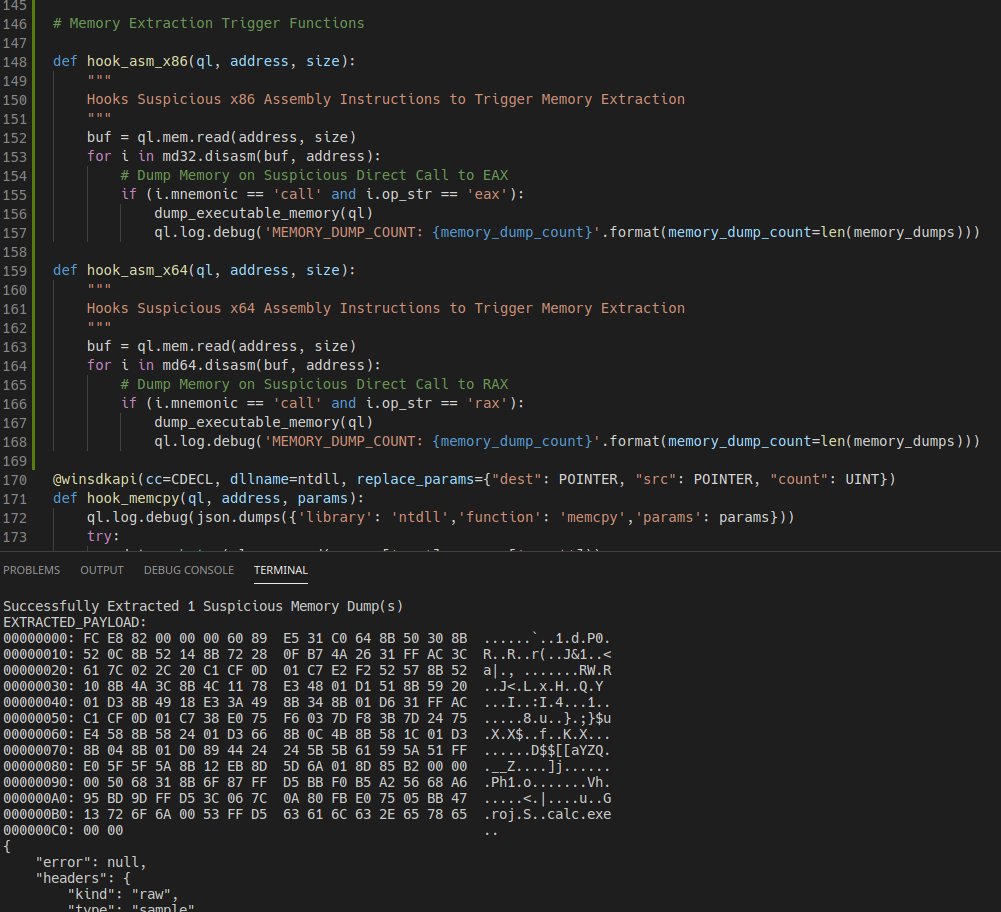
calc.exe shellcode from tests/shellcode.exe
Consumes:
{
    "type": "sample",
    "stage": "recognized",
    "kind": "runnable",
    "platform": "win32"
},
{
    "type": "sample",
    "stage": "recognized",
    "kind": "runnable",
    "platform": "win64"
},
{
    "type": "sample",
    "stage": "recognized",
    "kind": "runnable",
    "platform": "linux"
}
{
    "type": "sample",
    "kind": "runnable",
    "stage": "recognized",
    "platform": <win32|win64|linux> (If PE File in Dump),
    "payload": {
        "sample": <Resource>,
        "parent": <Resource>,
    }
}
Usage
Make sure you have setup the core system: https://github.com/CERT-Polska/karton
Install from PyPi:
$ sudo apt install -y python3-virtualenv python-is-python3
$ virtualenv venv/
$ source venv/bin/activate
$ pip install karton-unpacker
$ git clone https://github.com/c3rb3ru5d3d53c/karton-unpacker-modules.git modules/
$ find modules/ -name "requirements.txt" | while read i; do pip install -r $i; done
$ git clone --recursive https://github.com/qilingframework/qiling.git
# Due to distribution restriction, Qiling Framework will not bundle Microsoft Windows DLL files and registry.
# Please use the script qiling/examples/scripts/dllscollector.bat on your Windows machine to collect the required DLLS for the rootfs
# Once the required DLLs have been collected copy them in the rootfs
$ karton-unpacker --config-file karton.ini --modules modules/ --rootfs qiling/examples/rootfs/ --timeout 30 --debug
Install from Source:
$ sudo apt install -y python3-virtualenv python-is-python3
$ git clone --recursive https://github.com/c3rb3ru5d3d53c/karton-unpacker.git
$ cd karton-unpacker/
$ virtualenv venv/
$ source venv/bin/activate
$ pip install .
$ git clone --recursive https://github.com/qilingframework/qiling.git
# Due to distribution restriction, Qiling Framework will not bundle Microsoft Windows DLL files and registry.
# Please use the script qiling/examples/scripts/dllscollector.bat on your Windows machine to collect the required DLLS for the rootfs
# Once the required DLLs have been collected copy them in the rootfs
$ karton-unpacker --config-file karton.ini --modules modules/ --rootfs qiling/examples/rootfs/ --timeout 30 --debug
Testing Your Installation
Once you have completed installing karton-unpacker, try uploading the file tests/shellcode.exe to mwdb.
If successful, you will see a file in relations with the name unpacked, this is the extracted shellcode to spawn cmd.exe.
Contributing
If you wish to contribute your own modules to automatically unpack malware, please refer to CONTRIBUTING.md
1 maintainer

Metadata
1 maintainer
Release files for karton-unpacker 1.1.1
For a detailed explanation of source distributions (sdists) and built distributions (wheels), please see the package formats documentation.
Source distribution (sdist)
| File | Size | Uploaded | |
|---|---|---|---|
| karton-unpacker-1.1.1.tar.gz | 4.5 kB | Details |
Built distribution (wheel)
| File | Interpreter | ABI | Platform | Reset |
|---|---|---|---|---|
| karton_unpacker-1.1.1-py3-none-any.whl | Python 3 | none | any | Details |
Total release size: 10.9 kB
Release files / karton-unpacker-1.1.1.tar.gz
| Download URL | karton-unpacker-1.1.1.tar.gz |
|---|---|
| Size | 4.5 kB |
| Tags | Source |
|
SHA-256 checksum How to use checksums |
4a6a8e883e7428ee065378128b8351a652f095a3e508765cb632ccfaf3c0c7d4
|
|
BLAKE2b-256 checksum How to use checksums |
c3fbc88a7184bdec1fb1fdf7a6c1ff5ae3981db32429e0475b00ba2e130502ce
|
| Upload date | |
|
Uploaded using Trusted Publishing? What is trusted publishing? |
No |
| Uploaded via |
twine/3.4.1 importlib_metadata/4.0.1 pkginfo/1.7.0 requests/2.25.1 requests-toolbelt/0.9.1 tqdm/4.60.0 CPython/3.8.5
|
Release files / karton_unpacker-1.1.1-py3-none-any.whl
| Download URL | karton_unpacker-1.1.1-py3-none-any.whl |
|---|---|
| Size | 6.4 kB |
| Tags | Python 3 |
|
SHA-256 checksum How to use checksums |
5999e8e101c5f7eab90bb1c97e719078c9ef2c35f9ab4b11b555ec68dfbfa5cc
|
|
BLAKE2b-256 checksum How to use checksums |
495425e3ab105c01ec2776c77ff3b981c7f8b6287687b89d2948bceacb53b378
|
| Upload date | |
|
Uploaded using Trusted Publishing? What is trusted publishing? |
No |
| Uploaded via |
twine/3.4.1 importlib_metadata/4.0.1 pkginfo/1.7.0 requests/2.25.1 requests-toolbelt/0.9.1 tqdm/4.60.0 CPython/3.8.5
|














