



KASALv2: Fully Automatic 3D Rotational Symmetry Classification and Axis Localization
KASALv2 automatically classifies 3D rotational symmetry, estimates rotational order, and localizes the complete set of symmetry axes without requiring a predefined symmetry type. The repository also retains the original kasalv1 user-guided workflow in the same desktop application.
Paper: CVPR 2026 Open Access · PDF
PyPI package: KASALv2 2.0.0 is packaged as
kasal-6d, continuing the classic 0.1.x releases with an integrated kasalv1 + KASALv2 desktop application. Future updates use this package name. Objaverse-SAD is currently being prepared and will be released in a future update.
Highlights
- Fully automatic classification and localization across eight canonical 3D rotational-symmetry types
- Geometry analysis with an optional texture-aware refinement layer
- Integrated GUI with automatic kasalv2 and user-guided kasalv1 engines
- CPU and CUDA profiles for desktop or headless execution
- Incremental batch processing of unsaved objects and standalone dataset processing
- BOP-compatible symmetry payloads for downstream 6D pose-estimation workflows
Quick start
KASALv2 2.0.0 supports Python 3.10 and includes desktop dependencies by default. Install the matched PyTorch/PyTorch3D runtime first, then install KASALv2 from PyPI. CPU example:
conda create -n kasalv2 python=3.10
conda activate kasalv2
python -m pip install -r https://raw.githubusercontent.com/WangYuLin-SEU/KASAL/fa5f567a0aa7be862d00d5578f4a55a10449a6b1/requirements/torch-cpu.txt
python -m pip install kasal-6d==2.0.0
kasalv2 --help
For CUDA, use the matching torch-gpu.txt profile in a fresh environment. See the installation guide for details. If migrating from the standalone kasalv2 package in the same environment, uninstall it before installing kasal-6d: both distributions use the kasal import directory.
To run from source:
Python 3.10 and conda are recommended. Choose full-gpu only for a compatible NVIDIA/CUDA system.
git clone https://github.com/WangYuLin-SEU/KASAL.git
cd KASAL
conda create -n kasal python=3.10
conda activate kasal
python scripts/install_deps.py full-cpu
python scripts/verify_pytorch3d.py
python demo_shape_meshes.py
For texture-aware examples, run python demo_texture_meshes.py. See the installation guide for GPU, Linux, headless, and troubleshooting instructions.
Choose a workflow
| Goal | Entry point | Output |
|---|---|---|
| Explore or annotate meshes in the GUI | python demo_shape_meshes.py |
Sidecar *_sym_type.json and visualization *_sym.ply |
| Analyze textured examples in the GUI | python demo_texture_meshes.py |
The same sidecar files, with texture-aware analysis enabled from the UI |
| Run GUI-equivalent jobs without Polyscope | python -m kasal.cli.run_job kasal/jobs/example_job.json |
Sidecar files beside each source mesh |
| Process a flat dataset into a separate output tree | python -m kasal.rotational_symmetry.run_dataset --input-dir INPUT --output-dir OUTPUT |
Per-object BOP-style JSON plus batch JSON/CSV summaries |
| Use the classic manual kasalv1 workflow | Select a type/order in the integrated GUI, or install kasal-6d==0.1.4 for the original application |
User-guided axis localization |
The GUI recursively discovers .ply and .obj files and ignores generated *_sym.ply files. The KASALv2 loader can also read .glb, .gltf, .stl, and .off when those files are supplied explicitly through a job or a matching dataset-runner pattern.
Usage essentials
On the Setup page, choose the dataset folder, preprocessing policy, and compute device, then click Confirm. For most new datasets, keep the engine on kasalv2.
- Unlabeled objects use kasalv2 automatic analysis.
- User-edited symmetry types/orders and forced X/Y/Z fitting use kasalv1.
kasalv2_adaptiveis the recommended desktop preprocessing policy;kasalv2_strictis suitable for headless environments without PyMeshLab.- Cal All (unsaved) processes only objects without a saved result or objects edited since loading.
- Each completed object writes
{stem}_sym_type.jsonand, when applicable,{stem}_sym.plybeside the source mesh.
The standalone dataset runner uses a separate output directory and writes one BOP-style JSON per object plus JSON/CSV batch summaries. Its command-line options are available with:
python -m kasal.rotational_symmetry.run_dataset --help
Method overview
mesh
  -> load, normalize, and sample geometry
  -> search for the dominant high-order axis
  -> estimate rotational periodicity and order
  -> recover secondary axes and classify the symmetry family
  -> optionally refine symmetry using appearance
  -> export BOP-compatible symmetry data
KASALv2 first localizes a dominant high-order axis, infers its rotational order through self-consistency analysis, and reconstructs the full symmetry structure with a hierarchy-guided formulation. Texture analysis is stored separately so that appearance-induced order changes do not overwrite the geometric result.
On the 438 symmetric GSO objects reported in the paper, KASALv2 reaches 94.75% classification accuracy. The paper also reports gains of up to 0.9% when the estimated priors are used to train FoundationPose across five BOP datasets.
kasalv1 and KASALv2
| kasalv1 | KASALv2 | |
|---|---|---|
| Input | User-selected symmetry type and, when needed, order | No predefined type or order |
| Main use | Review, correction, and forced X/Y/Z-axis fitting | Automatic annotation of new meshes and datasets |
| Core stack | PyMeshLab-based preprocessing and key-axis templates | PyTorch3D, axis search, periodicity, and consistency analysis |
| Distribution | Classic kasal-6d 0.1.x; also retained in the integrated application |
Integrated kasal-6d 2.0.0 and source |
| Guide | Classic kasalv1 guide | This README |
Interface
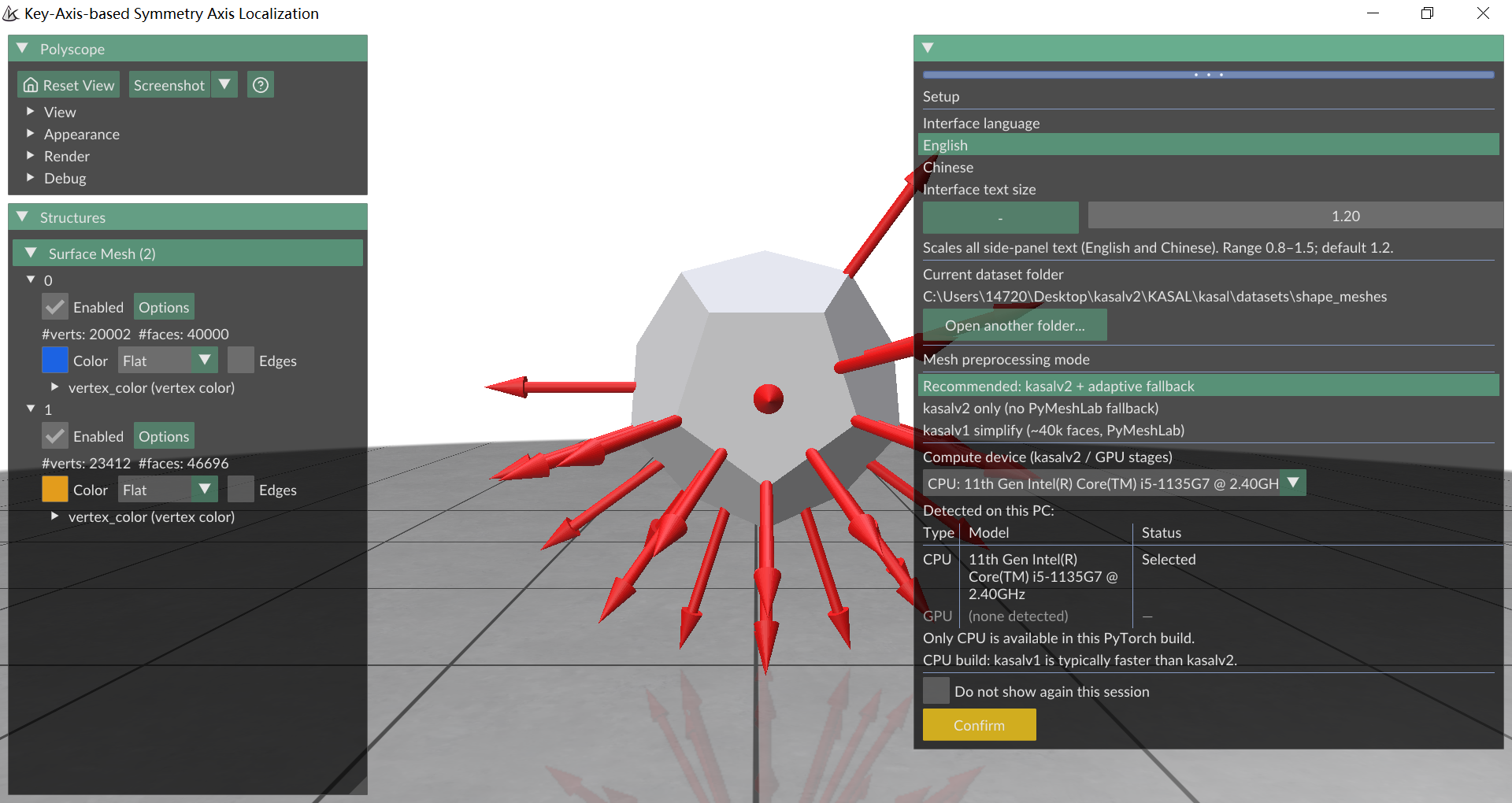
The Setup page selects the dataset folder, interface language, preprocessing policy, and compute device.
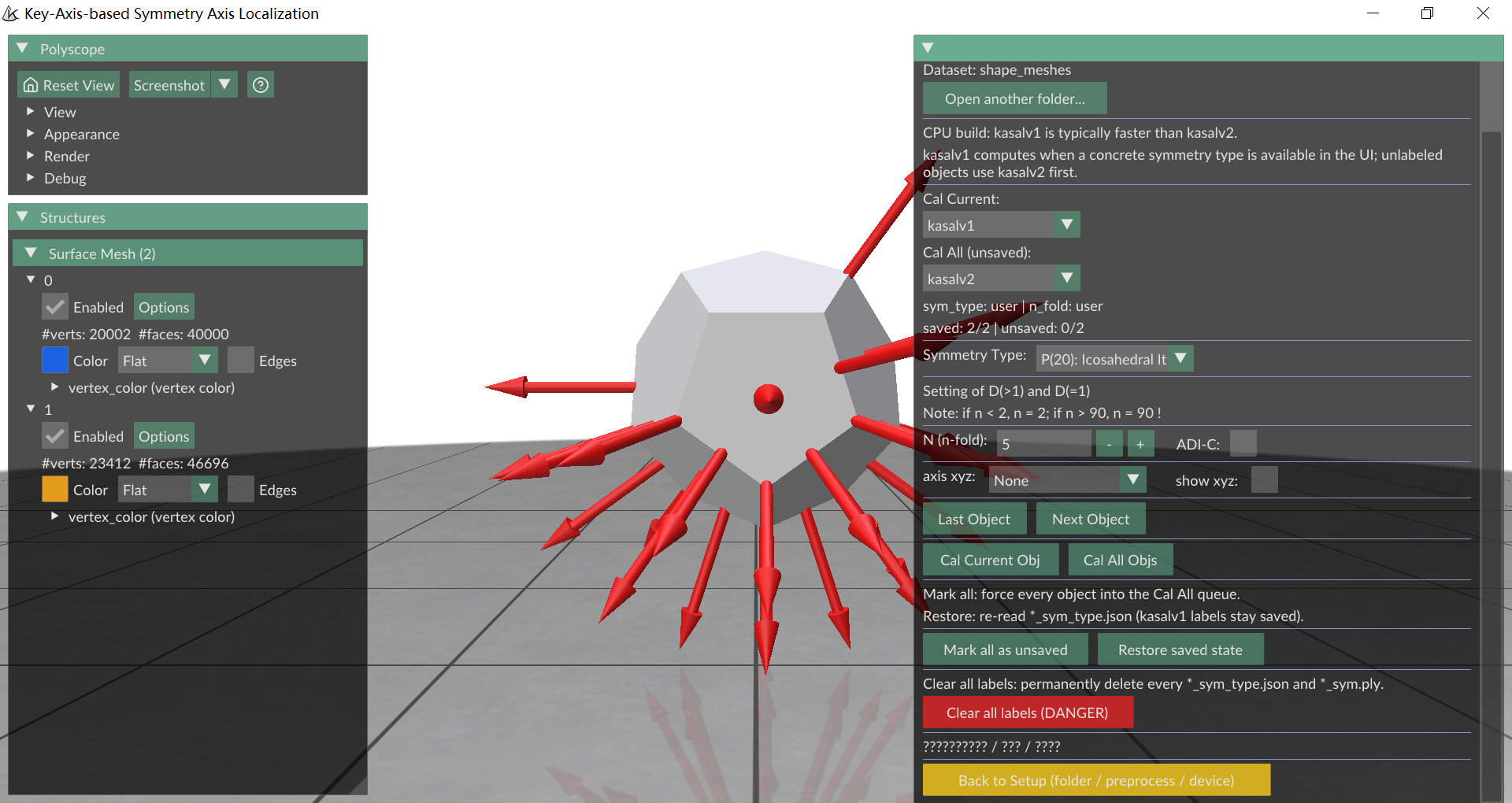
After confirmation, the KASAL page provides object navigation, annotation controls, engine selection, single-object computation, and incremental batch computation.
Guides
| Document | Purpose |
|---|---|
| Installation | Dependency profiles, CPU/GPU setup, Linux packages, and troubleshooting |
| Classic kasalv1 guide | Manual symmetry-type workflow retained for existing users |
Source layout
| Directory | Responsibility |
|---|---|
kasal/app/, kasal/cli/ |
GUI and headless job entry points |
kasal/compute/ |
Shared job execution, engine routing, and worker processes |
kasal/config/ |
algorithms.py holds v1/v2 and mesh preprocessing parameters; runtime.py holds GUI settings and state |
kasal/annotations/ |
Annotation formats, sidecar paths, and saved state; io.py handles formats and state.py manages application state |
kasal/keyaxis/, kasal/symmetry_lab/ |
kasalv1 key-axis search, symmetry templates, and axis localization |
kasal/rotational_symmetry/ |
KASALv2 automatic analysis and standalone dataset runner |
kasal/geometry/, kasal/viz/ |
Shared geometry processing and visualization export |
kasal/utils/, kasal/datasets/ |
General utilities, sample meshes, and resource paths |
The codebase separates application entry points, shared runtime state, annotation I/O, geometry utilities, and the KASALv1/KASALv2 algorithm modules. Algorithm parameters are centralized in kasal/config/algorithms.py, while mutable GUI/runtime state lives in kasal/config/runtime.py.
Datasets
- DSRSTO
- GSO-SAD
- ShapeNet-SAD
- Objaverse-SAD (~35,000 objects): in preparation and planned for a future release
License
This repository, including the integrated KASALv2 source release, is licensed under the PolyForm Noncommercial License 1.0.0. Commercial use is not permitted by this license; contact Yulin Wang (yulinwang@seu.edu.cn) for licensing questions.
The historical classic kasal-6d 0.1.x releases remain licensed under Apache License 2.0. The integrated 2.0.0 release uses the current repository license; bundled third-party code retains its own license notices.
Citation
If you use KASALv2, cite the CVPR 2026 paper:
@InProceedings{Zhang_2026_CVPR,
  author    = {Zhang, Mengxin and Wang, Yulin and Luo, Chen and Li, Yongzhe and Zhou, Yijun},
  title     = {KASALv2: Fully Automatic 3D Rotational Symmetry Classification and Axis Localization},
  booktitle = {Proceedings of the IEEE/CVF Conference on Computer Vision and Pattern Recognition (CVPR)},
  month     = {June},
  year      = {2026},
  pages     = {13866--13875}
}
If you use the original kasalv1 method, also cite:
@ARTICLE{KASAL,
  author  = {Wang, Yulin and Luo, Chen},
  title   = {Key-Axis-Based Localization of Symmetry Axes in 3D Objects Utilizing Geometry and Texture},
  journal = {IEEE Transactions on Image Processing},
  year    = {2024},
  volume  = {33},
  pages   = {6720--6733},
  doi     = {10.1109/TIP.2024.3515801}
}
1 maintainer

Metadata
1 maintainer
Release files for kasal-6d 2.0.0
For a detailed explanation of source distributions (sdists) and built distributions (wheels), please see the package formats documentation.
Built distribution (wheel)
| File | Interpreter | ABI | Platform | Reset |
|---|---|---|---|---|
| kasal_6d-2.0.0-py3-none-any.whl | Python 3 | none | any | Details |
Release files / kasal_6d-2.0.0-py3-none-any.whl
| Download URL | kasal_6d-2.0.0-py3-none-any.whl |
|---|---|
| Size | 2.7 MB |
| Tags | Python 3 |
|
SHA-256 checksum How to use checksums |
e6a48d106efae4e3e9d8a36161f944422babfcf1af9c2c7f14966b3fe5b5163c
|
|
BLAKE2b-256 checksum How to use checksums |
6fc4647a0f262d53473c475a17549e0003420c9c4ac4babfa18c723253ca6c0f
|
| Upload date | |
|
Uploaded using Trusted Publishing? What is trusted publishing? |
No |
| Uploaded via |
twine/7.0.0 CPython/3.10.20
|














