A lightweight container-based network emulation tool.

Project description





- Official Website
- What is it?
- How does it work?
- Installation
- Quick Example
- Publications
- External Tools
- Success Stories
- Join Us
- Docker Images and Dockerfiles
- Examples and Tutorials
- Python APIs
- Man Pages
What is it?
Kathará (from the Greek Καθαρά, purely) is a lightweight network emulation system based on Docker containers. It can be really helpful in showing interactive demos/lessons, testing production networks in a sandbox environment, or developing new network protocols.
Kathará is the spiritual successor of the notorious Netkit, hence it is cross-compatible, and inherits its language and features.
How does it work?
Each network device is emulated by a container. Virtual network devices are interconnected by virtual L2 LANs.
Each container can potentially run a different Docker image. Built-in images include Quagga, FRRouting, Bind, P4, OpenVSwitch, and more, but you can also use your own container images. For more information about Kathará images please visit the dedicated repository.
Kathará extremely simplifies the creation of complex networks using the concept of network scenario: a directory containing a file with the network topology, and, foreach device, files and folders containing the configuration of that device.
Kathará emulates network scenarios using either Docker or Kubernetes as backend virtualization system.
Installation
Install Docker and then run the installer specific for your Operating System. For a step-by-step guide check the Wiki.
For further information on how to use Kathará on Kubernetes (Megalos) please refer to the Wiki Page.
Kathará also provides a set of Python APIs. See the Python APIs Tutorial and the docs.
Quick Example
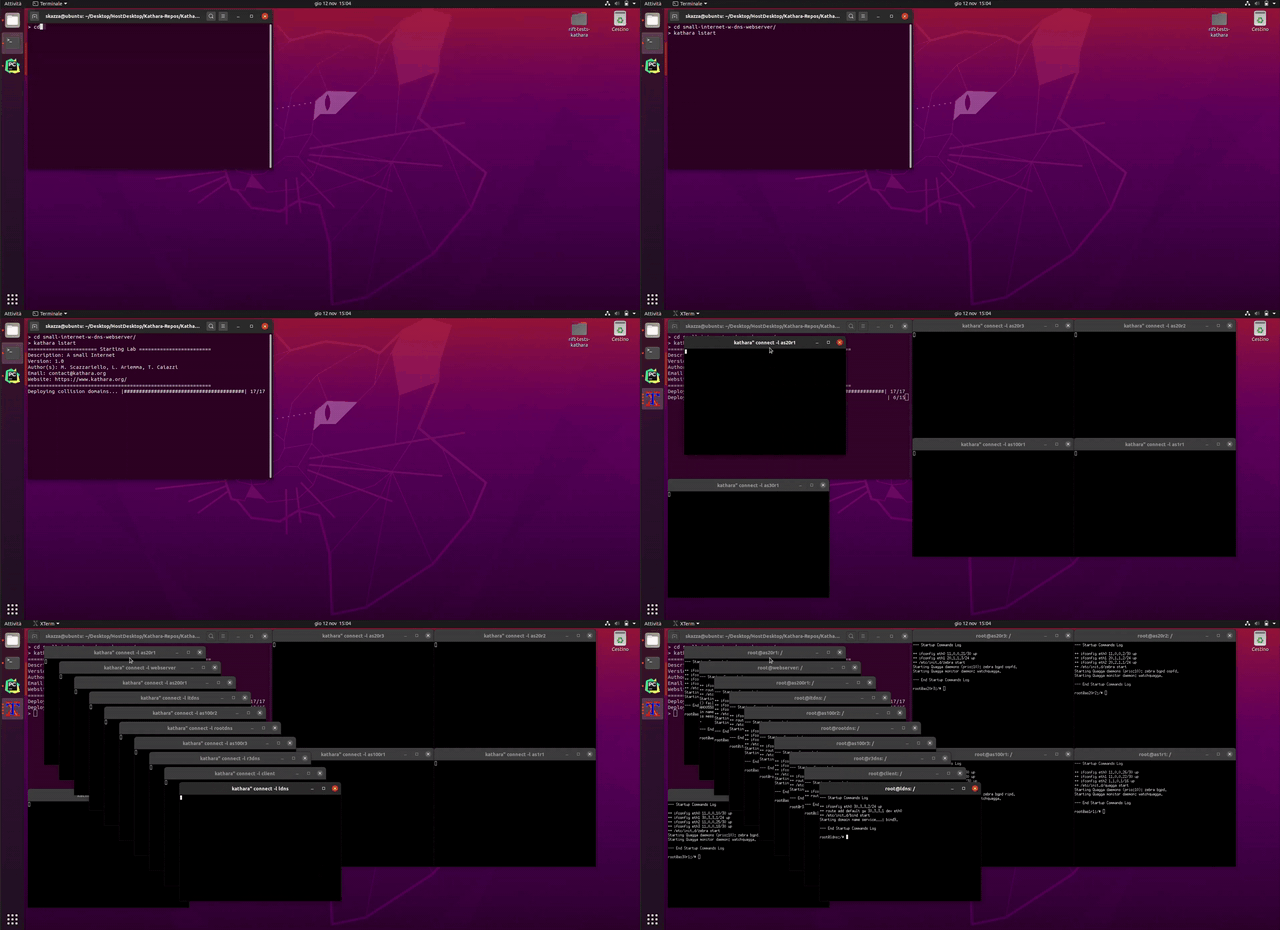
- Install Kathará by following the Installation section.
- Download and unpack the network scenario of a "Small Internet" from here (network topology can be found here).
cdinsidesmall-internet-with-dns-webserverand runkathara lstart.- Kathará will read the configuration of the scenario from
lab.confand the various*.startupfiles and start the devices, opening terminal windows to interact with them. - After you're done experimenting, simply run
kathara lcleanand wait until the network scenario closes.
Publications and Presentations
Kathará is developed by Roma Tre Computer Networks and Security Research Group.
Several publications are related to the tool:
- Kathará: A container-based framework for implementing network function virtualization and software defined networks (at NOMS 2018)
- Megalos: A Scalable Architecture for the Virtualization of Network Scenarios (at NOMS 2020)
- Kathará: A Lightweight Network Emulation System (at NOMS 2020)
- Megalos: A Scalable Architecture for the Virtualization of Large Network Scenarios (in MDPI Future Internet Journal 2021)
- Sibyl: a Framework for Evaluating the Implementation of Routing Protocols in Fat-Trees (at NOMS 2022)
Kathará has been also presented in meetings and workshops:
- RIFT Working Group Meeting (IETF 107 - March 2020)
- Kathará: A Lightweight Network Emulation System (Italian Audio) (GraphRM - June 2022)
- Kathará: A Lightweight and Scalable Network Emulation System (RIPE 85 - October 2022)
External Tools
- Netkit Lab Generator, a GUI that allows the easy creation of a network scenario configuration and the visualization of its network topology.
- VFTGen, a tool that allows creating three levels Fat Tree topologies (single-plane or multi-planes) and automatically configure them to run on Kathará.
- Tacatá, a lightweight Python script which creates Netkit and Kathará labs using an enriched version of the lab.conf file with a simple syntax.
- net-vis, a tool that parses (and generates) the
lab.conffile and all the.startupfiles to visualize the network. - kathara-lab-starter, an easy and extensible tool to get a kathara lab started. Utilizing JSON input files, it accelerates setup, while minimizing configuration redundancies.
- NetGUI-Kathará, NetGUI-Kathará is a graphical interface for Kathará that lets users design and manage network topologies. It also generates files for 3D traffic visualization with WireXRk.
- NIKA: A Network Arena for Benchmarking AI Agents on Network Troubleshooting. It offers an orchestration platform that connects AI agents with the network environment, enabling real-time troubleshooting in realistic conditions, and providing a human-facing interface to monitor agent performance.
Success Stories
As far as we know, Kathará is currently being used in many courses and projects.
We encourage you to tell us your story!
We are also collecting network scenarios from the community. If you want to be added to the list, please contact us!
Join Us
Kathará is an open source project. Feel free to download the code, play with it, and submit feature requests, notify bugs, or open pull requests!
Thanks to everyone who has contributed to the development of Kathará!
Release history Release notifications | RSS feed


Download files
Download the file for your platform. If you're not sure which to choose, learn more about installing packages.
Source Distribution
Built Distribution
Filter files by name, interpreter, ABI, and platform.
If you're not sure about the file name format, learn more about wheel file names.
Copy a direct link to the current filters
File details
Details for the file kathara-3.8.1.post5.tar.gz.
File metadata
- Download URL: kathara-3.8.1.post5.tar.gz
- Upload date:
- Size: 165.1 kB
- Tags: Source
- Uploaded using Trusted Publishing? No
- Uploaded via: twine/6.2.0 CPython/3.13.12
File hashes
| Algorithm | Hash digest | |
|---|---|---|
| SHA256 |
3c50582d33a35d032ad425c2d0f0a9f00d1c97f5be90ceca2fa587e18b9f6519
|
|
| MD5 |
df165f18a5534e4792d52fd089e54781
|
|
| BLAKE2b-256 |
daae2a71539b302bf2b9142d57e7eb3a58f5b4bcd23e1417c3ffc5506d1e1a51
|
File details
Details for the file kathara-3.8.1.post5-py3-none-any.whl.
File metadata
- Download URL: kathara-3.8.1.post5-py3-none-any.whl
- Upload date:
- Size: 221.6 kB
- Tags: Python 3
- Uploaded using Trusted Publishing? No
- Uploaded via: twine/6.2.0 CPython/3.13.12
File hashes
| Algorithm | Hash digest | |
|---|---|---|
| SHA256 |
7fa41ca13f0f6849724081fa6368497d217ffaeba1480b94e03ec57205052ead
|
|
| MD5 |
9f1647479aeacdb76442033307f9df14
|
|
| BLAKE2b-256 |
a8849a393edb554db7b80a9e613621717cfd1049534441ca14e8037ec3973931
|