
kb-recall


Persistent memory for Claude Code, scoped to the feature you're working on and shareable with the rest of your team — and measured, because context is a budget.
Table of Contents
- 30-Second Quickstart Walkthrough
- The problem
- What makes this different
- Installation
- Configuration
- KB structure
- How it works
- Tools
- Slash commands
- Version history
- Design notes
- Development
- Setup checklist
- Known problems
- Roadmap
30-Second Quickstart Walkthrough
Three commands, one reload, and Claude stops starting from scratch.
uv tool install kb-recall     # 1. install the CLI — isolated env, exposes one `recall` command
cd ~/your-project             # 2. `recall setup` is per-project — cd into the target first
recall setup                  # 3. register MCP server + config + CLAUDE.local.md + hook
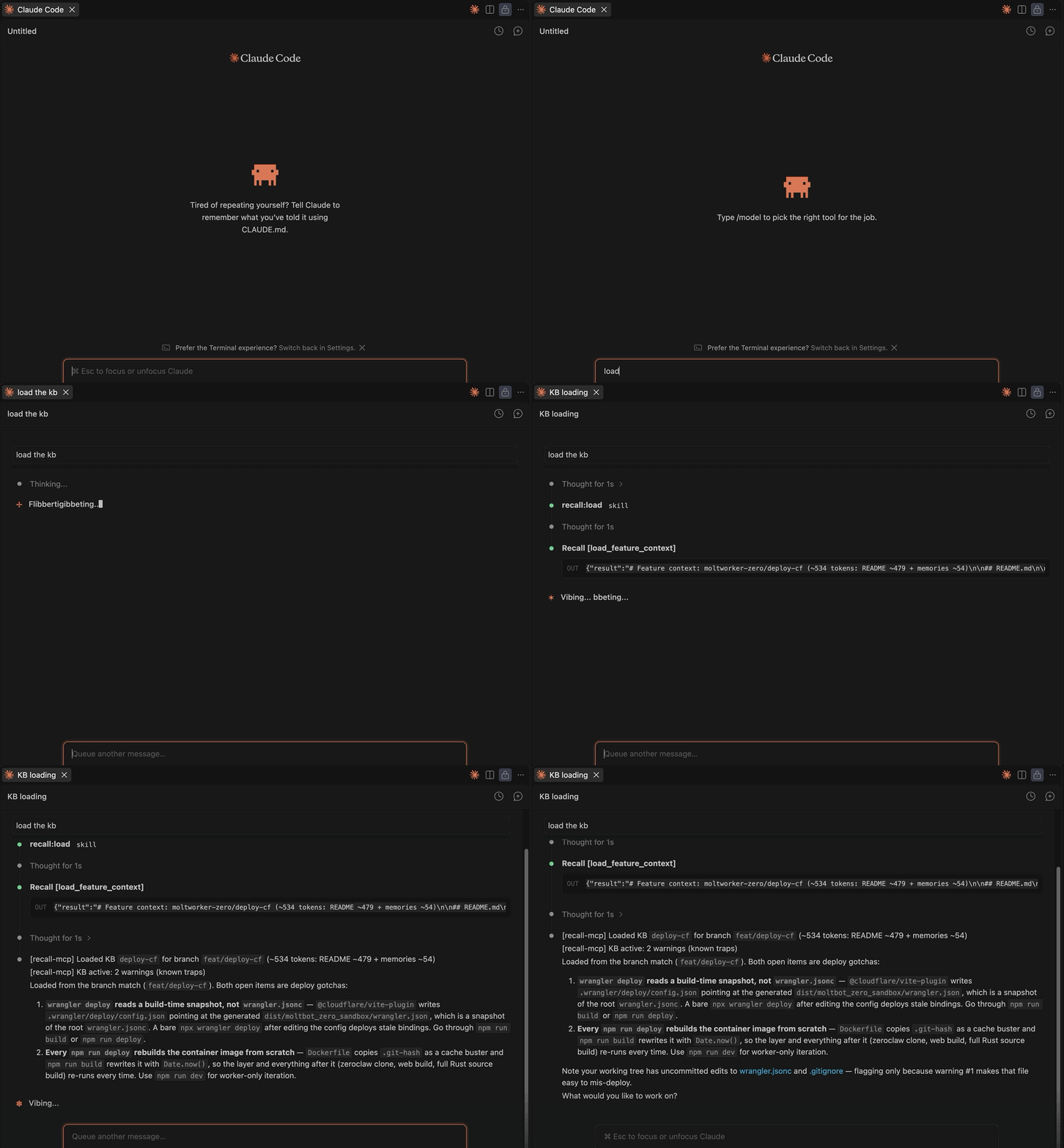
Reload Claude Code, then open a session on a feature branch. There is no load command to remember — the UserPromptSubmit hook reads your branch and loads the matching KB as the session opens. That is the moment in the GIF above. If the branch matches no known KB, Claude offers to create one (/recall:init) or link an existing one (/recall:link-feature).
Verify the install with recall --help. The full walkthrough, with a screenshot per step, is in GUIDE.md.
The problem
Claude is capable within a session but forgets everything between sessions. Each new conversation starts from scratch: no knowledge of past bugs, no memory of architecture decisions, no awareness of the edge cases you already discovered.
Pasting context into every session is tedious and incomplete. And putting it in CLAUDE.md loads all of it, every session — one file per repo, speaking to everything at once, so a payment-gateway session pays for auth context it will never touch. Neither records anything either: whatever a session teaches you is gone unless you stop, notice, and write it down yourself.
What makes this different
Most memory layers ask one question: did it remember? This one asks four — was it even the right memory to load, did anyone have to write it down, who else gets to use it. Every mechanism here spends tokens, so every mechanism is measured.
- Feature-scoped, not project-scoped — and your branch picks for you.
CLAUDE.mdis one file per repo and it speaks to everything at once, so every session loads all of it. A KB is per feature, and the hook reads branch and loads the matching one as the session opens: apayment-gatewaysession never pays for the auth context. Switch branches and you switch KBs — there is no load command to remember. - The KB is written while you work — you never take notes. Claude calls
save_memoryin the turn it learns something, not at the end when the context is gone: a root cause, a constraint the code doesn't show, an approach tried and rejected, a decision with non-obvious reasoning. What lands is tagged, dated, and attributed to the journal it came from. - Capture is automatic; promotion is gated. The two layers are built for opposite jobs. A memory is cheap and additive by construction — prepend-only, never edited, never deleted — so a write Claude makes on its own cannot damage the KB. The curated
README.mdis the opposite: a[gotcha],[rule]or[decision]reaches it only through a risk-classified promotion, and anything that would remove, merge or supersede an existing entry comes back as a diff to review before it is written. - None of it is locked in a service — a KB is plain markdown. A feature's KB is a few
.mdfiles. Read it withcat, grep it from a script, diff it in a PR. No database, no daemon, no vendor account standing between your team and its own knowledge. - One journal per contributor, so a team's findings accumulate instead of overwriting. Each engineer's Claude writes to that engineer's own
memories-{username}.md, while the sharedREADME.mdholds only what the team has agreed on.load_feature_contextmerges every contributor's journal present in the KB, chronologically, at read time — work one engineer did last week is in front of the next engineer this week — and because no two people write the same file, simultaneous saves never conflict. - Shareable by
git push, scoped so sharing stays safe.~/.recall-mcp/<project>/is a git repo from the first write, so handing a KB to your team is a push to a remote you control; and the repo is scoped per project, not per feature, so one push carries that project's KBs and never another project's. kb-recall only ever runsgit init— committing stays yours. - Cost guards, not just features. The
UserPromptSubmithook will block a prompt outright rather than let a session resume into an expired prompt cache with a large context — paying a full cache-write is worse than not running at all. See Idle-gap cost guard.
Installation
Requires uv. Two install sources are available — pick whichever your network allows:
From PyPI (recommended — stable releases):
uv tool install kb-recall
cd ~/your-project
recall setup
From GitHub (latest main, or if PyPI is blocked on your network):
uv tool install git+https://github.com/nguyenquangsang/kb-recall.git
Either way, uv tool install installs into its own isolated environment and exposes a single recall command (~/.local/bin/recall by default) — no manual git clone needed for the GitHub source either. This matters beyond convenience: the UserPromptSubmit hook runs recall prompt, and because the tool's environment is isolated and self-contained, that command reaches the right interpreter no matter which project's venv (if any) happens to be active in the calling shell — unlike invoking a bare python3 /path/to/prompt_submit.py, which only works when the ambient python3 happens to be kb-recall's own interpreter.
recall setup writes the hook using the absolute path to that executable rather than the bare name. Claude Code spawns hook commands through a shell that does not source your interactive rc (.zshrc), so a bare recall — which resolves only because .zshrc puts ~/.local/bin on PATH — would match nothing there and the hook would fail silently, injecting no context and printing no error.
Verify:
recall --help
Contributing to kb-recall itself? Clone it and install in editable mode instead, so code edits take effect immediately without reinstalling:
git clone git@github.com:nguyenquangsang/kb-recall.git ~/kb-recall
cd ~/kb-recall
uv tool install --editable .
Run setup from your project directory (one-time per project):
cd ~/your-project
recall setup
This registers the MCP server, adds the project to config, writes CLAUDE.local.md (gitignored, per-developer — not the team-shared CLAUDE.md), and installs the hook. Reload Claude Code after. See Setup checklist for what each step does.
recall setup detects the target project from the current working directory (Path.cwd()) — always cd into the target project first.
Configuration
~/.recall-mcp/config.json is created automatically by recall setup. To add more projects manually:
{
  "projects": ["/home/you/my-project", "/home/you/another-project"]
}
Idle-gap cost guard
The UserPromptSubmit hook blocks a prompt outright (Claude is never invoked) when you've been idle long enough that the 1-hour prompt cache has likely expired and the session's context is already large — resuming would pay a full cache-write instead of a cheap cache-read. Lighter, non-blocking reminders fire earlier (idle alone, or context size alone) regardless of this setting. To disable just the hard block:
recall block-idle false   # disable
recall block-idle true    # re-enable (default)
This writes "block_idle": false to config.json. See GUIDE.md's "Idle-gap cost guard" section for the full tier breakdown.
KB structure
~/.recall-mcp/
├── config.json
├── usage.log                        ← every tool call, human-readable (tail -f friendly)
├── usage.jsonl                      ← same data as JSON Lines, for jq/pandas/Claude analysis
└── my-project/
    ├── .git/                        ← one repo per project, created on first write
    ├── features.md                  ← index of all features
    └── payment-gateway/
        ├── README.md                ← stable knowledge
        └── memories-{username}.md   ← prepend-only journal, one per contributor
How it works
Each feature gets a small knowledge base (KB) stored in ~/.recall-mcp/{project-name}/{slug}/:
| File | Purpose |
|---|---|
README.md |
Stable knowledge: architecture, business rules, constraints, open items |
memories-{username}.md |
Dynamic journal: bugs, edge cases, trade-off decisions (prepend-only, newest first) — one file per contributor |
An index file (features.md) lists all KBs for quick discovery.
The KB lives in ~/.recall-mcp/ — completely outside the project repo. It never gets committed accidentally, and you can version it independently by committing to that project's KB repo.
Claude reads and writes these files via 8 MCP tools. No manual file management needed.
Every tool call is logged to two files: usage.log (human-readable, tail -f friendly) and usage.jsonl (JSON Lines for analysis with jq, pandas, or Claude). ~/.recall-mcp/<project-name>/ is initialized as a git repo automatically on first write — git init only, kb-recall itself never auto-commits. That scope is deliberate: one repo per project, not one for all of ~/.recall-mcp/, so sharing one project's KB with its team never carries another project's KB along with it. This leaves it ready for you to commit/push manually if you want to version or share the KB.
Tools
list_features
Lists all feature KBs across configured projects. Shows names, slugs, summaries, and last-updated dates. Call this at the start of a session to orient yourself.
list_features(project="")
search_features
Keyword search across every feature's README.md and memories-*.md (all contributors) in scope. Space-separated keywords are OR-matched, case-insensitive. Returns lightweight snippets grouped by slug — not full content. Use this to check a specific fact that might live in a feature you aren't currently working in (e.g. "was X already done elsewhere"); not for slug discovery, which list_features already covers. Pass a comma-separated list ("proj-a,proj-b") to search a specific subset of projects, or "all" for every configured project — only when the user explicitly asks for a cross-project search; default stays scoped to the current project in every other case. Claude should not decide subset-vs-all on its own either — ask the user, offering the real configured project names as choices. Multi-project results are prefixed <project>/<slug>; the footer instructs Claude to show that list to the user and let them pick which KB to load, rather than deciding on its own.
search_features(query="webhook retry idempotent", project="")
search_features(query="webhook retry idempotent", project="proj-a,proj-b")
search_features(query="webhook retry idempotent", project="all")
load_feature_context
Loads the full README.md + memories-{username}.md for a specific feature. Use this before working on a feature to restore context from past sessions. If the feature's README has a related_tickets section, a hint listing related features is appended to the response. The response header always shows <project>/<slug> so it's unambiguous which project's KB was loaded, even when the same slug exists in more than one project.
load_feature_context(slug="payment-gateway", project="")
save_memory
Prepends a single engineering insight to the current user's memories-{username}.md, dated today. Only call this for significant findings: bugs, edge cases, trade-off decisions, breaking changes. Skip routine implementation details. After saving, check whether to promote to README: [gotcha]/[constraint] → update_readme(section="critical_warnings", mode="append"); [decision] → update_readme(section="architecture", mode="append"); [rule] → update_readme(section="business_rules", mode="append"). Skip promotion for [bug], [idea], and [pattern].
save_memory(slug="payment-gateway", content="Stripe webhooks can arrive out of order — always reconcile against DB state, not event order.")
init_feature
Creates a new feature KB directory from templates in templates/, and adds a row to features.md (creates features.md if it doesn't exist yet).
init_feature(name="Payment Gateway", slug="payment-gateway", summary="Handles Stripe checkout and webhook reconciliation", project="my-project", ticket="PROJ-1234", branch="feat/payment-gateway")
projectis required when multiple projects are configured.ticketis optional.
update_readme
Replaces or appends the content of a named XML section in a feature's README.md. Call this after init_feature to fill in sections, or whenever architecture or business rules change. Valid sections: overview, key_files, technical_stack, business_rules, architecture, critical_warnings, open_items, checklist, related_tickets.
mode="append" writes immediately. mode="replace" (default) is two-step: the first call (confirm=False, default) writes nothing and returns a real diff of old vs proposed content; call again with confirm=True to actually write.
update_readme(slug="payment-gateway", section="business_rules", content="**[rule] ...**")   # returns a diff, writes nothing
update_readme(slug="payment-gateway", section="business_rules", content="**[rule] ...**", confirm=True)   # writes for real
update_feature_index
Updates one cell (ticket, branch, or summary) and the Last Updated date on a feature's row in features.md — the index row itself, not README.md content. Called by /recall:save (Step 8) when a feature's actual scope has drifted from the summary set at init_feature, and by /recall:link-feature when linking a renamed branch to an existing KB; not meant to be called mid-task otherwise.
Same diff-then-write pattern as update_readme: confirm=False (default) previews a diff, confirm=True writes it. append=True adds , {value} to the existing cell instead of replacing it (e.g. a KB now tracked by two branches).
update_feature_index(slug="payment-gateway", field="summary", value="Stripe checkout + webhook reconciliation + refund flow")   # returns a diff, writes nothing
update_feature_index(slug="payment-gateway", field="summary", value="Stripe checkout + webhook reconciliation + refund flow", confirm=True)   # writes for real
update_feature_index(slug="payment-gateway", field="branch", value="feat/payment-v2", append=True, confirm=True)   # keeps old branch, adds new one
report_miss
Records a context miss — a mistake Claude made that the KB should have prevented. Call this when the user points out that Claude ignored or lacked knowledge that should have been in the KB. Saves a [MISS] entry to memories-{username}.md so the gap is visible and can be fixed. Immediately after, call update_readme on the section the miss revealed as missing — do not stop at recording the miss.
report_miss(slug="payment-gateway", description="Forgot that webhooks can arrive out of order — this was already in README but Claude didn't apply it.")
Slash commands
Eight commands that wrap the most common workflows. Slug argument is optional for load, save, and miss — auto-detects from git branch, with fuzzy matching when provided.
/recall:load [slug]      ← /recall:load or /recall:load pay (matches "payment-gateway")
/recall:save [slug]      ← auto-detect, confirms before saving
/recall:list [project]
/recall:init [name]
/recall:miss [slug]
/recall:link-feature     ← link current branch to an existing KB (after branch rename)
/recall:compact [slug]   ← retire noise from memories (translate, compress, hide already-in-README entries)
/recall:tidy [slug]      ← rewrite README sections to be compact, English-only, high signal-to-token
Install (one-time, run from project directory):
recall sync-commands
Reload Claude Code. If you're working from a clone of this repo (editable install), recall sync-commands symlinks commands/*.md into ~/.claude/commands/recall/ — edit the source files and changes take effect immediately (no reload needed). Falls back to copying if your filesystem doesn't support symlinks; re-run recall sync-commands after editing in that case.
Version history
Git is initialized automatically in ~/.recall-mcp/<project-name>/ on the first write operation (git init only — kb-recall never auto-commits). Commit manually whenever you want a snapshot:
git -C ~/.recall-mcp/<project-name> add -A
git -C ~/.recall-mcp/<project-name> commit -m "KB snapshot"
git -C ~/.recall-mcp/<project-name> log --oneline
git -C ~/.recall-mcp/<project-name> diff HEAD~1
Design notes
Tool descriptions have a hard cap
Claude Code silently truncates a deferred MCP tool's description at roughly 2,000–2,150 characters. The cut is proportional, not fixed — a longer docstring loses a larger fraction of itself, not a fixed amount. This is a behavioral measurement taken against a live session, not something the client exposes, so it establishes nothing about why the cut lands there or whether it holds across Claude Code versions.
That finding is why Args: sits before OUTPUT in every tool on this server, and why CLAUDE.md carries a length budget. The two docstrings that produced it were both trimmed afterwards, so the numbers are documented rather than restated here as live figures: docs/toolsearch-truncation.md carries the measurements, the method, and the transcript route for checking it yourself — ~/.claude/projects/*/*.jsonl records what the model was actually served, so a rendered description can be compared against the docstring on disk.
Development
uv sync                 # install deps
uv run recall-server    # run locally (stdio mode)
Feature KB templates live in kb_recall/templates/ — edit them to change what init_feature generates. Six files: feature-README.md and feature-memories.md (the per-feature KB), features-index.md (the project index), claude-md-snippet.md (the CLAUDE.md section shown when a project isn't configured), claude-command.md (the standard every commands/*.md file follows), and claude-settings.json.
Tests and lint:
uv run pytest        # 174 tests: hook helpers, CLI, server tools, prompt_submit
uv run ruff check
Setup checklist
Several things must be in place for Claude to reliably use kb-recall. recall setup automates all of them — run it once per project.
cd ~/your-project
recall setup
What setup does
Step 1 — Register MCP server — runs claude mcp add --scope user recall .... Verify with claude mcp list.
Step 2 — Configure project — adds the project path to ~/.recall-mcp/config.json and appends the kb-recall rules to CLAUDE.local.md (created if missing, added to .gitignore) — not the team-shared CLAUDE.md, since these are per-developer opt-in instructions. These rules are what make Claude actually use the tools — without them, Claude has no instruction to load KB before working or save insights after.
Step 3 — Configure issue tracker — asks once whether the project uses Jira or none/other, saved to config.json (issue_trackers.<project-path>) so /recall:init never has to ask again. Skipped (not guessed) when run non-interactively — /recall:init falls back to asking itself if this is still unset.
Step 4 — Install hooks — injects into ~/.claude/settings.json:
UserPromptSubmit (the recall prompt command, written as an absolute path) — runs on every prompt:
- CLAUDE.local.md warning if the kb-recall section is missing (checks legacy CLAUDE.md too, for pre-existing installs)
- Feature index for the current project — first prompt of session only, so Claude knows which KBs exist without paying index token cost on every turn
- KB suggestion from branch name — once per session: if branch matches a known feature slug, Claude loads the KB; if no KB exists, offers to create one or link to an existing KB (
/recall:link-feature) - Turn counter reminders — two independent cadences, both active only when a KB is loaded: every 8 turns, reminds Claude to call
save_memoryif nothing has been saved recently; every 16 turns, reminds it to callreport_miss. Misses are much rarer than saves, so checking at the same rate would be mostly noise
This is the only hook kb-recall installs. (An earlier design also used a PreCompact hook for a pre-compaction save reminder; dropped in favor of the turn-counter reminder above, which covers the same need without the extra hook.)
Step 5 — Sync slash commands — symlinks commands/*.md to ~/.claude/commands/recall/.
Reload Claude Code after setup.
Known problems
Current (unfixed)
Reliability — Claude has no guarantee it will call load_feature_context before starting work. The hook injects the feature index, and CLAUDE.md rules instruct the behavior — but both are advisory. Claude can skip them. There is no hard enforcement mechanism at the protocol level.
No session-end checkpoint — (partially addressed) A turn counter reminder fires every 8 turns, prompting Claude to call save_memory (and a separate one every 16 turns for report_miss). Claude can still finish a session without saving if it ignores these signals.
Future (when KB grows or work spans features)
Cross-feature blind spots — each feature KB is isolated. When work touches two features, Claude must know in advance to load both. Two hint-on-load mechanisms exist: a curated <related_tickets> section, and key_files overlap mined live from every KB's <key_files> section, which surfaces "Possibly related (shared key_files, unconfirmed)" split into strong (ordinary overlap, or an exact shared path::symbol) and weak (the path is a hub, referenced by many features). Both are advisory — Claude can ignore them, and neither fires unless a KB is already being loaded.
KB staleness — memories-{username}.md entries are prepend-only and never expire. Over time, old entries about bugs that were fixed or decisions that were reversed accumulate. Retirement is manual: [supersedes:XXXX] and [resolved:XXXX] do drop an entry from the merged view, but only once someone knows its id and writes the tag — nothing detects that an entry has gone stale. The one automated exception is path-level: key_files references that no longer exist on disk are flagged on load. /recall:compact and /recall:tidy are the human-triggered cleanup path.
Single-project assumption — the hook and most tooling implicitly assume one active project. Multi-project setups work technically but the UX (specifying project= on every call, hook injecting all projects' indexes) becomes awkward.
Roadmap
Audited against the source on 2026-09-19. Checkboxes describe what ships today, not what was planned — if a claim here disagrees with the code, the code wins.
🚀 DX & Slash Commands (Short-term)
- CLI Setup:
recall setupautomates the installation steps — MCP server registration, project config, issue-tracker preference, hook install, slash-command sync. - Cross-project resolution: Auto-detect and resolve ambiguous feature slugs, disambiguating by project when a slug exists in more than one, with a fuzzy (
difflib, ≥0.8) fallback when an exact match isn't found. -
/recall:initauto-slugify: Derives the slug from the branch segment, pre-fills the ticket ID from a key-shaped pattern in the branch name, and defaults the username fromgit config user.name. Every command takes an optional slug and auto-detects from the branch otherwise. - Single-section update command: Rewrite one named README section without the model composing the replacement text first.
update_readmealready writes a section, but it takes the finished content as an argument — there is no command that takes "section X, change it this way"./recall:tidyrewrites sections but in bulk and for compaction, not for a targeted edit. - Multi-slug context loading:
load_feature_context(slugs=["payment", "fraud"])for cross-feature tasks. Todayslugis a single string.
🧠 Context Engine & Auto-Discovery
- Smart linkages:
<related_tickets>section hints related context on load. - Cross-feature discovery by
key_files: Every KB's<key_files>paths are mined into a live path→slug index, so loading one feature surfaces "Possibly related (shared key_files, unconfirmed)" for the others. - File-path mapping (hook): Auto-detect the KB from the edited file path (
src/.../cache.py) instead of branch name alone. Thekey_filesindex above runs insideload_feature_context—prompt_submit.pystill detects on branch name only, so nothing proposes a KB from the file you just opened. - Summary-injected hooks: The feature index injected on the first prompt of a session carries each feature's one-line summary, so Claude can weigh which KB matters without a discovery call.
- Semantic Search: Combine text search with local embeddings for large KBs.
🧹 Memory Lifecycle & Quality Control
- Session nudges: Two turn-counter reminders via
UserPromptSubmit—save_memoryevery 8 turns,report_missevery 16. AStophook for session-end save was rejected for token cost; an earlierPreCompactsave reminder was built and later dropped in favor of the turn counter. -
/recall:compact: Compress older journal entries to prevent unbounded context growth — translate non-English entries, condense verbose ones, and hide entries already captured in a README section. Surfaces itself through a size hint on load and after every write. - Batch Curation Agent: Weekly scheduled workflow to audit KBs, promote repeated patterns to README, and surface stale/contradicted entries.
- KB health signals: The hook reports a branch-matched KB's own counts (
N decisions · N warnings · N past mistakes) on the prompt that matches it, and everyload_feature_contextcall flagskey_filespaths that no longer exist on disk; oversized memories or README sections trigger a/recall:compactor/recall:tidyhint after a load or a write. - Health ratio:
report_missvssave_memoryas a proportion, so an unhealthy KB is visible without reading the numbers. Counts are surfaced today; the judgment isn't.
👥 Team Collaboration & Ecosystem
- Auto Git Remote Sync: Background
git pull/pushon load/save — keeping team READMEs synced while keeping personalmemories-{user}.mdconflict-free. - Provenance tracking: Add
sourcefield (PR, Jira ticket, manual) to memories and misses. - GitHub Copilot support: Extend hook compatibility to VS Code Copilot Agent hooks.
1 maintainer

Release files for kb-recall 0.1.0
For a detailed explanation of source distributions (sdists) and built distributions (wheels), please see the package formats documentation.
Source distribution (sdist)
| File | Size | Uploaded | |
|---|---|---|---|
| kb_recall-0.1.0.tar.gz | 208.3 kB | Details |
Built distribution (wheel)
| File | Interpreter | ABI | Platform | Reset |
|---|---|---|---|---|
| kb_recall-0.1.0-py3-none-any.whl | Python 3 | none | any | Details |
Total release size: 293.0 kB
Release files / kb_recall-0.1.0.tar.gz
| Download URL | kb_recall-0.1.0.tar.gz |
|---|---|
| Size | 208.3 kB |
| Tags | Source |
|
SHA-256 checksum How to use checksums |
55ea342e0b541873f07344c40493e9582f15ff06bc8d4adbb4d4f51bde247505
|
|
BLAKE2b-256 checksum How to use checksums |
48d780a770e045da6d19f961f78044645472befe6e3587e1e67dc0bc3ab605ba
|
| Upload date | |
|
Uploaded using Trusted Publishing? What is trusted publishing? |
Yes |
| Uploaded via |
twine/7.0.0 CPython/3.13.14
|
Provenance
Provenance describes where a file came from. On PyPI, provenance is shared via attestations, which provide a verifiable record of the build or publishing details. View details, limitations and caveats.


PyPI Publish Attestation
PyPI verified that this artifact, at this checksum, originated from the publisher listed below.
Signed by GitHub Actions, verified by PyPI on Sep 20, 2026.
Transparency logRelease files / kb_recall-0.1.0-py3-none-any.whl
| Download URL | kb_recall-0.1.0-py3-none-any.whl |
|---|---|
| Size | 84.7 kB |
| Tags | Python 3 |
|
SHA-256 checksum How to use checksums |
0225ec76138490e4058e465150482809fba4dc3ffc8a1bac531626fe0f09787b
|
|
BLAKE2b-256 checksum How to use checksums |
a057dadc066a05a4028ef8304335ea08ba276b23e4cc43dfedb361dc333c696e
|
| Upload date | |
|
Uploaded using Trusted Publishing? What is trusted publishing? |
Yes |
| Uploaded via |
twine/7.0.0 CPython/3.13.14
|
Provenance
Provenance describes where a file came from. On PyPI, provenance is shared via attestations, which provide a verifiable record of the build or publishing details. View details, limitations and caveats.
PyPI Publish Attestation
PyPI verified that this artifact, at this checksum, originated from the publisher listed below.
Signed by GitHub Actions, verified by PyPI on Sep 20, 2026.
Transparency log












