
BAND:BERT Application aNd Deployment
A simple and efficient BERT model training and deployment framework.




BAND:BERT Application aNd Deployment
Documents »
Examples
·
Report Bug
·
Feature Request
·
Questions
What is it
Encoding/Embedding is a upstream task of encoding any inputs in the form of text, image, audio, video, transactional data to fixed length vector. Embeddings are quite popular in the field of NLP, there has been various Embeddings models being proposed in recent years by researchers, some of the famous one are bert, xlnet, word2vec etc. The goal of this repo is to build one stop solution for all embeddings techniques available, here we are starting with popular text embeddings for now and later on we aim to add as much technique for image, audio, video inputs also.
Finally, embedding-as-service help you to encode any given text to fixed length vector from supported embeddings and models.
💾 Installation
Install the band via pip.
$ pip install band -U
Note that the code MUST be running on Python >= 3.6. Again module does not support Python 2!
⚡ ️Getting Started
Text Classification Example
import time
import tensorflow as tf
from transformers import BertConfig, BertTokenizer
from band.model import TFBertForSequenceClassification
from band.dataset import ChnSentiCorp
from band.progress import classification_convert_examples_to_features

USE_XLA = False
USE_AMP = False

EPOCHS = 1
BATCH_SIZE = 16
EVAL_BATCH_SIZE = 16
TEST_BATCH_SIZE = 1
MAX_SEQ_LEN = 128
LEARNING_RATE = 3e-5
SAVE_MODEL = False
pretrained_dir = "/home/band/models"

tf.config.optimizer.set_jit(USE_XLA)
tf.config.optimizer.set_experimental_options({"auto_mixed_precision": USE_AMP})

dataset = ChnSentiCorp(save_path="/tmp/band")
data, label = dataset.data, dataset.label
dataset.dataset_information()

train_number, eval_number, test_number = dataset.train_examples_num, dataset.eval_examples_num, dataset.test_examples_num

tokenizer = BertTokenizer.from_pretrained(pretrained_dir)
train_dataset = classification_convert_examples_to_features(data['train'], tokenizer, max_length=MAX_SEQ_LEN,
                                                            label_list=label,
                                                            output_mode="classification")
valid_dataset = classification_convert_examples_to_features(data['validation'], tokenizer, max_length=MAX_SEQ_LEN,
                                                            label_list=label,
                                                            output_mode="classification")
test_dataset = classification_convert_examples_to_features(data['test'], tokenizer, max_length=MAX_SEQ_LEN,
                                                           label_list=label,
                                                           output_mode="classification")

train_dataset = train_dataset.shuffle(100).batch(BATCH_SIZE, drop_remainder=True).repeat(EPOCHS)
train_dataset = train_dataset.prefetch(tf.data.experimental.AUTOTUNE)
valid_dataset = valid_dataset.batch(EVAL_BATCH_SIZE)
valid_dataset = valid_dataset.prefetch(tf.data.experimental.AUTOTUNE)
test_dataset = test_dataset.batch(TEST_BATCH_SIZE)
test_dataset = test_dataset.prefetch(tf.data.experimental.AUTOTUNE)

config = BertConfig.from_pretrained(pretrained_dir, num_labels=dataset.num_labels)
model = TFBertForSequenceClassification.from_pretrained(pretrained_dir, config=config, from_pt=True)
optimizer = tf.keras.optimizers.Adam(learning_rate=LEARNING_RATE, epsilon=1e-08)
if USE_AMP:
    optimizer = tf.keras.mixed_precision.experimental.LossScaleOptimizer(optimizer, 'dynamic')
loss = tf.keras.losses.SparseCategoricalCrossentropy(from_logits=True)
metric = tf.keras.metrics.SparseCategoricalAccuracy('accuracy')
model.compile(optimizer=optimizer, loss=loss, metrics=[metric])

history = model.fit(train_dataset, epochs=EPOCHS,
                    steps_per_epoch=train_number // BATCH_SIZE,
                    validation_data=valid_dataset,
                    validation_steps=eval_number // EVAL_BATCH_SIZE)

loss, accuracy = model.evaluate(test_dataset, steps=test_number // TEST_BATCH_SIZE)
print(loss, accuracy)

if SAVE_MODEL:
    saved_model_path = "./saved_models/{}".format(int(time.time()))
    model.save(saved_model_path, save_format="tf")
Named Entity Recognition
import time
import tensorflow as tf
from transformers import BertTokenizer, BertConfig
from band.dataset import MSRA_NER
from band.seqeval.callbacks import F1Metrics
from band.model import TFBertForTokenClassification
from band.utils import TrainConfig
from band.progress import NER_Dataset

pretrained_dir = '/home/band/models'

train_config = TrainConfig(epochs=3, train_batch_size=32, eval_batch_size=32, test_batch_size=1, max_length=128,
                           learning_rate=3e-5, save_model=False)

dataset = MSRA_NER(save_path="/tmp/band")

config = BertConfig.from_pretrained(pretrained_dir, num_labels=dataset.num_labels, return_unused_kwargs=True)
tokenizer = BertTokenizer.from_pretrained(pretrained_dir)
model = TFBertForTokenClassification.from_pretrained(pretrained_dir, config=config, from_pt=True)

ner = NER_Dataset(dataset=dataset, tokenizer=tokenizer, train_config=train_config)
model.compile(optimizer=ner.optimizer, loss=ner.loss, metrics=[ner.metric])

f1 = F1Metrics(dataset.get_labels(), validation_data=ner.valid_dataset, steps=ner.valid_steps)

history = model.fit(ner.train_dataset, epochs=train_config.epochs, steps_per_epoch=ner.test_steps, callbacks=[f1])

loss, accuracy = model.evaluate(ner.test_dataset, steps=ner.test_steps)

if train_config.save_model:
    saved_model_path = "./saved_models/{}".format(int(time.time()))
    model.save(saved_model_path, save_format="tf")
Question Answering
import time
import tensorflow as tf
from transformers import BertConfig, BertTokenizer
from band.model import TFBertForQuestionAnswering
from band.dataset import Squad
from band.progress import squad_convert_examples_to_features, parallel_squad_convert_examples_to_features

USE_XLA = False
USE_AMP = False

EPOCHS = 1
BATCH_SIZE = 4
EVAL_BATCH_SIZE = 4
TEST_BATCH_SIZE = 1
MAX_SEQ_LEN = 128
LEARNING_RATE = 3e-5
SAVE_MODEL = False
pretrained_dir = "/home/band/models"

tf.config.optimizer.set_jit(USE_XLA)
tf.config.optimizer.set_experimental_options({"auto_mixed_precision": USE_AMP})

dataset = Squad(save_path="/tmp/band")
data, label = dataset.data, dataset.label

train_number, eval_number = dataset.train_examples_num, dataset.eval_examples_num

tokenizer = BertTokenizer.from_pretrained(pretrained_dir)
train_dataset = parallel_squad_convert_examples_to_features(data['train'], tokenizer, max_length=MAX_SEQ_LEN,
                                                            doc_stride=128, is_training=True, max_query_length=64)
valid_dataset = parallel_squad_convert_examples_to_features(data['validation'], tokenizer, max_length=MAX_SEQ_LEN,
                                                            doc_stride=128, is_training=False, max_query_length=64)

train_dataset = train_dataset.shuffle(100).batch(BATCH_SIZE, drop_remainder=True).repeat(EPOCHS)
train_dataset = train_dataset.prefetch(tf.data.experimental.AUTOTUNE)
valid_dataset = valid_dataset.batch(EVAL_BATCH_SIZE)
valid_dataset = valid_dataset.prefetch(tf.data.experimental.AUTOTUNE)

config = BertConfig.from_pretrained(pretrained_dir)
model = TFBertForQuestionAnswering.from_pretrained(pretrained_dir, config=config, from_pt=True, max_length=MAX_SEQ_LEN)

print(model.summary())

optimizer = tf.keras.optimizers.Adam(learning_rate=LEARNING_RATE, epsilon=1e-08)
if USE_AMP:
    optimizer = tf.keras.mixed_precision.experimental.LossScaleOptimizer(optimizer, 'dynamic')

loss = {'start_position': tf.keras.losses.SparseCategoricalCrossentropy(from_logits=True),
        'end_position': tf.keras.losses.SparseCategoricalCrossentropy(from_logits=True)}
metrics = {'start_position': tf.keras.metrics.SparseCategoricalAccuracy('accuracy'),
           'end_position': tf.keras.metrics.SparseCategoricalAccuracy('accuracy')}

model.compile(optimizer=optimizer, loss=loss, metrics=metrics)

history = model.fit(train_dataset, epochs=EPOCHS,
                    steps_per_epoch=train_number // BATCH_SIZE,
                    validation_data=valid_dataset,
                    validation_steps=eval_number // EVAL_BATCH_SIZE)

if SAVE_MODEL:
    saved_model_path = "./saved_models/{}".format(int(time.time()))
    model.save(saved_model_path, save_format="tf")
Dataset
For more information about dataset, see
| Dataset Name | Language | TASK | Description |
|---|---|---|---|
| ChnSentiCorp | CN | Text Classification | Binary Classification |
| LCQMC | CN | Question Answer Match | Binary Classification |
| MSRA_NER | CN | Named Entity Recognition | Sequence Labeling |
| Toxic | EN | Text Classification | Multi-label Multi-label |
| Thucnews | CN | Text Classification | Multi-class Classification |
| SQUAD | EN | Machine Reading Comprehension | Span |
| DRCD | CN | Machine Reading Comprehension | Span |
| CMRC | CN | Machine Reading Comprehension | Span |
| GLUE | EN |
✅ Supported Embeddings and Models
For more information about pretrained models, see
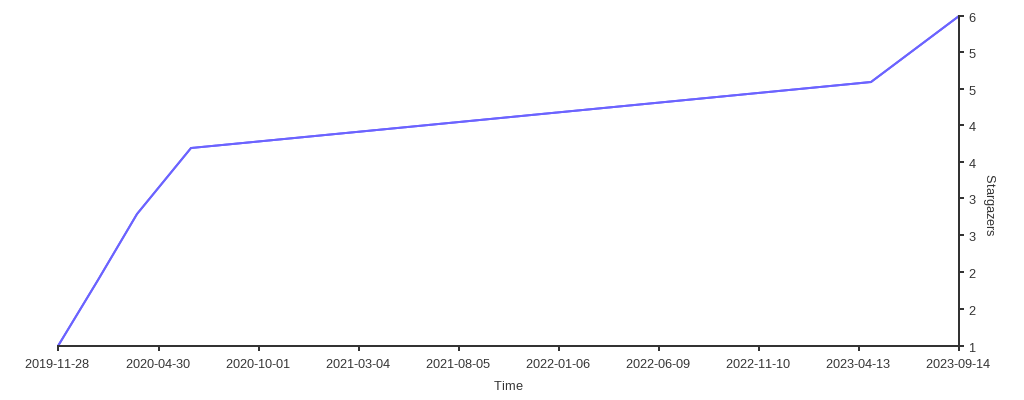
Stargazers over time
1 maintainer

Metadata
1 maintainer
Release files for kbert 0.1.2
For a detailed explanation of source distributions (sdists) and built distributions (wheels), please see the package formats documentation.
Source distribution (sdist)
| File | Size | Uploaded | Provenance | Actions |
|---|---|---|---|---|
| kbert-0.1.2.tar.gz | 110.8 kB | Without provenance | Details for kbert-0.1.2.tar.gz |
Built distribution (wheel)
| File | Interpreter | ABI | Platform | Actions Reset |
|---|---|---|---|---|
| kbert-0.1.2-py3-none-any.whl | Python 3 | none | any | Details for kbert-0.1.2-py3-none-any.whl |
Total release size: 281.9 kB
Release files / kbert-0.1.2.tar.gz
| Download URL | kbert-0.1.2.tar.gz |
|---|---|
| Size | 110.8 kB |
| Tags | Source |
|
SHA-256 checksum How to use checksums |
ff44054404b0b0acae156d6774374e4faf1adfff0aeb983333f723ede6c6a141
|
|
BLAKE2b-256 checksum How to use checksums |
c959dcba51f40ba21184dba4e25dae5528feb35086276032203c68a26be2afe9
|
| Upload date | |
|
Uploaded using Trusted Publishing? What is trusted publishing? |
No |
| Uploaded via |
twine/3.1.1 pkginfo/1.5.0.1 requests/2.22.0 setuptools/42.0.1.post20191125 requests-toolbelt/0.9.1 tqdm/4.32.2 CPython/3.6.7
|
Release files / kbert-0.1.2-py3-none-any.whl
| Download URL | kbert-0.1.2-py3-none-any.whl |
|---|---|
| Size | 171.1 kB |
| Tags | Python 3 |
|
SHA-256 checksum How to use checksums |
51332b477cd244eef9cc4d5bcb9f79e56e3b8a209e206f92f3ac4f729a5c506c
|
|
BLAKE2b-256 checksum How to use checksums |
97a0108010c2eb1528f34de6e9ea3d2383d0a9b3907764ad951427d173b26da7
|
| Upload date | |
|
Uploaded using Trusted Publishing? What is trusted publishing? |
No |
| Uploaded via |
twine/3.1.1 pkginfo/1.5.0.1 requests/2.22.0 setuptools/42.0.1.post20191125 requests-toolbelt/0.9.1 tqdm/4.32.2 CPython/3.6.7
|
Security for kbert 0.1.2
Provenance
Provenance describes where a file came from. On PyPI, provenance is shared via attestations, which provide a verifiable record of the build or publishing details. View details, limitations and caveats.
No provenance found
None of the files in this release were uploaded with provenance metadata.
A note on package security
PyPI is a repository for distributing packages, not a service for auditing them. While third-party security researchers and our staff do their best to detect and remove malicious packages, PyPI cannot guarantee the quality, security or suitability of any given package.
To learn more about protecting yourself from malicious actors, visit our package security documentation.














