

1. KBY-AI FaceSDK
Overview
This project demonstrates an advanced face recognition, face liveness-detection, face matching technology implemented via pip install.
You can simple plug & play the above multi-functions from Python or from the command line with our KBY-AI pip library.
It also includes features that allow for testing face recognition, face anti-spoofing, face matching between two images using both image files and base64-encoded images.
| Face Liveness Detection | Face Recognition |
|---|---|
| Face Detection | Face Detection |
| Face Liveness Detection | Face Recognition |
| Pose Estimation | Pose Estimation |
| 68 points Face Landmark Detection | 68 points Face Landmark Detection |
| Face Quality Calculation | Face Occlusion Detection |
| Face Occlusion Detection | Face Occlusion Detection |
| Eye Closure Detection | Eye Closure Detection |
| Mouth Opening Check | Mouth Opening Check |
Features
Detect Face liveness in pictures
from kbyai import facesdk
import base64

def image_to_base64(image_path):
    with open(image_path, "rb") as img_file:
        base64_data = base64.b64encode(img_file.read())
    return base64_data.decode("utf-8")

# Check liveness with a face image
filepath = "face.jpg"
result = facesdk.check_liveness(filepath)
print(result)

# Check liveness with an encoded face image data
file_base64 = image_to_base64(filepath)
result = facesdk.check_liveness_base64(file_base64)
print(result)
Find all the real & fake faces that appear in a picture:
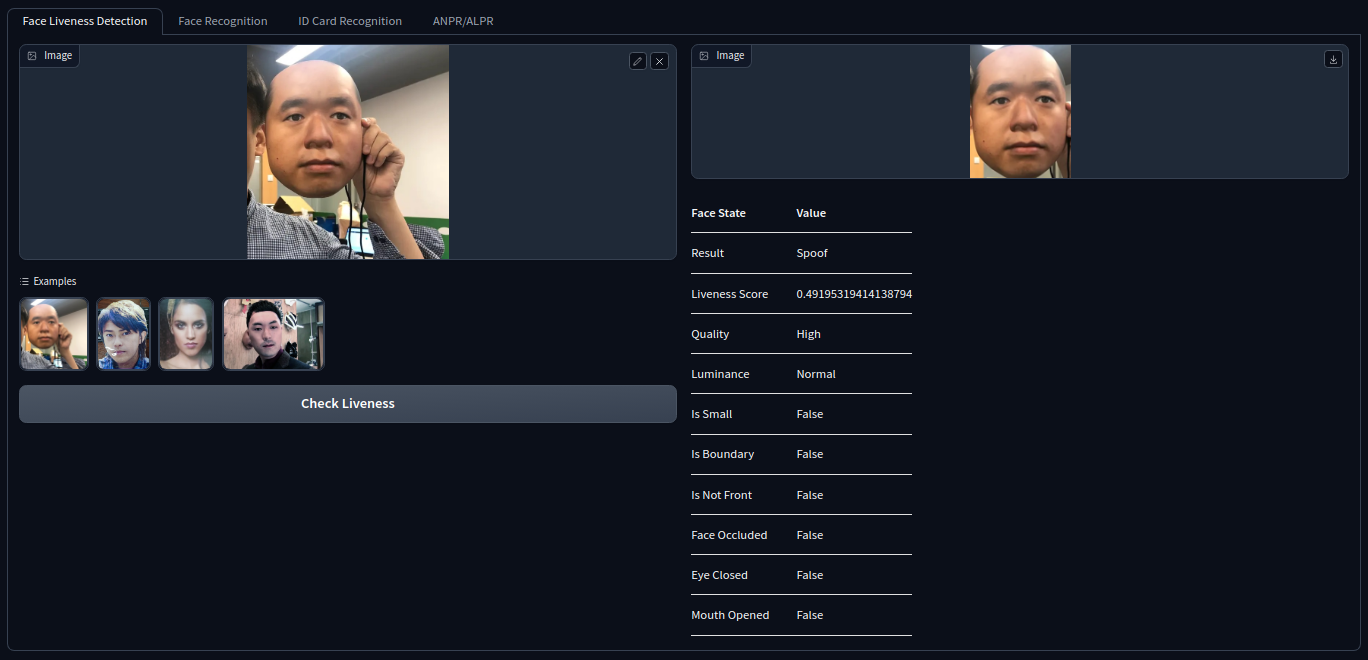
Comparing faces with two different images
from kbyai import facesdk
import base64

def image_to_base64(image_path):
    with open(image_path, "rb") as img_file:
        base64_data = base64.b64encode(img_file.read())
    return base64_data.decode("utf-8")

# Check similarity between two face images
filepath1 = "face1.jpg"
filepath2 = "face2.jpg"
result = facesdk.compare_face(filepath1, filepath2)
print(result)

# Check similarity between two encoded face images
file1_base64 = image_to_base64(filepath1)
file2_base64 = image_to_base64(filepath2)
result = facesdk.compare_face_base64(file1_base64, file2_base64)
print(result)
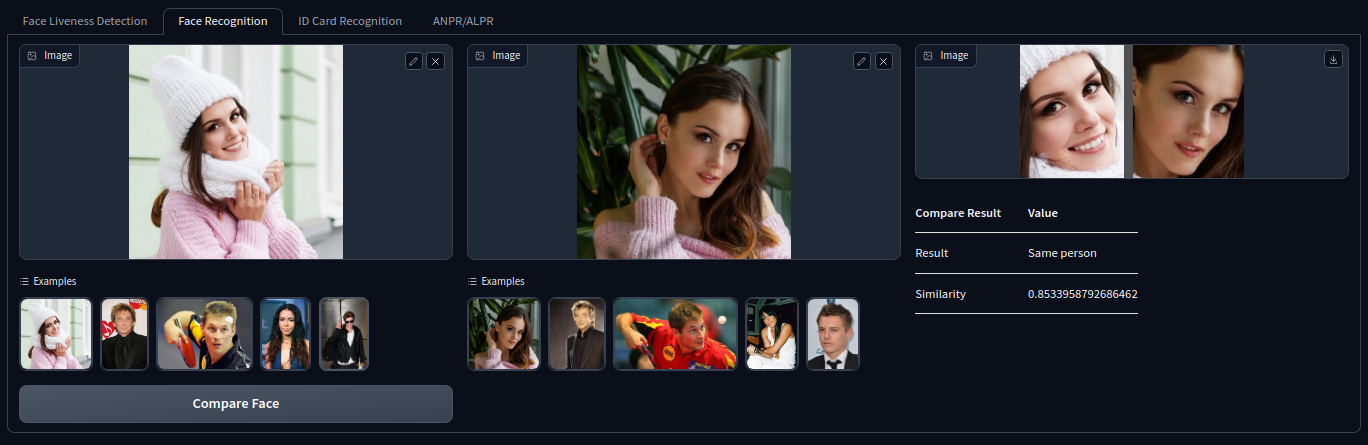
If you want to run our library to do real-time face recognition on cross platforms, please check our product list here.
Face Liveness Detection - Android(Basic SDK)
Face Liveness Detection - iOS(Basic SDK)
Face Recognition - Android(Standard SDK)
Face Recognition - iOS(Standard SDK)
Face Recognition - Flutter(Standard SDK)
Face Recognition - React-Native(Standard SDK)
2. KBY-AI IDSDK
Overview
This project demonstrates the server-based recognition capabilities for ID cards, passports, and driver's licenses.
At the core of this project lies the ID Card Recognition SDK, which has been developed to provide comprehensive support for recognizing ID cards, passports, and driver's licenses from over 180 countries.
You can simple plug & play the above function from Python or from the command line with our KBY-AI pip library.
ID document recognition with ID document image
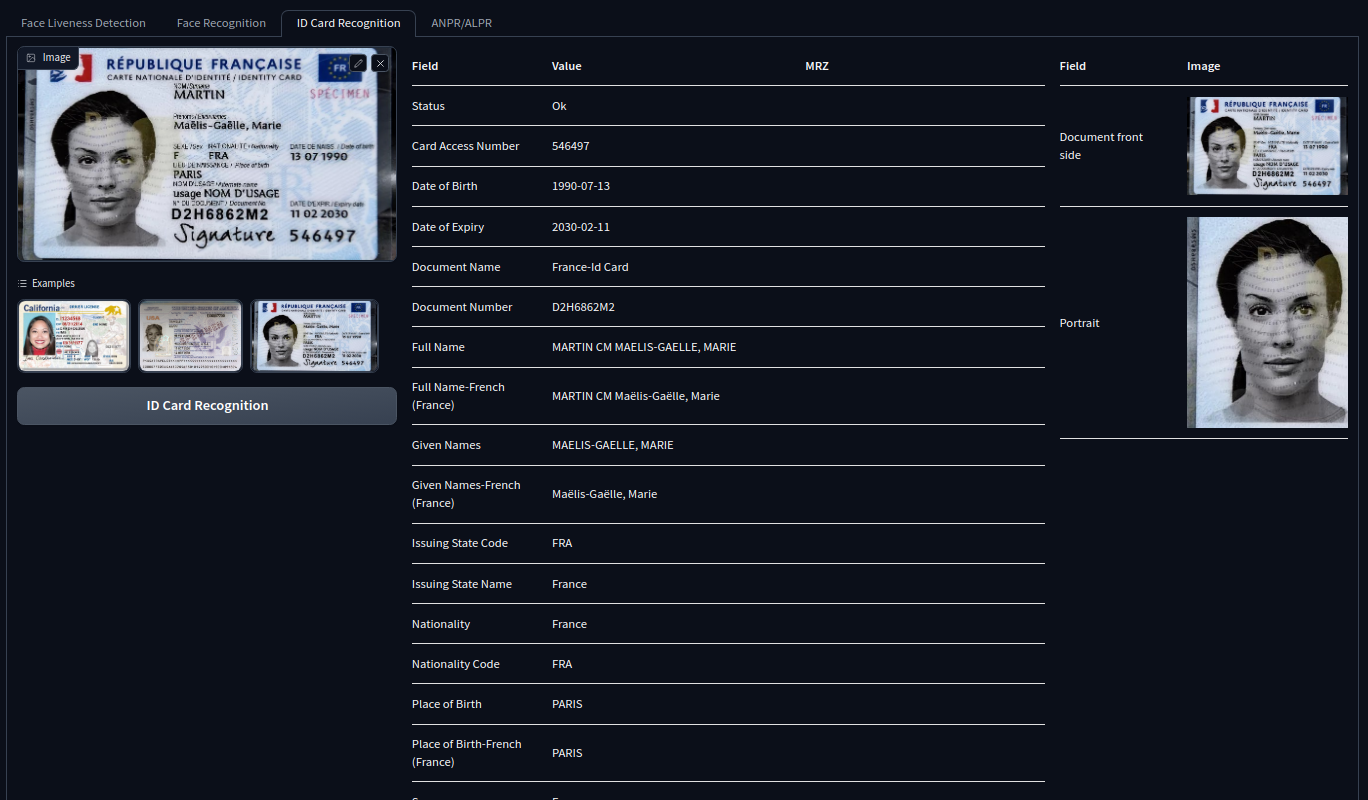
from kbyai import idsdk
import base64

def image_to_base64(image_path):
    with open(image_path, "rb") as img_file:
        base64_data = base64.b64encode(img_file.read())
    return base64_data.decode("utf-8")

# Check with ID card image file
filepath = "id.jpg"
result = idsdk.idcard_recognition(filepath)
print(result)

# Check with an encoded ID card Image data
file_base64 = image_to_base64(filepath)
result = idsdk.idcard_recognition_base64(file_base64)
print(result)
If you want to run our library to do real-time on cross platforms, please check our product list here.
Online Demos
You can test the SDK using images from the following URL: https://web.kby-ai.com
3. Our Product List
👏 We have published the Face Liveness Detection, Face Recognition SDK and ID Card Recognition SDK.
https://github.com/kby-ai/Product
4. Contact US
Email: contact@kby-ai.com
Telegram: @kbyai
WhatsApp: +19092802609
Skype: live:.cid.66e2522354b1049b
Facebook: https://www.facebook.com/KBYAI
1 maintainer

Release files for kbyai 1.0.0
For a detailed explanation of source distributions (sdists) and built distributions (wheels), please see the package formats documentation.
Source distribution (sdist)
| File | Size | Uploaded | |
|---|---|---|---|
| kbyai-1.0.0.tar.gz | 5.2 kB | Details |
Built distribution (wheel)
| File | Interpreter | ABI | Platform | Reset |
|---|---|---|---|---|
| kbyai-1.0.0-py3-none-any.whl | Python 3 | none | any | Details |
Total release size: 11.0 kB
Release files / kbyai-1.0.0.tar.gz
| Download URL | kbyai-1.0.0.tar.gz |
|---|---|
| Size | 5.2 kB |
| Tags | Source |
|
SHA-256 checksum How to use checksums |
ec4391b7721d9c3227614d69d95a5666ae8910089fde482276209a95dbba9a99
|
|
BLAKE2b-256 checksum How to use checksums |
59c3d2af7d1ddf10a27ad51af0e98837eae4996b4b9eadb203e152464b3a59af
|
| Upload date | |
|
Uploaded using Trusted Publishing? What is trusted publishing? |
No |
| Uploaded via |
twine/4.0.2 CPython/3.11.7
|
Release files / kbyai-1.0.0-py3-none-any.whl
| Download URL | kbyai-1.0.0-py3-none-any.whl |
|---|---|
| Size | 5.8 kB |
| Tags | Python 3 |
|
SHA-256 checksum How to use checksums |
6d65d27c6382996c6c179bdcda8a424b4ff03c159a0eacfe734dd9196fc6b7cd
|
|
BLAKE2b-256 checksum How to use checksums |
5d571530b2c9d234d709dd2df183e154ee0f635a9b3764bd2a864507529012b8
|
| Upload date | |
|
Uploaded using Trusted Publishing? What is trusted publishing? |
No |
| Uploaded via |
twine/4.0.2 CPython/3.11.7
|













