
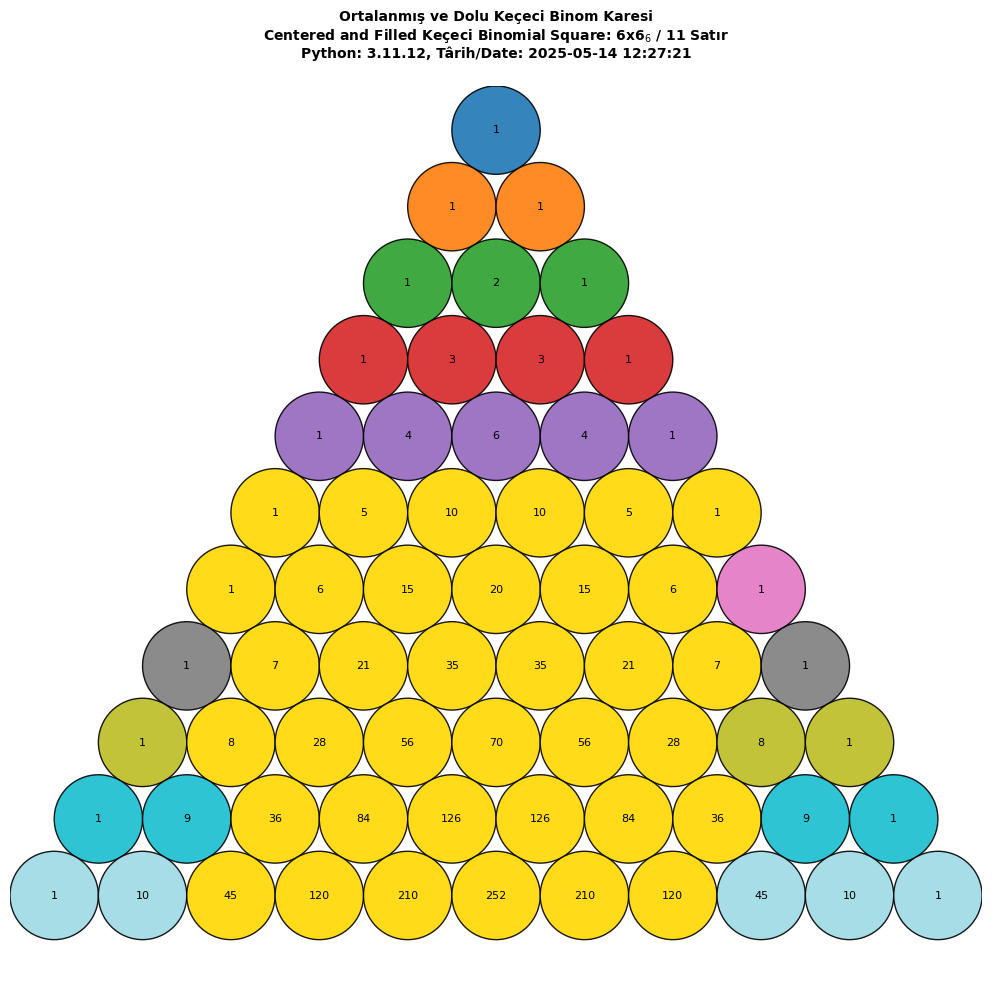
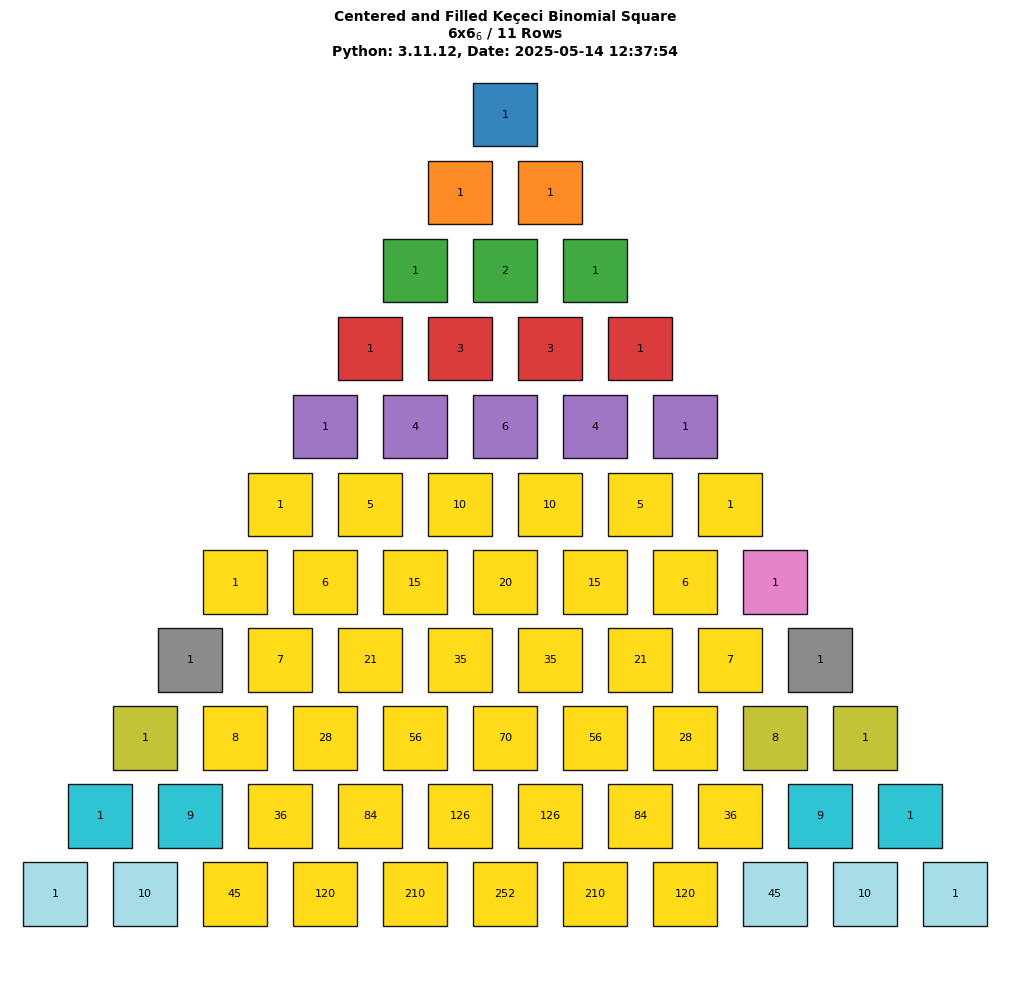
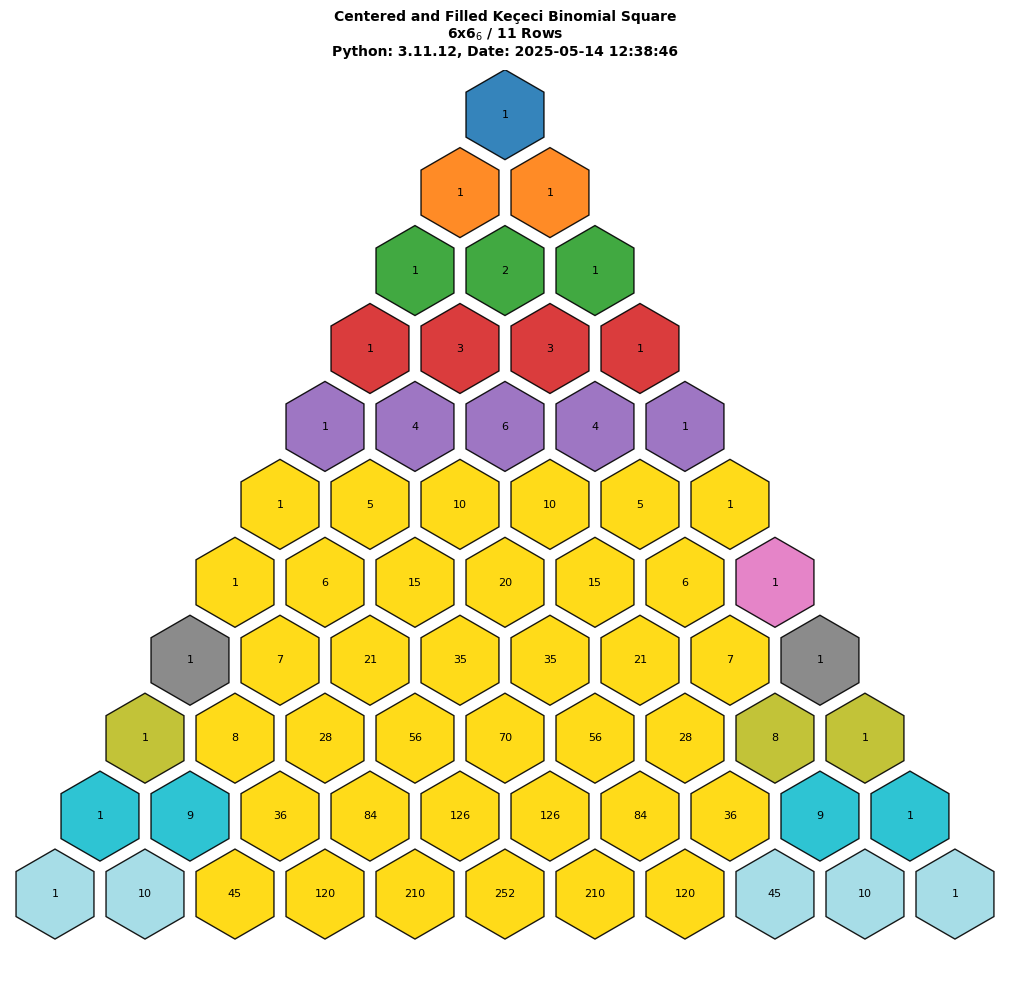
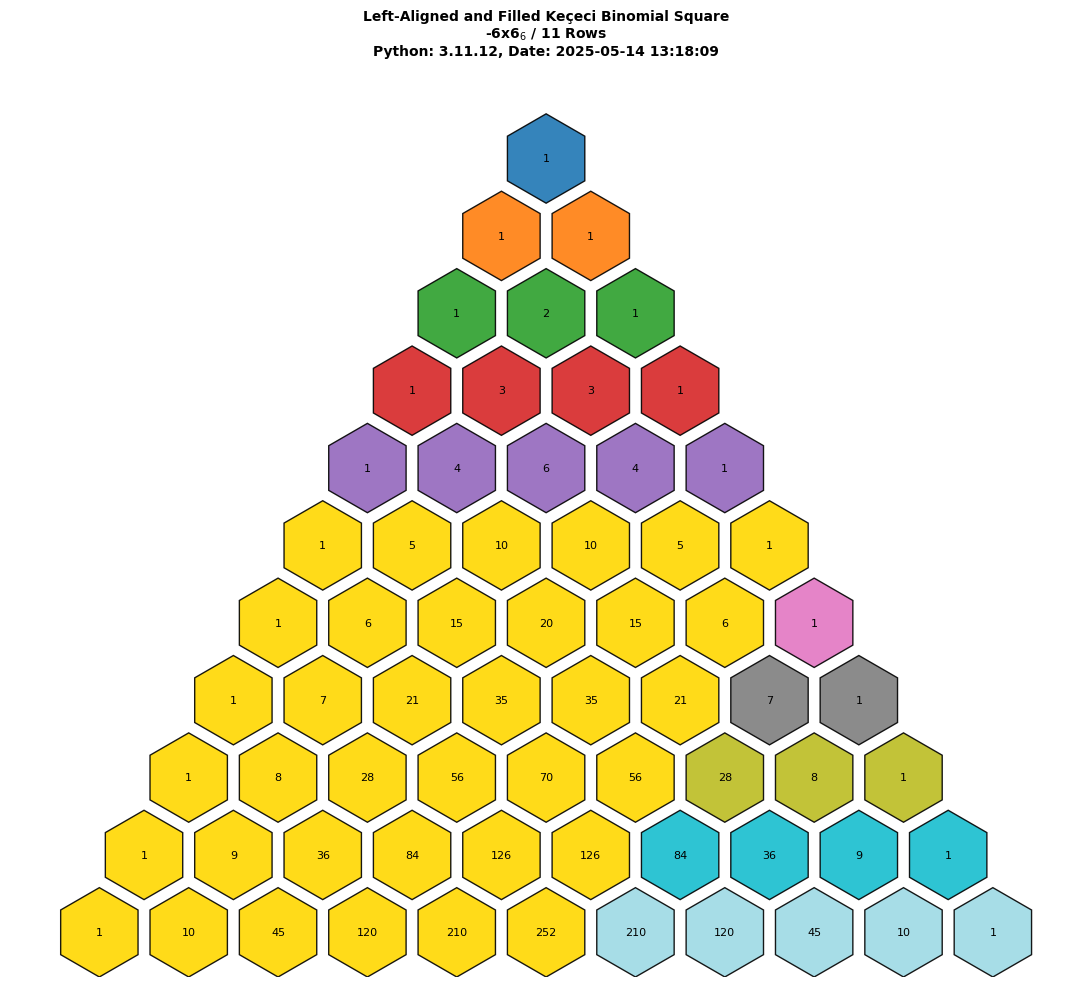
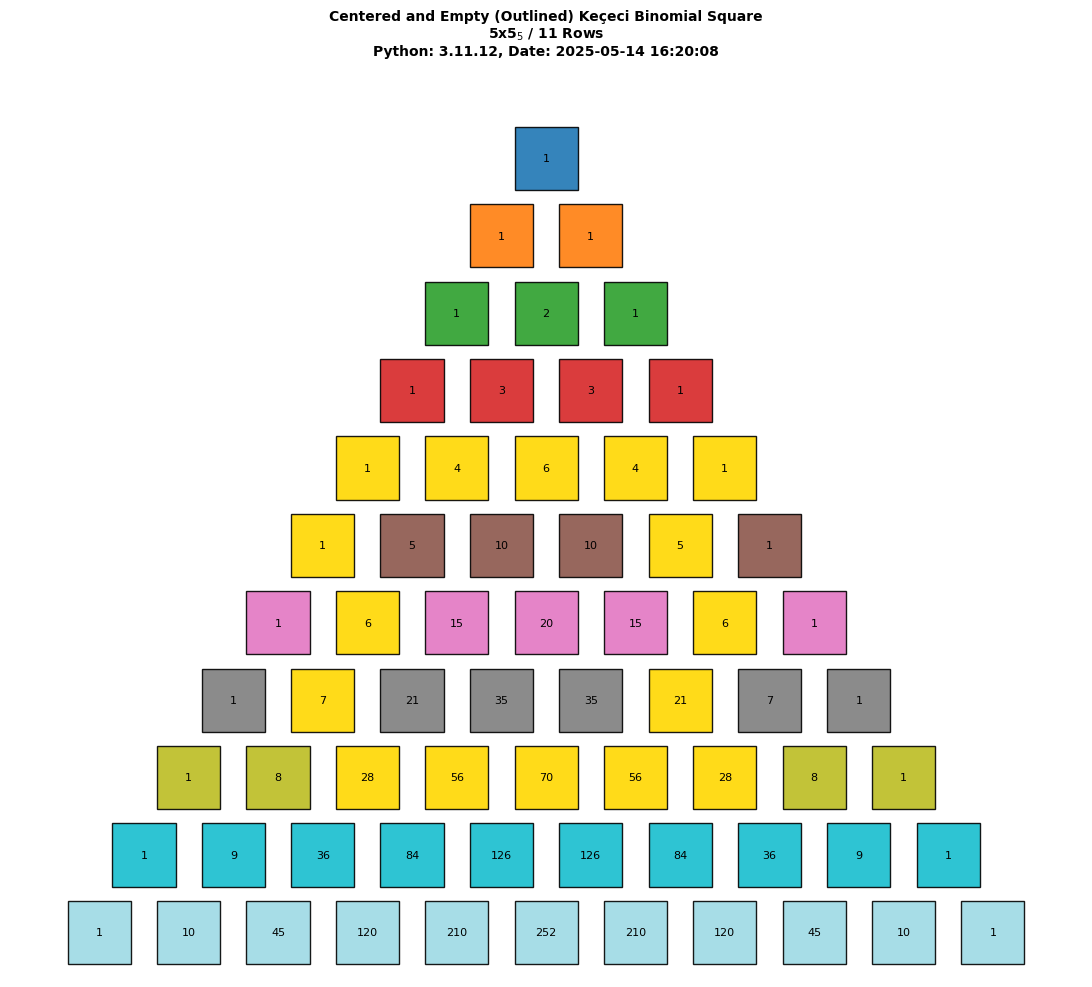
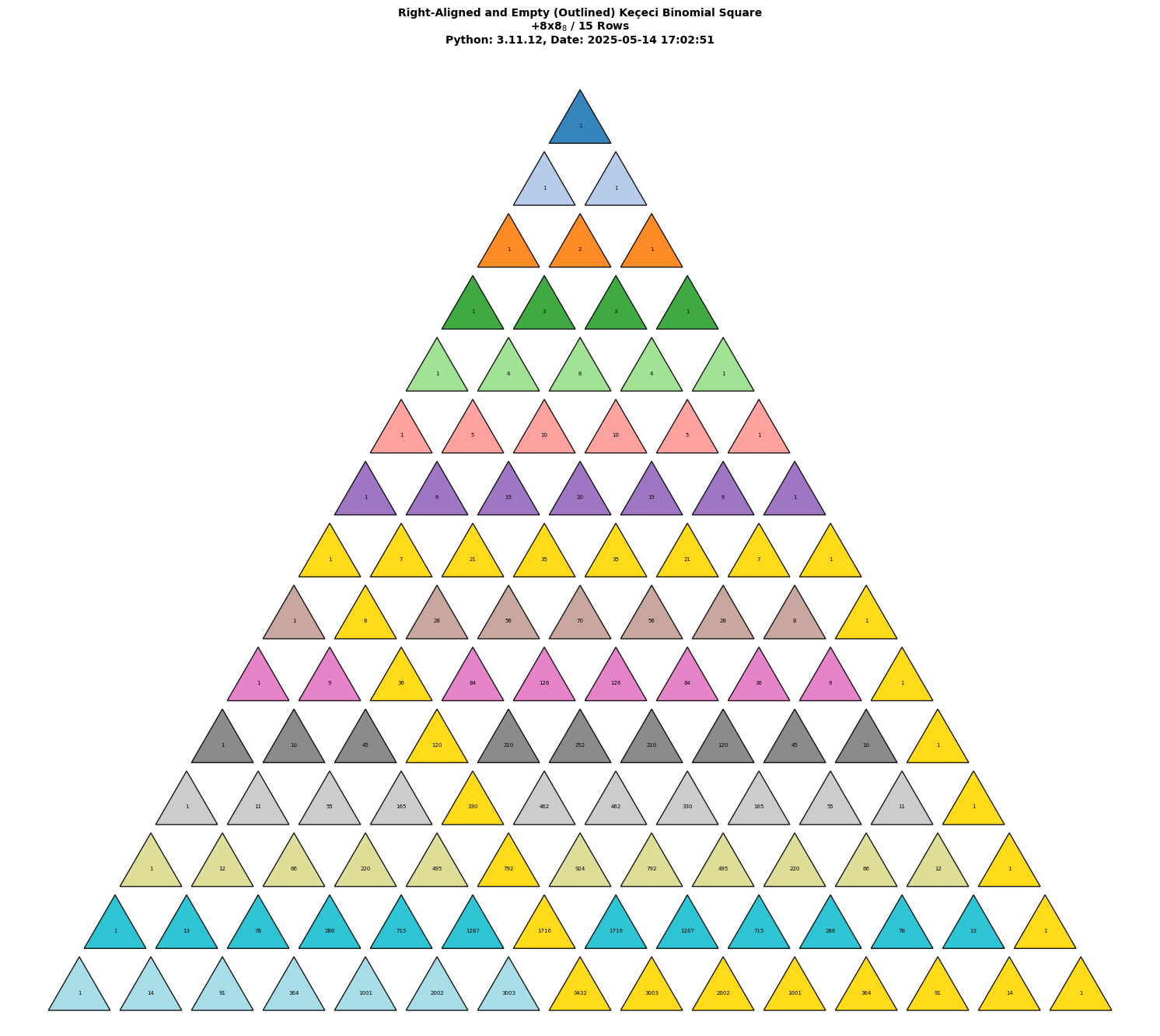
Keçeci Binomial Squares (Keçeci Binom Kareleri): The Keçeci Binomial Square is a series of binomial coefficients forming a square region within Khayyam (مثلث خیام), Pascal, Binomial Triangle, selected from a specified starting row with defined size and alignment.

Project description
Keçeci Binomial Squares (Keçeci Binom Kareleri)












Description / Açıklama
Keçeci Binomial Squares (Keçeci Binom Kareleri):
Keçeci Binomial Squares (Keçeci Binom Kareleri): The Keçeci Binomial Square is a series of binomial coefficients forming a square region within Khayyam (مثلث خیام), Pascal, Binomial Triangle, selected from a specified starting row with defined size and alignment.
Keçeci Binom Karesi, Hayyam (مثلث خیام), Pascal, Binomial üçgeni içinde belirli bir başlangıç satırından itibaren, seçili boyut ve hizalamada bir kare oluşturan binom katsayıları serisidir.
Installation / Kurulum
conda install bilgi::kececisquares -y

pip install kececisquares
https://anaconda.org/bilgi/kececisquares
https://pypi.org/project/kececisquares/
https://github.com/WhiteSymmetry/kececisquares
https://zenodo.org/records/15411671
Usage / Kullanım
Example
import matplotlib.pyplot as plt
import kececisquares as ks
import math # For math.ceil


# Cell 2: Function to get user input (optional, you can hardcode for simplicity)
def get_user_parameters():
    """Gets parameters from the user."""
    print("--- Configure Binomial Triangle Visualization ---")
    try:
        num_rows = int(input("Enter number of rows for Pascal's/Binomial Triangle (e.g., 7, min: 1): "))
        if num_rows < 1:
            print("Error: Number of rows must be at least 1.")
            return None

        practical_max_square_size = math.ceil(num_rows / 2) if num_rows > 1 else 1
        square_size_prompt = (f"Enter square size (1-{num_rows}, e.g., 3, "
                              f"practical max for centered: {practical_max_square_size}): ")
        square_size = int(input(square_size_prompt))
        if not (1 <= square_size <= num_rows):
            print(f"Error: Square size must be between 1 and {num_rows}.")
            return None

        min_start_row_0idx = max(0, square_size - 1)
        max_start_row_0idx = num_rows - square_size
        if min_start_row_0idx > max_start_row_0idx:
            print(f"A {square_size}x{square_size} square cannot be formed in a triangle of {num_rows} rows.")
            return None

        start_row_prompt = (f"Enter starting row for the square "
                            f"(1-indexed, between {min_start_row_0idx + 1} and {max_start_row_0idx + 1}, "
                            f"e.g., {min_start_row_0idx + 1}): ")
        start_row_user = int(input(start_row_prompt))
        start_row_0idx = start_row_user - 1
        if not (min_start_row_0idx <= start_row_0idx <= max_start_row_0idx):
            print(f"Error: Starting row (1-indexed) must be between {min_start_row_0idx + 1} and {max_start_row_0idx + 1}.")
            return None

        shape_prompt = "Shape type (1: hexagon, 2: square, 3: circle, 4: triangle; default: 1-hexagon): "
        shape_choice = input(shape_prompt).strip()
        shape_map = {"1": "hexagon", "2": "square", "3": "circle", "4": "triangle"}
        shape_type = "hexagon"
        if shape_choice == "": print("Defaulting to 'hexagon' (1).")
        elif shape_choice in shape_map: shape_type = shape_map[shape_choice]
        else: print(f"Invalid shape type. Defaulting to 'hexagon' (1).")

        align_prompt = "Square alignment (1: Left, 2: Right, 3: Centered; default: 1-Left): "
        align_choice = input(align_prompt).strip()
        align_map = {"1": "left", "2": "right", "3": "center"}
        alignment = "left"
        if align_choice == "": print("Defaulting to 'Left-Aligned' (1).")
        elif align_choice in align_map: alignment = align_map[align_choice]
        else: print(f"Invalid alignment. Defaulting to 'Left-Aligned' (1).")

        fill_prompt = "Fill the square? (1: Yes, 2: No; default: 1-Yes): "
        fill_choice = input(fill_prompt).strip()
        is_filled = True
        if fill_choice == "1": pass
        elif fill_choice == "2": is_filled = False
        elif fill_choice == "": print("Defaulting to 'Yes' (1).")
        else: print(f"Invalid fill choice. Defaulting to 'Yes' (1).")

        show_val_prompt = "Show numbers inside shapes? (1: Yes, 2: No; default: 1-Yes): "
        show_val_choice = input(show_val_prompt).strip()
        show_numbers = True # Varsayılan
        if show_val_choice == "1": pass
        elif show_val_choice == "2": show_numbers = False
        elif show_val_choice == "": print("Defaulting to show numbers (1).")
        else: print(f"Invalid choice for showing numbers. Defaulting to show numbers (1).")

        return {
            "num_rows": num_rows,
            "square_size": square_size,
            "start_row_0idx": start_row_0idx,
            "shape_type": shape_type,
            "alignment": alignment,
            "is_filled": is_filled,
            "show_numbers": show_numbers, # Yeni parametreyi sözlüğe ekle
        }
    except ValueError:
        print("Error: Invalid numerical input.")
        return None
    except Exception as e:
        print(f"An unexpected error occurred during input: {e}")
        return None

# Cell 3: Get parameters and run the visualization
params = get_user_parameters()

if params:
    print("\n--- Generating Plot ---")
    # Call the drawing function from the module
    # Pass show_plot=False if you want to manage plt.show() or save the figure later
    # We let the module handle plt.show() by default for simplicity here.
    fig, ax = ks.draw_kececi_binomial_square(
        num_rows_to_draw=params["num_rows"],
        square_region_size=params["square_size"],
        start_row_index_for_square_0based=params["start_row_0idx"],
        shape_to_draw=params["shape_type"],
        square_alignment=params["alignment"],
        is_square_filled=params["is_filled"],
        show_plot=True, # Let the function call plt.show()
        show_values=params.get("show_numbers", True) # Yeni parametre, varsayılan True
    )

    if fig:
        print("Plot generated successfully.")
        # You can do more with fig and ax here if needed, e.g., fig.savefig("triangle.png")
    else:
        print("Plot generation failed.")
else:
    print("Could not proceed due to invalid parameters.")

License / Lisans
This project is licensed under the MIT License. See the LICENSE file for details.
Citation
If this library was useful to you in your research, please cite us. Following the GitHub citation standards, here is the recommended citation.
BibTeX
@misc{kececi_2025_15411671,
  author       = {Keçeci, Mehmet},
  title        = {kececisquares},
  month        = may,
  year         = 2025,
  publisher    = {GitHub, PyPI, Anaconda, Zenodo},
  version      = {0.1.0},
  doi          = {10.5281/zenodo.15411671},
  url          = {https://doi.org/10.5281/zenodo.15411671},
}

@misc{kececi_2025_,
  author       = {Keçeci, Mehmet},
  title        = {
                  },
  month        = may,
  year         = 2025,
  publisher    = {Zenodo},
  doi          = {10.5281/zenodo.},
  url          = {https://doi.org/10.5281/zenodo.},
}
APA
Keçeci, M. (2025). kececisquares (0.1.0). GitHub, PyPI, Anaconda, Zenodo. https://doi.org/10.5281/zenodo.15411671
Chicago
Keçeci, Mehmet. "kececisquares". GitHub, PyPI, Anaconda, GitHub, Zenodo, 01 May 2025. https://doi.org/10.5281/zenodo.15411671
Release history Release notifications | RSS feed


Download files
Download the file for your platform. If you're not sure which to choose, learn more about installing packages.
Source Distribution
Built Distribution
Filter files by name, interpreter, ABI, and platform.
If you're not sure about the file name format, learn more about wheel file names.
Copy a direct link to the current filters
File details
Details for the file kececisquares-0.1.0.tar.gz.
File metadata
- Download URL: kececisquares-0.1.0.tar.gz
- Upload date:
- Size: 13.5 kB
- Tags: Source
- Uploaded using Trusted Publishing? No
- Uploaded via: twine/6.1.0 CPython/3.11.12
File hashes
| Algorithm | Hash digest | |
|---|---|---|
| SHA256 |
b5f9001b2627ccda297576a6dc8bf35b5a567107573d7473f742c8367a7d9e33
|
|
| MD5 |
ee5e2be17ea7a0a07749ceb510ddb3f6
|
|
| BLAKE2b-256 |
9ceac202cd3e00d072463d7bb82c5d4271ae8ff53585e373a917139f6d78210d
|
File details
Details for the file kececisquares-0.1.0-py3-none-any.whl.
File metadata
- Download URL: kececisquares-0.1.0-py3-none-any.whl
- Upload date:
- Size: 10.5 kB
- Tags: Python 3
- Uploaded using Trusted Publishing? No
- Uploaded via: twine/6.1.0 CPython/3.11.12
File hashes
| Algorithm | Hash digest | |
|---|---|---|
| SHA256 |
4b24052525de2482ce4eab4fe6f68ba3d9e63644cfcd4675b09090e29097f691
|
|
| MD5 |
9106313e09274b52d96bffad8af30c1e
|
|
| BLAKE2b-256 |
bd4e72b9c503f4e7704a67c19f22e5fec11d7d4e5bed76c79e55fb60e50815b3
|






