
Kedi Notebook
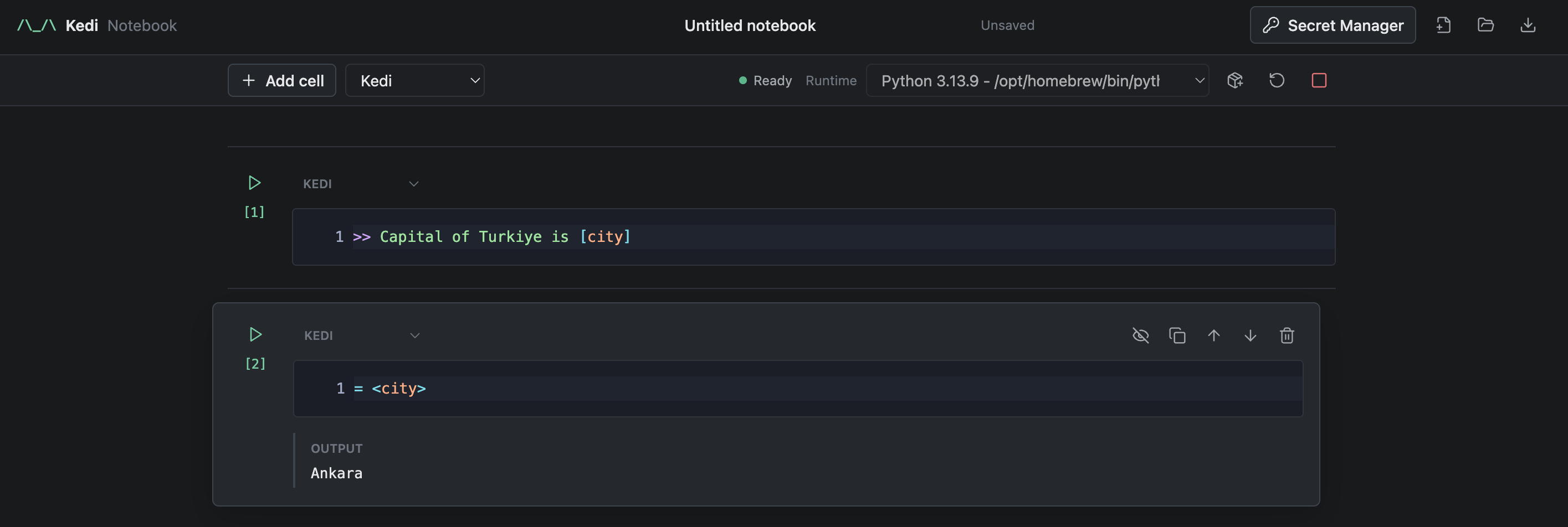
Kedi Notebook is the local, incremental notebook interface for the Kedi Programming Language. It provides editable Kedi, terminal, and Markdown cells, with either browser-owned Pyodide or a selected host Python interpreter.
Install and Run
Install Kedi with the notebook extra and start the notebook:
pip install "kedi[notebook]"
kedi notebook
From a Kedi source checkout, the same command runs the checked-out notebook
submodule and Kedi source:
uv run --extra notebook kedi notebook
For notebook development, run from the Kedi repository root with the notebook extra and development dependencies installed:
.venv/bin/python -m pytest notebook/tests
After syncing the extra, both entry points are equivalent:
kedi notebook
kedi-notebook
The default address is http://127.0.0.1:8788/notebook/. Add one or more host Python installations explicitly when needed:
kedi-notebook --python /opt/homebrew/bin/python3.11
kedi notebook --python ~/.pyenv/versions/3.12.4/bin/python --port 8899
Use --host, --port, --cwd, and --no-open to control local serving.
Loopback serving requires no credentials. A non-loopback --host is rejected
unless --token or KEDI_NOTEBOOK_TOKEN is set; the browser opened by the CLI
receives that token without leaving it in the visible URL.
At startup, the notebook server loads .env from --cwd without overriding
variables already present in its process. Set KEDI_ADAPTER_MODEL there or use
> model: in a Kedi cell before invoking a template. Calling load_dotenv()
inside a host Python cell affects only that cell worker, not the server process
that owns adapters; browser Python cannot read the host project's .env.
When a native Pydantic AI model requires a missing provider SDK, the notebook
installs only the provider group named by Pydantic AI, immediately before model
construction. OpenRouter, for example, requests the openai group. Unused
provider SDKs are not installed. Installation targets the notebook server's
Python environment, keeps its existing package versions, and requires package
index access on first use. It does not replay earlier statements in the cell.
Provider credentials are still required. A dependency conflict or failed
installation is shown as a cell error; specialized adapters retain their own
installation requirements.
The Secret Manager action in the top bar stores environment values outside
the notebook at ~/.kedi/notebook/secrets.json. Stored values take precedence
over the server process and project .env, and the browser can list only their
names, never their values. Add a single value or import an arbitrary .env
path; relative paths resolve from --cwd. The store is atomically written with
user-only file permissions and is never included in browser storage. Saving,
importing, or deleting a value closes active sessions so the next cell starts a
runtime with the new environment.
Runtime Model
Browser mode starts one persistent Pyodide worker as the page loads. Host mode
creates and reuses a project-specific virtual environment from the selected
Python executable, installs Kedi into it, and starts one persistent worker from
that environment. Kedi cells
execute incrementally against that session; completed cells remain editable
and rerunnable, and output is displayed under its source.
The bundled filesystem module works in both modes: browser mode accesses the
worker's temporary virtual filesystem, while host mode accesses the notebook
working directory on disk.
Every visible cell keeps its editor when focus moves elsewhere; inactive Kedi
cells retain syntax highlighting and can be edited or run directly. The cell
header can convert an individual cell between Kedi, Markdown, and Terminal.
Cells never collapse implicitly. Use the eye control to hide a cell explicitly;
the compact row remains available to show it again, and hidden state is saved
in .kedinb documents and local drafts.
Managed environments live under ~/.kedi/notebook/venvs by default and have a
stable kedi-notebook-py... name derived from the base interpreter and working
directory. Set KEDI_NOTEBOOK_ENV_HOME to choose another root. The package
action beside a host runtime lists installed packages and installs newline-
separated requirement strings into the managed environment with streamed pip
output. The environment and installed packages persist across notebook server
runs while the directory remains available.
Cells beginning with ! are terminal cells. Host commands run in the notebook
working directory, with !python and !pip bound to the managed environment.
Browser mode supports !pip install, !uv add, !pip list, !echo, and
!pwd. Terminal output streams into the active cell while it runs.
Use the square interrupt action while a cell is running. Interrupting replaces the active Python worker, so the source remains rerunnable but live runtime state is deliberately discarded. It also cancels that session's in-flight Pydantic AI or LangChain model and async tool work, without cancelling another session. Cancellation does not roll back completed effects or forcibly stop arbitrary synchronous tool code running in a server thread.
Embedded-Python bridge operations and terminal execution have 120-second timeouts; this is not a universal deadline for a complete model-backed cell. Package installation has a 10-minute limit. Idle sessions expire after 30 minutes.
Notebook execution is non-transactional. Rerunning a cell is a new execution attempt against current state; it does not roll back previous side effects. Displayed cell numbers follow notebook order and remain unchanged across reruns. Adding, moving, or deleting cells recomputes affected positions.
Notebook files are validated before they replace the current document. The UI warns before discarding unsaved changes and limits files to 5 MB, notebooks to 1,000 cells, individual cell source to 1 MB, and retained inline output to 200,000 characters. Output beyond that boundary is marked as truncated.
Downloading asks which form to save. Just notebook writes cell sources,
types, visibility, and layout without outputs or environment values. Save
progress also writes retained cell outputs/results and the strict,
pickle-free InteractiveSession snapshot containing the current KediEnv. It
never includes Secret Manager or process environment values. Opening a progress
file restores the Kedi session on the next execution. If any live value cannot
be represented without changing its semantics, progress download is rejected
instead of producing a partial snapshot.
Editing
Kedi cells provide Tree-sitter highlighting, Kedi and embedded-Python completion, hover, references, rename, live diagnostics, signature help, definition navigation, and runtime error markers. Rename is limited to the active cell when its LSP context includes earlier executed cells, avoiding a silent partial edit. Monaco falls back to a plain multiline editor if its external assets cannot be loaded. Markdown cells safely render headings, paragraphs, lists, fenced code, blockquotes, emphasis, links, and separators; raw HTML is not executed.
Use Shift+Enter to run the active cell, Ctrl/Cmd+S to download the notebook,
Ctrl/Cmd+Enter to insert after the active cell, Ctrl/Cmd+Shift+Enter to
append, Ctrl/Cmd+Backspace to delete, and Ctrl/Cmd+ArrowUp/ArrowDown to
move a cell. Toolbar actions expose the same operations.
Monaco is currently pinned on jsDelivr. Pyodide, its standard library, Micropip, and Pydantic are vendored in the notebook wheel, so browser Python can start without downloading its core runtime from a CDN. Packages installed later with Micropip may still need network access. Host execution remains usable through the fallback editor if Monaco is unavailable.
1 maintainer

Metadata
1 maintainer
Release files for kedi-notebook 0.1.3
For a detailed explanation of source distributions (sdists) and built distributions (wheels), please see the package formats documentation.
Source distribution (sdist)
| File | Size | Uploaded | Provenance | Actions |
|---|---|---|---|---|
| kedi_notebook-0.1.3.tar.gz | 8.8 MB | Without provenance | Details for kedi_notebook-0.1.3.tar.gz |
Built distribution (wheel)
| File | Interpreter | ABI | Platform | Actions Reset |
|---|---|---|---|---|
| kedi_notebook-0.1.3-py3-none-any.whl | Python 3 | none | any | Details for kedi_notebook-0.1.3-py3-none-any.whl |
Total release size: 17.6 MB
Release files / kedi_notebook-0.1.3.tar.gz
| Download URL | kedi_notebook-0.1.3.tar.gz |
|---|---|
| Size | 8.8 MB |
| Tags | Source |
|
SHA-256 checksum How to use checksums |
b9c1aef81044edf6beb2b71fbe312a2716fb83e6d86527673d3e02422ea3874f
|
|
BLAKE2b-256 checksum How to use checksums |
e1c649517a14e1612a764c7f62492612c61cae8cdde0d0fd5b63370768e6bc5a
|
| Upload date | |
|
Uploaded using Trusted Publishing? What is trusted publishing? |
No |
| Uploaded via |
twine/7.0.0 CPython/3.14.6
|
Release files / kedi_notebook-0.1.3-py3-none-any.whl
| Download URL | kedi_notebook-0.1.3-py3-none-any.whl |
|---|---|
| Size | 8.8 MB |
| Tags | Python 3 |
|
SHA-256 checksum How to use checksums |
5daf00006463a8b1d2b2b7a2a2380dd0883c4c68b58d60acb4fbd70e68284a0e
|
|
BLAKE2b-256 checksum How to use checksums |
0758d8ae6049438a7776af8a74b91fd09b8cd2497d18698e4daeff635f18f2fc
|
| Upload date | |
|
Uploaded using Trusted Publishing? What is trusted publishing? |
No |
| Uploaded via |
twine/7.0.0 CPython/3.14.6
|
Security for kedi-notebook 0.1.3
Provenance
Provenance describes where a file came from. On PyPI, provenance is shared via attestations, which provide a verifiable record of the build or publishing details. View details, limitations and caveats.
No provenance found
None of the files in this release were uploaded with provenance metadata.
A note on package security
PyPI is a repository for distributing packages, not a service for auditing them. While third-party security researchers and our staff do their best to detect and remove malicious packages, PyPI cannot guarantee the quality, security or suitability of any given package.
To learn more about protecting yourself from malicious actors, visit our package security documentation.














