
keelchat
Customer-facing chatbots that follow your rules.
Describe a bot in plain English or write it in YAML.
The runtime, not the model, enforces its steps, limits and handover to a person.


Run it locally · Deploy to Render · Docs · Website
Why keelchat
A bot that books appointments or takes support requests has a job to finish. Prompt-only bots drift: they skip questions, loop, or promise a person and never hand over. keelchat keeps the model for reading and phrasing, and puts every decision in code you can review.
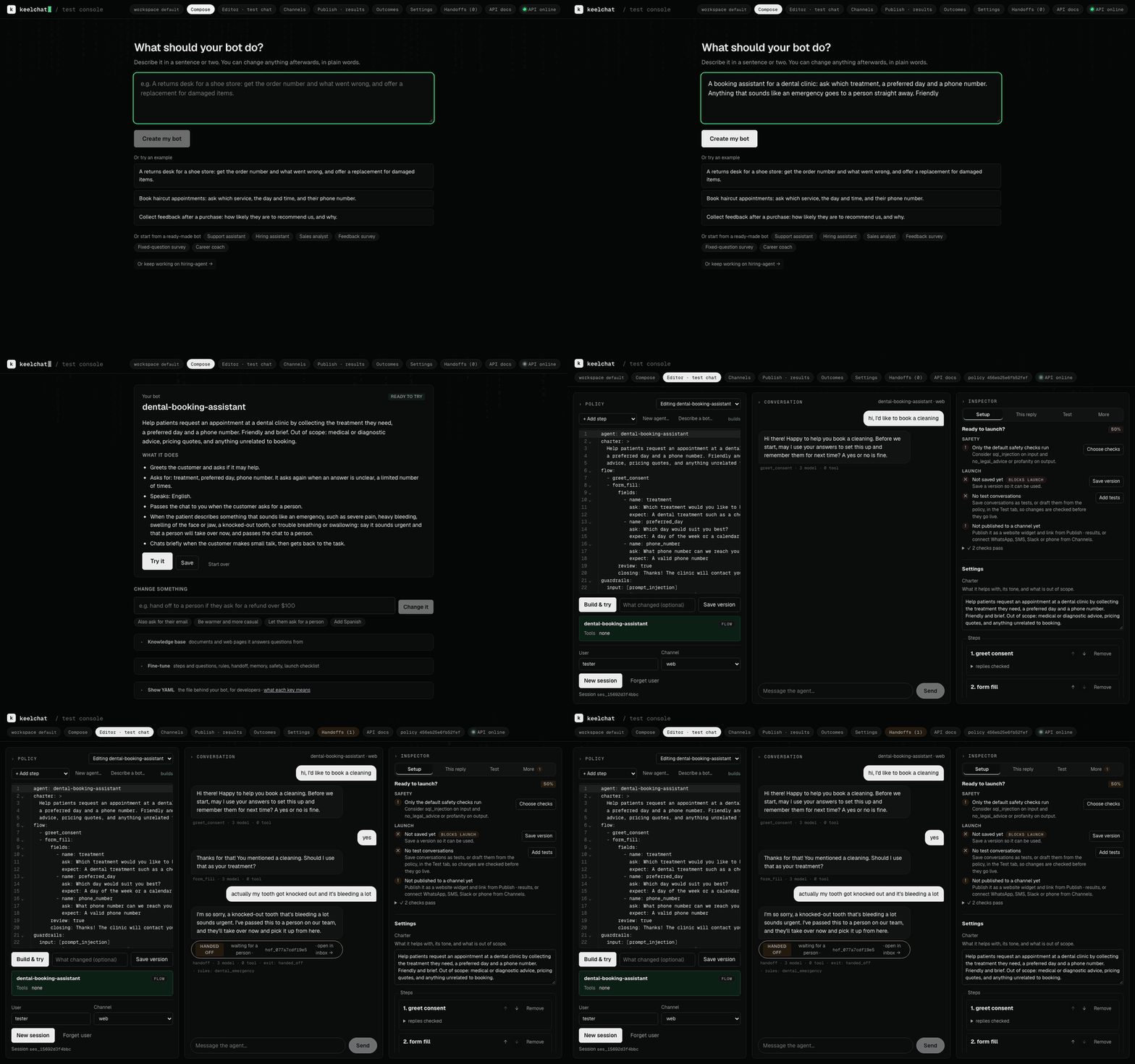
A patient mid-booking writes "I just knocked a tooth out playing football". Replies from the dental example bot, before and after #31; the model picks the words, code makes the handover:
| Where the rule lives | What happens |
|---|---|
| Rule in the prompt | "No problem. Which dental treatment are you looking for? I need to connect you with a staff member right away." Nobody gets the chat. |
Rule in code (handoff: true) |
"That sounds urgent, and I'm sorry you've been through that. I've passed this to a person on our team." A person gets the chat. |
|
Plain English in, a file out |
Code decides, the model phrases |
Safe by default |
|
Any model, any channel |
Tested from the policy |
Yours to run and extend |
A good fit for support triage, bookings, intake forms and surveys, with many bots on one self-hosted runtime. Not a fit for a free-form assistant, multi-agent research, or anything that needs stable APIs today (comparison).
Get started
| Try it in your browser | Run it locally | Deploy to Render |
|---|---|---|
| 1 minute, nothing to install. Open the demo → |
5 minutes. macOS, Linux or WSL 2, and a model key. Steps ↓ |
10 minutes. GitHub and Render accounts, and a model key. Steps ↓ |
Try it in your browser
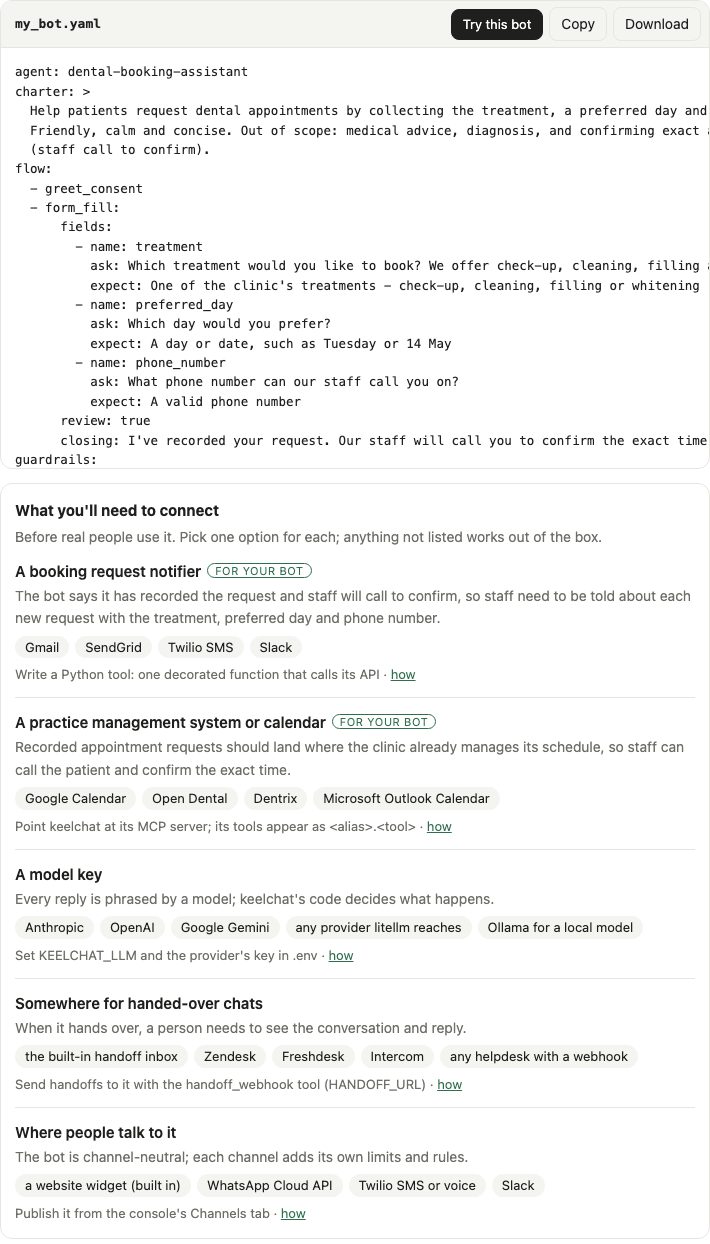
In the demo, with no sign-in, describe a bot and get its YAML. Press Try this bot
to chat with it (its tools answer with sample data), and see what it needs connecting before real people use it. A
link can start a draft:
?describe=Book haircuts and ask for a phone number.
Run it locally
git clone https://github.com/pnrajan/keelchat && cd keelchat
./setup.sh        # checks for git, uv, Node 20+; offers to install what's missing; asks for your model key
scripts/try.sh    # opens the console with a sample bot, everything in memory
In the console, open Compose, describe a bot, press Create my bot, then Try it. The Inspector shows why each reply was chosen.
- Whole stack in Docker (API, console, Redis, Postgres; data kept between restarts):
scripts/local.sh up - From Claude Code: the keelchat plugin builds and tries bots when you ask in plain words.
Deploy to Render
Run keelchat in your own Render account, on the free plan.
-
Fork this repository, so the deploy follows your copy.
-
Open
https://render.com/deploy?repo=https://github.com/<you>/keelchat. The button below deploys this repository as is, without your changes. -
Sign in to Render, review the service it will create, enter your
ANTHROPIC_API_KEYwhen asked, and approve. The first build takes a few minutes. -
On the service's Environment page, copy
KEELCHAT_API_KEY. Render generated it; it locks the console and API. -
Open
https://<service>.onrender.com. The console asks for the key once.

Good to know: other model providers, updates, sleeping
- Another model provider: on the Environment page, set
KEELCHAT_LLM=litellm,KEELCHAT_MODEL_GENERATE,KEELCHAT_MODEL_CLASSIFYand the provider's key (e.g.OPENROUTER_API_KEY), as in.env.example. - Updates are not automatic. To redeploy each time CI passes on your fork, set Auto-Deploy to "After CI checks pass" in the service's Settings, or press Manual Deploy.
- The free plan sleeps when idle, so the first request after that is slow. A paid plan stays awake.
- Settings are in
render.yaml. For Fly.io and other hosts, see Deploy from GitHub.
Your first bot
Save this as my_bot.yaml:
agent: support-assistant
charter: >
  Help customers with orders and returns. Friendly, concise.
  Out of scope: legal or medical advice.
languages: [en, es]
tools: [knowledge_search]
flow:
  - greet_consent
  - form_fill:
      fields:
        - {name: order_number, ask: "What is your order number?", expect: "An order number in any format, such as ORD-12345 or #98765"}
        - {name: issue, ask: "What went wrong?", expect: "A short description", optional: true}
guardrails: {input: [prompt_injection], output: [pii, no_legal_advice]}
limits: {reasks: 3, digressions: 3}
handoff: {when: [user_request, max_reasks]}
It asks for consent, collects an order number, answers side questions from your documents, blocks prompt injection, removes personal details from replies, and hands over to a person when asked or stuck.
uv run keelchat build my_bot.yaml # validate and compile; errors name the YAML path
Paste it into the console's editor and press Build & try, or send it to the API with POST /v1/agents
(walkthrough). The policy language
lists every key; examples has bots for bookings, surveys, hiring and data questions.
How it works
Every message goes through three stages. The model reads and phrases; the decisions in between are code.
flowchart LR
  U[User message] --> A["Understand<br>language, intent, input guardrails"]
  A --> B["Decide<br>the policy's current step, rules,<br>counters, tool gateway"]
  B --> C["Respond<br>phrase the reply, check it,<br>output guardrails, channel limits"]
  C --> R[Reply]
Each conversation is pinned to the compiled policy it started on, so a change never alters a chat in progress. Architecture has the detail.
Add a tool
from keelchat import tool


@tool("slot_search", timeout_s=3.0, retries=1)
async def slot_search(service: str, day: str = "") -> dict[str, list[str]]:
    """Open appointment slots for a service, optionally on one day."""
    return {"slots": await my_booking_api.free_slots(service, day)}
Type hints become the schema; the docstring is what the model reads. Allow it with tools: [slot_search].
uv run keelchat new package my_caps writes a starter package with a tool, a step, a guardrail and a passing test.
Test it
uv run keelchat evals generate my_bot.yaml           # a test set from the policy, in evals/<agent>/
uv run keelchat evals check evals/support_assistant  # the checks every conversation must pass
In the console, Test → Judge has a stronger model review a chat and propose fixes to the policy or the code.
Where a stronger model helps
keelchat runs well on a small, cheap model for everyday turns. A stronger model pays off in a few places, each one setting:
| Job | Why a stronger model helps | Setting |
|---|---|---|
| Writing a bot from English | Cleaner YAML on the first try, fewer build repairs | KEELCHAT_MODEL_GENERATE |
| Reviewing trial chats | Spots what went wrong on which turn and proposes fixes | KEELCHAT_MODEL_CRITIC |
| Hard or risky steps | high_stakes: true steps use the large model and are always checked |
the policy |
| Checking plans before replying | think: true steps plan first; a separate model can check the plan |
KEELCHAT_MODEL_VERIFY |
| Judging test results | Scores scope and rule-following in evals | EVALS_JUDGE_MODEL |
Classification and routine replies stay on KEELCHAT_MODEL_CLASSIFY. Model routing and cost has
the detail.
How keelchat compares
| keelchat | Parlant | Rasa | LangGraph | Botpress | |
|---|---|---|---|---|---|
| You write | One YAML file per bot, or plain English | Python guidelines and journeys | YAML flows and Python actions | Python graph code | Visual flows |
| Who decides the next step | Code, from the policy | The model, steered by matched guidelines | Code flows | Your code | Flows plus model nodes |
| Limits, guardrails, handoff | Built in, counted in code | Built in | Built in | You build them | Platform features |
| Open source | Apache-2.0 | Apache-2.0 | Pro is commercial; open source is in maintenance | MIT | Hosted; SDK is MIT |
| Maturity | Alpha | Active | Mature | Mature | Mature |
How keelchat compares has the detail and sources.
Docs
| To… | Read |
|---|---|
| write and tune a bot | Writing an agent |
| look up a policy key | The policy language |
| use the console, channels, memory, handoff, documents, Claude Code | Features |
| add a tool, step, guardrail or channel | Adding a capability |
| test and measure quality | Evals |
| look up the CLI, API, settings, deployment | Reference |
| understand the runtime | Architecture |
Help and contributing
- Questions, and bots to show: Discussions
- Bugs: issues; vulnerabilities: SECURITY.md
- Contributing: start with a good first issue, and see CONTRIBUTING.md and the code of conduct.
Status
Alpha (0.x): the policy language and APIs may still change between minor versions; CHANGELOG.md lists every change.
License
If keelchat is useful to you, a ⭐ helps others find it.
1 maintainer

Metadata
1 maintainer
Release files for keelchat 0.2.0
For a detailed explanation of source distributions (sdists) and built distributions (wheels), please see the package formats documentation.
Source distribution (sdist)
| File | Size | Uploaded | Provenance | Actions |
|---|---|---|---|---|
| keelchat-0.2.0.tar.gz | 982.3 kB | Without provenance | Details for keelchat-0.2.0.tar.gz |
Built distribution (wheel)
| File | Interpreter | ABI | Platform | Actions Reset |
|---|---|---|---|---|
| keelchat-0.2.0-py3-none-any.whl | Python 3 | none | any | Details for keelchat-0.2.0-py3-none-any.whl |
Total release size: 1.4 MB
Release files / keelchat-0.2.0.tar.gz
| Download URL | keelchat-0.2.0.tar.gz |
|---|---|
| Size | 982.3 kB |
| Tags | Source |
|
SHA-256 checksum How to use checksums |
754b182bc5fb8ee6f71e151f0cca8b0161efd7785d7da96049d5b96128749d0d
|
|
BLAKE2b-256 checksum How to use checksums |
90eca5952e9b999fa4be656a861ee3348d17b18ab2e54e8099d25ac6d2305016
|
| Upload date | |
|
Uploaded using Trusted Publishing? What is trusted publishing? |
No |
| Uploaded via |
twine/7.0.0 CPython/3.12.11
|
Release files / keelchat-0.2.0-py3-none-any.whl
| Download URL | keelchat-0.2.0-py3-none-any.whl |
|---|---|
| Size | 386.2 kB |
| Tags | Python 3 |
|
SHA-256 checksum How to use checksums |
3cd36b388e56d5c7492eda61071357a01dd6de23e4248b264bc89802f27407b2
|
|
BLAKE2b-256 checksum How to use checksums |
82c4744af1e5197bf815590464f6381e8becc866f74de2d5cdf68c5e936c48ac
|
| Upload date | |
|
Uploaded using Trusted Publishing? What is trusted publishing? |
No |
| Uploaded via |
twine/7.0.0 CPython/3.12.11
|
Security for keelchat 0.2.0
Provenance
Provenance describes where a file came from. On PyPI, provenance is shared via attestations, which provide a verifiable record of the build or publishing details. View details, limitations and caveats.
No provenance found
None of the files in this release were uploaded with provenance metadata.
A note on package security
PyPI is a repository for distributing packages, not a service for auditing them. While third-party security researchers and our staff do their best to detect and remove malicious packages, PyPI cannot guarantee the quality, security or suitability of any given package.
To learn more about protecting yourself from malicious actors, visit our package security documentation.













