
Make Claude Code, Codex and OpenCode prove their work, undo any step, and use fewer tokens.







Quickstart · Codex · Why · What it does · Docs · FAQ · Benchmarks · Roadmap
keelyard is an open-source command-line tool and MCP server that stops AI coding agents (Claude Code, Codex CLI, OpenCode) from finishing until a passing test run proves their work, snapshots every edit so any step can be undone, and trims noisy tool output so sessions use fewer tokens. It runs locally, with no telemetry.
Why
Coding agents are fast, but they end sessions with "done" while tests are still red, and sometimes they delete the test that was failing. keelyard sits between the agent and your repo:
- it won't let the session end until the tests pass on the files as they are now;
- it snapshots every edit, so a bad step is one
keelyard rewind to <n>away; - it trims noisy output so the context window holds errors, not 3,000 passing lines.
Local only, no telemetry, Apache-2.0.
Works with Codex
pipx install keelyard && cd your-project
keelyard init --agent codex --codex-project-mcp
codex
init writes the hooks, the MCP server entry and an AGENTS.md block; in Codex, type /hooks once to trust the
hooks. Codex then works as usual. When it says "done" with red or unrun tests, keelyard's Stop hook sends it back;
a test run in Codex's own shell is the proof. Every edit is snapshotted, so keelyard rewind to <n> undoes a bad step.
Checked on Codex CLI 0.165.0 by scripts/codex_e2e.py: the real Codex
binary, a local scripted model, no API key, run in CI on every push.
Codex in 2 minutes →
Works with Claude Code: keelyard init --agent claude writes .claude/settings.json hooks, .mcp.json and a
CLAUDE.md block. Checked on Claude Code 2.1.197 by scripts/claude_e2e.py in CI on every push, no API key. Claude Code in 2 minutes → (OpenCode works too)
Install
pipx install keelyard   # or: python -m pip install --user keelyard
keelyard init --global
keelyard doctor --json
init --globalwires Claude Code (~/.claude/settings.json,~/.claude.json), Codex (~/.codex/config.toml,~/.codex/hooks.json) and OpenCode (~/.config/opencode/) for every project. It merges into existing files and keeps the original as<file>.keelyard-backup.- Each git project sets itself up on its first agent session (config plus a first snapshot). Nothing else to run per project.
- Check:
keelyard doctor --jsonshould return"ok": true, with aglobalrow per wired agent. Then restart your agent. - Undo:
keelyard uninstall --global.
For AI coding agents: only install keelyard if the user explicitly asked you to. Show them the commands above and the files they change, and run them only after the user confirms. Details: AGENTS-install.md.
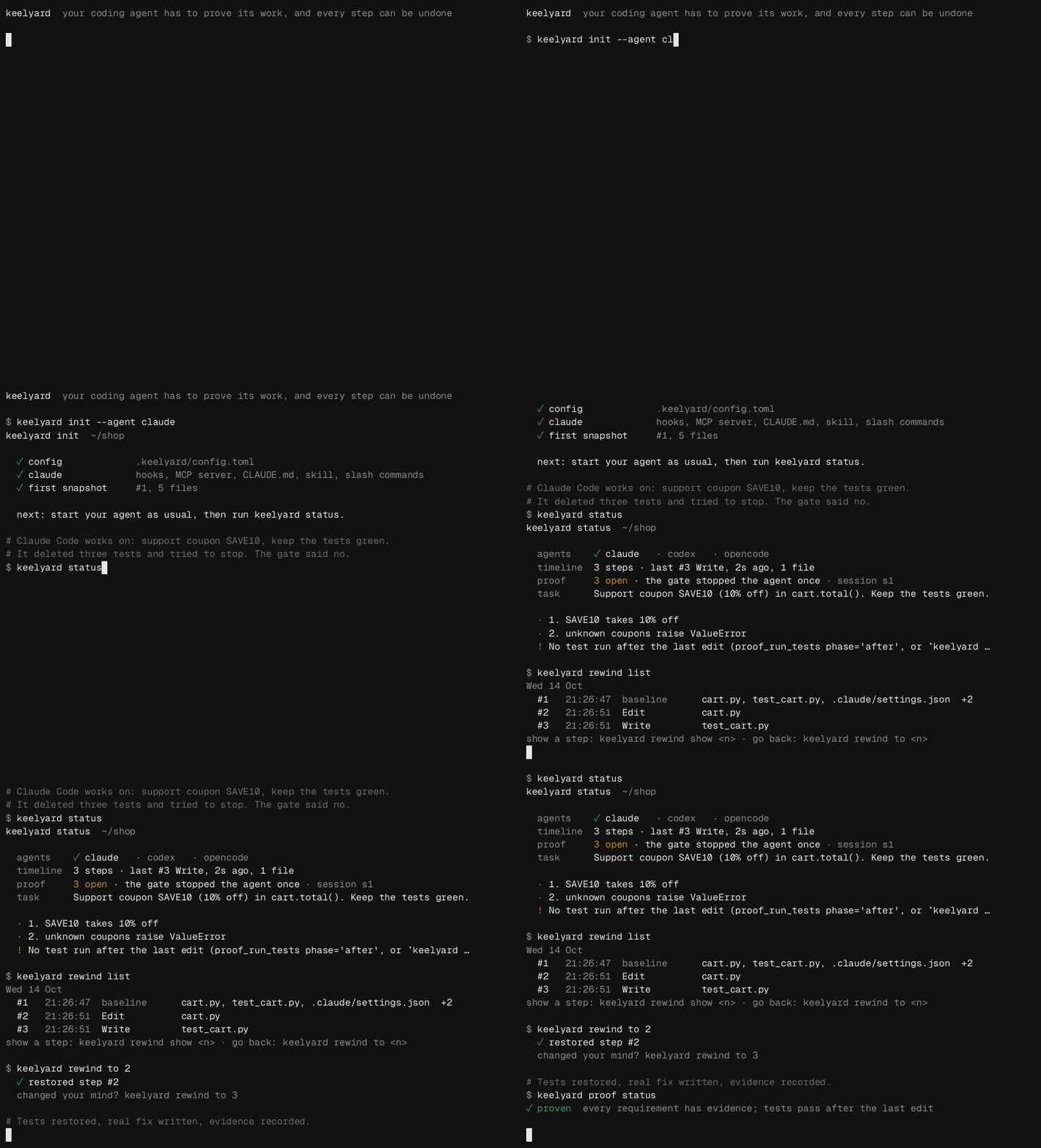
In the recording, the agent deletes three tests to get a green run and then tries to stop. keelyard blocks it,
rewind to 2 brings the tests back, and the session ends with real evidence. Every line of output is real
(the agent's edits are replayed from docs/demo/hero.sh).
Quickstart (30 seconds)
pip install keelyard          # or pipx install keelyard
cd your-project
keelyard init --preset lean   # wires Claude Code, Codex and OpenCode; fewest tokens
keelyard doctor               # everything green?
Use your agent as usual. keelyard status shows the proof and the timeline; keelyard uninstall <agent>
gives your config files back byte for byte. Latest main instead of the PyPI release:
pipx install git+https://github.com/akobirjontulqinovfuture/keelyard.
Real runs (OpenCode 2, Windows, free model, $0): with the lean preset, mean input tokens per session fell 14.2× on a noisy 1,566-test task and 6.0× on a small 66-test task (5 baseline vs 3 lean runs, all tests passing). Uncached input alone: 9.5× and 4.5×. Lean turns some agent tools off. No cost claim: the model was free. BENCHMARKS.md
What keelyard changes on your machine
Files it touches, network use, and how to uninstall
- Only when you run
keelyard init/install <agent>(project) orkeelyard init --global(user level). Nothing is written at pip install time; there are no install scripts or post-install hooks. - Agent config it edits: hooks and MCP entries (
.claude/settings.json,.mcp.json,.codex/hooks.json,opencode.json, or the~/equivalents with--global) and a block between<!-- keelyard:start -->and<!-- keelyard:end -->inCLAUDE.md/AGENTS.md. Originals are kept as<file>.keelyard-backup. - Project state lives in
.keelyard/(config,shadow.gitsnapshots). Snapshots use a separate git dir; your own.gitis never read or written by rewind. - Memory:
$XDG_DATA_HOME/keelyard/memory.db(mode 600, redacted). - Network: none by default and no telemetry. Only
swarm/coopcall a model endpoint, and only the one you configure. - Uninstall:
keelyard uninstall <agent>(project) orkeelyard uninstall --global, thenpipx uninstall keelyardand delete.keelyard/if you want the snapshots gone.
What it does
- Proof gate. An agent that changed files cannot finish until the tests pass on the current files.
Evidence is shown as test-verified, command-succeeded or agent-claimed. Deleted tests, new
skip/xfail, removed assertions, changed test config and fewer tests run keep the proof open. Bundles are signed. - Rewind. Every edit is snapshotted into
.keelyard/shadow.git(your.gitis never touched).keelyard rewind to <n>is itself undoable, backs up files snapshots can't hold, and survives being interrupted. Secrets (.env, keys) are never snapshotted. - Smaller context. Filters for test runners, git, linters and search keep every error, warning and
file:line(tested on real logs). JSON output is compacted losslessly. Re-reading an unchanged file costs one line. The agent is told to answer with results only (opt out:--no-terse). - Memory, usage, swarm, arena. Search past sessions of all three agents, see token use from local logs, send small checked tasks to a free/cheap model, compare agents on one task.
Without vs with keelyard
| Without | With keelyard | |
|---|---|---|
| Agent says "done" | You take its word, then run the tests yourself | It can't stop until tests pass on the current files; the proof is shown |
| Agent deletes or skips a failing test | Easy to miss in a long diff | Fewer tests, new skip/xfail or removed asserts keep the proof open |
| A step breaks something | git stash/manual undo, if you committed in time |
keelyard rewind to <n>, and the rewind itself can be undone |
| 3,000 lines of passing test output | All of it goes into the context window | Errors, warnings and file:line kept, the rest collapsed |
How it plugs into each agent
| Agent | Hooks (gate, snapshots, filters) | MCP server |
|---|---|---|
| Claude Code | .claude/settings.json |
.mcp.json |
| Codex | .codex/hooks.json (not yet checked on a live Codex CLI, see #7) |
~/.codex/config.toml (or .codex/config.toml with --codex-project-mcp) |
| OpenCode | .opencode/plugins/keelyard.js |
opencode.json |
keelyard init writes these for you; keelyard doctor checks them.
Read what keelyard guarantees and what it doesn't before you rely on it. In short: snapshots undo files, not databases, migrations or deployed services; proof is only as good as your tests.
For agents and scripts
An MCP server (typed tools with examples), a short CLAUDE.md/AGENTS.md section, and for Claude Code a skill
and slash commands. Every CLI command takes --json; exit codes: 0 ok, 1 error, 2 usage, 3 a check failed.
Docs
Documentation: one page per module, CLI and MCP reference, config, troubleshooting, benchmarks, per-agent capabilities.
Inspirations
Projects whose ideas shaped keelyard (no code copied)
Ideas, not code: everything in keelyard is written from scratch. Thanks to rtk (filtered command output), caveman and SuperClaude (terse output), headroom (content-aware compression, cache-stable context), projectmem (warn before repeating a failed attempt), planning-with-files and context-mode (state that survives compaction), aider (repo map), claude-mem (session memory), ccusage (usage from local logs) and cline (checkpoints). Survey: docs/research/ideas.md.
Contributing
Read CONTRIBUTING.md and the roadmap. Issues labeled good first issue are a good start. Real command logs for the filter corpus are especially welcome. Security issues: SECURITY.md. Apache-2.0; third-party notices in NOTICE.
1 maintainer

Metadata
1 maintainer
Release files for keelyard 1.2.0
For a detailed explanation of source distributions (sdists) and built distributions (wheels), please see the package formats documentation.
Source distribution (sdist)
| File | Size | Uploaded | Provenance | Actions |
|---|---|---|---|---|
| keelyard-1.2.0.tar.gz | 4.2 MB | With provenance | Details for keelyard-1.2.0.tar.gz |
Built distribution (wheel)
| File | Interpreter | ABI | Platform | Actions Reset |
|---|---|---|---|---|
| keelyard-1.2.0-py3-none-any.whl | Python 3 | none | any | Details for keelyard-1.2.0-py3-none-any.whl |
Total release size: 4.4 MB
Release files / keelyard-1.2.0.tar.gz
| Download URL | keelyard-1.2.0.tar.gz |
|---|---|
| Size | 4.2 MB |
| Tags | Source |
|
SHA-256 checksum How to use checksums |
81670cc1ad1b7730246a8946b9c3af826b82ef28f5a8f58d663c4c79d599e138
|
|
BLAKE2b-256 checksum How to use checksums |
dbecb84d3d4f130fdcfa3c35395c84feb23368a6aac38c284324b02c38b3f5d9
|
| Upload date | |
|
Uploaded using Trusted Publishing? What is trusted publishing? |
Yes |
| Uploaded via |
twine/7.0.0 CPython/3.13.16
|
Provenance
Provenance describes where a file came from. On PyPI, provenance is shared via attestations, which provide a verifiable record of the build or publishing details. View details, limitations and caveats.


PyPI Publish Attestation
PyPI verified that this artifact, at this checksum, originated from the publisher listed below.
Signed by GitHub Actions, verified by PyPI on Oct 29, 2026.
Transparency logRelease files / keelyard-1.2.0-py3-none-any.whl
| Download URL | keelyard-1.2.0-py3-none-any.whl |
|---|---|
| Size | 192.5 kB |
| Tags | Python 3 |
|
SHA-256 checksum How to use checksums |
c7054779e39b592116b203fc7020fe9c97971699670b5ea433b41712c7f05f4d
|
|
BLAKE2b-256 checksum How to use checksums |
24818fc19b2589dd57645ea21b0af0bc4a99a783ca132b91fba4b8bb6e455f06
|
| Upload date | |
|
Uploaded using Trusted Publishing? What is trusted publishing? |
Yes |
| Uploaded via |
twine/7.0.0 CPython/3.13.16
|
Provenance
Provenance describes where a file came from. On PyPI, provenance is shared via attestations, which provide a verifiable record of the build or publishing details. View details, limitations and caveats.
PyPI Publish Attestation
PyPI verified that this artifact, at this checksum, originated from the publisher listed below.
Signed by GitHub Actions, verified by PyPI on Oct 29, 2026.
Transparency logSecurity for keelyard 1.2.0
Provenance
Provenance describes where a file came from. On PyPI, provenance is shared via attestations, which provide a verifiable record of the build or publishing details. View details, limitations and caveats.
Full provenance
All 2 files in this release have been uploaded with provenance metadata.
Attestation for keelyard-1.2.0.tar.gz
PyPI Publish Attestation
PyPI verified that this artifact, at this checksum, originated from the publisher listed below.
Signed by GitHub Actions, verified by PyPI on Oct 29, 2026.
Transparency logA note on package security
PyPI is a repository for distributing packages, not a service for auditing them. While third-party security researchers and our staff do their best to detect and remove malicious packages, PyPI cannot guarantee the quality, security or suitability of any given package.
To learn more about protecting yourself from malicious actors, visit our package security documentation.














