
Turn Codex into your personal 24/7 assistant for staying on top of the latest developments.
Verified details
These details have been verified by PyPIProject links
GitHub Statistics
Maintainers

Project description

keep-up-with
Don’t fall behind. Keep up with everything that’s happening.
Turn Codex into your personal 24/7 assistant for staying on top of the latest developments.
Why This Exists
Everything moves so fast these days that it’s hard to keep up, especially in AI. Keeping up with things can feel like a full-time job. The links keep piling up: X threads, Reddit posts, YouTube talks, papers, repos, changelogs, blog posts. You save the promising ones, then “read later” turns into never. keep-up-with does the work you don’t have time for: it opens the links, checks the source material, follows the context, and turns the useful parts into something you can understand quickly, and sends it to you on Discord. Low-signal items get ignored. Small changes become short updates. Dense sources, public reactions, follow-ups, and related launches become threads, so the story is organized instead of becoming another tab you meant to read.
If last30days-skill is what you run when you finally ask "what did I miss?", keep-up-with is the always-on version. It keeps tabs on everything and updates you so you never fall behind. You can use it with your existing OpenAI (ChatGPT/Codex) subscription (OAuth) to keep watch while you focus on other things.
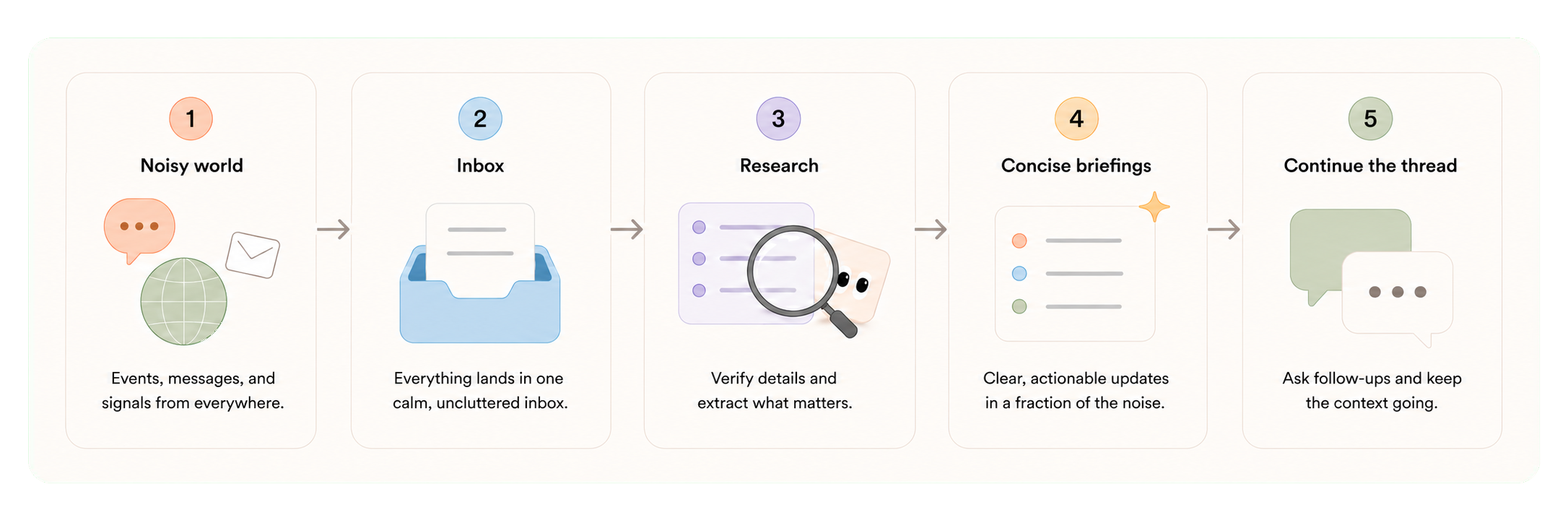
Think of it like having a hard-working intern tracking noisy feeds all day, then sharing only the interesting and relevant updates.
- Small useful items become short posts.
- Bigger launches, papers, talks, reactions, or ongoing stories become threads.
- Follow-ups append to the existing story instead of starting over.
- Related events can also become stories, so bigger trends and patterns are easier to spot.
What It Looks Like
keep-up-with shares updates in the messaging platform you already use (only Discord for now). It lives alongside your normal conversations, so it feels familiar, works from everywhere, and can be shared with friends, teammates, or coworkers when you want a common space.
| Shape | What shows up |
|---|---|
| Short update | One compact message with the source link and a useful visual when available. |
| Deep-dive thread | A focused thread for a launch, paper, talk, report, or messy public reaction. |
| Story follow-up | A new event gets appended to an existing thread when it changes the same story. |
| Shared server | Friends, teammates, or coworkers can use the same topic channels and nudge what gets covered. |
The result should be a stream that is easier to follow: fewer items, more context, useful visuals and artifacts, and updates that build on what you already know instead of repeating the whole story every time.
How It Works
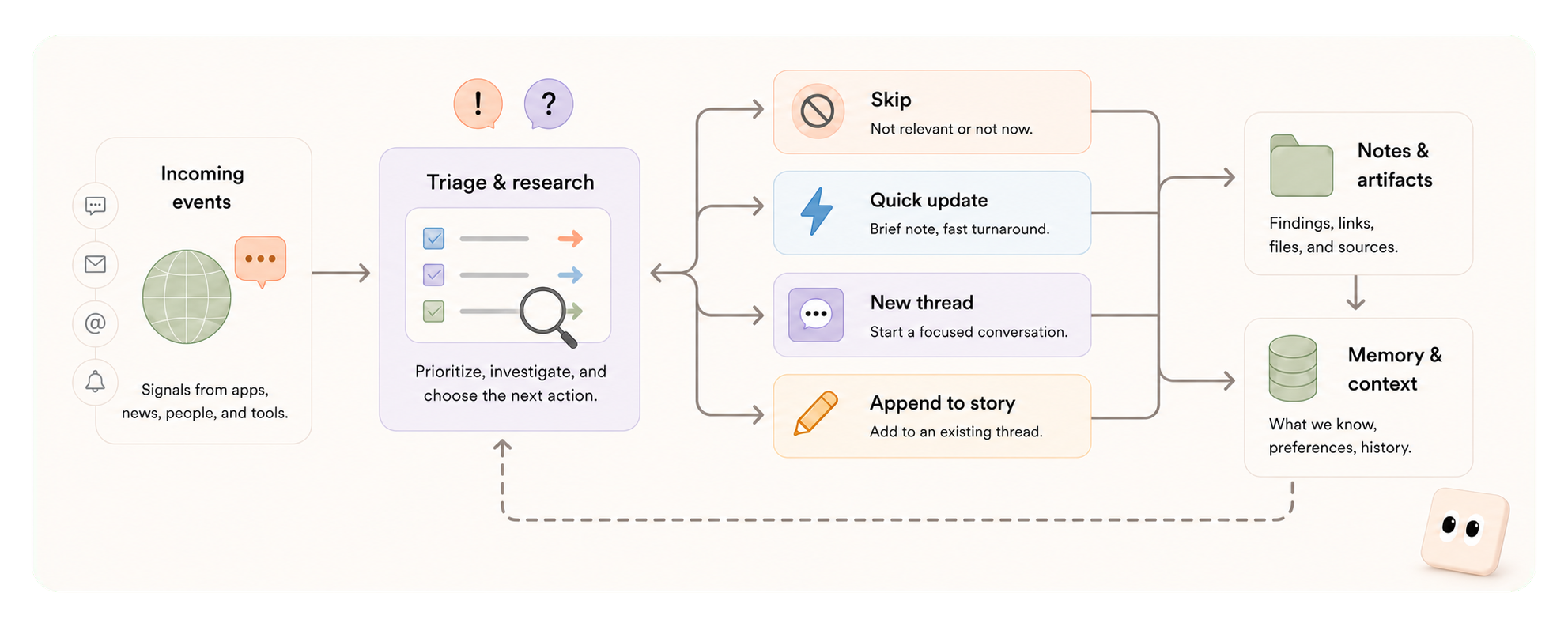
The sources you configure are watched continuously. When something new appears, it becomes an event in the inbox. Codex investigates the event, checks the surrounding context, gathers useful artifacts, and decides what should happen next: skip it, share a quick update, open a new thread, or append to an existing story.
Importantly, keep-up-with connects follow-ups, reactions, and related stories over time instead of treating every event like a separate one-off. It keeps track of what you have already seen, so updates can focus on what changed instead of repeating the whole story.
Integrations
keep-up-with comes with built-in integrations. You can enable or disable them based on what you want it to watch, fetch, and inspect. Subscribed events arrive through the bridge, and the agent uses configured tools through the agent-facing kup-cli.
| Source | What it is good for | Requires |
|---|---|---|
| X | Fast reactions, expert threads, launch posts, quote-post debate, and early attention signals. | X_BEARER_TOKEN |
| Practitioner reactions, skeptical comments, troubleshooting, product complaints, and aggregate sentiment from people actually trying things. | REDDIT_CLIENT_ID, REDDIT_CLIENT_SECRET |
|
| YouTube | Talks, demos, explainers, launch walkthroughs, and long-form context that is easier to search through transcripts than watch end to end. | YOUTUBE_API_KEY |
| Web and RSS | Official announcements, changelogs, engineering blogs, research posts, docs, and source pages that anchor the story. | None |
| arXiv | Papers, figures, source bundles, and technical claims that need direct inspection instead of summary-by-headline. | None |
| GitHub repos | What actually shipped: README, releases, examples, star history, issues, and whether a project looks real or abandoned. | None |
| Images | Cropping, inspecting, and preparing source visuals so updates are easier to understand at a glance. | None |
| Video | Pulling frames, clips, transcripts, and short demos from video sources or local files. | None |
| Raindrop | Your saved links and bookmarks, so the agent can connect new items to things you already cared enough to save. It can also act as an ingestion path if you want to use keep-up-with as a lightweight second brain. | RAINDROP_TOKEN |
| Browser history | Local context from what you have recently read or revisited, when you choose to enable it. | None |
A starter AI preset is included out of the box. It is tuned for AI news and technical updates, and it sets up both subscriptions and a Discord channel layout so you have a useful starting point instead of a blank config.
[!NOTE] The default AI preset is tuned for ChatGPT Pro users on the 5x or 20x plan and can consume substantial usage.
Quickstart
Install keep-up-with:
uv tool install keep-up-with
Run setup:
kup setup # set up Discord, integrations, presets, and workspace defaults
Setup writes your config to ~/.keep-up-with/config.toml. You can edit it directly, or ask the agent to update it for you after startup.
Start it:
kup start # begin watching sources and handling events
If everything is configured and working correctly, your agent should greet you on Discord shortly.
Commands
kup is for the human running keep-up-with.
kup setup  # run the setup wizard
kup start  # start the local service
kup status # check the daemon, gateway, thread, and event counts
kup stop   # stop the local service
kup reset  # reset local state while keeping setup files
kup-cli is for the agent. It is the first-party command Codex uses while working: reading events, handling the inbox, fetching source material, and sending messages or threads. You can also run it yourself for debugging.
kup-cli events list          # search or list stored events
kup-cli inbox list           # see pending events waiting for action
kup-cli tools --help         # list configured tools
kup-cli message send --help  # inspect message publishing options
kup-cli thread create --help # inspect story thread options
License
MIT. See LICENSE.
Project details
Verified details
These details have been verified by PyPIProject links
GitHub Statistics
Maintainers
Release history Release notifications | RSS feed

Download files
Download the file for your platform. If you're not sure which to choose, learn more about installing packages.
Source Distribution
Built Distribution
Filter files by name, interpreter, ABI, and platform.
If you're not sure about the file name format, learn more about wheel file names.
Copy a direct link to the current filters
File details
Details for the file keep_up_with-0.1.0.tar.gz.
File metadata
- Download URL: keep_up_with-0.1.0.tar.gz
- Upload date:
- Size: 12.0 MB
- Tags: Source
- Uploaded using Trusted Publishing? Yes
- Uploaded via: twine/6.1.0 CPython/3.13.12
File hashes
| Algorithm | Hash digest | |
|---|---|---|
| SHA256 |
b59443000c53c7106322d158f6cb68fd57a4d209a8bc69e97fa601a43fbbf6bc
|
|
| MD5 |
87c4542b1752f95de804b48fa4945540
|
|
| BLAKE2b-256 |
c048da9caa9fce2e78368810b8833f8862dc477e563ae5c9082b3ec86cf0e958
|
Provenance
The following attestation bundles were made for keep_up_with-0.1.0.tar.gz:
Publisher:
publish.yml on wiskojo/keep-up-with
-
Statement:
-
Statement type:
https://in-toto.io/Statement/v1 -
Predicate type:
https://docs.pypi.org/attestations/publish/v1 -
Subject name:
keep_up_with-0.1.0.tar.gz -
Subject digest:
b59443000c53c7106322d158f6cb68fd57a4d209a8bc69e97fa601a43fbbf6bc - Sigstore transparency entry: 1908890767
- Sigstore integration time:
-
Permalink:
wiskojo/keep-up-with@35a737fa99b3b89596d38bd8c817782146d25597 -
Branch / Tag:
refs/tags/v0.1.0 - Owner: https://github.com/wiskojo
-
Access:
public
-
Token Issuer:
https://token.actions.githubusercontent.com -
Runner Environment:
github-hosted -
Publication workflow:
publish.yml@35a737fa99b3b89596d38bd8c817782146d25597 -
Trigger Event:
push
-
Statement type:
File details
Details for the file keep_up_with-0.1.0-py3-none-any.whl.
File metadata
- Download URL: keep_up_with-0.1.0-py3-none-any.whl
- Upload date:
- Size: 142.6 kB
- Tags: Python 3
- Uploaded using Trusted Publishing? Yes
- Uploaded via: twine/6.1.0 CPython/3.13.12
File hashes
| Algorithm | Hash digest | |
|---|---|---|
| SHA256 |
4e388f0fa09f87f0b325b850c9445842124ff7ea3eb76dd259d2af7cfff99b3e
|
|
| MD5 |
19d87ec3395c2cb9b1fcb5dc68fe88f7
|
|
| BLAKE2b-256 |
ed0a70a974defd69ba63feb4779925e4f2c922a3c962abf4114845efac47eae4
|
Provenance
The following attestation bundles were made for keep_up_with-0.1.0-py3-none-any.whl:
Publisher:
publish.yml on wiskojo/keep-up-with
-
Statement:
-
Statement type:
https://in-toto.io/Statement/v1 -
Predicate type:
https://docs.pypi.org/attestations/publish/v1 -
Subject name:
keep_up_with-0.1.0-py3-none-any.whl -
Subject digest:
4e388f0fa09f87f0b325b850c9445842124ff7ea3eb76dd259d2af7cfff99b3e - Sigstore transparency entry: 1908890866
- Sigstore integration time:
-
Permalink:
wiskojo/keep-up-with@35a737fa99b3b89596d38bd8c817782146d25597 -
Branch / Tag:
refs/tags/v0.1.0 - Owner: https://github.com/wiskojo
-
Access:
public
-
Token Issuer:
https://token.actions.githubusercontent.com -
Runner Environment:
github-hosted -
Publication workflow:
publish.yml@35a737fa99b3b89596d38bd8c817782146d25597 -
Trigger Event:
push
-
Statement type:






