
Python package allowing you to manage your CHANGELOG.md files
Verified details
These details have been verified by PyPIProject links
GitHub Statistics
Maintainers

Project description
(Keep a) Changelog Manager
Python tool to
- initialize a CHANGELOG.md
- backfill it with commits, PRs, etc
- CLI and GUI to edit and update entries
- Validate
- Create a Github or Gitlab release page with CHANGLOG.md as note.
It supports these standards
- Keep a Changelog
- Semantic Version, PEP 440, Calver
- Conventional Commits, Gitmoji (for backfill from commit messages)
This is a fork of keepachangelog-manager, originally mostly written by KevinDeJong at TomTom International, but now
archived.
Install
uv tool install keepachangelog-manager-fork
The package name on PyPI is keepachangelog-manager-fork. The installed command is changelogmanager with legacy
alias of keepachangelog-manager.
Supports pre-commit, CLI, and GitHub Actions workflows.
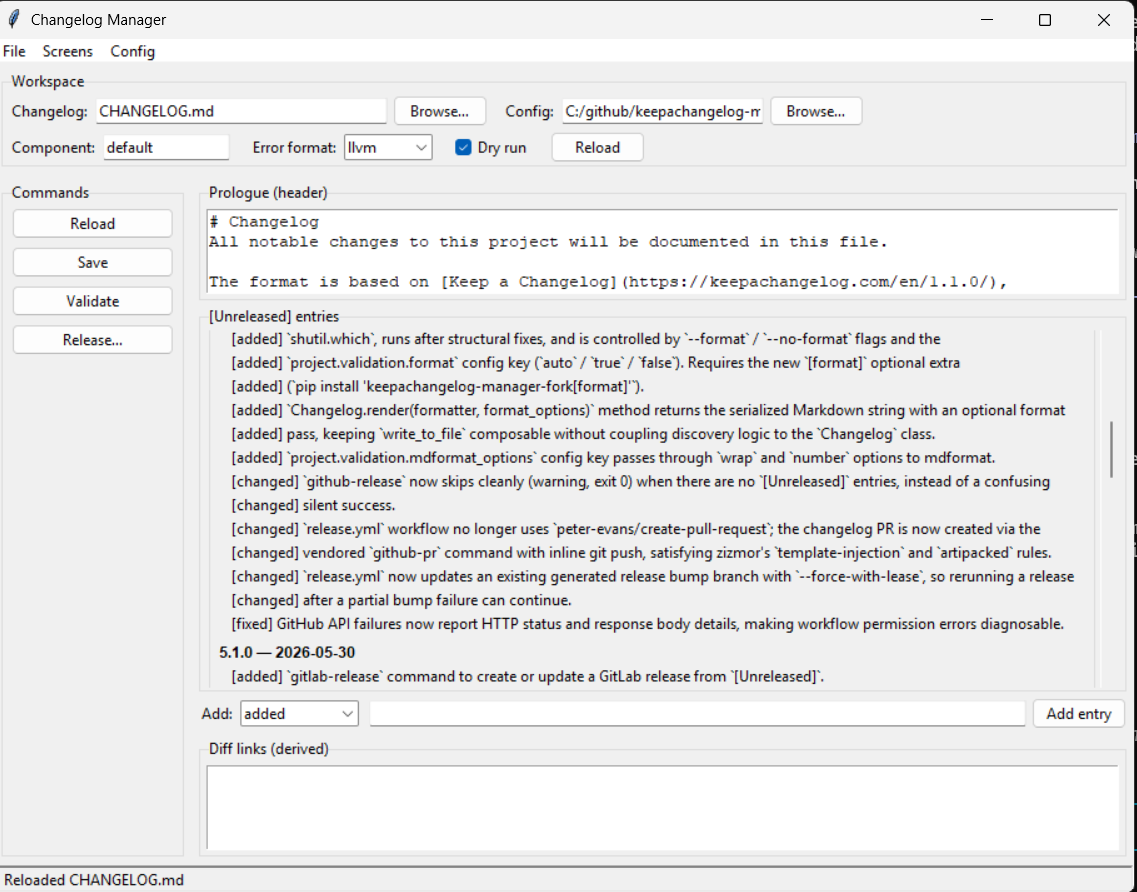
GUI
changelogmanager gui
The GUI now includes four screens: a live [Unreleased] editor, an initialize/backfill screen, a release publishing
screen for GitHub/GitLab, and a components screen for batch validation and from-commits --all.
What it does
keepachangelog-manager helps you:
Edit entries
- create and validate changelogs
- add, edit, list, and remove
[Unreleased]entries - keep future release notes in
TASKS.mdand promote finished items into[Unreleased] - work with multi-component repositories (multiple changelog) via TOML config files
Flip Unreleased Changelog to a Released Changelog
- infer the next release from change types for SemVer, PEP 440, or CalVer projects
- release
[Unreleased]with an optional confirmation guard
Initialize or bulk update Changelog
- seed
[Unreleased]from git history using Conventional Commit subjects - backfill missing released versions from local git tags
- support fragment-file workflows for teams that prefer
changelog.dover direct changelog edits
Many features for bash scripting ergonomics.
Online integration with Git Forge Release pages
- create or update GitHub and GitLab releases
- open or update a GitHub pull request for release automation
Examples
These are the happy-path workflows. For every alternate path and every extra flag, use ./docs/.
1. Initialize a new repo
Start with config if you want to lock in Semantic Versioning and defaults up front, then create the changelog:
changelogmanager config init
changelogmanager create
That gives you a clean CHANGELOG.md with an [Unreleased] section and the standard preamble.
2. Backfill released history from local tags
If the repo already has releases, let the tool build the missing version sections before you start editing new work:
changelogmanager backfill --source local --dry-run
changelogmanager backfill --source local
This is the "adopt the tool in an existing repo" path. It uses local tags and commit intervals, and falls back to an honest placeholder when old release notes are not recoverable.
3. Backfill [Unreleased] from commits since the last tag
If your release history is already fine and you only want today's work pulled into [Unreleased]:
changelogmanager backfill --source local --include-unreleased
That is the quickest "catch me up from git" workflow.
4. Edit or update [Unreleased]
Use direct changelog editing when you want polished wording instead of whatever came from commit subjects:
changelogmanager add --change-type added --message "Support draft release previews"
changelogmanager remove --list
changelogmanager edit --change-type added --index 0 --message "Support draft GitHub release previews"
The day-to-day model is simple: add entries as work lands, list them when you need context, and edit them before release.
5. Validate and update commit messages
If you want commit subjects that backfill cleanly, use Keep a Changelog-style subjects such as:
Added: support release PR automation
Fixed: preserve tag ordering during backfill
Audit the range you already have:
changelogmanager lint-commits --strict
Then get a rewrite plan for unpushed commits that need cleanup:
changelogmanager rewrite-messages --plan-out rewrite-plan.tsv
The rewrite command is intentionally plan-only today, which is perfect for reviewing the suggested subjects before you amend or rebase.
6. Validate and autofix the changelog
Before you cut a release, make sure the file is structurally clean:
changelogmanager validate
changelogmanager validate --fix
--fix handles the safe cleanup work: heading normalization, version ordering, duplicate removal, and other common Keep a Changelog paper cuts.
7. Preview the semantic version bump and release
See what the next release would be:
changelogmanager version --reference future
Then promote [Unreleased] into a real release:
changelogmanager release --yes
If your version also lives in pyproject.toml or Python __version__ strings, install the jiggle extra and do it in one step:
uv tool install "keepachangelog-manager-fork[jiggle]"
changelogmanager release --bump-versions --yes
8. Start the next round of tasks
After a release, it is usually time to collect the next set of user-facing changes that will eventually land in [Unreleased]:
changelogmanager tasks add added "Support release task docs"
changelogmanager tasks add fixed "Keep promoted task text out of TASKS.md"
changelogmanager tasks list
When tasks are complete, mark them checked and promote them into the changelog. If your team prefers fragment files instead of a shared task list, the tool also supports changelog fragments; see ./docs/tasks.md.
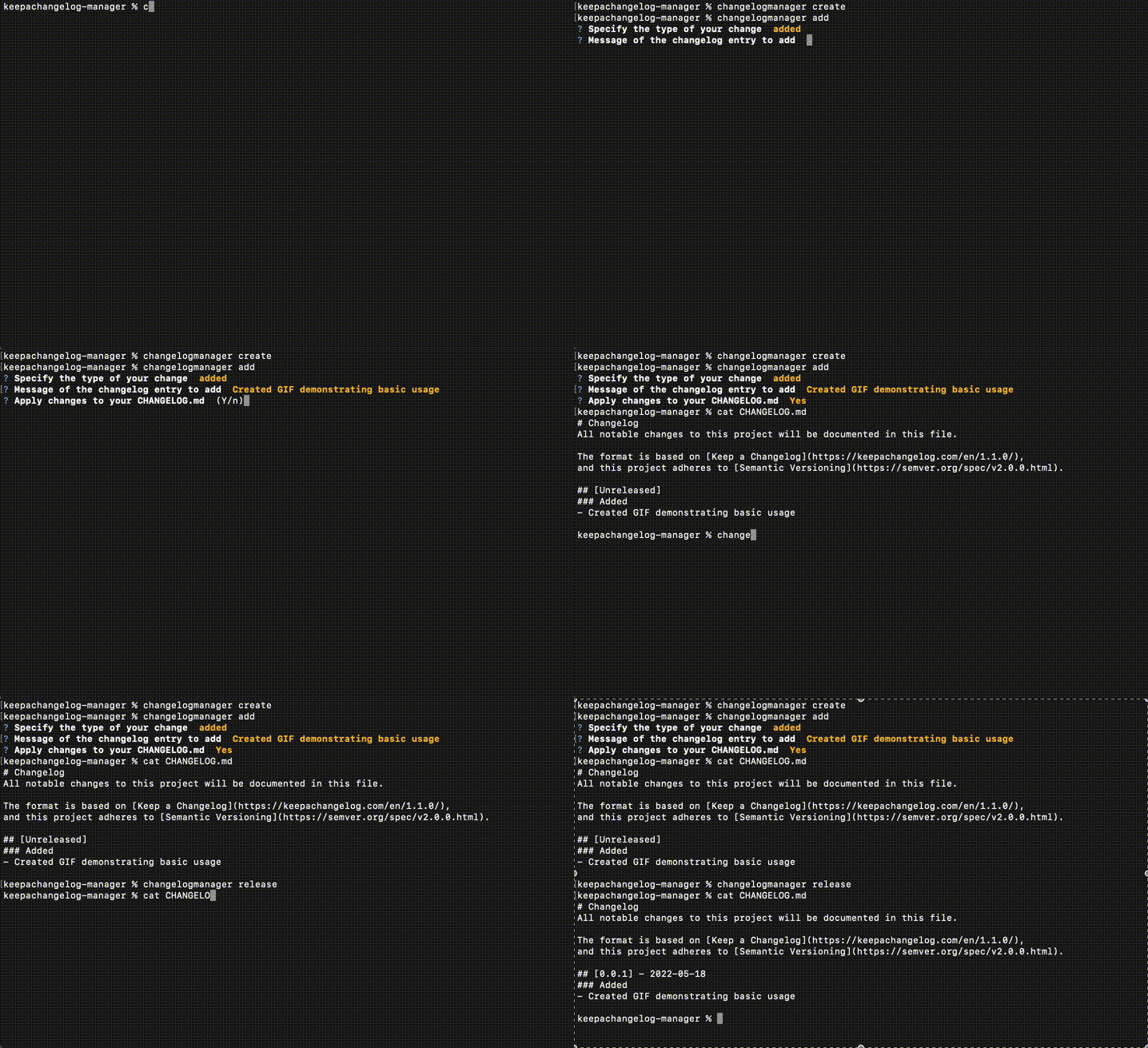
CLI Visuals
Credits
Vendored
Documentation
Project details
Verified details
These details have been verified by PyPIProject links
GitHub Statistics
Maintainers
Release history Release notifications | RSS feed


Download files
Download the file for your platform. If you're not sure which to choose, learn more about installing packages.
Source Distribution
Built Distribution
Filter files by name, interpreter, ABI, and platform.
If you're not sure about the file name format, learn more about wheel file names.
Copy a direct link to the current filters
File details
Details for the file keepachangelog_manager_fork-6.2.0.tar.gz.
File metadata
- Download URL: keepachangelog_manager_fork-6.2.0.tar.gz
- Upload date:
- Size: 1.1 MB
- Tags: Source
- Uploaded using Trusted Publishing? Yes
- Uploaded via: twine/6.1.0 CPython/3.13.13
File hashes
| Algorithm | Hash digest | |
|---|---|---|
| SHA256 |
bd97c7ff1e87b3ae7a2326eb1e6c0966e08229f0740300287eaaeb4f6d4dc39a
|
|
| MD5 |
3b813523b34c1b9bfc789c15604cb4c3
|
|
| BLAKE2b-256 |
87f6eef1c8539b08148522db0f5e6acf3704243d00b511b213341bb825e00613
|
Provenance
The following attestation bundles were made for keepachangelog_manager_fork-6.2.0.tar.gz:
Publisher:
release.yml on matthewdeanmartin/keepachangelog-manager
-
Statement:
-
Statement type:
https://in-toto.io/Statement/v1 -
Predicate type:
https://docs.pypi.org/attestations/publish/v1 -
Subject name:
keepachangelog_manager_fork-6.2.0.tar.gz -
Subject digest:
bd97c7ff1e87b3ae7a2326eb1e6c0966e08229f0740300287eaaeb4f6d4dc39a - Sigstore transparency entry: 1742141827
- Sigstore integration time:
-
Permalink:
matthewdeanmartin/keepachangelog-manager@c12923e69b54900c536adab14729e792532a7008 -
Branch / Tag:
refs/tags/v6.2.0 - Owner: https://github.com/matthewdeanmartin
-
Access:
public
-
Token Issuer:
https://token.actions.githubusercontent.com -
Runner Environment:
github-hosted -
Publication workflow:
release.yml@c12923e69b54900c536adab14729e792532a7008 -
Trigger Event:
release
-
Statement type:
File details
Details for the file keepachangelog_manager_fork-6.2.0-py3-none-any.whl.
File metadata
- Download URL: keepachangelog_manager_fork-6.2.0-py3-none-any.whl
- Upload date:
- Size: 146.2 kB
- Tags: Python 3
- Uploaded using Trusted Publishing? Yes
- Uploaded via: twine/6.1.0 CPython/3.13.13
File hashes
| Algorithm | Hash digest | |
|---|---|---|
| SHA256 |
5b2cc4f64e07bb46bf5de93db01adc79ff9dcd7d6dadb1cf35b17c0b04fafc99
|
|
| MD5 |
187c09a604802f6f7a9d08c27d506317
|
|
| BLAKE2b-256 |
4e3f5e857c50e6dfcdf6da12129b059ae598ecbaea79af6fb44fe6945374513c
|
Provenance
The following attestation bundles were made for keepachangelog_manager_fork-6.2.0-py3-none-any.whl:
Publisher:
release.yml on matthewdeanmartin/keepachangelog-manager
-
Statement:
-
Statement type:
https://in-toto.io/Statement/v1 -
Predicate type:
https://docs.pypi.org/attestations/publish/v1 -
Subject name:
keepachangelog_manager_fork-6.2.0-py3-none-any.whl -
Subject digest:
5b2cc4f64e07bb46bf5de93db01adc79ff9dcd7d6dadb1cf35b17c0b04fafc99 - Sigstore transparency entry: 1742141886
- Sigstore integration time:
-
Permalink:
matthewdeanmartin/keepachangelog-manager@c12923e69b54900c536adab14729e792532a7008 -
Branch / Tag:
refs/tags/v6.2.0 - Owner: https://github.com/matthewdeanmartin
-
Access:
public
-
Token Issuer:
https://token.actions.githubusercontent.com -
Runner Environment:
github-hosted -
Publication workflow:
release.yml@c12923e69b54900c536adab14729e792532a7008 -
Trigger Event:
release
-
Statement type:






