

KeepDelta
A Python Library for Human-Readable Data Differencing





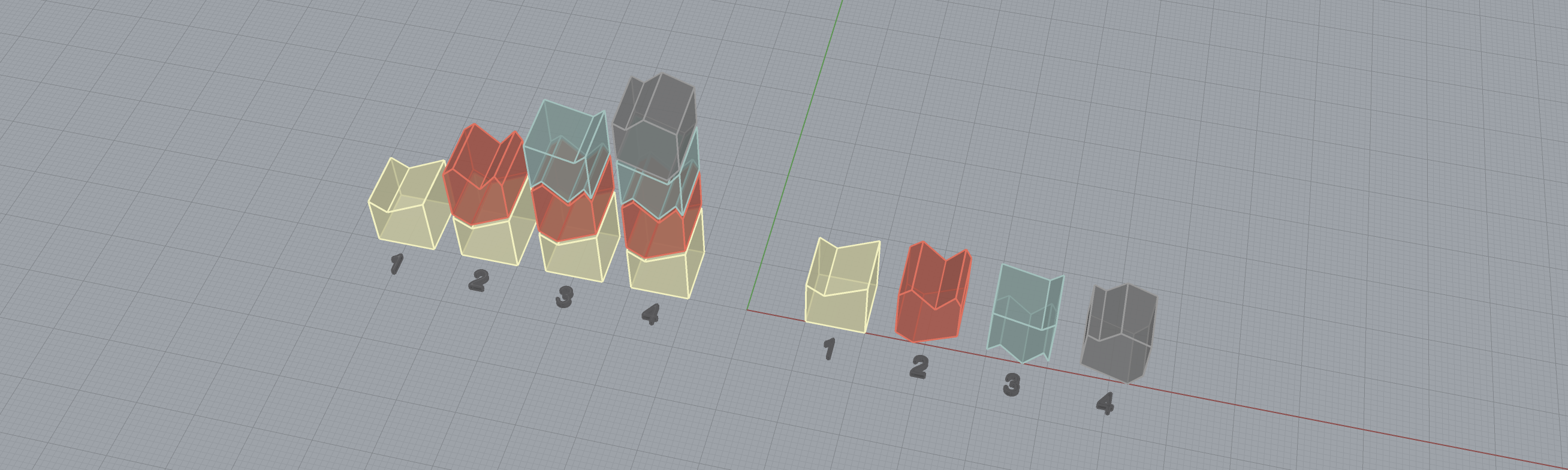
KeepDelta is a lightweight Python library designed to efficiently track and manage changes (deltas) between Python built-in types. It is applicable to various scenarios that require dynamic data management, especially when incremental numerical changes are present, such as simulations and sensing. While many alternative tools operate at the binary level, KeepDelta emphasizes human-readable delta encoding, facilitating debugging and analysis for Python developers and researchers across multiple domains.
What is Delta Encoding?
In many computational scenarios, efficiently managing evolving data is crucial. Traditional methods, that rely on full-state encoding — which means storing and/or transmitting complete snapshots at each step — can be inefficient due to the large size of the snapshots. Delta encoding addresses this challenge by capturing and applying only the changes (deltas) between successive states of data structures, resulting in significantly smaller and more manageable data.
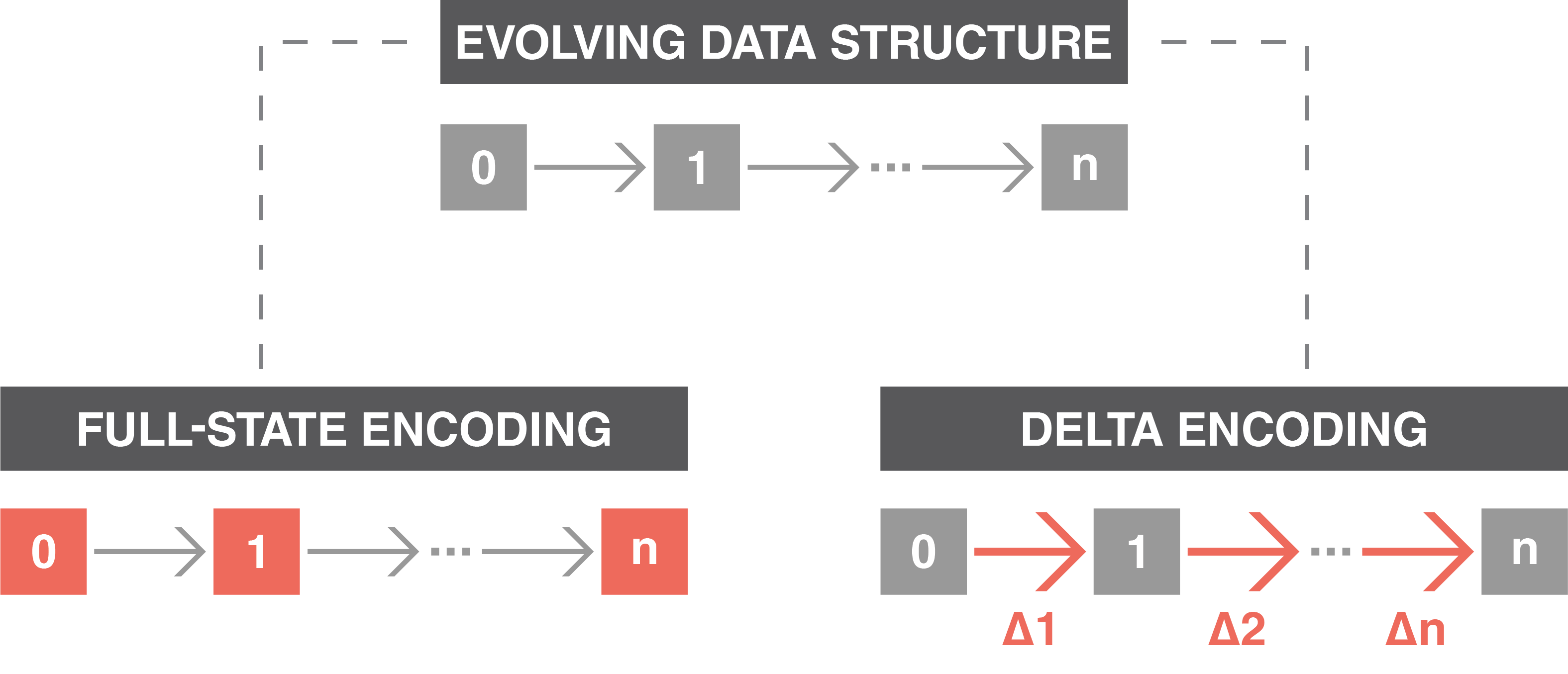
Managing evolving data structures: full-state encoding (left) stores the entire system state at each timestep, represented by colored blocks. In contrast, delta encoding (right) records only the differences between states, highlighted by colored arrows and identified by Δ, providing a more efficient solution for storage and/or transmission.
Features
- Generates compact and human-readable differences between two Python variables.
- Applies delta to a variable to reconstruct the updated version.
- Supports common Python built-in data types.
- Handles deeply nested and mixed data structures efficiently.
- Requires no external dependencies.
Installation
Install the package using pip:
pip install keepdelta
Usage
There are two core methods corresponding to the creation and application of delta encodings:
1. create(old, new):
The create function compares the old and new variables to generate delta that captures the differences between two data structures. It produces a compact data structure containing only these differences, and its high human readability greatly aids debugging during development.
Example:
>>> import keepdelta as kd

>>> # Initial data
>>> old = {
...     "name": "Alice",
...     "age": 20,
...     "is_student": True
... }

>>> # Updated data
>>> new = {
...     "name": "Alice",
...     "age": 25,
...     "is_student": False
... }

>>> # Create delta
>>> delta = kd.create(old, new)
>>> print(delta)
{
    "age": 5,
    "is_student": False
}
2. apply(old, delta):
The apply function takes the old variable and the delta, then applies the delta to recreate the updated, new variable.
Example:
>>> import keepdelta as kd

>>> # Initial data
>>> old = {
...     "name": "Alice",
...     "age": 20,
...     "is_student": True
... }

>>> # Delta
>>> delta = {
...     "age": 5,
...     "is_student": False
... }

>>> # Apply delta
>>> new = kd.apply(old, delta)
>>> print(new)
{
    "name": "Alice",
    "age": 25,
    "is_student": False
}
For more usage examples, refer to the examples folder in the project repository, or continue to the next section, "Supported Data Types & Behaviors”, for a detailed look at how each structure is handled.
Supported Data Types & Behaviors
KeepDelta supports common native Python data structures, ensuring compatibility and flexibility when working with a wide variety of data types. The currently supported structures are listed below. Click any item to see how it’s handled and view a quick example:
🔸 Primitive Types:
Boolean (bool)
Since booleans have only two states, the delta is simply the new state (True or False).
Example:
>>> import keepdelta as kd

>>> # Initial data
>>> old = False

>>> # Updated data
>>> new = True

>>> # Create delta
>>> delta = kd.create(old, new)
>>> print(delta)
True
String (str)
The delta for strings is simply the new string value.
Example:
>>> import keepdelta as kd

>>> # Initial data
>>> old = "hello"

>>> # Updated data
>>> new = "bye"

>>> # Create delta
>>> delta = kd.create(old, new)
>>> print(delta)
bye
Integer (int)
For integers, the delta is computed as subtraction of values, yielding the offset to apply during reconstruction.
Example:
>>> import keepdelta as kd

>>> # Initial data
>>> old = 42

>>> # Updated data
>>> new = 45

>>> # Create delta
>>> delta = kd.create(old, new)
>>> print(delta)
3
Float (float)
For floats, the delta is computed as subtraction of values, yielding the offset to apply during reconstruction.
Example:
>>> import keepdelta as kd

>>> # Initial data
>>> old = 3.13

>>> # Updated data
>>> new = 3.14

>>> # Create delta
>>> delta = kd.create(old, new)
>>> print(delta)
0.01
Complex (complex)
For complex numbers, the delta is computed as subtraction of values, yielding the offset to apply during reconstruction.
Example:
>>> import keepdelta as kd

>>> # Initial data
>>> old = 3+4j

>>> # Updated data
>>> new = 1+5j

>>> # Create delta
>>> delta = kd.create(old, new)
>>> print(delta)
(-2+1j)
NoneType (None)
Since KeepDelta supports type change, it is possible to track the changes from None to other types or vise versa.
Example:
>>> import keepdelta as kd

>>> # Initial data
>>> old = 1.62

>>> # Updated data
>>> new = None

>>> # Create delta
>>> delta = kd.create(old, new)
>>> print(delta)
None
🔸 Collections:
Dictionary (dict)
When diffing dictionaries, key-value pairs in the inputs are compared. The key removal is marked with the special token __delete__.
Example:
>>> import keepdelta as kd

>>> # Initial data
>>> old = {
...     "location": "earth",
...     "age": 20,
...     "snacks": ["chocolate", "bananas"],
...     "student": True,
... }

>>> # Updated data
>>> new = {
...     "location": "mars",
...     "age": 30,
...     "snacks": ["chocolate", "bananas"],
...     "happy": True,
... }

>>> # Create delta
>>> delta = kd.create(old, new)
>>> print(delta)
{
    "location": "mars",  # Location changed from "earth" → "mars"
    "age": 10,  # Age increased by 10
    "student": "__delete__",  # The removed key
    "happy": True  # The newly added key
}
List (list)
The delta for a list is a dictionary where each key is a list index and each value describes the change applied at that position; including a numerical offset (to adjust the original element) or __delete__ (to remove it).
Example:
>>> import keepdelta as kd

>>> # Initial data
>>> old = [2, 3, 5, 7]

>>> # Updated data
>>> new = [2, 3, 4]

>>> # Create delta
>>> delta = kd.create(old, new)
>>> print(delta)
{
    2: -1,  # Third element has been decreased by 1
    3: "__delete__"  # Fourth element has been deleted
}
Tuple (tuple)
The delta for a tuple is a dictionary where each key is a list index and each value describes the change applied at that position; including a numerical offset (to adjust the original element) or __delete__ (to remove it).
Example:
>>> import keepdelta as kd

>>> # Initial data
>>> old = (2, 3, 5, 7)

>>> # Updated data
>>> new = (2, 3, 4)

>>> # Create delta
>>> delta = kd.create(old, new)
>>> print(delta)
{
    2: -1,  # Third element has been decreased by 1
    3: "__delete__"  # Fourth element has been deleted
}
Set (set)
For sets, the delta is a dict with two special keys: __add__ for items to add and __remove__ for items to drop.
Example:
>>> import keepdelta as kd

>>> # Initial data
>>> old = {1, 2, 3}

>>> # Updated data
>>> new = {2, 3, 5, 7}

>>> # Create delta
>>> delta = kd.create(old, new)
>>> print(delta)
{
    "__add__": {5, 7},  # Numbers added
    "__remove__": {1}  # Numbers removed
}
Nested & Composite Structures
KeepDelta supports deeply nested combinations of variables, enabling structures like dictionaries of dictionaries, lists of sets, and other complex, interwoven data types.
Example:
>>> import keepdelta as kd

>>> # Initial data
>>> old = {
...     "name": "Alice",
...     "age": 20,
...     "is_student": True,
...     "grades": [85.5, 90.0, 78],
...     "preferences": {
...         "drink": "soda",
...         "sports": {"football", "tennis"},
...     },
... }

>>> # Updated data
>>> new = {
...     "name": "Alice",
...     "age": 25,
...     "is_student": False,
...     "grades": [87, 90.0, 78, 92],
...     "preferences": {
...         "drink": "coffee",
...         "sports": {"football", "bodybuilding"},
...     },
... }

>>> # Create delta
>>> delta = kd.create(old, new)
>>> print(delta)
{
    "is_student": False,  # Changed from True → False
    "grades": {
        0: 87,  # Updated from 85.5 → 87
        3: 92  # New grade appended
    },
    "preferences": {
        "drink": "coffee",  # Switched from “soda” → "coffee"
        "sports": {
            "__add__": {"bodybuilding"},  # Sport added
            "__remove__": {"tennis"}  # Sport removed
        }
    },
    "age": 5  # Increased by 5
}
🔸 Special Cases:
Type Conversion
KeepDelta supports changing variables types. In that case, the delta is simply the new value.
Example:
>>> import keepdelta as kd

>>> # Initial data
>>> old = "hello"

>>> # Updated data
>>> new = 3.14

>>> # Create delta
>>> delta = kd.create(old, new)
>>> print(delta)
3.14  # Type changed from string to float
No‑Change Cases
If no differences are found between the two inputs, KeepDelta returns the special token __nothing__, indicating that no changes are needed.
Example:
>>> import keepdelta as kd

>>> # Initial data
>>> old = "hello"

>>> # Updated data
>>> new = "hello"

>>> # Create delta
>>> delta = kd.create(old, new)
>>> print(delta)
"__nothing__"  # Both inputs are identical
Supported Python Versions
KeepDelta has been tested and verified to work with Python versions 3.7 to 3.13. While it is expected to work with older versions, they have not been tested and are not officially supported.
Citing KeepDelta
If you use KeepDelta in your work, please cite our paper.
You can either:
- Click the “Cite this repository” button at the top of the GitHub page and copy the generated APA or BibTeX.
Or
- Copy one of the entries below:
BibTeX:
@article{Noorghasemi_KeepDelta_A_Python_2025,
author = {Noorghasemi, Aslan and McComb, Christopher},
doi = {10.21105/joss.08075},
journal = {Journal of Open Source Software},
month = jun,
number = {110},
pages = {8075},
title = {{KeepDelta: A Python Library for Human-Readable Data Differencing}},
url = {https://joss.theoj.org/papers/10.21105/joss.08075},
volume = {10},
year = {2025}
}
APA:
Noorghasemi, A., & McComb, C. (2025). KeepDelta: A Python Library for Human-Readable Data Differencing. Journal of Open Source Software, 10(110), 8075. https://doi.org/10.21105/joss.08075
Contributing
Contributions are welcome! Feel free to:
- Report issues.
- Submit feature requests.
- Create pull requests.
License
Distributed under the MIT License. See LICENSE.txt for more information.
1 maintainer

Release files for keepdelta 0.2.0
For a detailed explanation of source distributions (sdists) and built distributions (wheels), please see the package formats documentation.
Source distribution (sdist)
| File | Size | Uploaded | |
|---|---|---|---|
| keepdelta-0.2.0.tar.gz | 15.3 kB | Details |
Built distribution (wheel)
| File | Interpreter | ABI | Platform | Reset |
|---|---|---|---|---|
| keepdelta-0.2.0-py3-none-any.whl | Python 3 | none | any | Details |
Total release size: 29.0 kB
Release files / keepdelta-0.2.0.tar.gz
| Download URL | keepdelta-0.2.0.tar.gz |
|---|---|
| Size | 15.3 kB |
| Tags | Source |
|
SHA-256 checksum How to use checksums |
8eb471b73016642fdca9ea22a8b68c13489b9c7bc35edf6ec820617424496866
|
|
BLAKE2b-256 checksum How to use checksums |
37bf6b9d94259e3dff787fe910b88c8a142a9e8f3b39a85b1793f9da2be2667c
|
| Upload date | |
|
Uploaded using Trusted Publishing? What is trusted publishing? |
Yes |
| Uploaded via |
twine/6.1.0 CPython/3.12.9
|
Provenance
Provenance describes where a file came from. On PyPI, provenance is shared via attestations, which provide a verifiable record of the build or publishing details. View details, limitations and caveats.


PyPI Publish Attestation
PyPI verified that this artifact, at this checksum, originated from the publisher listed below.
Signed by GitHub Actions, verified by PyPI on Jun 14, 2025.
Transparency logRelease files / keepdelta-0.2.0-py3-none-any.whl
| Download URL | keepdelta-0.2.0-py3-none-any.whl |
|---|---|
| Size | 13.7 kB |
| Tags | Python 3 |
|
SHA-256 checksum How to use checksums |
a38b20e280a6de0dc7b2245b41388c5183be3b9edca954110c6f6112283a9ac8
|
|
BLAKE2b-256 checksum How to use checksums |
aec59b99db16e496b2af911a3f07f97c030a70ecd99e483c923ec2c3b22b3c60
|
| Upload date | |
|
Uploaded using Trusted Publishing? What is trusted publishing? |
Yes |
| Uploaded via |
twine/6.1.0 CPython/3.12.9
|
Provenance
Provenance describes where a file came from. On PyPI, provenance is shared via attestations, which provide a verifiable record of the build or publishing details. View details, limitations and caveats.
PyPI Publish Attestation
PyPI verified that this artifact, at this checksum, originated from the publisher listed below.
Signed by GitHub Actions, verified by PyPI on Jun 14, 2025.
Transparency log













