
Keepfold






Keepfold is a memory for your AI apps that lives on your own computer: the AI apps you connect, such as Claude, Cursor and Codex, read from it and add to it, so a new chat can start from what you already told them.
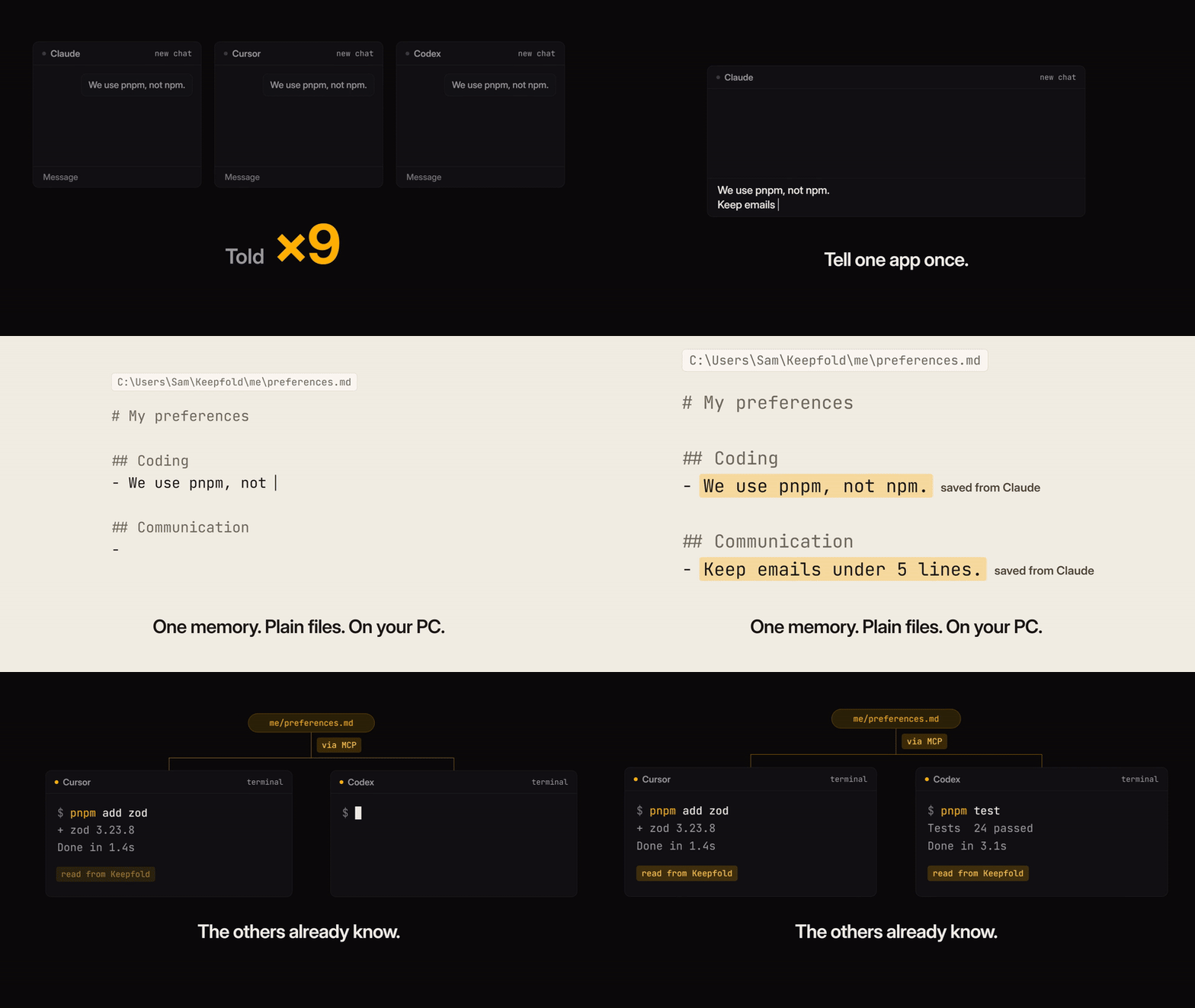
Download Keepfold for Windows
Free. One file. No account. Windows 10 and 11.
Keepfold is in beta until 1.0: its maker uses it every day, but expect rough edges, and please open an issue when something breaks.
Windows may say it "protected your PC", because the installer is not code-signed yet. Click More info, then Run anyway. You can read the source code and check the file's SHA-256, which is on each release page.
Keepfold was called Cortex before 0.6.2. Version 0.6.2 moves your settings, your vault folder and your AI-app connections over by itself the first time it runs; see Coming from Cortex.
- It remembers for you. Your AI chats, notes, decisions and what you read are saved by themselves, as plain notes in a folder you pick (your vault).
- The AI apps you connect get your context. Connect an app once, in a click. Keepfold plugs in through MCP, the standard way AI apps use outside tools. Claude Code, Codex CLI and Gemini CLI get your context with the first message of each chat, through a hook. Other apps get it when they call Keepfold's tools. Cursor, VS Code and Codex also get your pinned lines in a rules file.
- It answers from your own data. The app's Chat answers questions about your notes, chats and browsing, with sources, using an AI model on your computer. Without a local model, it answers only questions about Keepfold's own records, such as the sites you visited or what is due.
- It stays private. No account and no telemetry. Your notes stay on your computer. Keepfold sends nothing about you anywhere on its own: the AI apps you connect see what Keepfold hands them, a cloud model is used only if you turn one on, and the only automatic connection is a check with GitHub for a new Keepfold version, which you can turn off.
Every screenshot in this README shows the bundled sample vault of Sam, a made-up student, plus made-up demo data. None of it is a real person's.
How it works in 3 steps
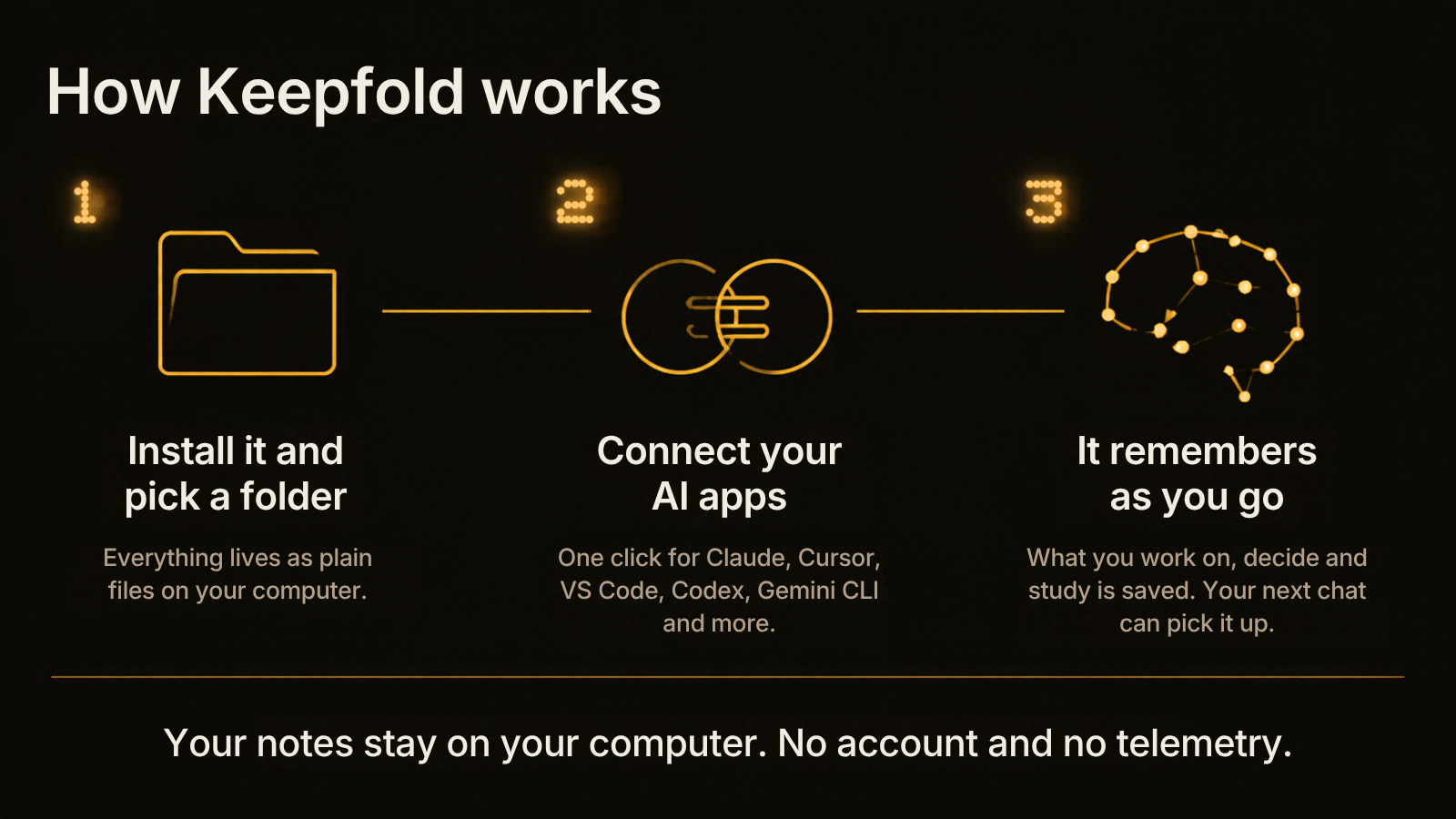
- Install it and pick a folder. Keepfold keeps everything there.
- Connect your AI apps. One click per app in the Keepfold app.
- It remembers as you go. Your chats, notes and decisions are saved by themselves.
Keepfold next to other AI memories
Each of these is a good tool built for a different job. This table only lists things you can check in their own docs. A "?" means we could not confirm it.
| Keepfold | ChatGPT memory | Claude's memory | Basic Memory | mem0 / OpenMemory | |
|---|---|---|---|---|---|
| Works across several AI apps | Yes | No, ChatGPT only | No, Claude apps only | Yes, any MCP app | Yes, any MCP app |
| Your memory as plain files on your PC | Yes | No, kept by OpenAI | No, kept by Anthropic (you can export it) | Yes, Markdown | No, a vector database |
| Free and open source | Yes, MIT | No | No | Yes, AGPL-3.0 (a paid cloud is optional) | Yes, Apache-2.0 |
| One-click Windows installer | Yes | Built into the app | Built into the app | No, installs with uv or Homebrew | No, runs on Docker |
| Local chat over your notes | Yes, with an optional local model | No, chats run in the cloud | No, chats run in the cloud | ? | No, it has a dashboard to browse memories |
Contents
- Next to other AI memories
- Made for vibe coding
- Who it is for
- Is my data safe?
- A tour
- Install
- FAQ
- Words you will see
- For the curious and for developers
- Found a problem?
- License
Made for vibe coding
You build with Claude Code, Cursor, Codex or Gemini CLI. Each new chat forgets your project, your stack, the way you like code written and what you already decided, so you explain it all again. Keepfold keeps those things and hands them to the app at the start of each chat.
What an AI app gets. Sam, the made-up student of the sample vault, types "Add a save command to my text adventure game". Before the AI answers, Keepfold gives it this (a real run on the sample, shortened):
## Related
- [[text-adventure]] — A small terminal game: rooms in a dict, one function per command.
- [[functions]] — Functions
- [[loops]] — Loops
The AI starts out knowing how the game is built. Sam's sample has no coding preferences, so none show here; with yours, the lines you pinned (say, "Python 3.12, type hints, uv only") and the preferences that fit the message come first.
What it keeps for you:
- Your projects, coding preferences and setup (your computer and tools).
- Decisions, including ones found in your git commit messages, which Review asks you to confirm.
- Your Claude Code chats, saved as short project summaries, never as code.
- Lines you start with
//pref:,//fact:or//forget:in Claude, Codex or Gemini CLI, saved as your own words.
How it reaches each app. You connect once in the app's Connect AI apps; each change is shown first and each config file is backed up.
- Claude Code: a small script Claude Code runs for you (a hook) adds your context to your first real message of each chat.
- Codex CLI and Gemini CLI: the same, through their own hooks. Codex asks you to trust a new hook once: open
/hooksin Codex after connecting. - Cursor, VS Code (Copilot) and Codex: your pinned lines also go in the rules file each app reads, with a line asking it to load the rest from Keepfold.
Cursor, VS Code, Codex and Gemini CLI see only what their profile allows: by default your pinned lines, coding preferences, setup and projects, never your journal, people pages or exams. You can change this per app.
Who it is for
Anyone who works with AI apps every day.
- Students: what is due today, your repeat mistakes, mock tests, and how ready you are for the next exam.
- Workers: your projects, decisions and preferences, given to every coding agent, so you stop repeating yourself.
- Researchers: papers, notes and AI chats, searchable by meaning, with a Chat that answers from them and shows sources.
Is my data safe?
- Your notes and chats stay on your computer, in a folder you choose.
- No account and no telemetry.
- No cloud AI model is used unless you turn one on. An AI app sees only what Keepfold hands it.
- Notes you mark private stay out of what AI apps get. (One exception: an AI app that asks for a person's page by name gets it.)
Read the full Privacy section.
A tour
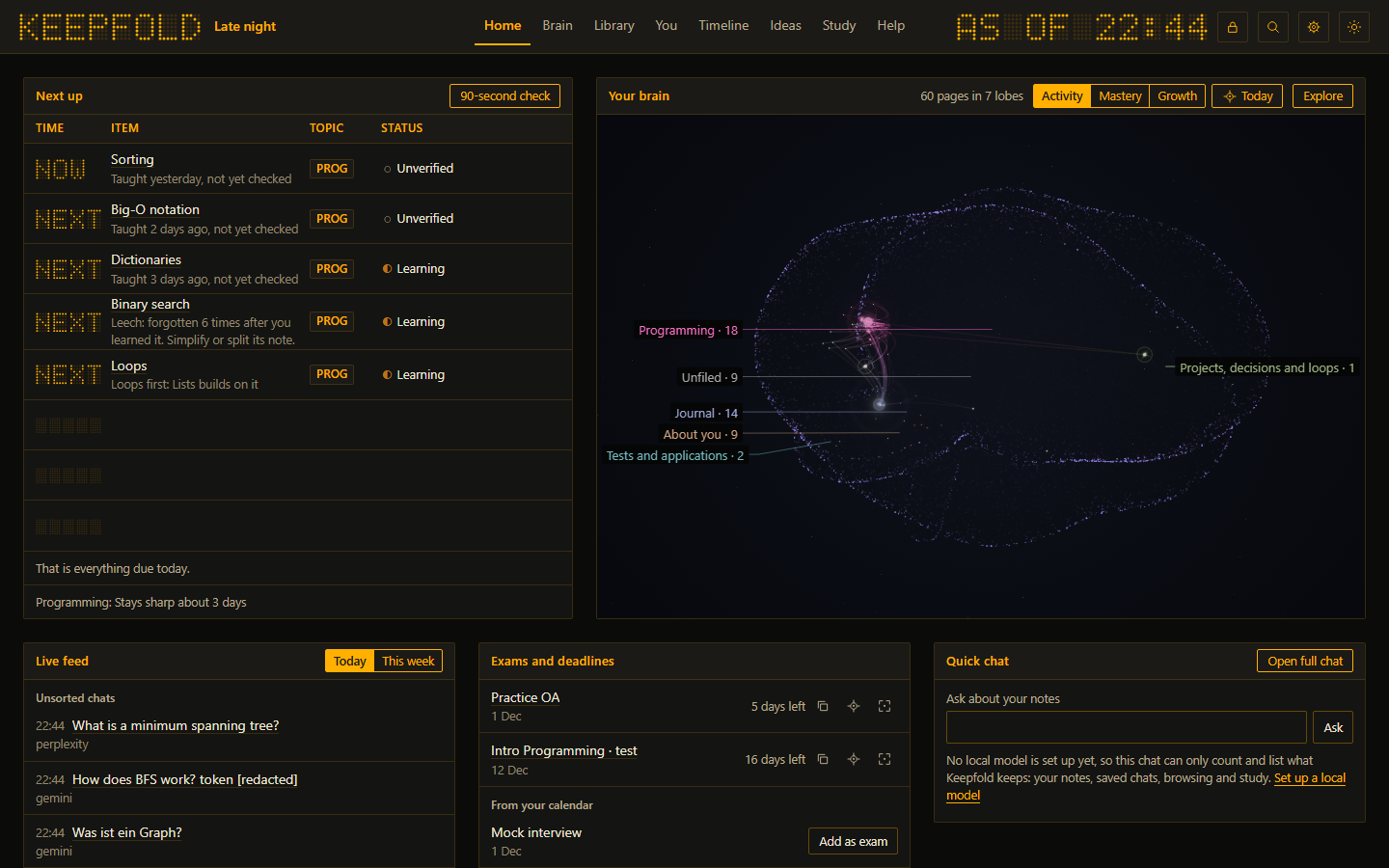
Home: what to do next, a live 3D brain of your notes, today's feed and a quick chat box.
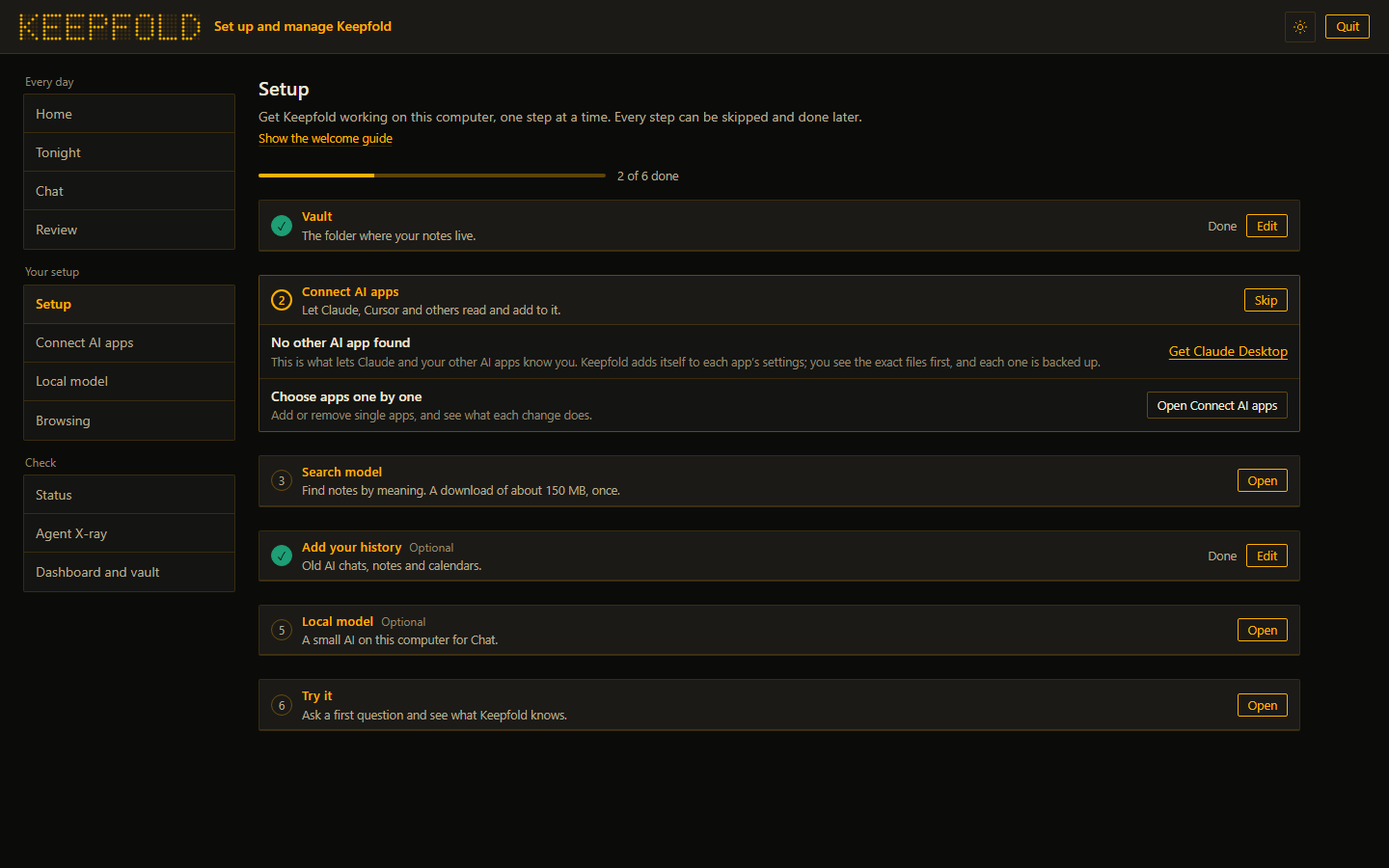
Setup: six steps, one at a time. Every step can be skipped and done later.
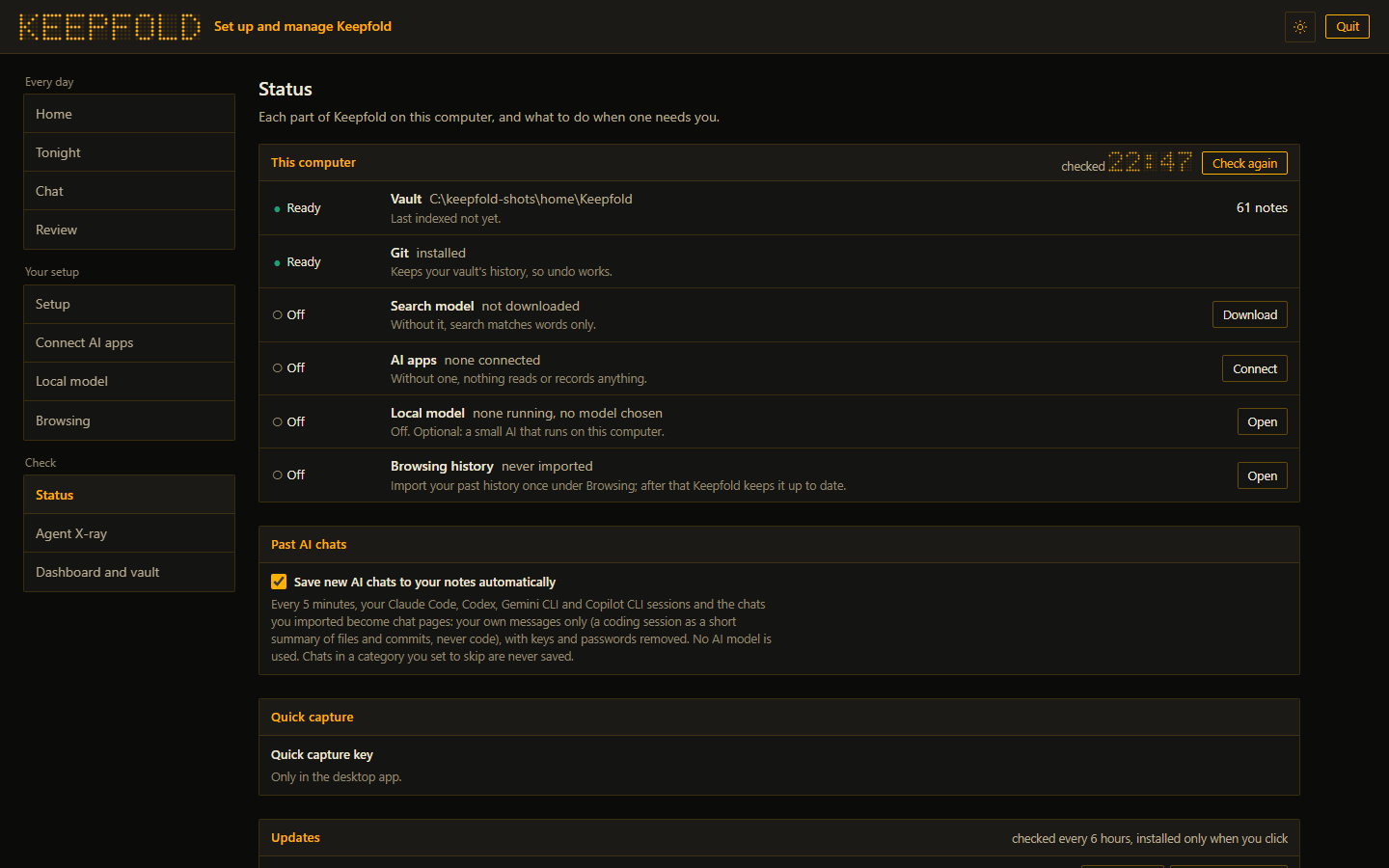
Status: each part of Keepfold on this computer, and what to do when one needs you.
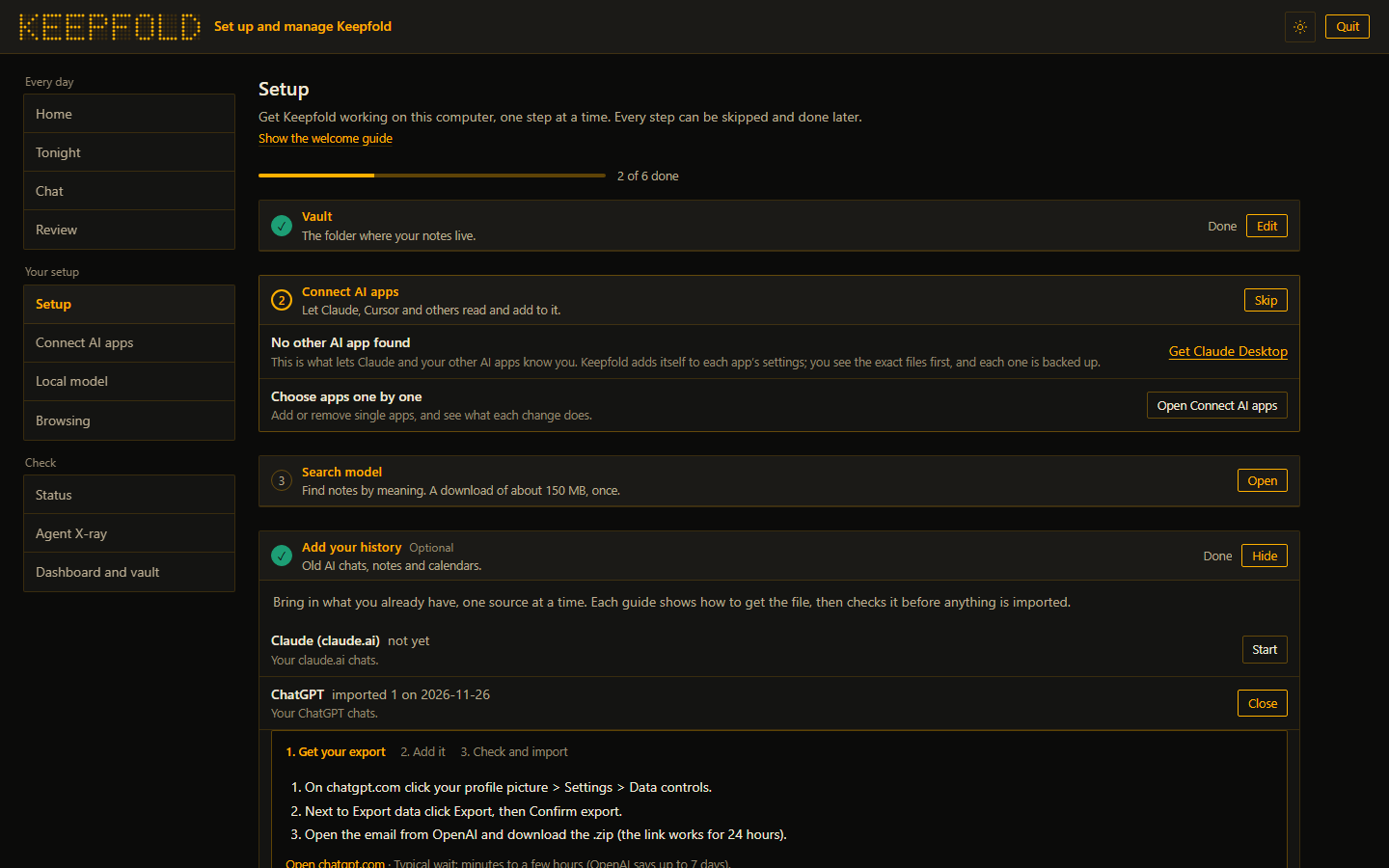
Add your history: a three-step guide for each source, such as your old ChatGPT chats.
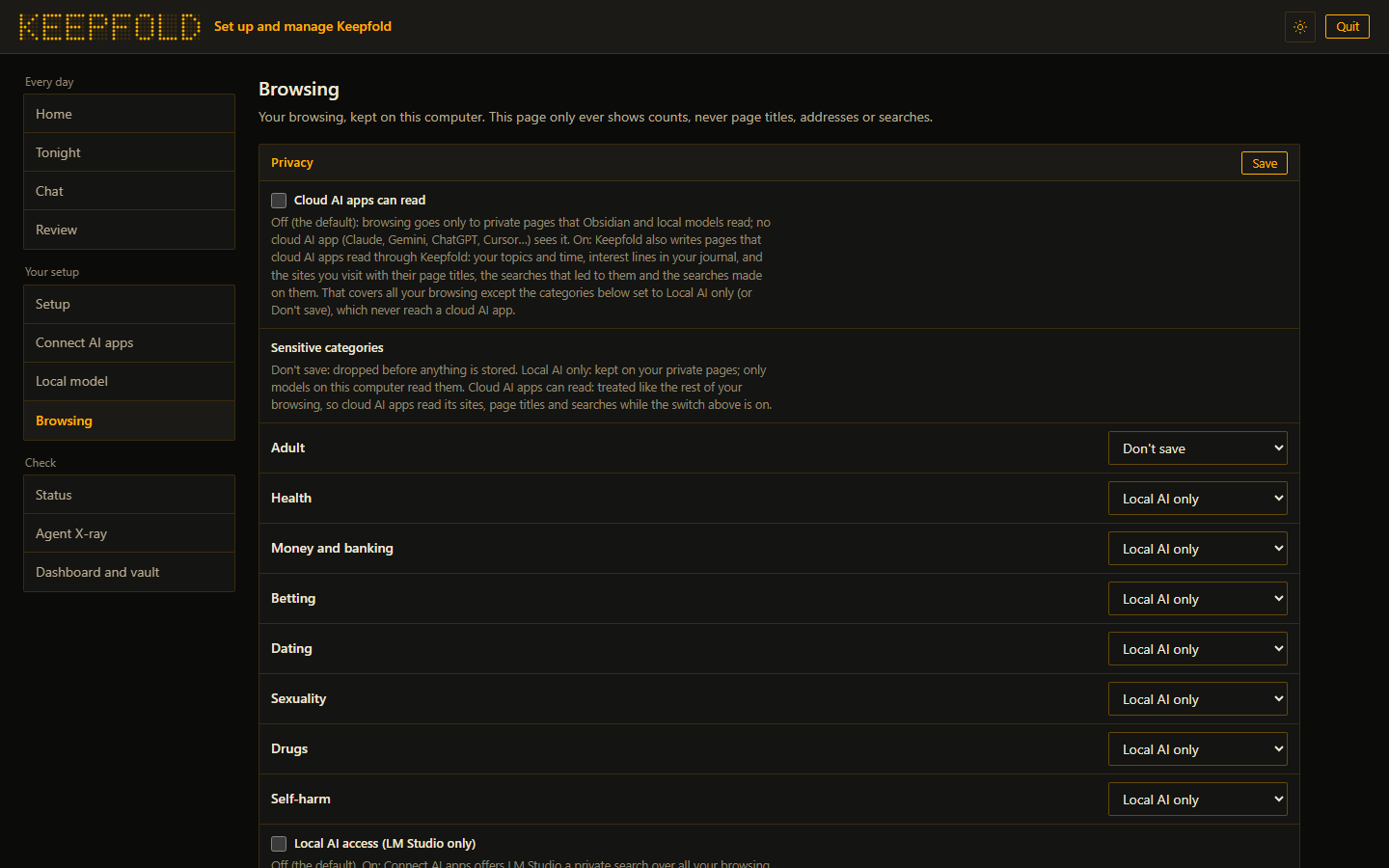
Browsing: you choose who may read each kind of site you visit.
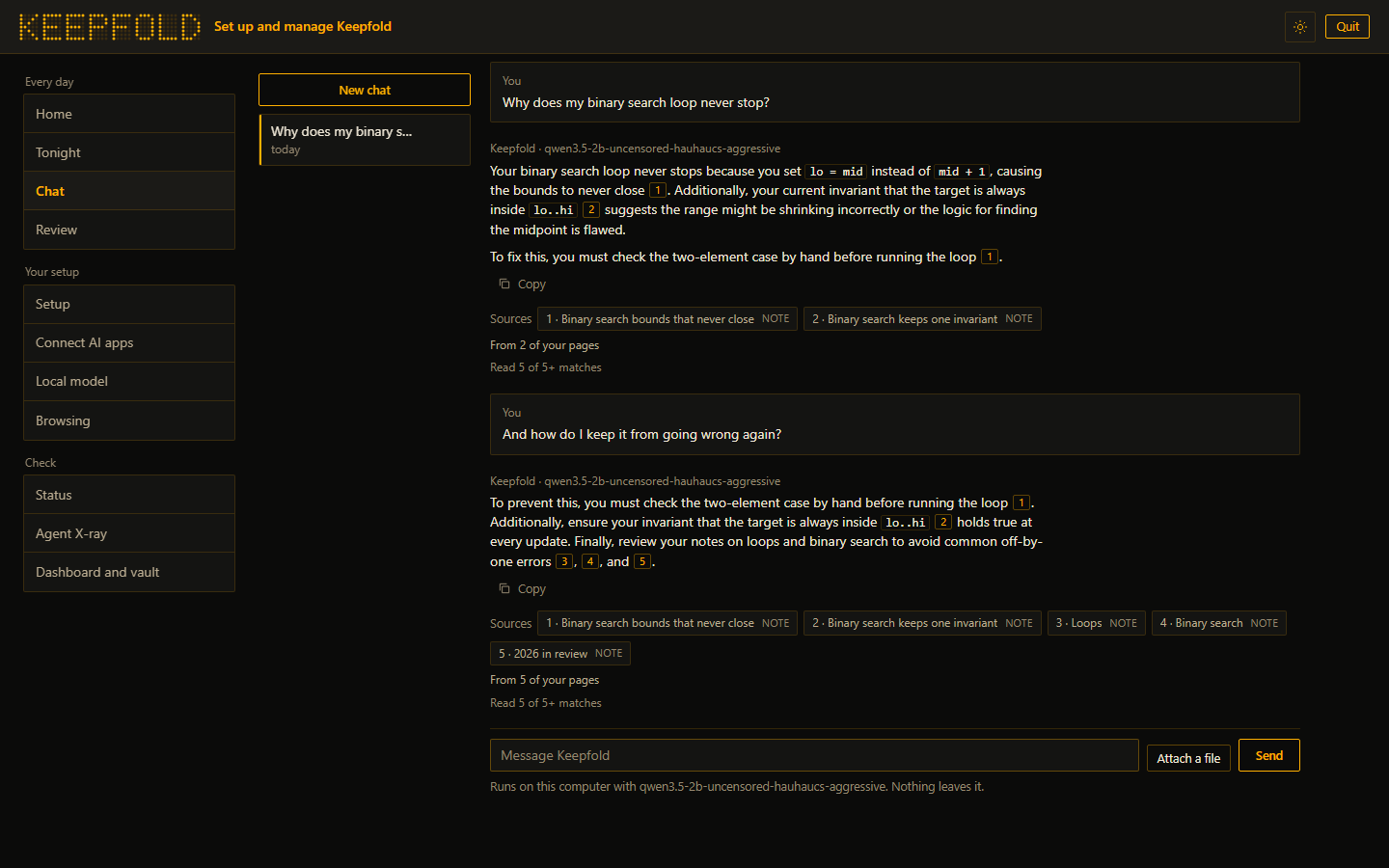
Chat: ask about your own notes and chats; each answer lists the pages it used.
A real run on the demo vault with Qwen 3.5 2B and the search model. A model this small can still get a detail wrong, so check the cited pages; a bigger model (4B, 9B) does better if your computer can run it.
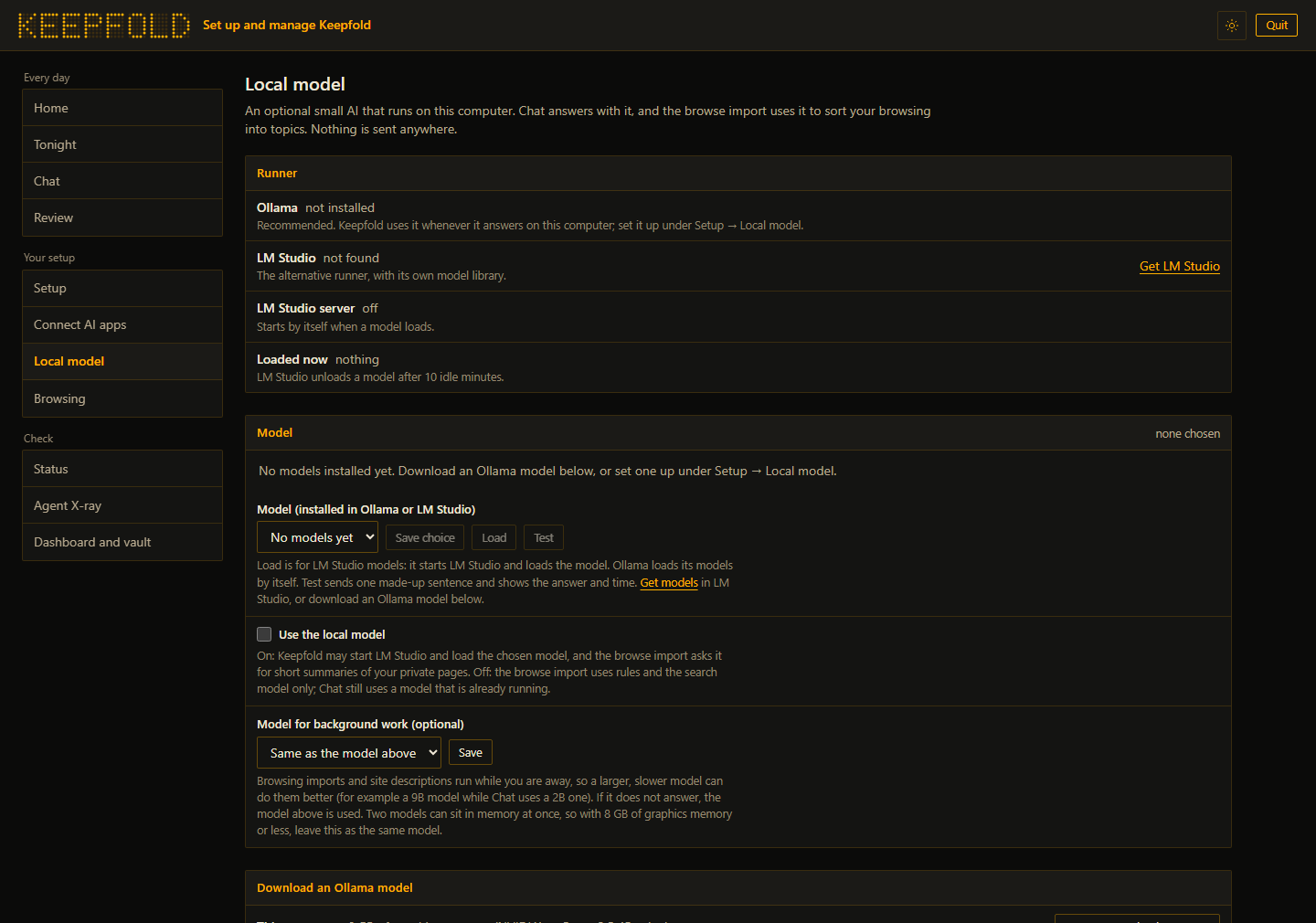
Local model: find, download and test an AI model that runs on your computer. Optional.
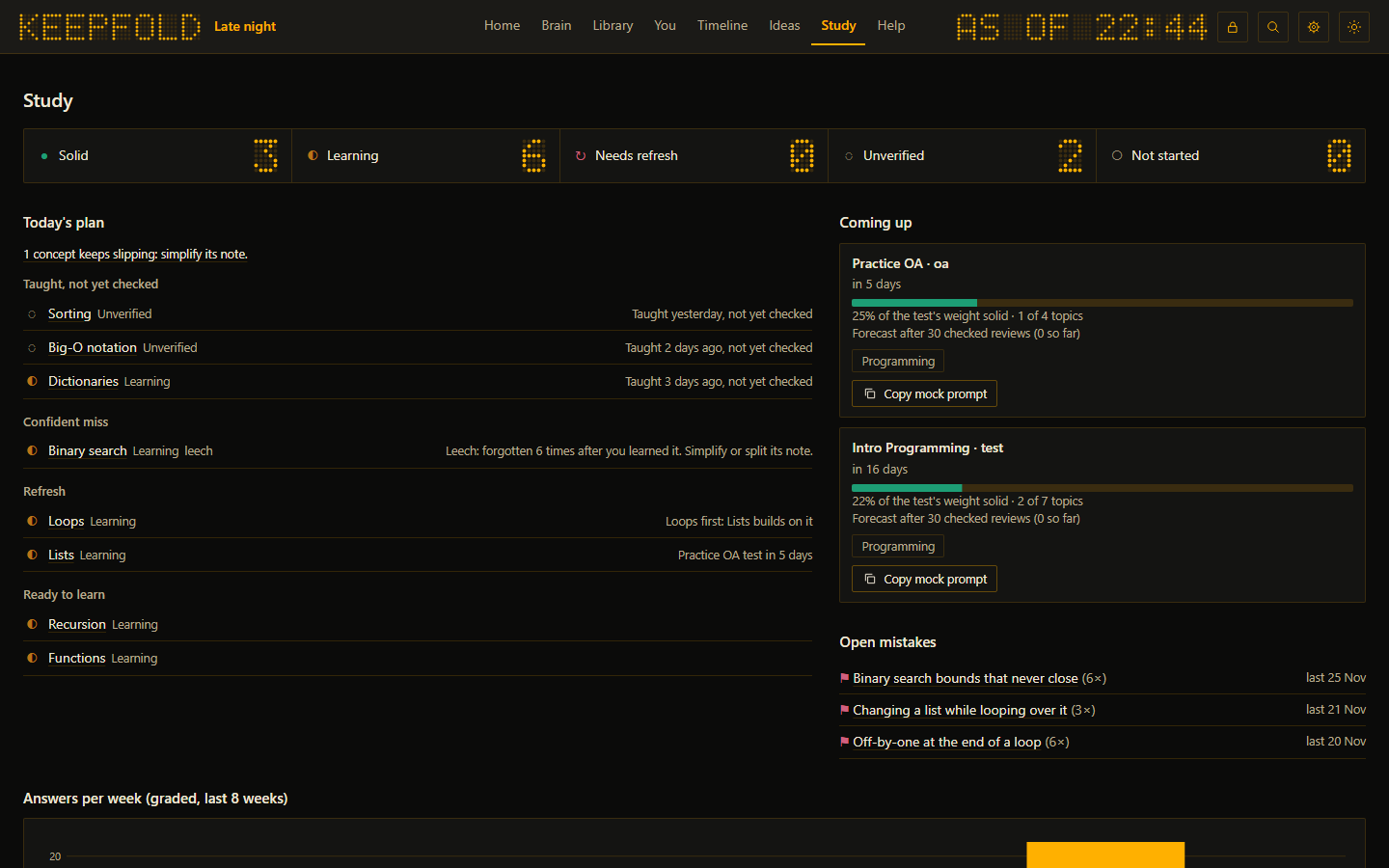
Study: today's revision plan, your coming tests and your open mistakes. It shows only if you study.
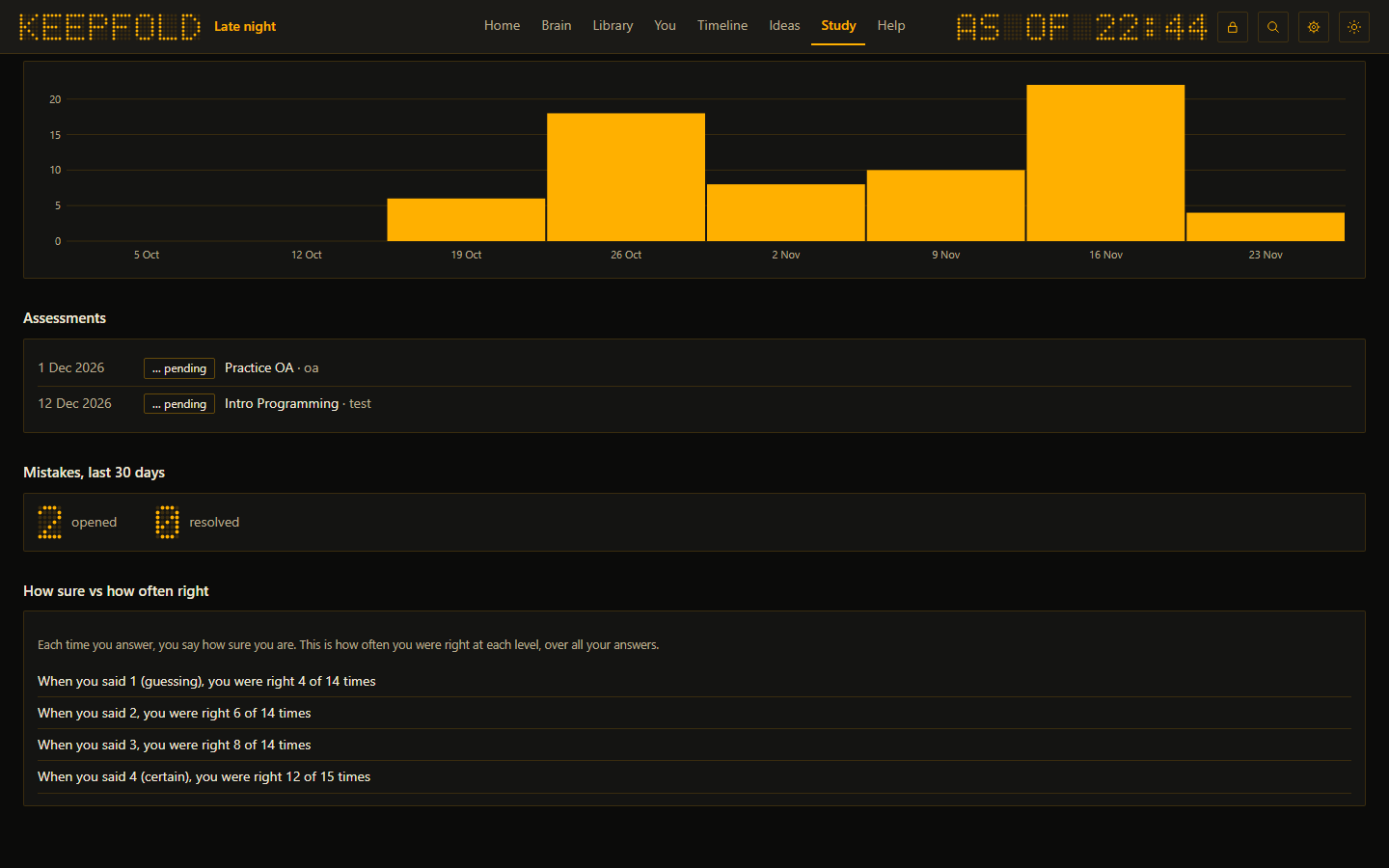
Confidence mirror: how often you were right, by how sure you said you were.
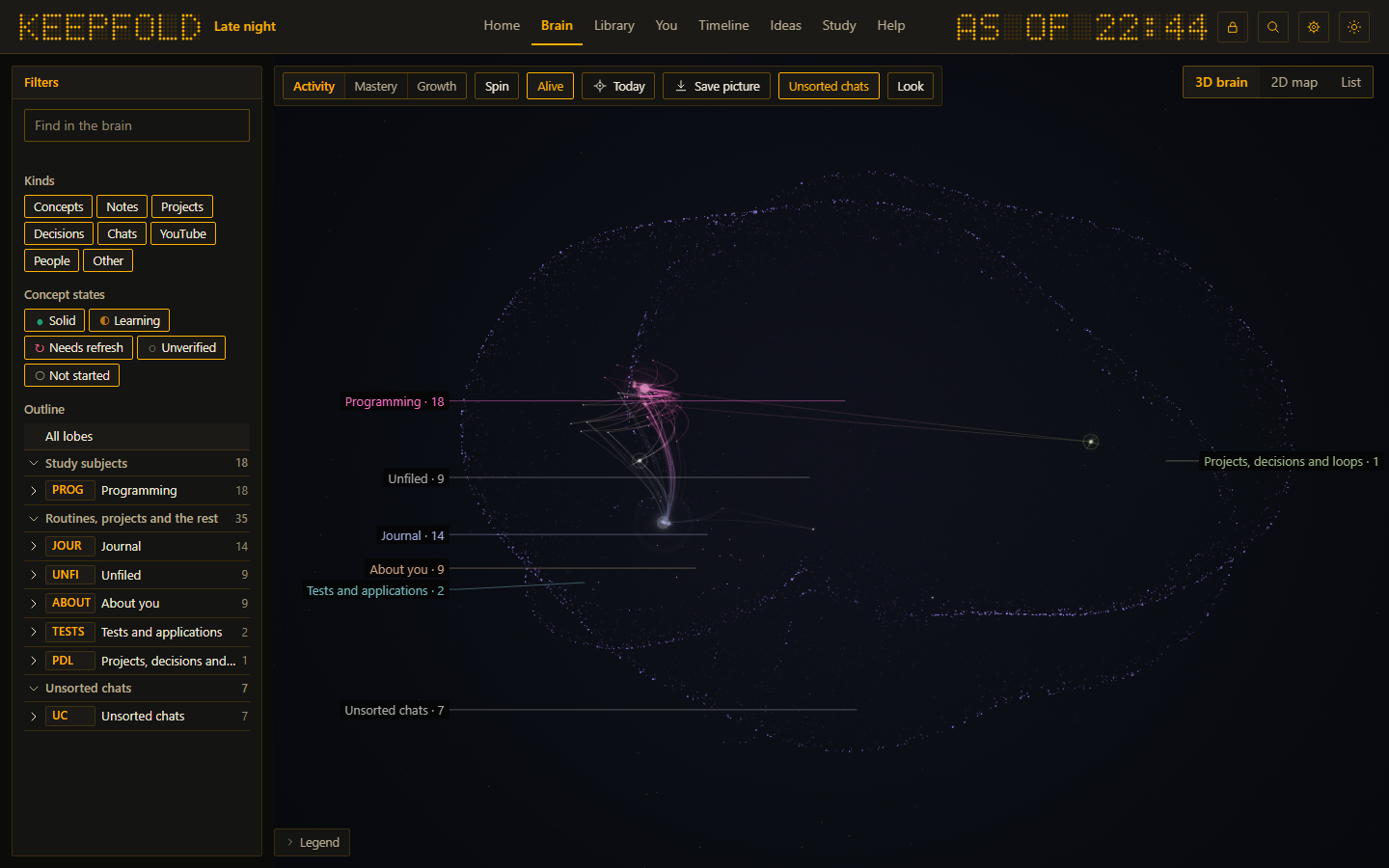
Brain: your vault drawn as a brain, one lobe per topic. Drag to turn it, click a page to see its links.
Install
- Download KeepfoldSetup.exe (Windows 10 or 11).
- Run it. The file is not signed, so Windows SmartScreen may say it "protected your PC": click More info, then Run anyway. Click Install. It needs the internet this once, for a few minutes, and no admin rights.
- Open Keepfold. A welcome guide walks you through the rest.
Connect your AI apps: step-by-step for each app. After connecting, restart Claude Code, or fully quit and reopen the Claude desktop app.
Later, open Keepfold from the Keepfold shortcut on the desktop or in the Start menu. It starts with Windows and keeps running in the tray when you close the window.
Updating: click Restart to update when it appears, or Check for updates under Status → Updates (0.1.0 has no such button: run a newer KeepfoldSetup.exe once). On 0.6.1 or older, the update check can't find new releases, because the GitHub repo was renamed: download KeepfoldSetup.exe from the releases page once and run it. Uninstalling: click Quit in the app, then remove Keepfold under Settings > Apps > Installed apps. Your vault and ~/.keepfold settings are kept; delete them yourself if you want them gone. Silent install options are in docs/INSTALL.md.
On macOS or Linux, or as a developer: see Install on macOS and Linux.
FAQ
Do I need to code? No. You install Keepfold, then click through the app. The terminal commands in this README are optional.
Does it cost anything? Keepfold is free and open source (MIT). Your AI apps' own plans are separate. The optional local model is free; the optional cloud model is billed by whichever provider you use.
Which AI apps work with it? Claude Desktop, Claude Code, Codex CLI, Gemini CLI, Cursor, VS Code (Copilot), Windsurf, Antigravity and LM Studio connect in one click; Zed, Cline, GitHub Copilot CLI and JetBrains Junie can be connected too. For ChatGPT and Gemini on the web, which can't plug in, the app gives you a short "context pack" to copy and paste. Step-by-step for each app.
Is my data private? Yes, by default. Everything stays in your folder and in ~/.keepfold/ on your computer. An AI app you connect sees only what Keepfold hands it (for Claude, that goes to Anthropic like the rest of your chat). Notes you mark private stay out of it, except a person's page that an app asks for by name. The details.
Will it slow my PC? In our measurement on a vault of 1,000 made-up pages, a long-running Keepfold process used about 510 MB of memory with its search models loaded, and about 190 MB after 10 idle minutes, when it lets the models go (how we measured). An optional local model needs more while it runs.
Mac or Linux? The installer is for Windows only, and Keepfold is tested most on Windows; its tests also run on macOS and Linux on every change. On macOS and Linux, install it with one uv command: see Install on macOS and Linux.
How do I report a problem? In the app, open Status, then Something not working?, press Copy details and paste them into a new issue (how). For a security or privacy problem, report it privately as SECURITY.md explains, never in a public issue.
Troubleshooting
Start with keepfold doctor (or Status in the app): it checks each part and prints a fix for anything wrong.
keepfold is not found. Run uv tool update-shell, then open a new terminal. (The Windows installer adds it to PATH for new terminals.)
The Claude desktop app shows keepfold as failed. Use the full path to keepfold in claude_desktop_config.json (find it with where.exe keepfold or which keepfold), then fully quit and reopen the app. docs/INSTALL.md section 7 has the entry to paste.
The first reply in a Claude Code chat is slow. The plugin's hook is loading your context. It waits at most 3 seconds, then asks Claude to load it instead.
The search model download failed. Search still works with keywords. Retry with keepfold model download.
Doctor warns about cloud sync. Move the vault out of OneDrive, Dropbox, Google Drive or iCloud: sync can break Keepfold's file lock and copies private pages off your computer.
git push is refused in my vault. On purpose: the vault's pre-push hook keeps it local.
My day ends late. Keepfold starts a new day at 04:00 in your computer's time zone.
I don't study. Do I see the study parts? No. The Study tab, exams and deadlines and the study lines on the home card appear only once your vault has a concept, a test or a grade.
Can I use it without Claude? Yes. Any MCP client can connect, and the CLI, the app and the dashboard work on their own. The /keepfold study modes are a Claude skill.
Where is my data? In the vault folder you chose, plus settings, models, logs and chat copies in ~/.keepfold/. Keepfold also leaves *.keepfold-*.bak backups beside the config and rules files of the AI apps you connect. To remove everything, follow docs/INSTALL.md section 11.
Words you will see
| Word | In plain words |
|---|---|
| Vault | Your Keepfold folder of plain notes and logs. |
| AI app | A chat or coding tool with an AI model, such as Claude or Cursor. |
| MCP | The standard way AI apps plug into tools. |
| Chat | The chat in the Keepfold app that answers from your own data. |
| Review | A short daily list of things only you can decide. |
| Home | The Keepfold app's first page. |
| Local model | An AI model that runs on your computer. Optional. |
All the names, in plain words.
For the curious and for developers
Everything below is detail: what each part does, the full privacy rules, measured numbers, how Keepfold is built and how to work on it. docs/GUIDE.md is the full user guide.
What Keepfold does
Keepfold keeps a picture of you and a store of what you know, in a folder of plain text files (Markdown notes and JSONL logs, the vault) that any editor can open. A software engineer can ask what they decided about a payments retry; a PhD student can ask which papers they read on contrastive learning; a student can ask what to revise tonight.
- It remembers what you do. Notes, decisions, projects, sources you read and facts about you are linked pages in the vault, and search finds them by meaning as well as by words.
- Every AI app starts with your context. In Claude Code, your first real message brings in your profile, your pinned core lines, the preferences that fit the message and a few related pages. Cursor, VS Code and Codex get your core lines in their rules file (the file that tells an app how to behave), and each app reads only what its profile allows.
- It saves your AI chats. Claude Code, Cowork and Claude desktop chats are saved as pages by themselves, with no model involved; coding sessions become short summaries, never code. You can import older exports from claude.ai, ChatGPT, Gemini and Perplexity.
- It brings in the rest of your history. Notes (Obsidian, Notion, any folder), calendars, documents (PDF, Word), your git projects, reading highlights (Kindle, Readwise, Pocket), sent mail, notes to yourself, Google activity (Search, YouTube and Chrome), location by city, photo dates, Spotify listening, voice memos (transcribed on your computer) and your browser history.
- It tidies by itself. What a chat infers about you is saved at once as a guess that AI apps see marked "(ask)". Near-duplicate lines collapse into one, and a newer line replaces the one it says it replaces. Each change can be undone. Review asks you about at most five things a day.
- It answers from your own data. Chat, on your computer, answers questions about your notes, saved chats, browsing and files you attach, with numbered sources. Counts, dates, site lists, day summaries and study questions are worked out by Keepfold itself, so they work with no model at all.
- It plans your study, if you study. Quiz answers, grades and mistakes are added to a log that is never rewritten. Mastery levels and memory states (FSRS-6, a spaced repetition method that predicts when you will forget) are worked out from that log every time and never stored, so a wrong grade can be cancelled and everything recomputes. A daily plan orders what to revise. People who do not study never see these parts.
- It stays on your computer. No account and no telemetry. The vault is a normal Obsidian vault with its own git history (your choice, git is a tool that records every change), so every change can be reviewed and undone.
The app, section by section
Keepfold is its own Windows app: a window and a tray icon. The window shows a page served on this computer only (at 127.0.0.1, an address that no other computer can reach, with a key that changes each launch); keepfold app opens the same page in a browser. docs/GUIDE.md describes every section in full.
- Private switch (header, Windows Hello): shows private notes and private browsing on the home page for 10 minutes; minimising the window locks it again. Chat answers from private notes without it, unless you turn off Private notes and browsing in Chat settings.
- Saved chats: past and new Claude Code, Desktop Code and Cowork chats become pages every 5 minutes, with no model. In the Claude desktop app's Chat tab, Claude logs each chat as it goes, and a safety net records topics a chat forgot to log.
- Setup: vault, connect AI apps, search model (a one-time download of about 150 MB; without it, search uses keywords only), add your history, local model, try it. Keepfold never changes notes already in the folder you pick.
- Add your history: when a claude.ai, ChatGPT or Google Takeout export lands in your Downloads folder, Home offers to import it in one click.
- Browsing: after your first import, new history comes in by itself every 10 minutes while the app runs, since browsers keep only about 90 days. The local model checks new page titles only while the computer is idle and the model is already loaded.
- Chat: never uses a cloud model. Attach a file to ask about a PDF, Word or text file; Save to your brain imports it. Questions about your own record ("what's due?", "summarize my week", "which sites did I visit this month?") are answered from Keepfold's data, even with no model.
- Review: at most five cards a day (Today's 5): lines that may steer an AI, teaching rules a chat suggested, lines that clash, corrections you repeated, decisions from your commit messages. Keys: J and K move, Y approves, N dismisses.
- Tonight (the start page between 8 p.m. and 4 a.m.): your day hour by hour, Today's 5, what each AI app saved today with one Undo per chat, and what is due tomorrow.
- Agent X-ray: what Keepfold told each AI app in its first calls. Pin a line to serve it in every chat, Mute one to never serve it, choose what each app may read, and Dry run a message.
- Local model: pick, load, test and download models; an optional slower Model for background work handles browsing imports.
- Home page tabs (also
keepfold dashboard): Home, Brain, Library, You, Timeline, Ideas, Help, and Study once your vault has a concept, a test or a grade. Export snapshot saves an offline copy of your non-private pages with no network access (content security policydefault-src 'none'). - Study: a test's readiness forecast stays hidden until Keepfold has 30 checked reviews to calibrate it.
keepfold today --minutes 30cuts the plan to fit;/keepfold mock paper 30builds a timed paper from your weak spots;/keepfold sweepasks 10 cold questions with "how sure? 1-4";keepfold digestsuggests topics for imported chats (a yes is never a grade).
Using it
With Claude
To add the Keepfold plugin to Claude Code yourself, run these two commands in a Claude Code session:
/plugin marketplace add alenissacsam-2/keepfold
/plugin install keepfold@keepfold
Talk normally. In Claude Code, the plugin's prime hook (a small script Claude Code runs for you) adds a short Keepfold context to your first real message of each chat (a greeting does not count); in the desktop app, Claude calls keepfold_prime, the Keepfold tool that loads that context, itself. Claude records lasting things as they come up and tells you briefly what it wrote. A line about who you are that Claude inferred is saved as a guess, marked "(ask)" until you confirm it. Start a line with //pref:, //fact: or //forget: and Keepfold saves it as your own words.
Type /keepfold [mode] [topic] for a deliberate session. The main modes:
| Command | What it does |
|---|---|
/keepfold |
Home card: what's due and what's waiting for you |
/keepfold learn [topic] |
Today's plan: retrieve first, teach the gap, re-test |
/keepfold review |
Only what is due for a refresh |
/keepfold short |
At most 5 small steps, for tired evenings |
/keepfold sweep |
10 cold questions across subjects, each with "how sure?" |
/keepfold mock |
A mock interview; /keepfold mock paper [15|30|45] for a timed paper |
/keepfold week |
This week's numbers and the confidence mirror |
/keepfold about <topic> |
What you know and have on a topic |
/keepfold capture |
Save a source and the ideas worth keeping |
/keepfold reflect |
The weekly review: confirm or drop lines about you, spot-check grades |
/keepfold help |
Every mode and command |
docs/GUIDE.md explains every mode, the 3D brain, browsing and the terms Keepfold uses.
In a terminal
| Command | What it does |
|---|---|
keepfold app |
Open the Keepfold app (--no-open prints the link only; --port N picks the port and stops if it is busy) |
keepfold today --minutes 30 |
Today's plan, cut to 30 minutes |
keepfold import <file> |
Import a chat export, notes, a calendar, Google activity, documents, git projects, highlights and more; --dry-run shows counts, --tier private keeps imported pages private |
keepfold ask "question" |
Answer from your notes, saved AI chats and browsing with your local model, with sources; --private adds private notes and private browsing (run it yourself, not through an AI app) |
keepfold recall "query" |
Search your vault by meaning and keywords |
keepfold doctor |
Health check, with a fix for each problem |
keepfold backup |
Zip the whole vault, history included |
keepfold undo <session> |
Revert one chat's changes |
keepfold exclude add <folder> |
Turn Keepfold off for chats in a folder |
keepfold --help lists every command, and docs/GUIDE.md explains the useful ones. The MCP tools and event schemas are in docs/tools.md.
Browsing
keepfold browse scan shows counts of your browser history without writing anything; keepfold browse import turns it into pages, private by default. New history then comes in by itself from your browsers' own history files. docs/GUIDE.md section 6 covers every step and setting.
Privacy
Keepfold is local-first: it works on your computer, not in a cloud. docs/PRIVACY.md has the full detail; in short:
- No account and no telemetry. Your vault is a folder you choose; settings live in
~/.keepfold/. - What reaches the internet: the one-time search model download; in the app, downloading Ollama or a local model when you click; and the app's update check, which asks GitHub for the latest Keepfold release a minute after the app starts and every 6 hours (an installed Keepfold downloads a newer installer in the background, and nothing is installed until you click Restart to update). Installing or upgrading fetches Python packages as usual.
- Servers listen on 127.0.0.1 only, an address no other computer can reach. The app needs a key that changes each launch. The MCP server talks to the AI app directly, not over the network.
- What the AI model sees. Whatever a Keepfold tool returns goes to the AI app you are chatting with (Anthropic, when you use Claude). Pages marked
private: trueare left out of search, recall and context.keepfold exclude add <folder>turns Keepfold off for chats in one folder. - Browsing has three settings per category. Don't save (adult, by default), Local AI only (health, money, betting, dating, sexuality, drugs and self-harm start here: only a model on this computer may read them), or Cloud AI apps can read. Nothing from browsing is visible to cloud AI apps until you turn that switch on. Sign-in, payment and bank pages that Keepfold's built-in lists recognise are dropped and never stored. Add any other site to
deny_domains. - The cloud model is off by default. If you opt in, it may sort and summarise only the Cloud AI apps can read categories. It needs an HTTPS address, reads its API key from an environment variable you name (a setting of your computer; the app never takes a key), sends at most 500 requests a run unless you change the cap, refuses a request that looks like it holds a secret, and logs counts only. It never sees a skipped or local-only category, and if no local model is running, local-only data is skipped rather than sent.
- Local models stay local. Keepfold talks to Ollama or LM Studio (programs that run models on your computer) on this computer only, ignores proxy settings and refuses models whose name marks them as cloud models (Ollama's
-cloud). - Do not publish your vault. It holds your profile and private pages; a pre-push hook (a git check that runs before sharing) in the vault stops an ordinary
git push(it is a guard against mistakes;git push --no-verifyskips it). If your vault already had a pre-push hook, Keepfold keeps yours.
How well it works
Every number in this section is measured by scripts in this repository on made-up data in a temp folder, never on a real vault. One command runs them all again and redraws the charts and tables below:
uv run python scripts/readme_numbers.py && uv run python scripts/readme_charts.py
The first script writes docs/benchmarks/results.json (numbers only, with each benchmark's exact arguments); the second draws the charts and fills in the tables of this section.
Measured on 2026-11-27 at commit b6f61d8, on AMD Ryzen 7 7435HS (16 logical cores), Windows-11-10.0.26200-SP0, Python 3.12.12; each time is the median of 3 runs.
Start-up and indexing
When an AI app starts Keepfold, it can call Keepfold's tools once the MCP server has answered its first message. The first time Keepfold opens a vault it builds a search index of every note; after that it starts from a saved snapshot and reads only the notes that changed. Script: scripts/bench_index.py (a vault with the mix of note kinds and lengths of a real one).
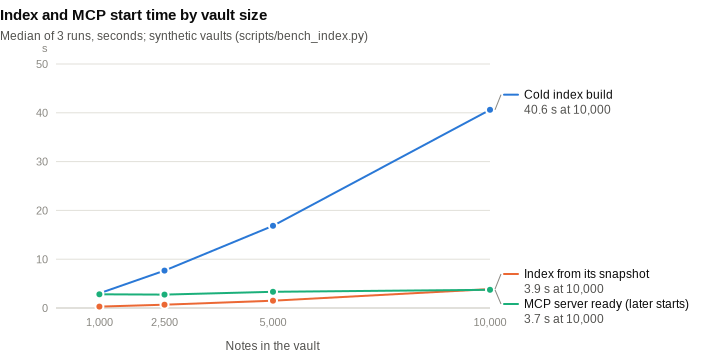
| Notes | Cold index build | Index from its snapshot | MCP ready, first start | MCP ready, later starts |
|---|---|---|---|---|
| 1,000 | 3.0 s | 290 ms | 3.0 s | 2.8 s |
| 2,500 | 7.7 s | 670 ms | 3.2 s | 2.8 s |
| 5,000 | 16.9 s | 1.5 s | 4.4 s | 3.3 s |
| 10,000 | 40.6 s | 3.9 s | 6.7 s | 3.7 s |
Search by meaning
Search by meaning scores every chunk of every page against your question. Adding a page embeds only that page, so the store stays current as you write. These runs use a fast stand-in for the search model, so they time Keepfold's own vector store and scoring; the real model adds the time it takes to embed your question. Script: scripts/bench_scale.py vectors.
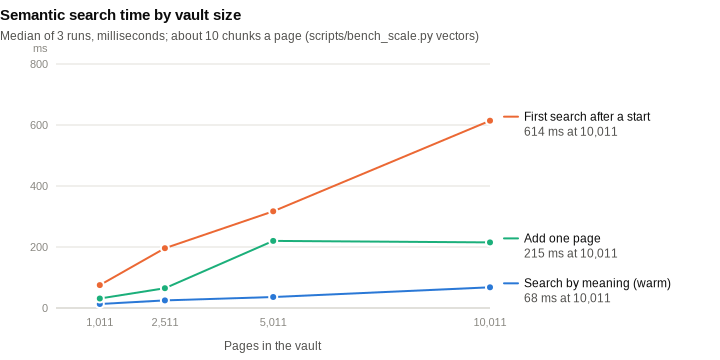
| Pages | Chunks | Search by meaning (warm) | First search after a start | Add one page |
|---|---|---|---|---|
| 1,011 | 10,011 | 13 ms | 75 ms | 31 ms |
| 2,511 | 25,011 | 25 ms | 196 ms | 65 ms |
| 5,011 | 50,011 | 36 ms | 317 ms | 220 ms |
| 10,011 | 100,011 | 68 ms | 614 ms | 215 ms |
Chat's answers from your own data
Questions such as "which sites did I visit this week?", "summarize my day" or "what's due?" are answered from Keepfold's records, not by a model. The vault here is heavy on purpose: 90 days of browsing with 2,000 sites a day, 10,000 notes and 20,000 study events. The first call after an import also reads the data into memory; later calls reuse it. In this run "Summarize my day" is the first question that needs the notes, so its first call also builds the search index of all 10,000 notes from scratch, which Keepfold does once per vault (see Start-up and indexing). Script: scripts/bench_chat_data.py.
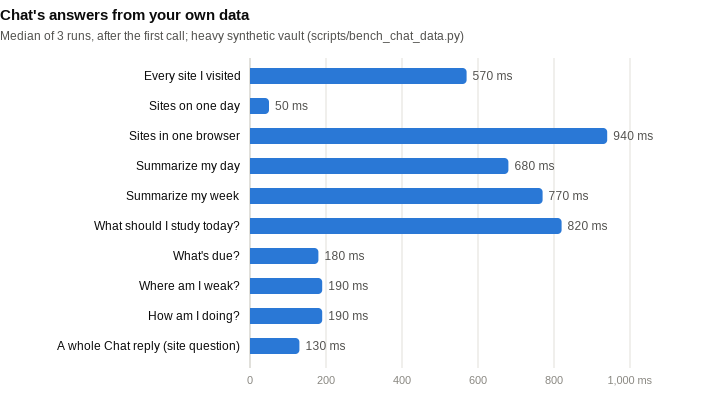
| Question | First call after an import | Later calls |
|---|---|---|
| Every site I visited | 630 ms | 570 ms |
| Sites on one day | 50 ms | 50 ms |
| Sites in one browser | 940 ms | 940 ms |
| Summarize my day | 58.4 s | 680 ms |
| Summarize my week | 1.1 s | 770 ms |
| What should I study today? | 860 ms | 820 ms |
| What's due? | 190 ms | 180 ms |
| Where am I weak? | 190 ms | 190 ms |
| How am I doing? | 200 ms | 190 ms |
| A whole Chat reply (site question) | 130 ms | 130 ms |
The Chat test
The Chat test asks Chat 60 questions about a made-up person and scores each answer in code, with no AI judge (keepfold chat eval, or Run Chat test in the app). These runs never load a model, so only the questions Keepfold answers from its own data (counts, first and last dates, study states, an empty month, a private project with Private off) can run. The others are shown as needing a local model, not as failures. Source: src/keepfold/chat_eval.py, run by readme_numbers.py as keepfold chat eval --no-model does.
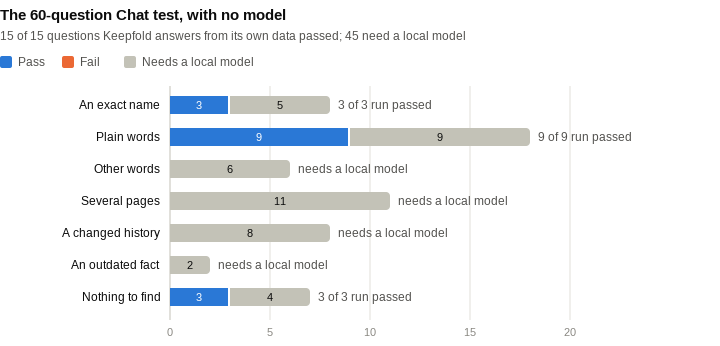
| The search a question needs | Pass | Fail | Needs a local model |
|---|---|---|---|
| An exact name | 3 | 0 | 5 |
| Plain words | 9 | 0 | 9 |
| Other words | 0 | 0 | 6 |
| Several pages | 0 | 0 | 11 |
| A changed history | 0 | 0 | 8 |
| An outdated fact | 0 | 0 | 2 |
| Nothing to find | 3 | 0 | 4 |
| All 60 | 15 | 0 | 45 |
Browsing history
The first import reads a whole year of history once. After that the app reads only what is new every 10 minutes, so a live read stays short. Script: scripts/bench_scale.py browse (no local model).
| Browsing history (synthetic, 5,000 sites over a year) | Time |
|---|---|
| First import of 50,000 visits | 50.8 s |
| The next import with nothing new | 90 ms |
| A live read of 50 new visits (the app does this every 10 minutes) | 2.7 s |
Tests
4,845 automated tests (uv run pytest --collect-only -q).
They use only made-up data in tests/fixtures/ and temp folders.
What is not measured here
- How good Chat's answers are with a local model: the 26 Chat test questions that need one. Run
keepfold chat evalwith a 2B model loaded to see them. - The real search model's time to embed a question or a page (the vector runs use a fast stand-in).
- How fast chat exports, notes, documents and the other sources import.
- Memory and disk use (beyond the snapshot size), the app's page load and the 3D brain's frame rate.
- macOS and Linux: every number above comes from one Windows laptop.
- Whether the study plan and readiness forecasts predict real test results.
How Keepfold differs
Other open-source memory projects, compared only on facts each one states in its own README and license. This table says nothing about their speed or quality.
| Project | License | Where the data lives | Storage | Models its README names |
|---|---|---|---|---|
| Keepfold | MIT | A folder on your computer | Markdown and JSONL files (an Obsidian vault), with a SQLite search index | A local embedding model for search by meaning (optional); an optional local chat model (Ollama or LM Studio) |
| Graphiti (README) | Apache-2.0 | A graph database you run (Neo4j, FalkorDB or Amazon Neptune); self-hosted | A temporal knowledge graph of entities, facts and episodes | An LLM and an embedder you supply; OpenAI by default, local servers such as Ollama or LM Studio through OpenAI-compatible endpoints |
| Basic Memory (README) | AGPL-3.0 | Your disk; an optional paid hosted cloud | Markdown files, searched on SQLite or Postgres | FastEmbed embeddings; an optional reranker (a local FastEmbed cross-encoder or a LiteLLM provider) |
| claude-mem (README) | Apache-2.0 | ~/.claude-mem on your computer; cloud sync is opt-in |
SQLite, with Chroma for semantic search | An observer model that turns tool activity into observations (its providers include Claude and OpenRouter) |
Licenses are from each repository's license as GitHub reports it; the rest is from each README as of November 2026.
How it works
flowchart LR
    subgraph apps["AI apps"]
        CC["Claude Code"]
        CD["Claude desktop"]
        OT["Gemini CLI, Cursor, VS Code, Windsurf, Codex, LM Studio"]
    end
    subgraph pc["Your computer"]
        MCP["MCP server<br/>keepfold mcp (stdio)"]
        CLI["CLI<br/>keepfold ..."]
        APP["Keepfold app<br/>127.0.0.1 + key"]
        VW["keepfold.vault<br/>lock, temp file, atomic replace, secret scan"]
        VAULT[("Vault in git<br/>Markdown notes + JSONL events")]
        IDX["Search<br/>SQLite FTS5 + local embeddings"]
        FOLD["Levels and FSRS states<br/>folded from events"]
        DASH["Home and dashboard<br/>3D brain, Review, X-ray"]
        IMP["Importers<br/>chats, notes, calendar, Takeout, documents, more"]
        BR["Browse brain<br/>history import + receiver"]
        LLM["Local model<br/>Ollama or LM Studio"]
    end
    CLOUD["Cloud model<br/>opt-in, off by default"]
    CC & CD & OT -->|MCP| MCP
    MCP --> VW
    CLI --> VW
    APP --> VW
    IMP --> VW
    BR --> VW
    VW --> VAULT
    VAULT --> IDX
    VAULT --> FOLD
    FOLD --> DASH
    IDX --> MCP
    LLM -.->|summaries, Chat| APP
    LLM -.-> BR
    BR -.->|"only 'cloud may read' categories"| CLOUD
- The vault is the source of truth. Notes are Markdown with YAML front matter; learning evidence is JSONL events under
events/. Every write goes through one module that takes a lock, writes a temp file and replaces the old one atomically, and refuses text that looks like a secret. With git on, each chat's changes are one git commit. - Everything else is derived and disposable: the search index, the vector cache, levels, the plan and the dashboard. Delete them and Keepfold rebuilds them.
- Search combines SQLite full-text search with a small embedding model that runs locally (about 150 MB, downloaded once).
- Note text is treated as untrusted. Over MCP it is wrapped in
<untrusted_note>tags so the model can tell your notes from instructions; in cards and the dashboard it is escaped and stripped of links and images.
A study session, step by step
- You type
/keepfold learnin Claude. The skill callskeepfold_start, which opens a session and returns the plan. - For each item Claude usually calls
keepfold_askto log the question (and, when it has one, a short expected answer), then asks you. You answer and say how sure you are, 1 to 4. - Claude calls
keepfold_gradewith the verdict, the hints used and any mistake. The server stamps the event's id, time and source; the tool input cannot set them. - The levels fold replays the log: the concept's state (Not started, Unverified, Learning, Needs refresh, Solid) and its FSRS memory card (stability, difficulty, next due date) update.
- The next
keepfold_startorkeepfold todayplans from the new state. When the chat ends, the session closes and its changes become one git commit;keepfold undo <session>reverts it.
The tool schemas are in docs/tools.md.
Local models
A local model is optional. Keepfold uses it to sort and summarise your browsing, to answer in Chat and to find facts about you in your recent chats while the computer is idle. It never leaves your computer.
- Ollama is recommended: the app's Setup can install it (
wingeton Windows, Homebrew on macOS; on Linux it shows the command). - LM Studio is the alternative, through its own
lmscommand.
Model sizes the app suggests (Qwen 3.5):
| Memory (graphics memory with an NVIDIA card, otherwise RAM) | Model |
|---|---|
| under 6 GB | qwen3.5:2b |
| 6 to 10 GB | qwen3.5:4b (the default) |
| 10 GB or more | qwen3.5:9b |
Without an NVIDIA card the app recommends at most the 4B model; the 9B one stays selectable. Without the app: install Ollama, run ollama pull qwen3.5:4b, add localllm: {enabled: true} to ~/.keepfold/config.yaml, and check with keepfold llm status.
Install on macOS and Linux
Keepfold is on PyPI. With uv installed, in a terminal:
uv tool install keepfold
keepfold setup
keepfold app
keepfold setup asks where your vault goes and connects Claude; keepfold app opens the app in your browser, where Connect adds your other AI apps. Update later with uv tool upgrade keepfold. This also works on Windows if you'd rather skip the installer.
From source
This is the way for developers. You need uv and git. In a terminal:
git clone https://github.com/alenissacsam-2/keepfold ~/Keepfold-app
cd ~/Keepfold-app
uv tool install --editable .
~/.local/bin/keepfold app
On Windows without the installer, use PowerShell:
git clone https://github.com/alenissacsam-2/keepfold "$HOME\Keepfold-app"
cd "$HOME\Keepfold-app"
uv tool install --editable .
& "$HOME\.local\bin\keepfold.exe" app
Keep the Keepfold-app folder: the installed program runs from it (it also holds the Claude Code plugin and the Chat skill). If a new terminal says keepfold is not found, run uv tool update-shell and open a new terminal. docs/INSTALL.md has every step for a first-time user, manual setup for each client, updating and a full uninstall.
Prefer a terminal to the app's Setup? keepfold setup asks the core questions (vault, sample, search model, Claude Code plugin, Claude desktop config) and runs the checks. keepfold setup --dry-run shows the plan and changes nothing; keepfold setup --sample adds the sample vault of Sam, a made-up student, so you can try things at once (keepfold sample remove clears it later).
Development
git clone https://github.com/alenissacsam-2/keepfold keepfold
cd keepfold
uv sync
uv run pytest -m "not slow"   # the quick loop
uv run pytest -n auto         # the full suite on every core, before a commit
uv run pytest -m perf         # the timing benchmarks, alone (they skip under -n)
uv run ruff check
Always run Python through uv run. Tests use only synthetic data in tests/fixtures/; two read-only smoke tests run against a real vault only when KEEPFOLD_REAL_VAULT is set. The rules for contributors and AI agents are in CLAUDE.md, and filemap.md describes every file.
- README numbers:
uv run python scripts/readme_numbers.py && uv run python scripts/readme_charts.pyre-measures everything in How well it works on made-up data, redraws the charts and rewrites its tables. Run it on a quiet machine.readme_numbers.py --quickis a fast smoke run with small sizes. - Windows installer:
uv run python installer/build.pybuildsdist/KeepfoldSetup.exe(Windows only). The sources are in installer/. - The
/keepfoldskill: editskills/keepfold/, then runuv run python scripts/build_skills.pyto refresh the plugin copy anddist/keepfold-skill.zip. - A demo vault:
uv run keepfold init <folder>thenuv run python scripts/make_demo_vault.py <folder>fills a throwaway vault with Sam, the made-up student, and made-up study history, as in the screenshots. Never point it at a real vault.
Layout in brief: src/keepfold/ is the Python package (vault.py for every write, events.py for the log, levels.py for the folds, planner.py for Today, mcp_server.py for the tools, cli.py for the commands, app/ for the Keepfold app, browse/ for browsing); src/keepfold/assets/ holds the dashboard and app pages; plugin/ is the Claude Code plugin.
Found a problem?
In the app, open Status, then Something not working?, and press Copy details: it copies versions and what is on or off, never your notes, chats, browsing or file paths. Paste it into a new report on the Issues page; see CONTRIBUTING.md.
License
MIT. See LICENSE.
1 maintainer

Metadata
1 maintainer
Release files for keepfold 0.6.4
For a detailed explanation of source distributions (sdists) and built distributions (wheels), please see the package formats documentation.
Source distribution (sdist)
| File | Size | Uploaded | Provenance | Actions |
|---|---|---|---|---|
| keepfold-0.6.4.tar.gz | 1.3 MB | With provenance | Details for keepfold-0.6.4.tar.gz |
Built distribution (wheel)
| File | Interpreter | ABI | Platform | Actions Reset |
|---|---|---|---|---|
| keepfold-0.6.4-py3-none-any.whl | Python 3 | none | any | Details for keepfold-0.6.4-py3-none-any.whl |
Total release size: 2.7 MB
Release files / keepfold-0.6.4.tar.gz
| Download URL | keepfold-0.6.4.tar.gz |
|---|---|
| Size | 1.3 MB |
| Tags | Source |
|
SHA-256 checksum How to use checksums |
bcdbff94d0cb0913004691109a8cacdbd01e99463a862f9f7ddb4cce1a74030e
|
|
BLAKE2b-256 checksum How to use checksums |
8ea10fc643db11b5fbfa9596c214f48866f9f2b0777c5b5383355785d3788828
|
| Upload date | |
|
Uploaded using Trusted Publishing? What is trusted publishing? |
Yes |
| Uploaded via |
twine/7.0.0 CPython/3.13.16
|
Provenance
Provenance describes where a file came from. On PyPI, provenance is shared via attestations, which provide a verifiable record of the build or publishing details. View details, limitations and caveats.


PyPI Publish Attestation
PyPI verified that this artifact, at this checksum, originated from the publisher listed below.
Signed by GitHub Actions, verified by PyPI on Nov 27, 2026.
Transparency logRelease files / keepfold-0.6.4-py3-none-any.whl
| Download URL | keepfold-0.6.4-py3-none-any.whl |
|---|---|
| Size | 1.4 MB |
| Tags | Python 3 |
|
SHA-256 checksum How to use checksums |
7663eb001d9903e4cb3e791163db0b9a6a9ded94e448694bc7114f6e79ddb0c0
|
|
BLAKE2b-256 checksum How to use checksums |
0cdcb3224d8cf68b0f3284eccff50cc6dc7ea68562a17ad8f1e8309936d9d366
|
| Upload date | |
|
Uploaded using Trusted Publishing? What is trusted publishing? |
Yes |
| Uploaded via |
twine/7.0.0 CPython/3.13.16
|
Provenance
Provenance describes where a file came from. On PyPI, provenance is shared via attestations, which provide a verifiable record of the build or publishing details. View details, limitations and caveats.
PyPI Publish Attestation
PyPI verified that this artifact, at this checksum, originated from the publisher listed below.
Signed by GitHub Actions, verified by PyPI on Nov 27, 2026.
Transparency logSecurity for keepfold 0.6.4
Provenance
Provenance describes where a file came from. On PyPI, provenance is shared via attestations, which provide a verifiable record of the build or publishing details. View details, limitations and caveats.
Full provenance
Both files in this release have been uploaded with provenance metadata.
Attestation for keepfold-0.6.4.tar.gz
PyPI Publish Attestation
PyPI verified that this artifact, at this checksum, originated from the publisher listed below.
Signed by GitHub Actions, verified by PyPI on Nov 27, 2026.
Transparency logA note on package security
PyPI is a repository for distributing packages, not a service for auditing them. While third-party security researchers and our staff do their best to detect and remove malicious packages, PyPI cannot guarantee the quality, security or suitability of any given package.
To learn more about protecting yourself from malicious actors, visit our package security documentation.













