
A knowledge sidecar for Claude Code

Project description
keephive


A knowledge sidecar for AI agentsClaude Code gets the full hook stack; every MCP-aware agent can tap the same memory, log, and audit tools. |
|
TLDR
- Install:
curl -fsSL https://raw.githubusercontent.com/joryeugene/keephive/main/install.sh | bash - Connect your agent. Claude Code discovers seven hooks automatically. Any MCP client can run
keephive mcp-serveand call the same tools. - Look around:
hive status(h s),hive log(h l),hive todo - Visual overview:
hive serve(h ws) opens a browser dashboard at localhost:3847 - Periodic cleanup:
hive verify(h v),hive reflect(h rf),hive audit(h a)
[!NOTE] Not on Claude Code? Run
keephive mcp-serve, point your MCP-compatible agent at the stdio endpoint, and you still get memory, recall, audit, and dashboard tooling.
Everything else on this page is optional depth.
[!TIP] Shortcuts everywhere. Three CLI names:
keephive,hive,h. Every command has a short alias (h s,h r,h rc,h v,h rf,h a). Guides and prompts resolve by slug, prefix, or substring:h p pr-re → pr-review-git-staged-diff-analysis.md h k agent → agent-principles.md h n code-review → starts note from code-review prompt template h go pr-re → launches session with pr-review prompt loadedYou never type a full name. Two keystrokes for the command, a few more for the target.
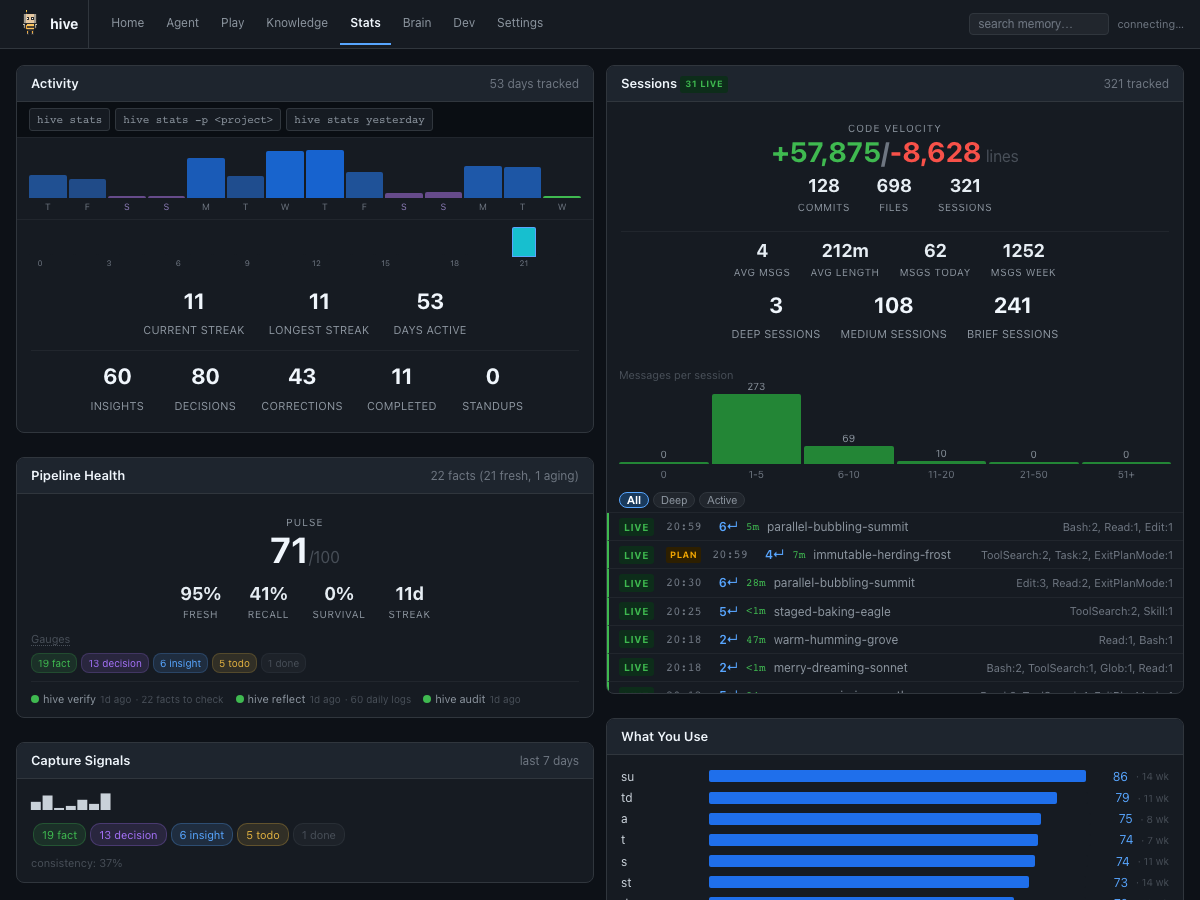

After a few sessions, hive shows what your agent has learned:

Keep your agent orientated across platforms. The new hive serve /brain view condenses working memory, rules, TODOs, and platform telemetry into a single high-density dashboard. It highlights the active backend, queued LLM work, and which agents (Claude, Gemini, Codex) are feeding data back into keephive.
Text output
$ hive
keephive v1.2.0
  ● hooks  ● mcp  ● data  ● daemon

  4 facts (4 ok) | 12 today | 8 yesterday | 2 guides | 48K
  42 cmds today · 120 this week · 5d streak ▁▂▅▃█▇▂▁▁▃▅▆▇█▂▁▁▁▁▁▁▁▁

  1 open TODO(s):
    [today] Add rate limiting to the /upload endpoint.

  Today:
  ~ [10:42:15] FACT: Auth service uses JWT with RS256, tokens expire after 1h.
  ~ [10:38:01] DECISION: Chose Postgres over SQLite for multi-user support.
  ~ [09:15:44] INSIGHT: The retry logic in api_client.py silently swallows 429s.
  [09:12:30] DONE: Migrate user table to new schema.

  Active draft: slot 1 · "api testing todo list..." (47 words)  ->  hive nc

  hive go (session) | hive inbox (ib) | hive l (log) | hive rf (reflect) | hive help
Install
curl -fsSL https://raw.githubusercontent.com/joryeugene/keephive/main/install.sh | bash
One command. Installs keephive, registers 7 hooks and an MCP server, and verifies everything. Requires uv. Run once; re-run after upgrades.
Or install manually:
uv tool install keephive
keephive setup
Via pip:
pip install keephive
keephive setup
From source:
git clone https://github.com/joryeugene/keephive.git
cd keephive && uv tool install . && keephive setup
Multi-agent setup
keephive setupdetects Claude, Gemini, and Codex CLIs and installs the sharedkeephive-helperskill in each environment.- Gemini and Codex receive lightweight hook shims that mirror the Claude lifecycle so telemetry and captures stay in sync.
- All data now lives under
~/.keephive/; legacy~/.claude/hiveinstalls are migrated with a compatibility symlink.
Stay up to date
hive up                    # upgrade in place (recommended)
uv tool upgrade keephive   # manual alternative; run keephive setup after
[!TIP] Run
keephive setupagain after upgrading manually to sync hooks and the MCP server registration to the new binary path.
When to use what
Every day (bread and butter)
| I want to... | Command |
|---|---|
| See what's going on | hive status (hive s) |
| Save something I learned | hive remember "FACT: ..." (hive r) |
| Find something from before | hive recall <query> (hive rc) |
| Track a task | hive todo "fix auth" (hive t) |
| Mark a task done | hive todo done "auth" (hive td) |
| See today's log | hive log (hive l) |
Visual overview
| I want to... | Command |
|---|---|
| Browse everything in a browser | hive serve |
| Quick terminal glance | hive status (hive s) |
| Watch for changes live | hive status --watch |
| See active sessions | hive ps |
Weekly maintenance (when things accumulate)
| I want to... | Command |
|---|---|
| Check if old facts are still true | hive verify (hive v) |
| Find patterns in daily logs | hive reflect (hive rf) |
| Get a quality assessment | hive audit (hive a) |
| Archive old logs | hive gc |
| Block all LLM calls (privacy) | hive privacy on (hive pv) |
| Restrict to claude -p subscription | hive privacy cli (hive pv) |
Power features (when you need them)
| I want to... | Command |
|---|---|
| Launch a focused session | hive session (hive go) |
| Run a session with a custom prompt | hive go <prompt> (prefix match) |
| Edit memory/rules/todos directly | hive edit <target> (hive e) |
| Use a multi-slot scratchpad | hive note (hive n) |
| Create a knowledge guide | hive knowledge edit <name> (hive ke) |
| Generate a standup | hive standup (hive su) |
| See what KingBee surfaced | hive inbox (hive ib) |
| Start an autonomous task loop | hive run "<task>" (hive rn) |
| Review KingBee improvement ideas | hive improve list (hive im) |
| Quick pipeline health check | hive checkup (hive ck) |
How it works
keephive ships two integration layers:
- Agent-agnostic CLI + MCP server. Every
hivecommand is available over stdio viakeephive mcp-serve, so any MCP-compatible agent can capture, recall, verify, and audit without touching the Claude stack. - Agent hook suite (Claude, Gemini, Codex). When a supported CLI is present, keephive installs the
keephive-helperskill and hook shims so each agent follows the same capture→recall→verify loop. Claude keeps the rich lifecycle (SessionStart, PreCompact, etc.); Gemini receives SessionStart / BeforeTool / AfterModel Python shims; Codex gets a notify bridge. All hooks call the samehivecommands and write normalized telemetry under~/.keephive/telemetry/<platform>/.- Hooks fire on agent events (session start, tool runs, prompt submits) to capture insights and inject context automatically.
- MCP server exposes shared tools (
hive_remember,hive_recall, etc.) so any MCP host can read and write memory directly. - Context injection still surfaces verified facts, behavioral rules, stale warnings, matching guides, and TODOs at session start via each platform's hook output.
The loop
  capture --> recall --> verify --> correct
     ^                                 |
     +---------------------------------+
- Capture: The PreCompact hook extracts FACT/DECISION/TODO/INSIGHT entries when conversations compact. It reads the full transcript, classifies insights via LLM, and writes them to today's daily log.
- Recall: Captured entries surface automatically at the next session start via context injection.
hive rcsearches all tiers directly;hiveshows current state. - Verify: Facts carry
[verified:YYYY-MM-DD]timestamps. After 30 days (configurable), they are flagged stale.hive vchecks them against the codebase with LLM analysis and tool access. - Correct: Invalid facts get replaced with corrected versions. Valid facts get re-stamped. Uncertain facts get flagged for human review.
Full architecture: see Architecture below.
Architecture
The diagram below shows the Claude Code integration path; MCP-only clients reuse the same knowledge store and tools without the hook cycle.
flowchart TD
    subgraph CYCLE["Session Cycle (8 hooks)"]
        direction LR
        START([New session]) -->|"SessionStart:<br>inject context + style hint"| WORK([Working])
        WORK -->|"PostToolUse · UserPromptSubmit:<br>recency-gated nudge, ui-queue"| WORK
        WORK -->|"Stop:<br>turn count, micro-nudge"| WORK
        WORK -->|"TaskCompleted:<br>auto-log DONE"| WORK
        WORK -->|"SubagentStop:<br>INSIGHT or DONE breadcrumb"| WORK
        WORK -->|context full| PC["PreCompact:<br>extract → log<br>+ pending-facts queue"]
        PC -->|next session| START
        WORK -->|session ends| SEND["SessionEnd:<br>finalize stats"]
    end

    subgraph LLM["LLM Routing (priority chain)"]
        direction LR
        ACLI["claude -p CLI<br>(priority 10, default)"]
        AAPI["Anthropic API<br>(priority 20)"]
        GAPI["Gemini API<br>(priority 25)"]
        OAPI["OpenAI API<br>(priority 30)"]
        NONE["none / offline<br>(priority 99)"]
        ACLI -->|"timeout → non-retriable"| NONE
        ACLI -->|"error in auto mode"| AAPI
        AAPI -->|"error"| GAPI
        GAPI -->|"error"| OAPI
        OAPI -->|"error"| NONE
    end

    subgraph STORE["Knowledge Store (~/.keephive/hive/)"]
        MEM[("Memory<br>30–90d TTL")]
        SOUL[("SOUL.md<br>agent identity")]
        GUIDES[("Guides")]
        RULES[("Rules")]
        LOG[("Daily log")]
        TODOS[("TODOs")]
        PENDING[(".pending-facts")]
        STATS[(".stats.json<br>workflow analytics")]
    end

    subgraph DAEMON["KingBee Daemon (background)"]
        BRIEF["morning briefing"]
        IMPROVE[(".pending-improvements")]
        STALECK["stale-check scan"]
        STANDUP["standup-draft"]
        WANDER["wander exploration"]
    end

    subgraph CC["Claude Code Data (~/.claude/usage-data/)"]
        META[("session-meta/<br>msgs, tools, duration,<br>lines, tokens, commits")]
        FACETS[("facets/<br>outcome, friction,<br>satisfaction")]
    end

    subgraph MANUAL["On-demand (CLI · MCP)"]
        REM["hive r · capture"]
        RCL["hive rc · recall"]
        VRF["hive v · verify"]
        REV["hive mem review"]
        RFL["hive rf · reflect"]
        DASH["hive serve · dashboard<br>+ bookmarklet"]
        STCMD["hive stats · hive insights"]
    end

    START -->|reads| STORE
    PC --> LOG
    PC --> PENDING
    PC -->|"soul-update (if data, throttled 1h)"| SOUL
    PC -.->|LLM classify| LLM
    VRF -.->|LLM verify| LLM
    LOG -->|"hive rf · promote"| MEM
    PENDING -->|"hive mem review"| MEM
    MEM -->|"hive v · re-stamp"| MEM
    REM --> LOG
    RCL -.->|searches| STORE
    VRF --> MEM
    REV --> MEM
    RFL --> GUIDES
    DASH -.->|reads| STORE
    DASH -.->|"session analytics"| CC
    STCMD -.->|"session analytics"| CC
    STCMD -.->|"workflow analytics"| STORE
    SEND -.->|".stats.json"| STATS
    DAEMON -->|reads/writes| STORE
    DAEMON --> BRIEF
    DAEMON --> IMPROVE
    DAEMON --> STALECK
    DAEMON --> STANDUP
    DAEMON --> WANDER

    classDef ccdata fill:#1a1a2e,stroke:#4a9eff,stroke-width:2px,color:#4a9eff
    class META,FACETS ccdata
Memory tiers
| Tier | Path | Purpose |
|---|---|---|
| Working memory | ~/.keephive/hive/working/memory.md |
Core facts, loaded every session |
| Rules | ~/.keephive/hive/working/rules.md |
Behavioral rules for the agent |
| Knowledge guides | ~/.keephive/hive/knowledge/guides/ |
Deep reference on specific topics |
| Daily logs | ~/.keephive/hive/daily/YYYY-MM-DD.md |
Append-only session logs |
| Archive | ~/.keephive/hive/archive/ |
Old daily logs after gc |
Hooks
| Hook | Trigger | What it does |
|---|---|---|
| SessionStart | New session | Injects memory, rules, TODOs, stale warnings, Agent Identity, style hint |
| PreCompact | Conversation compacts | Extracts insights; triggers throttled soul-update |
| PostToolUse | After Edit/Write | Periodic nudge (recency-gated) to record decisions |
| UserPromptSubmit | User sends prompt | Periodic nudge (recency-gated), UI queue injection |
| Stop | Agent turn ends | Increments turn counter, periodic micro-nudge |
| SessionEnd | Session terminates | Finalizes session stats with accurate end timestamp |
| TaskCompleted | Task marked done | Auto-logs DONE entry to daily log |
| SubagentStop | Task subagent done | Logs SUBAGENT-INSIGHT (haiku extraction) or SUBAGENT-DONE breadcrumb |
See the loop above.
Use it with other MCP clients
-
keephive mcp-serve— starts the stdio server. Leave it running (or supervise it via your agent's process manager). -
Add an MCP entry to your client. Most configs look like:
{
  "mcpServers": {
    "keephive": {
      "command": "keephive",
      "args": ["mcp-serve"]
    }
  }
}
-
Call the tools you need (
hive_recall,hive_status,hive_todo,hive_audit, etc.). They match the CLI one-for-one, so scripts and agents can share the same workflows.
If your agent exposes lifecycle hooks (session start, prompt submit, completion), map them to the same hive commands the Claude integration uses: call hive remember/hive todo to capture, hive status or hive recall before prompts, hive verify on a schedule. You get the same knowledge loop without depending on Claude Code internals.
Commands
Full command reference
| Command | Short | What |
|---|---|---|
| Capture | ||
hive remember "text" |
hive r "text" |
Save to daily log |
hive t <text> |
Quick-add a TODO | |
hive note |
hive n |
Multi-slot scratchpad ($EDITOR) |
hive n todo |
hive 4 todo |
Extract action items from a note slot |
| Recall | ||
hive status |
hive / hive s |
Status overview |
hive recall <query> |
hive rc <query> |
Search all tiers (BM25 ranked) |
hive log [date] |
hive l |
View daily log; hive l summarize for LLM summary |
hive todo |
hive td |
Open TODOs with ages |
hive todo done <pat> |
Mark TODO complete | |
hive knowledge |
hive k |
List/view knowledge guides |
hive prompt |
hive p |
List/use prompt templates |
hive ps |
Active sessions, project activity, git state | |
hive session [mode] |
hive go |
Launch interactive session |
hive standup |
hive su |
Standup summary with GitHub PR integration |
hive stats |
hive st |
Usage statistics |
| Verify | ||
hive verify |
hive v |
Check stale facts against codebase; auto-corrects |
hive reflect |
hive rf |
Pattern scan across daily logs |
hive audit |
hive a |
Quality Pulse: 3 perspectives + synthesis |
hive flow |
Guided maintenance flow: one-pass review | |
| Manage | ||
hive mem [rm] <text> |
hive m |
Add/remove working memory facts |
hive rule [rm] <text> |
Add/remove behavioral rules | |
hive rule learn |
Learn rules from /insights friction data | |
hive rule review |
Accept/reject pending rule suggestions | |
hive improve review |
Review pending identity/skill improvements | |
hive edit <target> |
hive e |
Edit memory, rules, soul, etc. |
hive skill |
hive sk |
Manage skill plugins |
| Maintain | ||
hive daemon [start] |
KingBee background daemon (morning briefs, soul) | |
| `hive privacy [on | off | cli]` |
hive doctor |
hive dr |
Health check |
hive checkup |
hive ck |
Pipeline health: hooks, queues, JSON integrity, magic numbers |
hive gc |
hive g |
Archive old logs |
hive setup |
Register hooks and MCP server | |
hive update |
hive up |
Upgrade keephive in-place |
| Dashboard | ||
hive serve [port] |
hive ws |
Live web dashboard (localhost:3847) |
hive ui |
Show / manage UI feedback queue | |
| Explore | ||
hive wander |
List free-thinking logs | |
hive wander seed <txt> |
Queue a seed for next wander run | |
hive wander show |
View most recent wander doc | |
hive wander run |
Run wander task manually | |
hive run "<task>" |
rn |
Run an autonomous multi-iteration loop |
hive inbox |
ib |
Surface KingBee output + review queues |
Features in depth
Dashboard
hive serve launches a live web dashboard at localhost:3847 with 7 views. See Commands for the full command list.
| View | Path | Focus |
|---|---|---|
| Home | / |
Full overview: status, log, TODOs, knowledge, memory |
| Dev | /dev |
Quick reference: TODOs+log, facts, knowledge+memory compact |
| Brain | /brain |
High-density: working memory, rules, TODOs, platform telemetry |
| Wander | /play |
Free-thinking logs, seed queue, hypothesis archive |
| Know | /know |
Knowledge guides with markdown rendering |
| Stats | /stats |
Usage: sparkline, heatmap, streak, command breakdown |
| Settings | /settings |
Profile management, agent identity, daemon status |
Real-time SSE push updates (file watcher, no polling), Cmd+K search, split-pane resizing, CRUD forms (remember, add TODO, mark done, append note), log type filters, and zero external dependencies.
UI feedback loop: hive ui-install generates a bookmarklet and copies it to your clipboard. Paste it as a bookmark URL, then click it on any page to capture an element selector and a note. The feedback is POSTed to the dashboard server, queued in .ui-queue, and automatically injected into your next Claude Code prompt via the UserPromptSubmit hook. No copy-paste required.
Log Summarize
hive l summarize pipes today's log entries to claude-haiku and prints 3-5 bullet-point highlights. Useful after long sessions before compaction.
Smart Recall
hive rc <query> uses an SQLite FTS5 index over all daily logs and the archive for ranked full-text search. Run hive gc to rebuild the index. Falls back to grep if the index is absent.
Guide front matter
Knowledge guides support optional YAML front matter for controlling injection:
| Field | Effect |
|---|---|
tags: [tag1, tag2] |
Matched against project name for auto-injection |
projects: [proj1] |
Matched against project name for auto-injection |
paths: ["/path/pattern"] |
Matched against working directory for auto-injection |
always: true |
Injected into every session regardless of project (opt-in, no guides ship with this) |
Guides without front matter match only by filename (project name as substring). The always: true flag is strictly opt-in and costs one of the three guide slots per session, so use it only for guides that genuinely apply to every project.
Notes
hive n is a multi-slot scratchpad. Each slot persists across sessions, auto-copies to clipboard on save, and can be initialized from a prompt template (hive n <template>). Use hive n.2 or hive 2 to switch to slot 2 and open it in $EDITOR.
hive n todo (or hive 4 todo for slot 4) scans the active slot for action items. Both plain text lines and bullet points from a ## todo section become candidates; items over 120 characters are skipped as observations. For a single item, you get a yes/no prompt. For multiple items, your $EDITOR opens with the candidates — delete lines you don't want, save and quit to confirm.
hive 4 "text" appends text directly to slot 4 without opening an editor. Use bare-digit commands with a quoted string to capture quick notes mid-session.
Edit
hive e <target> opens files in $EDITOR. Targets: memory, rules, todo (with diff-on-save), CLAUDE.md, settings, daily log, notes. Run hive e with no arguments to see all targets.
Sessions
hive go launches an interactive Claude session with your full keephive context pre-loaded (memory, rules, TODOs, stale warnings, matching guides). The SessionStart hook detects the launch and skips re-injection to avoid duplication.
| Command | What |
|---|---|
hive go |
General session with full memory and warnings |
hive session todo |
Walk through open TODOs one by one |
hive session verify |
Check stale facts against the codebase |
hive session learn |
Active recall quiz on recent decisions |
hive session reflect |
Pattern discovery from daily logs |
hive session <prompt> |
Load a custom prompt from knowledge/prompts/ |
Custom prompts resolve by prefix, so hive go pr-re finds pr-review-git-staged-diff-analysis.md. You can also pipe content in: cat api-spec.yaml | hive go review. Pass -c to continue the last conversation or -r <id> to resume a specific session.
Reflect
hive rf scans daily logs for recurring patterns across multiple days. When it finds a theme, hive rf draft <topic> generates a knowledge guide from the matching entries. This is how scattered daily notes become structured reference material.
Audit
hive a runs three parallel LLM analyses on your memory state (fact accuracy, data hygiene, strategic gaps), then synthesizes them into a quality score with actionable suggestions.
Standup
hive su generates a standup summary from recent daily log activity and optionally includes GitHub PR data.
KingBee (Daemon)
hive daemon start launches a background process that manages persistent agent identity and automated maintenance.
- Agent Identity: Manages
SOUL.md, a cross-project summary of the agent's specialized skills, patterns, and evolving personality. - Morning Briefing: Your first session of the day receives a synthesized briefing of pending tasks and recent activity.
- Self-Improvement: The daemon scans logs to propose new skills, behavioral rules, or task optimizations, queued for your review.
- Stale Check: Automatically identifies facts that haven't been verified recently.
Task triggers and opt-in status:
| Task | Trigger | Default | Enable via |
|---|---|---|---|
soul-update |
PreCompact hook (throttled 1h) | auto (hook) | — |
self-improve |
Hook-triggered (7d throttle) | auto (hook) | — |
morning-briefing |
Daily tick | disabled | hive daemon edit |
stale-check |
Weekly tick | disabled | hive daemon edit |
standup-draft |
Weekly tick | disabled | hive daemon edit |
wander |
Daily tick (14:00) | disabled | hive daemon enable wander |
Wander selects a seed (user-queued → cross-pollination → recurring-topic → stale-todo), runs a free-thinking pass, and writes a doc surfaced at /play.
See CLAUDE.md for daemon task contracts.
soul-update fires automatically via the PreCompact hook when a session context compacts. It is throttled to at most once per hour across all callers. hive daemon run soul-update forces a manual run outside the hook lifecycle.
Optional tasks (morning-briefing, stale-check, standup-draft) are disabled by default. Enable them with the enable subcommand or hive daemon edit to open the config directly:
hive daemon enable morning-briefing   # activate off-by-default tasks
hive daemon disable standup-draft
hive daemon log                        # tail last 50 lines of daemon.log
Checkup
hive checkup (alias: hive ck) is a 7-stage read-only health report. No LLM calls, no writes. Runs in under a second.
| Stage | What it checks |
|---|---|
| 0 | Privacy gate (.llm-paused present?) |
| 1 | Hook pipeline (all 8 hooks registered?) |
| 2 | Daemon task freshness (last-run timestamps) |
| 3 | Queue depths (pending facts, rules, improvements, TODOs) |
| 4 | SOUL.md age (last update) |
| 5 | JSON integrity (.stats.json, counters) |
| 6 | Magic number audit (config thresholds) |
hive checkup               # full 7-stage report
hive checkup --snapshot    # git-snapshot hive state (before/after testing)
hive checkup --diff        # show what changed since last snapshot
hive checkup --json        # structured output for scripting/CI
Flow
hive flow is a guided maintenance command that drains all pending queues in one pass. It walks you through:
- Triage: Overview of pending items.
- Fact Review: Graduate auto-captured insights to working memory.
- Rule Review: Accept or reject behavioral rule suggestions.
- Improvement Review: Review self-improvement proposals from KingBee.
- Verify: Run a full verification of stale facts against the codebase.
hive flow                  # full guided pass including LLM verify
hive flow --skip-verify    # skip LLM verify stage (faster for routine queue drains)
Improve
hive improve review opens an interactive TUI to review proposals from the KingBee daemon. Improvements can be:
- Skills: New specialized capabilities or tool patterns.
- Rules: Behavioral nudges to avoid recurring friction.
- Tasks: Suggested optimizations for your daily workflow.
- Edits: Direct improvements to knowledge guides or configuration.
hive improve review        # interactive accept/defer/dismiss
hive improve list           # show pending proposals with age
hive improve clear-stale    # remove proposals older than 30 days
Autonomous Loops (hive run)
hive run "<task>" launches a multi-iteration autonomous loop. Claude works on the task; the Stop hook captures progress after each turn and continues the loop until the task completes.
hive run "summarize last week's insights"
hive run "refactor the storage module" --background
hive run status      # show active loops
hive run history     # recent completed loops
SOUL wisdom injects into the first iteration banner. Facts extracted from each iteration land in .pending-facts.md for review. See the built-in loop guide: hive k loop.
Inbox (hive inbox)
hive inbox surfaces what KingBee generated recently alongside pending review queues.
hive inbox            # last 2 calendar days
hive inbox --days 7   # extend lookback window
Shows: KingBee activity (wander docs, standup drafts, stale findings) and queue depths (pending facts, rules, improvements, TODOs). Navigation hints point to the relevant review commands.
Stats
hive st shows usage statistics with per-project breakdown, session streaks, and activity sparklines. The dashboard stats view (/stats) adds a 14-day sparkline with day-of-week labels and weekend shading, an hourly heatmap, and a sortable command breakdown table.
Prompts
hive p lists reusable prompt templates stored in knowledge/prompts/. Use them to start notes (hive n <template>) or launch custom sessions (hive session <template>).
MCP tools
All commands are also available as MCP tools for Claude Code to call directly:
hive_remember, hive_recall, hive_status, hive_todo, hive_todo_done, hive_knowledge, hive_knowledge_write, hive_prompt, hive_prompt_write, hive_mem, hive_rule, hive_log, hive_audit, hive_recurring, hive_stats, hive_fts_search, hive_standup, hive_ps
Configuration
Environment variables
| Variable | Default | Description |
|---|---|---|
HIVE_HOME |
~/.keephive/hive |
Data directory |
HIVE_STALE_DAYS |
30 |
Days before a fact is flagged stale |
HIVE_CAPTURE_BUDGET |
4000 |
Characters to extract from transcripts |
ANTHROPIC_API_KEY |
(unset) | Enables Anthropic API backend inside Claude Code sessions |
OPENAI_API_KEY |
(unset) | Enables OpenAI backend fallback inside Claude Code sessions |
GEMINI_API_KEY |
(unset) | Enables Gemini API backend fallback inside Claude Code sessions |
NO_COLOR |
(unset) | Disable terminal colors |
LLM features
Most keephive commands are pure file I/O and never call an LLM. A handful are LLM-powered: hive a (audit), hive v (verify), hive rf analyze/draft (reflect), hive l summarize, hive su (standup), and the PreCompact hook's automatic extraction.
Turn LLM calls off
Two modes, one reset command:
# Full kill switch
hive privacy on       # block ALL LLM calls
hive privacy          # show current state
hive privacy off      # full reset — allows all backends again

# CLI-only mode (new)
hive privacy cli      # use claude -p only; ignore ANTHROPIC_API_KEY
hive privacy off      # same full reset — also clears CLI-only mode
hive privacy off is a full reset that clears both the kill switch and the CLI-only flag.
When to use cli mode: You have a work ANTHROPIC_API_KEY set in $ANTHROPIC_API_KEY and want keephive to use your personal subscription (claude -p) only, not the API key. This is common when running keephive inside a Claude Code session where the API key is present in the environment.
File I/O commands (hive r, hive rc, hive s, hive todo, hive serve) continue normally in both modes.
The active privacy state is visible in hive status, the web dashboard nav bar, and hive checkup Stage 0.
Which billing path am I on?
There are two paths. Which one is active depends on where you run the command:
| Path | Active when | Cost | Data handling |
|---|---|---|---|
claude -p CLI |
Terminal, hooks, all background tasks (the default) | Included with Claude Pro/Max; API tokens on API billing | Your Claude Code / Claude.ai subscription terms |
| Anthropic API | Inside a Claude Code session and ANTHROPIC_API_KEY is set |
Per-token | Anthropic's API usage policy |
The short version:
- Running
hive vfrom a terminal →claude -ppath, subscription terms. - Running
hive vinside a Claude Code session withANTHROPIC_API_KEYset → API path, API terms. - Running any hook (PreCompact, SessionStart, etc.) → always
claude -p, never the API path.
The active backend is always shown in hive doctor under "LLM backend". hive checkup --json includes "privacy_paused" and "force_cli" flags for scripting. hive status --json includes "llm_paused" and "force_cli".
LLM-powered commands, free commands, and multi-backend routing
LLM-powered commands
| Command | Model | Notes |
|---|---|---|
hive a (audit) |
3× haiku + 1× sonnet | 4 parallel calls; use intentionally |
hive v (verify) |
sonnet + tools, multi-turn | Heavyweight; runs against codebase |
hive rf analyze/draft |
haiku | Pattern discovery across daily logs |
hive su (standup) |
haiku | Daily standup generation |
hive l summarize |
haiku | End-of-session log summary |
hive dr (doctor) |
haiku, optional | Duplicate TODO detection only |
| PreCompact hook | haiku | Fires automatically on compaction |
Free commands (no LLM)
hive r, hive rc, hive s, hive todo, hive t, hive m, hive rule, hive e, hive n, hive k, hive p, hive st, hive l (without summarize), hive gc, hive sk, and all hooks except PreCompact (SessionStart, PostToolUse, UserPromptSubmit, Stop, SessionEnd, TaskCompleted).
Multi-backend routing
keephive uses a priority-ordered backend chain. The first available backend wins:
| Priority | Backend | Active when | Cost |
|---|---|---|---|
| 10 | claude -p CLI |
Terminal or hooks (always the default) | Included with Pro/Max; per-token on API billing |
| 20 | Anthropic API | Inside Claude Code + ANTHROPIC_API_KEY set |
Per-token |
| 25 | Gemini API | GEMINI_API_KEY set |
Per-token |
| 30 | OpenAI API | OPENAI_API_KEY set |
Per-token |
| 99 | None (offline) | Last resort | Free — no LLM output |
Transient errors trigger automatic fallback to the next backend. Timeouts are non-retriable — a BackendTimeoutError propagates immediately rather than silently switching models.
Development
uv run pytest                          # all tests
uv run pytest -m llm -v -o "addopts="  # LLM E2E tests (slow, real API calls)
uv run pytest -x                       # stop on first failure
See CLAUDE.md for architecture details, .claude/CLAUDE.md for release workflow and pre-flight checklist, and CHANGELOG.md for version history.
License
MIT
Release history Release notifications | RSS feed


Download files
Download the file for your platform. If you're not sure which to choose, learn more about installing packages.
Source Distribution
Built Distribution
Filter files by name, interpreter, ABI, and platform.
If you're not sure about the file name format, learn more about wheel file names.
Copy a direct link to the current filters
File details
Details for the file keephive-1.2.1.tar.gz.
File metadata
- Download URL: keephive-1.2.1.tar.gz
- Upload date:
- Size: 896.4 kB
- Tags: Source
- Uploaded using Trusted Publishing? No
- Uploaded via: twine/6.2.0 CPython/3.14.3
File hashes
| Algorithm | Hash digest | |
|---|---|---|
| SHA256 |
5e5296c91b136596856a1e42d6bc6007045450edf92d00eef50868208aabdaf3
|
|
| MD5 |
fe3d0c0c78b070d041870c290346db36
|
|
| BLAKE2b-256 |
1a8ab2a9a14a5a47c317f4466c01365118bfb000257ae37fe530aeb9d8d5d6bd
|
File details
Details for the file keephive-1.2.1-py3-none-any.whl.
File metadata
- Download URL: keephive-1.2.1-py3-none-any.whl
- Upload date:
- Size: 935.3 kB
- Tags: Python 3
- Uploaded using Trusted Publishing? No
- Uploaded via: twine/6.2.0 CPython/3.14.3
File hashes
| Algorithm | Hash digest | |
|---|---|---|
| SHA256 |
8e17a27a97d21cb759df3a203fd297cdb794dca20af6525839373c7b2df590c0
|
|
| MD5 |
812622ba62d10303461808567f86d4f8
|
|
| BLAKE2b-256 |
71695bbe644c8ce0ebb9382e297d6ae5db1a798426f6163cd9744ffa4e489592
|






