
Keptwise
Import last month's bank statement, see where the money went, and know exactly how much to invest.
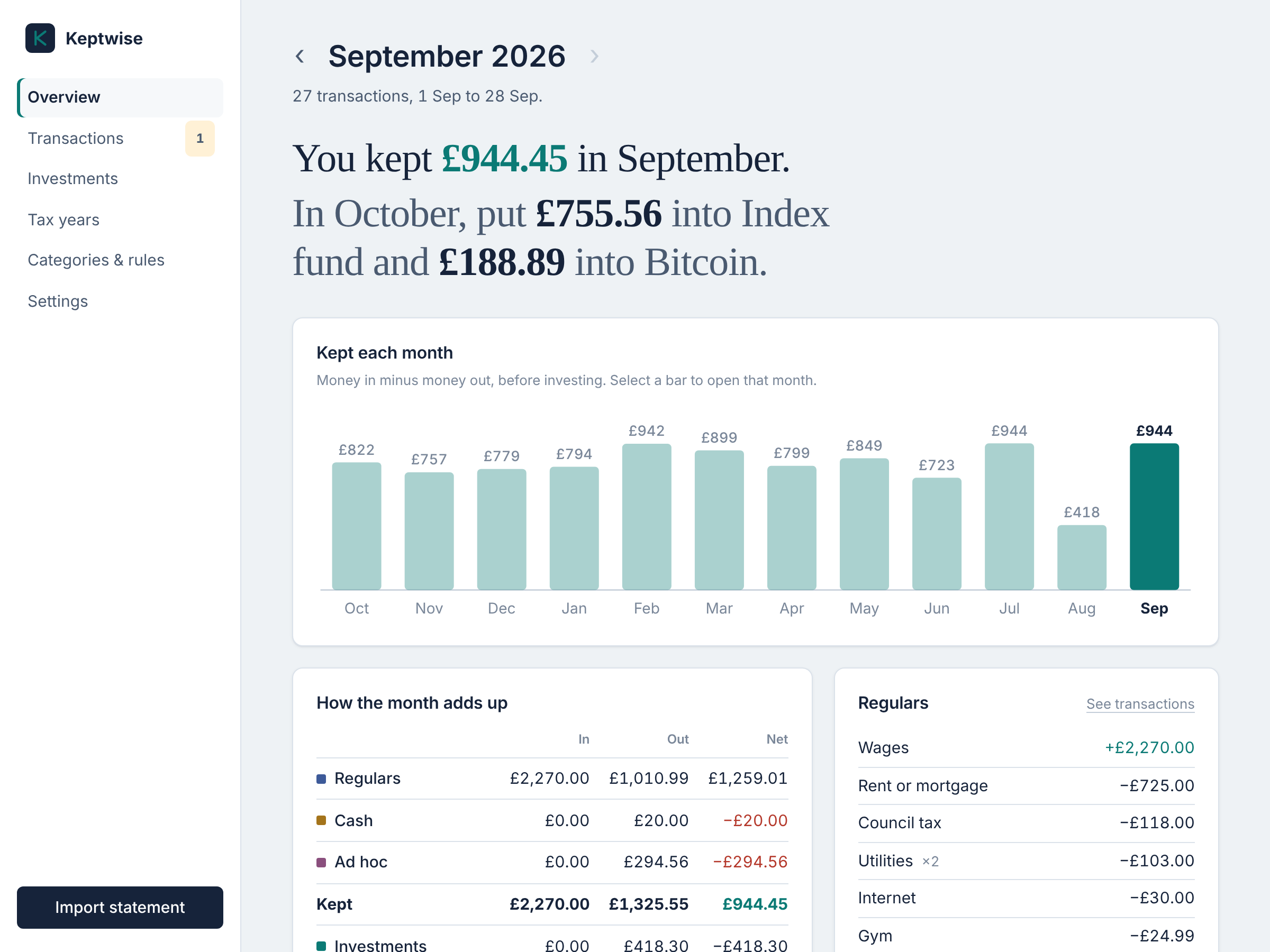
Keptwise is a small app that runs on your own computer. Once a month you download your current account's transactions as a CSV and drop them in. It sorts every transaction, shows what you kept, and splits that between your investments by the percentages you choose: "In October, put £755.56 into your index fund and £188.89 into Bitcoin."
Your data never leaves your computer. There are no accounts, no cloud and no bank logins.
Not financial advice. Keptwise does arithmetic with your own figures and the percentages you choose. It doesn't recommend what to invest in, and it isn't a substitute for advice from a qualified financial adviser.
Built for the UK, for now. Amounts are in pounds, tax years run 6 April to 5 April, and the ISA allowance is tracked. Support for other currencies and tax years is planned. If you'd like it for your country, see Contributing.
Try it
You need uv. It installs the right Python for you.
# macOS
brew install uv
# macOS and Linux
curl -LsSf https://astral.sh/uv/install.sh | sh
# Windows (PowerShell)
powershell -ExecutionPolicy ByPass -c "irm https://astral.sh/uv/install.ps1 | iex"
Then try it with a made-up year of data:
uvx keptwise demo
When you're ready to use it for real, install it and start it:
uv tool install keptwise
keptwise serve
Update it later with uv tool upgrade keptwise. If you prefer pipx, pipx install keptwise works too.
The demo uses its own database, on port 8766, so it never mixes with your data. Run it
again any time to start it afresh, and stop it with keptwise stop --port 8766.
keptwise serve opens http://127.0.0.1:8765 in your browser. A short setup asks for
your bank and what you invest in (both optional), then you import your first statement.
How it works
Every transaction lands in one of four groups:
| Group | What's in it |
|---|---|
| Regulars | Income and fixed bills: wages, rent, council tax, energy, phone… |
| Cash | Cash machines, and transfers between your own accounts |
| Investments | Payments to the platforms you invest with |
| Ad hoc | Everything else: groceries, eating out, shopping, trips… |
Kept is the net of Regulars, Cash and Ad hoc: what your balance did before you invested. Next month, that's split between your investments by percentage. If a month ran over, it tells you there's nothing to invest.
Each month
- Download last month's transactions from your bank as a CSV.
- Choose Import statement and drop the file in.
- If anything wasn't categorised, the import page links straight to it. Pick a category and accept the offer to make it a rule.
- Open the month's overview. It says what you kept and how much to put into each investment.
Features
- Import from most UK banks. Lloyds, Halifax and Bank of Scotland CSVs work as they are. The importer also recognises the column layouts that Monzo, Starling, Nationwide and others use. Overlapping statements are fine: duplicates are skipped.
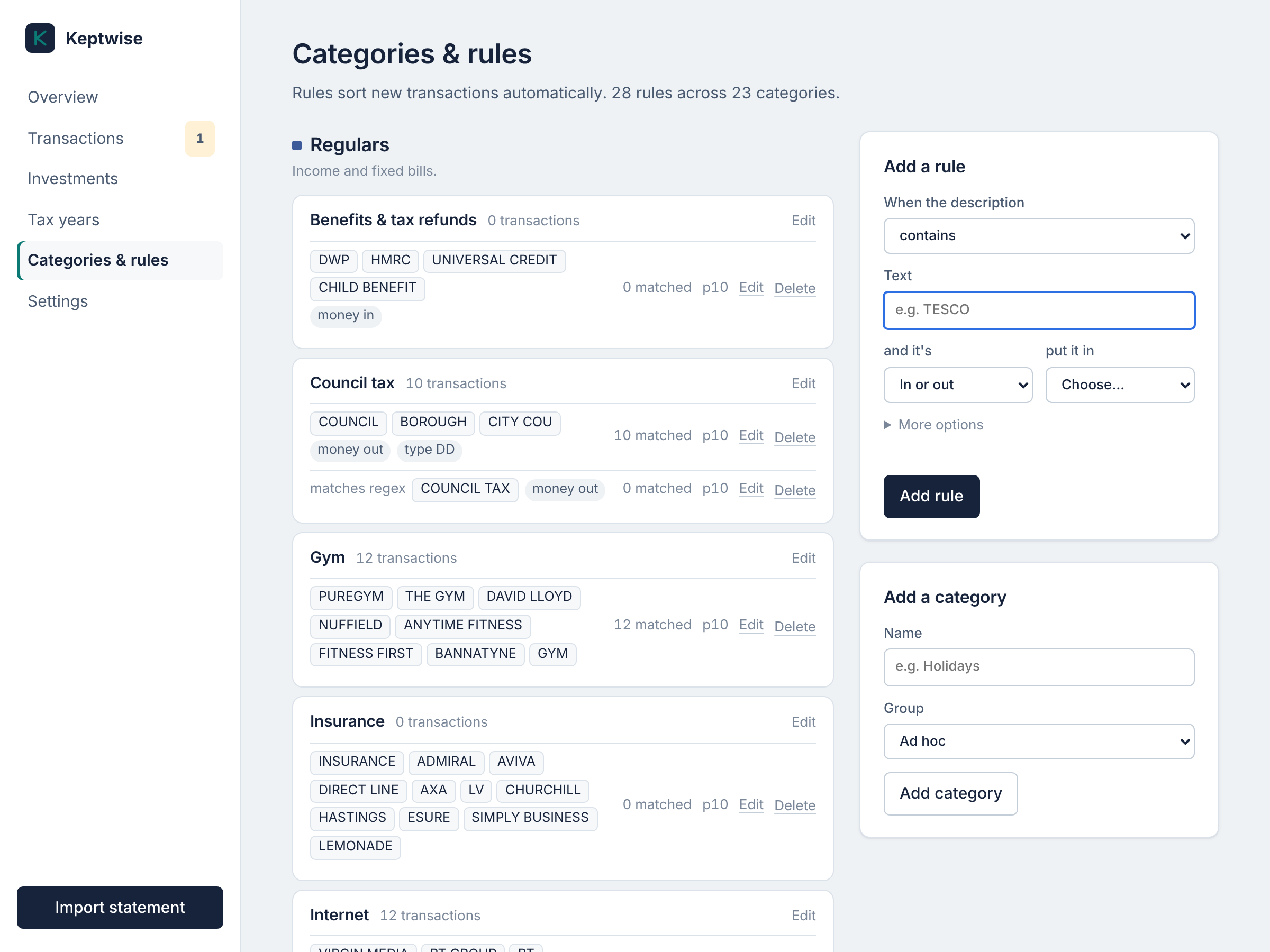
- Automatic categories. A starter set of rules covers common UK billers and chains. When you categorise something by hand, the app offers to remember it for next time.
- Month overview. What you kept and what to invest, a chart of every month, how the four groups add up, your bills, and ad hoc spending by category.
- Worth a look. It points out a bill that hasn't gone out, a fixed bill whose price changed, or spending well above or below normal, judged against your own last 12 months.
- Investments. Planned against actually invested, month by month, with links to log in to each platform.
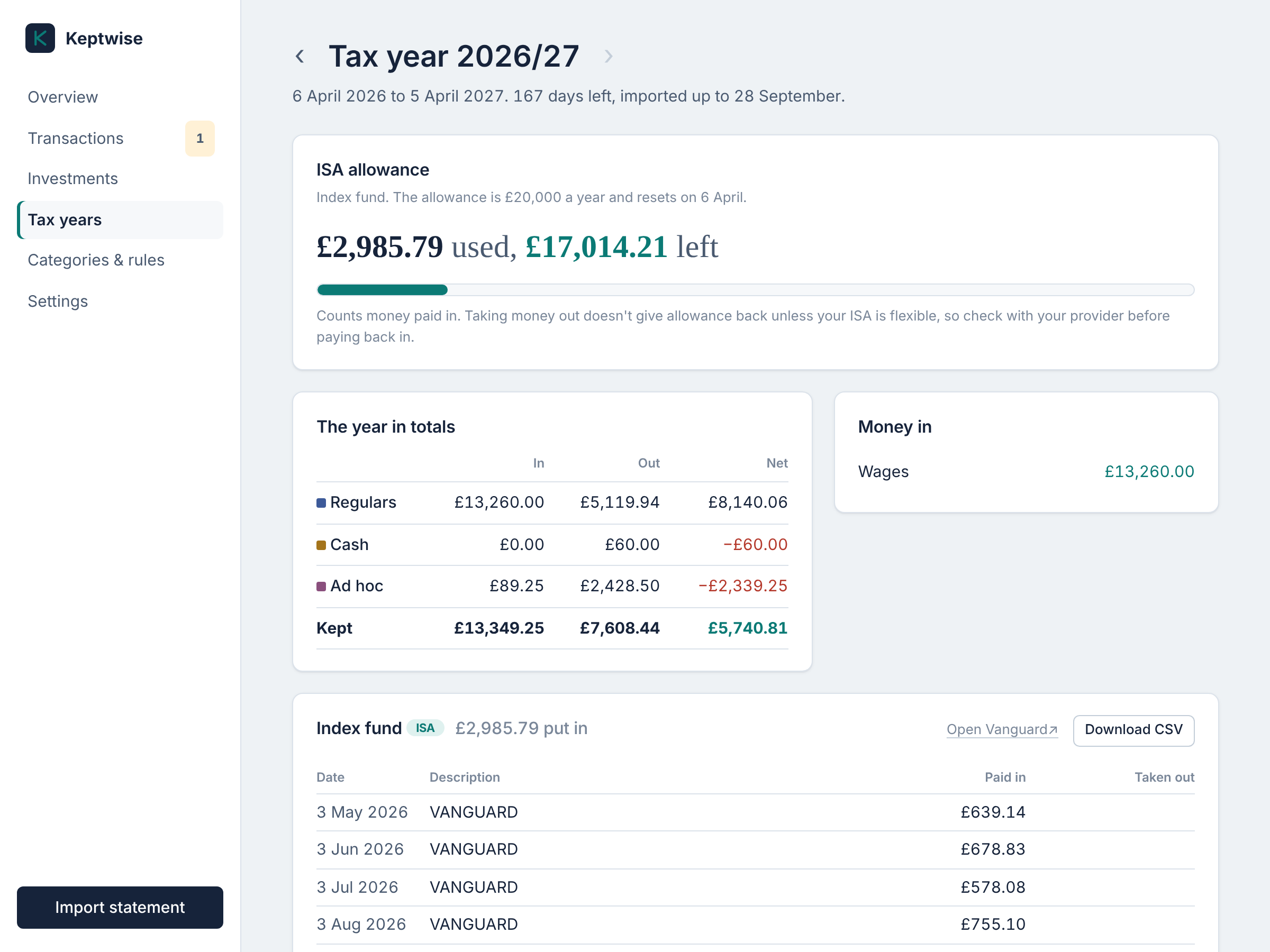
- Tax years. Totals for each April-to-April year, your ISA allowance used and left, and every payment to each platform as a CSV for your records.
- Monthly reminder. One click adds a repeating Apple Calendar or Outlook event, and a banner tells you exactly which dates to download.
- Safe. Automatic daily backups, and a backup before every upgrade.
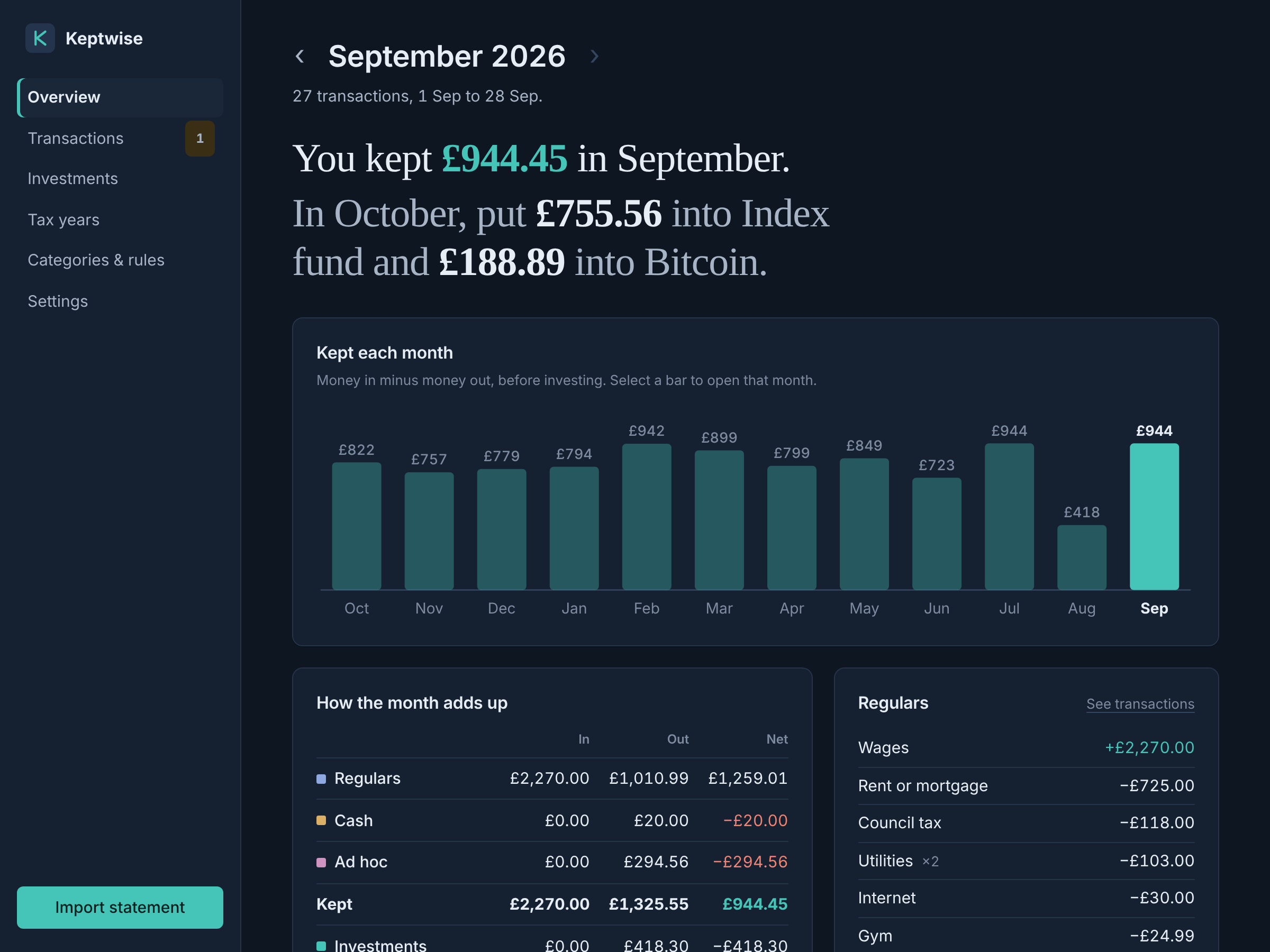
- Light and dark mode, and it works on a phone-sized screen.
| Tax year and ISA allowance | Rules with a live preview |
|---|---|
 |
 |
| Dark mode | On a phone |
|---|---|
 |
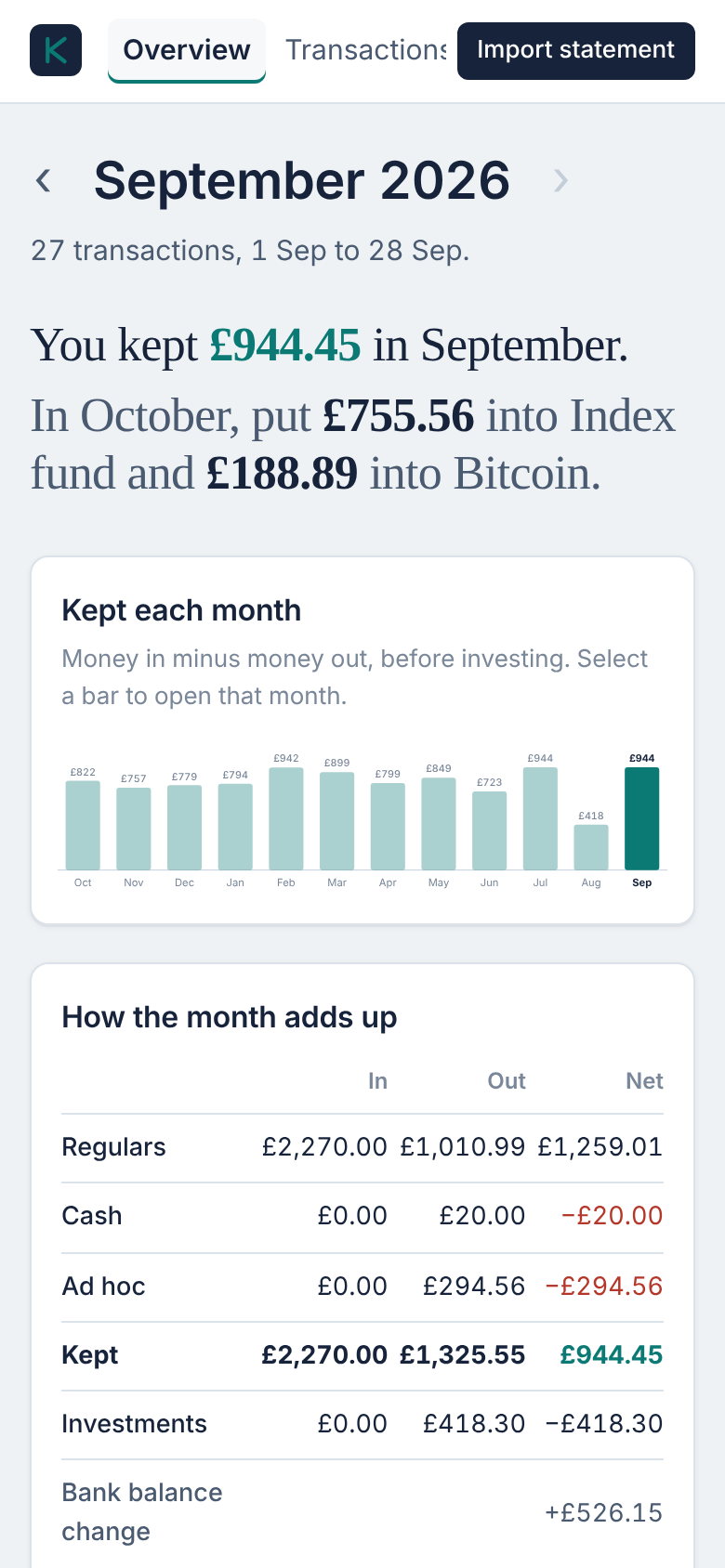 |
All screenshots use the made-up data from keptwise demo.
Where your data is kept
Your data goes in your user data folder:
- macOS:
~/Library/Application Support/Keptwise - Linux:
~/.local/share/keptwise - Windows:
%APPDATA%\Keptwise
If you run Keptwise from a clone of this repository instead, it uses data/keptwise.db
inside that folder. Settings shows the exact path. Set KEPTWISE_DB=/path/to/file.db to choose your own.
Daily backups go in a backups folder next to the database, and the newest 30 are kept.
Starting it without a terminal (macOS)
In a clone of this repository, double-click Keptwise.command in Finder. The first time, right-click it and choose
Open. Close the window to stop the app.
Command line
keptwise serve                      # start and open the app
keptwise serve --idle-timeout 60    # stop after an hour unused
keptwise import statement.csv       # import without the app
keptwise summary                    # latest month in the terminal
keptwise summary 2026-06            # a specific month
keptwise recategorise               # re-apply rules to everything
keptwise stop                       # stop an app running in the background
keptwise demo                       # try it with made-up data
From a clone of this repository, put uv run in front of each command.
Security
Keptwise is a single-user app for your own computer. It listens on 127.0.0.1 only and
has no login, so don't expose it on a network. See SECURITY.md.
Why no direct bank connection?
UK banks only share account data with FCA-authorised providers. The free options for individuals either don't cover UK banks or are closed to new users, and the rest are paid business products. Downloading a CSV once a month keeps the app free, private and independent of any third party.
Development
git clone https://github.com/indigoape/keptwise.git
cd keptwise
uv run pytest                      # tests
uv run ruff check .                # lint
uv run ruff format .               # format
uv run keptwise serve --debug      # auto-reload while editing
It's deliberately small, with few dependencies: Flask and Click, SQLite from Python's standard library, and charts drawn on the server as SVG. There's no JavaScript build step, and it works offline.
src/keptwise/
  importer.py     CSV parsing (bank column detection) and duplicate detection
  rules.py        rule matching and categorisation
  seed.py         starter categories and rules for new databases
  investments.py  investment platforms, split and statement text
  reports.py      monthly summaries, the investment plan, tax years
  insights.py     normal ranges, unusual months, missing or changed bills
  categories.py   merging categories
  money.py        pence and pounds formatting
  dates.py        date formatting that works on every system
  demo.py         the made-up year behind `keptwise demo`
  db.py           SQLite schema, migrations and backups
  cli.py          command line
  web/            Flask app: views, templates, CSS, SVG charts
tests/            pytest suite with made-up statements
Contributions are welcome, especially support for more banks. See CONTRIBUTING.md.
Licence
Copyright © 2026 Jamie Baxter.
Keptwise is free software: you can redistribute it and/or modify it under the terms of the GNU General Public License, version 3 or (at your option) any later version. It comes with no warranty.
In short, you can use, change and share it, even commercially, as long as anything you distribute stays under the GPL with its source code available.
1 maintainer

Metadata
1 maintainer
Release files for keptwise 1.2.1
For a detailed explanation of source distributions (sdists) and built distributions (wheels), please see the package formats documentation.
Source distribution (sdist)
| File | Size | Uploaded | Provenance | |
|---|---|---|---|---|
| keptwise-1.2.1.tar.gz | 89.0 kB | Without provenance | Details |
Built distribution (wheel)
| File | Interpreter | ABI | Platform | Reset |
|---|---|---|---|---|
| keptwise-1.2.1-py3-none-any.whl | Python 3 | none | any | Details |
Total release size: 180.0 kB
Release files / keptwise-1.2.1.tar.gz
| Download URL | keptwise-1.2.1.tar.gz |
|---|---|
| Size | 89.0 kB |
| Tags | Source |
|
SHA-256 checksum How to use checksums |
d41cd2696b5ab87a5a635b1eafd11e9691d0cb8034d57fe995cdf8e7d636bde6
|
|
BLAKE2b-256 checksum How to use checksums |
b12f6392cdfd2830d922bf8614837c0f171ec8dc167e72dafe029e4f2fc502a5
|
| Upload date | |
|
Uploaded using Trusted Publishing? What is trusted publishing? |
Yes |
| Uploaded via |
uv/0.13.4 {"installer":{"name":"uv","version":"0.13.4","subcommand":["publish"]},"python":null,"implementation":{"name":null,"version":null},"distro":{"name":"Ubuntu","version":"24.04","id":"noble","libc":null},"system":{"name":null,"release":null},"cpu":null,"openssl_version":null,"setuptools_version":null,"rustc_version":null,"ci":true}
|
Release files / keptwise-1.2.1-py3-none-any.whl
| Download URL | keptwise-1.2.1-py3-none-any.whl |
|---|---|
| Size | 91.0 kB |
| Tags | Python 3 |
|
SHA-256 checksum How to use checksums |
0278b3809141223c74ba378d9ad4ddde1fa63cdd3d91f4280aafbfc345e5b682
|
|
BLAKE2b-256 checksum How to use checksums |
171e9b92b6c16ef00ebd0c9a517d41c2b372122991e06407669c3aedf577f52d
|
| Upload date | |
|
Uploaded using Trusted Publishing? What is trusted publishing? |
Yes |
| Uploaded via |
uv/0.13.4 {"installer":{"name":"uv","version":"0.13.4","subcommand":["publish"]},"python":null,"implementation":{"name":null,"version":null},"distro":{"name":"Ubuntu","version":"24.04","id":"noble","libc":null},"system":{"name":null,"release":null},"cpu":null,"openssl_version":null,"setuptools_version":null,"rustc_version":null,"ci":true}
|
Security for keptwise 1.2.1
Provenance
Provenance describes where a file came from. On PyPI, provenance is shared via attestations, which provide a verifiable record of the build or publishing details. View details, limitations and caveats.
No provenance found
None of the files in this release were uploaded with provenance metadata.
A note on package security
PyPI is a repository for distributing packages, not a service for auditing them. While third-party security researchers and our staff do their best to detect and remove malicious packages, PyPI cannot guarantee the quality, security or suitability of any given package.













