
KERIA



KERI Agent in the cloud
Split from KERI Core
KERIA Service Architecture
Here we detail the components of a single KERIA instance. This architecture protects the host and the holder private keys. All client tasks/calls are signed 'at the edge', not in the hosted KERIA instance. Therefore, KERIA relies on the Signify protocol for all calls. The Architecture provides three endpoints for Signify clients to create their KERIA agents. The Agency (boot) endpoint establishes an agent. The API Handler and Message Router endpoints would be exposed to the internet for creating identifiers, receiving credentials, etc.
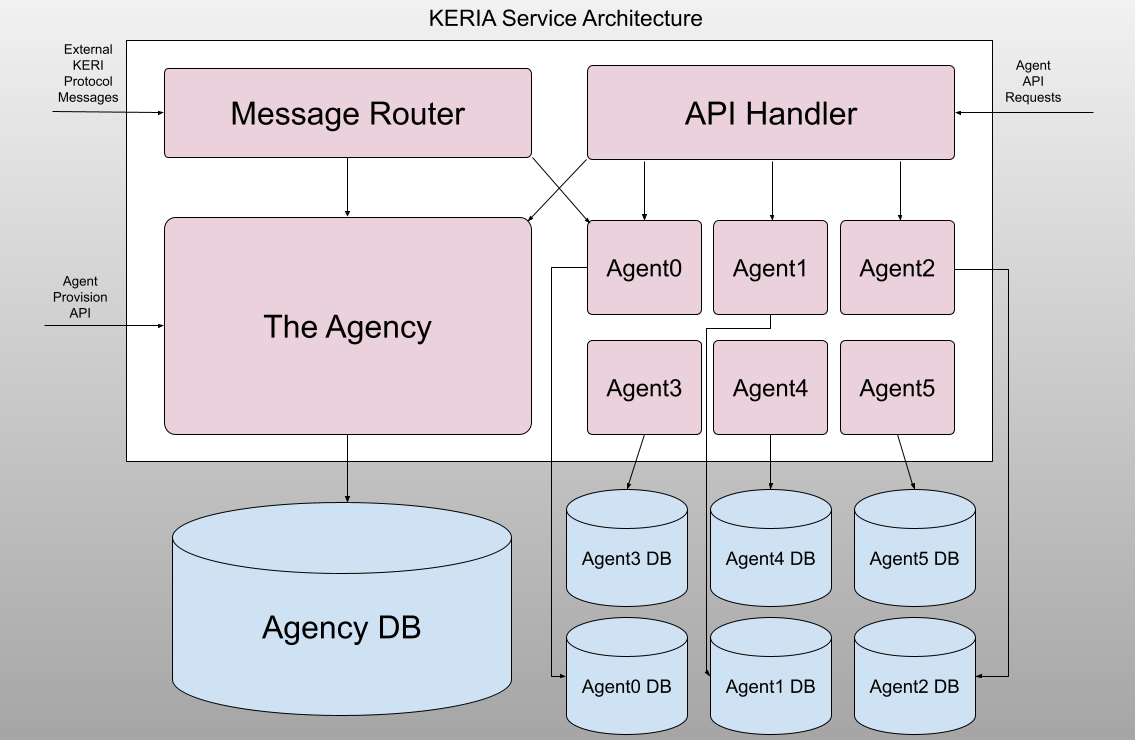
Message Router
The Message Router receives external KERI protocol messages. These are KERI protocol messages for instance coordinating multi-sig, revoking credentials, etc. It routes these messages to the appropriate Agent(s). For instance a multisig message requires asynchronous waiting (for signature responses from other participants) and the message router would route those incoming KERI protocol responses to the appropriate agents. From Signify client calls, this service endpoint corresponds to the http port (default is 3902). This endpoint allows all KERI clients (not just Signify) to interact in a seamless way.
The Agency
The Agency receives API requests (/boot requests) to provision agents. It is the central repository for initializing agents. The Agency database persists all of the information to track the existing agents, allowing recovery on restart. From Signify clients calls, this service endpoint corresponds to the boot port (default is 3903). A common entry in the agency is the mapping between a managed AID and the agency that handles that managed AID.
API Handler
The API Handler receives agent API requests (/agent requests) including for Signify clients to create identifiers, receiving credentials, etc. All API calls are signed by the Signify client headers so that all calls are secure. This API interacts with agents and those interactions are stored in the agent databases. From Signify clients calls, this service endpoint corresponds to the admin port (default is 3901).
Agents
Agents act on behalf of their Signify clients. They don't have the secrets of the client. Instead, they handle all actions for the clients, other than secret/encryption/signing. However, Agents do have their own keys and do sign all of their messages BACK to the Signify client, so the client can verify that all messages received are from their agent. Agents use KERI HIO to handle all of the different asynchronous actions that are occuring. HIO is an efficient and scalable orchestration/processing mechanism that leverages queues, handlers, coroutines, etc. All Agent db access is through the associated Agent.
Development
Setup
- Ensure Python
version 3.12.2+is installed - Install uv for Python package management
- Install Keripy dependency (
libsodium 1.0.18+)
Quick Start
# Prerequisites: Python 3.12.2+, uv, libsodium
make install-dev
make test

uv run keria start --config-dir scripts --config-file demo-witness-oobis
Build with docker
- Build KERIA docker image:
make build-keria
Run with docker
- The easiest way to configure a keria container is with environment variables. See below example for a working docker-compose configuration
services:
    keria:
        image: weboftrust/keria:latest
        environment:
            KERI_AGENT_CORS: 1
            KERIA_CURLS: http://<keria-hostname>:3902/
            KERIA_IURLS: http://<witness-demo-hostname>:5642/oobi/BBilc4-L3tFUnfM_wJr4S4OJanAv_VmF_dJNN6vkf2Ha;http://<witness-demo-hostname>:5643/oobi/BLskRTInXnMxWaGqcpSyMgo0nYbalW99cGZESrz3zapM
        ports:
            - 3901:3901
            - 3902:3902
            - 3903:3903
You can see a working example here.
Running Tests
-
Run the test suites:
make test
-
Run tests with coverage:
make test-coverage
Publishing containers
Enable the containerd image store
The containerd image store isn't enabled by default. To enable the feature for Docker Desktop:
Navigate to Settings in Docker Desktop. In the General tab, check Use containerd for pulling and storing images. Select Apply & Restart.
make build-keri
make publish-keri
3 maintainers


Metadata
3 maintainers
Release files for keria 0.4.0
For a detailed explanation of source distributions (sdists) and built distributions (wheels), please see the package formats documentation.
Source distribution (sdist)
| File | Size | Uploaded | |
|---|---|---|---|
| keria-0.4.0.tar.gz | 104.3 kB | Details |
Release files / keria-0.4.0.tar.gz
| Download URL | keria-0.4.0.tar.gz |
|---|---|
| Size | 104.3 kB |
| Tags | Source |
|
SHA-256 checksum How to use checksums |
a51dee9cc51ad3a513502149d8cdaa63b678691735725091538218a75eabd2b0
|
|
BLAKE2b-256 checksum How to use checksums |
f09a280765245f4216b196d0fa03b4b85406b964e0302a4c3de03608d80db0b9
|
| Upload date | |
|
Uploaded using Trusted Publishing? What is trusted publishing? |
No |
| Uploaded via |
twine/6.0.1 CPython/3.12.3
|














