
This release is a pre-release and may not be stable for production use.
Kerykeion







⭐ Like this project? Star it on GitHub and help it grow! ⭐
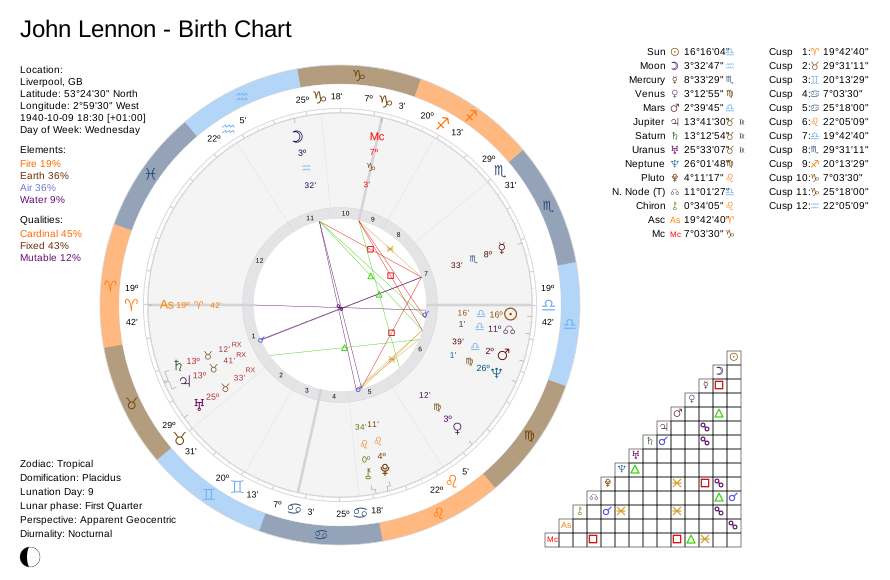
Kerykeion is a Python library for astrology. It computes planetary and house positions, detects aspects, and generates SVG charts, including birth, synastry, transit, and composite charts. You can also customize which planets to include in your calculations.
The main goal of this project is to offer a clean, data-driven approach to astrology, making it accessible and programmable.
Kerykeion also integrates seamlessly with LLM and AI applications.
Web API
If you want to use Kerykeion in a web application or for commercial or closed-source purposes, you can try the dedicated web API:
It is open source and directly supports this project.
Table of Contents
- Web API
- Table of Contents
- Installation
- Quick Start
- Basic Usage
- Generate a SVG Chart
- Wheel Only Charts
- Classic Chart Style
- Report Generator
- AI Context Serializer
- Example: Retrieving Aspects
- Relationship Score
- House Comparison (Synastry Overlay)
- Element & Quality Distribution Strategies
- Ayanamsa (Sidereal Modes)
- House Systems
- Perspective Type
- Themes
- Alternative Initialization
- Arabic Parts (Lots)
- Lunar Nodes (Rahu & Ketu)
- Fixed Stars
- JSON Support
- Moon Phase Details
- Timing Factories
- V6 Advanced Features
- Uranian / Hamburg School Planets
- Essential Dignities
- Vedic Nakshatras
- Eclipse Search
- Planetary Phenomena
- Planetary Nodes & Apsides
- Heliacal Risings & Settings
- Occultation Search
- Davison Composite Chart
- Relocated Charts
- Declination & Out-of-Bounds Detection
- Barycentric & Planetocentric Perspectives
- Nutation Model
- Dynamic Fixed Star Discovery
- Gauquelin Sectors
- Local Space (Azimuth & Altitude)
- Lilith Variants & Priapus Points
- Transit Exactness & Refinement
- Primary Directions (Placidus Semi-Arc)
- Secondary Progressions (Day-for-a-Year)
- Solar Arc Directions
- Midpoints (Cosmobiology / 90° Dial)
- Astro-Cartography (ACG)
- Chart Dominants
- Zodiacal Releasing (Aphesis)
- Profections (Annual)
- Firdaria (Planetary Periods)
- Mutual Receptions
- Horary Indicators
- Documentation
- Projects built with Kerykeion
- Development
- Using the Swiss Ephemeris Backend (Optional)
- AI Agent Skill
- Integrating Kerykeion into Your Project
- License
- Contributing
- Citations
Installation
Kerykeion requires Python 3.12 or higher.
pip3 install kerykeion
For more installation options and environment setup, see the Getting Started guide.
Note — supported date range. The default ephemeris data bundled with a fresh install covers the years 1849–2150 (JPL DE440s). Charts outside that range raise a
KerykeionExceptionuntil you install a wider data tier:import libephemeris libephemeris.download_leb_for_tier("medium") # 1550–2650 (upper bound exclusive: through 2649-12-31) libephemeris.download_leb_for_tier("extended") # full range, incl. BCE dates
Quick Start
from pathlib import Path
from kerykeion import AstrologicalSubjectFactory
from kerykeion.chart_data.factory import ChartDataFactory
from kerykeion.charts.drawer import ChartDrawer

subject = AstrologicalSubjectFactory.from_birth_data(
    name="Example Person",
    year=1990, month=7, day=15,
    hour=10, minute=30,
    lng=12.4964,
    lat=41.9028,
    tz_str="Europe/Rome",
    online=False,
)

chart_data = ChartDataFactory.create_natal_chart_data(subject)
chart_drawer = ChartDrawer(chart_data=chart_data)

output_dir = Path("charts_output")
output_dir.mkdir(exist_ok=True)

chart_drawer.save_svg(output_path=output_dir, filename="example-natal")
print("Chart saved to", (output_dir / "example-natal.svg").resolve())
This script shows the recommended workflow:
- Create an astrological subject via
AstrologicalSubjectFactorywith explicit coordinates and timezone (offline mode). - Build a
ChartDataModelthroughChartDataFactory. - Render the SVG via
ChartDrawer, saving it to a controlled folder (charts_output).
Use the same pattern for synastry, composite, transit, or return charts by swapping the factory method.
📖 More examples: kerykeion.net/examples
Basic Usage
Below is a simple example illustrating the creation of an astrological subject and retrieving astrological details:
from kerykeion import AstrologicalSubjectFactory

# Create an instance of the AstrologicalSubjectFactory class.
# Arguments: Name, year, month, day, hour, minutes, city, nation
john = AstrologicalSubjectFactory.from_birth_data(
    "John Lennon", 1940, 10, 9, 18, 30,
    lng=-2.9833,
    lat=53.4,
    tz_str="Europe/London",
    online=False,
)

# Retrieve information about the Sun:
print(john.sun.model_dump_json())
# > {"name":"Sun","quality":"Cardinal","element":"Air","sign":"Lib","sign_num":6,"position":16.26789435029039,"abs_pos":196.2678943502904,"emoji":"♎️","point_type":"AstrologicalPoint","house":"Sixth_House","retrograde":false,"speed":0.9884519666546676,"declination":-6.39888585742412, ...}
# (additional fields omitted: ecliptic_latitude, nakshatra*, gauquelin_sector, azimuth, altitude_above_horizon, is_out_of_bounds, ...)

# Retrieve information about the first house:
print(john.first_house.model_dump_json())
# > {"name":"First_House","quality":"Cardinal","element":"Fire","sign":"Ari","sign_num":0,"position":19.72351854613349,"abs_pos":19.72351854613349,"emoji":"♈️","point_type":"House","house":null,"retrograde":null,"speed":886.503993869951, ...}
# (additional fields omitted: declination, nakshatra*, gauquelin_sector, azimuth, altitude_above_horizon, is_out_of_bounds, ...)

# Retrieve the element of the Moon sign:
print(john.moon.element)
# > 'Air'

# Whether the Sun stood above the horizon (day chart) or below it (night chart).
# Computed from the Sun's true geometric altitude — independent of the chart's
# zodiac and perspective, so the value holds for sidereal and heliocentric
# charts and at polar latitudes. Note the chart and report still omit the line
# for a heliocentric chart: the value is about the moment, but the drawing has
# no Sun on it to point at — the Sun is the centre body there and is excluded.
print(john.is_diurnal)
# > False
Working offline: pass
online=Falseand specifylng,lat, andtz_stras shown above.
Working online: setonline=Trueand providecity,nation, and a valid GeoNames username. Register for free at geonames.org. You can set the username via theKERYKEION_GEONAMES_USERNAMEenvironment variable or thegeonames_usernameparameter.
📖 Full factory documentation: AstrologicalSubjectFactory
To avoid GeoNames, provide longitude, latitude, and timezone and set online=False:
john = AstrologicalSubjectFactory.from_birth_data(
    "John Lennon", 1940, 10, 9, 18, 30,
    city="Liverpool",
    nation="GB",
    lng=-2.9833,  # Longitude for Liverpool
    lat=53.4000,  # Latitude for Liverpool
    tz_str="Europe/London",  # Timezone for Liverpool
    online=False,
)
Generate a SVG Chart
All chart-rendering examples below create a local charts_output/ folder so the tests can write without touching your home directory. Feel free to change the path when integrating into your own projects.
To generate a chart, use the ChartDataFactory to pre-compute chart data, then ChartDrawer to create the visualization. This two-step process ensures clean separation between astrological calculations and chart rendering.
📖 Chart generation docs: Charts Documentation
The info panel in the bottom-left corner reports the chart's diurnality — whether the Sun stood above the horizon (Diurnality: Diurnal) or below it (Diurnality: Nocturnal). Two-wheel charts report both wheels, since each keeps its own, and drop the heading to fit (Natal Nocturnal · Transit Diurnal; a synastry names the two subjects). The line is omitted where it has no referent: any chart not cast from the Earth — a heliocentric one excludes the Sun (it is the centre body), and a Marscentric or Selenocentric one draws a Sun that is not the one measured, since is_diurnal comes from a tropical geocentric Sun — and a midpoint composite, which represents no single sky. A solar arc direction is omitted too: it keeps the nativity's instant, so its value answers for the birth chart rather than for the wheel drawn from it. Pass show_diurnality=False to ChartDrawer to leave it out entirely — the panel then keeps exactly the spacing it had before the line existed.
Tip:
The optimized way to open the generated SVG files is with a web browser (e.g., Chrome, Firefox).
To improve compatibility across different applications, you can use the remove_css_variables parameter when generating the SVG. This will inline all styles and eliminate CSS variables, resulting in an SVG that is more broadly supported.
Birth Chart
from pathlib import Path
from kerykeion import AstrologicalSubjectFactory
from kerykeion.chart_data.factory import ChartDataFactory
from kerykeion.charts.drawer import ChartDrawer

# Step 1: Create subject
john = AstrologicalSubjectFactory.from_birth_data(
    "John Lennon", 1940, 10, 9, 18, 30,
    lng=-2.9833,
    lat=53.4,
    tz_str="Europe/London",
    online=False,
)

# Step 2: Pre-compute chart data
chart_data = ChartDataFactory.create_natal_chart_data(john)

# Step 3: Create visualization
birth_chart_svg = ChartDrawer(chart_data=chart_data)

output_dir = Path("charts_output")
output_dir.mkdir(exist_ok=True)
birth_chart_svg.save_svg(output_path=output_dir, filename="john-lennon-natal")
The SVG file is saved under charts_output/john-lennon-natal.svg.
📖 More birth chart examples: Birth Chart Guide

External Birth Chart
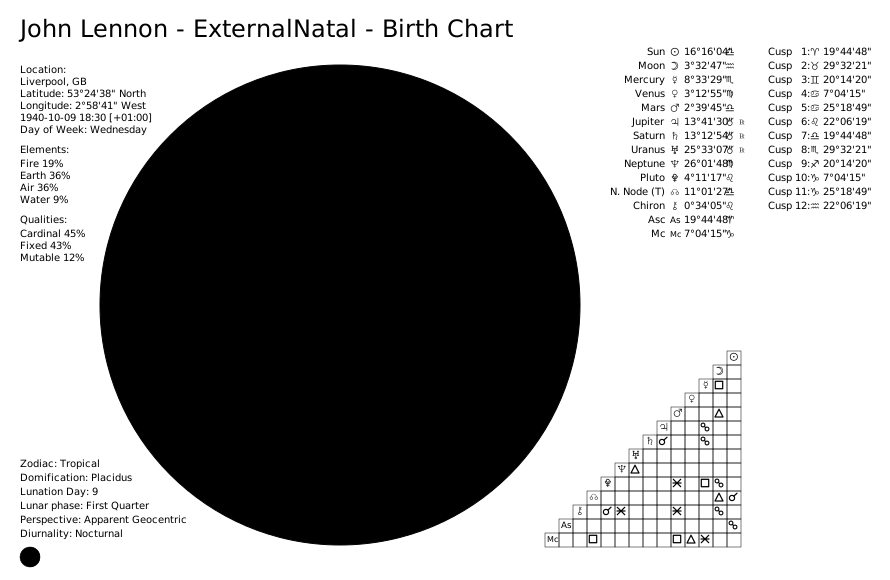
An "external" birth chart places the zodiac wheel on the outer ring, offering an alternative visualization style. external_view is a classic-style feature (the default modern style ignores it and logs a warning), so pass style="classic" explicitly:
from pathlib import Path
from kerykeion import AstrologicalSubjectFactory
from kerykeion.chart_data.factory import ChartDataFactory
from kerykeion.charts.drawer import ChartDrawer

# Step 1: Create subject
birth_chart = AstrologicalSubjectFactory.from_birth_data(
    "John Lennon", 1940, 10, 9, 18, 30,
    lng=-2.9833,
    lat=53.4,
    tz_str="Europe/London",
    online=False,
)

# Step 2: Pre-compute chart data for external natal chart
chart_data = ChartDataFactory.create_natal_chart_data(birth_chart)

# Step 3: Create visualization with external_view=True (classic style only)
birth_chart_svg = ChartDrawer(chart_data=chart_data, external_view=True)

output_dir = Path("charts_output")
output_dir.mkdir(exist_ok=True)
birth_chart_svg.save_svg(output_path=output_dir, filename="john-lennon-natal-external", style="classic")
Synastry Chart
Synastry charts overlay two individuals' planetary positions to analyze relationship compatibility:
from pathlib import Path
from kerykeion import AstrologicalSubjectFactory
from kerykeion.chart_data.factory import ChartDataFactory
from kerykeion.charts.drawer import ChartDrawer

# Step 1: Create subjects
first = AstrologicalSubjectFactory.from_birth_data(
    "John Lennon", 1940, 10, 9, 18, 30,
    lng=-2.9833,
    lat=53.4,
    tz_str="Europe/London",
    online=False,
)
second = AstrologicalSubjectFactory.from_birth_data(
    "Paul McCartney", 1942, 6, 18, 15, 30,
    lng=-2.9833,
    lat=53.4,
    tz_str="Europe/London",
    online=False,
)

# Step 2: Pre-compute synastry chart data
chart_data = ChartDataFactory.create_synastry_chart_data(first, second)

# Step 3: Create visualization
synastry_chart = ChartDrawer(chart_data=chart_data)

output_dir = Path("charts_output")
output_dir.mkdir(exist_ok=True)
synastry_chart.save_svg(output_path=output_dir, filename="lennon-mccartney-synastry")
📖 Synastry chart guide: Synastry Chart Examples

Transit Chart
Transit charts compare current planetary positions against a natal chart:
from pathlib import Path
from kerykeion import AstrologicalSubjectFactory
from kerykeion.chart_data.factory import ChartDataFactory
from kerykeion.charts.drawer import ChartDrawer

# Step 1: Create subjects
transit = AstrologicalSubjectFactory.from_birth_data(
    "Transit", 2025, 6, 8, 8, 45,
    lng=-84.3880,
    lat=33.7490,
    tz_str="America/New_York",
    online=False,
)
subject = AstrologicalSubjectFactory.from_birth_data(
    "John Lennon", 1940, 10, 9, 18, 30,
    lng=-2.9833,
    lat=53.4,
    tz_str="Europe/London",
    online=False,
)

# Step 2: Pre-compute transit chart data
chart_data = ChartDataFactory.create_transit_chart_data(subject, transit)

# Step 3: Create visualization
transit_chart = ChartDrawer(chart_data=chart_data)

output_dir = Path("charts_output")
output_dir.mkdir(exist_ok=True)
transit_chart.save_svg(output_path=output_dir, filename="john-lennon-transit")
📖 Transit chart guide: Transit Chart Examples

Solar Return Chart (Dual Wheel)
Solar returns calculate the exact moment the Sun returns to its natal position each year:
from pathlib import Path
from kerykeion import AstrologicalSubjectFactory
from kerykeion.planetary_returns.factory import PlanetaryReturnFactory
from kerykeion.chart_data.factory import ChartDataFactory
from kerykeion.charts.drawer import ChartDrawer

# Step 1: Create natal subject
john = AstrologicalSubjectFactory.from_birth_data(
    "John Lennon", 1940, 10, 9, 18, 30,
    lng=-2.9833,
    lat=53.4,
    tz_str="Europe/London",
    online=False,
)

# Step 2: Calculate Solar Return subject (offline example with manual coordinates)
return_factory = PlanetaryReturnFactory(
    john,
    lng=-2.9833,
    lat=53.4000,
    tz_str="Europe/London",
    online=False
)
solar_return_subject = return_factory.next_return_from_date(1964, 10, 1, return_type="Solar")

# Step 3: Pre-compute return chart data (dual wheel: natal + solar return)
chart_data = ChartDataFactory.create_return_chart_data(john, solar_return_subject)

# Step 4: Create visualization
solar_return_chart = ChartDrawer(chart_data=chart_data)

output_dir = Path("charts_output")
output_dir.mkdir(exist_ok=True)
solar_return_chart.save_svg(output_path=output_dir, filename="john-lennon-solar-return-dual")
📖 Return chart guide: Dual Return Chart Examples

Solar Return Chart (Single Wheel)
from pathlib import Path
from kerykeion import AstrologicalSubjectFactory
from kerykeion.planetary_returns.factory import PlanetaryReturnFactory
from kerykeion.chart_data.factory import ChartDataFactory
from kerykeion.charts.drawer import ChartDrawer

# Step 1: Create natal subject
john = AstrologicalSubjectFactory.from_birth_data(
    "John Lennon", 1940, 10, 9, 18, 30,
    lng=-2.9833,
    lat=53.4,
    tz_str="Europe/London",
    online=False,
)

# Step 2: Calculate Solar Return subject (offline example with manual coordinates)
return_factory = PlanetaryReturnFactory(
    john,
    lng=-2.9833,
    lat=53.4000,
    tz_str="Europe/London",
    online=False
)
solar_return_subject = return_factory.next_return_from_date(1964, 10, 1, return_type="Solar")

# Step 3: Build a single-wheel return chart
chart_data = ChartDataFactory.create_single_wheel_return_chart_data(solar_return_subject)

# Step 4: Create visualization
single_wheel_chart = ChartDrawer(chart_data=chart_data)

output_dir = Path("charts_output")
output_dir.mkdir(exist_ok=True)
single_wheel_chart.save_svg(output_path=output_dir, filename="john-lennon-solar-return-single")
📖 Planetary return factory docs: PlanetaryReturnFactory

Lunar Return Chart
Lunar returns calculate when the Moon returns to its natal position (approximately monthly):
from pathlib import Path
from kerykeion import AstrologicalSubjectFactory
from kerykeion.planetary_returns.factory import PlanetaryReturnFactory
from kerykeion.chart_data.factory import ChartDataFactory
from kerykeion.charts.drawer import ChartDrawer

# Step 1: Create natal subject
john = AstrologicalSubjectFactory.from_birth_data(
    "John Lennon", 1940, 10, 9, 18, 30,
    lng=-2.9833,
    lat=53.4,
    tz_str="Europe/London",
    online=False,
)

# Step 2: Calculate Lunar Return subject
return_factory = PlanetaryReturnFactory(
    john,
    lng=-2.9833,
    lat=53.4000,
    tz_str="Europe/London",
    online=False
)
lunar_return_subject = return_factory.next_return_from_date(1964, 1, 1, return_type="Lunar")

# Step 3: Build a dual wheel (natal + lunar return)
lunar_return_chart_data = ChartDataFactory.create_return_chart_data(john, lunar_return_subject)
dual_wheel_chart = ChartDrawer(chart_data=lunar_return_chart_data)

output_dir = Path("charts_output")
output_dir.mkdir(exist_ok=True)
dual_wheel_chart.save_svg(output_path=output_dir, filename="john-lennon-lunar-return-dual")

# Optional: create a single-wheel lunar return
single_wheel_data = ChartDataFactory.create_single_wheel_return_chart_data(lunar_return_subject)
single_wheel_chart = ChartDrawer(chart_data=single_wheel_data)
single_wheel_chart.save_svg(output_path=output_dir, filename="john-lennon-lunar-return-single")


Composite Chart
Composite charts create a single chart from two individuals' midpoints to represent the relationship entity:
from pathlib import Path
from kerykeion import CompositeSubjectFactory, AstrologicalSubjectFactory
from kerykeion.chart_data.factory import ChartDataFactory
from kerykeion.charts.drawer import ChartDrawer

# Step 1: Create subjects (offline configuration)
angelina = AstrologicalSubjectFactory.from_birth_data(
    "Angelina Jolie", 1975, 6, 4, 9, 9,
    lng=-118.2437,
    lat=34.0522,
    tz_str="America/Los_Angeles",
    online=False,
)

brad = AstrologicalSubjectFactory.from_birth_data(
    "Brad Pitt", 1963, 12, 18, 6, 31,
    lng=-96.7069,
    lat=35.3273,
    tz_str="America/Chicago",
    online=False,
)

# Step 2: Create composite subject
factory = CompositeSubjectFactory(angelina, brad)
composite_model = factory.get_midpoint_composite_subject_model()

# Step 3: Pre-compute composite chart data
chart_data = ChartDataFactory.create_composite_chart_data(composite_model)

# Step 4: Create visualization
composite_chart = ChartDrawer(chart_data=chart_data)

output_dir = Path("charts_output")
output_dir.mkdir(exist_ok=True)
composite_chart.save_svg(output_path=output_dir, filename="jolie-pitt-composite")
📖 Composite factory docs: CompositeSubjectFactory

Wheel Only Charts
For all the charts, you can generate a wheel-only chart by using the method save_wheel_only_svg_file():
📖 Minimalist charts guide: Wheel Only & Aspect Grid Charts
Birth Chart
from pathlib import Path
from kerykeion import AstrologicalSubjectFactory
from kerykeion.chart_data.factory import ChartDataFactory
from kerykeion.charts.drawer import ChartDrawer

# Step 1: Create subject
birth_chart = AstrologicalSubjectFactory.from_birth_data(
    "John Lennon", 1940, 10, 9, 18, 30,
    lng=-2.9833,
    lat=53.4,
    tz_str="Europe/London",
    online=False,
)

# Step 2: Pre-compute chart data
chart_data = ChartDataFactory.create_natal_chart_data(birth_chart)

# Step 3: Create visualization
birth_chart_svg = ChartDrawer(chart_data=chart_data)

output_dir = Path("charts_output")
output_dir.mkdir(exist_ok=True)
birth_chart_svg.save_wheel_only_svg_file(output_path=output_dir, filename="john-lennon-natal-wheel")

Wheel Only Birth Chart (External)
from pathlib import Path
from kerykeion import AstrologicalSubjectFactory
from kerykeion.chart_data.factory import ChartDataFactory
from kerykeion.charts.drawer import ChartDrawer

# Step 1: Create subject
birth_chart = AstrologicalSubjectFactory.from_birth_data(
    "John Lennon", 1940, 10, 9, 18, 30,
    lng=-2.9833,
    lat=53.4,
    tz_str="Europe/London",
    online=False,
)

# Step 2: Pre-compute external natal chart data
chart_data = ChartDataFactory.create_natal_chart_data(birth_chart)

# Step 3: Create visualization (external wheel view, classic style only)
birth_chart_svg = ChartDrawer(chart_data=chart_data, external_view=True)

output_dir = Path("charts_output")
output_dir.mkdir(exist_ok=True)
birth_chart_svg.save_wheel_only_svg_file(
    output_path=output_dir, filename="john-lennon-natal-wheel-external", style="classic"
)

Synastry Chart
from pathlib import Path
from kerykeion import AstrologicalSubjectFactory
from kerykeion.chart_data.factory import ChartDataFactory
from kerykeion.charts.drawer import ChartDrawer

# Step 1: Create subjects
first = AstrologicalSubjectFactory.from_birth_data(
    "John Lennon", 1940, 10, 9, 18, 30,
    lng=-2.9833,
    lat=53.4,
    tz_str="Europe/London",
    online=False,
)
second = AstrologicalSubjectFactory.from_birth_data(
    "Paul McCartney", 1942, 6, 18, 15, 30,
    lng=-2.9833,
    lat=53.4,
    tz_str="Europe/London",
    online=False,
)

# Step 2: Pre-compute synastry chart data
chart_data = ChartDataFactory.create_synastry_chart_data(first, second)

# Step 3: Create visualization
synastry_chart = ChartDrawer(chart_data=chart_data)

output_dir = Path("charts_output")
output_dir.mkdir(exist_ok=True)
synastry_chart.save_wheel_only_svg_file(output_path=output_dir, filename="lennon-mccartney-synastry-wheel")

Change the Output Directory
To save the SVG file in a custom location, specify the output_path parameter in save_svg():
from pathlib import Path
from kerykeion import AstrologicalSubjectFactory
from kerykeion.chart_data.factory import ChartDataFactory
from kerykeion.charts.drawer import ChartDrawer

# Step 1: Create subjects
first = AstrologicalSubjectFactory.from_birth_data(
    "John Lennon", 1940, 10, 9, 18, 30,
    lng=-2.9833,
    lat=53.4,
    tz_str="Europe/London",
    online=False,
)
second = AstrologicalSubjectFactory.from_birth_data(
    "Paul McCartney", 1942, 6, 18, 15, 30,
    lng=-2.9833,
    lat=53.4,
    tz_str="Europe/London",
    online=False,
)

# Step 2: Pre-compute synastry chart data
chart_data = ChartDataFactory.create_synastry_chart_data(first, second)

# Step 3: Create visualization with custom output directory
synastry_chart = ChartDrawer(chart_data=chart_data)

output_dir = Path("charts_output")
output_dir.mkdir(exist_ok=True)
synastry_chart.save_svg(output_path=output_dir)
print("Saved to", (output_dir / f"{synastry_chart.first_obj.name} - Synastry Chart.svg").resolve())
Change Language
You can switch chart language by passing chart_language to the ChartDrawer class:
from pathlib import Path
from kerykeion import AstrologicalSubjectFactory
from kerykeion.chart_data.factory import ChartDataFactory
from kerykeion.charts.drawer import ChartDrawer

# Step 1: Create subject
birth_chart = AstrologicalSubjectFactory.from_birth_data(
    "John Lennon", 1940, 10, 9, 18, 30,
    lng=-2.9833,
    lat=53.4,
    tz_str="Europe/London",
    online=False,
)

# Step 2: Pre-compute chart data
chart_data = ChartDataFactory.create_natal_chart_data(birth_chart)

# Step 3: Create visualization with Italian language
birth_chart_svg = ChartDrawer(
    chart_data=chart_data,
    chart_language="IT"  # Change to Italian
)

output_dir = Path("charts_output")
output_dir.mkdir(exist_ok=True)
birth_chart_svg.save_svg(output_path=output_dir, filename="john-lennon-natal-it")
You can also provide custom labels (or introduce a brand-new language) by passing
a dictionary to language_pack. Only the keys you supply are merged on top of the
built-in strings:
from pathlib import Path
from kerykeion import AstrologicalSubjectFactory
from kerykeion.chart_data.factory import ChartDataFactory
from kerykeion.charts.drawer import ChartDrawer

birth_chart = AstrologicalSubjectFactory.from_birth_data(
    "John Lennon", 1940, 10, 9, 18, 30,
    lng=-2.9833,
    lat=53.4,
    tz_str="Europe/London",
    online=False,
)
chart_data = ChartDataFactory.create_natal_chart_data(birth_chart)

custom_labels = {
    "PT": {
        "info": "Informações",
        "celestial_points": {"Sun": "Sol", "Moon": "Lua"},
    }
}

custom_chart = ChartDrawer(
    chart_data=chart_data,
    chart_language="PT",
    language_pack=custom_labels["PT"],
)

output_dir = Path("charts_output")
output_dir.mkdir(exist_ok=True)
custom_chart.save_svg(output_path=output_dir, filename="john-lennon-natal-pt")
📖 Language configuration guide: Chart Language Settings
The available languages are:
- EN (English)
- FR (French)
- PT (Portuguese)
- ES (Spanish)
- TR (Turkish)
- RU (Russian)
- IT (Italian)
- CN (Chinese)
- DE (German)
- HI (Hindi)
Minified SVG
To generate a minified SVG, set minify=True in the save_svg() method:
from pathlib import Path
from kerykeion import AstrologicalSubjectFactory
from kerykeion.chart_data.factory import ChartDataFactory
from kerykeion.charts.drawer import ChartDrawer

# Step 1: Create subject
birth_chart = AstrologicalSubjectFactory.from_birth_data(
    "John Lennon", 1940, 10, 9, 18, 30,
    lng=-2.9833,
    lat=53.4,
    tz_str="Europe/London",
    online=False,
)

# Step 2: Pre-compute chart data
chart_data = ChartDataFactory.create_natal_chart_data(birth_chart)

# Step 3: Create visualization
birth_chart_svg = ChartDrawer(chart_data=chart_data)

output_dir = Path("charts_output")
output_dir.mkdir(exist_ok=True)
birth_chart_svg.save_svg(
    output_path=output_dir,
    filename="john-lennon-natal-minified",
    minify=True,
)
SVG without CSS Variables
To generate an SVG without CSS variables, set remove_css_variables=True in the save_svg() method:
from pathlib import Path
from kerykeion import AstrologicalSubjectFactory
from kerykeion.chart_data.factory import ChartDataFactory
from kerykeion.charts.drawer import ChartDrawer

# Step 1: Create subject
birth_chart = AstrologicalSubjectFactory.from_birth_data(
    "John Lennon", 1940, 10, 9, 18, 30,
    lng=-2.9833,
    lat=53.4,
    tz_str="Europe/London",
    online=False,
)

# Step 2: Pre-compute chart data
chart_data = ChartDataFactory.create_natal_chart_data(birth_chart)

# Step 3: Create visualization
birth_chart_svg = ChartDrawer(chart_data=chart_data)

output_dir = Path("charts_output")
output_dir.mkdir(exist_ok=True)
birth_chart_svg.save_svg(
    output_path=output_dir,
    filename="john-lennon-natal-no-css-variables",
    remove_css_variables=True,
)
This will inline all styles and eliminate CSS variables, resulting in an SVG that is more broadly supported.
Grid Only SVG
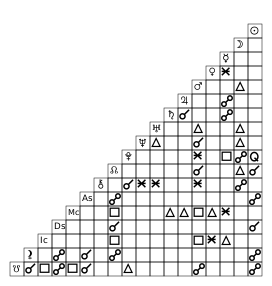
It's possible to generate a grid-only SVG, useful for creating a custom layout. To do this, use the save_aspect_grid_only_svg_file() method:
from pathlib import Path
from kerykeion import AstrologicalSubjectFactory
from kerykeion.chart_data.factory import ChartDataFactory
from kerykeion.charts.drawer import ChartDrawer

# Step 1: Create subjects
birth_chart = AstrologicalSubjectFactory.from_birth_data(
    "John Lennon", 1940, 10, 9, 18, 30,
    lng=-2.9833,
    lat=53.4,
    tz_str="Europe/London",
    online=False,
)
second = AstrologicalSubjectFactory.from_birth_data(
    "Paul McCartney", 1942, 6, 18, 15, 30,
    lng=-2.9833,
    lat=53.4,
    tz_str="Europe/London",
    online=False,
)

# Step 2: Pre-compute synastry chart data
chart_data = ChartDataFactory.create_synastry_chart_data(birth_chart, second)

# Step 3: Create visualization with dark theme
aspect_grid_chart = ChartDrawer(chart_data=chart_data, theme="dark")

output_dir = Path("charts_output")
output_dir.mkdir(exist_ok=True)
aspect_grid_chart.save_aspect_grid_only_svg_file(output_path=output_dir, filename="lennon-mccartney-aspect-grid")
Machine-readable point metadata
Rendered <g kr:node="ChartPoint"> elements expose stable kr: attributes for
interactive consumers. On every dual wheel (Transit, Synastry, Dual Return,
and Progression), kr:house remains the point owner's house and
kr:horoscope identifies that owner ring. kr:projectedhouse gives the same
point's house in the other subject's cusp system, while
kr:projectedhoroscope identifies that target ring. The reciprocal metadata is
available in classic/modern, full/wheel-only output even when house-comparison
data or tables are disabled.
Each point also carries the physical state the model computed for it —
kr:motionstate, kr:speed, kr:declination, kr:oob when the body is out of
bounds, plus kr:magnitude, kr:nearpoint and kr:orb on fixed stars — and the
chart-level analyses it takes part in: kr:angularity (one attribute listing
every angle the point stands on, as Ascendant:0.8991 Medium_Coeli:4.3156,
closest first) and kr:stellium. None of these are gated by a
rendering option; the opt-in marks above only decide whether a reader sees them
drawn. An attribute is absent when the model does not carry the value, so
silence means "this chart does not compute it" rather than zero or false — a
heliocentric chart states no motion state, a midpoint composite none at all.
Attribute names are lowercase letters with no separators (motionstate, not
motion_state), because consumers rewrite the namespace with a general pattern
and a name carrying an underscore would be dropped silently. See the
charts documentation for the
full table.
Classic Chart Style
Since v6 the modern concentric-ring layout is the default chart style. The traditional classic wheel remains fully supported: set it at the instance level via ChartDrawer(chart_data=..., style="classic") or per-render via save_svg(style="classic"). Both styles work with all six themes.
Available style values: "modern" (default) and "classic".
Default filenames spell the style out: save_svg() writes "{name} - {chart type} Chart - Modern.svg", and with style="classic" it writes "... - Classic.svg" (wheel-only output uses " - Modern Wheel Only" / " - Classic Wheel Only").
Info-panel keyword arguments (every chart type, both styles):
| Parameter | Type | Default | Description |
|---|---|---|---|
show_diurnality |
bool |
True |
Print the chart's diurnality (Sun above or below the horizon) in the bottom-left info panel. Constructor only — there is no save_svg() override |
Modern-only keyword arguments (ignored by the classic style):
| Parameter | Type | Default | Description |
|---|---|---|---|
show_zodiac_background_ring |
bool |
True |
Draw colored zodiac wedges as the outer zodiac annulus around the cusp ring |
glyph_size |
str |
"medium" |
Size of the planet cluster — glyph, degrees, sign, minutes and ℞. "small" is the medium cluster at 90%; "large" draws the planet glyph at the classic style's own size — 24px single / 19.2px dual at the default page with the zodiac background ring active, for glyphs at optical weight 1.0 (the per-glyph map stays applied; with the ring off the whole modern wheel, cluster included, draws 1/0.92 larger at every size). On the dual rings parity belongs to the glyph alone: the reading follows the single wheel's ×1.248 progression, so the dual numerals never outgrow the single wheel's. Overridable per render |
Dual-chart keyword arguments (Synastry, Transit, Composite, Dual Return):
| Parameter | Type | Default | Description |
|---|---|---|---|
double_chart_aspect_grid_type |
str |
"list" |
Aspect grid layout: "list" (compact vertical list) or "table" (traditional cross-reference grid) |
Classic-only constructor arguments (ignored by the modern style, which logs a warning when they are set):
| Parameter | Type | Default | Description |
|---|---|---|---|
external_view |
bool |
False |
Place planets outside the zodiac ring (Natal charts only) |
show_degree_indicators |
bool |
True |
Show degree indicators on planets |
show_aspect_icons |
bool |
True |
Show aspect icons on aspect lines |
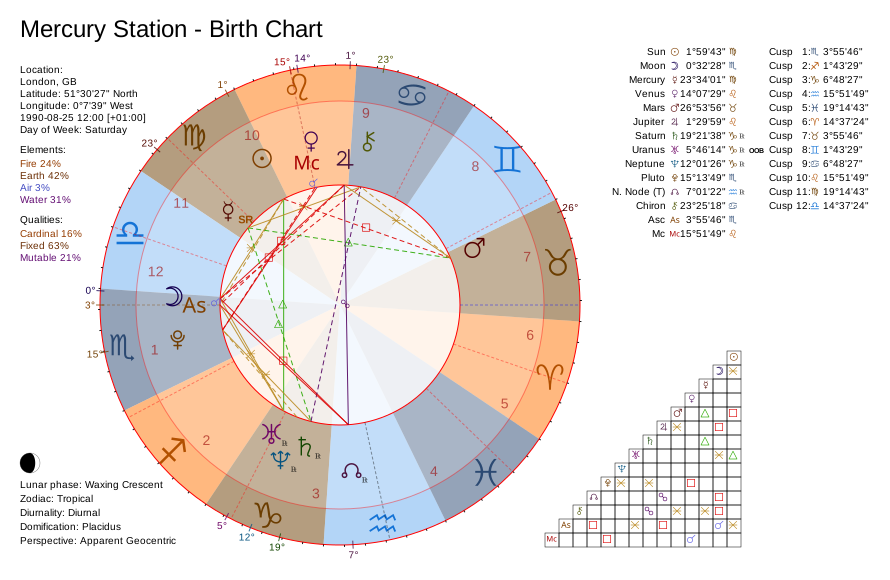
Opt-in marks (constructor only, both styles). Six facts the chart data already carries and the wheel did not show. Every one defaults to False, so no chart gains a mark it was not asked for, and every one is silent where it has no referent — a chart with no station, data that never computed a score, a tropical zodiac, a house system that was honoured:
| Parameter | Type | Default | Description |
|---|---|---|---|
show_motion_state |
bool |
False |
Mark a planet at a station: SR where the retrograde phase opens, SD where it closes. Modern recolours the cluster and uses the row that holds RX; classic writes the two letters at the foot of the glyph, where its ℞ sits |
show_out_of_bounds |
bool |
False |
Badge out-of-bounds planets OOB in the point tables (in the Gauquelin grid, off the declination column) |
show_aspect_movement |
bool |
False |
Dash the separating aspect lines; applying ones stay solid |
show_relationship_score |
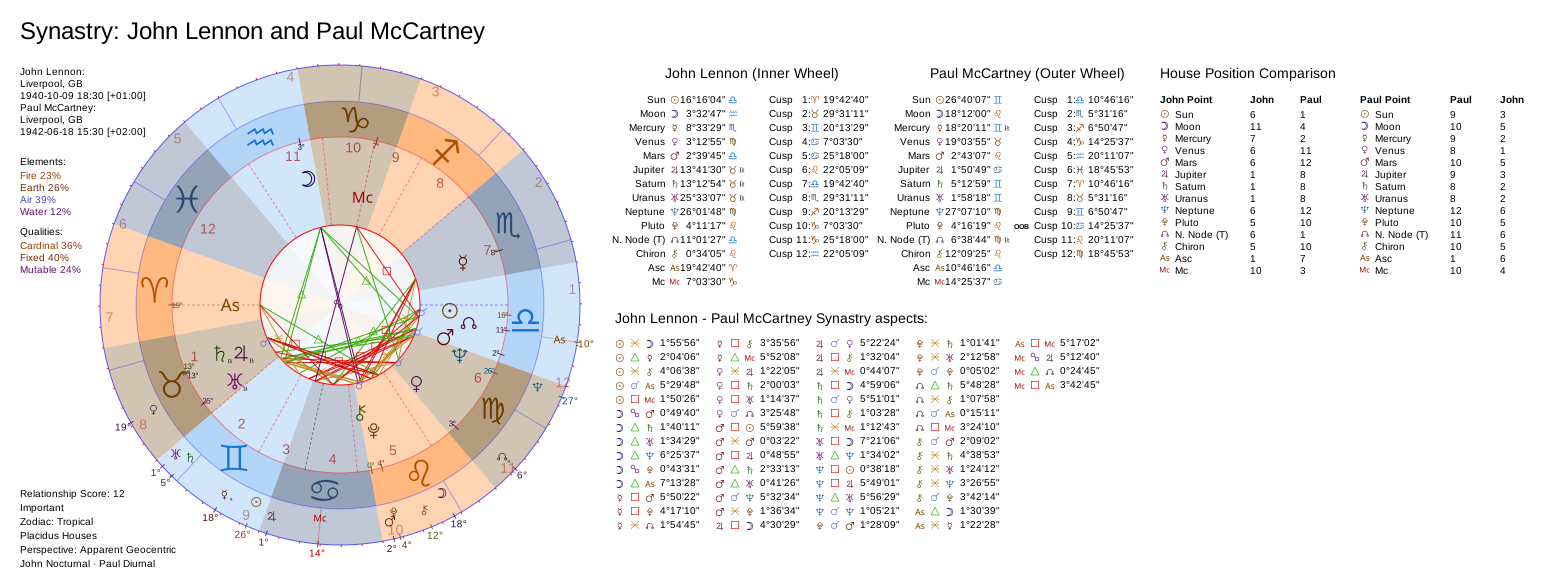
bool |
False |
Print the synastry relationship score in the info panel. Needs a score on the chart data, which create_synastry_chart_data computes by default |
show_ayanamsa_value |
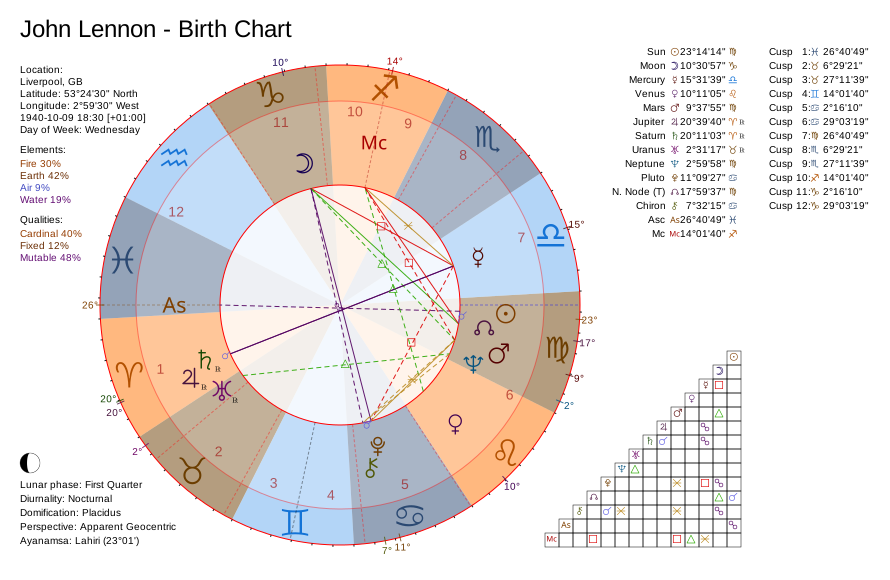
bool |
False |
Append the ayanamsa offset in degrees and minutes to the zodiac line of a sidereal chart |
show_polar_fallback_note |
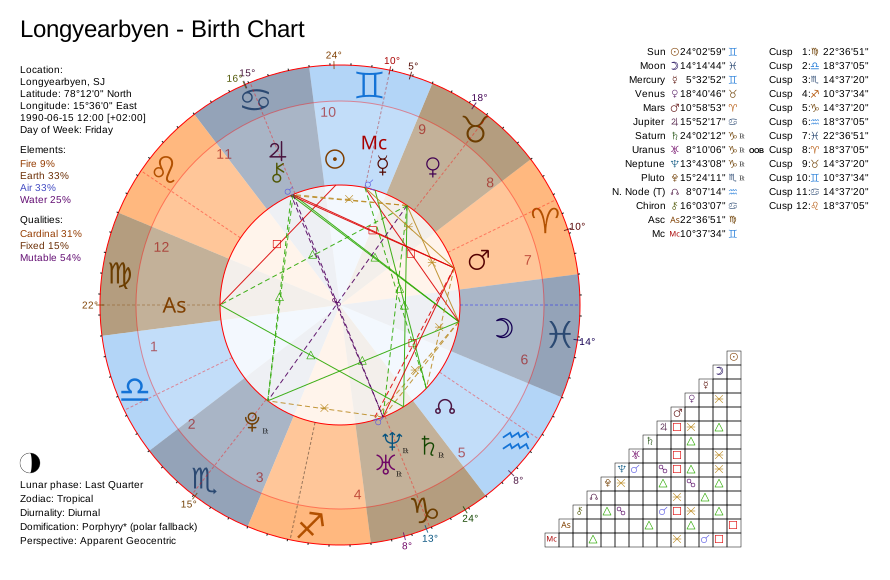
bool |
False |
Mark the domification line when the requested house system was undefined at that latitude and another stood in for it |
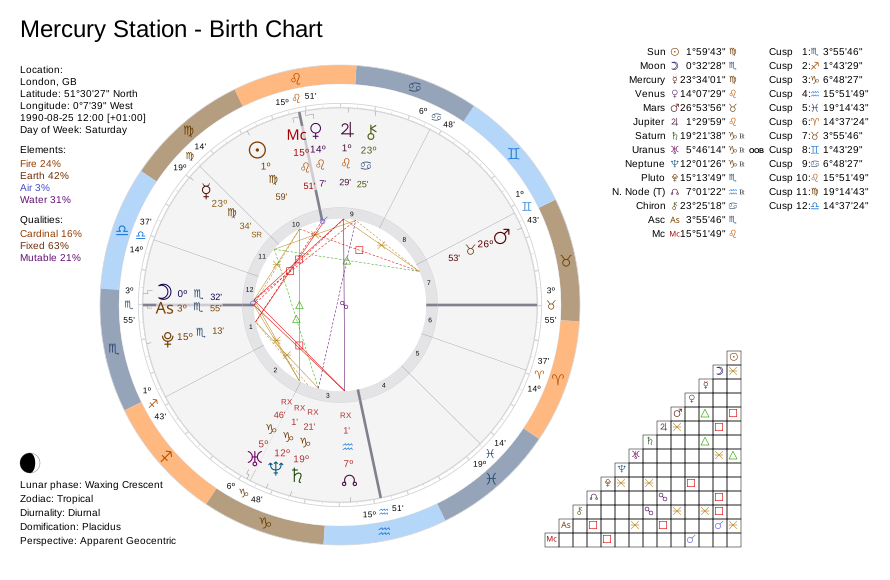
from kerykeion import AstrologicalSubjectFactory, ChartDataFactory, ChartDrawer

# 25 August 1990: Mercury is at a station, Uranus is out of bounds.
station = AstrologicalSubjectFactory.from_birth_data(
    "Mercury Station", 1990, 8, 25, 12, 0,
    lng=-0.1276, lat=51.5074, tz_str="Europe/London",
    online=False, suppress_geonames_warning=True,
)
drawer = ChartDrawer(
    ChartDataFactory.create_natal_chart_data(station),
    show_motion_state=True,
    show_out_of_bounds=True,
    show_aspect_movement=True,
)
svg = drawer.generate_svg_string()

print(station.mercury.motion_state)     # stationary_retrograde
print(station.uranus.is_out_of_bounds)  # True
examples/svg_extended_example.py renders all six, each on a subject that has its referent.
Rendered, with every option on. A mark draws nothing where there is nothing to mark, so no single chart shows the set — these four between them carry every referent, and none of them claims something its own sky does not have:
| Stations, out-of-bounds and separating aspects Mercury at its August 1990 station; Uranus past the obliquity |
The same sky, classic SR at the foot of the glyph, where ℞ sits |
 |
 |
| Ayanamsa offset Sidereal Lahiri — the offset next to the mode name |
Polar fallback note Placidus undefined at 78°N, so the line says what drew the cusps |
 |
 |
| Relationship score The synastry score and its band, in a panel row that was empty |
|
 |
|
Classic Birth Chart
from pathlib import Path
from kerykeion import AstrologicalSubjectFactory
from kerykeion.chart_data.factory import ChartDataFactory
from kerykeion.charts.drawer import ChartDrawer

john = AstrologicalSubjectFactory.from_birth_data(
    "John Lennon", 1940, 10, 9, 18, 30,
    lng=-2.9833,
    lat=53.4,
    tz_str="Europe/London",
    online=False,
)

chart_data = ChartDataFactory.create_natal_chart_data(john)
chart = ChartDrawer(chart_data=chart_data)

output_dir = Path("charts_output")
output_dir.mkdir(exist_ok=True)
chart.save_svg(output_path=output_dir, filename="john-lennon-classic", style="classic")
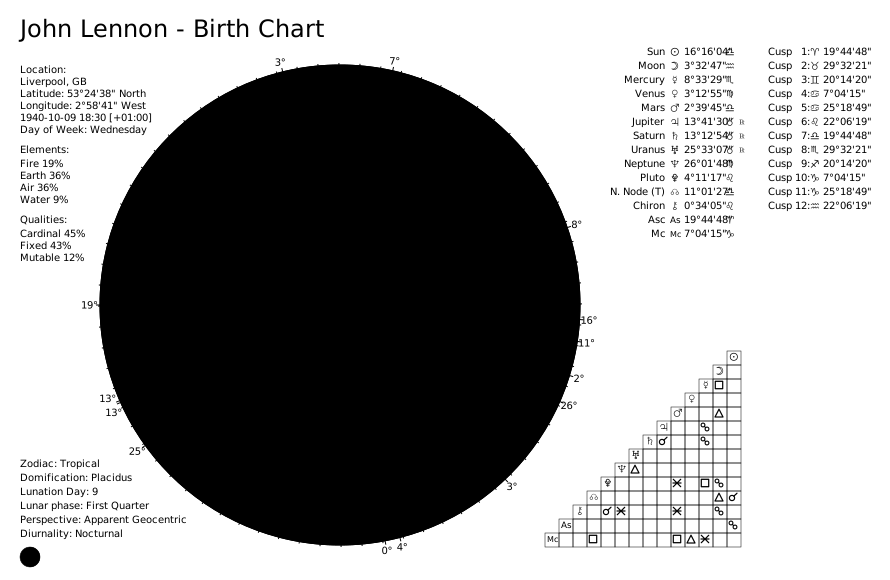
Classic Synastry Chart
from pathlib import Path
from kerykeion import AstrologicalSubjectFactory
from kerykeion.chart_data.factory import ChartDataFactory
from kerykeion.charts.drawer import ChartDrawer

john = AstrologicalSubjectFactory.from_birth_data(
    "John Lennon", 1940, 10, 9, 18, 30,
    lng=-2.9833,
    lat=53.4,
    tz_str="Europe/London",
    online=False,
)
paul = AstrologicalSubjectFactory.from_birth_data(
    "Paul McCartney", 1942, 6, 18, 15, 30,
    lng=-2.9833,
    lat=53.4,
    tz_str="Europe/London",
    online=False,
)

chart_data = ChartDataFactory.create_synastry_chart_data(john, paul)
chart = ChartDrawer(chart_data=chart_data)

output_dir = Path("charts_output")
output_dir.mkdir(exist_ok=True)
chart.save_svg(output_path=output_dir, filename="lennon-mccartney-synastry-classic", style="classic")
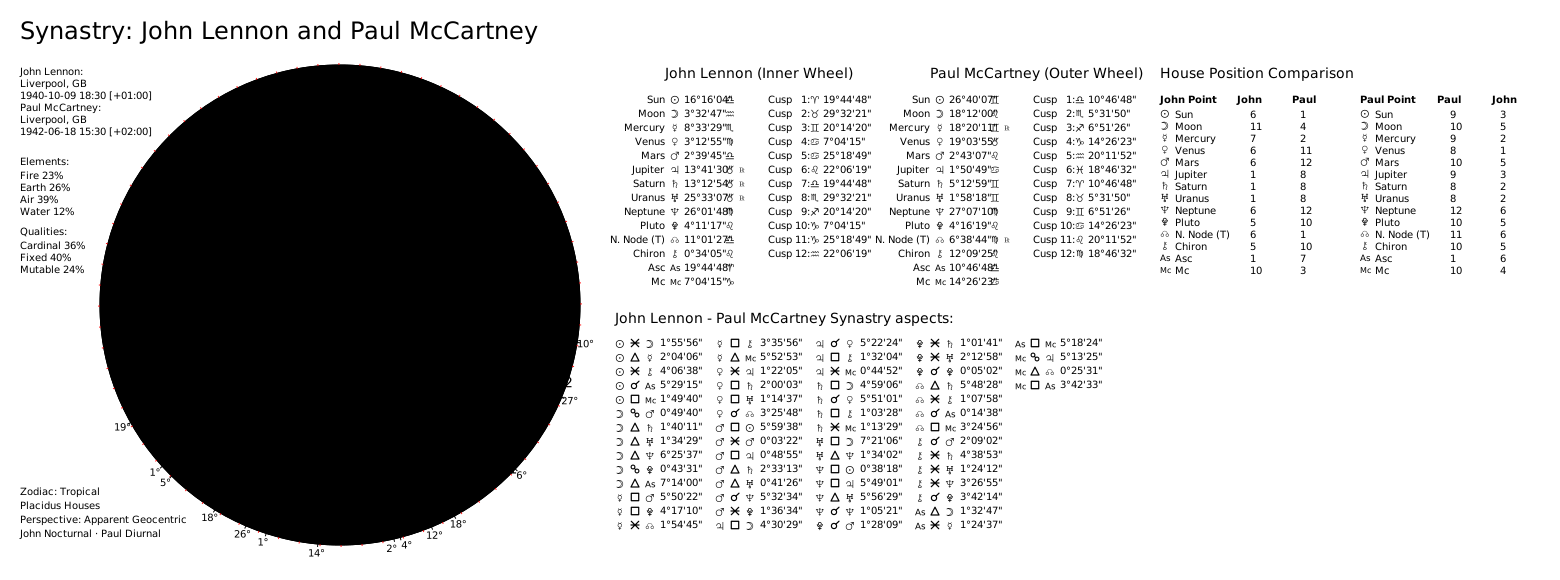
Classic Transit Chart
from pathlib import Path
from kerykeion import AstrologicalSubjectFactory
from kerykeion.chart_data.factory import ChartDataFactory
from kerykeion.charts.drawer import ChartDrawer

john = AstrologicalSubjectFactory.from_birth_data(
    "John Lennon", 1940, 10, 9, 18, 30,
    lng=-2.9833,
    lat=53.4,
    tz_str="Europe/London",
    online=False,
)

transit = AstrologicalSubjectFactory.from_birth_data(
    "Transit", 2025, 3, 4, 12, 0,
    lng=-2.9833,
    lat=53.4,
    tz_str="Europe/London",
    online=False,
)

chart_data = ChartDataFactory.create_transit_chart_data(john, transit)
chart = ChartDrawer(chart_data=chart_data)

output_dir = Path("charts_output")
output_dir.mkdir(exist_ok=True)
chart.save_svg(output_path=output_dir, filename="lennon-transit-classic", style="classic")
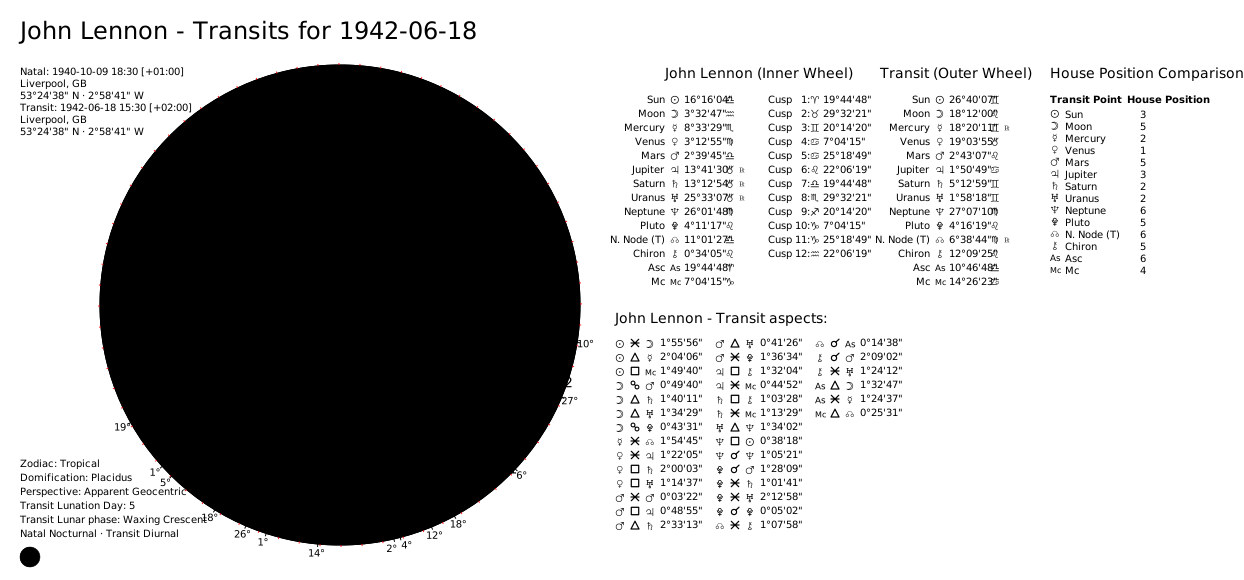
Classic Wheel Only
from pathlib import Path
from kerykeion import AstrologicalSubjectFactory
from kerykeion.chart_data.factory import ChartDataFactory
from kerykeion.charts.drawer import ChartDrawer

john = AstrologicalSubjectFactory.from_birth_data(
    "John Lennon", 1940, 10, 9, 18, 30,
    lng=-2.9833,
    lat=53.4,
    tz_str="Europe/London",
    online=False,
)

chart_data = ChartDataFactory.create_natal_chart_data(john)
chart = ChartDrawer(chart_data=chart_data)

output_dir = Path("charts_output")
output_dir.mkdir(exist_ok=True)
chart.save_wheel_only_svg_file(
    output_path=output_dir,
    filename="john-lennon-classic-wheel",
    style="classic",
)
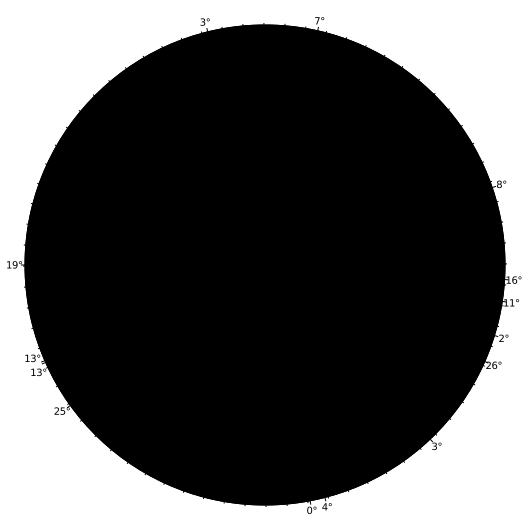
📖 Modern chart examples: Modern Charts Guide
Report Generator
ReportGenerator mirrors the chart-type dispatch of ChartDrawer. It accepts raw AstrologicalSubjectModel instances as well as any ChartDataModel produced by ChartDataFactory—including natal, composite, synastry, transit, and planetary return charts—and renders the appropriate textual report automatically.
📖 Full report documentation: Report Generator Guide
Quick Examples
from kerykeion import ReportGenerator, AstrologicalSubjectFactory, ChartDataFactory

# Subject-only report
subject = AstrologicalSubjectFactory.from_birth_data(
    "Sample Natal", 1990, 7, 21, 14, 45,
    lng=12.4964,
    lat=41.9028,
    tz_str="Europe/Rome",
    online=False,
)
ReportGenerator(subject).print_report(include_aspects=False)

# Single-chart data (elements, qualities, aspects enabled)
natal_data = ChartDataFactory.create_natal_chart_data(subject)
ReportGenerator(natal_data).print_report(max_aspects=10)

# Dual-chart data (synastry, transit, dual return, …)
partner = AstrologicalSubjectFactory.from_birth_data(
    "Sample Partner", 1992, 11, 5, 9, 30,
    lng=12.4964,
    lat=41.9028,
    tz_str="Europe/Rome",
    online=False,
)
synastry_data = ChartDataFactory.create_synastry_chart_data(subject, partner)
ReportGenerator(synastry_data).print_report(max_aspects=12)
Each report contains:
- A chart-aware title summarising the subject(s) and chart type
- Birth/event metadata and configuration settings
- Celestial points with sign, position, daily motion, motion state (including the two named stations, SR and SD), declination, retrograde flag, and house (an out-of-bounds column appears when a point actually is)
- Arabic Parts, fixed stars (with constellation) and midpoints in tables of their own, when active
- House cusp tables for every subject involved
- Essential dignities, nakshatras and Gauquelin sectors, when the chart computed them
- Lunar phase details when available
- Chart diurnality (Sun above or below the horizon), when it applies
- Element/quality distributions, angularities and stelliums, and active configuration summaries (for chart data)
- Aspect listings tailored for single or dual charts, with symbols for type and movement
- Dual-chart extras such as house comparisons and relationship scores (when provided by the data)
Technique results are accepted directly, each rendering its own report:
ProfectionsModel, FirdariaModel, HoraryIndicatorsModel,
MutualReceptionsModel, DominantsModel and ZodiacalReleasingModel.
from kerykeion import AstrologicalSubjectFactory, FirdariaFactory, ReportGenerator

subject = AstrologicalSubjectFactory.from_birth_data("Jane", 1990, 6, 15, 12, 0, "Rome", "IT")
ReportGenerator(FirdariaFactory.from_subject(subject, target_date="2026-06-04")).print_report()
Section Access
All section helpers remain available for targeted output:
from kerykeion import ReportGenerator, AstrologicalSubjectFactory, ChartDataFactory

subject = AstrologicalSubjectFactory.from_birth_data(
    "Sample Natal", 1990, 7, 21, 14, 45,
    lng=12.4964,
    lat=41.9028,
    tz_str="Europe/Rome",
    online=False,
)
natal_data = ChartDataFactory.create_natal_chart_data(subject)

report = ReportGenerator(natal_data)
sections = report.generate_report(max_aspects=5).split("\n\n")
for section in sections[:3]:
    print(section)
📖 Report examples: Report Examples
AI Context Serializer
The context_serializer module transforms Kerykeion data models into precise, non-qualitative XML optimized for LLM consumption. It provides the essential "ground truth" data needed for AI agents to generate accurate astrological interpretations.
📖 Full context serializer docs: Context Serializer Guide
Quick Example
from kerykeion import AstrologicalSubjectFactory, to_context

# Create a subject
subject = AstrologicalSubjectFactory.from_birth_data(
    "John Doe", 1990, 1, 1, 12, 0,
    city="London",
    nation="GB",
    lng=-0.1278,
    lat=51.5074,
    tz_str="Europe/London",
    online=False,
)

# Generate AI-ready context
context = to_context(subject)
print(context)
Output:
<chart name="John Doe">
  <birth_data date="1990-01-01 12:00" city="London" nation="GB" lat="51.51" lng="-0.13" lng_dir="W" tz="Europe/London" />
  <config zodiac="Tropical" house_system="Placidus" perspective="Apparent Geocentric" />
  <planets>
    <point name="Sun" position="10.81" sign="Capricorn" element="Earth" quality="Cardinal" ... />
    <point name="Moon" position="3.27" sign="Pisces" element="Water" quality="Mutable" ... />
    ...
  </planets>
  <houses>...</houses>
  <lunar_phase name="Waxing Crescent" phase="5" degrees_between="52.45" emoji="🌒" />
</chart>
Key Features:
- XML Output: Well-formed XML with semantic tags, proper escaping, and optional field omission.
- Standardized Output: Consistent format for Natal, Synastry, Composite, and Return charts.
- Non-Qualitative: Provides raw data (positions, aspects) without interpretive bias.
- Prompt-Ready: Designed to be injected directly into system prompts.
Example: Retrieving Aspects
Kerykeion provides a unified AspectsFactory class for calculating astrological aspects within single charts or between two charts:
from kerykeion import AspectsFactory, AstrologicalSubjectFactory

# Create astrological subjects
jack = AstrologicalSubjectFactory.from_birth_data(
    "Jack", 1990, 6, 15, 15, 15,
    lng=12.4964,
    lat=41.9028,
    tz_str="Europe/Rome",
    online=False,
)
jane = AstrologicalSubjectFactory.from_birth_data(
    "Jane", 1991, 10, 25, 21, 0,
    lng=12.4964,
    lat=41.9028,
    tz_str="Europe/Rome",
    online=False,
)

# For single chart aspects (natal, return, composite, etc.)
single_chart_result = AspectsFactory.single_chart_aspects(jack)
print(f"Found {len(single_chart_result.aspects)} aspects in Jack's chart")
print(single_chart_result.aspects[0])

# For dual chart aspects (synastry, transits, comparisons, etc.)
dual_chart_result = AspectsFactory.dual_chart_aspects(jack, jane)
print(f"Found {len(dual_chart_result.aspects)} aspects between Jack and Jane's charts")
print(dual_chart_result.aspects[0])

# Each AspectModel includes:
# - p1_name, p2_name: Planet/point names
# - p1_owner, p2_owner: Subject name string (e.g., "Jack", "Jane")
# - aspect: Aspect type (conjunction, trine, square, etc.)
# - orbit: Actual orb in degrees
# - aspect_degrees: Exact degrees for the aspect (0, 60, 90, 120, 180, etc.)
# - diff: Absolute angular difference between the two points
# - p1_abs_pos, p2_abs_pos: Absolute ecliptic positions
# - p1_speed, p2_speed: Daily speed of each point
# - aspect_movement: "Applying", "Separating", or "Static"
📖 Aspects documentation: Aspects Factory Guide
Advanced Usage with Custom Settings:
from kerykeion import AstrologicalSubjectFactory, AspectsFactory

subject = AstrologicalSubjectFactory.from_birth_data("Jane", 1990, 6, 15, 12, 0, "Rome", "IT")

# Custom aspect set with explicit per-aspect orbs (a list of {name, orb} dicts):
custom_aspects = [
    {"name": "conjunction", "orb": 3},
    {"name": "opposition", "orb": 3},
    {"name": "trine", "orb": 3},
    {"name": "square", "orb": 3},
    {"name": "sextile", "orb": 2},
]
aspects = AspectsFactory.single_chart_aspects(subject, active_aspects=custom_aspects)

# Tighten the orb when an angle (Asc/MC) is involved, or widen specific points:
aspects = AspectsFactory.single_chart_aspects(
    subject,
    axis_orb_limit=2.0,
    point_orb_adjustments={"Sun": 10.0, "Moon": 10.0},
)
📖 Configuration options: Settings Documentation
Relationship Score
Kerykeion can calculate a relationship compatibility score based on synastry aspects, using the method of the Italian astrologer Ciro Discepolo:
from kerykeion import AstrologicalSubjectFactory
from kerykeion.relationship_score.factory import RelationshipScoreFactory

# Create two subjects
person1 = AstrologicalSubjectFactory.from_birth_data(
    "Alice", 1990, 3, 15, 14, 30,
    lng=12.4964,
    lat=41.9028,
    tz_str="Europe/Rome",
    online=False,
)
person2 = AstrologicalSubjectFactory.from_birth_data(
    "Bob", 1988, 7, 22, 9, 0,
    lng=12.4964,
    lat=41.9028,
    tz_str="Europe/Rome",
    online=False,
)

# Calculate relationship score
score_factory = RelationshipScoreFactory(person1, person2)
result = score_factory.get_relationship_score()

print(f"Compatibility Score: {result.score_value}")
print(f"Description: {result.score_description}")
📖 Relationship score guide: Relationship Score Examples
📖 Factory documentation: RelationshipScoreFactory
House Comparison (Synastry Overlay)
HouseComparisonFactory performs a bidirectional house overlay: it reports where each subject's points fall within the other subject's houses — a core synastry technique. It also accepts planetary-return subjects.
from kerykeion import AstrologicalSubjectFactory, HouseComparisonFactory

person_a = AstrologicalSubjectFactory.from_birth_data("Person A", 1990, 5, 15, 10, 30, "Rome", "IT")
person_b = AstrologicalSubjectFactory.from_birth_data("Person B", 1992, 8, 23, 14, 45, "Milan", "IT")

comparison = HouseComparisonFactory(person_a, person_b).get_house_comparison()
for placement in comparison.first_points_in_second_houses:
    print(placement)  # A's points located in B's houses
# comparison.second_points_in_first_houses -> B's points in A's houses
Element & Quality Distribution Strategies
ChartDataFactory now offers two strategies for calculating element and modality totals. The default "weighted" mode leans on a curated map that emphasises core factors (for example sun, moon, and ascendant weight 2.0, angles such as medium_coeli 1.5, personal planets 1.5, social planets 1.0, outers 0.5, and minor bodies 0.3–0.8). Provide distribution_method="pure_count" when you want every active point to contribute equally.
You can refine the weighting without rebuilding the dictionary: pass lowercase point names to custom_distribution_weights and use "__default__" to override the fallback value applied to entries that are not listed explicitly.
from kerykeion import AstrologicalSubjectFactory, ChartDataFactory

subject = AstrologicalSubjectFactory.from_birth_data(
    "Sample", 1986, 4, 12, 8, 45,
    lng=11.3426,
    lat=44.4949,
    tz_str="Europe/Rome",
    online=False,
)

# Equal weighting: every active point counts once
pure_data = ChartDataFactory.create_natal_chart_data(
    subject,
    distribution_method="pure_count",
)

# Custom emphasis: boost the Sun, soften everything else
weighted_data = ChartDataFactory.create_natal_chart_data(
    subject,
    distribution_method="weighted",
    custom_distribution_weights={
        "sun": 3.0,
        "__default__": 0.75,
    },
)

print(pure_data.element_distribution.fire)
print(weighted_data.element_distribution.fire)
All convenience helpers (create_synastry_chart_data, create_transit_chart_data, returns, and composites) forward the same keyword-only parameters, so you can keep a consistent weighting scheme across every chart type.
📖 Element/quality distribution guide: Distribution Documentation
Ayanamsa (Sidereal Modes)
By default, the zodiac type is Tropical. To use Sidereal, specify the sidereal mode:
johnny = AstrologicalSubjectFactory.from_birth_data(
    "Johnny Depp", 1963, 6, 9, 0, 0,
    lng=-87.1112,
    lat=37.7719,
    tz_str="America/Chicago",
    online=False,
    zodiac_type="Sidereal",
    sidereal_mode="LAHIRI"
)

# The ayanamsa offset (degrees) is available on sidereal charts:
print(johnny.ayanamsa_value)  # e.g. 23.34
Kerykeion supports 47 named sidereal modes plus a USER mode for custom ayanamsa definitions (48 total). Mode families include Indian/Vedic (Lahiri, Krishnamurti, Raman, Aryabhata, Suryasiddhanta, True Citra/Pushya/Revati, ...), Western sidereal (Fagan-Bradley, DeLuce, Hipparchos, ...), Babylonian (Kugler, Huber, Britton, ...), galactic alignment, and astronomical reference frames (J2000, J1900, B1950).
Custom ayanamsa (USER mode):
custom = AstrologicalSubjectFactory.from_birth_data(
    "Custom Ayanamsa", 2000, 1, 1, 0, 0,
    lng=0.0, lat=51.5, tz_str="Etc/GMT", online=False,
    zodiac_type="Sidereal",
    sidereal_mode="USER",
    custom_ayanamsa_t0=2451545.0,      # J2000.0 reference epoch
    custom_ayanamsa_ayan_t0=23.5,       # ayanamsa offset at epoch (degrees)
)
📖 Sidereal mode examples: Sidereal Modes Guide
📖 Full list of supported sidereal modes: SiderealMode Schema
House Systems
By default, houses are calculated using Placidus. Configure a different house system as follows:
johnny = AstrologicalSubjectFactory.from_birth_data(
    "Johnny Depp", 1963, 6, 9, 0, 0,
    lng=-87.1112,
    lat=37.7719,
    tz_str="America/Chicago",
    online=False,
    houses_system_identifier="M"
)
📖 House system examples: House Systems Guide
📖 Full list of supported house systems: HouseSystemIdentifier Schema
All house systems available in the ephemeris backend are supported, including Gauquelin Sectors (see Gauquelin Sectors below).
Perspective Type
By default, Kerykeion uses the Apparent Geocentric perspective (the most standard in astrology). Other perspectives (e.g., Heliocentric) can be set this way:
johnny = AstrologicalSubjectFactory.from_birth_data(
    "Johnny Depp", 1963, 6, 9, 0, 0,
    lng=-87.1112,
    lat=37.7719,
    tz_str="America/Chicago",
    online=False,
    perspective_type="Heliocentric"
)
📖 Perspective type examples: Perspective Type Guide
📖 Full list of supported perspective types: PerspectiveType Schema
Themes
| Classic | Dark | Black & White | |
| Modern Style (default) | 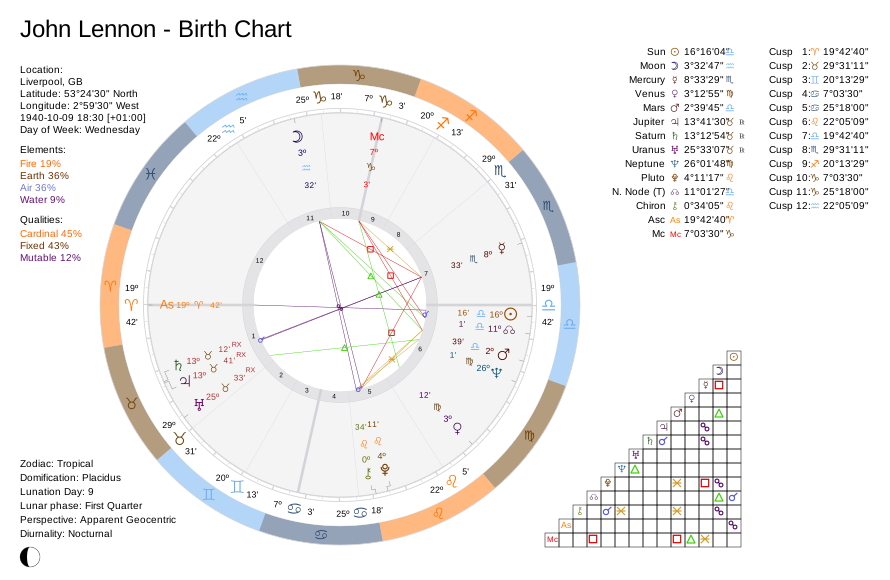 |
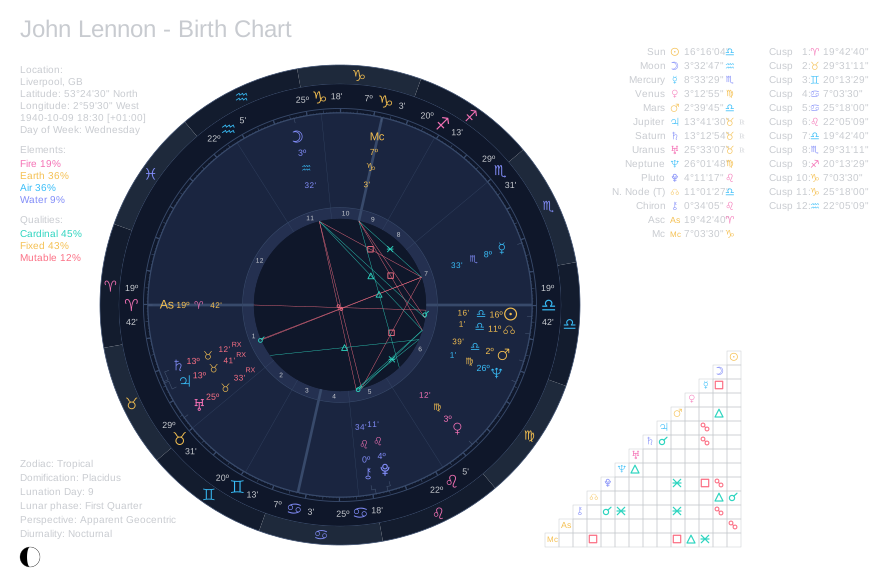 |
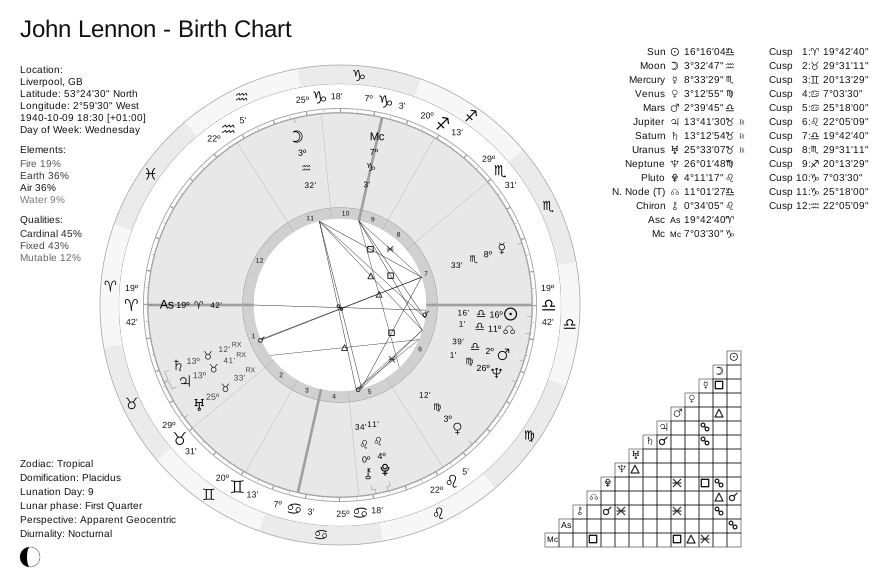 |
| Classic Style | 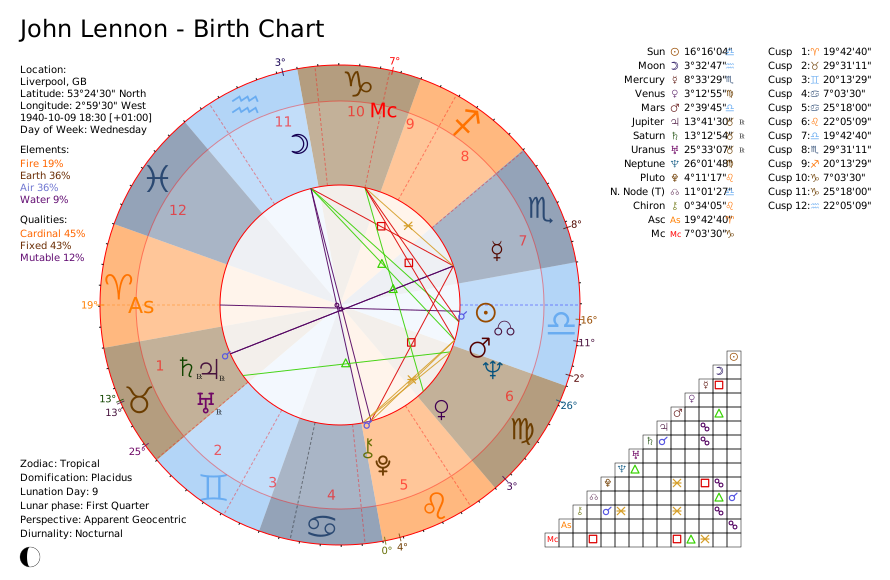 |
 |
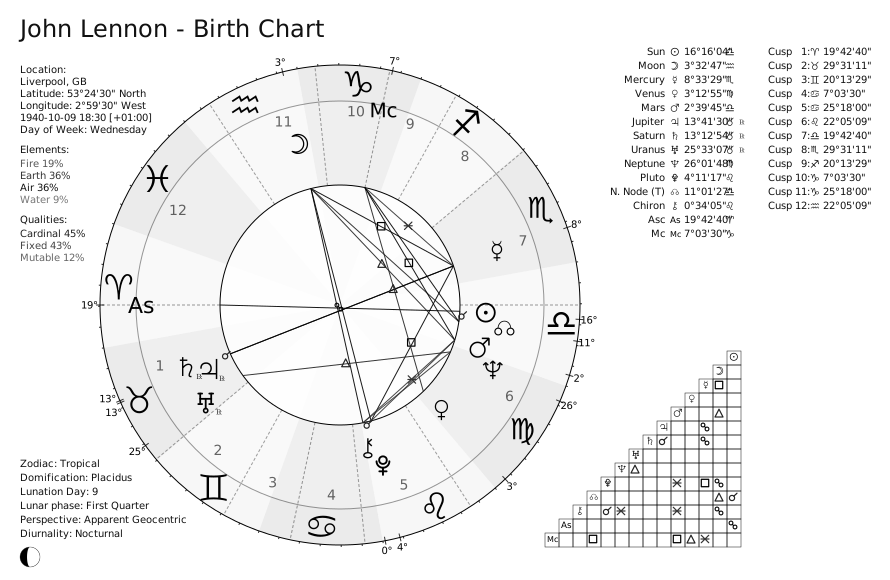 |
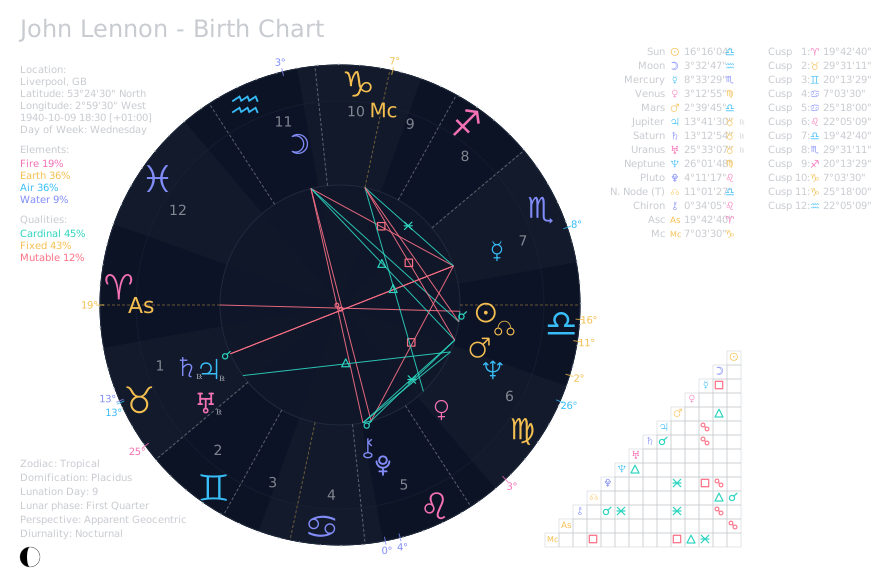
Kerykeion ships three chart themes — Classic (the default: light, with the rainbow zodiac band), Dark, and Black & White (for monochrome printing) — plus the option of no theme at all. Each works in both modern (the default style) and classic chart styles: the theme picks the palette, the style picks the wheel layout. All three meet WCAG AAA on the text a reader reads.
Each theme offers a distinct visual style, allowing you to choose the one that best suits your preferences or presentation needs. If you prefer more control over the appearance, you can opt not to set any theme, making it easier to customize the chart by overriding the default CSS variables.
📖 Theming guide with all examples: Theming Documentation
The Black & White theme renders glyphs, rings, and aspects in solid black on light backgrounds, designed for crisp B/W prints (PDF or paper) without sacrificing legibility.
Here's an example of how to set the theme:
from pathlib import Path
from kerykeion import AstrologicalSubjectFactory
from kerykeion.chart_data.factory import ChartDataFactory
from kerykeion.charts.drawer import ChartDrawer

# Step 1: Create subject
dark_theme_subject = AstrologicalSubjectFactory.from_birth_data(
    "John Lennon - Dark Theme", 1940, 10, 9, 18, 30,
    lng=-2.9833,
    lat=53.4,
    tz_str="Europe/London",
    online=False,
)

# Step 2: Pre-compute chart data
chart_data = ChartDataFactory.create_natal_chart_data(dark_theme_subject)

# Step 3: Create visualization with dark high contrast theme
dark_theme_natal_chart = ChartDrawer(chart_data=chart_data, theme="dark")

output_dir = Path("charts_output")
output_dir.mkdir(exist_ok=True)
dark_theme_natal_chart.save_svg(output_path=output_dir, filename="john-lennon-natal-dark")

Alternative Initialization
Create an AstrologicalSubjectModel from a UTC ISO 8601 string:
from kerykeion import AstrologicalSubjectFactory

subject = AstrologicalSubjectFactory.from_iso_utc_time(
    name="Johnny Depp",
    iso_utc_time="1963-06-09T05:00:00Z",
    city="Owensboro",
    nation="US",
    lng=-87.1112,
    lat=37.7719,
    tz_str="America/Chicago",
    online=False,
)

print(subject.iso_formatted_local_datetime)
If you prefer automatic geocoding, set online=True and provide your GeoNames credentials via geonames_username.
📖 All initialization options: AstrologicalSubjectFactory Documentation
Arabic Parts (Lots)
Kerykeion computes the four classical Arabic Parts (Hellenistic Lots) as activatable points. Add them to active_points to include them in a chart and its aspects:
Pars_Fortunae— Part of Fortune (Lot of Fortune; sect-aware: day = Asc + Moon − Sun, night = Asc + Sun − Moon)Pars_Spiritus— Part of SpiritPars_Amoris— Part of Eros / LovePars_Fidei— Part of Faith / Necessity
from kerykeion import AstrologicalSubjectFactory
from kerykeion.settings.config_constants import DEFAULT_ACTIVE_POINTS

subject = AstrologicalSubjectFactory.from_birth_data(
    "Jane", 1990, 6, 15, 12, 0, "Rome", "IT",
    active_points=DEFAULT_ACTIVE_POINTS + ["Pars_Fortunae", "Pars_Spiritus", "Pars_Amoris", "Pars_Fidei"],
)
print(subject.pars_fortunae.sign, subject.pars_fortunae.position)
Lunar Nodes (Rahu & Ketu)
Kerykeion supports both True and Mean Lunar Nodes:
- True North Lunar Node:
"True_North_Lunar_Node" - True South Lunar Node:
"True_South_Lunar_Node" - Mean North Lunar Node:
"Mean_North_Lunar_Node" - Mean South Lunar Node:
"Mean_South_Lunar_Node"
By default, only the True nodes are active in charts and aspect calculations. To include the Mean nodes (or customize which nodes appear), pass the active_points parameter to the ChartDataFactory methods.
📖 ChartDataFactory documentation: ChartDataFactory Guide
Example:
from pathlib import Path
from kerykeion import AstrologicalSubjectFactory
from kerykeion.chart_data.factory import ChartDataFactory
from kerykeion.charts.drawer import ChartDrawer

# Step 1: Create subject
subject = AstrologicalSubjectFactory.from_birth_data(
    "John Lennon", 1940, 10, 9, 18, 30,
    lng=-2.9833,
    lat=53.4,
    tz_str="Europe/London",
    online=False,
)

# Step 2: Pre-compute chart data with custom active points including true nodes
chart_data = ChartDataFactory.create_natal_chart_data(
    subject,
    active_points=[
        "Sun",
        "Moon",
        "Mercury",
        "Venus",
        "Mars",
        "Jupiter",
        "Saturn",
        "Uranus",
        "Neptune",
        "Pluto",
        "Mean_North_Lunar_Node",
        "Mean_South_Lunar_Node",
        "True_North_Lunar_Node",
        "True_South_Lunar_Node",
        "Ascendant",
        "Medium_Coeli",
        "Descendant",
        "Imum_Coeli"
    ]
)

# Step 3: Create visualization
chart = ChartDrawer(chart_data=chart_data)

output_dir = Path("charts_output")
output_dir.mkdir(exist_ok=True)
chart.save_svg(output_path=output_dir, filename="johnny-depp-custom-points")
Fixed Stars
The default libephemeris backend exposes a 1,447-star catalog. Kerykeion's
DEFAULT_FIXED_STARS preset selects 23 commonly used stars: all 15 Behenian
stars plus 8 additional bright stars, including the 4 Royal Stars. You may pass
any catalog name, not only preset members. Each computed star provides ecliptic
longitude, daily motion (speed), equatorial declination, and apparent visual
magnitude.
Fixed stars are opt-in: pass the names you want to active_fixed_stars when building the subject. Stars requested this way are computed into subject.fixed_stars and participate automatically in chart rendering and aspect calculations.
from kerykeion import AstrologicalSubjectFactory
from kerykeion.chart_data.factory import ChartDataFactory

subject = AstrologicalSubjectFactory.from_birth_data(
    "John Lennon", 1940, 10, 9, 18, 30,
    lng=-2.9833, lat=53.4, tz_str="Europe/London", online=False,
    active_fixed_stars=["Sirius", "Regulus", "Aldebaran", "Antares", "Fomalhaut"],
)

# Access fixed star data
sirius = subject.find_fixed_star("Sirius")
print(sirius.abs_pos)        # Ecliptic longitude
print(sirius.magnitude)      # -1.46
print(sirius.declination)    # Equatorial declination

# The requested stars are rendered and aspected automatically
chart_data = ChartDataFactory.create_natal_chart_data(subject)
The 23-star preset contains: Regulus, Spica, Aldebaran, Antares, Sirius,
Fomalhaut, Algol, Betelgeuse, Canopus, Procyon, Arcturus, Pollux, Deneb, Altair,
Rigel, Achernar, Capella, Vega, Alcyone, Alphecca, Algorab, Deneb_Algedi, and
Alkaid. Discover other names with FixedStarCatalog.list_all() or
FixedStarCatalog.find() from kerykeion.fixed_stars.
📖 Full active points list: Active Points Documentation
JSON Support
You can serialize the astrological subject (the base data used throughout the library) to JSON:
from kerykeion import AstrologicalSubjectFactory

johnny = AstrologicalSubjectFactory.from_birth_data(
    "Johnny Depp", 1963, 6, 9, 0, 0,
    lng=-87.1112,
    lat=37.7719,
    tz_str="America/Chicago",
    online=False,
)

print(johnny.model_dump_json(indent=2))
📖 Data models and schemas: Schemas Documentation
Moon Phase Details
The MoonPhaseDetailsFactory generates a rich lunar phase context from any astrological subject — including illumination, upcoming major phases, next eclipses (solar and lunar), sunrise/sunset, moonrise/moonset, and apparent solar position. All timings use the ephemeris backend for ~1 second precision. moonrise and moonset are ISO-8601 strings in the subject's local zone, with the same instants as Unix timestamps beside them; either is None on the roughly one civil day in thirty that has no such event.
from kerykeion import AstrologicalSubjectFactory, MoonPhaseDetailsFactory, ReportGenerator

subject = AstrologicalSubjectFactory.from_birth_data(
    "Example", 2025, 4, 1, 7, 51,
    lng=-0.1276, lat=51.5074, tz_str="Europe/London",
    online=False,
)

overview = MoonPhaseDetailsFactory.from_subject(subject)

print(f"Phase: {overview.moon.phase_name} {overview.moon.emoji}")
print(f"Illumination: {overview.moon.illumination}")
print(f"Stage: {overview.moon.stage}")

if overview.moon.detailed and overview.moon.detailed.upcoming_phases:
    fm = overview.moon.detailed.upcoming_phases.full_moon
    if fm and fm.next:
        print(f"Next Full Moon: {fm.next.datestamp}")

# Generate a formatted ASCII report
ReportGenerator(overview).print_report()
Report output (truncated):
=====================================================
Moon Phase Overview — Tue, 01 Apr 2025 06:51:00 +0000
=====================================================

+Moon Summary--+--------------------+
| Field        | Value              |
+--------------+--------------------+
| Phase Name   | Waxing Crescent 🌒 |
| Major Phase  | New Moon           |
| Stage        | Waxing             |
| Illumination | 12%                |
| Age (days)   | 3                  |
| Lunar Cycle  | 11.068%            |
| Sun Sign     | Ari                |
| Moon Sign    | Tau                |
+--------------+--------------------+

+Illumination Details-------+
| Field            | Value  |
+------------------+--------+
| Percentage       | 12.0%  |
| Visible Fraction | 0.1161 |
| Phase Angle      | 39.85° |
+------------------+--------+

+Upcoming Phases+---------------------------------+---------------------------------+
| Phase         | Last                            | Next                            |
+---------------+---------------------------------+---------------------------------+
| New Moon      | Sat, 29 Mar 2025 10:57:49 +0000 | Sun, 27 Apr 2025 19:31:09 +0000 |
| First Quarter | ...                             | ...                             |
| Full Moon     | ...                             | ...                             |
| Last Quarter  | ...                             | ...                             |
+---------------+---------------------------------+---------------------------------+

...
You can also get the full model as JSON:
from kerykeion import AstrologicalSubjectFactory, MoonPhaseDetailsFactory

subject = AstrologicalSubjectFactory.from_birth_data(
    "Example", 2025, 4, 1, 6, 51,
    lng=-0.1276, lat=51.5074, tz_str="Etc/GMT", online=False,
)
overview = MoonPhaseDetailsFactory.from_subject(subject)
print(overview.model_dump_json(exclude_none=True, indent=2))
JSON output (truncated):
{
  "timestamp": 1743490260,
  "datestamp": "Tue, 01 Apr 2025 06:51:00 +0000",
  "sun": {
    "sunrise": "2025-04-01T05:35:33.380154Z",
    "sunset": "2025-04-01T18:34:03.841539Z",
    "solar_noon": "2025-04-01T12:04:48.610846Z",
    "day_length": "PT12H58M30.461385S",
    "next_solar_eclipse": { "type": "Partial Solar Eclipse", "...": "..." }
  },
  "moon": {
    "phase_name": "Waxing Crescent",
    "major_phase": "New Moon",
    "stage": "waxing",
    "illumination": "12%",
    "emoji": "🌒",
    "moonrise": "2025-04-01T06:29:49.367603+00:00",
    "moonrise_timestamp": 1743488989,
    "moonset": "2025-04-01T23:37:11.433132+00:00",
    "moonset_timestamp": 1743550631,
    "next_lunar_eclipse": { "type": "Total Lunar Eclipse", "...": "..." },
    "detailed": { "upcoming_phases": { "...": "..." }, "illumination_details": { "...": "..." } }
  },
  "location": { "latitude": "51.5074", "longitude": "-0.1276" }
}
📖 Full documentation: Moon Phase Details Factory
📖 Examples: Moon Phase Details Examples
Timing Factories
Six lightweight factories that work directly from dates/locations (no full AstrologicalSubject is constructed). Times are returned as timezone-aware UTC datetimes.
Sun Times
SunTimesFactory returns sunrise / sunset / solar-noon / day-length for a civil date at a location, with polar day/night detection.
What the numbers mean. Sunrise and sunset are the moment the Sun's apparent upper limb meets the horizon: the semidiameter is taken from the real Earth–Sun distance rather than a fixed 16′, and refraction from a standard atmosphere (1013.25 hPa, 15 °C), which puts the Sun's geometric centre near −0.83° at the event. The horizon is the level sea horizon at any elevation, which is the convention published rise/set tables use. Solar noon is the meridian transit — the instant the Sun is highest — not the midpoint of sunrise and sunset; the two agree only while the declination is stationary, and away from the solstices the midpoint drifts by up to a minute, more the higher the latitude. Because a transit is a meridian crossing rather than a horizon crossing, solar noon is reported on polar days too, when there is no rise/set pair at all.
Sunrise is not is_diurnal. AstrologicalSubjectModel.is_diurnal tests the Sun's geometric centre against the true horizon — no disc, no atmosphere — because that is the question a chart is cast from. Sunrise counts the Sun as risen as soon as its upper edge shows through the air, which happens earlier. The gap is real and grows towards the poles: about 3.3 min at the equator, 4.4 min at Rome, 8.2 min at Reykjavík and 10 min at Tromsø. Both answers are right to their own question, and neither should ever be derived from the other.
from kerykeion import SunTimesFactory

sun = SunTimesFactory.from_date(
    2026, 5, 28, latitude=41.9028, longitude=12.4964, tz_str="Europe/Rome"
)
print(sun.sunrise, sun.sunset, sun.day_length)
Planetary Hours
PlanetaryHoursFactory computes the 24 unequal Chaldean planetary hours (twelve day + twelve night) for the planetary day containing a moment. Moments before sunrise resolve to the previous planetary day.
from kerykeion import PlanetaryHoursFactory

hours = PlanetaryHoursFactory.from_datetime(
    2026, 5, 28, 11, 30, latitude=41.9028, longitude=12.4964, tz_str="Europe/Rome"
)
print(hours.day_ruler, hours.current_ruler)
for hour in hours.hours[:3]:
    print(hour.index, hour.ruler, hour.start, hour.end)
Void of Course Moon
VoidOfCourseMoonFactory resolves the classical void-of-course Moon — the last exact Ptolemaic aspect to a traditional planet before sign ingress. It is geocentric (no location needed) and supports both the tropical and sidereal zodiacs.
from kerykeion import VoidOfCourseMoonFactory

voc = VoidOfCourseMoonFactory.from_datetime(2026, 6, 1, 9, 0, tz_str="Europe/Rome")
print(voc.is_void_of_course, voc.moon_sign, "->", voc.next_sign)
print(voc.last_aspect, voc.next_aspect, voc.ingress)
Lunation Finder
LunationFinderFactory finds the New, First-Quarter, Full and Last-Quarter Moons in a date range (ISO dates, treated as UTC). It is geocentric — no location needed.
from kerykeion import LunationFinderFactory

result = LunationFinderFactory.from_iso_range("2026-01-01", "2026-12-31")
for lunation in result.lunations:
    print(lunation.iso_utc, lunation.phase)  # phase: new / first_quarter / full / last_quarter

# Only full moons:
fulls = LunationFinderFactory.from_iso_range("2026-01-01", "2026-12-31", phases=["full"])
Retrograde Stations
RetrogradeStationFactory finds planetary stations (retrograde and direct turning points) in a date range (Mercury–Pluto by default).
from kerykeion import RetrogradeStationFactory

result = RetrogradeStationFactory.from_iso_range("2026-01-01", "2026-12-31")
for station in result.stations:
    print(station.iso_utc, station.planet, station.station_type)  # station_type: 'SR' (turns retrograde) / 'SD' (turns direct)
Sign Ingresses
SignIngressFactory finds the moments planets cross from one zodiac sign into the next (Sun–Pluto by default; pass planets=["Moon"] to include the fast-moving Moon).
from kerykeion import SignIngressFactory

result = SignIngressFactory.from_iso_range("2026-01-01", "2026-12-31")
for ingress in result.ingresses:
    print(ingress.iso_utc, ingress.planet, "->", ingress.sign)
V6 Advanced Features
Kerykeion v6 adds a suite of advanced astronomical and astrological calculation modules. All v6 features are optional opt-in — existing code works unchanged.
Uranian / Hamburg School Planets
Eight hypothetical planets used in Uranian astrology: Cupido, Hades, Zeus, Kronos, Apollon, Admetos, Vulkanus, Poseidon.
from kerykeion import AstrologicalSubjectFactory

subject = AstrologicalSubjectFactory.from_birth_data(
    "Example", 1985, 4, 15, 8, 30,
    lng=11.25, lat=43.77, tz_str="Europe/Rome", online=False,
    active_points=["Sun", "Moon", "Cupido", "Hades", "Zeus", "Kronos",
                   "Apollon", "Admetos", "Vulkanus", "Poseidon"],
)
print(f"Cupido: {subject.cupido.abs_pos:.4f}")
print(f"Poseidon: {subject.poseidon.abs_pos:.4f}")
Essential Dignities
Ptolemaic essential dignities (Domicile, Exaltation, Detriment, Fall, Term, Peregrine) for any planet.
from kerykeion import AstrologicalSubjectFactory

subject = AstrologicalSubjectFactory.from_birth_data(
    "Example", 1985, 4, 15, 8, 30,
    lng=11.25, lat=43.77, tz_str="Europe/Rome", online=False,
    calculate_dignities=True,
)
print(f"Sun dignity: {subject.sun.essential_dignity}")
Vedic Nakshatras
Lunar mansions with pada and Vimsottari Dasha lord.
The nakshatras divide the sidereal zodiac. A sidereal chart supplies those
longitudes itself; on a tropical chart they are rotated by nakshatra_ayanamsa
(default "LAHIRI") for the 27-fold division only, so the chart stays tropical
and still names the nakshatra a Jyotish chart would name. Pass
nakshatra_ayanamsa=None to get back the pre-v6 uncorrected values.
subject = AstrologicalSubjectFactory.from_birth_data(
    "Example", 1985, 4, 15, 8, 30,
    lng=11.25, lat=43.77, tz_str="Europe/Rome", online=False,
    calculate_nakshatra=True,
)
print(f"Moon nakshatra: {subject.moon.nakshatra}, pada: {subject.moon.nakshatra_pada}")
print(f"Rotated by {subject.nakshatra_ayanamsa}: {subject.nakshatra_ayanamsa_value:.4f} deg")
Eclipse Search
Find upcoming solar and lunar eclipses globally or from a specific location.
from kerykeion import EclipseFactory

result = EclipseFactory.search_global(start_year=2025, count=3)
for ecl in result.solar_eclipses:
    print(f"Solar: {ecl.datestamp} ({ecl.type})")
for ecl in result.lunar_eclipses:
    print(f"Lunar: {ecl.datestamp} ({ecl.type})")
📖 Full documentation: Eclipse Factory
Planetary Phenomena
Phase angle, elongation, apparent magnitude, morning/evening star status, and the solar phase.
solar_phase names the classical condition near the Sun — "cazimi",
"combust", "under_the_beams" or "free" — read off the elongation against
the collection's solar_phase_thresholds (0.2833° / 8.5° / 17° by default, and
replaceable, since the schools disagree). is_morning_star / is_evening_star
are a different question and purely geometric: which side of the Sun the planet
stands on, with no visibility threshold at all.
from kerykeion import PlanetaryPhenomenaFactory, AstrologicalSubjectFactory

subject = AstrologicalSubjectFactory.from_birth_data(
    "Example", 2000, 1, 1, 12, 0,
    lng=0, lat=0, tz_str="Etc/GMT", online=False,
)
phenom = PlanetaryPhenomenaFactory.from_subject(subject)
venus = next(p for p in phenom.phenomena if p.name == "Venus")
print(f"Venus elongation: {venus.elongation:.2f}, magnitude: {venus.apparent_magnitude:.2f}")
print(f"Solar phase: {venus.solar_phase}")
📖 Full documentation: Planetary Phenomena Factory
Planetary Nodes & Apsides
Ascending/descending node and the orbit's periapsis/apoapsis.
The apsides carry two names for the same two points. periapsis/apoapsis are
generic and always correct; perihelion/aphelion are deprecated — they name
the Sun, which is right for the planets and wrong for the Moon, which goes round
the Earth. apsis_kind says which reading applies ("geocentric" for the Moon
alone, whose apoapsis is to the decimal the Black Moon Lilith).
from kerykeion import PlanetaryNodesFactory

nodes = PlanetaryNodesFactory.from_julian_day(2451545.0, planets=["Mars", "Jupiter"])
for entry in nodes.nodes:
    print(f"{entry.planet_name}: ascending node {entry.ascending_node.abs_pos:.2f}")
    print(f"  apoapsis {entry.apoapsis.abs_pos:.2f} ({entry.apsis_kind})")
📖 Full documentation: Planetary Nodes & Apsides
Heliacal Risings & Settings
Find when a planet first becomes visible or disappears in twilight.
from kerykeion import HeliacalFactory

factory = HeliacalFactory()
from kerykeion.ephemeris_backend import ephe
jd = ephe.julday(2025, 1, 1, 0.0)
event = factory.next_heliacal_rising(jd, "Venus", geopos=(12.5, 41.9, 0))
print(f"Venus heliacal rising: {event.datestamp}")
📖 Full documentation: Heliacal Risings & Settings
Occultation Search
Find lunar occultations of planets.
from kerykeion import OccultationFactory
from kerykeion.ephemeris_backend import ephe

factory = OccultationFactory()
jd = ephe.julday(2025, 1, 1, 0.0)
events = factory.search_global(jd, ephe.VENUS, count=3)
for occ in events:
    print(f"{occ.planet_name} occultation: {occ.datestamp} ({occ.type})")
📖 Full documentation: Occultation Factory
Davison Composite Chart
Time-space midpoint composite method (in addition to the existing midpoint composite).
from kerykeion import AstrologicalSubjectFactory, CompositeSubjectFactory

s1 = AstrologicalSubjectFactory.from_birth_data("A", 1990, 3, 15, 10, 0,
    lng=12.5, lat=41.9, tz_str="Europe/Rome", online=False)
s2 = AstrologicalSubjectFactory.from_birth_data("B", 1992, 7, 20, 14, 30,
    lng=-73.9, lat=40.7, tz_str="America/New_York", online=False)

factory = CompositeSubjectFactory(s1, s2)
davison = factory.get_davison_composite_subject_model()
print(f"Davison Sun: {davison.sun.abs_pos:.4f}")
Relocated Charts
Keep planetary positions, recalculate houses for a new location.
from kerykeion import AstrologicalSubjectFactory, RelocatedChartFactory

subject = AstrologicalSubjectFactory.from_birth_data(
    "Example", 1985, 4, 15, 8, 30,
    lng=11.25, lat=43.77, tz_str="Europe/Rome", online=False,
)
relocated = RelocatedChartFactory.relocate(subject, new_lng=139.69, new_lat=35.69, new_city="Tokyo")
print(f"Original ASC: {subject.first_house.abs_pos:.2f}")
print(f"Tokyo ASC: {relocated.first_house.abs_pos:.2f}")
📖 Full documentation: Relocated Chart Factory
Motion State & Stations
Every planet carries a motion_state: "fast", "average", "slow",
"retrograde", or one of the three stationary values. The stationary band
brackets zero speed on both sides and is tested before the sign, so a planet
edging backwards at a hundredth of its mean motion reports a station rather than
a plain retrograde. Which station it is comes from the trend, not the sign —
both stations are approached from one side of zero and left on the other — so
the factory samples the speed again a day later: falling through the band opens
the retrograde phase ("stationary_retrograde", SR), rising through it closes
the phase ("stationary_direct", SD). Where no second sample is available the
generic "stationary" stands.
subject = AstrologicalSubjectFactory.from_birth_data(
    "Mercury Station", 1990, 8, 25, 12, 0,
    lng=-0.1276, lat=51.5074, tz_str="Europe/London", online=False,
)
print(f"Mercury: {subject.mercury.motion_state} at {subject.mercury.speed:.5f}°/day")
# Mercury: stationary_retrograde at 0.01237°/day
ChartDrawer(..., show_motion_state=True) draws these as SR/SD on the wheel;
RetrogradeStationFactory finds the instants of the stations themselves.
Declination & Out-of-Bounds Detection
Equatorial declination and OOB detection for all celestial points.
subject = AstrologicalSubjectFactory.from_birth_data(
    "Example", 1985, 4, 15, 8, 30,
    lng=11.25, lat=43.77, tz_str="Europe/Rome", online=False,
)
print(f"Sun declination: {subject.sun.declination:.4f}")
print(f"Sun OOB: {subject.sun.is_out_of_bounds}")
Barycentric & Planetocentric Perspectives
Solar system barycenter or any planet as the observer origin.
bary = AstrologicalSubjectFactory.from_birth_data(
    "Bary", 1985, 4, 15, 8, 30,
    lng=11.25, lat=43.77, tz_str="Europe/Rome", online=False,
    perspective_type="Barycentric",
)
print(f"Barycentric Sun: {bary.sun.abs_pos:.4f}")
Nutation Model
True/mean obliquity and nutation in longitude/obliquity.
subject = AstrologicalSubjectFactory.from_birth_data(
    "Example", 2000, 1, 1, 12, 0,
    lng=0, lat=0, tz_str="Etc/GMT", online=False,
    calculate_nutation=True,
)
print(f"True obliquity: {subject.nutation.true_obliquity:.4f}")
print(f"Nutation in longitude: {subject.nutation.nutation_longitude:.6f}")
Dynamic Fixed Star Discovery
Auto-discover fixed stars near natal planet positions.
from kerykeion import AstrologicalSubjectFactory, FixedStarDiscoveryFactory

subject = AstrologicalSubjectFactory.from_birth_data(
    "Example", 1985, 4, 15, 8, 30,
    lng=11.25, lat=43.77, tz_str="Europe/Rome", online=False,
)
stars = FixedStarDiscoveryFactory.find_prominent_stars(subject, orb=2.0)
for star in stars:
    print(f"{star.name} at {star.longitude:.2f} (mag {star.magnitude:.1f})")
📖 Full documentation: Fixed Star Discovery
Gauquelin Sectors
36-sector system for statistical astrology research.
subject = AstrologicalSubjectFactory.from_birth_data(
    "Example", 1985, 4, 15, 8, 30,
    lng=11.25, lat=43.77, tz_str="Europe/Rome", online=False,
    calculate_gauquelin=True,
)
print(f"Sun Gauquelin sector: {subject.sun.gauquelin_sector:.2f}")
print(f"Mars Gauquelin sector: {subject.mars.gauquelin_sector:.2f}")
Local Space (Azimuth & Altitude)
Horizon coordinates for all celestial points.
subject = AstrologicalSubjectFactory.from_birth_data(
    "Example", 1985, 4, 15, 8, 30,
    lng=11.25, lat=43.77, tz_str="Europe/Rome", online=False,
    calculate_local_space=True,
)
print(f"Sun azimuth: {subject.sun.azimuth:.2f}, altitude: {subject.sun.altitude_above_horizon:.2f}")
Lilith Variants & Priapus Points
Interpolated Lilith, Mean Priapus, and True Priapus (anti-Lilith points).
subject = AstrologicalSubjectFactory.from_birth_data(
    "Example", 1985, 4, 15, 8, 30,
    lng=11.25, lat=43.77, tz_str="Europe/Rome", online=False,
    active_points=["Sun", "Moon", "Mean_Lilith", "True_Lilith",
                   "Interpolated_Lilith", "Mean_Priapus", "True_Priapus"],
)
print(f"Interpolated Lilith: {subject.interpolated_lilith.abs_pos:.4f}")
print(f"Mean Priapus: {subject.mean_priapus.abs_pos:.4f}")
Transit Exactness & Refinement
Bisection refinement for sub-step precision on exact transit moments.
from datetime import datetime
from kerykeion import AstrologicalSubjectFactory, TransitsTimeRangeFactory, EphemerisDataFactory

natal = AstrologicalSubjectFactory.from_birth_data(
    "Example", 1985, 4, 15, 8, 30,
    lng=11.25, lat=43.77, tz_str="Europe/Rome", online=False,
)

# Generate ephemeris points for the transit period. A 4-hour step keeps the
# sampling finer than half the Moon's in-orb window; the default 1-day step is
# coarse enough that the factory logs a sub-sampling warning for the Moon.
ephemeris = EphemerisDataFactory(
    start_datetime=datetime(2025, 6, 1),
    end_datetime=datetime(2025, 7, 1),
    step_type="hours", step=4,
    lng=11.25, lat=43.77, tz_str="Europe/Rome",
)
points = ephemeris.get_ephemeris_data_as_astrological_subjects()

factory = TransitsTimeRangeFactory(natal, points)
events = factory.get_transit_events(refine_exact_moments=True)
for ev in events.events[:3]:
    print(f"{ev.p1_name} {ev.aspect} {ev.p2_name}: {ev.exact_moment} (orb {ev.min_orb:.4f})")
Primary Directions (Placidus Semi-Arc)
Classical predictive technique with Ptolemy and Naibod rate keys.
from kerykeion import AstrologicalSubjectFactory, PrimaryDirectionsFactory

subject = AstrologicalSubjectFactory.from_birth_data(
    "Example", 1985, 4, 15, 8, 30,
    lng=11.25, lat=43.77, tz_str="Europe/Rome", online=False,
)
directions = PrimaryDirectionsFactory.compute(subject, max_years=30)
for d in directions[:5]:
    print(f"{d.promissor} {d.aspect} {d.significator}: {d.direction_years:.1f} years")
📖 Full documentation: Primary Directions
Secondary Progressions (Day-for-a-Year)
The day-for-a-year technique maps each day after birth to one year of life.
The progressed chart is a real ephemeris snapshot, returned as a standard
AstrologicalSubjectModel — so every downstream tool (aspects, dignities,
chart drawer) works transparently.
from pathlib import Path

from kerykeion import AstrologicalSubjectFactory, SecondaryProgressionFactory
from kerykeion.chart_data.factory import ChartDataFactory
from kerykeion.charts.drawer import ChartDrawer

natal = AstrologicalSubjectFactory.from_birth_data(
    "Example", 1985, 4, 15, 8, 30,
    lng=11.25, lat=43.77, tz_str="Europe/Rome", online=False,
)
progressed = SecondaryProgressionFactory.compute(natal, target_year=2026)

# Inspect progressed positions
print(f"Progressed Sun: {progressed.sun.sign} {progressed.sun.position:.2f}°")
print(f"Progressed Moon: {progressed.moon.sign} {progressed.moon.position:.2f}°")

# Generate a biwheel SVG (natal inner ring, progressed outer ring)
data = ChartDataFactory.create_progression_chart_data(natal, progressed)
drawer = ChartDrawer(data)
output_dir = Path("charts_output")
output_dir.mkdir(parents=True, exist_ok=True)
drawer.save_svg(output_path=output_dir, filename="progression-biwheel")
📖 Full documentation: Secondary Progressions
The biwheel shows the natal chart on the inner ring and progressed positions on the outer ring. Astrologers read it by looking for contacts between the two rings: when a progressed planet (outer) reaches a conjunction, square, or trine to a natal planet (inner), it signals a symbolic theme active for roughly one year. Sign ingresses (a progressed planet changing zodiac sign) mark longer-term shifts in how that planetary energy is expressed.
Solar Arc Directions
Solar arc takes the progressed Sun's forward motion and applies it uniformly to every natal point. The result is a structured model with directed positions and directed-to-natal aspect contacts.
from kerykeion import AstrologicalSubjectFactory, SolarArcFactory

natal = AstrologicalSubjectFactory.from_birth_data(
    "Example", 1985, 4, 15, 8, 30,
    lng=11.25, lat=43.77, tz_str="Europe/Rome", online=False,
)
result = SolarArcFactory.compute(natal, target_year=2026)

print(f"Solar arc: {result.solar_arc:.2f}°")
for dp in result.directed_points[:5]:
    ingress = " (sign changed)" if dp.sign_changed else ""
    print(f"  {dp.name}: {dp.directed_sign} {dp.directed_position:.2f}°{ingress}")

for asp in result.directed_to_natal_aspects[:5]:
    print(f"  {asp.directed_point} {asp.aspect} {asp.natal_point} (orb {asp.orb:.2f}°)")
📖 Full documentation: Solar Arc Directions
Midpoints (Cosmobiology / 90° Dial)
Computes every pairwise midpoint of the active points, with the 90° dial position used by cosmobiology and Uranian astrology, plus optional aspect-to-midpoint detection (third-point activations).
from kerykeion import AstrologicalSubjectFactory, MidpointFactory

natal = AstrologicalSubjectFactory.from_birth_data(
    "Example", 1985, 4, 15, 8, 30,
    lng=11.25, lat=43.77, tz_str="Europe/Rome", online=False,
)
midpoints = MidpointFactory.compute(natal, aspect_orb=1.0)

for m in midpoints[:5]:
    activations = ", ".join(
        f"{a.point_name} {a.aspect} ({a.orb:.2f}°)" for a in m.aspects_to_midpoint
    )
    print(f"{m.point_a}/{m.point_b}: {m.midpoint_sign} {m.midpoint_position:.2f}° "
          f"(90° dial: {m.midpoint_modulus_90:.2f}°)"
          f"{' — activated by: ' + activations if activations else ''}")
📖 Full documentation: Midpoints
Astro-Cartography (ACG)
Compute MC, IC, ASC, DSC planetary lines on the world map.
from kerykeion import AstrologicalSubjectFactory, AstroCartographyFactory

subject = AstrologicalSubjectFactory.from_birth_data(
    "Example", 1985, 4, 15, 8, 30,
    lng=11.25, lat=43.77, tz_str="Europe/Rome", online=False,
)
lines = AstroCartographyFactory.compute(subject)
for line in lines[:5]:
    print(f"{line.planet} {line.line_type}: {len(line.points)} points")
📖 Full documentation: Astro-Cartography
Chart Dominants
DominantsFactory computes a chart's dominant planet / sign / element / quality using a chosen scoring school: "modern" (default), "almuten_figuris" (the traditional "Lord of the Geniture"), or "elemental". Custom schools (the DominantStrategy protocol) and per-point custom_weights are also supported.
from kerykeion import AstrologicalSubjectFactory, DominantsFactory

subject = AstrologicalSubjectFactory.from_birth_data("John Lennon", 1940, 10, 9, 18, 30, "Liverpool", "GB")

dominants = DominantsFactory.from_subject(subject, strategy="modern")
print(dominants.dominant_planet, dominants.dominant_sign)
print(dominants.dominant_element, dominants.dominant_quality)

# Traditional Almuten Figuris, with a per-rule audit trail:
almuten = DominantsFactory.from_subject(subject, strategy="almuten_figuris", include_score_breakdown=True)
Zodiacal Releasing (Aphesis)
ZodiacalReleasingFactory computes the Hellenistic time-lord technique of zodiacal releasing (aphesis) from the Lot of Fortune or Spirit, unfolding nested periods (levels L1–L4) with the "loosing of the bond" jumps and peak/angular markers. Requires a known birth time.
from kerykeion import AstrologicalSubjectFactory, ZodiacalReleasingFactory

subject = AstrologicalSubjectFactory.from_birth_data("Jane", 1990, 6, 15, 12, 0, "Rome", "IT")
zr = ZodiacalReleasingFactory.from_subject(subject, lot="fortune", levels=2, target_date="2026-06-04")
print(zr.lot_sign, len(zr.periods), "top-level periods")
Profections (Annual)
ProfectionsFactory computes annual profections — a traditional timing technique where each year of life activates one house (cycling every 12 years). The sign on the cusp determines the Lord of the Year. Respects the subject's house system and supports BCE births.
from kerykeion import AstrologicalSubjectFactory, ProfectionsFactory

subject = AstrologicalSubjectFactory.from_birth_data("Jane", 1990, 6, 15, 12, 0, "Rome", "IT")
profections = ProfectionsFactory.from_subject(subject, target_date="2026-06-04")
print(f"Age {profections.current.age}: house {profections.current.house}, lord {profections.current.lord}")
Firdaria (Planetary Periods)
FirdariaFactory computes the Persian time-lord sequence that divides life into planetary periods. Day charts begin with the Sun (10 years), night charts with the Moon (9 years). Each major period is subdivided among the seven classical planets. All date arithmetic uses Julian Days, so BCE births are supported.
from kerykeion import AstrologicalSubjectFactory, FirdariaFactory

subject = AstrologicalSubjectFactory.from_birth_data("Jane", 1990, 6, 15, 12, 0, "Rome", "IT")
firdaria = FirdariaFactory.from_subject(subject, target_date="2026-06-04")
print(f"Current lord: {firdaria.current.lord}" if firdaria.current else "No current period")
Mutual Receptions
MutualReceptionsFactory detects domicile and exaltation mutual receptions among the seven classical planets (Sun through Saturn). A reception is found when two planets each occupy a sign ruled by the other.
from kerykeion import AstrologicalSubjectFactory, MutualReceptionsFactory

subject = AstrologicalSubjectFactory.from_birth_data("Jane", 1990, 6, 15, 12, 0, "Rome", "IT")
receptions = MutualReceptionsFactory.from_subject(subject)
for r in receptions.receptions:
    print(f"{r.first_planet} ↔ {r.second_planet} ({r.reception_type})")
Horary Indicators
HoraryIndicatorsFactory assembles horary significators (querent/quesited via classical rulership), considerations before judgment (Ascendant degree, Saturn placement, Moon void-of-course), and mutual receptions for a question chart.
from kerykeion import AstrologicalSubjectFactory, HoraryIndicatorsFactory

subject = AstrologicalSubjectFactory.from_birth_data("Question", 2026, 6, 4, 15, 30, "Rome", "IT")
indicators = HoraryIndicatorsFactory.from_subject(subject)
print(f"Querent ruler: {indicators.querent.ruler}, Quesited ruler: {indicators.quesited.ruler}")
Documentation
- Main Website: kerykeion.net
- Getting Started: kerykeion.net/docs
- Examples Gallery: kerykeion.net/examples
- API Reference: kerykeion.net/pydocs
- Astrologer API Docs: kerykeion.net/astrologer-api
- Migration Guide (v4/v5 to v6): Migration Guide
Projects built with Kerykeion
AstrologerStudio is a cloud-based astrology app built on top of Kerykeion.
Development
Clone the repository or download the ZIP via the GitHub interface.
git clone https://github.com/g-battaglia/kerykeion.git
cd kerykeion
uv sync --dev
Using the Swiss Ephemeris Backend (Optional)
Kerykeion uses libephemeris by default (no external data files needed). If you want to use the Swiss Ephemeris C backend instead, install the optional extra and run the setup utility:
pip install kerykeion[swiss]
python -m kerykeion.swisseph_setup
The setup utility downloads the required data files from the official Swiss Ephemeris repository (AGPL-3.0, Astrodienst AG) and asks for license confirmation. Then set the environment variables:
export KERYKEION_BACKEND=swisseph
export KERYKEION_EPHE_PATH=~/.kerykeion/sweph
For the full configuration guide, see Swiss Ephemeris Configuration.
Fixed stars on swisseph: the fixed-star catalog file
sefstars.txtis required for any fixed-star feature when using the swisseph backend, and is not bundled with kerykeion (Swiss Ephemeris license belongs to Astrodienst). The setup utility above downloads it automatically; for the manual procedure and a diagnostic warning reference, see the Fixed Stars Catalog section of the configuration guide.
AI Agent Skill
Kerykeion ships a cross-platform Agent Skill that teaches AI coding agents the real v6 API — factories, chart types, backends, sidereal modes, predictive and traditional techniques — so generated code stops guessing method names. It works with any skills-aware agent (Claude Code, Cursor, Codex, Copilot, Gemini CLI, and others).
During the v6 alpha, install from the
alpha/v6branch. The skill is not part of the PyPI package, and the registry command below resolves this repository's default branch — which still carries the v5-era skill. Until v6 is merged to the default branch, clone the branch and copy the folder.
git clone --branch alpha/v6 --depth 1 https://github.com/g-battaglia/kerykeion.git
cd kerykeion

# Claude Code
cp -r skills/kerykeion /path/to/your-project/.claude/skills/kerykeion

# Codex
cp -r skills/kerykeion /path/to/your-project/.agents/skills/kerykeion

# Generic agentskills.io layout (Cursor and others)
cp -r skills/kerykeion /path/to/your-project/skills/kerykeion
Once v6 is the default branch, skills.sh installs it in one step:
npx skills add g-battaglia/kerykeion
Prefer a single-file guide? The package also ships kerykeion/llms.txt, a self-contained AI-agent reference installed with the library. For turning chart data into LLM input at runtime, see AI Context Serializer.
Integrating Kerykeion into Your Project
If you would like to incorporate Kerykeion's astrological features into your application, please reach out via email. Whether you need custom features, support, or specialized consulting, I am happy to discuss potential collaborations.
For commercial or closed-source applications, consider using the paid Astrologer API (RapidAPI plans & pricing) which provides REST endpoints for all Kerykeion functionality.
License
This project is covered under the AGPL-3.0 License. For detailed information, please see the LICENSE file. If you have questions, feel free to contact me at kerykeion.astrology@gmail.com.
As a rule of thumb, if you use this library in a project, you should open-source that project under a compatible license. Alternatively, if you wish to keep your source closed, consider using the paid Astrologer API, which is AGPL-3.0 compliant and also helps support the project.
Since the Astrologer API is an external third-party service, using it does not require your code to be open-source.
This is not legal advice — see the LICENSE file and consult legal counsel for guidance.
Contributing
Contributions are welcome! Feel free to submit pull requests or report issues.
By submitting a contribution, you agree to assign the copyright of that contribution to the maintainer. The project stays openly available under the AGPL for everyone, while the re-licensing option helps sustain future development. Your authorship remains acknowledged in the commit history and release notes.
Citations
If using Kerykeion in published or academic work, please cite as follows:
Battaglia, G. (2025). Kerykeion: A Python Library for Astrological Calculations and Chart Generation.
https://github.com/g-battaglia/kerykeion
1 maintainer

Download files
Download the file for your platform. If you're not sure which to choose, learn more about installing packages.
Source Distribution
Built Distribution
Filter files by name, interpreter, ABI, and platform.
If you're not sure about the file name format, learn more about wheel file names.
Copy a direct link to the current filters
File details
Details for the file kerykeion-6.0.0a92.tar.gz.
File metadata
- Download URL: kerykeion-6.0.0a92.tar.gz
- Upload date:
- Size: 826.0 kB
- Tags: Source
- Uploaded using Trusted Publishing? No
- Uploaded via:
uv/0.11.26 {"installer":{"name":"uv","version":"0.11.26","subcommand":["publish"]},"python":null,"implementation":{"name":null,"version":null},"distro":{"name":"macOS","version":null,"id":null,"libc":null},"system":{"name":null,"release":null},"cpu":null,"openssl_version":null,"setuptools_version":null,"rustc_version":null,"ci":null}
File hashes
| Algorithm | Hash digest | |
|---|---|---|
| SHA256 |
77db9922265450da402258517b46b8f64b63127707aee4aba3cd52b90861bf75
|
|
| MD5 |
40106ce6bbacaa540900ad0b08ff51c3
|
|
| BLAKE2b-256 |
9b57c53b17b675e6b7628559a92658207f40462a14f7755528587ad8289c4a2b
|
File details
Details for the file kerykeion-6.0.0a92-py3-none-any.whl.
File metadata
- Download URL: kerykeion-6.0.0a92-py3-none-any.whl
- Upload date:
- Size: 874.8 kB
- Tags: Python 3
- Uploaded using Trusted Publishing? No
- Uploaded via:
uv/0.11.26 {"installer":{"name":"uv","version":"0.11.26","subcommand":["publish"]},"python":null,"implementation":{"name":null,"version":null},"distro":{"name":"macOS","version":null,"id":null,"libc":null},"system":{"name":null,"release":null},"cpu":null,"openssl_version":null,"setuptools_version":null,"rustc_version":null,"ci":null}
File hashes
| Algorithm | Hash digest | |
|---|---|---|
| SHA256 |
1982670b47794ad30127864c5429e86620f47e05347af65fd8246735b215bbbd
|
|
| MD5 |
70ff64f7914a6f46e85d22a13dd83e18
|
|
| BLAKE2b-256 |
aacd0b14d67e3468fc39359be5bed670ebf40d384fb51413a8a4b3e5c70ed5b0
|














