
keyboardlayout
A python library to display different keyboards. Works with pygame or tkinter.
If you need to show your users a graphic that shows a specific keyboard layout or a portion of a keyboard, this is the library for you.
Features:
- shows a keyboard to the user
- keyboard layouts
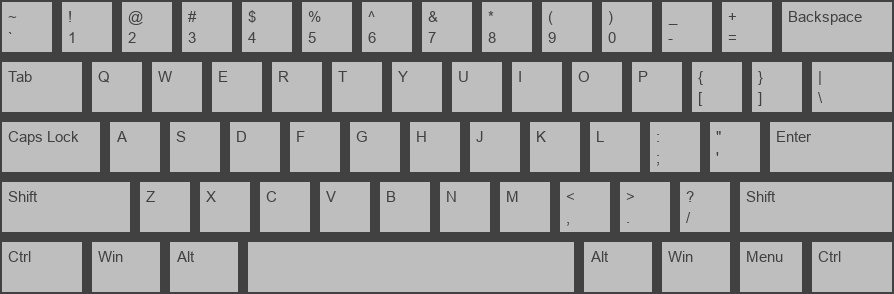
- qwerty
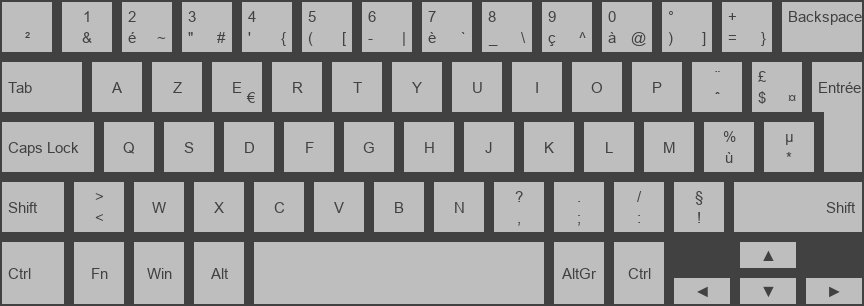
- azerty laptop
- graphics backends
- pygame (uses sprite groups)
- tkinter (uses frames + labels)
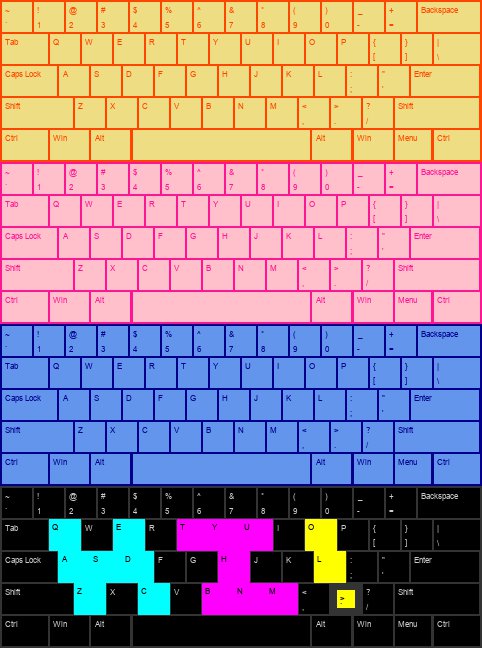
- customize the keyboard with sizes, colors, key margin, padding, font, location, etc
- update a specific key with
update_key - can update key images when keys are pressed
Changelog
https://github.com/spacether/keyboardlayout/tree/master/CHANGELOG.md
Documentation
https://spacether.github.io/keyboardlayout/
Examples
qwerty with colors
qwerty
azerty laptop
Installation
Make sure that you are using Python3
pip install keyboardlayout
Samples
Usage
tkinter example
import tkinter as tk
import tkinter.font as tkf

import keyboardlayout as kl
import keyboardlayout.tkinter as klt

layout_name = kl.LayoutName.QWERTY
key_size = 60
grey = '#bebebe'
dark_grey = '#414141'
keyboard_info = kl.KeyboardInfo(
    position=(0, 0),
    padding=2,
    color=dark_grey
)
window = tk.Tk()
window.resizable(False, False)
key_info = kl.KeyInfo(
    margin=10,
    color=grey,
    txt_color=dark_grey,
    txt_font=tkf.Font(family='Arial', size=key_size//4),
    txt_padding=(key_size//6, key_size//10)
)
letter_key_size = (key_size, key_size)  # width, height
keyboard_layout = klt.KeyboardLayout(
    layout_name,
    keyboard_info,
    letter_key_size,
    key_info,
    master=window
)
window.mainloop()
Local Installation
# make and activate virtual env
python3 -m venv venv
source venv/bin/activate

# if you want to edit the program and have the library use your edits
make develop

# to install separately in your virtual environment
make install
Test
make test
1 maintainer

Release files for keyboardlayout 2.0.1
For a detailed explanation of source distributions (sdists) and built distributions (wheels), please see the package formats documentation.
Source distribution (sdist)
| File | Size | Uploaded | |
|---|---|---|---|
| keyboardlayout-2.0.1.tar.gz | 13.9 kB | Details |
Built distribution (wheel)
| File | Interpreter | ABI | Platform | Reset |
|---|---|---|---|---|
| keyboardlayout-2.0.1-py3-none-any.whl | Python 3 | none | any | Details |
Total release size: 30.5 kB
Release files / keyboardlayout-2.0.1.tar.gz
| Download URL | keyboardlayout-2.0.1.tar.gz |
|---|---|
| Size | 13.9 kB |
| Tags | Source |
|
SHA-256 checksum How to use checksums |
4340f550537f8e04b73a86679d604e38f04bd77889e7cc9c4149d04fdec75181
|
|
BLAKE2b-256 checksum How to use checksums |
ae82757bc51ddecac8a03ac8aef747c07cf4d6ae5c783454574ffa1bc0e64714
|
| Upload date | |
|
Uploaded using Trusted Publishing? What is trusted publishing? |
No |
| Uploaded via |
twine/3.2.0 pkginfo/1.6.1 requests/2.25.1 setuptools/49.2.1 requests-toolbelt/0.9.1 tqdm/4.54.1 CPython/3.8.6
|
Release files / keyboardlayout-2.0.1-py3-none-any.whl
| Download URL | keyboardlayout-2.0.1-py3-none-any.whl |
|---|---|
| Size | 16.6 kB |
| Tags | Python 3 |
|
SHA-256 checksum How to use checksums |
be8cbd653e456ce67f62b77e3894b8101ed773fd27d3efb7bbf62fdfb7348e24
|
|
BLAKE2b-256 checksum How to use checksums |
6a987428f2dcd1c3d4782e9530099ec18362d08591ff011d93e331dcd11222f0
|
| Upload date | |
|
Uploaded using Trusted Publishing? What is trusted publishing? |
No |
| Uploaded via |
twine/3.2.0 pkginfo/1.6.1 requests/2.25.1 setuptools/49.2.1 requests-toolbelt/0.9.1 tqdm/4.54.1 CPython/3.8.6
|














