
🔐 Keep secrets in Keychain, inject on demand 🔐




keyenv is a macOS command-line tool for developers who want to keep development
credentials out of plaintext dotenv files. Store secrets in the login Keychain,
then use keyenv run to inject them into a command's environment. Before Keychain
access, it shows the project, operation, and secret names and asks for approval.
Install
Requires macOS, Python 3.11 or newer, and uv. Install the current repository
version, including the approval and profile commands below:
git clone https://github.com/tsilva/keyenv.git
cd keyenv
uv tool install --force --config-file uv.toml .
keyenv --help
Published releases are also available with uv tool install keyenv-macos.
The distribution is named keyenv-macos; the command is keyenv.
Configure
Create a value-free .keyenv.toml in your project's root:
[keyenv]
version = 1

[secrets.OPENROUTER_API_KEY]
account = "my-project/OPENROUTER_API_KEY"
required = true
From that project, authorize the account, enter its value through the hidden prompt, and launch your application:
keyenv authorize OPENROUTER_API_KEY
keyenv set OPENROUTER_API_KEY
keyenv doctor
keyenv run -- pnpm dev
Commit the manifest, but keep credential values out of it and dotenv files. Your application reads the injected values through its normal environment API.
Approvals
Before a launch reads Keychain, you see the project, executable path, and selected
secret names. Type allow to approve that operation once; authorize requires
the exact secret name. Any other answer cancels before access. Values and command
arguments are never displayed.
Each Keychain call announces which item it is accessing before a macOS dialog can appear. macOS may still identify the requester as Python. Terminal approval and the macOS dialog are separate; the summary cannot authenticate another application's popup.
doctor checks configuration without opening Keychain. Use doctor --verify to
approve reads that check stored credentials and compare their sources.
Commands
Run these from a configured project:
keyenv run -- COMMAND [ARGS...]              # launch with declared secrets
keyenv run --profile dev -- COMMAND [ARGS...] # use a configured launch profile
keyenv doctor                               # check config; no Keychain reads
keyenv doctor --verify                      # approve credential verification
keyenv authorize NAME                       # bind an account to this project
keyenv authorize --rebind NAME              # transfer a binding after a move
keyenv set NAME                             # enter and verify a credential
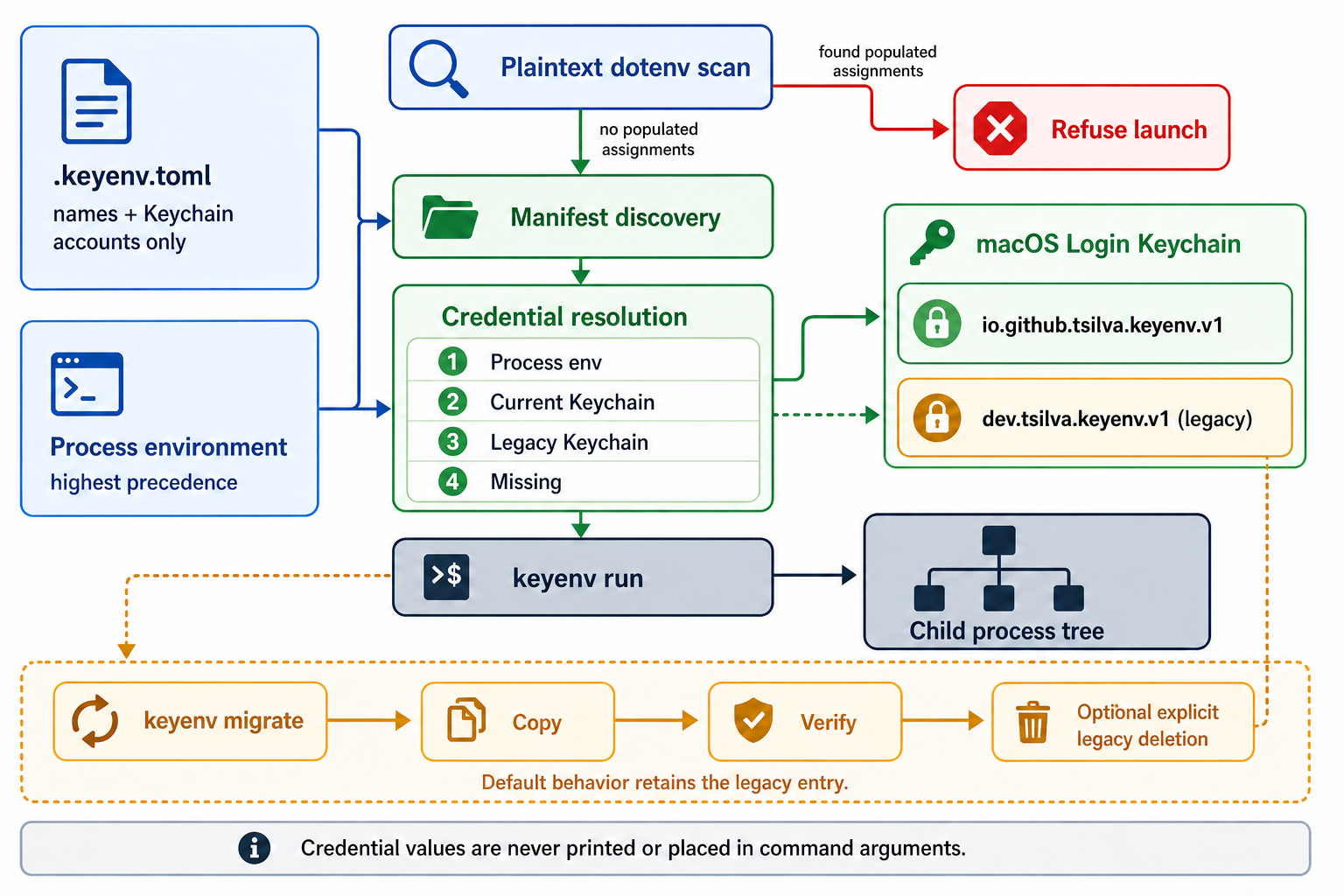
keyenv migrate                              # copy legacy entries; keep originals
keyenv migrate --delete-legacy              # delete verified legacy entries
keyenv --version                            # show the installed version
Notes
- Non-empty process-environment values take precedence over Keychain. CI and background launches work without approval when all selected values are supplied that way. Keychain access requires visible stdin and stderr terminals.
- Optional launch profiles restrict the executable and selected secrets. Other declared secrets are removed from the inherited environment. See profiles and access details.
- A Keychain account belongs to one canonical project root. Run inside that root;
moving it requires
authorize --rebind. Use separate accounts across projects. - Launches refuse populated dotenv assignments for any declared secret or
VERCEL_OIDC_TOKEN. Browser/mobile public environment prefixes cannot be secrets. - The launched program and its descendants can read injected secrets. Profiles do not sandbox code, and arbitrary code running as the same user is outside the protection boundary. See the security policy.
For scan rules, provider injection, migration, and exit codes, see the usage guide. For tests, dependency auditing, and package checks, see development.
Architecture
License
1 maintainer

Metadata
1 maintainer
Release files for keyenv-macos 0.1.3
For a detailed explanation of source distributions (sdists) and built distributions (wheels), please see the package formats documentation.
Source distribution (sdist)
| File | Size | Uploaded | |
|---|---|---|---|
| keyenv_macos-0.1.3.tar.gz | 1.5 MB | Details |
Built distribution (wheel)
| File | Interpreter | ABI | Platform | Reset |
|---|---|---|---|---|
| keyenv_macos-0.1.3-py3-none-any.whl | Python 3 | none | any | Details |
Total release size: 1.5 MB
Release files / keyenv_macos-0.1.3.tar.gz
| Download URL | keyenv_macos-0.1.3.tar.gz |
|---|---|
| Size | 1.5 MB |
| Tags | Source |
|
SHA-256 checksum How to use checksums |
4388b5c6ea4ab67ba9761d15677a81294b2247501325a4430bcf563fd97ba51e
|
|
BLAKE2b-256 checksum How to use checksums |
cb2434be27a815a793080b5adeb011cf4dd5ad7ad9a5f3198294b57c7a553062
|
| Upload date | |
|
Uploaded using Trusted Publishing? What is trusted publishing? |
Yes |
| Uploaded via |
twine/7.0.0 CPython/3.13.14
|
Provenance
Provenance describes where a file came from. On PyPI, provenance is shared via attestations, which provide a verifiable record of the build or publishing details. View details, limitations and caveats.


PyPI Publish Attestation
PyPI verified that this artifact, at this checksum, originated from the publisher listed below.
Signed by GitHub Actions, verified by PyPI on Oct 3, 2026.
Transparency logRelease files / keyenv_macos-0.1.3-py3-none-any.whl
| Download URL | keyenv_macos-0.1.3-py3-none-any.whl |
|---|---|
| Size | 15.1 kB |
| Tags | Python 3 |
|
SHA-256 checksum How to use checksums |
14cf8c00f34fbeee289f620c2265fa5f4afbfaeb9df7760d2462b4e69322f980
|
|
BLAKE2b-256 checksum How to use checksums |
d8304f15f5130fda4c6c5b860e21bab34756454ad3199b4b9eae78bc78cefe36
|
| Upload date | |
|
Uploaded using Trusted Publishing? What is trusted publishing? |
Yes |
| Uploaded via |
twine/7.0.0 CPython/3.13.14
|
Provenance
Provenance describes where a file came from. On PyPI, provenance is shared via attestations, which provide a verifiable record of the build or publishing details. View details, limitations and caveats.
PyPI Publish Attestation
PyPI verified that this artifact, at this checksum, originated from the publisher listed below.
Signed by GitHub Actions, verified by PyPI on Oct 3, 2026.
Transparency log













