
keyfleet
Your YubiKey can't tell you which accounts it's registered to. keyfleet can.




keyfleet is a local-first CLI that keeps a small YAML ledger of your hardware security keys, the accounts they are registered to, and the credential type of each registration — then answers the questions the keys themselves can't:
- Which accounts have only one key registered?
- What breaks if I lose this key — and where do I go to de-register it?
- Which of my keys does that vendor advisory affect?
- How close is this key to its passkey capacity?
It stores no secrets (validation refuses anything that looks like one) and makes no network calls, ever — both enforced by tests.
Why a ledger? Your key literally cannot tell you.
FIDO2 has two kinds of credentials. Discoverable credentials (passkeys)
live on the key — it has a fixed number of slots, and tools can list them.
But the classic security-key registration — U2F, and most "add a security
key" 2FA flows — is non-discoverable: the key stores nothing per
account. The service keeps a credential ID that only your key can use, and
the key just answers challenges with it. No software can enumerate those
registrations from the hardware — not ykman, nothing — because the list
does not exist anywhere except across the services themselves.
So the only complete map of what your keys unlock is the one you maintain. Every vendor's advice is to register a backup key with every account; nothing tracks whether you actually did. keyfleet is that map, plus the checker that turns it into answers.
Quick start
Once v0.1.0 is on PyPI, no install needed:
uvx keyfleet init
(or pipx install keyfleet). From a clone, today:
uv sync --all-extras --dev
uv run keyfleet check keyfleet.example.yaml
keyfleet init drops a fictional example ledger next to you and makes sure
.gitignore covers keyfleet.yaml. Copy keyfleet.example.yaml to
keyfleet.yaml, make it yours, and from then on it's just keyfleet check.
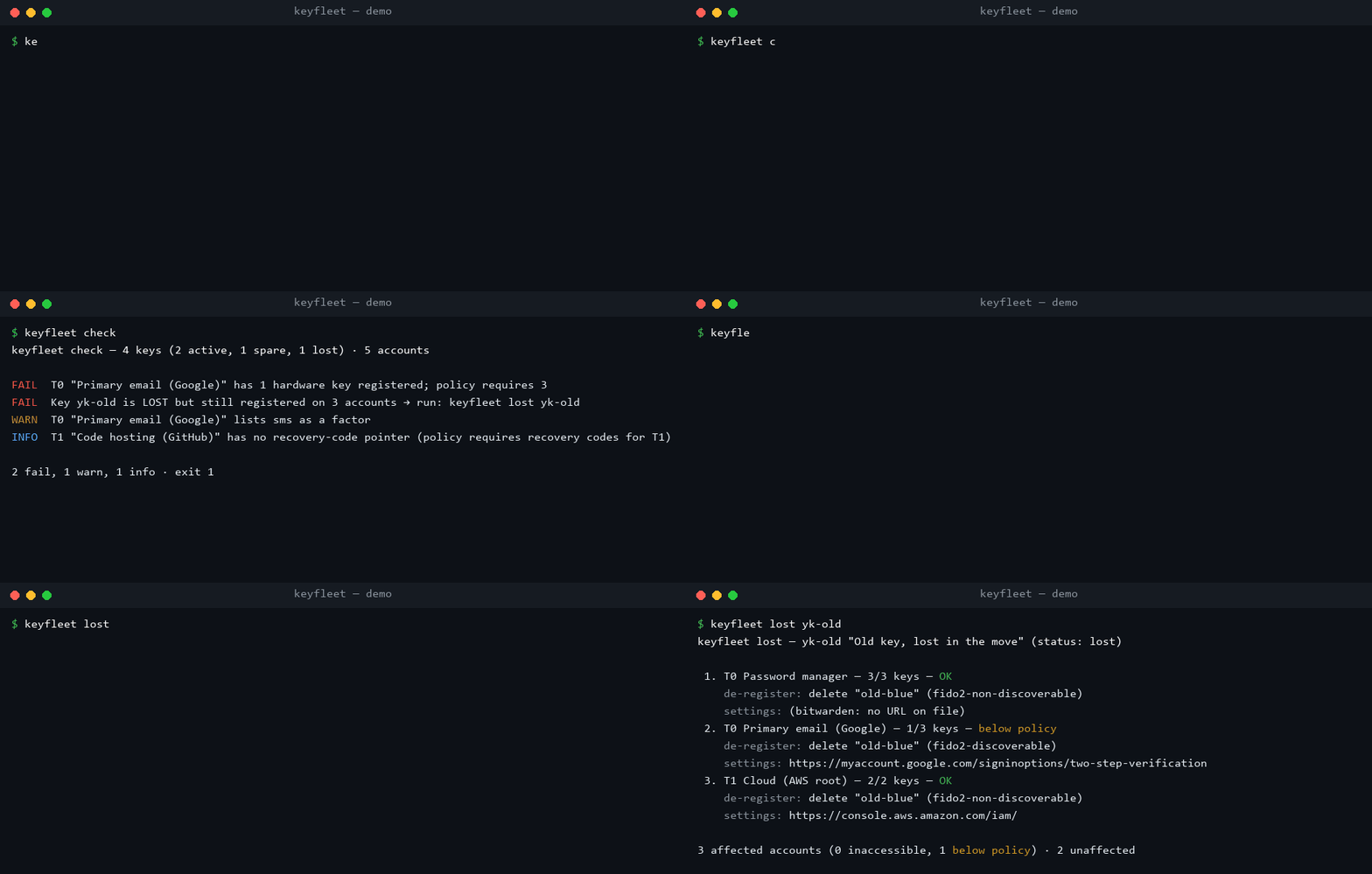
keyfleet check — 4 keys (2 active, 1 spare, 1 lost) · 5 accounts

FAIL  T0 "Primary email (Google)" has 1 hardware key registered; policy requires 3
FAIL  Key yk-old is LOST but still registered on 3 accounts → run: keyfleet lost yk-old
WARN  T0 "Primary email (Google)" lists sms as a factor
INFO  T1 "Code hosting (GitHub)" has no recovery-code pointer (policy requires recovery codes for T1)

2 fail, 1 warn, 1 info · exit 1
That keyfleet lost yk-old prints the incident checklist: every affected
account ordered by tier (the ones that become inaccessible first), which
registration nickname to delete, and the service's security-settings URL —
straight from the bundled, source-cited services table.
Commands
| Command | What it does |
|---|---|
keyfleet validate [LEDGER] |
Schema + referential integrity + secret rejection. Exit 0/1/2. |
keyfleet check [LEDGER] [--json] |
Policy violations and coverage gaps; exit 1 on any FAIL. |
keyfleet lost KEY_ID [LEDGER] [--md] |
Impact analysis + ordered de-registration checklist. |
keyfleet report [LEDGER] [--md|--json] |
Coverage matrix, per-tier summary, key utilization. |
keyfleet advisories [LEDGER] |
Keys matching vendor advisories by firmware range. |
keyfleet services [--search NAME] |
The bundled service table. |
keyfleet init |
Example ledger + .gitignore entry. |
The checks: minimum keys per account tier (default T0:3, T1:2, T2:1 — override per ledger), registrations still sitting on lost/retired keys, weak factors on sensitive tiers (default: sms/email on T0), spares registered nowhere, missing recovery-code pointers (never the codes), passkey-slot usage against known model capacities, and service-id typos.
The ledger
keys:
  - id: yk-blue
    label: "Blue YubiKey 5C NFC — daily carry"
    vendor: yubico
    model: "YubiKey 5C NFC"
    firmware: "5.7.1"
    status: active            # active | spare | lost | retired
accounts:
  - id: email-primary
    service: google           # keys into the bundled services.yaml
    label: "Primary email (Google)"
    tier: T0                  # T0 root of trust · T1 important · T2 nice-to-have
    registrations:
      - { key: yk-blue, type: fido2-discoverable, nickname: blue-daily }
    other_factors: [totp-app, recovery-codes]
    recovery_codes: { stored: true, where: "sealed envelope" }   # a pointer, never the codes
Full shape: keyfleet.example.yaml. Editors get
completion from schema/keyfleet.schema.json
(VS Code: map it to keyfleet*.yaml under yaml.schemas).
The services dataset
services.yaml ships knowledge about 32
services: where the security-key settings live, the documented maximum number
of keys, and whether passkeys are supported — every fact read from the
service's own page, with source_url and a verified date, and null
where the vendor documents nothing (never a guess). Browse it in
docs/SERVICES.md; add your service via
CONTRIBUTING.md — those PRs are the easiest way to help.
Encrypted ledgers
The ledger reveals which accounts exist and which keys guard them — treat it
as sensitive. Keep it as a password-manager document, in a private repo, or
age-encrypted: every command transparently
reads keyfleet.yaml.age (decrypted to memory only, never to disk). Set
KEYFLEET_AGE_IDENTITY to an identity file for non-interactive use.
Security posture
- No secrets, ever: validation refuses fields or values that look like recovery codes, TOTP seeds, PINs, or OTP secrets, with tests to keep it so.
- No network calls in runtime code (a test greps the imports), no telemetry.
keyfleet.yamlis gitignored here and bykeyfleet init.- See SECURITY.md for reporting.
Roadmap
- v0.2 —
keyfleet add key|accountinteractive prompts; CSV import helpers. - v0.3 — optional read-only
ykman/fido2integration to pull model/firmware/serial; a static, local-storage-only PWA on the same schema.
License
Apache-2.0 — see LICENSE.
1 maintainer

Download files
Download the file for your platform. If you're not sure which to choose, learn more about installing packages.
Source Distribution
Built Distribution
Filter files by name, interpreter, ABI, and platform.
If you're not sure about the file name format, learn more about wheel file names.
Copy a direct link to the current filters
File details
Details for the file keyfleet-0.1.1.tar.gz.
File metadata
- Download URL: keyfleet-0.1.1.tar.gz
- Upload date:
- Size: 156.0 kB
- Tags: Source
- Uploaded using Trusted Publishing? Yes
- Uploaded via:
twine/7.0.0 CPython/3.13.14
File hashes
| Algorithm | Hash digest | |
|---|---|---|
| SHA256 |
507c3e0294da803b640b9c66e692bb6b76d80bec972f9b6b5afa3b7f7a54faa8
|
|
| MD5 |
15a4d59533470081e5c8782d671a3b51
|
|
| BLAKE2b-256 |
dbe38a9139ac5640cc9d7cf05b93eecd411b72b9f2b8ad5cf4736813269c2194
|
Provenance
The following attestation bundles were made for keyfleet-0.1.1.tar.gz:
Publisher:
release.yml on ThePrimeLayer/keyfleet
-
Statement:
-
Statement type:
https://in-toto.io/Statement/v1 -
Predicate type:
https://docs.pypi.org/attestations/publish/v1 -
Subject name:
keyfleet-0.1.1.tar.gz -
Subject digest:
507c3e0294da803b640b9c66e692bb6b76d80bec972f9b6b5afa3b7f7a54faa8 - Sigstore transparency entry: 2650368881
- Sigstore integration time:
-
Permalink:
ThePrimeLayer/keyfleet@57ca1e50ff3946ddd0639cf0de615dca61af5bd5 -
Branch / Tag:
refs/tags/v0.1.1 - Owner: https://github.com/ThePrimeLayer
-
Access:
public
-
Token Issuer:
https://token.actions.githubusercontent.com -
Runner Environment:
github-hosted -
Publication workflow:
release.yml@57ca1e50ff3946ddd0639cf0de615dca61af5bd5 -
Trigger Event:
push
-
Statement type:
File details
Details for the file keyfleet-0.1.1-py3-none-any.whl.
File metadata
- Download URL: keyfleet-0.1.1-py3-none-any.whl
- Upload date:
- Size: 37.7 kB
- Tags: Python 3
- Uploaded using Trusted Publishing? Yes
- Uploaded via:
twine/7.0.0 CPython/3.13.14
File hashes
| Algorithm | Hash digest | |
|---|---|---|
| SHA256 |
e2662aa7bc0b2e56fe6869d8dffa721a192642afe1446c76fe3bed143dd7c1f6
|
|
| MD5 |
adfabea61729c683f97f2cedb7afbad7
|
|
| BLAKE2b-256 |
ba1665fc1d5a1cfac83bbd66ca3cda71159e688c01b9ca2f8d9f126eb7fbbad9
|
Provenance
The following attestation bundles were made for keyfleet-0.1.1-py3-none-any.whl:
Publisher:
release.yml on ThePrimeLayer/keyfleet
-
Statement:
-
Statement type:
https://in-toto.io/Statement/v1 -
Predicate type:
https://docs.pypi.org/attestations/publish/v1 -
Subject name:
keyfleet-0.1.1-py3-none-any.whl -
Subject digest:
e2662aa7bc0b2e56fe6869d8dffa721a192642afe1446c76fe3bed143dd7c1f6 - Sigstore transparency entry: 2650368884
- Sigstore integration time:
-
Permalink:
ThePrimeLayer/keyfleet@57ca1e50ff3946ddd0639cf0de615dca61af5bd5 -
Branch / Tag:
refs/tags/v0.1.1 - Owner: https://github.com/ThePrimeLayer
-
Access:
public
-
Token Issuer:
https://token.actions.githubusercontent.com -
Runner Environment:
github-hosted -
Publication workflow:
release.yml@57ca1e50ff3946ddd0639cf0de615dca61af5bd5 -
Trigger Event:
push
-
Statement type:














