
KeyGate


A fast local pre-commit guardrail that stops secrets before they enter git history.
pipx install keygate
keygate activate
That's it. keygate now runs automatically before every git commit.
keygate scans only staged added lines, runs offline, and blocks likely API keys, passwords, tokens, and private keys before a commit is created. Zero configuration required.
Why KeyGate?
- Fast by design: scans only
git diff --cachedadded lines - Local-first: no cloud service, no external API calls, no LLM validation
- Low-friction: install once, then keep using
git commitnormally - Practical false-positive handling: inline ignores, allowlists, and baselines
- Agent-friendly: stable JSON output for AI coding agents and automation
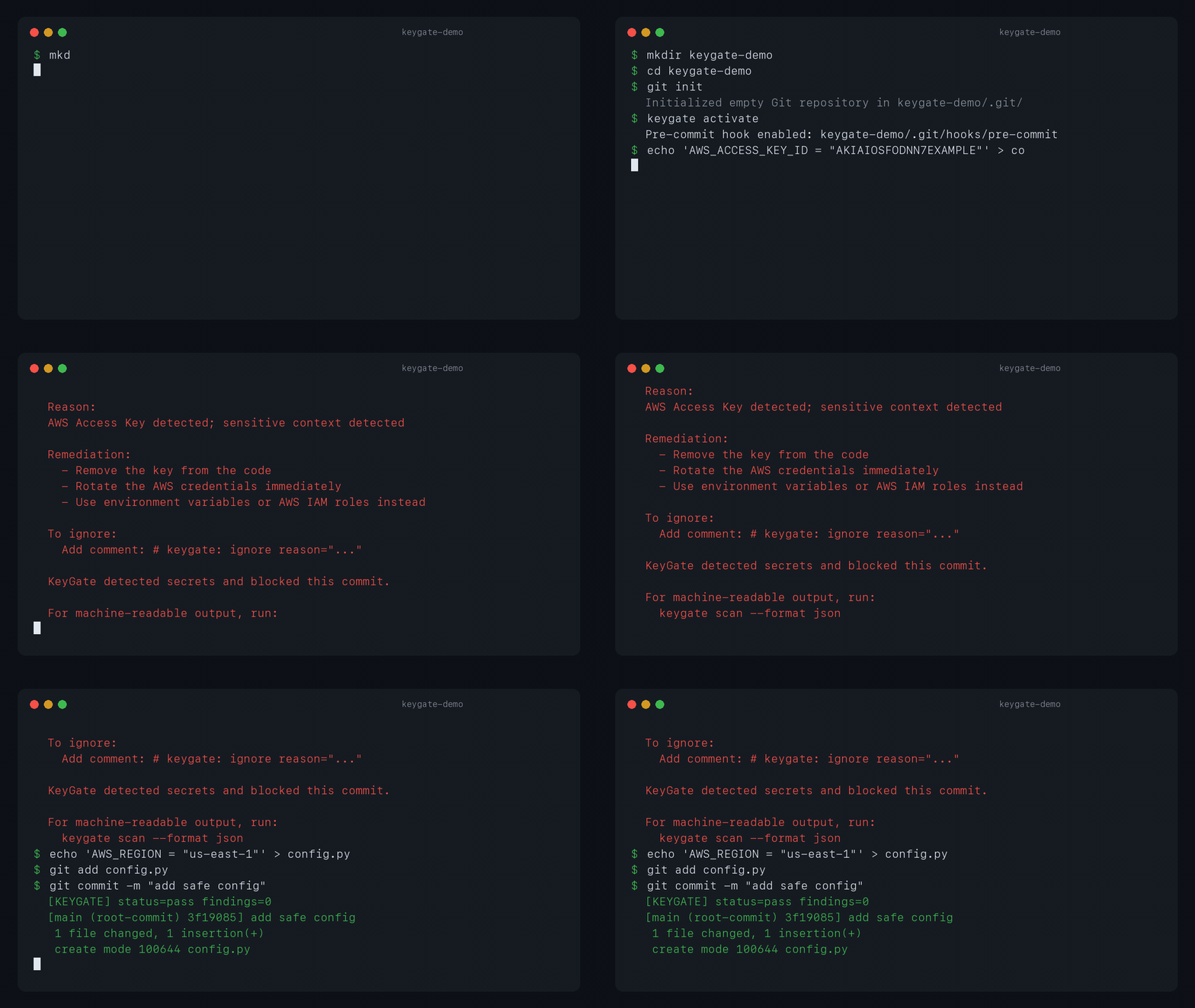
Demo
Why this matters
During development, it's easy to write API keys or passwords directly in code. Once committed with git commit, they become permanently embedded in the repository history.
Even if you delete them later, they remain accessible from past commits. Once exposed on GitHub or similar platforms, they can be exploited almost immediately. There are countless cases of AWS key leaks resulting in massive unexpected bills.
keygate blocks the mistake at the local commit boundary, before the secret becomes part of repository history.
How it works
keygate is intentionally narrow. It is not trying to replace full-repository scanners, CI scanners, or cloud security platforms.
Instead, it focuses on the moment right before git commit succeeds:
- Read
git diff --cached - Extract added lines only
- Combine rule-based detection, entropy checks, and context scoring
- Block high-confidence secrets, warn on lower-confidence findings
The default threshold blocks findings with a score of 70 or higher and warns for scores from 40 to 69.
What it detects
- AWS Access Keys
- OpenAI API Keys
- Anthropic API Keys
- Google API Keys
- GitHub Tokens
- GitLab Personal Access Tokens
- Slack Tokens
- Private Keys (PEM format)
- JWT Tokens
- Stripe Secret and Publishable Keys
- SendGrid API Keys
- npm Access Tokens
- PyPI API Tokens
- Django Secret Keys
- Azure Storage Account Keys
- Azure SAS Tokens
- Hugging Face, Docker Hub, Vercel, Datadog, Discord, Telegram, and Twilio tokens
- Sentry DSNs
- URLs with embedded credentials
Authorization: Bearer ...and decodableAuthorization: Basic ...headers- Personal information patterns:
email addresses,
Japanese phone numbers (separator formats like
03-1234-5678and090-1234-5678, no-separator mobile numbers starting with090/080/070/050, parenthesized formats like(03)1234-5678and03(1234)5678, international format+81-..., and optional extension suffixes likeext. 123or内線 456), credit card numbers including JCB, US SSNs, IBANs (compact and space-grouped formats, case-insensitive), and UK National Insurance numbers (compactAB123456Cand spacedAB 12 34 56 C) - Long random-looking strings (high-entropy detection)
- Variable names like
api_key,password,secretpaired with values
PII-only findings are reported as warnings, not commit-blocking errors. If the same line also contains strong non-PII secret signals that reach the block threshold on their own, the finding may still block the commit.
How is this different from Gitleaks or TruffleHog?
keygate is not a replacement for full repository, history, CI, or cloud secret scanning.
It is a lightweight local guardrail for the moment right before a commit is created.
| Tool | Best for |
|---|---|
| KeyGate | Fast local pre-commit checks on staged changes |
| Gitleaks | Full repository, history, CI, and configurable rule scanning |
| TruffleHog | Deep secret discovery and verification workflows |
Use keygate when you want a small commit-time check that developers will actually keep enabled.
Getting started
Step 1: Install
keygate is a Python CLI tool. The easiest way to install it is via pipx.
pipx install keygate
If you don't have
pipx, install it withpip install pipx. Usingpipxmakes thekeygatecommand available from any project directory.
Step 2: Activate
cd path/to/your-project
keygate activate
This installs KeyGate as a Git pre-commit hook. If your repo has core.hooksPath configured, KeyGate installs there instead of forcing .git/hooks.
Windows users: Git for Windows is required. The hook runs through the MSYS2 shell bundled with Git for Windows. If you installed
keygatewithpip installinstead ofpipx, activate your virtualenv in your shell before runningkeygate activate. If you usedpipx, no extra steps are needed. WSL also works.
The generated hook prefers the current Python environment (python -m keygate.cli scan) and falls back to keygate scan, which makes it more reliable on systems where the hook PATH is limited.
If a pre-commit hook already exists (for example a lint hook or one managed by the pre-commit framework), KeyGate asks for confirmation, saves it as pre-commit.keygate-orig, and keeps running it before the KeyGate scan. keygate deactivate restores the saved hook.
That's all the setup you need.
Step 3: Use it
Just run git add and git commit as usual. If nothing dangerous is found, nothing happens.
If a secret is detected, the commit is blocked like this:
[BLOCK] High confidence secret detected

File: config.py:12
Rule: aws-access-key
Score: 100

Reason:
AWS Access Key detected; sensitive context detected

Remediation:
  - Remove the key from the code
  - Rotate the AWS credentials immediately
  - Use environment variables or AWS IAM roles instead

To ignore:
  Add comment: # keygate: ignore reason="..."
How to read the output:
File: config.py:12— the file and line number where the issue was foundRule: aws-access-key— what was detectedScore: 100— severity (70+ blocks the commit; 40–69 warns only)Reason— why it was flaggedRemediation— suggested fixes
Step 4: Update
If you installed keygate with pipx, upgrade it like this:
pipx upgrade keygate
If you installed it with pip, use:
python -m pip install -U keygate
Use with AI coding agents
AI coding agents can generate large diffs quickly. That makes a local commit-time guardrail more useful, not less: copied tokens, .env values, and test credentials can slip into staged changes before a human notices.
For agents and automation, use the JSON profile:
keygate scan --profile agent
The agent profile emits stable JSON with masked snippets, verdicts, rule IDs, scores, and file locations. Detection logic and policies are identical to the normal CLI scan.
Claude Code plugin
keygate is also available as a Claude Code plugin. With it installed, Claude can scan staged changes for secrets automatically before you commit, and you can run keygate operations from Claude Code as slash commands.
Step 1: Install the keygate CLI
The plugin wraps the CLI, so the CLI must be installed first. Pick one:
pipx install keygate          # if you use pipx
uv tool install keygate       # if you use uv
pip install --user keygate    # fallback
Step 2: Add the marketplace and install the plugin
In Claude Code:
/plugin marketplace add kanekoyuichi/keygate
/plugin install keygate
What you get
- Skill
keygate-secret-scan— Claude triggers this automatically before commits or when staged changes contain credential-like values. It runskeygate scan --profile agent, parses the JSON output, and reports findings with masked snippets. - Slash commands:
/keygate:scan— scan staged changes on demand/keygate:install-hook— install the Git pre-commit hook/keygate:baseline-create— record current findings as accepted/keygate:baseline-update— append newly-detected findings
The plugin uses KeyGate's agent JSON profile (schema_version: "1") internally.
Manual scan
You can also scan without using the hook.
git add .
keygate scan
This scans git diff --cached (staged changes only).
JSON output for AI agents and automation
By default, keygate scan prints human-readable text. For AI agents or scripts that need to parse the result, use JSON output:
keygate scan --format json    # JSON only on stdout
keygate scan --json           # alias for --format json
keygate scan --profile agent  # forces JSON, no human prose
Default text output starts with a machine-readable summary line so simple tools can also pick up the status:
[KEYGATE] status=block findings=1
When a commit is blocked, the text output also points to the JSON command so an agent can re-run and parse the result. The JSON payload follows a fixed schema (schema_version: "1") with status, summary, and findings[] (including rule_id, policy, score, verdict, file, line, message, and a masked snippet when available).
Exit codes are unchanged: 0 for pass/warn, 1 for block, 2 for usage errors (such as combining --format text with --json).
Handling false positives
keygate errs on the side of caution, so it may occasionally flag things that aren't real secrets. There are three ways to deal with this.
Option 1: Inline ignore comment
Suppresses detection for that specific line. A reason is required.
api_key = "dummy-key-for-testing" # keygate: ignore reason="test data"
Option 2: Allowlist paths or patterns
Create a keygate.toml file in your project root and specify paths or patterns to exclude.
[allowlist]
paths = ["vendor/*", "third_party/*"]  # ignore code you don't own
patterns = ["dummy", "example"]         # regex patterns for lines to ignore
keywords = ["fixture"]                  # case-insensitive keywords for lines to ignore
Note: Adding
tests/*to the allowlist globally will cause keygate to miss real secrets embedded in test code. Use option 1 (inline ignore) or option 3 (baseline) for false positives in tests.
Option 3: Baseline — register existing findings to ignore
Useful when you only want to catch newly added secrets, not existing ones.
keygate baseline create
The current findings are saved to .keygate.baseline.json. From that point on, the same findings are ignored. The file looks like this:
{
  "version": 1,
  "entries": [
    {
      "fingerprint": "e5282a7860678bc768d280eb3e77d2ca8a44286357c743dd024d74fe0605fe09",
      "file_path": "src/app/config.py",
      "line_number": 42,
      "rule_id": "url-credentials",
      "created_at": "2026-04-22T09:30:00+00:00"
    }
  ]
}
The fingerprint is a SHA256 hash of file_path + line_number + matched string. The actual secret value is never stored, so committing the baseline file to Git is safe.
If .keygate.baseline.json already exists, keygate baseline create preserves existing entries and adds newly detected findings on top. Re-running it will not silently discard your current baseline.
To add newly discovered findings to the baseline:
keygate baseline update
Sharing with your team
We recommend committing .keygate.baseline.json to Git so the whole team uses the same ignore list.
git add .keygate.baseline.json
git commit -m "Add keygate baseline"
New team members only need to run pipx install keygate and keygate activate — the shared baseline is picked up automatically.
Configuration (optional)
The defaults work well out of the box, but you can customize behavior by creating keygate.toml in your project root.
[scan]
entropy_threshold = 4.2    # threshold for random-looking strings (lower = stricter)
block_score = 70           # commits are blocked at this score or above

[allowlist]
paths = ["vendor/*"]
patterns = ["dummy", "example"]
keywords = ["fixture"]

[baseline]
path = ".keygate.baseline.json"
If no config file is present, defaults are used.
FAQ
Q. I accidentally committed a secret. What should I do?
A. Revoke (rotate) the key immediately. Removing it from Git history is not enough. Assume any leaked key has already reached an attacker.
Q. How do I temporarily disable the hook?
A. Use git commit --no-verify to skip all hooks for a single commit. To remove the hook entirely, run keygate deactivate.
Q. How do we share this across a team?
A. Commit keygate.toml and .keygate.baseline.json to Git. Each team member needs to run keygate activate individually.
Q. How do I update KeyGate?
A. If you installed it with pipx, run pipx upgrade keygate. If you installed it with pip, run python -m pip install -U keygate.
Detection accuracy
Measured against a labeled corpus of 100 samples (50 known secrets, 50 benign strings).
| Metric | Value |
|---|---|
| Recall | 100.0% |
| Precision | 80.6% |
| F1 | 89.3% |
| True Positive | 50 |
| False Negative | 0 |
| False Positive | 12 |
| True Negative | 38 |
Recall 100.0% means every known secret in the corpus was detected (BLOCK or WARN). In other words, the benchmark had zero missed secrets.
Precision 80.6% reflects 12 false positives. These include masked URL credentials, placeholders, Stripe publishable keys, and empty values such as API_KEY=. They are not always real secrets, but they look close enough to secret-like values that keygate reports them before commit so you can review them.
The corpus and thresholds are enforced as a regression test. To re-run:
python -m tests.benchmark.benchmark
Disclaimer
keygate is a best-effort detection tool. Please understand the following before use.
- Detection is not guaranteed: Unknown secret formats, obfuscated values, or custom formats may not be detected (false negatives).
- False positives can occur: Non-secret strings may be flagged. Use allowlist / baseline / inline ignore to address them.
- Not a replacement for proper secret management: This tool is an additional safeguard at commit time. Secrets should be managed via environment variables, secret managers, or KMS — never stored in the repository.
- Hooks can be bypassed:
git commit --no-verifyskips all hooks. For organizational enforcement, combine with server-side checks (pre-receive hooks, CI scanning, etc.). - You are responsible for any leaks caused by missed detections: The authors and contributors accept no liability for damages arising from use of this tool (see LICENSE for details).
- If a secret is detected, rotate the key promptly: Even if the commit was blocked, the value may remain in local files, editor history, clipboard, or other devices.
This tool is designed as a last-resort safety net to catch human mistakes — not as a substitute for doing secret management correctly.
License
Distributed under the MIT License. Free to use, modify, and redistribute, including for commercial use. See LICENSE for details.
1 maintainer

Metadata
1 maintainer
Release files for keygate 0.6.0
For a detailed explanation of source distributions (sdists) and built distributions (wheels), please see the package formats documentation.
Source distribution (sdist)
| File | Size | Uploaded | Provenance | |
|---|---|---|---|---|
| keygate-0.6.0.tar.gz | 58.0 kB | With provenance | Details |
Built distribution (wheel)
| File | Interpreter | ABI | Platform | Reset |
|---|---|---|---|---|
| keygate-0.6.0-py3-none-any.whl | Python 3 | none | any | Details |
Total release size: 86.9 kB
Release files / keygate-0.6.0.tar.gz
| Download URL | keygate-0.6.0.tar.gz |
|---|---|
| Size | 58.0 kB |
| Tags | Source |
|
SHA-256 checksum How to use checksums |
5d663492d04256048b44ed7824f14f1ca875b29aedf8841bdd88a9aea602397f
|
|
BLAKE2b-256 checksum How to use checksums |
a669992e38561d09e7f086a1dca5a8b494216d40c3a5fac261f0470d1b81c085
|
| Upload date | |
|
Uploaded using Trusted Publishing? What is trusted publishing? |
Yes |
| Uploaded via |
twine/6.1.0 CPython/3.13.12
|
Provenance
Provenance describes where a file came from. On PyPI, provenance is shared via attestations, which provide a verifiable record of the build or publishing details. View details, limitations and caveats.


PyPI Publish Attestation
PyPI verified that this artifact, at this checksum, originated from the publisher listed below.
Signed by GitHub Actions, verified by PyPI on Jun 12, 2026.
Transparency logRelease files / keygate-0.6.0-py3-none-any.whl
| Download URL | keygate-0.6.0-py3-none-any.whl |
|---|---|
| Size | 28.9 kB |
| Tags | Python 3 |
|
SHA-256 checksum How to use checksums |
1e0f4f57d231e681b12ce7d7be077c06e158f78eb7d4edccce067473217d26c0
|
|
BLAKE2b-256 checksum How to use checksums |
2cb6833f1d4f04ee567b609ff4f5f3150c35f854201d28b5179d648547ad248b
|
| Upload date | |
|
Uploaded using Trusted Publishing? What is trusted publishing? |
Yes |
| Uploaded via |
twine/6.1.0 CPython/3.13.12
|
Provenance
Provenance describes where a file came from. On PyPI, provenance is shared via attestations, which provide a verifiable record of the build or publishing details. View details, limitations and caveats.
PyPI Publish Attestation
PyPI verified that this artifact, at this checksum, originated from the publisher listed below.
Signed by GitHub Actions, verified by PyPI on Jun 12, 2026.
Transparency logSecurity for keygate 0.6.0
Provenance
Provenance describes where a file came from. On PyPI, provenance is shared via attestations, which provide a verifiable record of the build or publishing details. View details, limitations and caveats.
Full provenance
All 2 files in this release have been uploaded with provenance metadata.
Attestation for keygate-0.6.0.tar.gz
PyPI Publish Attestation
PyPI verified that this artifact, at this checksum, originated from the publisher listed below.
Signed by GitHub Actions, verified by PyPI on Jun 12, 2026.
Transparency logA note on package security
PyPI is a repository for distributing packages, not a service for auditing them. While third-party security researchers and our staff do their best to detect and remove malicious packages, PyPI cannot guarantee the quality, security or suitability of any given package.














