
Keystrike




Adaptive drills for your weakest keys — an offline terminal typing tutor inspired by keybr.com. Stats stay on your machine; nothing phones home. Design follows research-backed typing pedagogy.
Install: pipx install keystrike · PyPI · Discussions
What it does
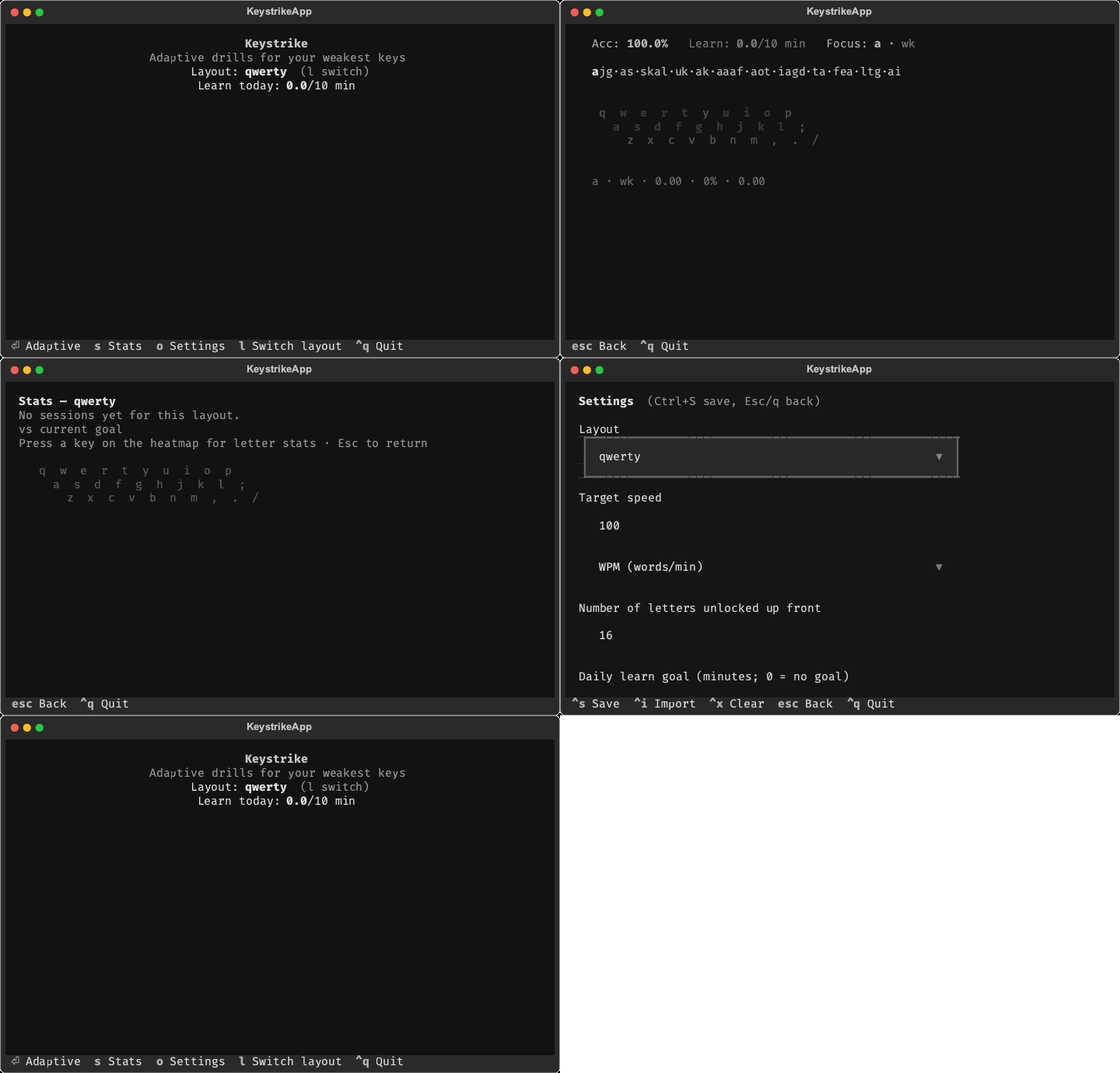
Keystrike tracks how fast and accurately you type each key, unlocks new letters as you hit your targets, and generates practice text that overweight your current weak spot. Switch keyboard layouts (QWERTY, Dvorak, Colemak, Colemak Mod-DH, or your own TOML) and each layout keeps its own history.
Why it works
The adaptive engine applies principles from typing research and tools like Keybr — see the Typing pedagogy wiki for sources and how each maps to the code.
- Accuracy before speed — a new key unlocks only when every letter in your current set is fast and accurate; high speed with lots of errors does not advance you.
- Targets your weak keys — generated text overweight keys and bigrams you still miss, instead of generic full-alphabet drills.
- Home row first — unlock order follows keyboard rows (home → top → bottom), matching standard touch-typing curricula and reach-distance effects in keystroke timing.
- Word-level practice — Markov word chunks build sequence memory; skilled typing is controlled at the word and bigram level, not isolated letters.
- Spaced review — keys you have not practiced recently resurface in lessons before they fade.
Features
- Adaptive engine — row-weighted key unlock order, skill gates for unlocks, confidence-weighted focus and heatmap, Markov word drills with a guaranteed focus letter or bigram.
- Per-layout stats — heatmap with per-key confidence and urgency; layout-wide and focus-key trend grids (confidence, speed, accuracy); press a heatmap key for per-letter drill-down.
- Daily learn goal — optional minutes goal tracked in the HUD; practice is not blocked when reached.
- Custom layouts — drop
*.tomlfiles into your layouts directory; new layouts appear when cycling layouts or opening Settings (no app restart required). See the Custom layouts wiki. - Git backup sync — optional CLI to push/pull settings and sessions to a private remote (union-merge sessions, last-write-wins settings).
- Offline by default — a compact JSONL session history (per-key stats, no keystroke logs) and a local stats cache under platformdirs paths; sync is opt-in.
Install
Requires Python 3.12+ and a terminal with raw-mode keyboard input (Terminal setup).
pipx install keystrike    # or: uv tool install keystrike
keystrike                 # launch TUI (default)
keystrike run             # same as bare keystrike
keystrike --version
Or from source:
git clone https://github.com/egno/keystrike
cd keystrike
uv sync --no-dev
uv run keystrike
Usage
Home
| Key | Action |
|---|---|
Enter |
Start adaptive practice |
s |
Stats |
o |
Settings |
l |
Cycle layout |
Ctrl+Q |
Quit |
On other screens, Esc / q goes back. Settings saves with Ctrl+S.
Practice
Adaptive mode disables backspace — mistakes stay in the record so confidence scores stay honest. The HUD shows accuracy, remaining daily learn time, and the current focus key as a fixed snapshot for the lesson's fresh word set — it does not tick while you type, only refreshing when the next lesson starts. When a session ends, the next lesson starts automatically unless you go back. Hitting your daily goal is shown in the HUD only — practice continues.
Stats
Layout and focus trend grids (confidence, speed, accuracy) sit above the heatmap.
Press any key on the heatmap for letter stats; Esc / q returns to the
overview.
Settings
| Setting | Default | Notes |
|---|---|---|
| Layout | qwerty |
Any bundled or custom layout |
| Target speed | 46 WPM | Or CPM — your unlock threshold |
| Letters unlocked up front | 16 | Force-unlocked before skill gating |
| Daily learn goal | 10 min | 0 = no goal |
Advanced confidence tuning (session window, min key/bigram attempts) is
config-file only — edit settings.toml directly; see the
Confidence tuning wiki
and Focus states wiki
for HUD labels (wk, cal, rev).
Backup sync
Opt-in git sync for backing up or moving data between machines. Requires git on
PATH and a private remote (sessions contain your typing history).
Not Keystrike cloud sync — only runs when you invoke keystrike sync. Background and FAQ: discussion #6.
keystrike sync init git@github.com:you/keystrike-backup.git   # one-time
keystrike sync push      # local → remote
keystrike sync pull      # remote → local (rebuilds stats cache)
keystrike sync status    # diff summary
Sync merges sessions by session_id (union), resolves settings by updated_at
(last-write-wins), and copies layout files both ways. The stats cache is excluded —
pull triggers a rebuild.
Data locations
Paths come from platformdirs. On Linux, config and data are split; on macOS and Windows, everything lives under one app directory.
| Contents | Linux | macOS |
|---|---|---|
| User settings | ~/.config/keystrike/settings.toml |
~/Library/Application Support/keystrike/settings.toml |
| Custom layouts | ~/.config/keystrike/layouts/ |
~/Library/Application Support/keystrike/layouts/ |
Sync config (after sync init) |
~/.config/keystrike/sync.toml |
~/Library/Application Support/keystrike/sync.toml |
Session history (index.jsonl) |
~/.local/share/keystrike/sessions/ |
~/Library/Application Support/keystrike/sessions/ |
| Stats cache | ~/.local/share/keystrike/cache/ |
~/Library/Application Support/keystrike/cache/ |
Windows uses %LOCALAPPDATA%\keystrike\ for the same layout (single directory).
Terminal setup
Keystrike captures every keystroke in raw mode via Textual.
Works out of the box in Terminal.app, iTerm2, and most Linux terminals.
Windows
Use Windows Terminal —
the legacy conhost host has unreliable raw-mode support. Run keystrike inside WT,
not cmd.exe. Raw mode is not verified on every Windows build; please
open an issue if something breaks.
Development
uv sync                  # runtime + dev (pytest, pyright, pre-commit)
uv run pre-commit install  # optional: ruff + pyright hooks on commit
uv run pytest -q
uv run pyright
uv sync --all-groups      # + ruff + snapshot tests (desktop only)
uv run ruff check
Dependency groups: dev (default, pure Python — safe on Termux), lint (Ruff),
snapshot (pytest-textual-snapshot). Keep native-wheel tools out of dev; see
pyproject.toml for why.
Before you push (CI parity)
Pre-commit runs ruff and pyright only. GitHub Actions also runs the full test matrix and a separate snapshot (macos) job that default pytest skips.
| Check | Command | When |
|---|---|---|
| Lint (also in pre-commit) | uv run ruff check && uv run pyright |
every commit |
| Unit tests | uv run pytest -q |
every push |
| UI snapshots | see below | after presentation/UI changes |
On macOS, match the snapshot CI job before pushing UI work:
uv sync --group snapshot
NO_COLOR=1 TERM=xterm-256color LC_ALL=C.UTF-8 uv run pytest -m snapshot -q
Snapshots are not in pre-commit (macOS-only, extra deps). Linux/Windows devs can rely on CI for snapshot coverage.
Regenerate baselines after intentional UI changes:
uv sync --group snapshot
NO_COLOR=1 TERM=xterm-256color LC_ALL=C.UTF-8 \
  uv run pytest tests/presentation/test_snapshots.py -m snapshot --snapshot-update
Regenerate the demo GIF after UI changes. The script drives the real app with a simulated typist (seeded history, mid-lesson practice, stats, settings), so it does not depend on the snapshot baselines:
uv pip install pillow cairosvg   # one-off; system cairo on macOS/Linux
uv run python scripts/generate_demo_gif.py
License
MIT
1 maintainer

Metadata
1 maintainer
Release files for keystrike 2.2.1
For a detailed explanation of source distributions (sdists) and built distributions (wheels), please see the package formats documentation.
Source distribution (sdist)
| File | Size | Uploaded | |
|---|---|---|---|
| keystrike-2.2.1.tar.gz | 107.2 kB | Details |
Built distribution (wheel)
| File | Interpreter | ABI | Platform | Reset |
|---|---|---|---|---|
| keystrike-2.2.1-py3-none-any.whl | Python 3 | none | any | Details |
Total release size: 244.3 kB
Release files / keystrike-2.2.1.tar.gz
| Download URL | keystrike-2.2.1.tar.gz |
|---|---|
| Size | 107.2 kB |
| Tags | Source |
|
SHA-256 checksum How to use checksums |
6a965d9120bd76ee3f6f7817f891acbba2ea31a5292c707000f55530f291b4d6
|
|
BLAKE2b-256 checksum How to use checksums |
e8da43181b36d82f71b204215340d829992f99d9c8d28eea26d18d969f7ac969
|
| Upload date | |
|
Uploaded using Trusted Publishing? What is trusted publishing? |
Yes |
| Uploaded via |
uv/0.12.23 {"installer":{"name":"uv","version":"0.12.23","subcommand":["publish"]},"python":null,"implementation":{"name":null,"version":null},"distro":{"name":"Ubuntu","version":"24.04","id":"noble","libc":null},"system":{"name":null,"release":null},"cpu":null,"openssl_version":null,"setuptools_version":null,"rustc_version":null,"ci":true}
|
Release files / keystrike-2.2.1-py3-none-any.whl
| Download URL | keystrike-2.2.1-py3-none-any.whl |
|---|---|
| Size | 137.0 kB |
| Tags | Python 3 |
|
SHA-256 checksum How to use checksums |
39c1c554fe554b19909b6062dfc0c411e00a2a3d2145b7638173d9c5b5fa2909
|
|
BLAKE2b-256 checksum How to use checksums |
c32d921009a7a96ee367520b3e78d3a1c58f4fa08595cb02b6cf5de9fb6f135a
|
| Upload date | |
|
Uploaded using Trusted Publishing? What is trusted publishing? |
Yes |
| Uploaded via |
uv/0.12.23 {"installer":{"name":"uv","version":"0.12.23","subcommand":["publish"]},"python":null,"implementation":{"name":null,"version":null},"distro":{"name":"Ubuntu","version":"24.04","id":"noble","libc":null},"system":{"name":null,"release":null},"cpu":null,"openssl_version":null,"setuptools_version":null,"rustc_version":null,"ci":true}
|














