
KFBSlide
纯 Python 实现的 KFB(KFBio)数字病理切片读取库,提供与 OpenSlide 完全兼容的 API





✨ 特性 • 📦 安装 • 🚀 快速开始 • 📖 API • ⚡ 性能

✨ 特性
- 🐍 纯 Python 实现 — 零原生依赖,跨平台开箱即用
- 🔄 OpenSlide 兼容 API — 可直接替换
openslide-python,无需修改业务代码 - ⚡ 对比 OpenSlide 更快 — 典型场景下 KFB 读取速度优于 OpenSlide 读取 SVS(详见性能)
- 🔺 金字塔多层级读取 — 自动解析 KFB 内部 40× / 20× / 10× / 5× / 2.5× / 1.25× 层级
- 🖼️ 关联图像读取 — 支持 macro、label、thumbnail
- ⚡ Tile LRU 缓存 — 重复读取同区域加速 10~20 倍
- 📊 完整元数据支持 — MPP、扫描倍率、瓦片尺寸等
📦 安装
使用 uv(推荐)
uv pip install kfbslide
使用 pip
pip install kfbslide
仅依赖 Pillow,任何平台都能直接安装。
🚀 快速开始
作为 OpenSlide 的 drop-in 替代品
import kfbslide as openslide

slide = openslide.OpenSlide("path/to/sample.kfb")

print(f"层级数: {slide.level_count}")
print(f"Level 0 尺寸: {slide.dimensions}")
for i in range(slide.level_count):
    print(f"  Level {i}: {slide.level_dimensions[i]} "
          f"downsample={slide.level_downsamples[i]}")

# 读取区域(location 为 level 0 坐标,返回 RGBA)
img = slide.read_region((1000, 2000), 0, (256, 256))
img.save("region.png")

# 缩略图
thumb = slide.get_thumbnail((512, 512))
thumb.save("thumbnail.png")

# 关联图像
macro = slide.associated_images["macro"]
macro.save("macro.png")

# 属性读取
vendor = slide.properties[openslide.PROPERTY_NAME_VENDOR]
mpp_x = slide.properties[openslide.PROPERTY_NAME_MPP_X]

slide.close()
上下文管理器
with openslide.OpenSlide("sample.kfb") as slide:
    img = slide.read_region((0, 0), 0, (256, 256))
# 自动 close
📖 API 参考
OpenSlide(filename)
打开一个 KFB 文件。
类方法
| 方法 | 说明 |
|---|---|
OpenSlide.detect_format(filename) |
检测文件格式,返回 "kfbio" 或 None |
属性
| 属性 | 类型 | 说明 |
|---|---|---|
level_count |
int |
金字塔层级数 |
dimensions |
(int, int) |
Level 0 尺寸(最高分辨率) |
level_dimensions |
Tuple[(w, h), ...] |
每层尺寸 |
level_downsamples |
Tuple[float, ...] |
每层下采样倍数 |
properties |
Mapping[str, str] |
元数据属性(只读映射) |
associated_images |
Mapping[str, PIL.Image] |
关联图像:macro、label、thumbnail |
color_profile |
object | None |
ICC 颜色配置文件(当前返回 None) |
方法
| 方法 | 说明 |
|---|---|
read_region(location, level, size) |
读取指定区域,返回 RGBA 图像 |
read_regions(regions, max_workers=None) |
线程池并行读取多个区域,按输入顺序返回 RGBA 图像列表 |
get_best_level_for_downsample(downsample) |
根据下采样倍数选择最佳层级 |
get_thumbnail(size) |
生成缩略图 |
set_cache(cache) |
API 兼容方法(当前为 no-op) |
cache_info() |
返回 tile 缓存统计:entries / bytes / max_bytes |
close() |
关闭并释放资源(含所有线程的文件句柄) |
属性常量
from kfbslide import (
    PROPERTY_NAME_VENDOR,           # "openslide.vendor"
    PROPERTY_NAME_MPP_X,            # "openslide.mpp-x"
    PROPERTY_NAME_MPP_Y,            # "openslide.mpp-y"
    PROPERTY_NAME_OBJECTIVE_POWER,  # "openslide.objective-power"
)
⚡ 性能
在 sample.kfb(85,678 × 44,995,78,724 tiles)上测试:
| 操作 | 时间 | 备注 |
|---|---|---|
| 首次读取 512×512 region | ~5.7 ms | Pillow 后端 |
| 缓存命中读取 512×512 | ~0.9 ms | 6× 加速 |
| 扫描 20 个相邻 512×512 region(首次) | ~58 ms | 2.9 ms/region |
| 扫描 20 个相邻 512×512 region(缓存后) | ~20 ms | 1.0 ms/region,2.9× 加速 |
测试环境:Python 3.12,Pillow,SSD。
与 OpenSlide 对比
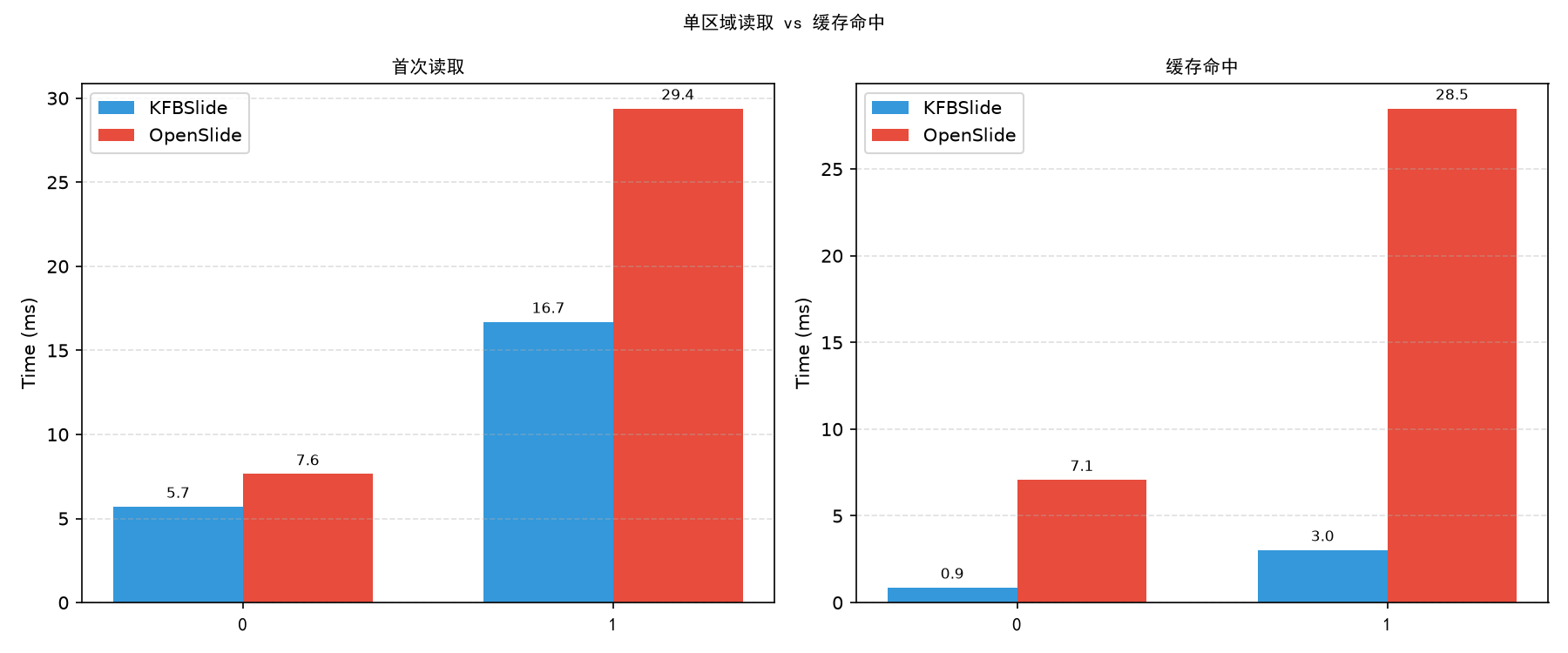
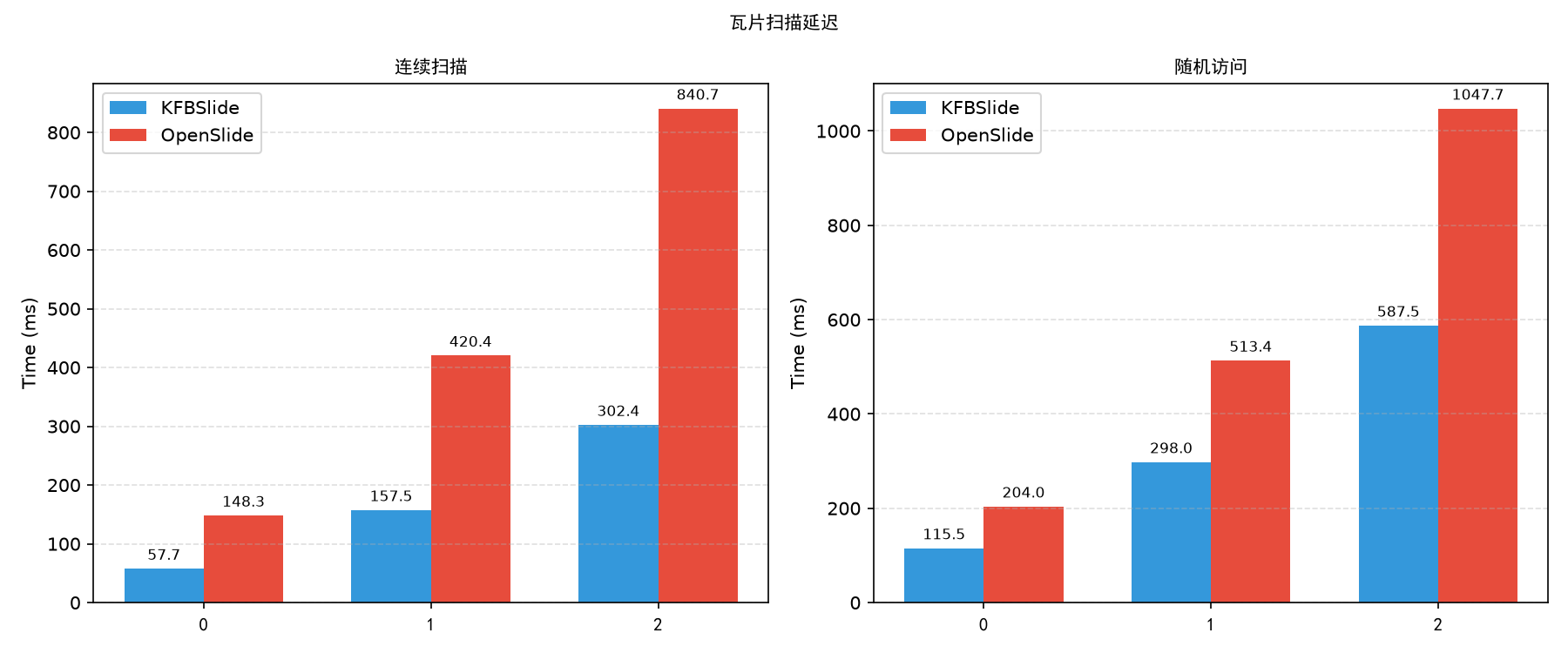
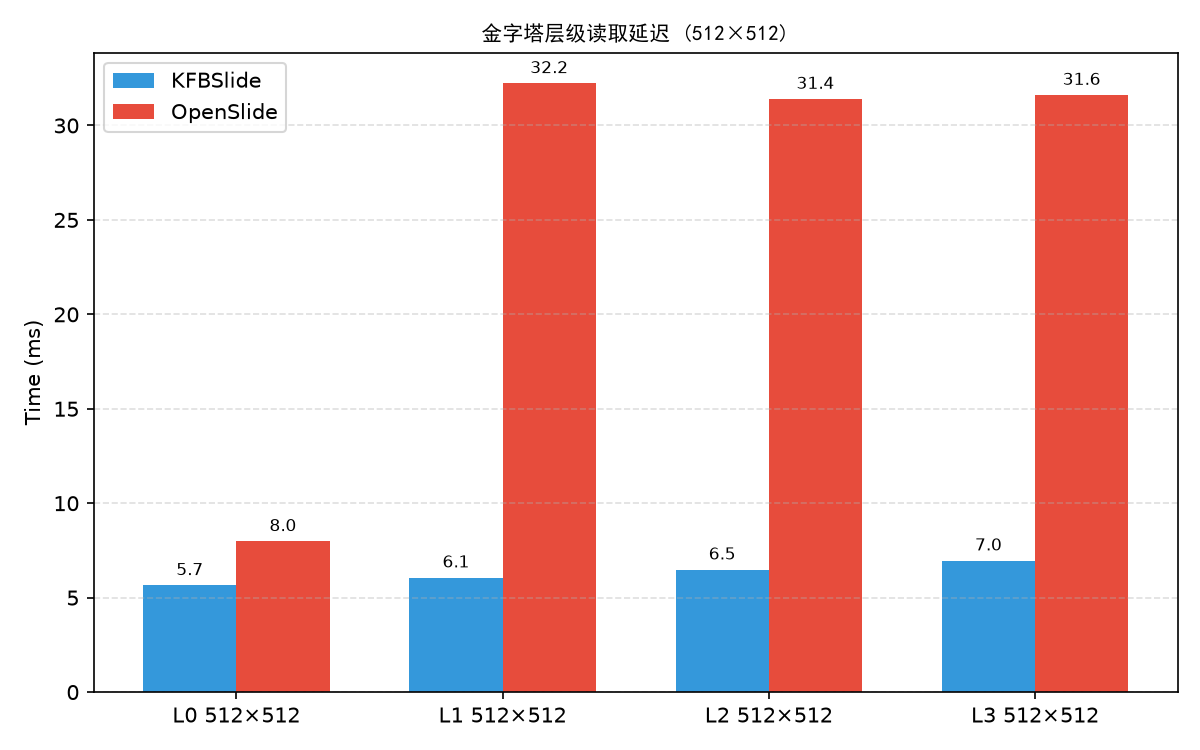
我们与 OpenSlide 读取 SVS 格式做了横向对比(测试脚本见 benchmarks/compare_kfb_svs.py):
| 操作 | KFBSlide (KFB) | OpenSlide (SVS) | 加速比 |
|---|---|---|---|
| 单区域 512×512 | 5.70 ms | 7.64 ms | 1.34× |
| 缓存命中 512×512 | 0.90 ms | 7.10 ms | 7.89× |
| 单区域 1024×1024 | 16.69 ms | 29.39 ms | 1.76× |
| 缓存命中 1024×1024 | 3.00 ms | 28.50 ms | 9.50× |
| 连续扫描 100 tiles | 302.41 ms | 840.74 ms | 2.78× |
| 随机访问 100 tiles | 587.49 ms | 1047.70 ms | 1.78× |
| Level 1 512×512 | 6.06 ms | 32.23 ms | 5.32× |
测试文件:KFB
sample.kfb(85,678 × 44,995,40×),SVSsample.svs(42,009 × 22,721,40×)。
环境:Intel Xeon E5-2678 v3 / Python 3.12 / Pillow 12.2.0 / OpenSlide 1.4.6。
完整报告见benchmarks/results/report.md。
🧵 线程安全与并发
自 0.3.4 起,一个 OpenSlide 实例可以被多个线程并发调用:
- 每个线程持有独立的文件句柄(
threading.local),并发read_region不存在 seek/read 竞争; - tile 缓存为按字节限容(默认 256 MiB/实例)且内部加锁,缓存 tile 为 RGBA(读路径免重复 alpha 转换);
- 索引解析、JPEG 解码(Pillow)与文件 I/O 均会释放 GIL,多线程流水线在 I/O 密集场景(网络盘/慢速挂载)收益明显;纯 Python 胶水代码仍受 GIL 限制;
- fork 后子进程自动重开句柄,PyTorch DataLoader worker 场景继续可用。
# 共享单实例多线程:0.3.4 起安全,推荐用于区域批量扫描
slide = OpenSlide("slide.kfb")
regions = [((x, y), 0, (448, 448)) for y in range(0, 4096, 448) for x in range(0, 4096, 448)]
images = slide.read_regions(regions, max_workers=8)  # 库内线程池,按输入顺序返回
print(slide.cache_info())  # {'entries': 64, 'bytes': 16777216, 'max_bytes': 268435456}
内存估算:
- 共享单实例:所有线程共用一份缓存,峰值 ≈
max_bytes(默认 256 MiB); - 每线程独立实例:N 线程 ≈ N 份缓存,峰值 ≈
N × 256 MiB; - 单 tile 缓存开销 ≈
tile_size² × 4字节(RGBA;256px ≈ 256 KiB,512px ≈ 1 MiB)。
若需关闭多线程安全带来的句柄开销(几乎可忽略),或旧版本(<0.3.4)下并发,请使用"每线程独立实例"模式——8 线程 × 独立实例在 NVMe 上实测约 10× 吞吐。
🏗️ 架构
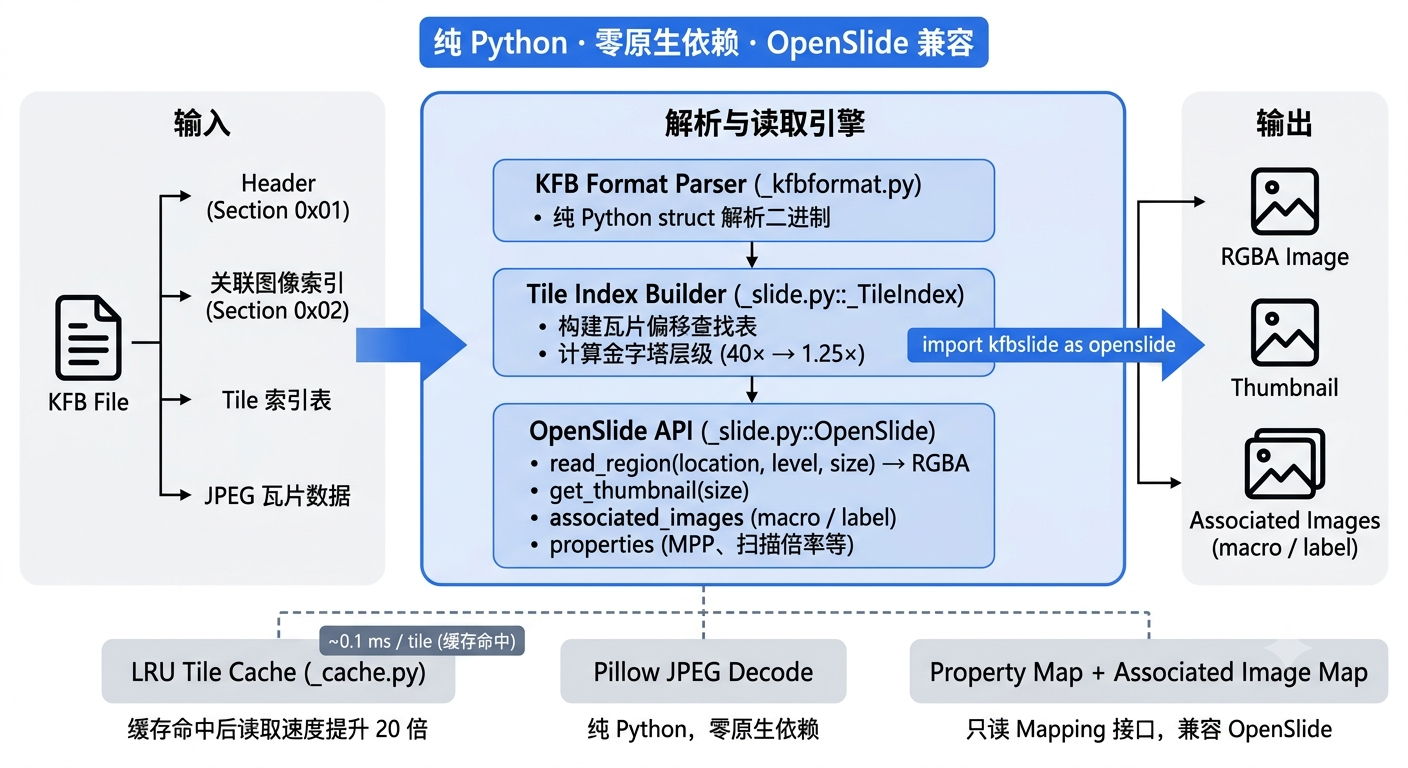
KFBSlide 完全基于纯 Python 实现,通过直接解析 KFB 二进制格式完成图像读取:
- 无需任何 C/C++ 扩展或系统动态库
- 不依赖 OpenSlide、libtiff、libjpeg 等外部库
- 单文件即可部署,适合服务器、容器、嵌入式等场景
📁 项目结构
kfbslide/
├── src/kfbslide/
│   ├── __init__.py          # 包入口,导出 OpenSlide API
│   ├── _slide.py            # OpenSlide 主类
│   ├── _kfbformat.py        # KFB 二进制格式解析
│   ├── _cache.py            # LRU tile 缓存
│   └── _exceptions.py       # OpenSlideError / 兼容异常
├── tests/                   # 测试(含 sample.kfb 软链)
├── examples/                # 示例脚本
├── docs/                    # 文档图片
├── README.md
├── LICENSE
└── pyproject.toml
⚠️ 已知限制
- 只读:目前不支持写入 KFB 文件。
- KFB v1.6:在版本 1.6 文件上验证过。其他版本可能需要适配。
📄 License
Copyright (c) 2026 Yifan Feng
1 maintainer

Metadata
1 maintainer
Release files for kfbslide 0.3.4
For a detailed explanation of source distributions (sdists) and built distributions (wheels), please see the package formats documentation.
Source distribution (sdist)
| File | Size | Uploaded | |
|---|---|---|---|
| kfbslide-0.3.4.tar.gz | 26.9 kB | Details |
Built distribution (wheel)
| File | Interpreter | ABI | Platform | Reset |
|---|---|---|---|---|
| kfbslide-0.3.4-py3-none-any.whl | Python 3 | none | any | Details |
Total release size: 46.7 kB
Release files / kfbslide-0.3.4.tar.gz
| Download URL | kfbslide-0.3.4.tar.gz |
|---|---|
| Size | 26.9 kB |
| Tags | Source |
|
SHA-256 checksum How to use checksums |
bda875aa2b4c8b89726f9a7dc19032ad2e55fb2ee2dc4b6340fbd99c95fbeb0e
|
|
BLAKE2b-256 checksum How to use checksums |
209eff656d965f9647f74b127c49a3de7797ff1bae1e3e1a529069d4463ced7d
|
| Upload date | |
|
Uploaded using Trusted Publishing? What is trusted publishing? |
Yes |
| Uploaded via |
twine/7.0.0 CPython/3.13.14
|
Provenance
Provenance describes where a file came from. On PyPI, provenance is shared via attestations, which provide a verifiable record of the build or publishing details. View details, limitations and caveats.


PyPI Publish Attestation
PyPI verified that this artifact, at this checksum, originated from the publisher listed below.
Signed by GitHub Actions, verified by PyPI on Oct 5, 2026.
Transparency logRelease files / kfbslide-0.3.4-py3-none-any.whl
| Download URL | kfbslide-0.3.4-py3-none-any.whl |
|---|---|
| Size | 19.7 kB |
| Tags | Python 3 |
|
SHA-256 checksum How to use checksums |
8a6068a7087f98d67f160627295f13eb7f4241da7f0da220e197005d5b986d10
|
|
BLAKE2b-256 checksum How to use checksums |
6b1a7746159fcbb3846c6e6bd18525603f832bd5c3b2cba2b0a59cbbec33c74f
|
| Upload date | |
|
Uploaded using Trusted Publishing? What is trusted publishing? |
Yes |
| Uploaded via |
twine/7.0.0 CPython/3.13.14
|
Provenance
Provenance describes where a file came from. On PyPI, provenance is shared via attestations, which provide a verifiable record of the build or publishing details. View details, limitations and caveats.
PyPI Publish Attestation
PyPI verified that this artifact, at this checksum, originated from the publisher listed below.
Signed by GitHub Actions, verified by PyPI on Oct 5, 2026.
Transparency log













