
kglite-visual: see a knowledge graph, and let an agent drive it


kglite-visual is an interactive viewer, a headless renderer and an agent
interface for .kgl knowledge-graph files produced by
KGLite. One command opens a browser on a
localhost server; the same binary draws an image without one; and while the
server runs it speaks the Model Context Protocol, so an agent can drive the
window you are looking at.
The Python wheel has no required runtime dependencies: the graph engine, the HTTP server and the WebGL frontend bundle are all inside one compiled extension. No Node, no separate server process, no database service.
Quick Start
The released package:
pip install kglite-visual==0.1.9
kglite-visual graph.kgl
Open the downloadable 17-node team sample from Getting started. The first exploration takes it through browse, inspect, query, filter, calculate, save and export.
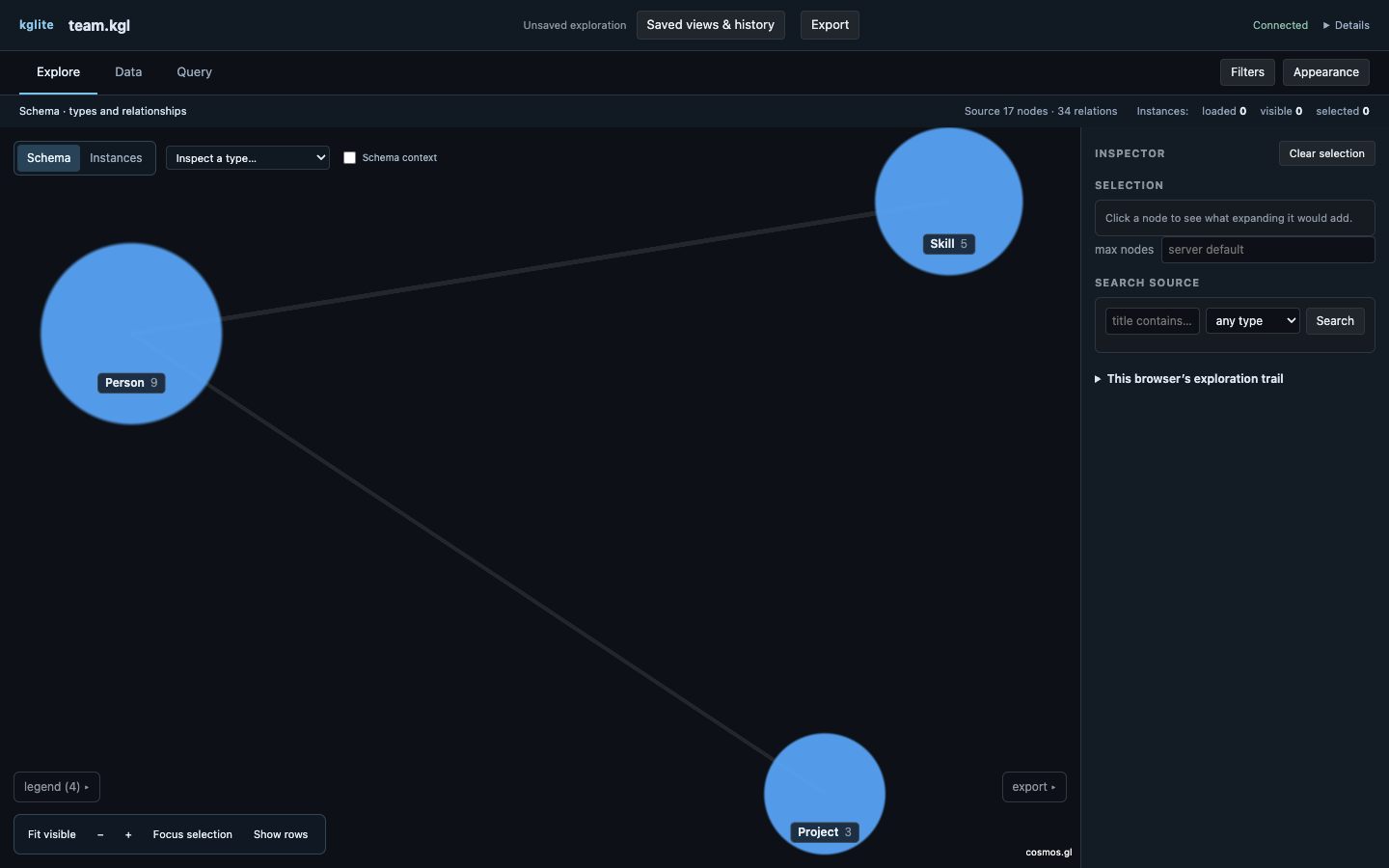
What you land on is a type-level meta-graph, rather than every instance in the
source. .kgl files reach 100M+ nodes, so you inspect counts first and load a
bounded slice only when it is useful.
Two more commands, no server and no browser in either:
kglite-visual render graph.kgl --meta -o schema.svg      # one image, one JSON line
kglite-visual export graph.kgl --format gexf -o out.gexf # one file for somebody else's tool
Then hand the running server to an agent. The MCP endpoint is on the same port, and its URL is printed on the same stdout line as everything else:
{"url":"http://127.0.0.1:54137/","port":54137,"pid":69850,"graph":"graph.kgl","mcp":"http://127.0.0.1:54137/mcp"}
→ Getting started · Agents and MCP.
What makes it different
Three things this does that a graph viewer normally does not.
An agent drives the window you are watching. The running server speaks MCP
at /mcp — no second process to start, no discovery file, nothing to install:
attaching an agent is pointing it at a URL. Twenty-seven tools act on one shared
view, with ordered changes and optional revision checks: read what is on screen, put a Cypher result into it,
expand or collapse, highlight, zoom, recolour, re-lay-out, export it, draw a
picture of it, and run the queries you saved under the names you chose.
Whoever changes the view — you, the agent, a curl — every connected window
sees the change immediately. Watching an agent expand a type and zoom to what
it found is the feature, not a side effect of it.
→ Agents and MCP.
The honesty model: truncation is drawn into the picture. A graph viewer is
a machine for showing you less than there is, and the design position here is
that the subset must name itself. The response bound lives in core, not in
the UI — a guarantee the client implements is not a guarantee — so a curl, an
agent and a second tab all hit the same ceiling. Every bounded answer carries
{returned, total, truncated}; a slice carries two of those, because nodes
and links share one byte budget and a complete node list can sit beside an
incomplete link list. And because an image travels without its response, the
banner is drawn into the image, beside three more counts for the other ways
a picture can be less than its input: types_shown (a canvas too small for the
schema draws the largest types and says top 24 of 98), names_shown (labels
that lost their cell keep their circle and lose their name), and folded (a
fan too big to read is one wedge saying how big it is).
→ The honesty model.
Layouts chosen from the graph's own structure — including a real map. A
force layout is the right tool for a graph with no discoverable shape and the
wrong one for a star, a bipartite result or a schema with disconnected
families, which is most of what a real graph hands it. So a neighbourhood is
drawn as hop rings, a community-structured graph as packed islands with a quiet
boundary round each, and unattached nodes as one labelled grid. And where the
nodes carry coordinates there is --layout geo: an equirectangular projection
whose longitudes are corrected by the cosine of the data's mid-latitude — so a
shelf at 68°N comes out its own shape rather than 2.7× too wide — over the
world's real coastline at three scales chosen by how much of the world the
frame covers, so a North Sea crop gets the fjords and a world map does not
carry 400,000 points nothing can resolve. Nodes with no coordinate go in a
labelled tray with a count, never dropped.
→ Layouts.
From Python, and from a notebook
import kglite_visual as kv

view = kv.show("graph.kgl")     # the same server, in-process
view.url                        # 'http://127.0.0.1:54137/'
view.launch_info                # {'url', 'port', 'pid', 'graph', 'mcp'}
view.close()                    # stops it, frees the port

# Or hand over an in-memory kglite graph — through to_bytes(), never the disk.
import kglite
view = kv.show(kglite.load("graph.kgl"))
In a notebook the returned object renders itself in the cell: a proxy-prefixed
iframe where jupyter-server-proxy can reach the port, and no iframe at
all — the URL plus an ssh -N -L hint — where the kernel looks remote,
because a localhost iframe from a remote kernel is a silently blank frame.
show(path) is the large-graph answer: handing over an in-memory graph costs
about 2× the graph's size at the moment of the call.
→ Python API.
Render and export
The browser’s Export dialog previews visible instances and exact retained relationships, the wider loaded-node induced graph, or a deterministic SVG/PNG. Downloads refuse stale previews after shared changes. The image uses a server layout, separate from the browser camera. Data tables also export scoped CSV.
# an image: --meta, --cypher "…" or --expand type=T rel=R dir=out
kglite-visual render graph.kgl --meta -o schema.svg
kglite-visual render graph.kgl --cypher "MATCH (f:Field) RETURN f" --layout geo --format png

# a file: graphml | gexf | csv | csv-edges | json
kglite-visual export graph.kgl --format gexf -o graph.gexf
kglite-visual export graph.kgl --format csv --cypher "MATCH (n:Field) RETURN n"
The render's layout is seeded and deterministic — the same request produces
the same bytes, forever — so --seed is how you get a different arrangement
of the same data, and an exact golden baseline is possible at all. Each command
writes its file and prints one JSON line describing it; nothing else ever
touches stdout.
→ Render ·
Export.
Requirements
CPython 3.10+ (one abi3 wheel serves every version from 3.10 up) on macOS,
Linux and Windows, plus a .kgl file supported by the embedded KGLite reader —
this version pins kglite 0.21.1, which reads compatible files written by
older releases. Building from source additionally needs a
Rust toolchain; the published wheels and the source distribution both carry a
prebuilt frontend, so neither needs Node at install time.
Documentation
Full docs at kglite-visual.readthedocs.io.
- Getting started — install the package and open the sample.
- Your first exploration — browse, inspect, query, filter, calculate, save and export one graph.
- The viewer — the app in full:
the honesty model ·
layouts ·
query surfaces (editor, saved queries, generated tables, the path builder,
PROFILE/EXPLAIN) · appearance and filtering. - Agents and MCP — the launch contract, the JSON twin, the twenty-seven tools,
window.__kglv, and what an agent may claim about a screen it cannot see. - Python API · CLI reference · Render · Export.
- Concepts — bounds in core · the protocol · storage · memory.
Rendering is cosmos.gl (MIT, OpenJS Foundation): a WebGL GPU force layout, fed over a binary protocol — typed-array buffers for topology and positions, JSON for metadata.
Stability
Alpha, pre-1.0. The launch contract (one JSON line: url, port, pid,
graph, mcp), the render and export summary lines, and the MCP tool names
are the surfaces to depend on; everything else may move.
CHANGELOG.md
records what a user can see change.
License
MIT — see LICENSE.
1 maintainer

Metadata
1 maintainer
Release files for kglite-visual 0.1.21
For a detailed explanation of source distributions (sdists) and built distributions (wheels), please see the package formats documentation.
Source distribution (sdist)
| File | Size | Uploaded | Provenance | |
|---|---|---|---|---|
| kglite_visual-0.1.21.tar.gz | 3.1 MB | With provenance | Details |
Built distributions (wheels)
| File | Reset | |||
|---|---|---|---|---|
| kglite_visual-0.1.21-cp310-abi3-win_amd64.whl | CPython 3.10 | abi3 | Windows x86-64 | Details |
| kglite_visual-0.1.21-cp310-abi3-musllinux_1_2_x86_64.whl | CPython 3.10 | abi3 | Linux musl 1.2+ x86-64 | Details |
| kglite_visual-0.1.21-cp310-abi3-musllinux_1_2_aarch64.whl | CPython 3.10 | abi3 | Linux musl 1.2+ ARM64 | Details |
| kglite_visual-0.1.21-cp310-abi3-manylinux_2_28_aarch64.whl | CPython 3.10 | abi3 | Linux glibc 2.28+ ARM64 | Details |
| kglite_visual-0.1.21-cp310-abi3-manylinux_2_17_x86_64.manylinux2014_x86_64.whl | CPython 3.10 | abi3 | Linux glibc 2.17+ x86-64 | Details |
| kglite_visual-0.1.21-cp310-abi3-macosx_11_0_arm64.whl | CPython 3.10 | abi3 | macOS 11.0+ ARM64 | Details |
| kglite_visual-0.1.21-cp310-abi3-macosx_10_12_x86_64.whl | CPython 3.10 | abi3 | macOS 10.12+ x86-64 | Details |
Total release size: 89.6 MB
Release files / kglite_visual-0.1.21.tar.gz
| Download URL | kglite_visual-0.1.21.tar.gz |
|---|---|
| Size | 3.1 MB |
| Tags | Source |
|
SHA-256 checksum How to use checksums |
00f6b2706c4f6d555d8f1d18d25b7f854570001a7abd4c062d224dcda0a85b4a
|
|
BLAKE2b-256 checksum How to use checksums |
1c73035f6161b2e97b2f1f6125c9daf044c60ea144a4ea1909239a22f3d76ac4
|
| Upload date | |
|
Uploaded using Trusted Publishing? What is trusted publishing? |
Yes |
| Uploaded via |
twine/7.0.0 CPython/3.13.16
|
Provenance
Provenance describes where a file came from. On PyPI, provenance is shared via attestations, which provide a verifiable record of the build or publishing details. View details, limitations and caveats.


PyPI Publish Attestation
PyPI verified that this artifact, at this checksum, originated from the publisher listed below.
Signed by GitHub Actions, verified by PyPI on Oct 24, 2026.
Transparency logRelease files / kglite_visual-0.1.21-cp310-abi3-win_amd64.whl
| Download URL | kglite_visual-0.1.21-cp310-abi3-win_amd64.whl |
|---|---|
| Size | 13.0 MB |
| Tags | CPython 3.10 Windows x86-64 abi3 |
|
SHA-256 checksum How to use checksums |
8440159cf12c0244d195a62527282eb530bddad754e65c6c6115ceb63a0095c9
|
|
BLAKE2b-256 checksum How to use checksums |
7176d4b692c328fcf1b7fe9f0d6fa3a8945fcc15a979c64b31fdd4e3f677c81b
|
| Upload date | |
|
Uploaded using Trusted Publishing? What is trusted publishing? |
Yes |
| Uploaded via |
twine/7.0.0 CPython/3.13.16
|
Provenance
Provenance describes where a file came from. On PyPI, provenance is shared via attestations, which provide a verifiable record of the build or publishing details. View details, limitations and caveats.
PyPI Publish Attestation
PyPI verified that this artifact, at this checksum, originated from the publisher listed below.
Signed by GitHub Actions, verified by PyPI on Oct 24, 2026.
Transparency logRelease files / kglite_visual-0.1.21-cp310-abi3-musllinux_1_2_x86_64.whl
| Download URL | kglite_visual-0.1.21-cp310-abi3-musllinux_1_2_x86_64.whl |
|---|---|
| Size | 13.0 MB |
| Tags | CPython 3.10 Linux musl 1.2+ x86-64 abi3 |
|
SHA-256 checksum How to use checksums |
1c21d6911a9ce8adbe4ed3f4d88a3babe142a91122dc150a76f0adbf4f8de664
|
|
BLAKE2b-256 checksum How to use checksums |
9de826a7cab22cc8e05693ef353377024b296c7620c053f62b0c169f8b2effcc
|
| Upload date | |
|
Uploaded using Trusted Publishing? What is trusted publishing? |
Yes |
| Uploaded via |
twine/7.0.0 CPython/3.13.16
|
Provenance
Provenance describes where a file came from. On PyPI, provenance is shared via attestations, which provide a verifiable record of the build or publishing details. View details, limitations and caveats.
PyPI Publish Attestation
PyPI verified that this artifact, at this checksum, originated from the publisher listed below.
Signed by GitHub Actions, verified by PyPI on Oct 24, 2026.
Transparency logRelease files / kglite_visual-0.1.21-cp310-abi3-musllinux_1_2_aarch64.whl
| Download URL | kglite_visual-0.1.21-cp310-abi3-musllinux_1_2_aarch64.whl |
|---|---|
| Size | 12.1 MB |
| Tags | CPython 3.10 Linux musl 1.2+ ARM64 abi3 |
|
SHA-256 checksum How to use checksums |
26ea767de3242a422cd633f465f0c6459f0d3ec19eb3ae1bf20873bc205f4b44
|
|
BLAKE2b-256 checksum How to use checksums |
67dd543dd3783a53dafb9a151ec07a4f434e35f9b172fb34ca1c96a04cec70b5
|
| Upload date | |
|
Uploaded using Trusted Publishing? What is trusted publishing? |
Yes |
| Uploaded via |
twine/7.0.0 CPython/3.13.16
|
Provenance
Provenance describes where a file came from. On PyPI, provenance is shared via attestations, which provide a verifiable record of the build or publishing details. View details, limitations and caveats.
PyPI Publish Attestation
PyPI verified that this artifact, at this checksum, originated from the publisher listed below.
Signed by GitHub Actions, verified by PyPI on Oct 24, 2026.
Transparency logRelease files / kglite_visual-0.1.21-cp310-abi3-manylinux_2_28_aarch64.whl
| Download URL | kglite_visual-0.1.21-cp310-abi3-manylinux_2_28_aarch64.whl |
|---|---|
| Size | 12.0 MB |
| Tags | CPython 3.10 Linux glibc 2.28+ ARM64 abi3 |
|
SHA-256 checksum How to use checksums |
6f91125a108ed9d2bb08378b99ba09b43d5866f20809826c0e0788ebaa11ef45
|
|
BLAKE2b-256 checksum How to use checksums |
d6a97d3f6a00b426f2fa708e37bb6567a5dd485fef6aa8b372f875068afafe4c
|
| Upload date | |
|
Uploaded using Trusted Publishing? What is trusted publishing? |
Yes |
| Uploaded via |
twine/7.0.0 CPython/3.13.16
|
Provenance
Provenance describes where a file came from. On PyPI, provenance is shared via attestations, which provide a verifiable record of the build or publishing details. View details, limitations and caveats.
PyPI Publish Attestation
PyPI verified that this artifact, at this checksum, originated from the publisher listed below.
Signed by GitHub Actions, verified by PyPI on Oct 24, 2026.
Transparency logRelease files / kglite_visual-0.1.21-cp310-abi3-manylinux_2_17_x86_64.manylinux2014_x86_64.whl
| Download URL | kglite_visual-0.1.21-cp310-abi3-manylinux_2_17_x86_64.manylinux2014_x86_64.whl |
|---|---|
| Size | 12.7 MB |
| Tags | CPython 3.10 Linux glibc 2.17+ x86-64 abi3 |
|
SHA-256 checksum How to use checksums |
991395a5f842a1c6a7423ba9a2c403d829f887b325362c7625a250569970b75e
|
|
BLAKE2b-256 checksum How to use checksums |
90a55aa56e603745bc40d5ae68db5f83ef0323058f6c47e031c4ee5aac01355c
|
| Upload date | |
|
Uploaded using Trusted Publishing? What is trusted publishing? |
Yes |
| Uploaded via |
twine/7.0.0 CPython/3.13.16
|
Provenance
Provenance describes where a file came from. On PyPI, provenance is shared via attestations, which provide a verifiable record of the build or publishing details. View details, limitations and caveats.
PyPI Publish Attestation
PyPI verified that this artifact, at this checksum, originated from the publisher listed below.
Signed by GitHub Actions, verified by PyPI on Oct 24, 2026.
Transparency logRelease files / kglite_visual-0.1.21-cp310-abi3-macosx_11_0_arm64.whl
| Download URL | kglite_visual-0.1.21-cp310-abi3-macosx_11_0_arm64.whl |
|---|---|
| Size | 11.6 MB |
| Tags | CPython 3.10 abi3 macOS 11.0+ ARM64 |
|
SHA-256 checksum How to use checksums |
3cc38ad3178cd3d0e472efb616f4832e69d731c3c3185eeaef2d2b791a58dea6
|
|
BLAKE2b-256 checksum How to use checksums |
c875fd6707310eae0d6b76ad4504d3740c883bb2fe2475058350d18c20e397b7
|
| Upload date | |
|
Uploaded using Trusted Publishing? What is trusted publishing? |
Yes |
| Uploaded via |
twine/7.0.0 CPython/3.13.16
|
Provenance
Provenance describes where a file came from. On PyPI, provenance is shared via attestations, which provide a verifiable record of the build or publishing details. View details, limitations and caveats.
PyPI Publish Attestation
PyPI verified that this artifact, at this checksum, originated from the publisher listed below.
Signed by GitHub Actions, verified by PyPI on Oct 24, 2026.
Transparency logRelease files / kglite_visual-0.1.21-cp310-abi3-macosx_10_12_x86_64.whl
| Download URL | kglite_visual-0.1.21-cp310-abi3-macosx_10_12_x86_64.whl |
|---|---|
| Size | 12.2 MB |
| Tags | CPython 3.10 abi3 macOS 10.12+ x86-64 |
|
SHA-256 checksum How to use checksums |
0add41342e8765dfd6552fe8734a9dd295c4582f91041e2b4a06b8a1d0bae0e1
|
|
BLAKE2b-256 checksum How to use checksums |
0f4c4ecd1aec31bfa7a567e16c0f41d45998e718fabd2bf8f3116dfe4b298fd6
|
| Upload date | |
|
Uploaded using Trusted Publishing? What is trusted publishing? |
Yes |
| Uploaded via |
twine/7.0.0 CPython/3.13.16
|
Provenance
Provenance describes where a file came from. On PyPI, provenance is shared via attestations, which provide a verifiable record of the build or publishing details. View details, limitations and caveats.
PyPI Publish Attestation
PyPI verified that this artifact, at this checksum, originated from the publisher listed below.
Signed by GitHub Actions, verified by PyPI on Oct 24, 2026.
Transparency logSecurity for kglite-visual 0.1.21
Provenance
Provenance describes where a file came from. On PyPI, provenance is shared via attestations, which provide a verifiable record of the build or publishing details. View details, limitations and caveats.
Full provenance
All 8 files in this release have been uploaded with provenance metadata.
Attestation for kglite_visual-0.1.21.tar.gz
PyPI Publish Attestation
PyPI verified that this artifact, at this checksum, originated from the publisher listed below.
Signed by GitHub Actions, verified by PyPI on Oct 24, 2026.
Transparency logA note on package security
PyPI is a repository for distributing packages, not a service for auditing them. While third-party security researchers and our staff do their best to detect and remove malicious packages, PyPI cannot guarantee the quality, security or suitability of any given package.
To learn more about protecting yourself from malicious actors, visit our package security documentation.














