
خَطّ — Khatt


Correct Arabic text for Python — on images, in videos and in the terminal. Joined letters, right-to-left order and vowel marks in place, the same on Windows, macOS and Linux, with no system libraries.
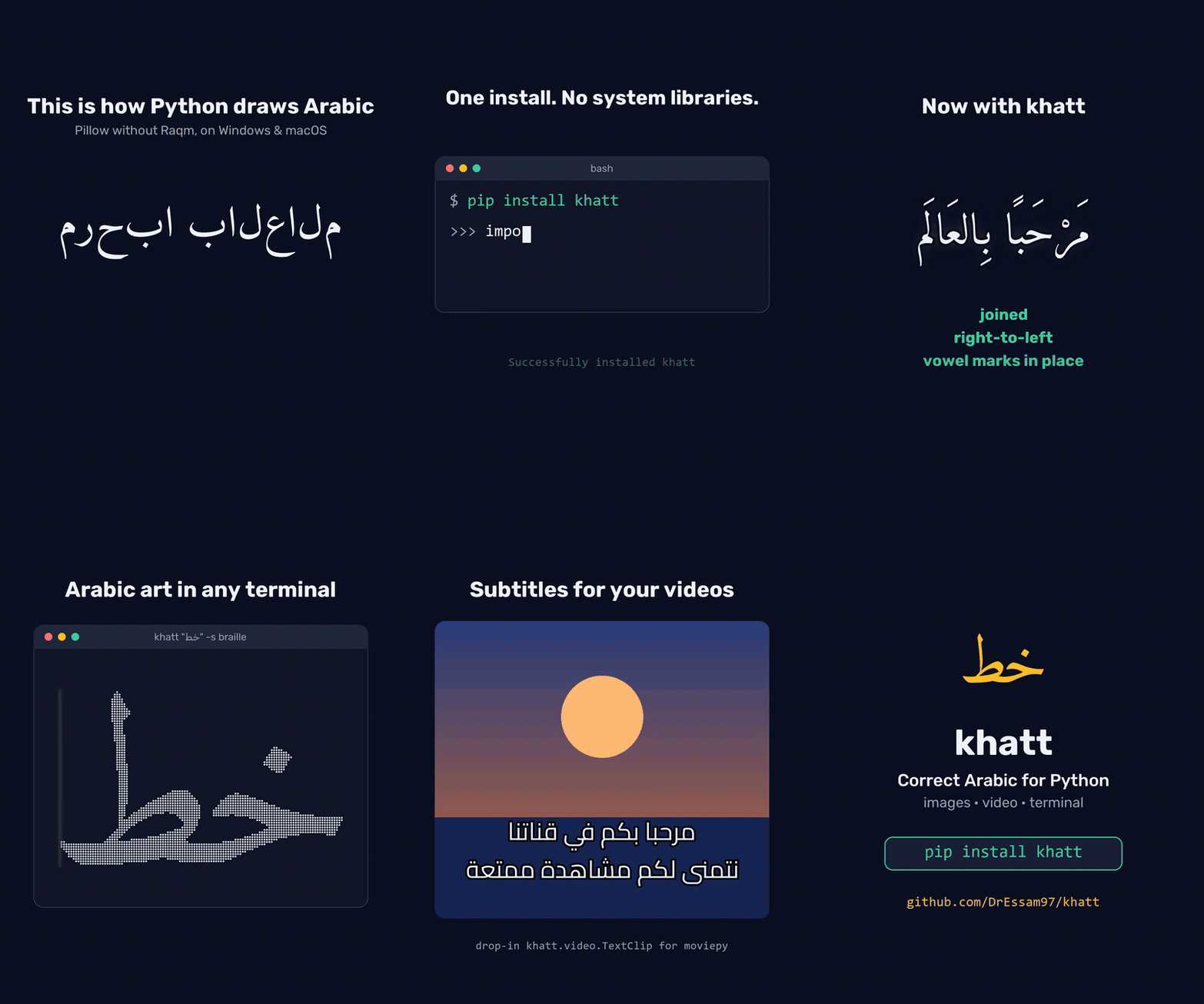
Try it without installing anything:
uvx khatt "مرحبا"
Or install it: pip install khatt (add [video] for moviepy subtitles).
It started as the Arabic FIGlet that FIGlet can't be, Arabic as Unicode art in the terminal:
⠀⠀⠀⠀⠀⠀⠀⠀⠀⠀⢀⣾⡄
⠀⠀⠀⠀⠀⠀⠀⠀⠀⠀⢺⣿⣿⣄
⠀⠀⠀⠀⠀⠀⠀⠀⠀⠀⢸⣿⣿⠟
⠀⠀⠀⠀⠀⠀⠀⠀⠀⠀⠈⣿⣿
⠀⠀⠀⠀⠀⠀⠀⠀⠀⠀⠀⣿⣿
⠀⠀⠀⠀⠀⠀⠀⠀⠀⠀⠀⢻⣿⡆⠀⠀⠀⠀⠀⠀⠀⠀⠀⠀⠀⠀⠀⠀⠀⠀⠀⠀⠀⠀⠀⠀⠀⠀⠀⠀⠀⠀⣤⣄⡀
⠀⠀⠀⠀⠀⠀⠀⠀⠀⠀⠀⢸⣿⡇⠀⠀⠀⠀⠀⠀⠀⠀⠀⠀⠀⠀⠀⠀⠀⠀⠀⠀⠀⠀⠀⠀⠀⠀⠀⠀⢀⣾⣿⣿⣿⡗
⠀⠀⠀⠀⠀⠀⠀⠀⠀⠀⠀⢸⣿⡇⠀⠀⠀⠀⠀⠀⠀⠀⠀⠀⠀⠀⠀⠀⠀⠀⠀⠀⠀⠀⠀⠀⠀⠀⠀⠀⠈⠛⢿⣿⠟
⠀⠀⠀⠀⠀⠀⠀⠀⠀⠀⠀⠘⣿⣇⠀⠀⠀⠀⠀⠀⠀⠀⠀⠀⠀⠀⠀⠀⠀⠀⠀⠀⠀⠀⠀⠀⠀⠀⠀⠀⠀⠀⠀⠈
⠀⠀⠀⠀⠀⠀⠀⠀⠀⠀⠀⠀⣿⣿⠀⠀⠀⠀⠀⠀⠀⠀⣀⣠⣄⣀
⠀⠀⠀⠀⠀⠀⠀⠀⠀⠀⠀⠀⣿⡏⠀⠀⠀⠀⣀⣤⣶⣿⣿⣿⣿⣿⣷⡄⠀⠀⠀⠀⣠⣶⣿⣿⣷⣶⣤⣄⣀
⠀⠀⠀⠀⠀⠀⠀⠀⠀⠀⠀⠀⣿⠇⠀⣀⣴⣿⣿⣿⣿⣿⣿⣿⣿⣿⣿⣿⠀⠀⢠⣾⣿⣿⣿⣿⣿⣿⣿⣿⣿⣿⣶⣦⣤⣀⣀
⠀⠀⠀⠀⠀⠀⠀⠀⠀⠀⠀⠀⣿⣤⣾⣿⠟⠋⠉⠀⠀⠀⠀⠙⢿⣿⣿⡟⠀⠀⠘⠉⠉⠉⠉⠉⠉⠙⠛⠿⣿⣿⣿⣿⣿⣿⣿⣿⣿⣷⣶⣶⣶⣶⣶⡶
⠀⠀⠀⠀⠀⠀⠀⠀⠀⠀⢀⣴⣿⠟⠋⠀⠀⠀⠀⠀⠀⣀⣠⣤⣶⣿⡿⠁⠀⠀⠀⠀⠀⠀⠀⠀⠀⠀⠀⣀⣤⣽⣿⣿⣿⣿⣿⣿⣿⣿⣿⣿⣿⣿⡿⠁
⣀⣀⣀⣀⡀⠀⣀⣀⣀⣴⣿⣿⣥⣤⣤⣤⣴⣶⣶⣿⣿⣿⣿⣿⣿⣋⣀⡀⠀⠀⣀⣀⣀⣀⣤⣤⣶⣾⣿⣿⣿⡿⠿⠛⠋⠉⠁⠀⠀⠀⠀⠀⠀⠈
⠈⢿⣿⣿⣿⣿⣿⣿⣿⣿⣿⣿⣿⣿⣿⣿⣿⣿⣿⣿⣿⣿⣿⣿⣿⣿⣿⣿⣿⣿⣿⣿⣿⣿⣿⣿⡿⠟⠋⠉
⠀⠀⠙⠿⢿⣿⣿⣿⣿⣿⣿⣿⣿⠿⠿⠿⠿⠿⠛⠛⠉⠛⠛⠻⠿⠿⠿⠿⠿⠿⠿⠿⠟⠛⠉⠁
(that's «خط» — "khatt", meaning line/script/calligraphy — Amiri font, braille style)
                              -%+.
       :@.           =:       *+--  =@   *#                       =@
       -@.           +:        +=   =@   #%                       +@
   %+  -@.   =%   =**+***:     @#   =@   *%       -*****%+   -%.  +@
   @*  -@.   +@         +@.    %*   =@   *%      -@-    @*   -@.  +@
   @+  -@.   +@         .@-    %*   =@   *%      +@     @*   -@.  +@
   @+  -@.   +@         :@-    %#   =@   #%      :@-    @*   -@.  +@
   @*  :%****##**********%: +**%#***#%   +#       -*****%#**+*%   =%
  .@=        :-                                             :- -.
+*%+         -*                                             =+ *:
(«ايه الأخبار» — "What's the news?" — Cairo font, ascii style)
Why FIGlet can't do this
FIGlet fonts map one character to one fixed glyph. Arabic doesn't work that way:
- Every letter has up to four positional forms (isolated / initial / medial / final).
- Some letter pairs form mandatory ligatures — ل + ا must become لا.
- The script is cursive: letters connect, and the connections carry the word's shape.
- Text runs right-to-left, and real text mixes RTL words with LTR numbers and names.
Khatt sidesteps glyph tables entirely with a rasterize-then-map pipeline:
text ──► HarfBuzz shaping ──► FreeType rasterization ──► density mapping ──► art
         (positional forms,    (real Arabic fonts,        (blocks / ascii /
          ligatures, bidi)      hi-res grayscale)          braille ramps)
The result is genuine calligraphic letterforms — from real fonts — approximated in terminal characters.
Install
pip install khatt        # or: uv add khatt
pip install "khatt[video]"   # + moviepy captions (khatt.video)
From source:
git clone https://github.com/DrEssam97/khatt.git && cd khatt
uv sync
Quickstart
Python API
import khatt

print(khatt.render("مرحبا"))                          # blocks style, size 10
print(khatt.render("خط", style="braille", size=16))   # bigger, high effective resolution
print(khatt.render("القاهرة", font="cairo", style="ascii", threshold=0.4))
print(khatt.render("السلام عليكم ورحمة الله", width=60))  # wraps at 60 columns
print(khatt.render("مرحبا\nKhatt 2026", font="rubik"))    # one art line per text line

art = khatt.render("مرحبا", style="braille")
khatt.art_to_image(art, fg="white", bg="#1e1e2e").save("art.png")  # the art as a picture

image = khatt.render_image("مرحبا\nKhatt 2026")  # the plain text: Pillow image, black on white
image.save("khatt.png")

khatt.list_fonts()   # ['amiri', 'cairo', 'noto-naskh', 'rubik']
khatt.list_styles()  # ['ascii', 'blocks', 'braille']
CLI
khatt "مرحبا"                          # render to the terminal
khatt "خط" --style braille --size 16
khatt "القاهرة" -f cairo -s ascii -t 0.4
khatt "خط" -f ./MyFont.ttf             # any .ttf/.otf font file
echo "سلام" | khatt                    # stdin
printf 'سطر أول\nسطر ثاني' | khatt     # multi-line input
khatt "خط" --output art.txt            # save the art
khatt "خط" -s braille -o art.png       # save the art as an image
khatt "خط" -s ascii -o art.png --fg "#e5e5e5" --bg "#1e1e2e"   # terminal colours
khatt "خط" -o logo.png --bg none       # transparent background
khatt "خط" -o khatt.png --png text     # the plain high-resolution text instead
khatt --list-fonts
khatt --list-styles
khatt --doctor                         # which Arabic shapers are installed
Arabic diacritics (tashkeel) are stripped from text art by default — they're
illegible at character-grid resolution. Pass --keep-tashkeel (API:
render(..., keep_tashkeel=True)) to render them. Plain-text images
(--png text, render_image) keep them by default, since they have the
resolution to show them: pass --strip-tashkeel (API:
render_image(..., keep_tashkeel=False)) to remove them.
In art images, braille dots and shade blocks are drawn as shapes, so they stay
crisp at any size; ascii characters are drawn in a bold sans font. Each
character gets a cell twice as tall as it is wide (12 × 24 px by default;
API: cell_width=), matching the terminal the art was sized for.
Sizing and wrapping
Like FIGlet, letters have a fixed size and long text wraps:
size(--size) is the font size in character rows per em (default 10). It gives the same on-screen height in every style;braillejust packs 4× the dots into it.width(--width) is the maximum width. Lines wrap at spaces; a single word that can't fit on its own shrinks the whole render until it does. The CLI defaults to your terminal's width, the API to 80 columns;width=Noneturns wrapping off.- Line breaks in the input start new lines. Right-to-left paragraphs are right-aligned, left-to-right ones left-aligned.
--fit(API:size=None) is the 0.1.0 behaviour: scale each line to fill exactlywidthcolumns, without wrapping.
Drawing on images
khatt.draw_text draws correctly shaped Arabic, mixed Arabic/Latin and Arabizi
onto an existing Pillow image. It's a drop-in for ImageDraw.text, and
khatt.overlay fits text into a box:
from PIL import Image
import khatt

image = Image.open("certificate.png").convert("RGBA")

# Like ImageDraw.text: xy is where the anchor goes ("ra" = right edge, ascender line).
khatt.draw_text(image, (1100, 80), "شهادة تقدير", size_px=72, anchor="ra", fill="#1a3c6e")
khatt.draw_text(image, (1100, 200), "تُمنح هذه الشهادة إلى", size_px=36, anchor="ra",
                max_width=800)  # wraps at spaces

# The largest size at which the name fits the box, wrapped if it has to be.
khatt.overlay(image, "محمد عبد الله", (200, 260, 1100, 400), padding=12, fill="black")

image.save("certificate-filled.png")

# Outlined text, e.g. captions or thumbnails over busy backgrounds.
frame = Image.open("frame.png").convert("RGB")
khatt.draw_text(frame, (640, 650), "مرحبا بالعالم", size_px=64, anchor="md",
                fill="white", stroke_width=5, stroke_fill="black")

# Measure without drawing, like ImageDraw.textbbox: the exact box draw_text paints.
left, top, right, bottom = khatt.text_bbox("مرحبا بالعالم", xy=(640, 650), size_px=64,
                                           anchor="md", stroke_width=5)
- Pass text as typed. Don't run it through
arabic_reshaperorget_displayfirst. draw_text:size_px(pixels per em, likeImageFont.truetype),fill(colour name,#rrggbb[aa]or an RGB/RGBA tuple; alpha makes the text translucent), Pillow-styleanchor(l/m/r+a/t/m/s/b/d),max_widthin pixels to wrap,line_spacing(baseline distance in multiples of the size) orspacing(pixels between lines, as in Pillow'smultiline_text),align(None: right-to-left paragraphs right-aligned, left-to-right ones left-aligned),keep_tashkeel(diacritics are kept by default on images), andstroke_width/stroke_fillfor an outline, as in Pillow: it grows outward around the text without moving it, andstroke_filldefaults tofill.overlay(image, text, (left, top, right, bottom)):fit="shrink"(default) uses the largest size betweenmax_size_pxandmin_size_pxat which the wrapped text fits;"wrap"wraps atmax_size_px;"none"draws atmax_size_pxas is. Alsoalign,valign(top/middle/bottom),padding, and the samestroke_width/stroke_fill(the outline is fitted inside the padding too). It never draws outside the box: text that doesn't fit is clipped, with akhatt.TextOverflowWarning.text_bbox(text, xy=(0, 0), ...)takesdraw_text's arguments and returns(left, top, right, bottom): exactly the pixelsdraw_textwould paint, outline included. Use it to measure words for your own wrapping or to size a box behind a caption.- RGB and RGBA images both work; on RGBA, a transparent background stays transparent around the text.
Why not just ImageDraw.text? Pillow shapes Arabic only when it's built with
Raqm, which most Windows installs aren't. The usual workaround,
arabic_reshaper plus get_display, pre-shapes the text, so wherever native
shaping is available (Pillow with Raqm, matplotlib 3.11+) the text gets shaped
twice and comes out corrupted. khatt never hands text to another shaper: it
shapes with HarfBuzz, rasterizes with FreeType and composites only the finished
pixels, so the output is identical everywhere.
khatt --doctor (API: khatt.doctor()) shows which shapers your environment
has and warns about that double-shaping trap:
$ khatt --doctor
khatt 0.4.0 (Python 3.13.15)
Pillow 12.3.0: no Raqm, so ImageDraw.text cannot shape Arabic
matplotlib: not installed
arabic_reshaper: not installed
khatt shapes text itself: its output is the same in every case above.
Video captions (moviepy)
khatt.video.TextClip is a drop-in for moviepy's TextClip: same arguments,
same order, same clip sizes, but the text is shaped by khatt. moviepy's own
TextClip draws with Pillow, so on Windows (no Raqm) Arabic comes out as
disconnected letters in reverse order, and with Pillow 11 or later it cuts off
the bottom of label clips (descenders, kasra, tanween), English included.
from moviepy import ColorClip, CompositeVideoClip
from khatt.video import TextClip  # instead of: from moviepy import TextClip

caption = TextClip(
    text="بِسْمِ اللَّهِ الرَّحْمَٰنِ الرَّحِيمِ",
    font_size=56, color="white", stroke_color="black", stroke_width=3,
    method="caption", size=(1000, None),  # wraps to 1000 px
).with_duration(3).with_position(("center", "bottom"))
video = CompositeVideoClip([ColorClip((1280, 720), (20, 30, 60), duration=3), caption])
video.write_videofile("caption.mp4", fps=24)
- Every moviepy 2.2 argument works:
font_size,size,margin,color,bg_color,stroke_color,stroke_width,method("label"or"caption", with the automatic font size),text_align,horizontal_align,vertical_align,interline,transparent,duration,filename. - Differences:
fonttakes a bundled name or a font path and defaults to Amiri;text_aligndefaults to aligning each paragraph by its direction (Arabic right, English left) instead of"left";filenameis read as UTF-8;keep_tashkeel=Falsestrips diacritics. - Clips are as tall as moviepy's formula says (ascent + descent + outline,
plus
interlinespacing per line), and taller only if stacked diacritics reach beyond it, so nothing is cut off. The exception: words aren't broken, so if you fix bothsizeandfont_sizeand a word is wider than the width, the edges are cut and you get akhatt.TextOverflowWarning. - Without moviepy,
khatt.caption_image(text, ...)takes the same arguments and returns the frame as a Pillow image, e.g. for ffmpeg overlays.
Gradio app
uv sync --extra app
uv run python app.py
Bundled fonts and styles
| Font | Family | Character |
|---|---|---|
amiri (default) |
Amiri | Classical naskh, rich calligraphic detail |
cairo |
Cairo | Geometric, modern, bold strokes |
noto-naskh |
Noto Naskh Arabic | Clean, highly legible naskh |
rubik |
Rubik | Strong Latin + Arabic pairing for mixed text |
All fonts are licensed under the SIL Open Font License 1.1, preserved verbatim in
khatt/fonts/LICENSES/.
Your own fonts. Anywhere khatt takes a font (render, render_image,
draw_text, overlay, the CLI's --font), you can pass the path to a TrueType or
OpenType file instead of a bundled name, as a string or a pathlib.Path:
khatt.draw_text(image, (40, 40), "مرحبا", font="brand/Tajawal-Bold.ttf")
khatt "مرحبا" --font ~/fonts/Tajawal-Bold.ttf
Bundled names take precedence over a file with the same name. Web fonts
(.woff/.woff2) aren't supported, so use the font's .ttf or .otf version. A
path that doesn't exist raises KeyError (like an unknown name), and a file that
isn't a usable font raises ValueError.
Glyph coverage. khatt skips characters a font has no glyph for, with a
khatt.UnsupportedCharacterWarning. khatt.missing_characters(text, font) lists
them beforehand, so you can fall back to another font:
font = "brand/Tajawal-Bold.ttf"
if khatt.missing_characters(text, font):  # e.g. ["ے", "ٹ"]
    font = "amiri"  # also covers Persian and Urdu letters
Or keep your font and name fallbacks for what it can't draw. Every function that
takes a font also takes fallback_fonts, tried in order for each character the
font has no glyph for, such as Chinese inside an Arabic subtitle:
khatt.draw_text(image, (40, 40), "مرحبا بالعالم 中文测试",
                font="fonts/NotoSansSC-Regular.ttf", fallback_fonts=["noto-naskh"])
Arabic stays joined within its own font, and line spacing follows font.
| Style | Ramp | Notes |
|---|---|---|
blocks |
░ ▒ ▓ █ |
Default; reads well at any size |
ascii |
. : - = + * # % @ |
Pure ASCII, maximum compatibility |
braille |
⠁ … ⣿ |
2×4 dots per cell — 8× the effective resolution |
Deploy the app to a Hugging Face Space
app.py follows the Spaces convention (single file at the repo root), so the whole
repository deploys unchanged with one command:
uv run --extra app gradio deploy
1 maintainer

Metadata
1 maintainer
Release files for khatt 0.4.0
For a detailed explanation of source distributions (sdists) and built distributions (wheels), please see the package formats documentation.
Source distribution (sdist)
| File | Size | Uploaded | Provenance | Actions |
|---|---|---|---|---|
| khatt-0.4.0.tar.gz | 1.1 MB | With provenance | Details for khatt-0.4.0.tar.gz |
Built distribution (wheel)
| File | Interpreter | ABI | Platform | Actions Reset |
|---|---|---|---|---|
| khatt-0.4.0-py3-none-any.whl | Python 3 | none | any | Details for khatt-0.4.0-py3-none-any.whl |
Total release size: 1.9 MB
Release files / khatt-0.4.0.tar.gz
| Download URL | khatt-0.4.0.tar.gz |
|---|---|
| Size | 1.1 MB |
| Tags | Source |
|
SHA-256 checksum How to use checksums |
4ee39d25f4055d4573f1bd4d19d18a19c373865d883d7c10dd85fe2811d5d1b5
|
|
BLAKE2b-256 checksum How to use checksums |
f55acb0771767f91ac72d296e16df1a4b060435d71cf96a8d03c7a28387bec54
|
| Upload date | |
|
Uploaded using Trusted Publishing? What is trusted publishing? |
Yes |
| Uploaded via |
twine/7.0.0 CPython/3.13.16
|
Provenance
Provenance describes where a file came from. On PyPI, provenance is shared via attestations, which provide a verifiable record of the build or publishing details. View details, limitations and caveats.


PyPI Publish Attestation
PyPI verified that this artifact, at this checksum, originated from the publisher listed below.
Signed by GitHub Actions, verified by PyPI on Oct 30, 2026.
Transparency logRelease files / khatt-0.4.0-py3-none-any.whl
| Download URL | khatt-0.4.0-py3-none-any.whl |
|---|---|
| Size | 859.1 kB |
| Tags | Python 3 |
|
SHA-256 checksum How to use checksums |
9f8649f2d5edf1365176e419a7f0b1d6e0fb3c2062dad5a8ff3624d3e42df5d9
|
|
BLAKE2b-256 checksum How to use checksums |
a5a2f0770999f067fc0f033b2c91ed18be2f6421a2d6eadd3bf343a390642175
|
| Upload date | |
|
Uploaded using Trusted Publishing? What is trusted publishing? |
Yes |
| Uploaded via |
twine/7.0.0 CPython/3.13.16
|
Provenance
Provenance describes where a file came from. On PyPI, provenance is shared via attestations, which provide a verifiable record of the build or publishing details. View details, limitations and caveats.
PyPI Publish Attestation
PyPI verified that this artifact, at this checksum, originated from the publisher listed below.
Signed by GitHub Actions, verified by PyPI on Oct 30, 2026.
Transparency logSecurity for khatt 0.4.0
Provenance
Provenance describes where a file came from. On PyPI, provenance is shared via attestations, which provide a verifiable record of the build or publishing details. View details, limitations and caveats.
Full provenance
Both files in this release have been uploaded with provenance metadata.
Attestation for khatt-0.4.0.tar.gz
PyPI Publish Attestation
PyPI verified that this artifact, at this checksum, originated from the publisher listed below.
Signed by GitHub Actions, verified by PyPI on Oct 30, 2026.
Transparency logA note on package security
PyPI is a repository for distributing packages, not a service for auditing them. While third-party security researchers and our staff do their best to detect and remove malicious packages, PyPI cannot guarantee the quality, security or suitability of any given package.
To learn more about protecting yourself from malicious actors, visit our package security documentation.














