
kiapi



Summary
kiapi is an API server that uses a Mac Studio M4 Max with 128GB of memory at home to provide the following capabilities.
| Capability | Support |
|---|---|
| Chat | OpenAI Chat Completions API compatible text + image + audio + video input support tool call + tool choice (auto, any, specific) + parallel tool calls + streaming support |
| Embedding | text + image input support |
| Image generation | text2image, image2image, image editing, and LoRA training support |
| Music and sound-effect generation | text2audio, cover, repaint, and extract support |
| Video generation | text2video, image2video, and audio2video support |
| Web | search + fetch support |
See: API Documents
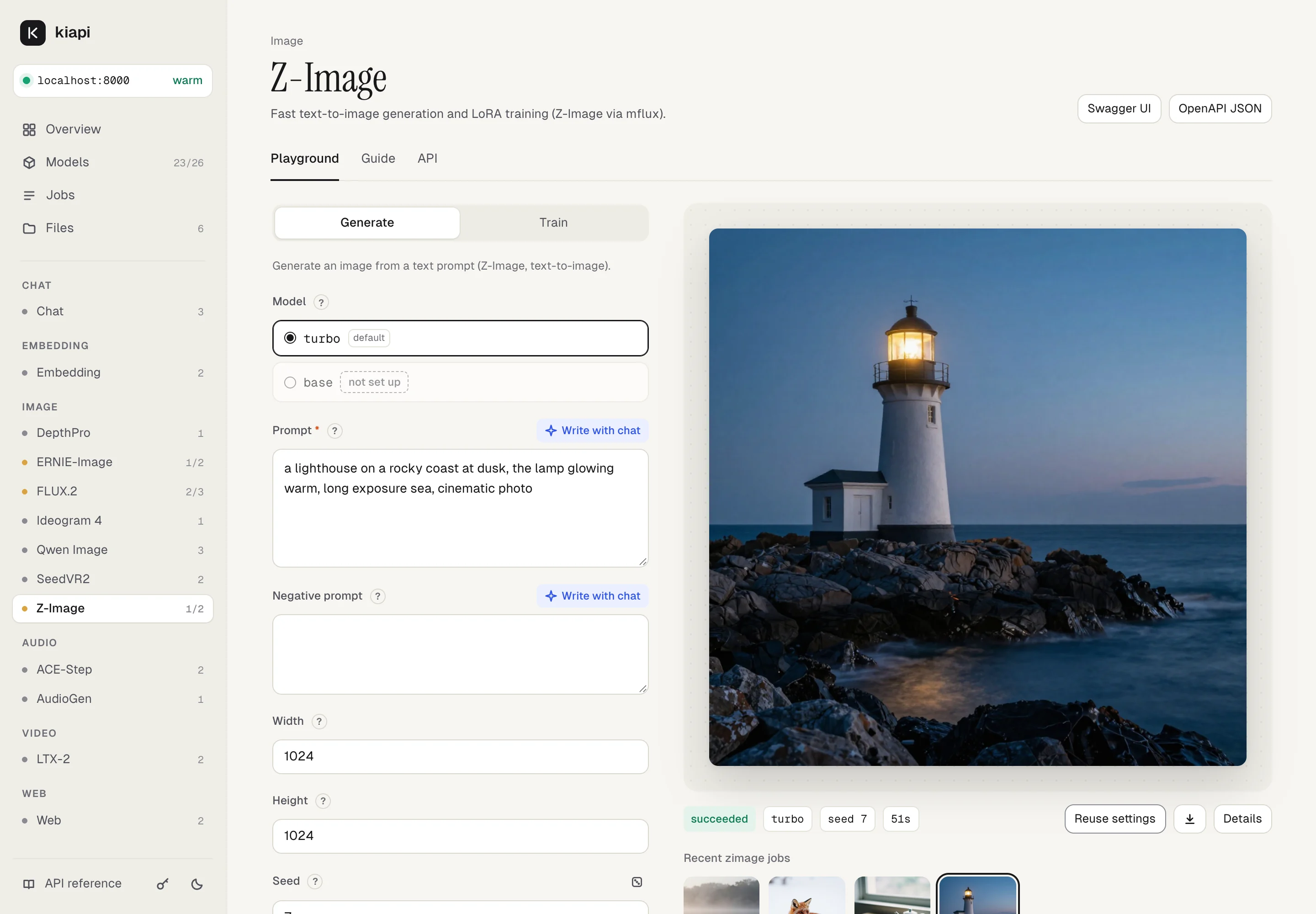
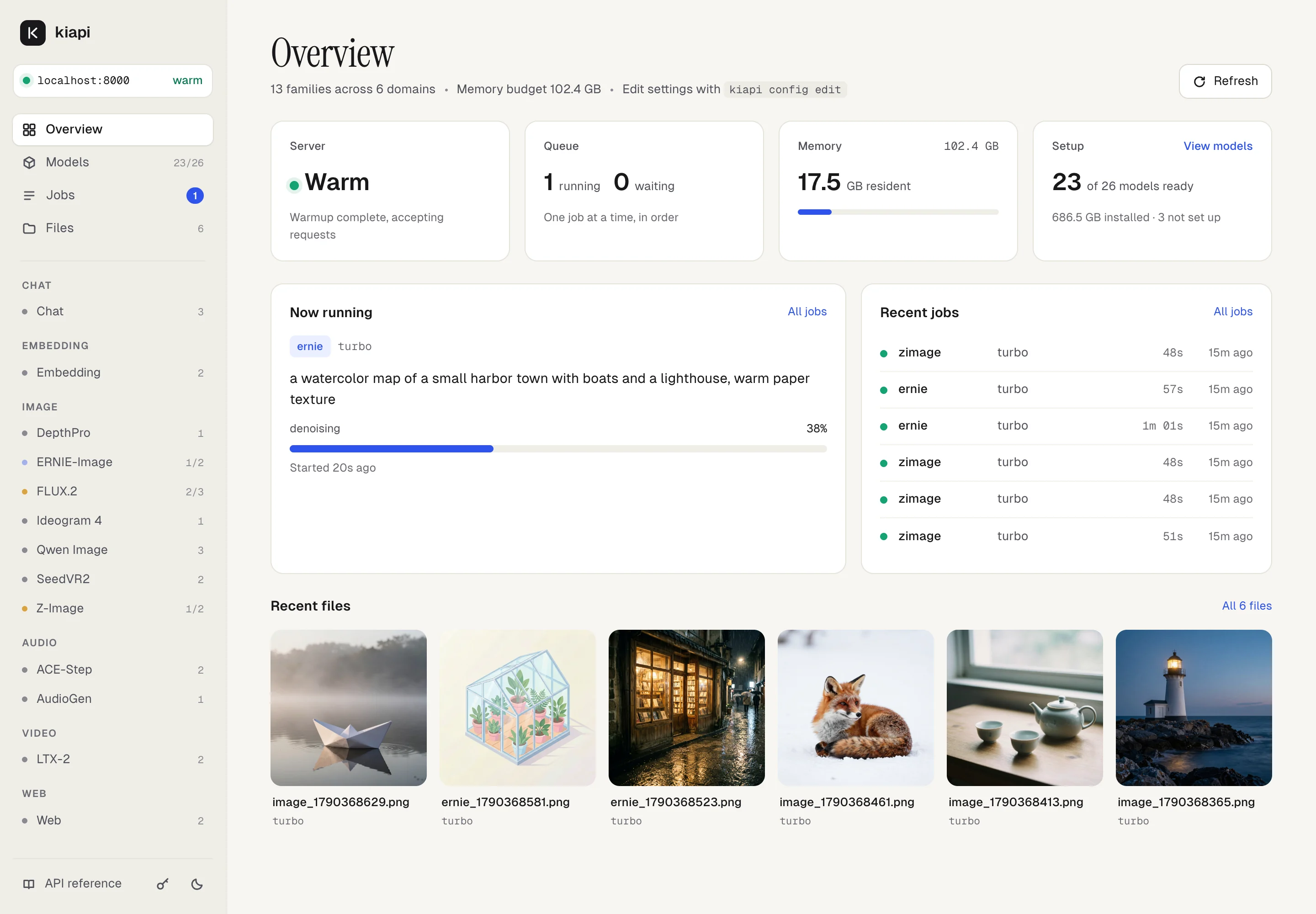
Web UI
Open http://localhost:8000/ while kiapi runs. The web UI lets you try every
family without writing a request, and shows what each one can do.
- Playground for every family: forms built from the API schema, uploads or stored files as inputs, and results as they finish.
- Write with chat drafts prompts with a local chat model that reads the family's guide.
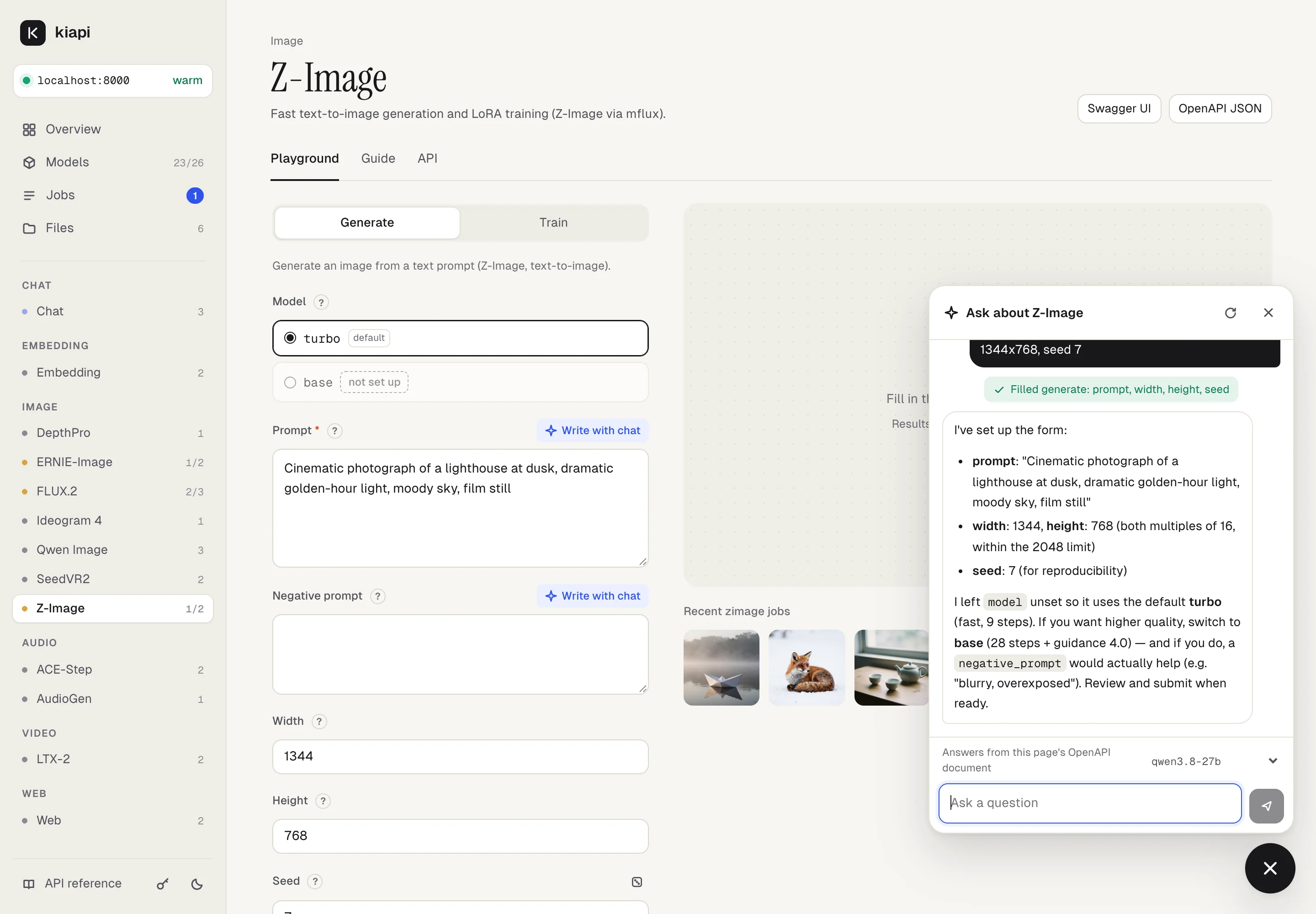
- Ask about a family from the corner button. The assistant answers from the family's OpenAPI document and can fill in the form for you; you review and submit it.
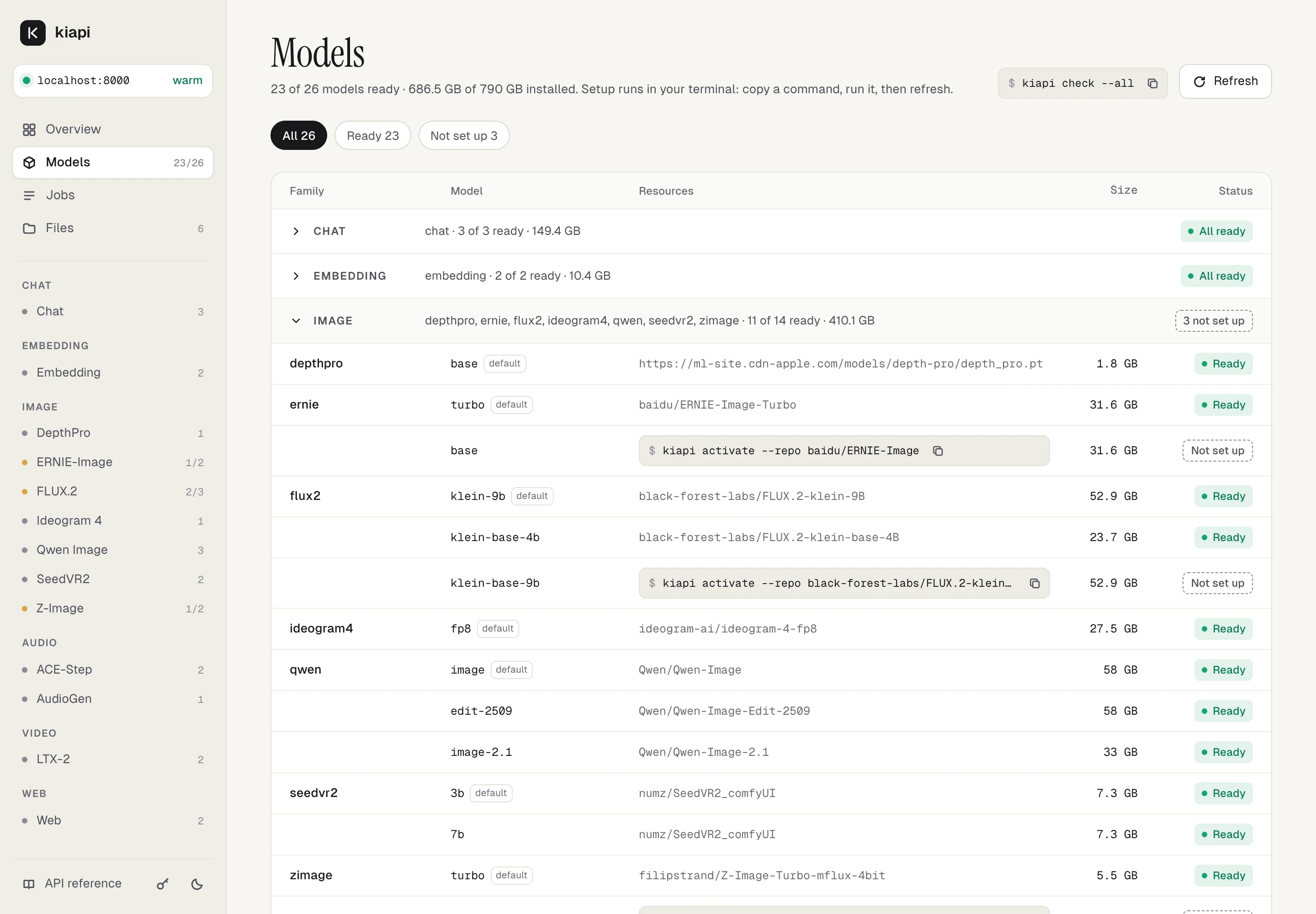
- Models shows which models are ready and the
kiapi activatecommand for anything missing. Jobs and Files show progress and previews.
Resources
To provide its capabilities, kiapi downloads and uses selected resources from the list below. Each resource is governed by its upstream license. Always review the upstream license to confirm the terms and whether commercial use is permitted.
| Domain | Family | Resource | Kind | Upstream license | Notes |
|---|---|---|---|---|---|
| chat | chat | mlx-community/Qwen3-Omni-30B-A3B-Instruct-4bit | model weights | Apache-2.0 | MLX-converted Qwen3 Omni model. |
| mlx-community/Qwen3.8-Flash-Next-4bit | model weights | Qwen Community License 1.0 | MLX-converted Qwen3.8-Flash-Next. Commercial Model-as-a-Service or AI-work-assistant businesses need a separate license from Qwen. | ||
| mlx-community/Qwen3.8-27B-4bit | model weights | Apache-2.0 | MLX-converted Qwen3.8 model. | ||
| embedding | embedding | mlx-community/Qwen3-Embedding-8B-mxfp8 | model weights | Apache-2.0 | Text embedding model. |
| mlx-community/Qwen3-VL-Embedding-2B-mxfp8 | model weights | Apache-2.0 | Text + image embedding model. | ||
| image | zimage | filipstrand/Z-Image-Turbo-mflux-4bit | model weights | Tongyi Qianwen License | Quantized MLX-compatible Z-Image Turbo; inherits the original Z-Image Turbo license. |
| Tongyi-MAI/Z-Image | model weights | Apache-2.0 | Base Z-Image model. | ||
| flux2 | black-forest-labs/FLUX.2-klein-9B | model weights | FLUX Non-Commercial License | Gated upstream model. Confirm terms before any commercial use. | |
| black-forest-labs/FLUX.2-klein-base-4B | model weights | Apache-2.0 | Open-weight FLUX.2 Klein Base 4B variant. | ||
| black-forest-labs/FLUX.2-klein-base-9B | model weights | FLUX Non-Commercial License | Gated upstream model. Confirm terms before any commercial use. | ||
| qwen | Qwen/Qwen-Image | model weights | Apache-2.0 | Text-to-image model. | |
| Qwen/Qwen-Image-Edit-2509 | model weights | Apache-2.0 | Image editing model. | ||
| Qwen/Qwen-Image-2.1 | model weights | Qwen Research License | Non-commercial (research and evaluation) only; commercial use needs a separate license from Alibaba. Unified generation and editing, RGBA output. Editing is pinned from the kiarina fork of mflux until #741 is released. | ||
| ideogram4 | ideogram-ai/ideogram-4-fp8 | model weights | Ideogram Non-Commercial Model Agreement | Gated upstream model. Confirm hosted-service and commercial-use terms. | |
| ernie | baidu/ERNIE-Image-Turbo | model weights | Apache-2.0 | Turbo ERNIE-Image variant. | |
| baidu/ERNIE-Image | model weights | Apache-2.0 | Base ERNIE-Image variant. | ||
| seedvr2 | numz/SeedVR2_comfyUI | model weights | Apache-2.0 | SeedVR2 3B and 7B upscaling checkpoints. | |
| depthpro | apple/ml-depth-pro / depth_pro.pt | code + model file | Apple custom license | GitHub reports NOASSERTION; review Apple's license text before redistribution or commercial use. |
|
| audio | acestep | ace-step/ACE-Step-1.5 | Python package | MIT | Installed into the ACE-Step dedicated venv. |
| ACE-Step/Ace-Step1.5 | shared checkpoints | MIT | Shared ACE-Step 1.5 checkpoint resources. | ||
| ACE-Step/acestep-v15-xl-base | model weights | MIT | Extra checkpoint used by xl-base. |
||
| audio | audiogen | facebook/audiogen-medium | model weights | CC-BY-NC-4.0 | Non-commercial license. |
| video | ltx2 | Blaizzy/mlx-video | Python package | MIT | Installed from a pinned Git commit for LTX-2.5 / LTX-2 inference. LTX-2.5 support is pinned from the kiarina fork until #52 is merged. |
| Lightricks/LTX-2.5 | model weights | LTX-2.x Community License | Gated; accept the model terms on Hugging Face. Used by the default ltx-2.5-distilled. |
||
| Lightricks/LTX-2.5-22b-IC-LoRA-Pixel-Spatial-Upscaler | model weights | LTX-2.x Community License | Gated. Detailing adapter for pipeline="dfr". |
||
| mlx-community/gemma-4-e2b-it-bf16 | model weights | Gemma Terms of Use | Prompt enhancer for enhance_prompt. |
||
| prince-canuma/LTX-2-distilled | model weights | Not declared upstream | The model card has no license metadata; verify rights before use. | ||
| web | web | searxng/searxng / searxng/searxng:latest |
Docker image | AGPL-3.0 | Web search backend. AGPL obligations can matter for network services. |
unclecode/crawl4ai / unclecode/crawl4ai:latest |
Docker image | Apache-2.0 | Web fetch backend. |
Design
Reliably provide every capability:
- Queue non-administrative requests and process them one at a time
- Manage API server memory to prevent overcommit failures
Support interactive integration with LLM agents:
- Provide LLMs with tips as well as I/O specifications through
openapi.json - Run generation tasks in both sync and async modes
- Make asynchronous task progress observable
Provide secure external access to kiapi inside a closed network:
- kiapi binds to
127.0.0.1by default and never exposes an inbound socket by itself - For access from other machines, put it behind your own private network layer, for example
tailscale serve
API
| Domain | Family | Endpoint | Description |
|---|---|---|---|
| chat | POST /v1/chat |
Chat API details | |
| embedding | POST /v1/embedding |
Embedding API details | |
| image | zimage | POST /v1/image/zimage |
Z-Image API details |
| flux2 | POST /v1/image/flux2 |
FLUX.2 API details | |
| qwen | POST /v1/image/qwen |
Qwen Image API details | |
| ideogram4 | POST /v1/image/ideogram4 |
Ideogram 4 API details | |
| ernie | POST /v1/image/ernie |
ERNIE-Image API details | |
| seedvr2 | POST /v1/image/seedvr2 |
SeedVR2 API details | |
| depthpro | POST /v1/image/depthpro |
Depth Pro API details | |
| audio | acestep | POST /v1/audio/acestep |
ACE-Step API details |
| audiogen | POST /v1/audio/audiogen |
AudioGen API details | |
| video | ltx2 | POST /v1/video/ltx2 |
LTX-2 API details |
| web | POST /v1/web |
Web API details | |
| core | files | POST /v1/files |
Upload input files, LoRA adapters, and other files, then issue a file_id. |
GET /v1/files |
Return a list of stored files. | ||
GET /v1/files/{file_id} |
Return file metadata. | ||
GET /v1/files/{file_id}/download |
Download the file body. | ||
DELETE /v1/files/{file_id} |
Delete a stored file. | ||
| jobs | GET /v1/jobs |
Return a list of generation jobs. | |
GET /v1/jobs/{job_id} |
Return job status, progress, result, and artifact file_ids. |
||
DELETE /v1/jobs/{job_id} |
Remove a job from the job store. Running jobs are not interrupted. | ||
| openapi | GET /openapi.json |
Return the common API and each capability documentation URL. | |
GET /v1/{domain}/{family}/openapi.json |
Return detailed input/output specs, usage, tips, and examples for each family. | ||
| health | GET /health |
Return server status, warmup status, queue length, and memory usage. | |
| setup | GET /v1/setup |
Return every model with its setup state and the command that activates a missing resource. | |
| web UI | GET / |
Serve the web UI. |
See: kiapi API Docs
Requirements
- macOS / Apple Silicon
- Python
>=3.12,<3.13 uv(optional, recommended for isolated CLI installs and faster venv/package setup inkiapi activate)mise(used for development)- Docker (when using the Web capability)
- Enough disk capacity for model weights and Docker images
kiapi is developed mainly for personal use on a Mac Studio M4 Max 128GB. Some or all features may work on other Apple Silicon environments, but they are not the primary verification target.
The memory budget can be specified with KIAPI_MEMORY_LIMIT_GB. If omitted,
kiapi automatically uses 80% of installed memory as the effective budget on
startup. If a model's required memory does not fit in that budget, requests
return 503 as an insufficient memory budget error.
kiapi activate --all uses a little under 600GB of disk capacity, including
model weights and Docker images. At first, it is recommended to use kiapi activate
to set up only the capabilities you need.
Quick Start
Set up kiapi:
# Install kiapi
python3.12 -m pip install --upgrade kiapi  # If you cannot use uv
uv tool install --python 3.12 kiapi        # If you can use uv

# Change the default host, port, or memory budget if needed
kiapi config init  # Create the configuration file
kiapi config edit  # Edit the configuration file in an editor

# Check the current setup state
kiapi status

# Prepare model weights, Docker images, and dedicated venv environments
kiapi activate                   # Choose targets from the interactive list
kiapi activate --all             # Set up everything (just under 600GB)
kiapi activate --family acestep  # Set up only the specified family

# Verify the setup
kiapi check        # Choose targets from the interactive list
kiapi check --all  # Verify everything
Use from an LLM agent:
# Start the kiapi server
kiapi run                             # Start based on the configuration file (default: 127.0.0.1:8000)
kiapi run --host 0.0.0.0 --port 8500  # Start on a specific host and port

# Example integration with an agent
codex e "
Please inspect http://localhost:8000/openapi.json.
Use the music generation API to create a 20-second BGM track at ~/Downloads/bgm.wav
with the theme 'a person walking in the rain'.
"

# Inspect the generated file
open ~/Downloads/bgm.wav
Use from a browser:
Open http://localhost:8000/ while kiapi runs. See Web UI.
Run as a background service:
# kiapi
kiapi service install    # Register
kiapi service show       # Show the installed plist
kiapi service start      # Start
kiapi service status     # Check status and the tail of logs
kiapi service stop       # Stop
kiapi service uninstall  # Remove
Access from other machines:
kiapi binds to 127.0.0.1 by default. To reach it from other machines, expose
it over your own private network layer. For example, with
Tailscale on the kiapi machine:
tailscale serve --bg --https=8500 8500 # TLS endpoint reachable only inside your tailnet
Local Storage
kiapi mainly writes to these local paths at runtime.
| Purpose | Setting | Default | Notes |
|---|---|---|---|
| Files API uploads, generated artifacts, and URL/data URL inputs | KIAPI_FILES_ROOT |
/tmp/kiapi/files |
Storage referenced by file_id. The default may disappear after OS reboot or tmp cleanup. Use ~/.kiapi/files or external storage for long-term retention. |
| Temporary working directories during request processing | KIAPI_TMP_ROOT |
/tmp/kiapi/work |
Used for chat/embedding input expansion, generation intermediates, LoRA training work, and similar tasks. |
| Web backend subprocess logs | KIAPI_WEB_BACKEND_LOG_DIR |
/tmp/kiapi/logs/web |
stdout/stderr for SearXNG / Crawl4AI Docker subprocesses. |
| ACE-Step dedicated venv / project / checkpoints | KIAPI_ACESTEP_PYTHON_PATH, KIAPI_ACESTEP_PROJECT_ROOT, KIAPI_ACESTEP_CHECKPOINT_DIR |
acestep/ under the user data dir |
When python_path, project_root, and checkpoint_dir are omitted, kiapi places the ACE-Step venv and checkpoints under a persistent ACE-Step directory. |
Other model weights and library caches are managed by Hugging Face, mflux, Docker, or each library/tool. kiapi generally does not move them into its own storage location.
Security
By default, kiapi run starts on 127.0.0.1:8000.
When --host 0.0.0.0 is specified, the server may be reachable from other
machines, so use it only on trusted networks.
Development
make init     # Install dependencies, download test data, and create venv environments
make update   # Sync dependencies
make upgrade  # Upgrade dependencies

# ... implement

make       # Format, type-check, and regenerate dynamic documentation
make test  # Unit tests
make dev   # Start the development server with auto-reload
make web-dev  # Start the web UI dev server against `make dev` (needs Node and pnpm via mise)

# GPU-backed functional and regression tests
make verify        # Choose the capability family interactively
make verify-fast   # Interactive choice, light tests only
make verify-kiapi  # Run every capability non-interactively
Release
Releases to PyPI are automated by GitHub Actions workflows.
Project Status
1 maintainer

Release files for kiapi 0.8.0
For a detailed explanation of source distributions (sdists) and built distributions (wheels), please see the package formats documentation.
Source distribution (sdist)
| File | Size | Uploaded | |
|---|---|---|---|
| kiapi-0.8.0.tar.gz | 832.2 kB | Details |
Built distribution (wheel)
| File | Interpreter | ABI | Platform | Reset |
|---|---|---|---|---|
| kiapi-0.8.0-py3-none-any.whl | Python 3 | none | any | Details |
Total release size: 1.9 MB
Release files / kiapi-0.8.0.tar.gz
| Download URL | kiapi-0.8.0.tar.gz |
|---|---|
| Size | 832.2 kB |
| Tags | Source |
|
SHA-256 checksum How to use checksums |
0bb3210db1d3e534876ee681f50c8595c1afae60c59e2245579376c660f50423
|
|
BLAKE2b-256 checksum How to use checksums |
46f77aefc4f92cb88e49528754bbe7a35e7395c2a32a51725688b97a52cf1f75
|
| Upload date | |
|
Uploaded using Trusted Publishing? What is trusted publishing? |
Yes |
| Uploaded via |
twine/7.0.0 CPython/3.13.14
|
Provenance
Provenance describes where a file came from. On PyPI, provenance is shared via attestations, which provide a verifiable record of the build or publishing details. View details, limitations and caveats.


PyPI Publish Attestation
PyPI verified that this artifact, at this checksum, originated from the publisher listed below.
Signed by GitHub Actions, verified by PyPI on Sep 25, 2026.
Transparency logRelease files / kiapi-0.8.0-py3-none-any.whl
| Download URL | kiapi-0.8.0-py3-none-any.whl |
|---|---|
| Size | 1.1 MB |
| Tags | Python 3 |
|
SHA-256 checksum How to use checksums |
af353fcde599e8d97960a584411ac8a2020ab030a316cd9013bdd827a6ac216a
|
|
BLAKE2b-256 checksum How to use checksums |
419878e5b4d999a75cebf89ad7e96134cf71a4537e7485a66f7e529de242e76c
|
| Upload date | |
|
Uploaded using Trusted Publishing? What is trusted publishing? |
Yes |
| Uploaded via |
twine/7.0.0 CPython/3.13.14
|
Provenance
Provenance describes where a file came from. On PyPI, provenance is shared via attestations, which provide a verifiable record of the build or publishing details. View details, limitations and caveats.
PyPI Publish Attestation
PyPI verified that this artifact, at this checksum, originated from the publisher listed below.
Signed by GitHub Actions, verified by PyPI on Sep 25, 2026.
Transparency log













