
kibends
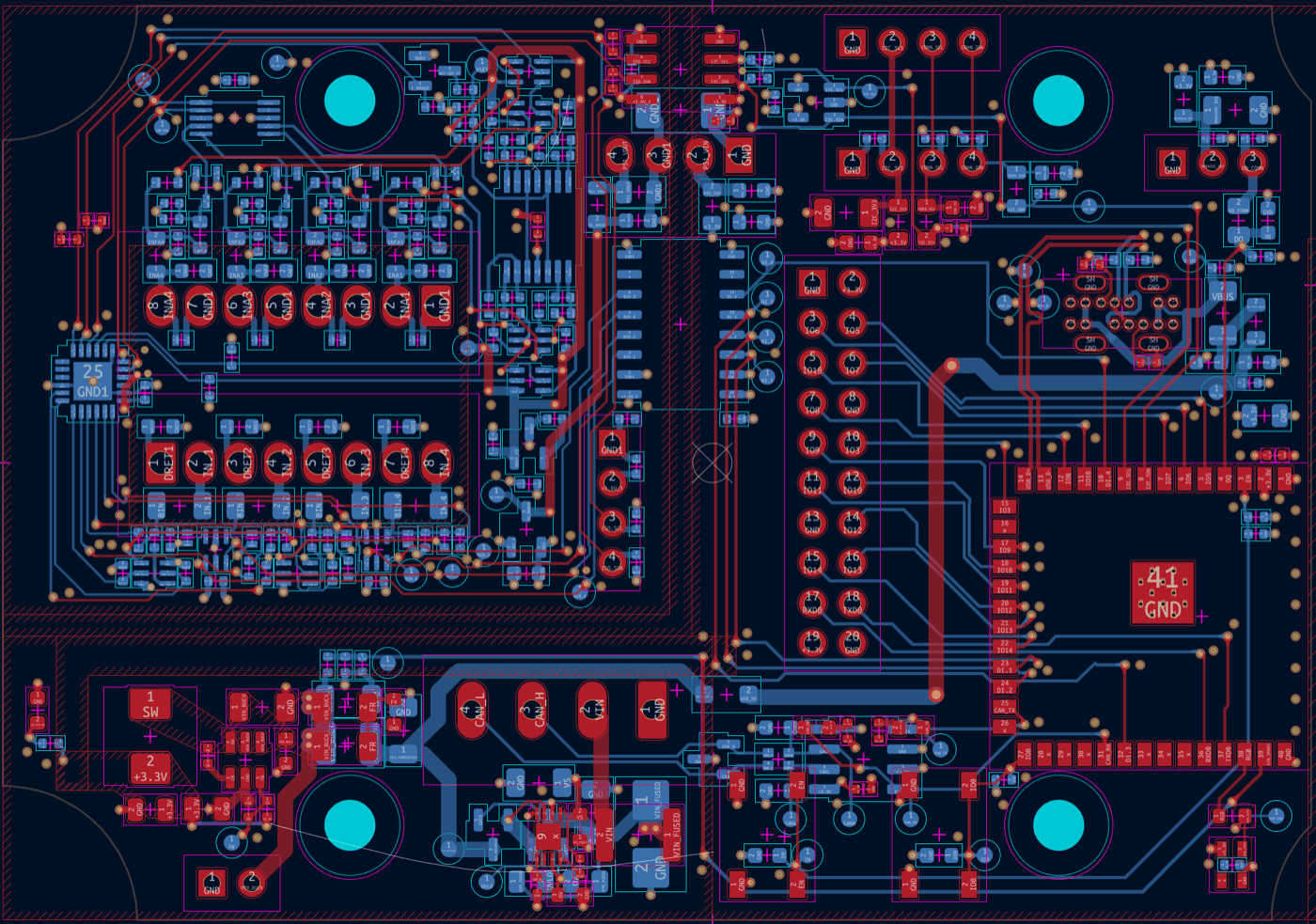
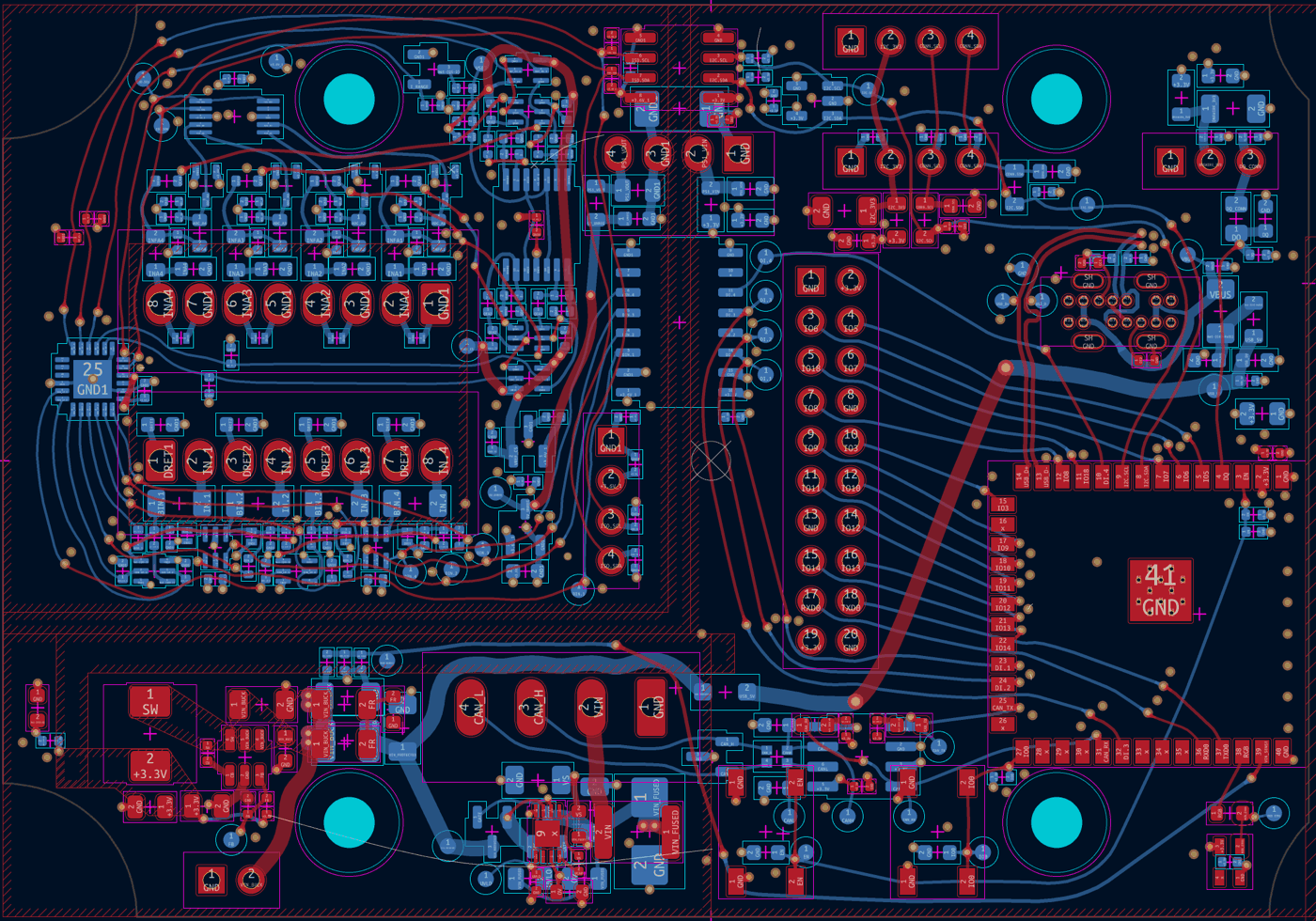
kibends smooths the tracks of a KiCad board. It replaces each selected route with a short, smooth path that keeps its clearance to other copper, and it does so in the running PCB editor as one undo step.
| Before | After |
|---|---|
 |
 |
Why
Mostly for the looks, as inspired by mitxela/kicad-round-tracks: those pre-1990s hand-drawn PCBs look groovy! There may be theoretical benefits in reducing the power and signal track lengths, and the more even spacing between tracks may also help signal integrity a little.
The result follows the board's clearances: netclass clearances and the edge, hole and hole-to-hole clearances from the project. Custom DRC rules are not read (see Limits).
The board stays fully editable. The result is ordinary straight track segments, so you can push, drag and reroute it with KiCad's router like any other track, and run kibends again afterwards.
The board's topology does not change in general: tracks keep their connections and stay on the same side of the copper around them. In rare cases a track can jump over a lone via to its other side, where that gives a shorter path.
Install
kibends installs from KiCad's Plugin and Content Manager:
- In the Plugin and Content Manager, open Manage repositories and add
https://github.com/mairas/kibends/releases/download/pcm/repository.json. - Choose kibends in the repository list at the top of the window; adding a repository does not show it. Install kibends from the Plugins tab and apply the changes.
- Open a board in the PCB editor and press the kibends button in the toolbar.
kibends runs outside KiCad. The first press of the button offers to install uv and kibends, which needs an internet connection, and installs nothing until you agree. Later presses open the panel, or bring it to the front.
You need KiCad 10 or later, with the API server enabled (Preferences > Plugins > Enable KiCad API).
kibends has prebuilt packages for Windows on x86_64, macOS on Apple
silicon, and Linux with glibc 2.28 or later on x86_64 and aarch64.
Anywhere else the install builds kibends from source, which needs a Rust
toolchain, 1.90 or later. Without cargo on the path, the build downloads
one into its own cache; rustup installs one to keep.
An older cargo on the path, such as a distribution's package, stops the
build.
The panel needs macOS 14 or later, or on Linux glibc 2.34 or later (2.39 on aarch64).
Without the plugin manager
kibends is on PyPI. It needs Python 3.14; name it, since one of its dependencies has no packages for 3.15 yet:
uv tool install --python 3.14 'kibends[gui]'
Without the gui extra you get only the command line.
Using it
- Open the board in KiCad's PCB editor.
- Press the kibends button in the PCB editor's toolbar, or run
kibends-panel. A small window opens and stays open between runs. - Select the tracks to smooth, on any copper layers, with the vias that may move with them. Select nothing to smooth the whole board. The top line of the panel says what Run will touch.
- Press Run. The panel shows the progress and a graph of how much shorter the tracks get. Stop ends optimizing and commits the best result so far.
- Look at the result in KiCad. The report in the panel says how much length the run saved, how many chains and vias it changed, and any warnings. One Ctrl+Z in KiCad undoes the whole run.
- Refill the zones (B) and run KiCad's DRC.
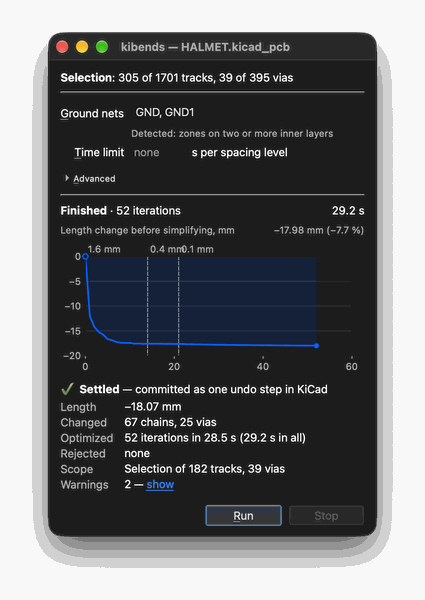
To change a smoothed route, edit it by hand or with the router, select it again and run again. After a run on a selection, the new tracks and moved vias are selected, so a second run needs no new selection.
The panel describes its fields and report, and What gets smoothed how kibends reads a selection.
What it changes and what it does not
- A run is one undo step in KiCad. If any part fails, nothing is committed.
- Locked tracks, pads, other nets' copper and the tracks of selected groups, such as length-tuning patterns, are never modified.
- A via moves only when it is selected, or the run covers the whole board, and only where kibends can tell the move is safe; which vias move has the rules. A moved via stays inside the zones of its net that connected it.
- A route keeps its connections: its ends stay on the pads, vias and tracks they meet, and it keeps touching every pad and via it touched. Tracks of one net that only cross each other may come apart; see crossing tracks.
- kibends never refills zones and never runs the DRC. Refill the zones and run KiCad's DRC after every run.
Limits
- The output is straight track segments. A selected arc is replaced by straight tracks; kibends never draws KiCad arcs.
- kibends cannot read custom DRC rules (
.kicad_dru) or board minimums. It keeps the netclass clearances and the edge, hole and hole-to-hole clearances from the project file. Clearances lists what only KiCad's DRC checks. - A selection whose copper already violates a clearance is refused, with each place listed.
- Skew between the two tracks of a differential pair is not corrected. See Differential pairs.
How it works
kibends looks for the shortest path for each route that still keeps away from the copper around it. Tracks drift toward the middle of the free space and bend smoothly round what they have to avoid. It refines all selected routes and vias together, coarse to fine, so neighbouring tracks make room for each other. Signal vias are also drawn toward their ground return vias (Return vias).
Command line
kibends smooth does the same as the panel's Run. It needs a
selection; --all smooths the whole board:
kibends smooth --dry-run   # optimize and report, change nothing
kibends smooth             # optimize and commit
kibends smooth --all       # the whole board, whatever is selected
Ctrl-C stops a run and commits the best result so far. Command line lists every option.
Documentation
kibends uses the KiCad IPC API through kicad-python.
1 maintainer

Metadata
1 maintainer
Release files for kibends 0.2.1
For a detailed explanation of source distributions (sdists) and built distributions (wheels), please see the package formats documentation.
Source distribution (sdist)
| File | Size | Uploaded | Provenance | Actions |
|---|---|---|---|---|
| kibends-0.2.1.tar.gz | 445.2 kB | With provenance | Details for kibends-0.2.1.tar.gz |
Built distributions (wheels)
| File | Actions Reset | |||
|---|---|---|---|---|
| kibends-0.2.1-cp314-abi3-win_amd64.whl | CPython 3.14 | abi3 | Windows x86-64 | Details for kibends-0.2.1-cp314-abi3-win_amd64.whl |
| kibends-0.2.1-cp314-abi3-manylinux_2_28_x86_64.whl | CPython 3.14 | abi3 | Linux glibc 2.28+ x86-64 | Details for kibends-0.2.1-cp314-abi3-manylinux_2_28_x86_64.whl |
| kibends-0.2.1-cp314-abi3-manylinux_2_28_aarch64.whl | CPython 3.14 | abi3 | Linux glibc 2.28+ ARM64 | Details for kibends-0.2.1-cp314-abi3-manylinux_2_28_aarch64.whl |
| kibends-0.2.1-cp314-abi3-macosx_11_0_arm64.whl | CPython 3.14 | abi3 | macOS 11.0+ ARM64 | Details for kibends-0.2.1-cp314-abi3-macosx_11_0_arm64.whl |
Total release size: 7.0 MB
Release files / kibends-0.2.1.tar.gz
| Download URL | kibends-0.2.1.tar.gz |
|---|---|
| Size | 445.2 kB |
| Tags | Source |
|
SHA-256 checksum How to use checksums |
8975b18759f53c6de2095c70750fd27e6d589f67786e15239d48e94fb14c2561
|
|
BLAKE2b-256 checksum How to use checksums |
ba861699adeaf4d95246f9297609c70eeecb9f84d13981478aa7306cfb07accf
|
| Upload date | |
|
Uploaded using Trusted Publishing? What is trusted publishing? |
Yes |
| Uploaded via |
twine/7.0.0 CPython/3.13.16
|
Provenance
Provenance describes where a file came from. On PyPI, provenance is shared via attestations, which provide a verifiable record of the build or publishing details. View details, limitations and caveats.


PyPI Publish Attestation
PyPI verified that this artifact, at this checksum, originated from the publisher listed below.
Signed by GitHub Actions, verified by PyPI on Nov 19, 2026.
Transparency logRelease files / kibends-0.2.1-cp314-abi3-win_amd64.whl
| Download URL | kibends-0.2.1-cp314-abi3-win_amd64.whl |
|---|---|
| Size | 1.5 MB |
| Tags | CPython 3.14 Windows x86-64 abi3 |
|
SHA-256 checksum How to use checksums |
b418d605748bc67110c283692219c4f528ca390f8c7b300c4cdc07e7f60bb7f7
|
|
BLAKE2b-256 checksum How to use checksums |
785f2aa7fc62a6149871fa82a837cb18b19d2dbcdab52aad0d2cb2993512846f
|
| Upload date | |
|
Uploaded using Trusted Publishing? What is trusted publishing? |
Yes |
| Uploaded via |
twine/7.0.0 CPython/3.13.16
|
Provenance
Provenance describes where a file came from. On PyPI, provenance is shared via attestations, which provide a verifiable record of the build or publishing details. View details, limitations and caveats.
PyPI Publish Attestation
PyPI verified that this artifact, at this checksum, originated from the publisher listed below.
Signed by GitHub Actions, verified by PyPI on Nov 19, 2026.
Transparency logRelease files / kibends-0.2.1-cp314-abi3-manylinux_2_28_x86_64.whl
| Download URL | kibends-0.2.1-cp314-abi3-manylinux_2_28_x86_64.whl |
|---|---|
| Size | 1.7 MB |
| Tags | CPython 3.14 Linux glibc 2.28+ x86-64 abi3 |
|
SHA-256 checksum How to use checksums |
084c11b2854b6a96b13617f01a103978e683bd4aa49a904a89c08ff8582fece8
|
|
BLAKE2b-256 checksum How to use checksums |
a7050aa0f7f3d74318eb73ffb193f40fc3097462d0388d16b5ad6f4b83de0345
|
| Upload date | |
|
Uploaded using Trusted Publishing? What is trusted publishing? |
Yes |
| Uploaded via |
twine/7.0.0 CPython/3.13.16
|
Provenance
Provenance describes where a file came from. On PyPI, provenance is shared via attestations, which provide a verifiable record of the build or publishing details. View details, limitations and caveats.
PyPI Publish Attestation
PyPI verified that this artifact, at this checksum, originated from the publisher listed below.
Signed by GitHub Actions, verified by PyPI on Nov 19, 2026.
Transparency logRelease files / kibends-0.2.1-cp314-abi3-manylinux_2_28_aarch64.whl
| Download URL | kibends-0.2.1-cp314-abi3-manylinux_2_28_aarch64.whl |
|---|---|
| Size | 1.7 MB |
| Tags | CPython 3.14 Linux glibc 2.28+ ARM64 abi3 |
|
SHA-256 checksum How to use checksums |
fde7786749ab69062d997029dd1569ab7c8fb115ef82620a4990edd3293bddb5
|
|
BLAKE2b-256 checksum How to use checksums |
6ce55bb0cf48ac4e8358e05c0cfcd9d9cd62976d59a76136a765f7d504ed8f77
|
| Upload date | |
|
Uploaded using Trusted Publishing? What is trusted publishing? |
Yes |
| Uploaded via |
twine/7.0.0 CPython/3.13.16
|
Provenance
Provenance describes where a file came from. On PyPI, provenance is shared via attestations, which provide a verifiable record of the build or publishing details. View details, limitations and caveats.
PyPI Publish Attestation
PyPI verified that this artifact, at this checksum, originated from the publisher listed below.
Signed by GitHub Actions, verified by PyPI on Nov 19, 2026.
Transparency logRelease files / kibends-0.2.1-cp314-abi3-macosx_11_0_arm64.whl
| Download URL | kibends-0.2.1-cp314-abi3-macosx_11_0_arm64.whl |
|---|---|
| Size | 1.6 MB |
| Tags | CPython 3.14 abi3 macOS 11.0+ ARM64 |
|
SHA-256 checksum How to use checksums |
c8eef0cdb26c0df9c11d8120560a245af223f5735b643e6a894ee0d27662a8be
|
|
BLAKE2b-256 checksum How to use checksums |
316ed81cf190eeb06d8647b41d77c00edfee97d0a4a9f939b4143bf113ce0aba
|
| Upload date | |
|
Uploaded using Trusted Publishing? What is trusted publishing? |
Yes |
| Uploaded via |
twine/7.0.0 CPython/3.13.16
|
Provenance
Provenance describes where a file came from. On PyPI, provenance is shared via attestations, which provide a verifiable record of the build or publishing details. View details, limitations and caveats.
PyPI Publish Attestation
PyPI verified that this artifact, at this checksum, originated from the publisher listed below.
Signed by GitHub Actions, verified by PyPI on Nov 19, 2026.
Transparency logSecurity for kibends 0.2.1
Provenance
Provenance describes where a file came from. On PyPI, provenance is shared via attestations, which provide a verifiable record of the build or publishing details. View details, limitations and caveats.
Full provenance
All 5 files in this release have been uploaded with provenance metadata.
Attestation for kibends-0.2.1.tar.gz
PyPI Publish Attestation
PyPI verified that this artifact, at this checksum, originated from the publisher listed below.
Signed by GitHub Actions, verified by PyPI on Nov 19, 2026.
Transparency logA note on package security
PyPI is a repository for distributing packages, not a service for auditing them. While third-party security researchers and our staff do their best to detect and remove malicious packages, PyPI cannot guarantee the quality, security or suitability of any given package.
To learn more about protecting yourself from malicious actors, visit our package security documentation.














