
kicad-mcp
KiCad MCP integrated with the KiCad IPC API.


Usage
Run the latest release
You can run the MCP server directly without installing it using uvx:
uvx kicad-mcp --editor-type schematic
This will download and execute the latest version from PyPI in an isolated environment.
MCP client configuration
- Claude Code
{
	"mcpServers": {
		"Kicad-Schematic-MCP": {
			"type": "stdio",
			"command": "uvx",
			"args": [
				"kicad-mcp",
				"--editor-type",
				"schematic"
			]
		},
		"Kicad-PCB-MCP": {
			"type": "stdio",
			"command": "uvx",
			"args": [
				"kicad-mcp",
				"--editor-type",
				"pcb"
			]
		}
	},
	"inputs": []
}
- VSCode
Add the following configuration to your MCP client:
{
	"servers": {
		"Kicad-Schematic-MCP": {
			"type": "stdio",
			"command": "uvx",
			"args": [
				"kicad-mcp",
				"--editor-type",
				"schematic"
			]
		},
		"Kicad-PCB-MCP": {
			"type": "stdio",
			"command": "uvx",
			"args": [
				"kicad-mcp",
				"--editor-type",
				"pcb"
			]
		}
	},
	"inputs": []
}
- Cherry Studio
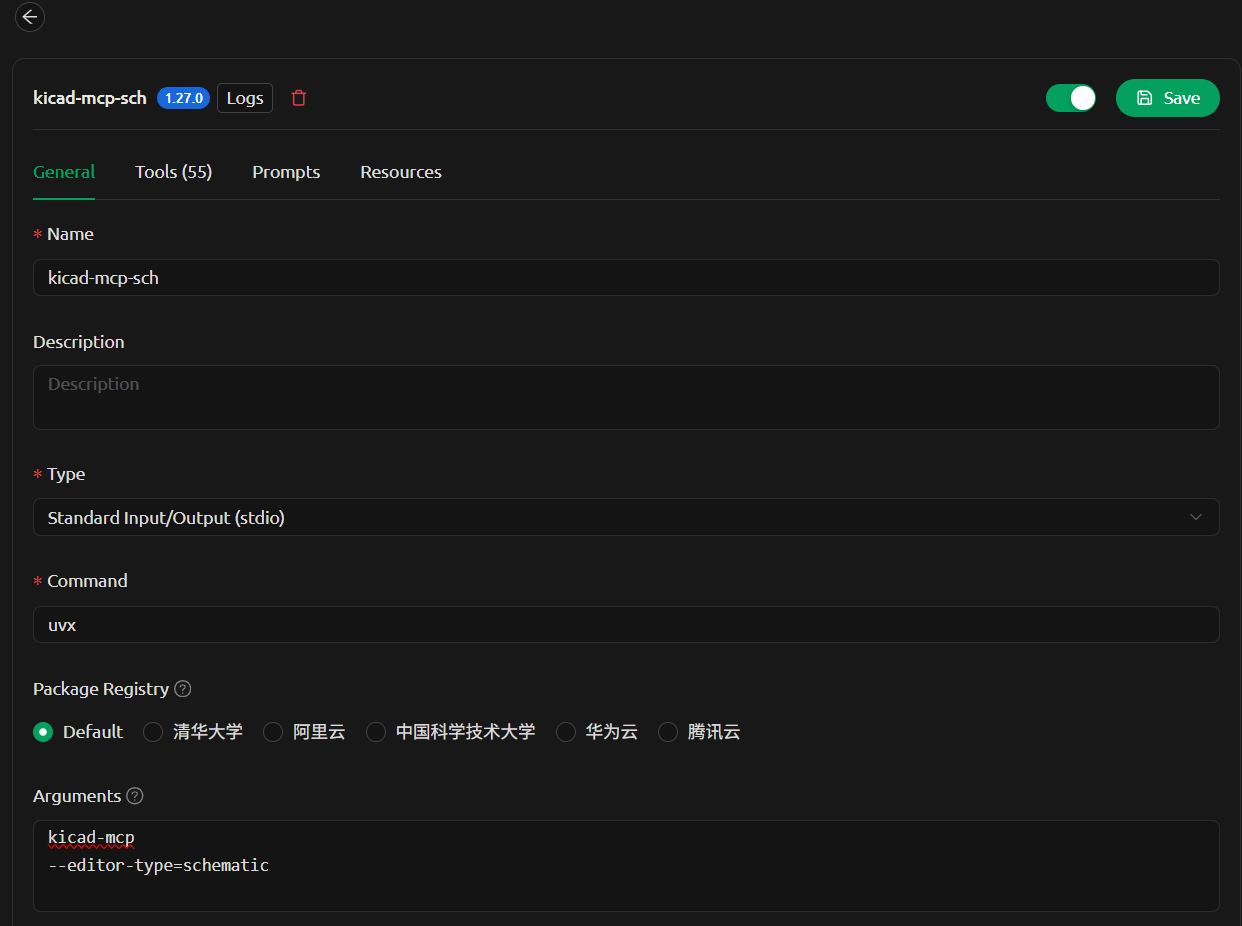
Options
--editor-type supports:
schematicpcbsymbolfootprint
Development
1. Clone the repository
git clone <your-repo-url>
cd kicad-mcp
2. Configure MCP client (local development)
Example configuration in VSCode:
{
  "servers": {
    "kicad-pcb-mcp": {
      "type": "stdio",
      "command": "uv",
      "args": [
        "--directory",
        "C:/code/kicad-mcp",
        "run",
        "kicad-mcp",
        "--editor-type",
        "pcb"
      ]
    },
    "kicad-schematic-mcp": {
      "type": "stdio",
      "command": "uv",
      "args": [
        "--directory",
        "C:/code/kicad-mcp",
        "run",
        "kicad-mcp",
        "--editor-type",
        "schematic"
      ]
    }
  }
}
3. Run locally
Install dependencies and run:
uv sync
uv run kicad-mcp --editor-type schematic
4. Iterate
Modify the code and restart your MCP client to see changes.
Notes
- Requires
uv: https://github.com/astral-sh/uv - Python 3.11+
- Ensure KiCad is running with IPC enabled
1 maintainer

Download files
Download the file for your platform. If you're not sure which to choose, learn more about installing packages.
Source Distribution
Built Distribution
Filter files by name, interpreter, ABI, and platform.
If you're not sure about the file name format, learn more about wheel file names.
Copy a direct link to the current filters
File details
Details for the file kicad_mcp-0.1.6.tar.gz.
File metadata
- Download URL: kicad_mcp-0.1.6.tar.gz
- Upload date:
- Size: 42.0 kB
- Tags: Source
- Uploaded using Trusted Publishing? Yes
- Uploaded via:
twine/6.1.0 CPython/3.13.12
File hashes
| Algorithm | Hash digest | |
|---|---|---|
| SHA256 |
f2dc7428eff3c921aa1a97a0ec8b9a83e49aeda94cc5e9423c627c59668e063b
|
|
| MD5 |
5a3d70fdb1f628f05f9bd4aba3eca5e6
|
|
| BLAKE2b-256 |
3c4dc4fd0ca0ab2e9f2c7d3c45c0d271a6162af9ebfbbd72f7a6d9ee9a2648ac
|
Provenance
The following attestation bundles were made for kicad_mcp-0.1.6.tar.gz:
Publisher:
publish-pypi.yml on Huaqiu-Electronics/kicad-mcp
-
Statement:
-
Statement type:
https://in-toto.io/Statement/v1 -
Predicate type:
https://docs.pypi.org/attestations/publish/v1 -
Subject name:
kicad_mcp-0.1.6.tar.gz -
Subject digest:
f2dc7428eff3c921aa1a97a0ec8b9a83e49aeda94cc5e9423c627c59668e063b - Sigstore transparency entry: 1342287238
- Sigstore integration time:
-
Permalink:
Huaqiu-Electronics/kicad-mcp@a2a7bf565273c629a67ddd7be4cdb273c6148b75 -
Branch / Tag:
refs/tags/v0.1.6 - Owner: https://github.com/Huaqiu-Electronics
-
Access:
public
-
Token Issuer:
https://token.actions.githubusercontent.com -
Runner Environment:
github-hosted -
Publication workflow:
publish-pypi.yml@a2a7bf565273c629a67ddd7be4cdb273c6148b75 -
Trigger Event:
push
-
Statement type:
File details
Details for the file kicad_mcp-0.1.6-py3-none-any.whl.
File metadata
- Download URL: kicad_mcp-0.1.6-py3-none-any.whl
- Upload date:
- Size: 44.3 kB
- Tags: Python 3
- Uploaded using Trusted Publishing? Yes
- Uploaded via:
twine/6.1.0 CPython/3.13.12
File hashes
| Algorithm | Hash digest | |
|---|---|---|
| SHA256 |
2f20e8625bd347b209f774fcf675a21a865df91906c782e076c219c59b6823b0
|
|
| MD5 |
a6ade4f6f27e6b6172f647dea93ffd9d
|
|
| BLAKE2b-256 |
94528552ed026e2a1694dce52bf7c745faece48537cc74fdc8f92d4649e5eed5
|
Provenance
The following attestation bundles were made for kicad_mcp-0.1.6-py3-none-any.whl:
Publisher:
publish-pypi.yml on Huaqiu-Electronics/kicad-mcp
-
Statement:
-
Statement type:
https://in-toto.io/Statement/v1 -
Predicate type:
https://docs.pypi.org/attestations/publish/v1 -
Subject name:
kicad_mcp-0.1.6-py3-none-any.whl -
Subject digest:
2f20e8625bd347b209f774fcf675a21a865df91906c782e076c219c59b6823b0 - Sigstore transparency entry: 1342287240
- Sigstore integration time:
-
Permalink:
Huaqiu-Electronics/kicad-mcp@a2a7bf565273c629a67ddd7be4cdb273c6148b75 -
Branch / Tag:
refs/tags/v0.1.6 - Owner: https://github.com/Huaqiu-Electronics
-
Access:
public
-
Token Issuer:
https://token.actions.githubusercontent.com -
Runner Environment:
github-hosted -
Publication workflow:
publish-pypi.yml@a2a7bf565273c629a67ddd7be4cdb273c6148b75 -
Trigger Event:
push
-
Statement type:














