
Sign and verify MCP server interfaces. Detects when tools, schemas or descriptions change.
Project description
kiji-safeguard
Sign and verify MCP servers. Detects when tools, schemas or descriptions change.
kiji-safeguard is the MCP-server sibling of
agent-signing. The signature
of an MCP server is a content hash of its public interface — tool names,
descriptions and JSON schemas (plus prompts, resources and server
instructions). No keys, no user identity: a server is registered with a
name, its interface hash and the full interface description, and
verification recomputes the hash from the live server and looks it up in the
registry. The check runs on both ends: the server (or its CI) publishes
its intended interface, and the agent verifies it on every connection —
recomputed from what actually arrived over the wire, before any tool reaches
the model. Nothing is pre-registered: the first execution registers
(trust-on-first-use), every later run verifies.
This catches the classic MCP supply-chain problems: a tool quietly added or removed, a schema widened, or a description rewritten to poison the model ("rug pull" / tool-description injection).
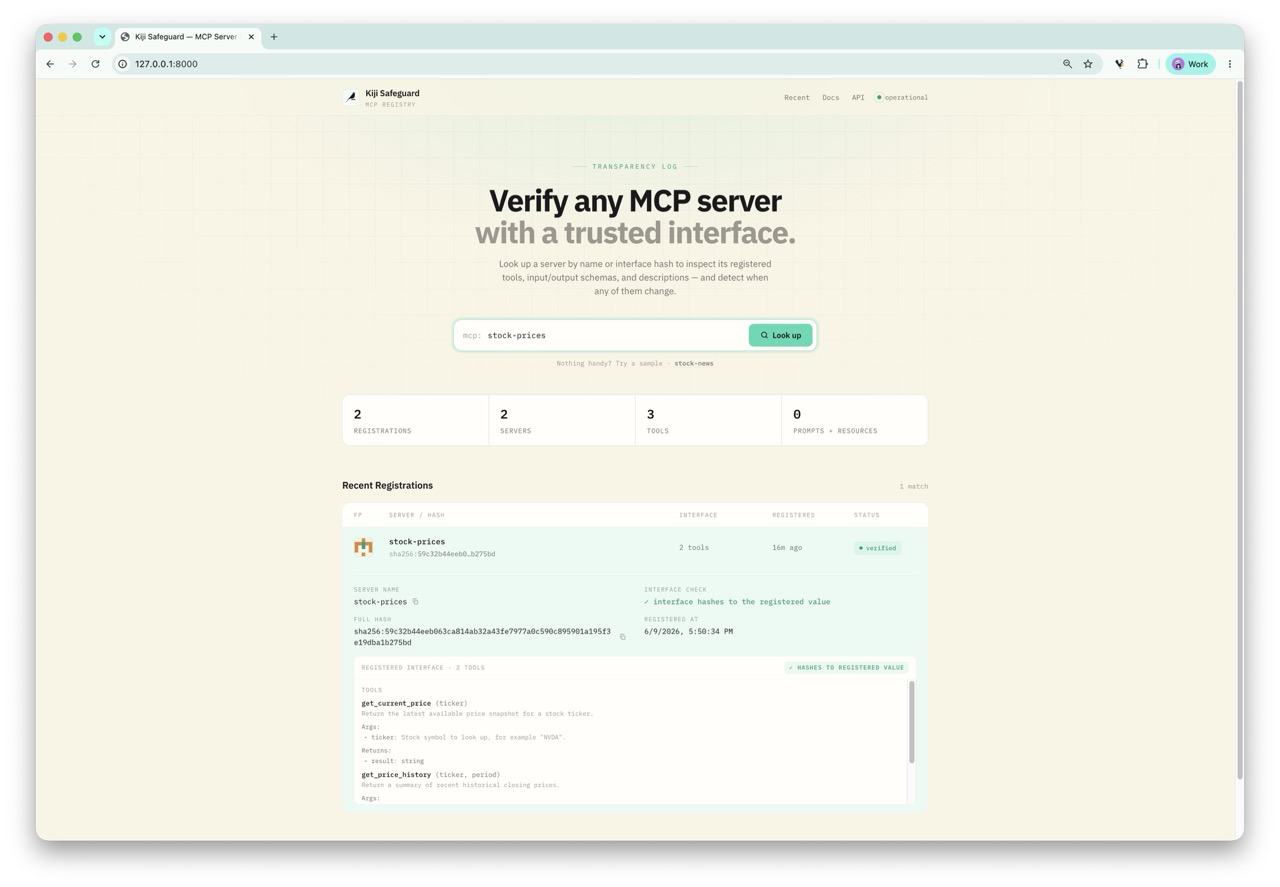
The registry's web UI (GET /): browse recent registrations, search by name or
hash, and inspect the registered interface of any MCP server.
The magic one-liner
Add a single import to your agent — or to any
FastMCP server —
before or after mcp is imported:
import kiji_safeguard.autosign # noqa: F401
The same line plays two roles depending on where it sits: in the server it publishes (registers) the intended interface and catches accidental drift; in the agent it verifies that interface before any tool reaches the model — the actual security check (see Threat model).
There is no registration ceremony: the first execution registers the interface (trust-on-first-use), every run after verifies it — and flags the moment it changes:
$ python my_agent.py
[kiji-safeguard] first sight of 'weather' — registered with hash 4c469eb41474f6eb… at http://127.0.0.1:8000
$ python my_agent.py
[kiji-safeguard] verified 'weather' (hash 4c469eb41474f6eb…)
If someone edits a tool description after that first sight:
$ python my_agent.py
[kiji-safeguard] WARNING: verification of 'weather' failed: interface changed:
'weather' is registered with hash 4c469eb4…, but the live interface hashes to 740e904b…
In the server, an import hook patches FastMCP.run() the moment
mcp.server.fastmcp is imported (or in place, if it already was): every time
the server starts, its interface is extracted, hashed and checked against the
registry — with zero further code changes.
Behaviour is driven by environment variables, so the same code runs in every stage of the lifecycle:
| Variable | Values | Default | Meaning |
|---|---|---|---|
KIJI_SAFEGUARD_MODE |
auto / verify / register / approval / off |
auto |
auto verifies and registers unknown servers on first sight (a changed interface is only flagged, never re-registered); verify never registers; register always publishes; approval pauses on a changed interface and waits for a human to approve/reject it in the web UI; off disables |
KIJI_SAFEGUARD_REGISTRY |
URL | http://127.0.0.1:8000 |
Registry base URL |
KIJI_SAFEGUARD_ENFORCE |
1/true/… |
unset | Abort on failure instead of warning — server startup, or the agent's connection |
KIJI_SAFEGUARD_APPROVAL_TIMEOUT |
seconds | 1800 |
approval mode: how long to wait for a human decision before falling back to enforce/warn |
KIJI_SAFEGUARD_APPROVAL_POLL_INTERVAL |
seconds | 3 |
approval mode: how often to poll the registry while waiting |
All diagnostics go to stderr — stdout stays clean for the stdio transport.
Approval mode: a human in the loop
With KIJI_SAFEGUARD_MODE=approval, a changed interface neither aborts nor
silently warns. Instead the agent pauses and opens a request in the
registry's Pending Approvals panel showing the exact diff. A reviewer
clicks Approve — the new interface is registered as trusted and the agent
proceeds — or Reject, which hard-blocks execution (a SafeguardError,
regardless of the enforce flag). If no one decides within
KIJI_SAFEGUARD_APPROVAL_TIMEOUT, it falls back to the usual enforce/warn
behaviour. Approval mode is aimed at the agent/client side; on a server it
blocks FastMCP.run startup until a decision is made.
The same line protects the agent
The import also works on the client side. Drop it into the process that
connects to MCP servers — directly via mcp.ClientSession or through an
adapter such as CrewAI's MCPServerAdapter:
import kiji_safeguard.autosign # noqa: F401
The hook detects which side it is on: importing mcp.server.fastmcp patches
FastMCP.run() (server side), importing mcp.client.session patches
ClientSession.initialize() (agent side) — both can coexist in one process.
On the agent side every connection's initialize() handshake is followed by
listing the server's tools, prompts and resources, rebuilding the interface
from the wire and checking it against the registry before any tool reaches
the agent:
[kiji-safeguard] verified 'stock-prices' (hash 4c469eb41474f6eb…)
[kiji-safeguard] WARNING: verification of 'stock-news' failed: interface changed: …
The server is identified by the serverInfo.name it reports during the
handshake, and the wire-derived hash matches the one the server computes for
itself, so both sides verify against the same registry record. The same
environment variables apply; with KIJI_SAFEGUARD_ENFORCE=1 a failed
verification aborts the connection (the adapter's context manager raises),
so the agent never sees the tools of a tampered server.
Tools with structured output need
mcp >= 1.10on both sides — older clients never receive the output schema on the wire, so their hash cannot match.
Threat model: who should run what
The two sides of the import are not equally trustworthy, and it pays to be explicit about which one protects you from what.
Server-side verification is self-attestation. The process doing the
check is the one you are worried about: a tampered or malicious server
simply removes the import, sets KIJI_SAFEGUARD_MODE=off, or strips the
environment variables — and even when the import survives, its warnings land
on a subprocess stderr that MCP adapters often swallow. Treat the
server-side hook as the publishing half (declaring the intended
interface to the registry, the way a publisher signs a release) plus
honest-mistake drift detection: a dependency upgrade that silently
changes a generated schema, or a dev edit that reaches prod, is flagged at
startup instead of when agents start failing.
The agent-side check is the security boundary. It runs in the process the attacker does not control and hashes what actually arrived over the wire, so a server cannot lie its way past it. Production agents should run it strictly:
KIJI_SAFEGUARD_MODE=verify KIJI_SAFEGUARD_ENFORCE=1 python my_agent.py
Recommended deployment:
| Where | Mode | Why |
|---|---|---|
| Server startup or CI release step | register |
Publish the authoritative interface baseline |
| Development & demos | auto (default) |
Trust-on-first-use; new interfaces are pinned automatically |
| Production agents | verify + KIJI_SAFEGUARD_ENFORCE=1 |
Strict check; a mismatch aborts the connection before any tool reaches the model |
| Human-gated changes | approval |
A changed interface pauses for a reviewer to approve (pin the new interface) or reject (block) in the web UI |
Known limitation. The agent looks the server up by the
serverInfo.name the server reports about itself, so a tampered server can
rename itself — and in auto mode an unknown name is TOFU-registered and
trusted. verify mode with enforcement narrows this (an unregistered name
fails instead of being adopted), but the full fix — pinning the expected
name per configured server on the agent side — is future work.
Quickstart
pip install "kiji-safeguard[server]"   # or: uv pip install -e ".[dev]" from this repo

# 1. Run the registry (FastAPI + SQLite, with a tiny web UI at /)
kiji-safeguard serve --port 8000

# 2. Add one line to your agent — or any FastMCP server:
#        import kiji_safeguard.autosign  # noqa: F401

# 3. Just run it — first sight registers, every run after verifies
python my_agent.py

# Production: refuse to connect on mismatch
KIJI_SAFEGUARD_MODE=verify KIJI_SAFEGUARD_ENFORCE=1 python my_agent.py

# Human in the loop: pause on a changed interface and approve/reject it in the web UI
KIJI_SAFEGUARD_MODE=approval python my_agent.py
Or with explicit control via the CLI:
# Pin a reviewed interface explicitly — e.g. from CI
# (optional: the first execution registers it anyway)
kiji-safeguard register mcp_servers/stock_price_server.py

# Verify any time — exits non-zero on mismatch, so it doubles as a pipeline gate
kiji-safeguard verify mcp_servers/stock_price_server.py

# Print the interface hash without touching the registry
kiji-safeguard hash mcp_servers/stock_price_server.py
Programmatic API
from kiji_safeguard import MCPSigner

signer = MCPSigner.from_server(mcp)          # any FastMCP instance
signer.hash                                  # 64-char interface hash
signer.register("http://127.0.0.1:8000")     # POST name + hash + interface

result = signer.verify("http://127.0.0.1:8000")
if not result:
    raise RuntimeError(result.reason)
extract_interface() and aggregate_hash() are exposed too if you only want
the hashing.
How the hash works
Following agent-signing, the hash is order-independent:
- Every interface component (tool, prompt, resource, instructions) is serialised as canonical JSON (sorted keys, compact separators).
- Each serialisation is hashed with SHA-256.
- The per-component digests are sorted lexicographically, concatenated and hashed again.
Reordering tools never changes the hash; changing a name, description or any schema detail always does. The server name is not part of the hash — it is registry metadata, which lets verification distinguish "interface changed" from "same interface registered under a different name".
Registry API
| Method & path | Purpose |
|---|---|
POST /servers |
Register {name, hash, interface}. Rejects submissions whose hash doesn't match the interface (400). Idempotent per (name, hash). |
GET /servers/{hash} |
All registrations for an interface hash (404 if none). |
GET /servers?name=&limit=&offset= |
Recent registrations, optionally filtered by name. |
POST /approvals |
Open an approval request {name, recorded_hash?, new_hash, new_interface, diff} for a changed interface. Rejects a hash that doesn't match the interface (400). Idempotent per pending (name, new_hash). |
GET /approvals?status=pending&limit=&offset= |
Pending approval requests awaiting a human decision. |
GET /approvals/{id} |
A single request (clients poll this until it resolves). |
POST /approvals/{id}/approve |
Register the new interface as trusted, then mark the request approved. |
POST /approvals/{id}/reject |
Mark the request rejected without registering anything. |
GET / |
Web UI: browse, search by name or hash, inspect interfaces, and approve/reject pending changes. |
Storage is SQLite (KIJI_SAFEGUARD_DB, default kiji_safeguard_registry.db).
Repository layout
kiji_safeguard/        # client library (stdlib-only, no dependencies)
├── signer.py          # interface extraction, hashing, register/verify
├── autosign.py        # the magic import hook
└── cli.py             # hash / register / verify / serve
server/                # registry service (mirrors agent-signing's layout)
├── backend/
│   ├── main.py        # FastAPI endpoints
│   ├── models.py      # pydantic models
│   └── database.py    # SQLite persistence
└── frontend/
    └── index.html     # web UI (shares agent-signing's registry design)
examples/              # demo project whose MCP servers use the magic import
tests/                 # pytest suite (incl. live-registry round trips)
The client library is intentionally dependency-free (stdlib urllib +
hashlib), so adding the safeguard import to an MCP server or agent pulls in
nothing else. (The agent-side hook uses anyio for its thread offload, but
only ever runs where mcp — which depends on anyio — is already
installed.) The registry extras (fastapi, uvicorn) are only needed where
the registry runs.
Development
uv venv && uv pip install -e ".[dev]"
pytest
Project details
Release history Release notifications | RSS feed


Download files
Download the file for your platform. If you're not sure which to choose, learn more about installing packages.
Source Distribution
Built Distribution
Filter files by name, interpreter, ABI, and platform.
If you're not sure about the file name format, learn more about wheel file names.
Copy a direct link to the current filters
File details
Details for the file kiji_safeguard-0.3.0.tar.gz.
File metadata
- Download URL: kiji_safeguard-0.3.0.tar.gz
- Upload date:
- Size: 46.6 kB
- Tags: Source
- Uploaded using Trusted Publishing? Yes
- Uploaded via: twine/6.1.0 CPython/3.13.13
File hashes
| Algorithm | Hash digest | |
|---|---|---|
| SHA256 |
a9f7d04d4eecd73e013ab32fd2e5090e7bcb0622c9c6b011544925ff30d81a0f
|
|
| MD5 |
a2331e3428e0edc567cbf8791a13bf2f
|
|
| BLAKE2b-256 |
b5fa2d2d11ebb6c5a7d6641d07b004b0071a9287e6f7d14445c880d16d4266d8
|
Provenance
The following attestation bundles were made for kiji_safeguard-0.3.0.tar.gz:
Publisher:
release.yml on hanneshapke/kiji-safeguard
-
Statement:
-
Statement type:
https://in-toto.io/Statement/v1 -
Predicate type:
https://docs.pypi.org/attestations/publish/v1 -
Subject name:
kiji_safeguard-0.3.0.tar.gz -
Subject digest:
a9f7d04d4eecd73e013ab32fd2e5090e7bcb0622c9c6b011544925ff30d81a0f - Sigstore transparency entry: 1927004618
- Sigstore integration time:
-
Permalink:
hanneshapke/kiji-safeguard@e3508c39482a62982230c33cc46eb104fefb058e -
Branch / Tag:
refs/heads/main - Owner: https://github.com/hanneshapke
-
Access:
public
-
Token Issuer:
https://token.actions.githubusercontent.com -
Runner Environment:
github-hosted -
Publication workflow:
release.yml@e3508c39482a62982230c33cc46eb104fefb058e -
Trigger Event:
push
-
Statement type:
File details
Details for the file kiji_safeguard-0.3.0-py3-none-any.whl.
File metadata
- Download URL: kiji_safeguard-0.3.0-py3-none-any.whl
- Upload date:
- Size: 39.5 kB
- Tags: Python 3
- Uploaded using Trusted Publishing? Yes
- Uploaded via: twine/6.1.0 CPython/3.13.13
File hashes
| Algorithm | Hash digest | |
|---|---|---|
| SHA256 |
d33fbcadedd9e747d52218215b536b9b92a9dbfce17f8ee6e157195751d46703
|
|
| MD5 |
dd3cec202a9f0f6ccca86bbfd171b9cd
|
|
| BLAKE2b-256 |
8262d9d805c9d03363b5645c58878c6779b53bab60e39a085d0dc2e96a7199b8
|
Provenance
The following attestation bundles were made for kiji_safeguard-0.3.0-py3-none-any.whl:
Publisher:
release.yml on hanneshapke/kiji-safeguard
-
Statement:
-
Statement type:
https://in-toto.io/Statement/v1 -
Predicate type:
https://docs.pypi.org/attestations/publish/v1 -
Subject name:
kiji_safeguard-0.3.0-py3-none-any.whl -
Subject digest:
d33fbcadedd9e747d52218215b536b9b92a9dbfce17f8ee6e157195751d46703 - Sigstore transparency entry: 1927004829
- Sigstore integration time:
-
Permalink:
hanneshapke/kiji-safeguard@e3508c39482a62982230c33cc46eb104fefb058e -
Branch / Tag:
refs/heads/main - Owner: https://github.com/hanneshapke
-
Access:
public
-
Token Issuer:
https://token.actions.githubusercontent.com -
Runner Environment:
github-hosted -
Publication workflow:
release.yml@e3508c39482a62982230c33cc46eb104fefb058e -
Trigger Event:
push
-
Statement type:






