
Automation for KiCAD boards

Project description
KiKit – Automation for KiCAD

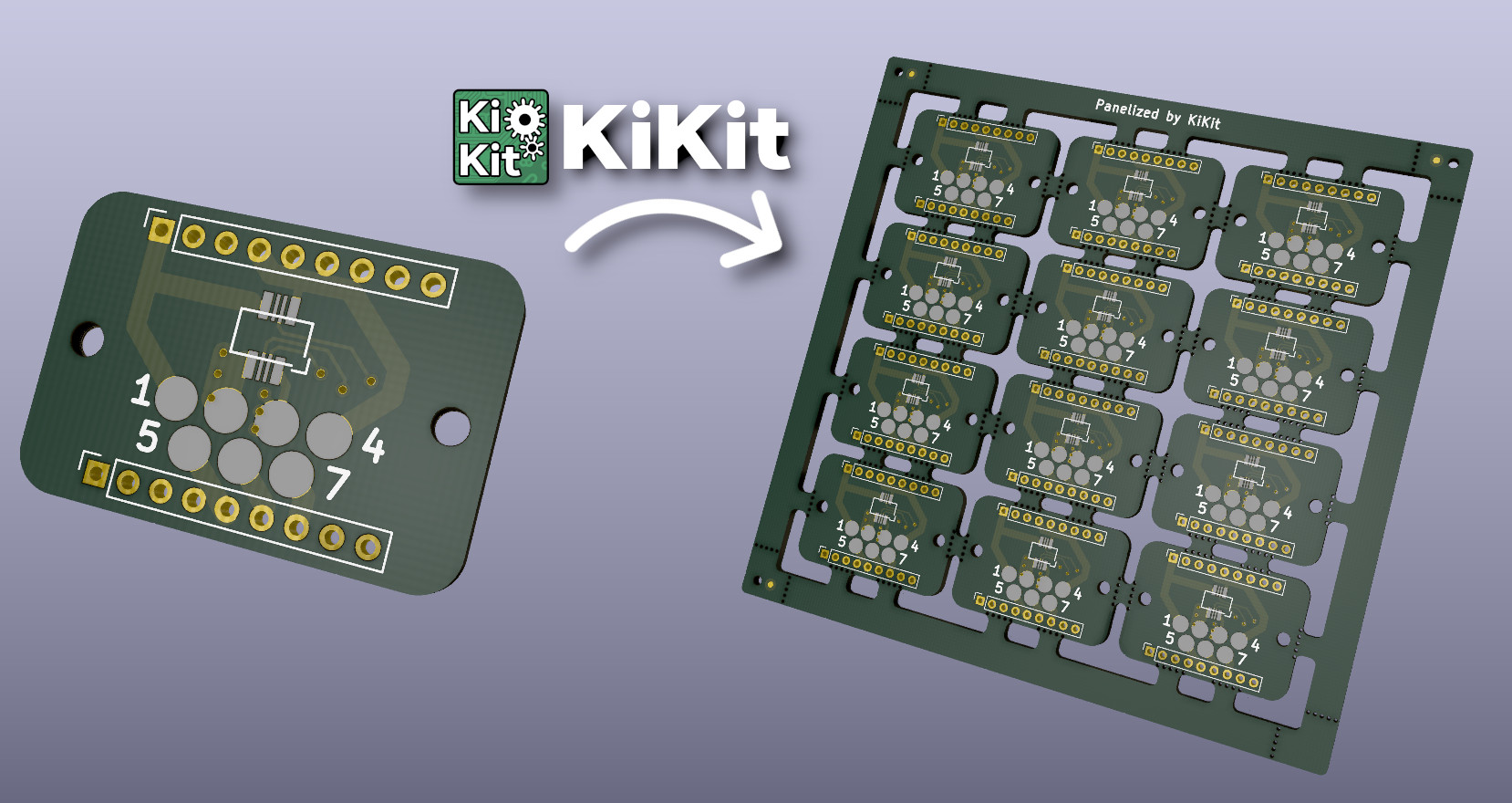
KiKit is a Python library, KiCAD plugin and a CLI tool to automate several tasks in a standard KiCAD workflow like:
- panelization of both, regular and oddly shaped, boards (see examples)
- automated exporting manufacturing data based on manufacturer presets
- multi-board project in KiCAD
- building board presentation pages (see an example presentation page generated by KiKit)
Do You Enjoy KiKit or Does It Save You Time?
Then definitely consider:
- supporting me on GitHub Sponsors
- or become my Patreon,
- or buy me a coffee:

Your support will allow me to allocate time to properly maintain my projects like this.
PS: Be sure to check out my other KiCAD & PCB related projects:
Installation
KiKit is available as a PyPi package, therefore, you can install it via pip:
pip3 install kikit
Then you can install the Pcbnew action plugins via KiCAD's PCM.
For more detailed instructions with steps to enable GUI plugins, please see the installation guide.
Why Should I Use It?
Everything KiKit does, can also be done via Pcbnew in KiCAD. However, you have to do it manually. One of the common scenarios is the creation of panels. Most of the tutorials on the internet guide you to use the "append board" functionality of Pcbnew. However, this approach is labour-intensive, error-prone and whenever, you change the board, you have to do it again.
With KiKit you just call a CLI command if you have a simple layout (e.g., a grid) or write few Python instructions like "place board here", "add bridge here", "separate boards via mouse bites/v-cuts" and you are done. The process is repeatable and actually much simpler than hand-drawing the panels. KiKit also allows you to easily export all the Gerbers in a single step.
You can then write a Makefile and simply call make to get all your
manufacturing data and board presentation pages.
Feature List
- create panels by appending boards and pieces of substrate (bridges)
- supports board with arbitrary shapes
- easily create mouse-bites/V-CUTS
- compared to hand-creation of panels, your panels will pass DRC (as tracks from different instances of the same board have distinct nets when using KiKit)
- if you have multiple boards in a single file, you can split them
- simplifying multi-board project in KiCAD
- automated export of gerbers and assembly data
- 3D printed self-registering solder paste stencils
- steel stencils with alignment jig
- create powerfull shell scrips or Makefiles which automates your workflow...
- ...or invoke the functionality via GUI in KiCAD.
How To Use It?
Read the CLI documentation and the panelize documentation. Also don't miss the examples. There is also a quick not on how to use panelization action plugin. If you are interested in generating solder paste stencils, see Stencil documentation
Acknowledgements
The project is supported by:

KiKit Is Broken or Does Not Work as Expected
Please, first check FAQ. If you have not found answer for your problem there, feel free to open an issue on GitHub.
If you would like to have a feature in KiKit that is currently not on a roadmap, or if you need to prepare custom panelization script (e.g., multi-design panels, panels with specific arrangement), you can consider hiring me to do the job. Just reach out to me via e-mail and we can discuss further details.
Release history Release notifications | RSS feed


Download files
Download the file for your platform. If you're not sure which to choose, learn more about installing packages.
Source Distribution
Built Distribution
Filter files by name, interpreter, ABI, and platform.
If you're not sure about the file name format, learn more about wheel file names.
Copy a direct link to the current filters
File details
Details for the file KiKit-1.4.0.tar.gz.
File metadata
- Download URL: KiKit-1.4.0.tar.gz
- Upload date:
- Size: 240.5 kB
- Tags: Source
- Uploaded using Trusted Publishing? No
- Uploaded via: twine/4.0.2 CPython/3.10.12
File hashes
| Algorithm | Hash digest | |
|---|---|---|
| SHA256 |
9b4ee595b5acb5827ce17ba99c6eee040d3ed89b1788471a75686a35817e4c04
|
|
| MD5 |
45093cff2a166300dd417ec979855708
|
|
| BLAKE2b-256 |
faddc86f1567588e923dedbd46f23a403f1dccfa56407333c82858de3d505e44
|
File details
Details for the file KiKit-1.4.0-py3-none-any.whl.
File metadata
- Download URL: KiKit-1.4.0-py3-none-any.whl
- Upload date:
- Size: 240.4 kB
- Tags: Python 3
- Uploaded using Trusted Publishing? No
- Uploaded via: twine/4.0.2 CPython/3.10.12
File hashes
| Algorithm | Hash digest | |
|---|---|---|
| SHA256 |
31a1f5faf9a5c7b0ad3d5af5dab900b0932758dd4195711bc26529863992e2ea
|
|
| MD5 |
b6eb10892a50974605f0d768c17dc7fe
|
|
| BLAKE2b-256 |
7bfeb959dd17cb71af15df08f84acb010ef722d8aee94d38d1dfdaf4e1f90551
|






