






Keras Image Models
Latest Updates
2024/06/02:
- Add docstrings for all
kimmmodels. - Merge reparameterizable layers into 1
ReparameterizableConv2D - Add
GhostNetV3*from huawei-noah/Efficient-AI-Backbones
Introduction
Keras Image Models (kimm) is a collection of image models, blocks and layers written in Keras 3. The goal is to offer SOTA models with pretrained weights in a user-friendly manner.
KIMM is:
- 🚀 A model zoo where almost all models come with pre-trained weights on ImageNet.
- 🧰 Providing APIs to export models to
.tfliteand.onnx. - 🔧 Supporting the reparameterization technique.
- ✨ Integrated with feature extraction capability.
Usage
kimm.list_modelskimm.models.*.available_feature_keyskimm.models.*(...)kimm.models.*(..., feature_extractor=True, feature_keys=[...])
import keras
import kimm

# List available models
print(kimm.list_models("mobileone", weights="imagenet"))
# ['MobileOneS0', 'MobileOneS1', 'MobileOneS2', 'MobileOneS3']

# Initialize model with pretrained ImageNet weights
# Note: all `kimm` models expect inputs in the value range of [0, 255] by
# default if `incldue_preprocessing=True`
x = keras.random.uniform([1, 224, 224, 3]) * 255.0
model = kimm.models.MobileOneS0()
y = model.predict(x)
print(y.shape)
# (1, 1000)

# Print some basic information about the model
print(model)
# <MobileOneS0 name=MobileOneS0, input_shape=(None, None, None, 3),
# default_size=224, preprocessing_mode="imagenet", feature_extractor=False,
# feature_keys=None>
# This information can also be accessed through properties
print(model.input_shape, model.default_size, model.preprocessing_mode)

# List available feature keys of the model class
print(kimm.models.MobileOneS0.available_feature_keys)
# ['STEM_S2', 'BLOCK0_S4', 'BLOCK1_S8', 'BLOCK2_S16', 'BLOCK3_S32']

# Enable feature extraction by setting `feature_extractor=True`
# `feature_keys` can be optionally specified
feature_extractor = kimm.models.MobileOneS0(
    feature_extractor=True, feature_keys=["BLOCK2_S16", "BLOCK3_S32"]
)
features = feature_extractor.predict(x)
for feature_name, feature in features.items():
    print(feature_name, feature.shape)
# BLOCK2_S16 (1, 14, 14, 256), BLOCK3_S32 (1, 7, 7, 1024), ...
[!NOTE]
All models inkimmexpect inputs in the value range of [0, 255] by default ifincldue_preprocessing=True. Some models only accept static inputs. You should explicitly specify the input shape for these models byinput_shape=[*, *, 3].
Advanced Usage
kimm.utils.get_reparameterized_modelkimm.export.export_tflitekimm.export.export_onnx
import keras
import kimm
import numpy as np

# Initialize a reparameterizable model
x = keras.random.uniform([1, 224, 224, 3]) * 255.0
model = kimm.models.MobileOneS0()
y = model.predict(x)

# Get reparameterized model by kimm.utils.get_reparameterized_model
reparameterized_model = kimm.utils.get_reparameterized_model(model)
y2 = reparameterized_model.predict(x)
np.testing.assert_allclose(
    keras.ops.convert_to_numpy(y), keras.ops.convert_to_numpy(y2), atol=1e-3
)

# Export model to tflite format
kimm.export.export_tflite(reparameterized_model, 224, "model.tflite")

# Export model to onnx format
# Note: must be "channels_first" format before the exporting
# kimm.export.export_onnx(reparameterized_model, 224, "model.onnx")
Installation
pip install keras kimm -U
[!IMPORTANT]
Make sure you have installed a supported backend for Keras.
Quickstart
Image classification using the model pretrained on ImageNet

Using kimm.models.VisionTransformerTiny16:
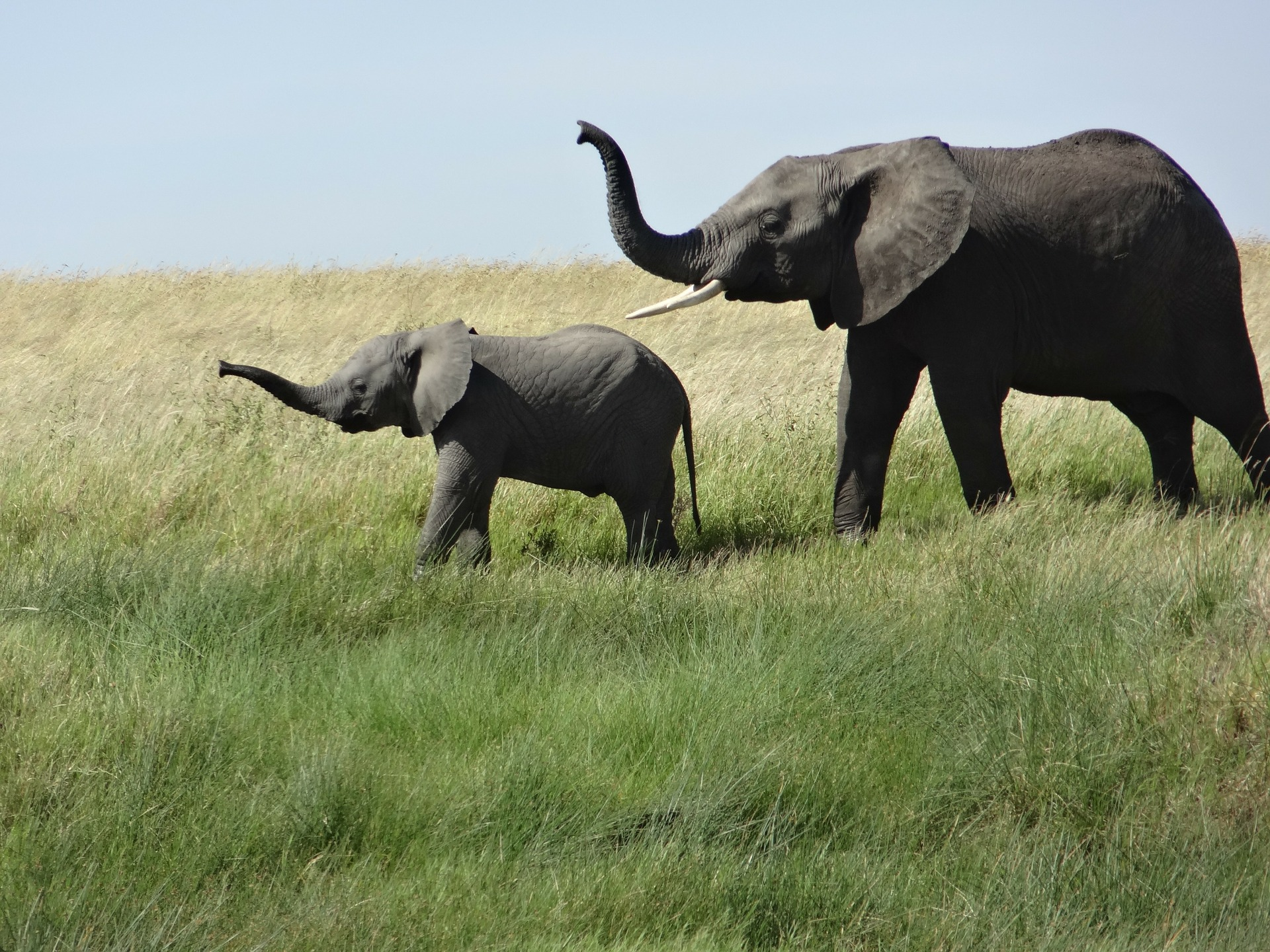
1/1 ━━━━━━━━━━━━━━━━━━━━ 1s 1s/step
Predicted: [('n02504458', 'African_elephant', 0.6895825), ('n01871265', 'tusker', 0.17934209), ('n02504013', 'Indian_elephant', 0.12927249)]
An end-to-end example: fine-tuning an image classification model on a cats vs. dogs dataset
Using kimm.models.EfficientNetLiteB0:
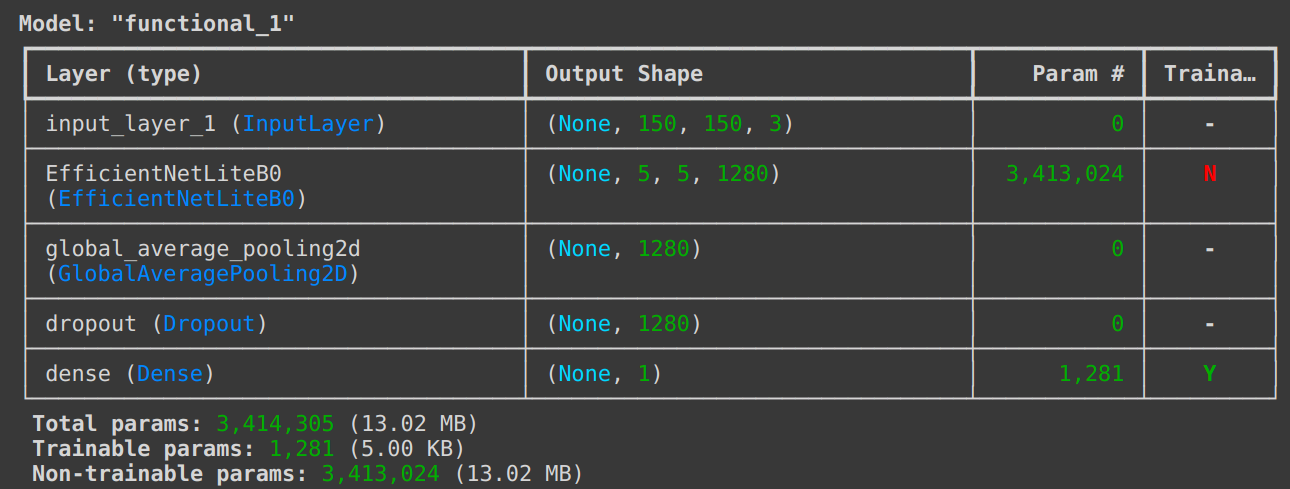

Reference: Transfer learning & fine-tuning (keras.io)
Grad-CAM
Using kimm.models.MobileViTS:
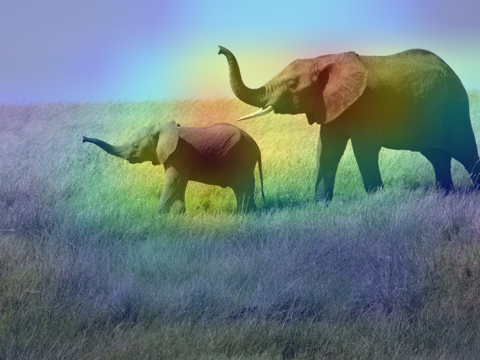
Reference: Grad-CAM class activation visualization (keras.io)
Model Zoo
| Model | Paper | Weights are ported from | API (kimm.models.*) |
|---|---|---|---|
| ConvMixer | ICLR 2022 Submission | timm |
ConvMixer* |
| ConvNeXt | CVPR 2022 | timm |
ConvNeXt* |
| DenseNet | CVPR 2017 | timm |
DenseNet* |
| EfficientNet | ICML 2019 | timm |
EfficientNet* |
| EfficientNetLite | ICML 2019 | timm |
EfficientNetLite* |
| EfficientNetV2 | ICML 2021 | timm |
EfficientNetV2* |
| GhostNet | CVPR 2020 | timm |
GhostNet* |
| GhostNetV2 | NeurIPS 2022 | timm |
GhostNetV2* |
| GhostNetV3 | arXiv 2024 | github |
GhostNetV3* |
| HGNet | timm |
HGNet* |
|
| HGNetV2 | timm |
HGNetV2* |
|
| InceptionNeXt | CVPR 2024 | timm |
InceptionNeXt* |
| InceptionV3 | CVPR 2016 | timm |
InceptionV3 |
| LCNet | arXiv 2021 | timm |
LCNet* |
| MobileNetV2 | CVPR 2018 | timm |
MobileNetV2* |
| MobileNetV3 | ICCV 2019 | timm |
MobileNetV3* |
| MobileOne | CVPR 2023 | timm |
MobileOne* |
| MobileViT | ICLR 2022 | timm |
MobileViT* |
| MobileViTV2 | arXiv 2022 | timm |
MobileViTV2* |
| RegNet | CVPR 2020 | timm |
RegNet* |
| RepVGG | CVPR 2021 | timm |
RepVGG* |
| ResNet | CVPR 2015 | timm |
ResNet* |
| TinyNet | NeurIPS 2020 | timm |
TinyNet* |
| VGG | ICLR 2015 | timm |
VGG* |
| ViT | ICLR 2021 | timm |
VisionTransformer* |
| Xception | CVPR 2017 | keras |
Xception |
The export scripts can be found in tools/convert_*.py.
License
Please refer to timm as this project is built upon it.
kimm Code
The code here is licensed Apache 2.0.
Acknowledgements
Thanks for these awesome projects that were used in kimm
Citing
BibTeX
@misc{rw2019timm,
  author = {Ross Wightman},
  title = {PyTorch Image Models},
  year = {2019},
  publisher = {GitHub},
  journal = {GitHub repository},
  doi = {10.5281/zenodo.4414861},
  howpublished = {\url{https://github.com/rwightman/pytorch-image-models}}
}
@misc{hy2024kimm,
  author = {Hongyu Chiu},
  title = {Keras Image Models},
  year = {2024},
  publisher = {GitHub},
  journal = {GitHub repository},
  howpublished = {\url{https://github.com/james77777778/kimm}}
}
1 maintainer

Download files
Download the file for your platform. If you're not sure which to choose, learn more about installing packages.
Source Distribution
Built Distribution
Filter files by name, interpreter, ABI, and platform.
If you're not sure about the file name format, learn more about wheel file names.
Copy a direct link to the current filters
File details
Details for the file kimm-0.2.5.tar.gz.
File metadata
- Download URL: kimm-0.2.5.tar.gz
- Upload date:
- Size: 75.1 kB
- Tags: Source
- Uploaded using Trusted Publishing? Yes
- Uploaded via:
twine/5.1.1 CPython/3.12.7
File hashes
| Algorithm | Hash digest | |
|---|---|---|
| SHA256 |
fa2446e6fd8586a6c831a0e05c133004cdcb274e6c5d42b10c89c0e620b846fd
|
|
| MD5 |
7c0141171840aa16a4a208e5dba72812
|
|
| BLAKE2b-256 |
319e4552f921b25f15f170f21ebfbd695891100b7062282e5156ee95edb99f46
|
File details
Details for the file kimm-0.2.5-py3-none-any.whl.
File metadata
- Download URL: kimm-0.2.5-py3-none-any.whl
- Upload date:
- Size: 123.4 kB
- Tags: Python 3
- Uploaded using Trusted Publishing? Yes
- Uploaded via:
twine/5.1.1 CPython/3.12.7
File hashes
| Algorithm | Hash digest | |
|---|---|---|
| SHA256 |
a3cdb835e572937c3731376a2af035077ed025de699f70ef5d1e61436e2d9d47
|
|
| MD5 |
5958645501092871581da24aa3342a51
|
|
| BLAKE2b-256 |
01d66e92201aa07ce13e7453537b5df141ad020b5153b956c7b5e6c1da21361b
|














