

Kindlegarten
A desktop app and CLI for backing up your purchased ebooks and comics.






Installation · Changelog · 简体中文
Back up purchased Kindle books, Comipo comics and supported DLsite ebooks and comics. For Kindle, Kindlegarten downloads the iPad edition and preserves the color illustrations Amazon supplies for that edition.
- Automatically exports text-based books as EPUB and fixed-layout comics and magazines as CBZ when their pages can be extracted as images.
- Names output files after the book title, replaces characters disallowed in filenames, and shortens long titles. One progress bar tracks the entire download.
- Keeps a separate local sign-in for each Kindle store.
Comipo comics are saved as CBZ. A series download exports the purchased volumes in volume order to a folder named after the series.
Desktop app
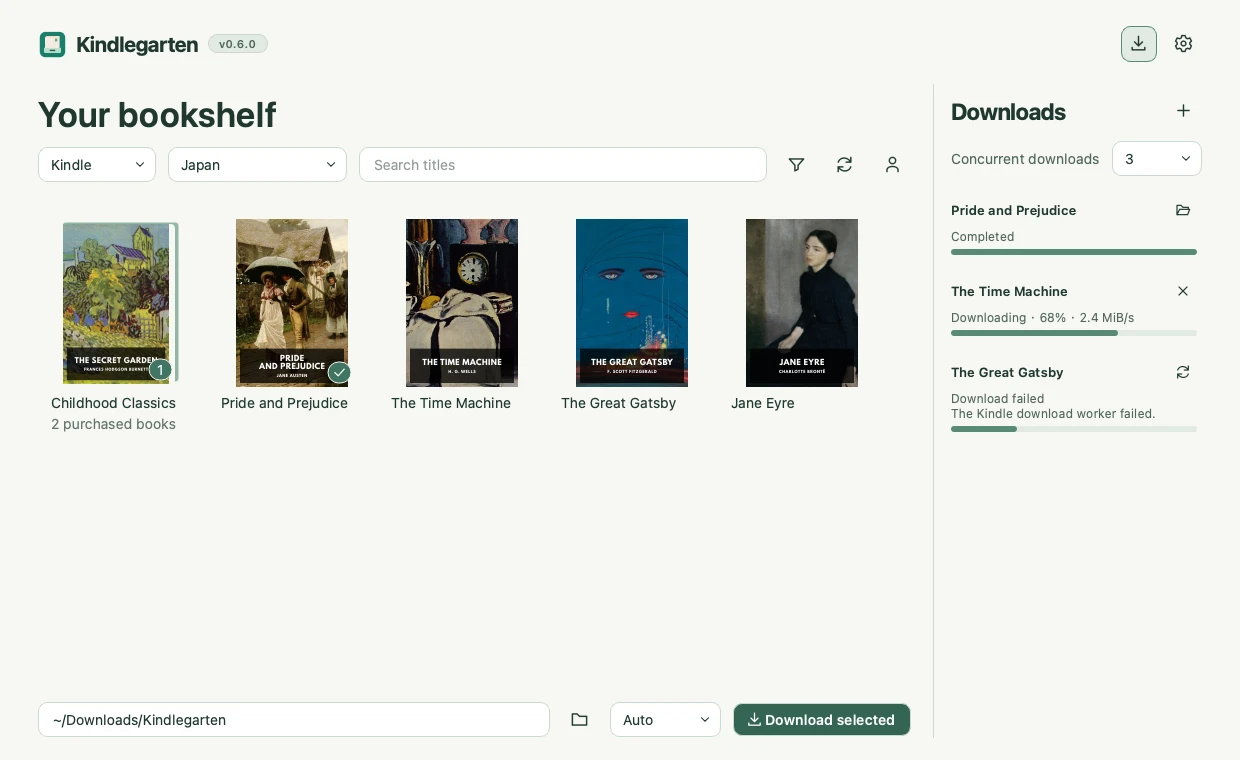
Sample bookshelf with covers from Standard Ebooks.
Download the macOS Apple Silicon app, Windows x64 portable ZIP or Linux x86_64 AppImage from GitHub Releases. You can also install and launch the desktop app from Python.
python -m pip install 'kindlegarten[gui]'
kindlegarten-gui
See the desktop build guide for platform requirements and source builds. Kindle exports use your installed Calibre.
Choose Kindle, Comipo or DLsite in the bookshelf. For Kindle, choose your store in the second menu. If you need to sign in, select Sign in in the center of the bookshelf. The account icon opens the account details and sign-out controls. In the sign-in window, use the provider's browser page or select Paste credentials for manual import instructions.
The bookshelf opens from its local cache and checks for changes in the background. Use the filter icon beside search to sort books and series together by title or purchase date. Purchase date defaults to newest first and uses the latest purchased volume for a series. Hover over a cover to see its action, then click to open the series or download the book. Use the selection modifier keys and Download selected for bulk downloads.
Choose the destination folder and format before downloading. Settings controls proxy, language and appearance. The app supports English, Simplified Chinese and Japanese, with light, dark and system appearance options. About displays the installed version and checks for a stable GitHub release.
CLI library and formats
kindlegarten help
kindlegarten help series
kindlegarten library
kindlegarten library --source dlsite
kindlegarten library --source amazon --region us
kindlegarten series SERIES_ID --source amazon --region jp --format epub --output ./books
kindlegarten work BJ123456 --source dlsite --format pdf
library groups purchased books by verified series and displays series and book IDs. It defaults to Kindle Japan. work and series default to Comipo and accept --source amazon|comipo|dlsite.
The desktop app and download, work and series share the same export formats.
| Content | Auto | Available formats |
|---|---|---|
| Text ebook | EPUB | EPUB or PDF using Calibre |
| Image-only comic or magazine | CBZ | CBZ, ZIP, fixed-layout EPUB or PDF |
| Book supplied only as PDF |
Pass --format auto|epub|pdf|cbz|zip to select a CLI format. A single-book --output filename supplies the format when --format is omitted. An explicit format must match that filename's extension. For a series, --output selects the parent directory. CBZ and ZIP use the same comic page archive.
The CLI follows the system language and falls back to English. Set KINDLEGARTEN_LANGUAGE to en, zh or ja to choose a language explicitly.
Installation
You need Python 3.11 or later. Kindle downloads also require Calibre and a browser for Amazon sign-in. The CLI is designed for macOS, Windows, and Linux and has been tested on macOS.
python3 -m pip install kindlegarten
kindlegarten setup
On Windows, use py -3 -m pip install kindlegarten. If your Python installation is managed by your system package manager, install kindlegarten in a virtual environment or run pipx install kindlegarten. Run kindlegarten setup once to install the components used for export.
Login methods
Running kindlegarten login with no options signs in to Amazon Japan. Kindlegarten uses a dedicated browser profile for each service or Kindle store. Browser sessions may be reused for later sign-ins.
| Service | Default when --method is omitted |
Explicit methods |
|---|---|---|
| Amazon Kindle | Opens a browser and captures the authorization redirect automatically. | browser uses the default flow. callback prints the login URL and accepts the redirect in the terminal. |
Comipo (--source comipo) |
Opens a Playwright browser. Kindlegarten detects a successful sign-in automatically. | browser uses the default flow. credentials uses headless Chromium. cookie imports an existing Comipo Play session and needs no browser. |
DLsite (--source dlsite) |
Opens a Playwright browser and validates the Play session. | browser uses the default flow. cookie accepts a cookie or a Play session JSON file. |
Run kindlegarten login --help for the full list.
Amazon Kindle
kindlegarten login --region jp
kindlegarten d B0EXAMPLE0
The CLI registers a Kindle for iPad client after you sign in. Over SSH, use --method callback to print the sign-in URL. Open it on another device and paste the final redirect URL into the remote terminal. The terminal hides the pasted URL.
kindlegarten login --region jp --method browser
kindlegarten login --region jp --method callback
The browser method uses Chrome or Playwright's Chromium. If neither is installed, run python -m playwright install chromium in the CLI's Python environment.
d is shorthand for download and accepts the same options. Replace B0EXAMPLE0 with the book's ten-character ASIN. You can also pass an Amazon product URL, which selects the store from its domain. A bare ASIN defaults to Amazon Japan. Use --region for another Kindle store when signing in, listing books or downloading by ASIN. The choices are jp, us, uk, de, fr, it, es, nl, ca, au, in, br and mx.
kindlegarten download "https://www.amazon.co.jp/dp/B0EXAMPLE0"
kindlegarten download B0EXAMPLE0 --output "My Book.epub"
kindlegarten download --help
By default, books are saved as books/<title>.epub or books/<title>.cbz under the current directory. If the title is missing, the filename uses the ASIN. Use --output to specify a filename and format. Relative paths start from the current directory. CBZ export requires pages that can be safely extracted as images. The CLI reports a conflict if the output file already exists.
Comipo
Install the Comipo extra and sign in with your viviON ID. The CLI saves a local session for later downloads.
python3 -m pip install 'kindlegarten[comipo]'
kindlegarten login --source comipo
kindlegarten work BJ123456
kindlegarten series TITLE12345678
kindlegarten logout --source comipo
On servers without a GUI, run kindlegarten login --source comipo --method credentials from an interactive terminal. This method uses viviON's official form in a headless browser. It prompts in the terminal for your login ID, password, and six-digit authenticator code when requested. Password and code input are hidden.
If you are already signed in on another machine, import that Comipo Play session from the terminal. In your browser's developer tools, open Network, reload Comipo Play, and copy the Cookie value under Request Headers for the /api/comipo/authorize request to play.comipo.app. Paste it when prompted. You can also import the comipo-session.json saved by kindlegarten. The CLI checks the session with Comipo Play before saving it. Both options work without launching a browser.
kindlegarten login --source comipo --method cookie
kindlegarten login --source comipo --method cookie --session-file ~/comipo-session.json
If viviON requests interactive verification such as a Cloudflare challenge, complete it in the browser before copying the Cookie or exporting the session. Keep Cookies and session files private. The final address-bar URL does not carry the Comipo Play session.
Use your own work ID or series ID. w is shorthand for work, and s is shorthand for series. The download and d commands still accept work:ID, series:ID, bare Comipo IDs such as BJ123456 or TITLE12345678, Comipo Play reader and series links, and Comipo store product links.
A work is saved to books/<work title>.cbz. A series is saved under books/<series name>/ with one CBZ per purchased volume. Re-running a series skips files previously saved for the same work ID. For a work, --output sets the CBZ filename. For a series, it sets the parent of the series folder. The browser and credentials methods use Chrome or Playwright's Chromium. If neither is available, run python -m playwright install chromium in the CLI's Python environment. Comipo downloads do not require Calibre or kindlegarten setup.
DLsite Play
python -m pip install 'kindlegarten[dlsite]'
kindlegarten login --source dlsite
kindlegarten library --source dlsite
kindlegarten work BJ123456 --source dlsite
kindlegarten series SERIES_ID --source dlsite
The library lists purchased ebooks and comics that are available through DLsite Play. Use the IDs shown by library. For manual sign-in, run kindlegarten login --source dlsite --method cookie and paste the Cookie header from the /api/authorize request to play.dlsite.com, or add --session-file to import a saved dlsite-session.json.
Proxy settings
The desktop app lets you select system, direct or custom routing in Settings. For the CLI, set KINDLEGARTEN_PROXY to system (the default), direct, or an HTTP, HTTPS or SOCKS5 proxy URL such as http://127.0.0.1:7890.
Releasing a version
Update __version__ in kindlegarten/__init__.py and add a matching ## X.Y.Z section to CHANGELOG.md. A push to main triggers tests and the three desktop builds. Once those builds pass, the workflow publishes the Python package through PyPI Trusted Publishing and attaches the desktop artifacts to the GitHub Release. If a release fails after the version tag is created, rerun the workflow for the commit referenced by that tag.
Local data
The desktop app and pip-installed CLI share a per-user data directory for sign-in state and export dependencies. The app also keeps a bookshelf cache for each provider or Kindle store, along with cached cover images.
- macOS uses
~/Library/Application Support/kindlegarten/. - Windows uses
%LOCALAPPDATA%\kindlegarten\. - Linux uses
$XDG_DATA_HOME/kindlegarten/, which defaults to~/.local/share/kindlegarten/.
Set KINDLEGARTEN_DATA_DIR to use a different directory. To reuse sign-in state and dependencies from a source checkout, set it to the absolute path to that checkout's .kindle-data/ directory. Running python3 kindle.py directly from a checkout uses its own .kindle-data/ and books/ directories.
Troubleshooting
- Calibre cannot be found. Set
KINDLE_CALIBRE_BINto the directory containingcalibre-debugandcalibre-customize. On Windows, these files have the.exeextension. - Amazon sign-in has expired or you want to switch accounts. Run
kindlegarten logout --region jpto clear the local sign-in state for Japan, then sign in again. You can deregister the device from Amazon's Manage Your Content and Devices page. - Comipo rejects a session. Sign in again with
kindlegarten login --source comipoor import a fresh session. Usekindlegarten logout --source comipoto clear the saved session. - A book fails to download or convert. Check that you can open it in your Kindle library for the selected region. Format and encryption compatibility depend on the files Amazon delivers for the book.
- Setting up Kindle downloads on another computer. Install Calibre and kindlegarten, then run
kindlegarten setupto install the export dependencies.
kindlegarten uses kindl for downloading, DeDRM Tools for decryption, and KFX Input for conversion. The project is licensed under the MIT License.
1 maintainer

Metadata
1 maintainer
Release files for kindlegarten 0.3.0
For a detailed explanation of source distributions (sdists) and built distributions (wheels), please see the package formats documentation.
Source distribution (sdist)
| File | Size | Uploaded | Provenance | Actions |
|---|---|---|---|---|
| kindlegarten-0.3.0.tar.gz | 1.1 MB | With provenance | Details for kindlegarten-0.3.0.tar.gz |
Built distribution (wheel)
| File | Interpreter | ABI | Platform | Actions Reset |
|---|---|---|---|---|
| kindlegarten-0.3.0-py3-none-any.whl | Python 3 | none | any | Details for kindlegarten-0.3.0-py3-none-any.whl |
Total release size: 2.1 MB
Release files / kindlegarten-0.3.0.tar.gz
| Download URL | kindlegarten-0.3.0.tar.gz |
|---|---|
| Size | 1.1 MB |
| Tags | Source |
|
SHA-256 checksum How to use checksums |
7eb69e5707adf04a6028dda1e868520449f6dd61797eac0f70cc427a117e86e8
|
|
BLAKE2b-256 checksum How to use checksums |
4ba7265f5480ba9f9e58f041f9ef5ee4a95c4871fc1f18b2b88b6bde55624362
|
| Upload date | |
|
Uploaded using Trusted Publishing? What is trusted publishing? |
Yes |
| Uploaded via |
twine/7.0.0 CPython/3.13.16
|
Provenance
Provenance describes where a file came from. On PyPI, provenance is shared via attestations, which provide a verifiable record of the build or publishing details. View details, limitations and caveats.


PyPI Publish Attestation
PyPI verified that this artifact, at this checksum, originated from the publisher listed below.
Signed by GitHub Actions, verified by PyPI on Nov 25, 2026.
Transparency logRelease files / kindlegarten-0.3.0-py3-none-any.whl
| Download URL | kindlegarten-0.3.0-py3-none-any.whl |
|---|---|
| Size | 1.1 MB |
| Tags | Python 3 |
|
SHA-256 checksum How to use checksums |
33313088f6920fd6dc82d04ef2078ae6319128122bbc2be9b0b1e572fbc0d36a
|
|
BLAKE2b-256 checksum How to use checksums |
00fee86ceb59c8cb9c32488780cd592300fde941292aae50389a0ed7b2cc0ced
|
| Upload date | |
|
Uploaded using Trusted Publishing? What is trusted publishing? |
Yes |
| Uploaded via |
twine/7.0.0 CPython/3.13.16
|
Provenance
Provenance describes where a file came from. On PyPI, provenance is shared via attestations, which provide a verifiable record of the build or publishing details. View details, limitations and caveats.
PyPI Publish Attestation
PyPI verified that this artifact, at this checksum, originated from the publisher listed below.
Signed by GitHub Actions, verified by PyPI on Nov 25, 2026.
Transparency logSecurity for kindlegarten 0.3.0
Provenance
Provenance describes where a file came from. On PyPI, provenance is shared via attestations, which provide a verifiable record of the build or publishing details. View details, limitations and caveats.
Full provenance
Both files in this release have been uploaded with provenance metadata.
Attestation for kindlegarten-0.3.0.tar.gz
PyPI Publish Attestation
PyPI verified that this artifact, at this checksum, originated from the publisher listed below.
Signed by GitHub Actions, verified by PyPI on Nov 25, 2026.
Transparency logA note on package security
PyPI is a repository for distributing packages, not a service for auditing them. While third-party security researchers and our staff do their best to detect and remove malicious packages, PyPI cannot guarantee the quality, security or suitability of any given package.
To learn more about protecting yourself from malicious actors, visit our package security documentation.














