Kioko
Pluggable, self-managing long-term memory for AI agents, for any framework, any language and any MCP host.
Documentation: https://aion7891.github.io/kioko-docs/ · Install: pip install kioko
The name comes from kioku (記憶), Japanese for "memory": 記 (ki) "to record" and 憶 (oku) "to remember".
Kioko remembers what users tell your agents and hands the right memories back before every reply. That covers who users are, what they prefer, what they are working towards, what they decided, which procedures work and what happened. It manages that memory by itself.
- Fifteen kinds of memory. Profile, factual, semantic, episodic, working, conversational, goal, procedural, skill, strategy, decision, graph, KV-cache, parametric, and hybrid recall over all of them. Every kind works on every store and every surface.
- A memory graph that connects them. Every new memory is linked to the memories it relates to, with a type and the evidence: a decision serves a goal, a lesson refines a procedure, a fix resolves an incident. Recall follows the links and tells the agent how things connect. The algorithm is documented in full in graph memory.
- An intelligence that manages them. It routes each turn into the right kind with the right operation: progress on a goal, a decision that replaces an earlier one, a value that changed, "forget that", a ticket number for this session. It plans which kinds a question needs, and summarises, reflects, pins hot memories and tidies up in the background. It runs offline with rules and algorithms, or with any LLM, where the algorithms gate, validate and fall back.
- Efficient by design.
- One model call per turn at most, and none for small talk.
- Intent-based retrieval within a token budget: about 20% fewer tokens in the measured example.
- Rolling session summaries.
- A stable, cacheable prompt prefix that carries the memories needed most.
- Pluggable everywhere.
- Stores: in-process, SQLite, Postgres + pgvector, Qdrant, or your own.
- Embedders, extractors, rankers, processors, summarizers, framework adapters, and each part of the intelligence.
- Plug in by class, by name, or with a pip-installable entry point.
- Three ways in, one behaviour.
attach()for any Python agent: Agno, LangChain, LangGraph, CrewAI, OpenAI Agents SDK, AutoGen, smolagents, plain functions.- A REST API with OpenAPI for any language or low-code tool.
- An MCP server for GitHub Copilot, Claude, Cursor and Copilot Studio.
- No dependencies. The core, SQLite, the offline embedder, the intelligence, the REST/MCP server and the web console use only the Python 3.14 standard library.
- You can see and steer what it does. Every write, recall and decision is an event. The web console shows them live and lets you manage every user, session and memory. Webhooks push them elsewhere.
 any Python agent ──► attach() / with_memory / MemoryMiddleware ─┐
 any language     ──► REST  /v1   (OpenAPI)                      ├──► MemoryLayer ── 15 kinds of memory
 any MCP host     ──► MCP   /mcp  or stdio                       │      │  intelligence: route · plan · maintain
 other processes  ──► RemoteMemory / connect("http://...")       ┘      └─► store: SQLite · pgvector · Qdrant · yours
                                                                             events ──► console · webhooks
Five lines
import kioko

memory = kioko.intelligent("sqlite:///plant-memory.db")      # offline; kioko.intelligent(..., llm=ask) for a model

memory.record_turn("Hi, I'm Asha, a controls engineer at the Pune plant. I prefer short answers.",
                   "Nice to meet you, Asha!", user_id="asha", session_id="mon-shift")
memory.record_turn("My goal is to get line 3 OEE above 85% by December 31.",
                   "Noted - let's track it.", user_id="asha", session_id="mon-shift")
memory.record_turn("To reset the safety relay, switch off the main breaker, then press reset for 5 seconds, "
                   "then switch the breaker back on.", "Thanks, saved.", user_id="asha", session_id="mon-shift")

print(memory.recall("The safety relay tripped again - what do I do?", user_id="asha", session_id="tue-shift"))
<memory>
Long-term memory about the user. Use it to personalise your answer. ...

Instructions from the user:
- User prefers short answers.

About the user:
- User is a controls engineer.
- User works at the Pune plant.
- User's name is Asha.

The user's open goals:
- Get line 3 OEE above 85% by December 31 (medium, 0%, due 2026-12-31)

Procedures that may apply:
- reset the safety relay: 1) Switch off the main breaker; 2) Press reset for 5 seconds; 3) Switch the breaker back on
</memory>
Each sentence went to the kind where it belongs:
- name, role and employer became profile slots;
- the answer-style preference became a standing instruction;
- the goal became a goal with a due date;
- the how-to became a procedure.
The next day's question was recognised as a how-to. No model was called. The guide continues from here, through the agent loop, frameworks, stores, the service, MCP, the console and production.
Try it without writing code:
kioko demo                                  # scripted conversation in the terminal
kioko ui --db memory.db --intelligence      # web console at http://localhost:8765 (also serves /v1 and /mcp)
Documentation
| Read | For |
|---|---|
| Guide | a new user's path: install, the agent loop, frameworks, stores, service, MCP, console, production checklist, configuration, troubleshooting |
| Memory types | the fifteen kinds: what each remembers, its API, how it reaches the context, where the idea comes from |
| Intelligence | self-management: what it decides and why, LLM mode, retrieval plans, maintenance, measured savings, research basis |
| Graph memory | the memory graph: the linking algorithm step by step with formulas and worked examples, spreading-activation recall, feedback and decay, cost, API |
| Cookbook | 23 runnable recipes, every kind and feature, with their real output |
| Stores | SQLite, Postgres + pgvector, Qdrant, Docker compose, switching embedders, writing your own store |
| PolicyPal | a complete example app: a company-policy chatbot for many employees, with a memory on/off toggle, a memory inspector, an accuracy evaluation and a step-by-step tutorial |
| Console | opening the web UI on any memory, managing users, sessions and memories, reaching it on a server, security |
Pick your way in
| You have | Use | Start with |
|---|---|---|
| A Python agent, any framework | attach() |
agent = attach(agent, kioko.intelligent("sqlite:///memory.db")) |
| Your own agent loop | recall() + record_turn() |
guide §3 |
| Several processes or containers that must share memory | the service + connect() |
kioko serve --intelligence, then connect("http://memory:8765") |
| Code in another language, or a low-code tool | REST API + OpenAPI | POST /v1/recall before the LLM call, POST /v1/turns after it |
| An MCP host (Copilot, Claude, Cursor, Copilot Studio) | MCP server | kioko mcp (stdio) or POST /mcp (HTTP) |
| A production database | pgvector or Qdrant | kioko.intelligent("postgresql://...") / "qdrant://host:6333/memories" |
| Other systems that react to memory changes | webhooks | kioko serve --webhook https://... |
| Your own storage, embeddings, framework or memory policy | plug-ins | @register("store" | "embedder" | "adapter" | "intelligence", ...) |
Install
Requires Python 3.14 or newer. On Windows, run the commands below through the launcher: py -3.14 -m ....
pip install kioko                 # the core: no third-party dependencies
pip install "kioko[pgvector]"     # + Postgres / pgvector (psycopg)
pip install "kioko[agno]"         # + the Agno adapter
pip install .                     # or from the source folder
Name. The package is
kiokoon PyPI. The standard romanizationkiokuis taken there by an unrelated cache library, andkioku-lite,kioku-agent-kitandkioku-mcpare other agent-memory projects.kiokokeeps the meaning and stays distinct.
What's inside
Fifteen kinds of memory
| Kind | Accessor | Remembers |
|---|---|---|
| Profile | memory.profile |
who the user is: one value per slot, with history |
| Factual | memory.facts |
facts and preferences, with confidence and verification |
| Semantic | memory.semantic |
domain knowledge, shared by every user or personal; ingest() documents |
| Episodic | memory.episodes |
events with when, where, who and outcome; consolidated as they age |
| Working | memory.working(session) |
the current task's scratchpad: small, expiring, never embedded |
| Conversational | memory.conversation(session) |
rolling summary + recent turns, constant size |
| Goal | memory.goals |
objectives with priority, progress, due dates, sub-goals |
| Procedural | memory.procedures |
how-tos with versioned steps and a success record; standing rules |
| Skill | memory.skills |
reusable prompts, tools and code, ranked by relevance × reliability |
| Strategy | memory.strategies |
what worked for which kind of task, and what to avoid |
| Decision | memory.decisions |
decisions with options, rationale, outcome and supersession |
| Graph | memory.graph |
a temporal knowledge graph of entities and relations with history, and links between the memories themselves (serves, resolves, refines ...) |
| KV cache | memory.kv |
a byte-stable prompt prefix for provider caches; embedding and context caches |
| Parametric | memory.parametric |
the bridge to fine-tuned weights: export datasets, skip what a model has learned |
| Hybrid | memory.recall() |
dense + BM25 + graph + recency, fused with RRF, packed into a token budget |
Details and APIs: memory types. Runnable recipes: cookbook.
Every kind, on every surface
Each kind is reached the same way wherever your agent runs:
- Python, in-process or remote. The accessors above, on a
MemoryLayeror onconnect("http://...")(RemoteMemoryhas the same API). - REST.
POST /v1/kinds/{kind}/{operation}, with the method's arguments as JSON.GET /v1/kindsreturns every kind's operations and counts. - MCP. Dedicated tools for goals, decisions, lessons and the graph;
save_memoryfor facts, preferences, instructions, knowledge and episodes. - From conversation. With the intelligence on,
manage(),record_turn(),POST /v1/manage,POST /v1/turnsor MCPlearn_from_conversationput each sentence into the right kind.
Whichever way a memory was written, it reaches the agent through recall() (REST POST /v1/recall, MCP
get_memory_context).
All fifteen in one script (offline, no setup):
import kioko

memory = kioko.connect()            # in-process; connect("http://memory-service:8765") gives the same API remotely
user = "kumar"

memory.profile.set("location", "Pune", user_id=user)                                            # 1 profile
memory.facts.add("User's manager is Krutika", key="work.manager", user_id=user)                  # 2 factual
memory.semantic.add("OPC UA servers listen on TCP port 4840 by default", topic="iiot")           # 3 semantic (shared)
memory.episodes.record("Presented the maintenance demo", when="2026-10-20", user_id=user,         # 4 episodic
                       outcome="approved for a pilot")
memory.working("shift-1", user_id=user).set("ticket", "INC-4521")                                # 5 working
memory.conversation("shift-1", user_id=user).add_turn("The relay tripped", "Reset it at the panel")  # 6 conversational
goal = memory.goals.add("Ship Kioko 1.0", user_id=user, priority="high", due="2026-12-15")       # 7 goal
memory.procedures.add("Reset the safety relay", user_id=user,                                    # 8 procedural
                      steps=["Switch off the breaker", "Press reset for 5 seconds", "Switch it back on"])
memory.skills.add("summarize alarm log", description="Top recurring faults from a PLC alarm log",  # 9 skill
                  body="Summarize these alarms by fault code: {alarms}", user_id=user)
memory.strategies.reflect("debugging drives", "check the encoder cable first", "success", user_id=user)  # 10 strategy
memory.decisions.record("Vector store", chosen="pgvector", rationale="we already run Postgres",   # 11 decision
                        user_id=user)
memory.graph.add("Kumar", "reports_to", "Krutika", user_id=user)                                 # 12 graph
prefix = memory.kv.prefix(user_id=user)                                                          # 13 KV cache
rows = memory.parametric.export_dataset(user_id=user)                                           # 14 parametric
ctx = memory.recall("The relay tripped again, what do I do?", user_id=user, session_id="shift-1")  # 15 hybrid

print(ctx.text)
The same over REST (any language). Session-scoped kinds take a session_id:
H="Authorization: Bearer $KIOKO_API_KEY"
curl -s localhost:8765/v1/kinds/goals/add -H "$H" -H 'Content-Type: application/json' \
  -d '{"user_id": "kumar", "title": "Ship Kioko 1.0", "priority": "high", "due": "2026-12-15"}'
curl -s localhost:8765/v1/kinds/working/set -H "$H" -H 'Content-Type: application/json' \
  -d '{"user_id": "kumar", "session_id": "shift-1", "slot": "ticket", "value": "INC-4521"}'
curl -s localhost:8765/v1/kinds/decisions/record -H "$H" -H 'Content-Type: application/json' \
  -d '{"user_id": "kumar", "title": "Vector store", "chosen": "Qdrant", "rationale": "fast to set up"}'
curl -s localhost:8765/v1/kinds/decisions/supersede -H "$H" -H 'Content-Type: application/json' \
  -d '{"user_id": "kumar", "ref": "Vector store", "chosen": "pgvector", "rationale": "we already run Postgres"}'
curl -s "localhost:8765/v1/kinds?user_id=kumar" -H "$H"          # every kind's operations and counts
Writing each kind
| Kind | Python | REST POST /v1/kinds/... |
MCP tool |
|---|---|---|---|
| Profile | profile.set() · get() · history() · remove() |
profile/set · get · history · remove |
(from conversation) |
| Factual | facts.add() · verify() · search() |
facts/add · verify · search |
save_memory (fact, preference, instruction) |
| Semantic | semantic.add() · ingest() · search() · forget_source() |
semantic/add · ingest · search · forget_source |
save_memory (semantic) |
| Episodic | episodes.record() · timeline() · recent() · consolidate() |
episodes/record · timeline · recent · consolidate |
save_memory (episodic) |
| Working | working(session).set() · snapshot() · promote() |
working/set · snapshot · promote (+ session_id) |
(from conversation) |
| Conversational | conversation(session).add_turn() · as_messages() · context() |
conversation/add_turn · context (+ session_id); POST /v1/turns |
(from conversation) |
| Goal | goals.add() · update() · complete() · drop() · tree() |
goals/add · update · complete · drop · tree |
manage_goal |
| Procedural | procedures.add() · find() · record_outcome() · add_rule() |
procedures/add · find · record_outcome · add_rule |
(from conversation) |
| Skill | skills.add() · find() · render_prompt() · record_use() |
skills/add · find · render_prompt · record_use |
|
| Strategy | strategies.reflect() · recommend() · avoid() |
strategies/reflect · recommend · avoid |
record_lesson |
| Decision | decisions.record() · supersede() · set_outcome() · chain() |
decisions/record · supersede · set_outcome · chain |
record_decision (supersedes: true) |
| Graph | graph.add() · about() · path(); memory links: graph.links() · related() · link() |
graph/add · about · path · neighbors; /v1/memories/{id}/links |
relate_entities · explore_entity · explore_memories |
| KV cache | kv.prefix() · anthropic_system() · openai_messages() · stats() |
kv/prefix · stats |
|
| Parametric | parametric.export_dataset() · register_model() · mark_consolidated() |
parametric/export_dataset · register_model · models |
|
| Hybrid | recall() · hybrid.search() |
POST /v1/recall |
get_memory_context · search_memory |
Learning and recalling each kind
| Kind | The intelligence fills it from (manage, checked offline) |
In the recall block as |
|---|---|---|
| Profile | "I'm Kumar and I live in Pune." → profile.set |
About the user (also in the cacheable prefix) |
| Factual | "My team has 6 engineers." → fact.add; "I prefer short answers." → instruction.add |
Relevant memories; instructions in Instructions from the user |
| Semantic | "FYI, OPC UA servers listen on TCP port 4840 by default." → knowledge.add |
Background knowledge |
| Episodic | "Yesterday I presented the maintenance demo to the plant team." → episode.add |
Relevant memories (more of them for "when did ..." questions) |
| Working | "I'm debugging ticket INC-4521, error E-217 on line 3." → working.set |
Current task notes |
| Conversational | every turn passed to record_turn() / POST /v1/turns |
Earlier in this session |
| Goal | "My goal is to ship Kioko 1.0 by December 15." → goal.add; "I'm about 60% done ..." → goal.progress |
The user's open goals (also in the cacheable prefix) |
| Procedural | "To reset the safety relay, switch off the breaker, then ..." → procedure.add |
Procedures that may apply; rules in Instructions from the user |
| Skill | outcomes only (skill.outcome); skills are added in code |
Skills you can use |
| Strategy | "Lesson learned: when debugging OPC UA, check the certificate trust list first." → strategy.add |
Lessons from earlier attempts |
| Decision | "We decided to use Qdrant because ..." → decision.add; "We switched from Qdrant to pgvector because ..." → decision.supersede |
Earlier decisions (superseded ones left out) |
| Graph | "My manager is Krutika." → relation.add; memory links are made as memories are written |
Known relationships and How these memories connect |
| KV cache | built from the stable kinds | the byte-stable prefix for provider prompt caches (kv.anthropic_system(), kv.openai_messages()) |
| Parametric | stable memories exported for fine-tuning | memories a fine-tuned model already knows are left out (recall(..., model=...)) |
| Hybrid | (retrieval over all of the above) | the whole block, ranked and packed into budget_tokens |
The intelligence
memory = kioko.intelligent()                         # or MemoryLayer(..., intelligence=True)
memory.manage("My goal is to pass the Azure AI Engineer exam by March 31.", user_id="kumar")
memory.manage("We decided to use Qdrant because it is fast.", user_id="kumar")

report = memory.manage("I'm about 60% done with the Azure exam prep, and we switched from Qdrant to pgvector "
                       "because we already run Postgres.", user_id="kumar", dry_run=True)
print(report.summary())
# [dry run] goal.progress "Pass the Azure AI Engineer exam by March 31" -> 60%
# [dry run] decision.supersede "use Qdrant" -> pgvector
Read intelligence for the operations, the LLM mode with validation and fallback, retrieval plans, maintenance (summaries, reflection, pinning hot memories, session wrap-up, consolidation) and the research behind it: Mem0, MIRIX, Generative Agents, MemGPT, MemOS, MemoryOS, LightMem and others.
The memory graph
memory.graph.add("Kioko", "uses", "pgvector", user_id="kumar")          # the entity graph
memory.manage("We decided to use pgvector because we already run Postgres.", user_id="kumar")
# linked: decision "use pgvector because we already run Postgres" serves goal "Ship the Kioko memory layer ..."
#         (why: via Kioko uses pgvector)

memory.graph.links(memory_id)          # typed links with their evidence, weight and author
memory.graph.related(memory_id)        # spreading activation: what is connected, with the chain of links
memory.graph.explain(a, b)             # why two memories are, or are not, linked
ctx = memory.recall("line 3 is faulting with E-217 again", user_id="kumar")
# ... brings the fix that worked last time, and a "How these memories connect:" section
Each new memory is anchored (entities, rare words), compared with candidates from an inverted index, nearest
neighbours and its session, scored with a noisy-OR of shared terms, meaning, entity-graph bridges and time, typed
from the pair of kinds and cue words, and stored on both memories. Feedback ("that worked") adds resolves
links and strengthens what was used; unused links fade. Graph memory has the algorithm,
with formulas, worked examples and measured cost.
Stores
| Store | Target | Notes |
|---|---|---|
| In-process | memory:// |
tests, notebooks |
| SQLite | sqlite:///memory.db |
standard library; memories, history and events in one file |
| Postgres + pgvector | postgresql://user:password@host:5432/db |
HNSW cosine index per embedding size; halfvec above 2,000 dimensions; iterative filtered scans |
| Qdrant | qdrant://host:6333/collection |
Qdrant's REST API with the standard library; payload indexes; vector-less memories never surface in vector search |
| Your own | MemoryLayer(MyStore()) |
five methods, plus reusable contract tests |
docker compose -f docker-compose.stores.yml up -d starts Postgres with pgvector, Qdrant and a Kioko service.
Read stores for the details.
attach(): any agent, one line
from kioko import MemoryLayer, attach

memory = MemoryLayer.sqlite("memory.db")    # or kioko.intelligent("sqlite:///memory.db") to let it manage itself

# LangChain runnable or LangGraph graph: user and thread come from the config
chain = attach(prompt | llm, memory)
chain.invoke({"input": "I prefer short answers"},
             config={"configurable": {"user_id": "kumar", "thread_id": "t1"}})

# Agno agent: hooks + memory tools
agent = attach(Agent(model=OpenAIChat(id="gpt-4o-mini")), memory)
agent.run("What do you know about me?", user_id="kumar")

# CrewAI crew: say which input holds the user's text
crew = attach(my_crew, memory, input_key="topic", user_id="kumar")

# OpenAI Agents SDK, or anything else: wrap the call in a function
from agents import Agent, Runner
support = Agent(name="Support", instructions="You are a helpful assistant.")
ask = attach(lambda message: Runner.run_sync(support, message).final_output, memory)
ask("I prefer metric units", user_id="kumar")
attach(target, memory=None, *, adapter=None, **options) picks the first adapter whose matches() accepts
the target, and returns what to use from now on (usually the same object):
| Adapter | Targets | What it does |
|---|---|---|
agno |
Agno Agent / Team |
Pre-hook recalls memories into the input, post-hook learns, plus save/search/update/delete_memory tools scoped to run_context.user_id. |
method |
Any object with invoke/ainvoke, stream/astream, run/arun, chat/achat, ask/aask, query/aquery, kickoff/kickoff_async: LangChain runnables, LangGraph graphs, CrewAI crews, your classes |
Wraps those methods in place (same object, same type). Objects that refuse new attributes get a MemoryProxy. methods=[...] picks the methods. |
callable |
Functions and callable objects, sync, async or streaming | Returns a wrapped function (with_memory). |
| yours | Anything | Registered adapters and installed plug-ins are tried first (see Extend). |
What is injected, and where. The memory block goes where the agent will read it, keeping the input's shape:
| Input shape | Where the memory block goes |
|---|---|
| a string | in front of the text |
a message list (OpenAI dicts, LangChain messages, ("human", "hi") tuples) |
a system message after your own system messages |
a dict with messages (LangGraph state, chat-completion requests) |
the same, inside messages |
a dict with input/query/question/prompt/message/... |
in front of that field (input_key= picks another field) |
| a pydantic model or dataclass with such a field (LangChain prompt values too) | on a copy |
| one message with multi-part content (vision) | a leading text part |
Who is talking. The user and session ids come from user_id= / session_id= / thread_id= arguments
(removed before the call unless the target declares them), then a LangChain/LangGraph
config={"configurable": {...}} (or config["metadata"]), then the payload dict itself. Without one,
user_id= and session_id= given to attach() are the defaults. scope=lambda args, kwargs: ... decides
first; it receives the call's original arguments, and if it returns None the rules above apply.
Replies. Replies are read from strings, {"output"|"answer"|"content": ...}, LangGraph state (the last
assistant message), LangChain messages, Agno RunOutput, OpenAI Agents RunResult.final_output and CrewAI
CrewOutput.raw. Streams (generators and async generators) pass through untouched and are recorded when
they finish.
Nested calls. When a wrapped method calls another wrapped method of the same object (chat() →
run(), or stream() → invoke(), even through a thread pool), memory is added once and the turn is
recorded once. Async streams fetch memory off the event loop. If a stream fails, the agent's own error is
raised, never a recording error.
detach(agent) undoes attach() and restores the original methods. Calling attach() again replaces the
previous wrapping, so the newest options win. Attach once at startup and pass user_id with each call;
don't re-attach per request. attach(agent, "http://memory:8765"), or attach(agent) with KIOKO_URL
set, connects to a shared service instead of a local layer.
Checkpointed threads. For LangChain and LangGraph targets the injected system message carries a stable
id (kioko-memory), so a checkpointed LangGraph thread replaces last turn's memory message instead of
piling up a new one each turn. Memory blocks are never stored as history or learned from, even when they come
back inside a later input.
Agno in detail
from kioko.integrations import AgnoMemory

mem = AgnoMemory(memory, inject="input", background=False)   # what attach() uses for Agno agents
agent = Agent(model=..., tools=mem.tools(), pre_hooks=[mem.pre_hook], post_hooks=[mem.post_hook])
| Piece | What it does |
|---|---|
pre_hook |
Retrieves the user's instructions, profile facts and the memories relevant to the message, and puts the memory block in front of run_input.input_content. |
post_hook |
Stores the exchange as session history, extracts and writes new memories, then restores the original input in the stored run, so memory blocks don't pile up in Agno's history. |
| tools | save_memory, search_memory, update_memory, delete_memory. They declare run_context, so Agno injects the current run (hidden from the model) and the tools act on run_context.user_id. |
Options: agent_id, inject="input" | "none", learn, tools, allow_update, allow_delete,
context_limit, background (learn in a worker thread), restore_input. Also: LLMExtractor(llm=agno_agent),
AgnoEmbedder(any_agno_embedder), and export_to_agno / import_from_agno to sync with Agno's built-in user
memories. The adapter follows Agno's documented 3.x API (2.2.7+). Run
python -m unittest tests.test_agno_contract -v once with Agno installed to check it against the real package.
Lower-level building blocks
from kioko import MemoryMiddleware, with_memory

@with_memory(memory)                                     # sync, async or streaming functions
def my_agent(message: str, memory_context: str = "") -> str:
    return call_llm(system=memory_context, user=message)

hooks = MemoryMiddleware(memory, agent_id="support-bot")  # inside a graph node, a task, your own loop
ctx = hooks.before(question, user_id="kumar", session_id="s1")   # str(ctx) is the prompt block
reply = run_my_agent(question, context=str(ctx))
hooks.after(question, reply, user_id="kumar", session_id="s1")   # history + learning

tools = memory.tools(user_id="kumar")                    # OpenAI / Azure OpenAI function calling
messages = memory.inject([{"role": "user", "content": question}], user_id="kumar")
response = client.chat.completions.create(model="gpt-4o-mini", messages=messages,
                                          tools=tools.openai_schemas())
for call in response.choices[0].message.tool_calls or []:
    output = tools.call(call.function.name, call.function.arguments)
tools.functions() returns plain functions with type hints and docstrings, ready to register as tools in
LangChain (StructuredTool.from_function), CrewAI, smolagents, AutoGen or the OpenAI Agents SDK
(function_tool). The tools only read and change the memories of the user they are bound to.
Run it as a service
export KIOKO_API_KEY="$(python -c 'import secrets; print(secrets.token_urlsafe(32))')"
kioko serve --db /data/memory.db --host 0.0.0.0 --port 8765 --intelligence
REST API            http://localhost:8765/v1   (OpenAPI: http://localhost:8765/v1/openapi.json)
MCP endpoint        http://localhost:8765/mcp
The agent loop is the same in every language: ask for memory before the LLM call, report the turn after it.
H='Authorization: Bearer '$KIOKO_API_KEY
curl -s localhost:8765/v1/recall -H "$H" -H 'Content-Type: application/json' \
  -d '{"user_id": "kumar", "session_id": "s1", "query": "Plan my weekend"}'     # -> {"text": "<memory>...", ...}
curl -s localhost:8765/v1/turns -H "$H" -H 'Content-Type: application/json' \
  -d '{"user_id": "kumar", "session_id": "s1", "user_message": "I moved to Pune", "assistant_message": "Noted!"}'
| Endpoint | Purpose |
|---|---|
POST /v1/recall · POST /v1/context |
Everything the agent should know for a query: a prompt-ready text plus every section (hybrid, planned, within budget_tokens) |
POST /v1/turns · POST /v1/learn |
After a reply: store the exchange and learn from it |
POST /v1/manage · POST /v1/plan · POST /v1/maintain · GET /v1/intelligence |
The intelligence: decisions for a turn (dry_run), recall plans, maintenance, status |
POST /v1/kinds/{kind}/{operation} · GET /v1/kinds · GET /v1/graph |
Every typed operation (goals/add, decisions/supersede, graph/neighbors ...), counts, the graph |
POST /v1/search · POST /v1/memories · GET · GET/PATCH/DELETE /v1/memories/{id} · DELETE /v1/memories?user_id= |
Search, create (through the write pipeline), list, read, edit, delete, clear one user |
GET /v1/pins · POST/DELETE /v1/memories/{id}/pin |
Pinned, always-at-hand memories |
GET/POST /v1/memories/{id}/links · DELETE .../links/{target} · GET .../links/{target}/explain · GET /v1/memories/{id}/related · GET /v1/graph/memories · POST /v1/graph/connect |
The memory graph: links, linking by hand, evidence, spreading activation, the graph for drawing, linking what was never linked |
POST /v1/messages · GET /v1/sessions · GET /v1/sessions/{id}/messages · POST .../summarize · POST .../end · DELETE /v1/sessions/{id} |
Sessions and short-term memory |
POST /v1/consolidate · GET /v1/cache · GET /v1/events?after=<seq> · GET /v1/users · GET /v1/stats · GET /v1/info |
Maintenance, caches, activity log, users, counts, configuration |
GET /v1/health · GET /v1/openapi.json |
Liveness and the OpenAPI 3.0 document (no key needed) |
Import openapi.json (kioko openapi --server-url https://memory.example.com > openapi.json) into
Postman, Swagger UI, Azure API Management or a Power Platform custom connector, or generate a typed client.
Errors are JSON: {"error": "...", "code": "rejected"}, with 422 when a processor refused the content (for
example a secret).
Security
| Setting | Behaviour |
|---|---|
| API key | KIOKO_API_KEY (or --api-key-env NAME). /v1 and /mcp then require Authorization: Bearer <key> or X-API-Key: <key>, compared in constant time. health and openapi.json stay open. |
| Public bind | Without a key, serve refuses any non-loopback address unless you pass --insecure. |
| DNS rebinding | Without a key, or with the console on, requests need an expected Host header (add names with --allowed-host). |
| CSRF and Origin | A request carrying an Origin header must be same-origin or from an allowed host. Origins listed with --cors-origin are also accepted, with CORS, on /v1 and /mcp only; the console never accepts cross-origin calls. --cors-origin '*' requires an API key. |
| Request limits | JSON bodies only, at most 1 MB, and a 30-second socket timeout. |
One key grants access to every user's memories, which suits service-to-service calls. Put a gateway in front for per-user auth, and use HTTPS outside a private network.
RemoteMemory and connect()
from kioko import connect, attach

memory = connect("http://memory-service:8765")   # RemoteMemory; API key from $KIOKO_API_KEY
memory.goals.add("Ship v1", user_id="kumar")      # every kind works remotely
memory.manage("We switched to pgvector", user_id="kumar", dry_run=True)    # so does the intelligence
agent = attach(my_agent, memory)                  # every adapter works remotely
RemoteMemory has the MemoryLayer API and return types (MemoryRecord, SearchResult, WriteResult,
MemoryContext, ManageReport, RecallPlan ...). Rejected writes return None, a rejected update raises
MemoryRejected, and an unknown id gives None / KeyError. Other failures raise RemoteMemoryError
(.status, 0 when the service can't be reached). Idempotent requests are retried. Redirects are not
followed, so the key never leaves for another host. subscribe() polls the activity log. Calls that act on
memories need a user_id.
connect(target) accepts:
| Target | Gives you |
|---|---|
None |
$KIOKO_URL, else an in-process layer |
"memory://" |
an in-process layer |
"sqlite:///path.db", or a .db / .sqlite path |
a local SQLite layer |
"postgresql://..." |
a layer on Postgres + pgvector |
"qdrant://host:6333/collection" (qdrant+https:// for TLS) |
a layer on Qdrant |
"http(s)://..." |
RemoteMemory |
a .json path or a config dict |
MemoryLayer.from_config |
kioko.intelligent(target, llm=None, ...) takes the same targets (except a service URL) and returns a
self-managing layer. Anything with the same methods also satisfies the MemoryAPI protocol, so you can
bridge another backend.
MCP server
The tools: get_memory_context (hybrid, planned recall), search_memory, list_memories, explore_entity,
explore_memories (how memories connect), save_memory, learn_from_conversation, manage_goal,
record_decision, record_lesson, relate_entities, update_memory and delete_memory. Start the server with
--intelligence and learn_from_conversation also updates goals and decisions, keeps task details in working
memory and forgets on request. Read-only tools are annotated, and --read-only exposes only those. The user
whose memory the tools use is set by the server (--user, or the X-Kioko-User header over HTTP). The model can
never choose it, so a prompt injection can't reach another user's memories. Protocol revisions 2024-11-05 to
2025-11-25 are supported.
Desktop hosts (stdio). For Claude Desktop (claude_desktop_config.json), Cursor (~/.cursor/mcp.json)
and similar hosts:
{
  "mcpServers": {
    "kioko": { "command": "kioko", "args": ["mcp", "--user", "kumar"] }
  }
}
With no --db, memories go to ~/.kioko/memory.db. Use --url http://memory-service:8765 (plus
KIOKO_API_KEY in env) to share a central service. For Claude Code:
claude mcp add kioko -- kioko mcp --user kumar.
VS Code / GitHub Copilot (HTTP), in .vscode/mcp.json:
{
  "servers": {
    "kioko": {
      "type": "http",
      "url": "http://localhost:8765/mcp",
      "headers": { "X-Kioko-User": "kumar", "Authorization": "Bearer ${input:kioko-key}" }
    }
  },
  "inputs": [{ "type": "promptString", "id": "kioko-key", "description": "Kioko API key", "password": true }]
}
Copilot Studio and other remote clients. Use the Streamable HTTP endpoint https://<your-host>/mcp,
with API-key authentication as Authorization: Bearer <key> or X-API-Key, served by kioko serve
behind HTTPS. The server answers with JSON, keeps no sessions, and returns 405 to GET.
Webhooks
from kioko import WebhookSink

memory.subscribe(WebhookSink("https://hooks.example.com/memory", secret=os.environ["HOOK_SECRET"],
                             events=["memory.added", "memory.updated"]))   # prefixes like "memory." work too
Each event is POSTed as JSON from a background thread, so a slow or failing receiver never slows the
agent. Each request carries X-Kioko-Event and X-Kioko-Delivery headers and, with a secret,
X-Kioko-Signature: sha256=<HMAC>. Check the signature with
kioko.sinks.verify_signature(secret, body, header). From the CLI:
kioko serve --webhook URL --webhook-secret-env HOOK_SECRET.
Concepts
| Concept | Details |
|---|---|
| Memory types | fact, preference, episodic, instruction, summary, semantic, goal, procedure, skill, strategy, decision, working, entity, relation, parametric (and index for the layer's own bookkeeping). Each has a typed manager; see memory types. Any other string works too. |
| Scope | user_id and an optional agent_id. agent_id=None shares a user's memories across agents. session_id records where a memory came from; search never filters by it. Without a session_id, each user gets their own default:<user_id> session, so users never share history. |
| Slot keys | e.g. profile.location, opinion:hiking. Writing a new value to the same key updates the memory and keeps the old value in metadata["history"]. |
| Resolution | Similarity compares only against memories without a slot key, so a keyed write never merges into a different slot. Cosine ≥ dedup_threshold (0.9) reinforces the existing memory, and cosine ≥ contradiction_threshold (0.8) with opposite polarity supersedes it. ttl_seconds follows the latest write. |
| Context | memory.context(query, user_id=...) / memory.recall(...) return up to fifteen sections: instructions, profile, goals and pinned memories (the stable, cacheable part), the session's working memory, relevant facts and episodes, knowledge, graph relations, procedures, skills, lessons, decisions, how these memories connect (links), the session summary and recent turns. budget_tokens= keeps the most important items that fit. str(ctx) is the prompt block. |
| Short-term memory | record_turn, add_message, get_history, summarize_session (writes one summary memory per session). |
| Ranking | HybridRanker scores vector similarity, keyword (IDF-weighted term coverage), recency (half-life decay) and importance. Results carry the per-signal breakdown. |
| Events | memory.subscribe(callback) receives memory.added/updated/deduplicated/dropped/deleted/searched/extracted/managed/pinned/unpinned/consolidated, context.built, session.summarized and history.appended. Stores that support it persist them, which is what the console and /v1/events read. |
| Async | aadd, asearch, acontext, abuild_context, alearn, arecord_turn, arecall, aconsolidate, amanage, amaintain. |
Extend it
| Kind | Interface | Built-ins (registry name) |
|---|---|---|
| store | MemoryStore: insert, update, get, delete, query (+ optional vector_search) |
memory, sqlite, pgvector, qdrant |
| embedder | Embedder: embed(texts) |
hashing (offline), ollama (local model), openai, azure_openai, function, agno |
| extractor | Extractor: extract(messages, existing) |
rules (offline), llm, none |
| ranker | Ranker: rank(query, query_embedding, records, limit=, at=) |
hybrid |
| processor | Processor: process(candidate) returns the candidate or None to drop it. A plain function works too. |
drop_secrets (default), redact_pii, min_importance |
| summarizer | Summarizer: summarize(messages, previous) |
extractive, llm |
| adapter | Adapter: matches(target), attach(target, memory, **options), optional detach(target) |
agno, method, callable |
| intelligence | manage(memory, messages, ...) - or replace one part: a router route(memory, turn), a planner plan(memory, query, ...), a scheduler after_turn(memory, report, ...) |
heuristic, llm |
from kioko import Adapter, Embedder, MemoryLayer, MemoryMiddleware, register

@register("embedder", "minilm")
class MiniLM(Embedder):
    def __init__(self):
        from sentence_transformers import SentenceTransformer
        self.model = SentenceTransformer("all-MiniLM-L6-v2")
    def embed(self, texts):
        return self.model.encode(list(texts)).tolist()

@register("adapter", "my-framework")              # tried before the built-in adapters
class MyFrameworkAdapter(Adapter):
    def matches(self, target):
        return type(target).__module__.startswith("my_framework")
    def attach(self, target, memory, **options):
        hooks = MemoryMiddleware(memory, **options)
        target.before_turn(lambda t: t.add_context(str(hooks.before(t.text, user_id=t.user))))
        target.after_turn(lambda t: hooks.after(t.text, t.reply, user_id=t.user))
        return target

memory = MemoryLayer.from_config({          # or a path to a JSON file
    "store": {"type": "sqlite", "path": "memory.db"},
    "embedder": "minilm",                     # or {"type": "azure_openai", "deployment": "text-embedding-3-small"}
    "extractor": {"type": "llm", "llm": {"$import": "my_app.llm:complete"}},
    "processors": ["drop_secrets", "redact_pii"],
    "dedup_threshold": 0.92,
})
Ship components in their own package so pip install is all it takes. kioko components lists
everything that's available:
[project.entry-points."kioko.embedders"]
minilm = "my_plugin.embedders:MiniLM"

[project.entry-points."kioko.adapters"]
my-framework = "my_plugin.adapter:MyFrameworkAdapter"
A custom store only needs five methods. See examples/04_custom_components.py for a JSON-file store in
about 30 lines, and stores for the reusable contract tests. For a vector database (Azure AI
Search, Elasticsearch, Milvus ...), implement vector_search, as the pgvector and Qdrant stores do.
The extraction rules can be extended without a new extractor:
RuleBasedExtractor(extra_rules=[Rule("ticket", r"^my ticket is (?P<id>[A-Z]+-\d+)$", template="User's open ticket is {id}", key="work.ticket", flags=0)]).
The console
kioko ui --db memory.db --intelligence                   # http://localhost:8765
kioko ui --store postgresql://... --agent my_agent:build # your database, your agent in the Playground
kioko ui --url http://memory-service:8765                # manage a running service from your laptop
| Tab | What it shows |
|---|---|
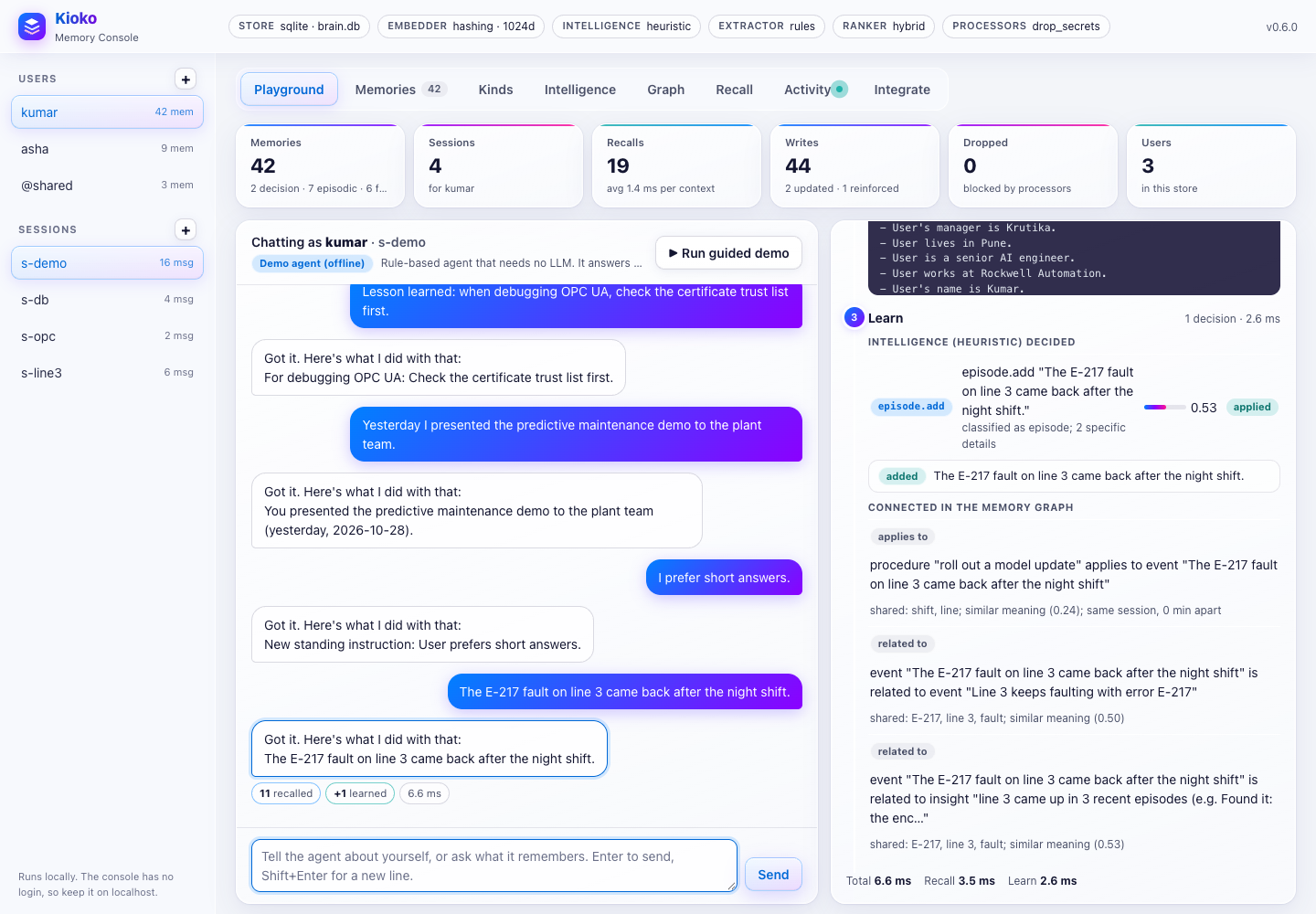
| Playground | Chat with an agent as any user, in any session. Each reply shows the pipeline for that turn: what was recalled (with score breakdowns), the exact memory block injected, and what was learned or decided by the intelligence. Run guided demo walks through it all. |
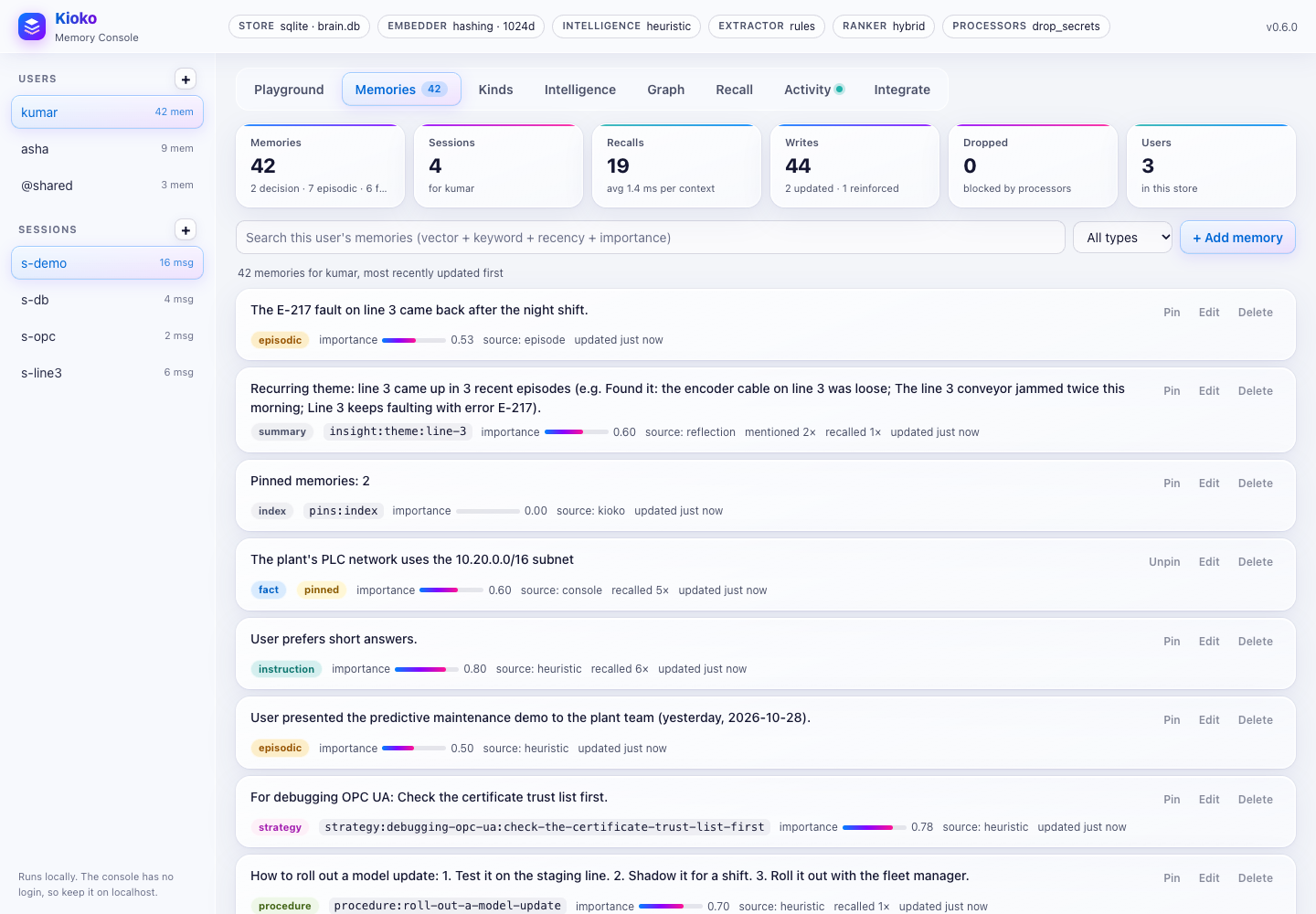
| Memories | Every memory of the user: type, slot key, importance, source, recall count, previous values. Hybrid search with per-signal bars; add, edit, pin and delete; a dry-run extractor tester. |
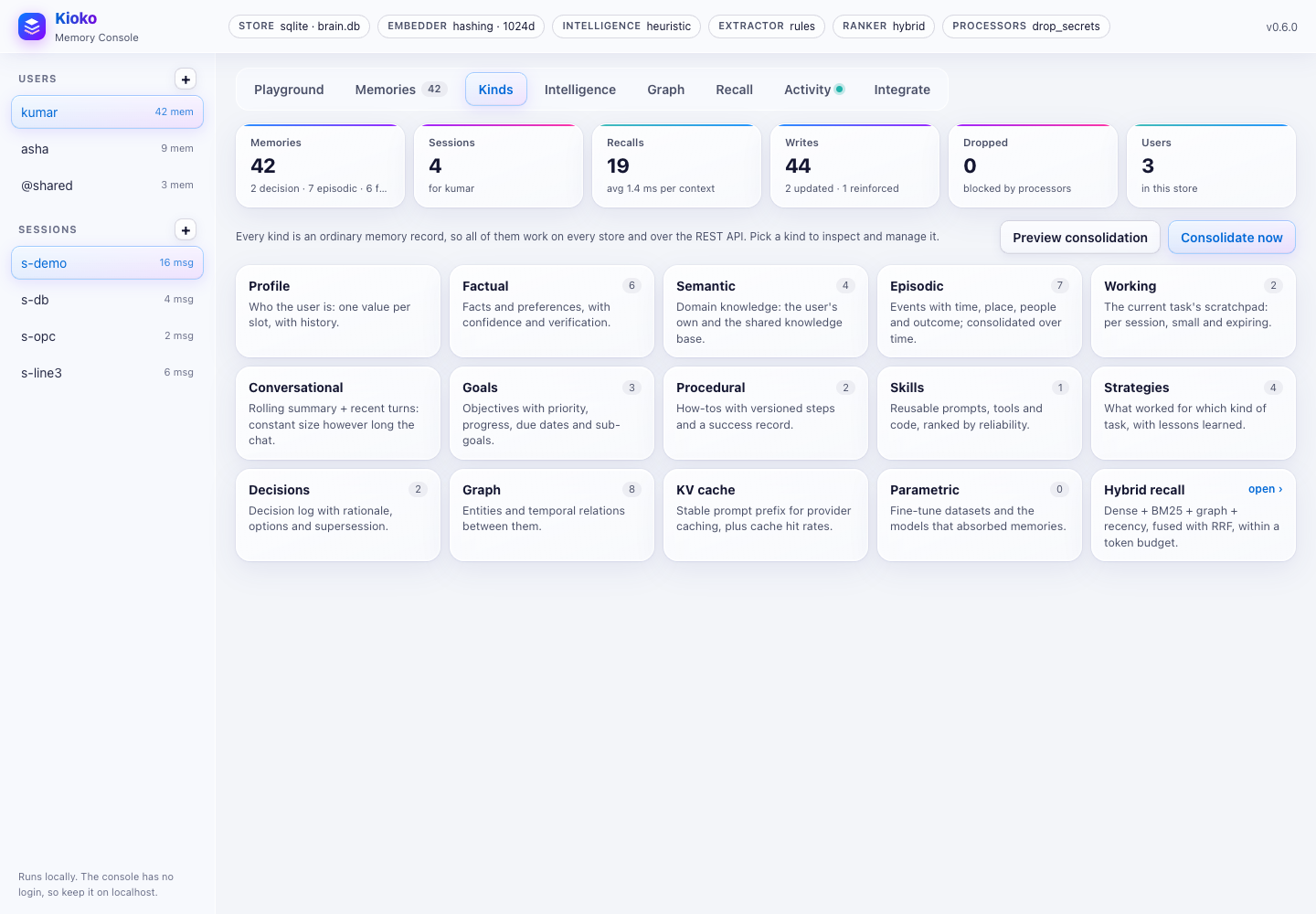
| Kinds | One card per kind of memory: profile, facts, knowledge, the episode timeline, the session's working memory and summary, goals, procedures, skills, lessons, the decision log, the KV-cache prefix and the fine-tuned models. Consolidation preview and run. |
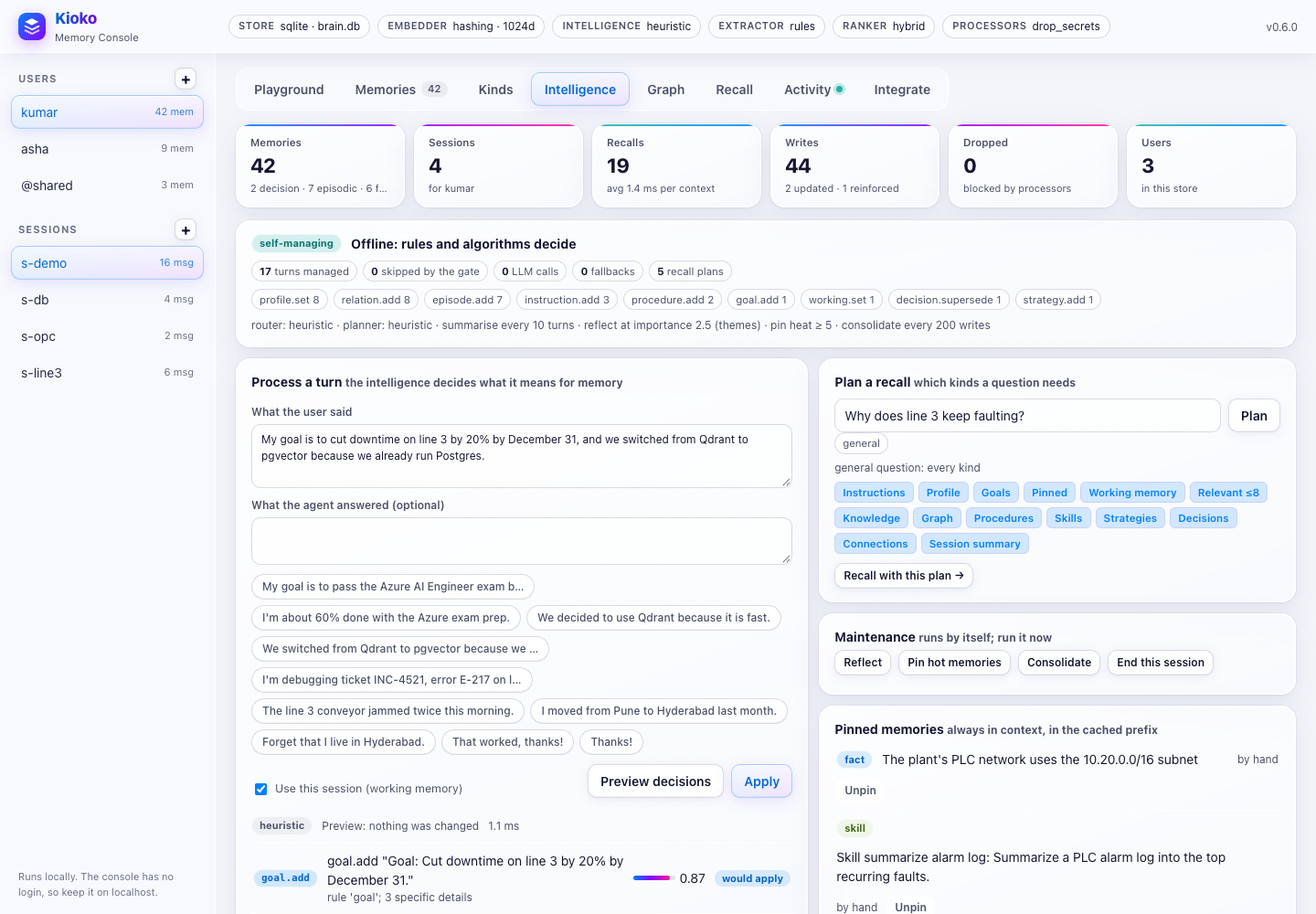
| Intelligence | Preview and apply the decisions for a message, plan a recall, run reflection, pinning, consolidation and session wrap-up, and manage pinned memories. |
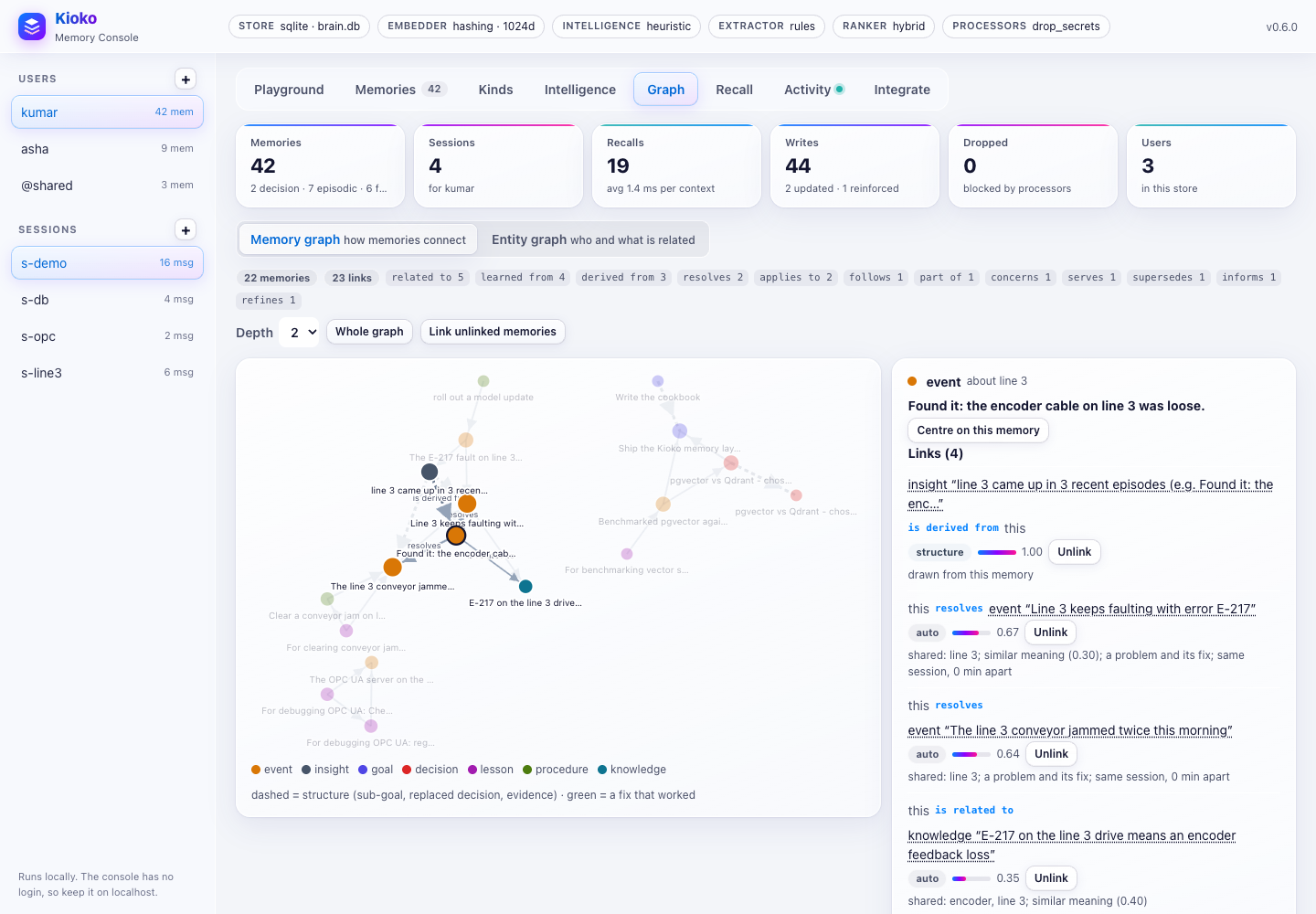
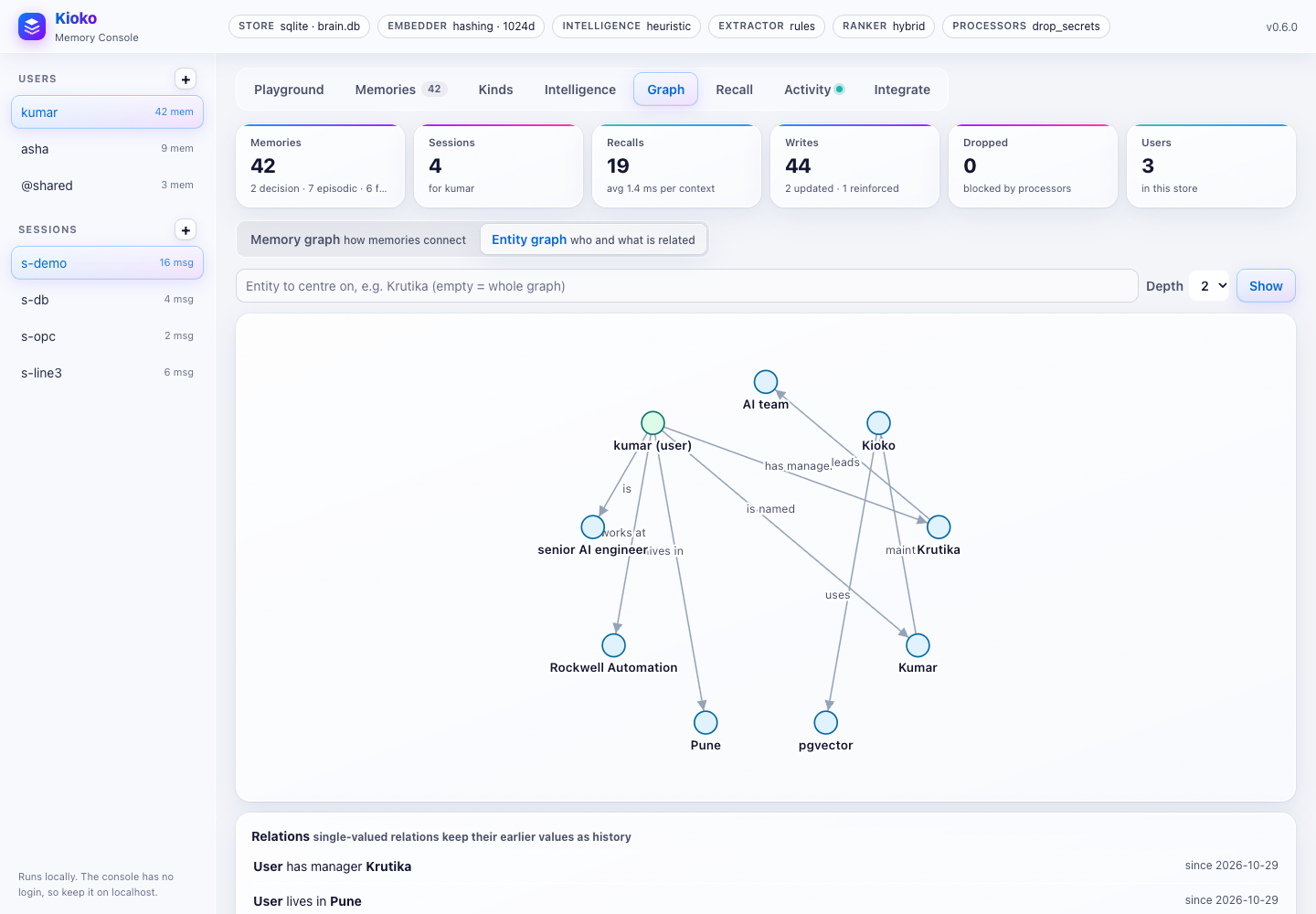
| Graph | The memory graph (memories as nodes, typed links as edges; click one for each link's evidence and what lies further away) and the entity graph around an entity, with relation history. |
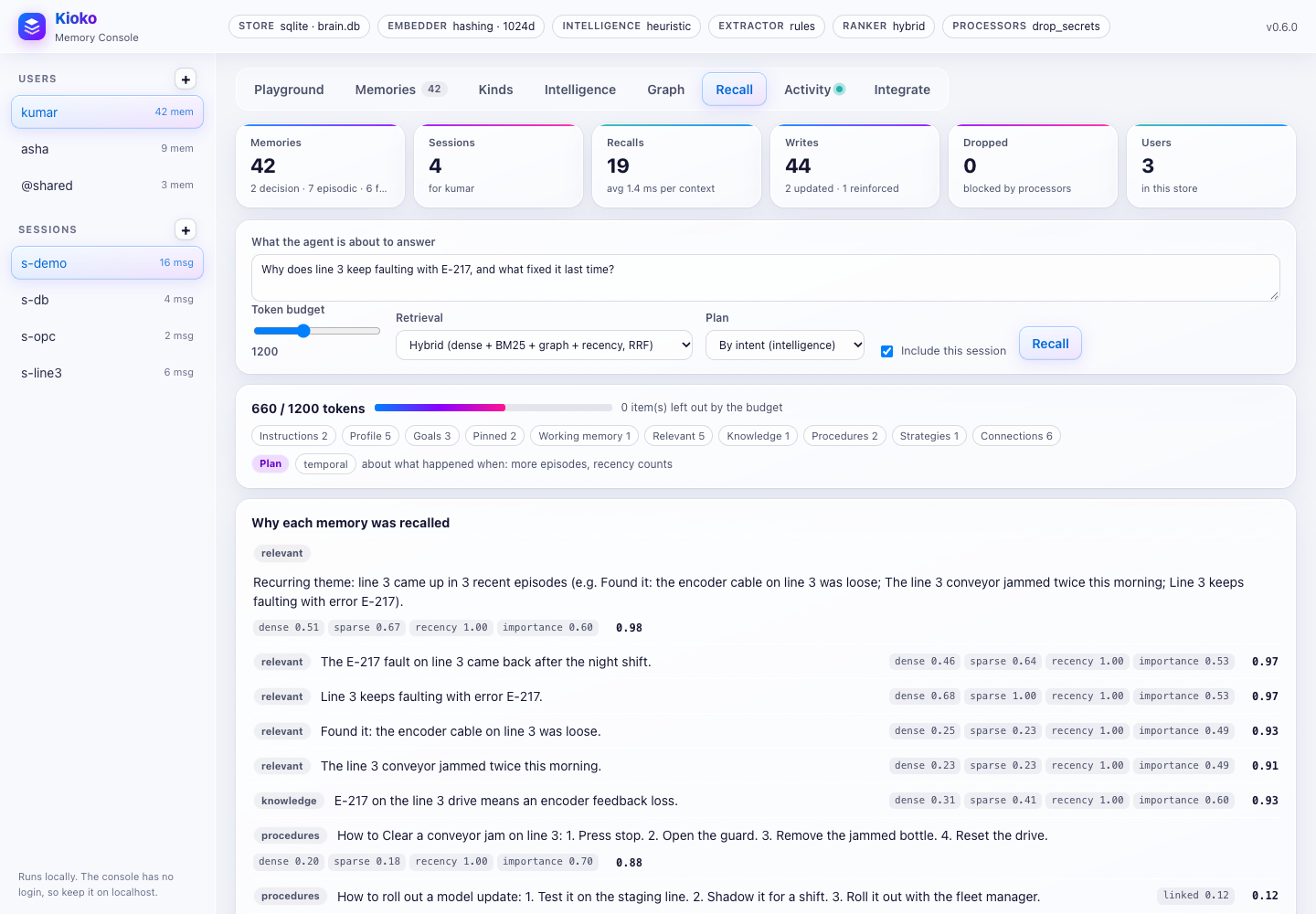
| Recall | The block for a question within a token budget, with the plan, why each memory was recalled and what was left out. |
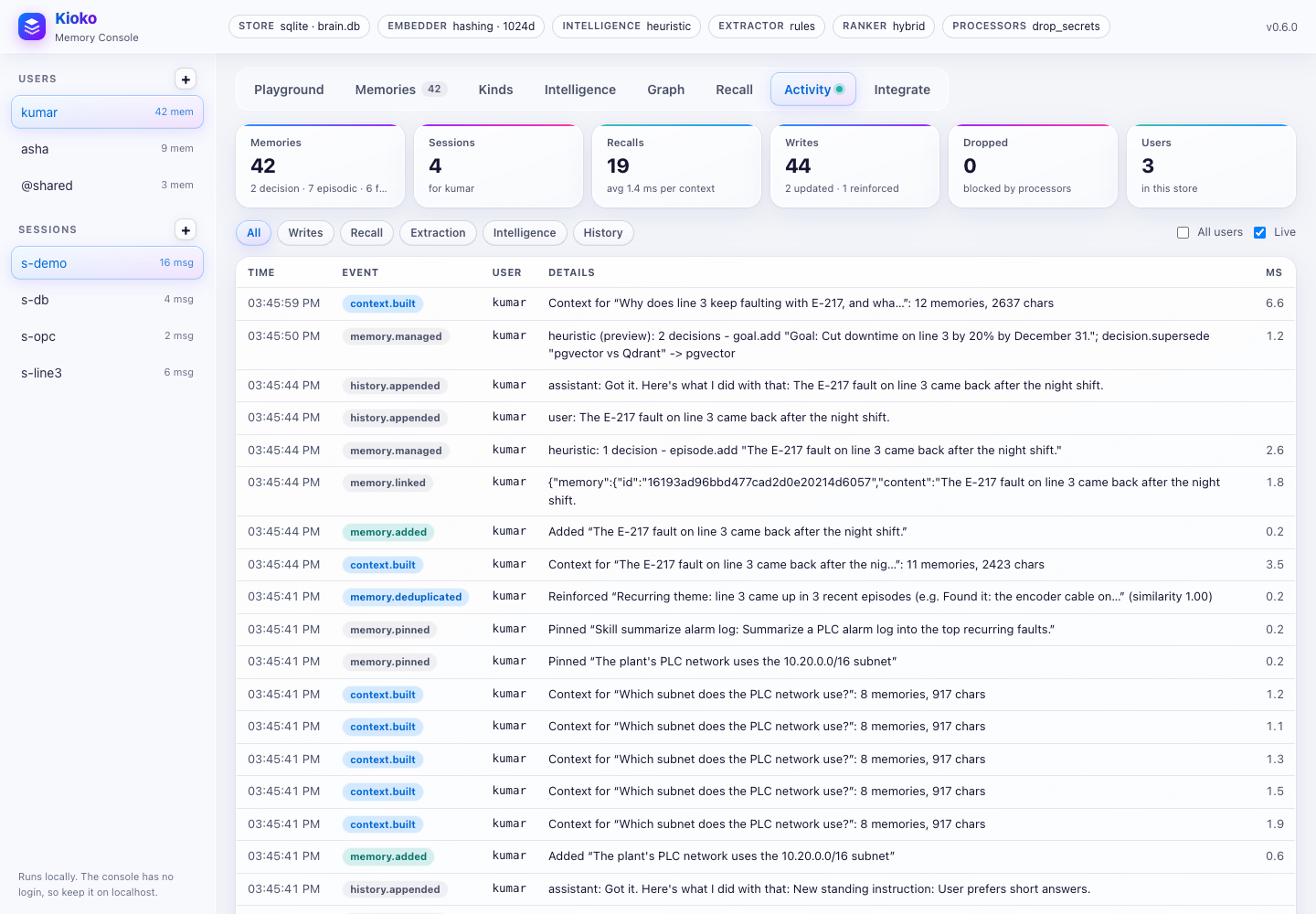
| Activity | Live event feed (writes, recalls, extraction, intelligence, history), including agents in other processes that share the database. |
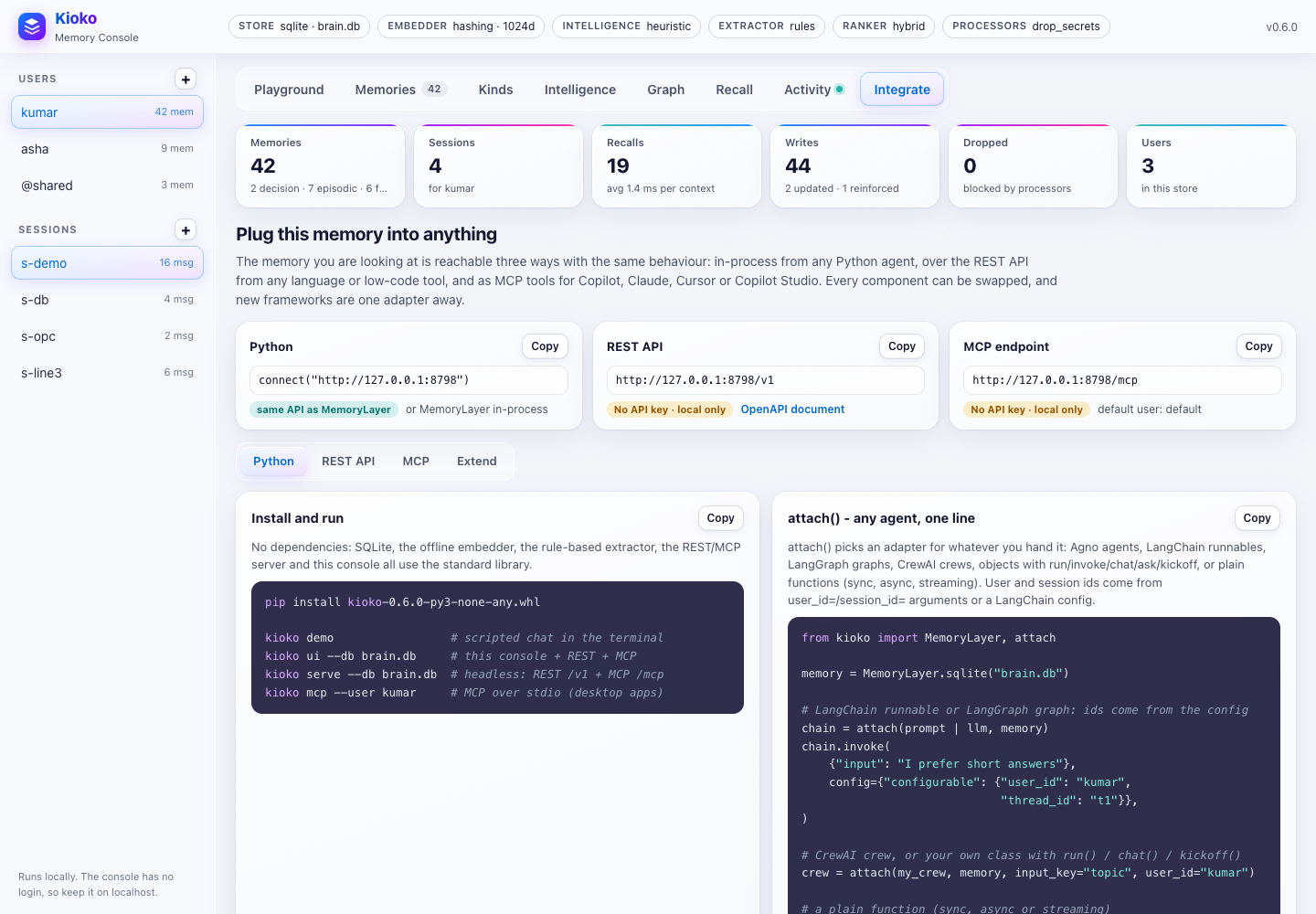
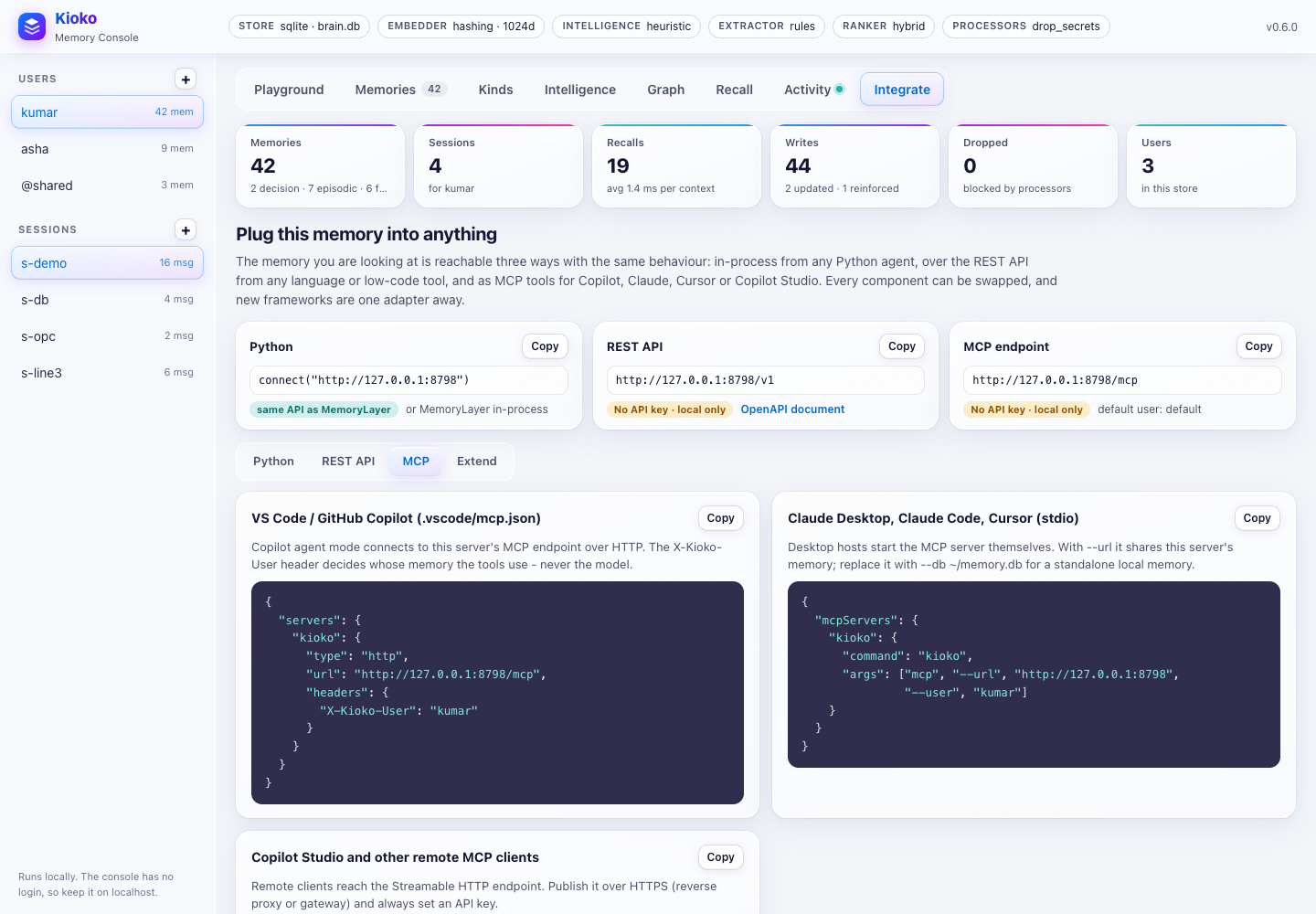
| Integrate | This server's live REST and MCP endpoints, and ready-to-copy snippets for Python, REST, MCP and extending, filled in with this server's URL and the selected user. |
More screenshots: playground · memories · kinds · memory graph · entity graph · recall · activity · integrate · integrate: MCP. How to reach a console on a server, and keep it safe: console.
The console also serves /v1 and /mcp. It is a local operator's tool. It binds to 127.0.0.1, its own
pages and /api have no login (KIOKO_API_KEY protects /v1 and /mcp only), it checks Host and
Origin, and it serves a strict Content-Security-Policy. Use kioko serve for anything shared.
CLI
kioko serve      [--db PATH | --store URL | --config JSON] [--intelligence | --intelligence-llm MOD:FN]
                     [--host] [--port] [--api-key-env NAME] [--cors-origin O ...] [--allowed-host NAME ...]
                     [--insecure] [--no-mcp] [--mcp-user U] [--mcp-read-only] [--webhook URL ...] [--webhook-secret-env NAME]
kioko ui         [--db | --store | --config | --url URL] [--intelligence] [--agent MODULE:FACTORY] [--open]
                     (+ the serve options except --insecure / --no-mcp)
kioko mcp        [--db | --store | --config | --url URL] [--intelligence] [--user U] [--agent-id A] [--read-only]
kioko recall Q   --user ID [--session S] [--budget N] [--plan] [--json]           [--db | --store | --url]
kioko manage T   --user ID [--reply R] [--session S] [--dry-run] [--json]         [--db | --store | --url]
kioko plan Q     --user ID [--json]                                               [--db | --store | --url]
kioko maintain   [--user ID] [--tasks reflect,pin,link,consolidate] [--json]      [--db | --store | --url]
kioko related ID [--depth N] [--json]                                            [--db | --store | --url]
kioko link A B   [--type T] [--why W] [--remove]                                 [--db | --store | --url]
kioko connect    [--user ID] [--rebuild] [--json]                                [--db | --store | --url]
kioko consolidate [--user ID] [--dry-run] [--json]                                [--db | --store | --url]
kioko kinds | list | search Q | add TEXT | context Q    (--user ID ...)           [--db | --store | --url]
kioko openapi    [--server-url URL]
kioko demo       [--db PATH] [--user ID]
kioko components
| Variable | Used by |
|---|---|
KIOKO_API_KEY |
the server's key, and RemoteMemory's default |
KIOKO_URL |
connect(), attach() and the CLI commands when no target is given |
KIOKO_DB |
the default SQLite path |
KIOKO_PG_DSN / DATABASE_URL |
PgVectorStore() without a DSN |
QDRANT_API_KEY |
QdrantStore() without api_key= |
KIOKO_USER |
kioko mcp --user default |
Deploy
A Dockerfile based on python:3.14-slim, a one-command local stack (compose.yml: service + console +
Postgres/pgvector on http://127.0.0.1:8770, API key kioko-local-test-key) and docker-compose.stores.yml
(Postgres + pgvector, Qdrant and the service) are included.
docker compose up --build -d --wait # local stack, uses examples/config/pgvector.json
docker build -t kioko .                                       # SQLite / Qdrant
docker build -t kioko --build-arg KIOKO_EXTRAS=pgvector .     # + Postgres/pgvector (psycopg)
docker run -p 8765:8765 -v kioko-data:/data -e KIOKO_API_KEY=... kioko \
  kioko serve --host 0.0.0.0 --db /data/memory.db --intelligence

export KIOKO_PG_PASSWORD=... KIOKO_API_KEY=...
docker compose -f docker-compose.stores.yml up -d             # Postgres + pgvector, Qdrant, the service
Production notes
- Embeddings. The default
HashingEmbedderis lexical: it matches words, word pairs and character trigrams, not meaning, so "car" and "automobile" don't match. UseOpenAIEmbedder,AzureOpenAIEmbedder,AgnoEmbedderorFunctionEmbedderfor semantic recall. After you change embedders, runmemory.reembed()once. TuneHybridRanker(min_vector_only=...)to your embedder's cosine range. - Extraction and management. The offline rules and intelligence cover common English phrasings: identity,
location, work, likes and dislikes, instructions, goals and progress, decisions and changes, procedures,
lessons, dated events, "remember ..." and "forget ...". For open-ended conversations and other languages,
give the intelligence a model (
kioko.intelligent(llm=...)); the rules stay as gate and fallback. - Scale. Without
vector_search, search scores every memory in the user's scope: about 5–30 ms for a few hundred memories, ~150 ms for 1,000. Past that, use the pgvector or Qdrant store. The service is a threaded standard-library server, which is enough for an internal agent fleet. For heavy traffic, run several instances behind a load balancer on Postgres, and lowercontext_cache_ttl. - Secrets and PII.
DropSecretsis on by default (passwords, API keys, tokens, private keys, card numbers). AddRedactPIIto mask e-mails and phone numbers. Processors run on every write and every update, through any channel (Python, REST, MCP, tools, console). - Languages. Storage, tokenization, the offline embedder and search work in any script, and tool and MCP
output keeps non-ASCII text readable. The rule-based extraction only understands English, so use a model
(
LLMExtractor, or the intelligence withllm=) for other languages. - Python 3.14 annotations. Annotations are evaluated lazily in 3.14 (PEP 649), so an agent function may
annotate with a class defined later in the module.
attach()/with_memorynever force that evaluation: they read signatures withannotationlib.Format.FORWARDREFand copy the lazy__annotate__function. - Concurrency. SQLite runs in WAL mode with one serialized connection per process. That's fine for a service plus the console. For many writers, use Postgres + pgvector.
Development
python3.14 -m unittest discover -s tests -t . -v      # the full suite, standard library only (pytest also works)
python3.14 -m unittest tests.test_agno_contract -v    # with the real Agno installed
KIOKO_TEST_PG_DSN=postgresql://... KIOKO_TEST_QDRANT_URL=http://localhost:6333 \
  python3.14 -m unittest tests.test_stores tests.test_intelligence -v     # against real pgvector and Qdrant
python3.14 docs/build_cookbook.py                     # regenerate docs/cookbook.md from the recipes
CI (.github/workflows/tests.yml) runs on Python 3.14:
- on Linux and Windows, it compiles everything with warnings as errors (which catches 3.14 syntax warnings such
as
returninsidefinally, PEP 765), runs the suite from source, builds the wheel and sdist, and runs the suite again against the installed wheel; - one job runs the store and intelligence contracts against real
pgvector/pgvector:0.8.7-pg17andqdrant/qdrant:v1.20.0service containers; - a separate, non-blocking job runs the Agno contract tests against the real
agnopackage.
Releases are published by .github/workflows/release.yml. Bump the version in pyproject.toml and
src/kioko/_version.py, then push a matching tag (git tag v0.6.1 && git push origin v0.6.1). The workflow
checks that the tag and versions match, runs the suite, builds and checks the wheel and sdist, publishes to
TestPyPI, installs the package back from there, publishes to PyPI (Trusted Publishing, no stored token) and
creates a GitHub Release with the same files.
src/kioko/
  layer.py            MemoryLayer: write / learn / search / context / recall / manage / pins / events
  kinds/              the typed kinds: profile, facts, semantic, episodic, working, conversation, goals,
                      procedural, skills, strategies, decisions, graph, cache (KV), parametric, hybrid, maintenance
  intelligence/       routers (heuristic, LLM), planner, scheduler, operations, signals
  context.py          sections, rendering, token budgets             budget.py   token estimates
  connect.py          connect(): URL / path / config -> memory     protocol.py   MemoryAPI
  remote.py           RemoteMemory (HTTP client)                   sinks.py      WebhookSink
  service/            http.py (server, auth), rest.py (/v1), mcp.py (MCP), openapi.py
  integrations/       adapters.py (attach/detach, Adapter), generic.py (with_memory, MemoryMiddleware),
                      agno.py (AgnoMemory, AgnoEmbedder, export/import)
  stores/             memory, sqlite, pgvector, qdrant
  base.py             component interfaces        registry.py   names, config, entry points
  types.py            MemoryRecord, MemoryFilter, SearchResult, MemoryEvent, ...
  embedders/ extractors/ ranking.py processors.py summarizers.py tools.py
  ui/                 console app, demo agent, static web app
docs/                 guide, memory types, intelligence, cookbook (generated), stores, console, screenshots
examples/             quick start, Agno, any agent, custom components, console agent, service clients, cookbook/
tests/                unit + integration + contract tests (every store), fake Agno, fake Postgres, fake Qdrant
License
MIT. See LICENSE.
1 maintainer

Metadata
1 maintainer
Release files for kioko 0.6.1
For a detailed explanation of source distributions (sdists) and built distributions (wheels), please see the package formats documentation.
Source distribution (sdist)
| File | Size | Uploaded | Provenance | Actions |
|---|---|---|---|---|
| kioko-0.6.1.tar.gz | 373.6 kB | With provenance | Details for kioko-0.6.1.tar.gz |
Built distribution (wheel)
| File | Interpreter | ABI | Platform | Actions Reset |
|---|---|---|---|---|
| kioko-0.6.1-py3-none-any.whl | Python 3 | none | any | Details for kioko-0.6.1-py3-none-any.whl |
Total release size: 747.4 kB
Release files / kioko-0.6.1.tar.gz
| Download URL | kioko-0.6.1.tar.gz |
|---|---|
| Size | 373.6 kB |
| Tags | Source |
|
SHA-256 checksum How to use checksums |
587b89215d0d29c6c8fb9a19c747c72148eabf8754c12b426033024823b431b0
|
|
BLAKE2b-256 checksum How to use checksums |
801f4308d5a39bc33f6dc0328f27eb583cccb17a3bb2789759f2ca1eb9e657f8
|
| Upload date | |
|
Uploaded using Trusted Publishing? What is trusted publishing? |
Yes |
| Uploaded via |
twine/7.0.0 CPython/3.13.16
|
Provenance
Provenance describes where a file came from. On PyPI, provenance is shared via attestations, which provide a verifiable record of the build or publishing details. View details, limitations and caveats.


PyPI Publish Attestation
PyPI verified that this artifact, at this checksum, originated from the publisher listed below.
Signed by GitHub Actions, verified by PyPI on Nov 3, 2026.
Transparency logRelease files / kioko-0.6.1-py3-none-any.whl
| Download URL | kioko-0.6.1-py3-none-any.whl |
|---|---|
| Size | 373.8 kB |
| Tags | Python 3 |
|
SHA-256 checksum How to use checksums |
28771c9265e506e413384ed333d2f1e995d93dd834d1485ec43fb5814f2689d7
|
|
BLAKE2b-256 checksum How to use checksums |
9ad9c483c99d549ddf98d4ec4d13eb947463aaf39438103594d947d300bebb27
|
| Upload date | |
|
Uploaded using Trusted Publishing? What is trusted publishing? |
Yes |
| Uploaded via |
twine/7.0.0 CPython/3.13.16
|
Provenance
Provenance describes where a file came from. On PyPI, provenance is shared via attestations, which provide a verifiable record of the build or publishing details. View details, limitations and caveats.
PyPI Publish Attestation
PyPI verified that this artifact, at this checksum, originated from the publisher listed below.
Signed by GitHub Actions, verified by PyPI on Nov 3, 2026.
Transparency logSecurity for kioko 0.6.1
Provenance
Provenance describes where a file came from. On PyPI, provenance is shared via attestations, which provide a verifiable record of the build or publishing details. View details, limitations and caveats.
Full provenance
All 2 files in this release have been uploaded with provenance metadata.
Attestation for kioko-0.6.1.tar.gz
PyPI Publish Attestation
PyPI verified that this artifact, at this checksum, originated from the publisher listed below.
Signed by GitHub Actions, verified by PyPI on Nov 3, 2026.
Transparency logA note on package security
PyPI is a repository for distributing packages, not a service for auditing them. While third-party security researchers and our staff do their best to detect and remove malicious packages, PyPI cannot guarantee the quality, security or suitability of any given package.
To learn more about protecting yourself from malicious actors, visit our package security documentation.