
Local-first, source-backed decision memory for AI agents — Context Packs with provenance and reversal detection. MCP server + REST API + Python SDK.

Project description
Kioku
Cross-model memory, local-first.




Kioku is cross-model memory, local-first. One memory layer shared across Claude, ChatGPT, Cursor, Gemini, Copilot, and any MCP-aware agent, so you stop re-explaining yourself and stop losing useful work. It runs on your own OpenAI, Anthropic, Gemini, or Perplexity key — or a fully local model via Ollama, with no key and no data leaving your machine — and keeps your data on your machine by default. Local. Cross-model. Yours.
Free needs no account. Pro (€9/mo, free during early access) adds the knowledge graph, custom and scheduled agents, and end-to-end-encrypted multi-device sync.
Why Kioku is different from other memory layers
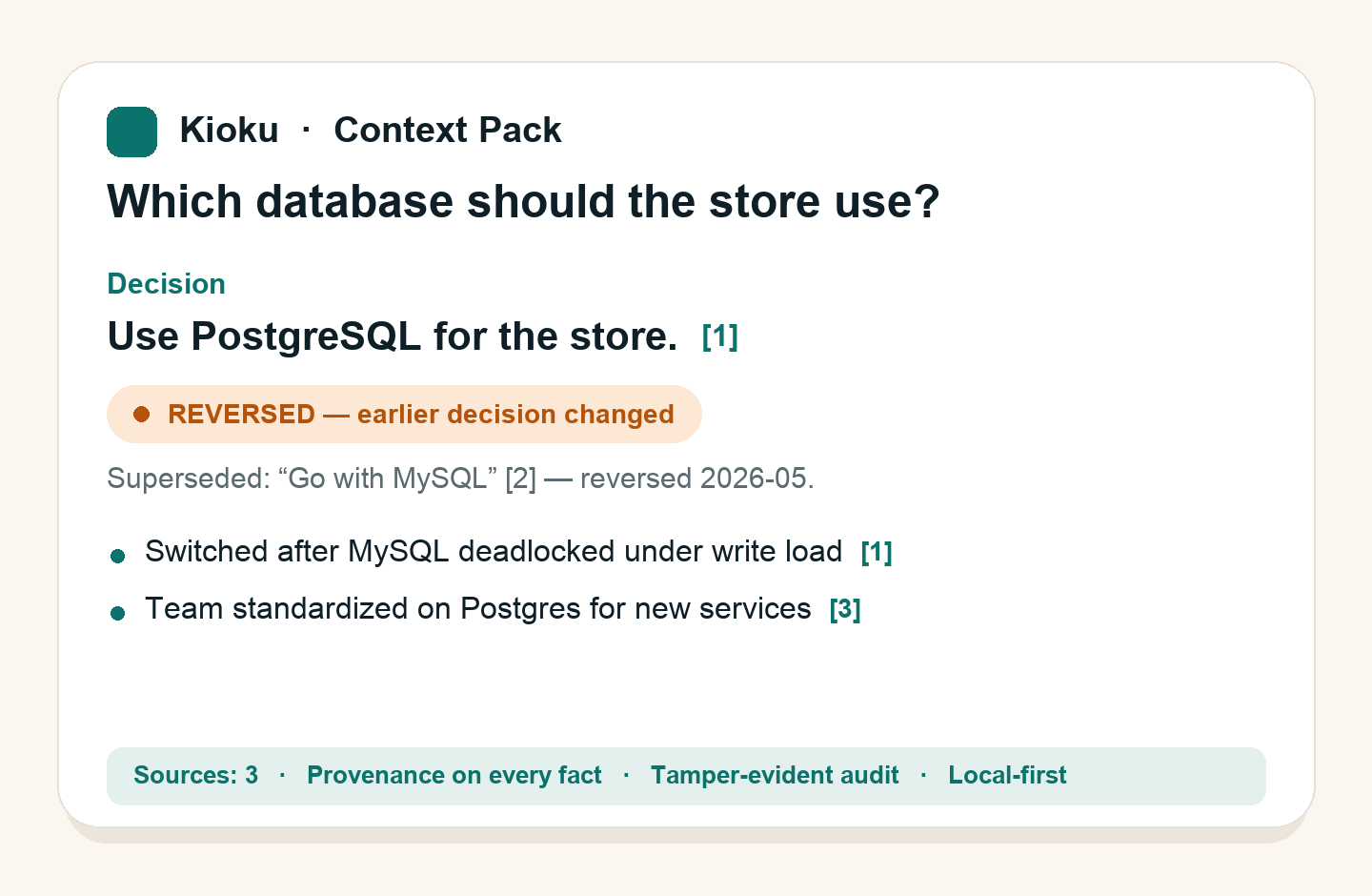
"Local" is now table stakes — Mem0 and others ship offline too. Kioku's edge is trust in the memory itself: every recalled fact carries provenance (the exact source it came from), and reversal detection flags a decision you later changed so a stale call never resurfaces as current. You can inspect the original transcript before trusting a result, capture works across every AI tool rather than one vendor, and a tamper-evident audit trail records every injection. It's decision memory you can verify — not just a faster vector store.
Security & privacy
- Local by default — captures (browser extension, MCP) go only to your local backend (
127.0.0.1:8742). Content leaves your machine only for features you explicitly enable (your own LLM key, or optional sync). A no-egress mode can hard-block all outbound content. - Encrypted at rest — AES-256-GCM with an Argon2id-derived key (opt-in; set it before your first import).
- Tamper-evident audit log — a SHA-256 hash chain records every memory injection, with Ed25519-signed exportable artifacts.
- Telemetry is opt-out — set
KIOKU_NO_TELEMETRY=1(only an anonymous install/heartbeat ping otherwise). - We never train on your data.
Full details: kiokuapp.cloud/security.
What Kioku is for
Kioku is strongest when you need:
- exact replay, not just vague personalization
- one source-backed context layer across more than one AI tool
- transcript and provenance inspection before trusting a result
- local-first ownership instead of vendor lock-in
Best-fit users:
- developers
- technical founders
- researchers
- legal and finance professionals
- anyone doing high-trust knowledge work across multiple AI tools
What you can do with Kioku
- create reusable Context Packs from verified sources — decision-first, cited, and provenance-backed
- get reversed/superseded decisions flagged in a Pack (it leads with the current position and marks what changed) instead of silently mixing old and new
- import old ChatGPT, Claude, Gemini, and Perplexity history
- run Recall against your own Archive
- inspect transcripts, provenance, and preserved artifacts
- connect Claude Desktop, Cursor, and other MCP clients
- save supported browser chats with the extension
- use Kioku from Python through the SDK that ships inside
kioku-ai - add LangChain memory on top of the same backend
- bring your own LLM key (OpenAI, Anthropic, Gemini, Perplexity) or run fully local with Ollama — pick the active provider when you have more than one
For developers and coding agents:
- index a local folder or GitHub repo as code memory (
kioku index-repo) - sync external connectors such as GitHub issues/PRs (
kioku connector sync) - pull task-aware context and recall scoped to what you're working on
- record a session handoff and resume it later from any MCP client
Pro capabilities (free tier is fully usable without them):
- knowledge graph / Relationship Map across your memories
- a synthesized Profile/persona built from your own data
- end-to-end-encrypted cross-device sync
- digests, proactive nudges, and custom + scheduled agents
How it works
Kioku front-loads the hard work at write time so reads are fast and source-backed:
- Ingest — conversations, documents (PDF / DOCX / XLSX / images), code, and browser captures stream in through one provider-agnostic pipeline. The raw export is preserved in an Archive; re-imports are idempotent (content-hashed), so the same history never duplicates.
- Extract typed units — each item is broken into small, classified memory units (facts, decisions, preferences, goals, relationships…) and enriched.
memory_typeis an open, LLM-assigned label, not a fixed enum. - Retrieve with multiple signals — a query is answered by fusing semantic (vector), lexical (BM25/FTS), conversation, and graph signals, then reranking with a cross-encoder — not a single embedding lookup.
- Synthesize a Context Pack — a tight, decision-first brief (~300–500 tokens) built only from retrieved sources, with citations and provenance. It distinguishes settled decisions from open deliberation, and flags decisions that were later reversed.
- Inject — the Pack (or raw recall) is delivered to your AI tool over MCP, the REST API, or the SDK.
Background specialist agents run on a schedule to keep memory healthy: enrichment/classification, duplicate review, reversal detection (a decision changed over time), the knowledge graph build, a synthesized persona, goal/temporal/learning tracking, and retention cleanup.
Surfaces: a local FastAPI backend (127.0.0.1:8742) + an MCP server (stdio/SSE), a Tauri desktop app, a Chrome extension, a Python SDK (+ LangChain), and an optional Cloudflare worker for accounts, billing, licensing, and encrypted sync. Everything is scoped per user/workspace; content is encryptable at rest and secrets are redacted on ingest.
Choose your starting path
Desktop vs. headless — pick one backend. The desktop app bundles and supervises its own backend on
127.0.0.1:8742. If you use the app, do not also runkioku serve-http/kioku starton the same port — the two would fight over the port and data dir. Thepip+kioku startpaths below are for running Kioku headless, without the desktop app (MCP / SDK / servers).
1. Desktop user
Just install and open the app — no pip, no terminal. It runs its own backend.
- Download and open the desktop app
- Import old history first
- Open Archive to inspect transcripts and provenance
- Use Recall when you need the same code, fix, or decision again
2. MCP user (headless, no desktop app)
If you mainly work in Claude Desktop or Cursor and don't run the desktop app:
pip install kioku-ai
kioku start          # background; survives closing the terminal (restart-on-crash: kioku service install)
Then:
- Write the MCP config (or use the desktop app's one-click Connections setup)
- Restart Claude Desktop, Cursor, or your MCP client
- Ask for:
- the same code again
- the prior fix
- the earlier decision with transcript
Manage the backend with kioku status and kioku stop. To keep it running across
reboots with automatic restart-on-crash, run kioku service install.
If you already use the desktop app, skip this — the app's backend already serves MCP. Connect via the app's Connections screen instead.
3. Python / agent user (headless, no desktop app)
If you want to use Kioku from code:
pip install kioku-ai
kioku start          # background, supervised (use `kioku serve-http` to run in foreground)
Then use the Python SDK:
from kioku_client import KiokuMemory

memory = KiokuMemory()
memory.add("User prefers Python over JavaScript")
results = memory.search("programming preferences")
print(results[0]["content"])  # search() returns flat memory dicts
Installation
First-run footprint (so there are no surprises): Python ≥ 3.11; one pip install
pulls the full stack (vector search + embeddings are core, not an extra); the first
kioku warmup downloads the local embedding model Snowflake/snowflake-arctic-embed-m-v1.5
(~130 MB) and cold start is ~30–60 s. After that, recall is fast and fully local.
Extraction quality needs an LLM provider key (or local Ollama) — without one it
falls back to a lower-quality regex extractor and the CLI will warn you.
End users
Install Kioku:
pip install kioku-ai
kioku warmup
kioku verify
Start the local backend:
kioku serve-http
The backend normally runs on 127.0.0.1:8742.
Optional multimodal extras
If you want richer local document import:
pip install "kioku-ai[multimodal]"
This enables:
- structured PDF parsing through Docling Parse
- local OCR for screenshots and scanned documents (runs on your machine, no cloud)
- richer PDF handling without Java or Tesseract system dependencies
Optional code-ingestion extras
To index local folders and GitHub repos as code memory:
pip install "kioku-ai[code]"
This pulls in the tree-sitter parsers used to chunk source code by symbol.
Optional encryption-at-rest extras
To encrypt memory content at rest (AES-256-GCM, passphrase-derived key):
pip install "kioku-ai[encryption]"
Set KIOKU_ENCRYPTION_ENABLED=true and KIOKU_ENCRYPTION_PASSPHRASE=…. Keyword
search still works on encrypted installs via a keyed blind-token index — your
plaintext terms are never written to disk.
Configure your LLM provider (BYOK)
LLM features (extraction, synthesis, the chatbot, the knowledge graph, and the agents) run on a key you supply — Kioku never ships a shared key. Any one of these turns on the full feature set:
- OpenAI, Anthropic (Claude), Gemini, Perplexity — cloud, key-based
- Ollama — fully local, no key; point it at your local server (default
http://localhost:11434)
Keys come from either:
- your environment /
.env(e.g.OPENAI_API_KEY=…) — persists across restarts, or - the desktop Settings → API keys screen — applied instantly without a restart
If both are set for the same provider, the Settings key wins. When you have more
than one provider configured, you choose the active one (Settings, or
POST /api/v1/llm/active); only one is active at a time. On Claude and Gemini the
chatbot streams token-by-token just like OpenAI.
Developer usage
Python SDK
The Python SDK ships inside kioku-ai.
Install:
pip install kioku-ai
Docs:
Common operations:
from kioku_client import KiokuMemory

memory = KiokuMemory()

memory.add("Likes dark mode", memory_type="preference", tags=["ui"])
memory.search("theme preference", limit=5)
memory.get_context("coding style")
memory.ask("What editor do I use?")
memory.list(memory_type="preference", limit=20)
memory.health()
memory.stats()
LangChain
Install the LangChain extra:
pip install "kioku-ai[langchain]" langchain-openai
Example:
from kioku_client.langchain import KiokuSessionStore
from langchain_core.prompts import ChatPromptTemplate, MessagesPlaceholder
from langchain_core.runnables.history import RunnableWithMessageHistory
from langchain_openai import ChatOpenAI

llm = ChatOpenAI(model="gpt-4o-mini")
prompt = ChatPromptTemplate.from_messages([
    ("system", "You are a helpful assistant."),
    MessagesPlaceholder(variable_name="history"),
    ("human", "{input}"),
])

chain = prompt | llm
sessions = KiokuSessionStore()

chain_with_memory = RunnableWithMessageHistory(
    chain,
    sessions.get_history,
    input_messages_key="input",
    history_messages_key="history",
)

response = chain_with_memory.invoke(
    {"input": "I love building with FastAPI"},
    config={"configurable": {"session_id": "my-session"}},
)
MCP
Kioku can expose a local MCP server for tools like Claude Desktop and Cursor.
Typical flow:
- With the desktop app: open Connections → Set up MCP (one click; wires the
client to the app's bundled backend, no
pip). - Headless:
pip install kioku-ai, thenkioku start, then write the MCP config and restart the client. (Don't run both — pick one backend; see "Choose your starting path".)
Tools exposed to MCP clients include:
remember,recall,list_memories,forget— core memoryget_context,get_context_pack,attach_context_pack— source-backed contextadd_conversation,get_persona,get_stats— conversation + profile + statsremember_code,developer_recall,get_task_context— code and task-aware contextrecord_handoff,resume_session— session handoff and resume
Extension and imports
Kioku supports:
- ChatGPT, Claude, Gemini, and Perplexity import
- browser capture for ChatGPT, Claude, Gemini, Copilot, and Perplexity
Best rollout order:
- imports first
- MCP next
- browser capture later
Benchmarks
Kioku tracks two benchmarks — a retrieval suite and a LongMemEval-style end-to-end suite. Headline results are below; numbers are reported with the real local embedding model, since that reflects what users actually get.
Current retrieval benchmark
Latest run on the current tree (2026-06-14), 23-case search-quality suite.
Numbers are reported with the real local embedding model
(--real-embeddings) since that reflects what users actually get; the suite
has some run-to-run variance, so a range across repeated runs is given rather
than a single hero figure.
Real embeddings (3 runs):
- pass rate: 87–91% (
20–21/23) - MRR: 0.84–0.87
- average latency: ~210ms
- P95 latency: ~160ms
Deterministic-embedding mode (run_suite.py --suite search, the default) is a
stable lower bound at 87% / MRR ~0.79, but uses hash-based toy embeddings
and shows a one-off ~3s P95 from the first-query model load — it is a
regression guard, not a representative score.
A previous README figure of 95.7% came from an April 2026 snapshot that predates this repository's git history and could not be reproduced on the current dependency set; the pre/post comparison above confirms no recent code regression (the same suite scores identically before and after the latest search changes).
Current LongMemEval sample result
The LongMemEval harness now drives the real product pipeline —
add_conversation(extract=True) for ingestion and manager.synthesize() for
answering — so the score reflects Kioku's actual extraction + synthesis, not a
bespoke benchmark reimplementation. (The old bespoke prompts remain available via
--legacy-harness for comparison.)
Latest run (2026-06-15), full mode, 25-question balanced sample, gpt-4o-mini:
- overall accuracy: 60% (
15/25), no crashes - by category: knowledge-update 70% (
7/10), multi-session 50% (5/10), single-session-assistant 60% (3/5) - elapsed: ~900s
What the fidelity work changed (each was a real product fix, verified on
category subsets, that also helps everyday /ask answers):
- Recall — "remind me about our earlier chat about X" recall roughly doubled vs the old bespoke harness; the root cause was extraction dropping detail, now preserved (adaptive caps + atomic/detail extraction prompt).
- Counting / sums — quantity questions ("how many / how much / how long total") now compute and state the explicit total (e.g. "3.5 weeks", "$185") instead of just listing the parts. Summation subset went ~1/7 → 6/7.
- Temporal updates — when a fact changes over time, synthesis now sees each memory's date and returns the most-recent value (e.g. an improved 5K time, an updated mortgage pre-approval) instead of an older one.
- Distinct-fact preservation — a dedup fix stops the memory layer merging separately-countable facts (a blue bike and a red bike are two memories), which previously collapsed "how many X" answers.
Caveats (read honestly):
- The 25-question sample is small and noisy — per-category figures
(especially the 5-question single-session bucket) swing run-to-run with
gpt-4o-mininon-determinism. Treat this as indicative, not a headline claim. - A rare, intermittent
'int' object is not subscriptablecrash has been observed in long (~20+ question) single-process runs; it is caught per-question (the run continues) and did not occur in this run. SetKIOKU_BENCH_TRACEBACK=1to capture it; the robust fix (per-question subprocess isolation) is tracked as follow-up.
License
Proprietary. Copyright (c) 2024-2026 Kioku. All rights reserved. See LICENSE.


Download files
Download the file for your platform. If you're not sure which to choose, learn more about installing packages.
Source Distribution
Built Distribution
Filter files by name, interpreter, ABI, and platform.
If you're not sure about the file name format, learn more about wheel file names.
Copy a direct link to the current filters
File details
Details for the file kioku_ai-0.2.5.tar.gz.
File metadata
- Download URL: kioku_ai-0.2.5.tar.gz
- Upload date:
- Size: 1.1 MB
- Tags: Source
- Uploaded using Trusted Publishing? No
- Uploaded via: twine/6.2.0 CPython/3.12.13
File hashes
| Algorithm | Hash digest | |
|---|---|---|
| SHA256 |
a478bd37a882e121031d0cd0888111d49382fdb9b0c5f35078b4b779c4e62ea3
|
|
| MD5 |
a2bdd421e63c61798d2ef2acaa750c37
|
|
| BLAKE2b-256 |
0f5114ede98547777136a28c37f56c8e463b8a0a1db5f74ab5313a40b7c56b37
|
File details
Details for the file kioku_ai-0.2.5-py3-none-any.whl.
File metadata
- Download URL: kioku_ai-0.2.5-py3-none-any.whl
- Upload date:
- Size: 1.3 MB
- Tags: Python 3
- Uploaded using Trusted Publishing? No
- Uploaded via: twine/6.2.0 CPython/3.12.13
File hashes
| Algorithm | Hash digest | |
|---|---|---|
| SHA256 |
94610e8d5bb5421f421730e6b4ad420dc86f57ccdada2d12b1455cedaebcc693
|
|
| MD5 |
5108f5526913238f1335945214398362
|
|
| BLAKE2b-256 |
366b50a1dc5ab305418133872805cc98ae6386639b23312e244f5dc4a91fd96b
|






