

This is the unofficial API
Installation
pip install kirbacterai
Code example
import asyncio
from kirbacterai import Client

async def main():

    client = Client()

    await client.auth_as_guest()
    # You can use client.auth_with_token(token) instead

    link = "https://c.ai/c/0FGHpcylr6O0l46xHrTMzRGnqAU6beVz0k3i294wbUQ"

    character = await client.get_character_from_link(link)

    chat = await character.chat_create()

    character_reply = await chat.send_message("Hello!")

    print(character_reply)


asyncio.get_event_loop().run_until_complete(main())
Using an Access Token
Some parts of the API, like managing a conversation requires for you to be logged in using an accessToken.
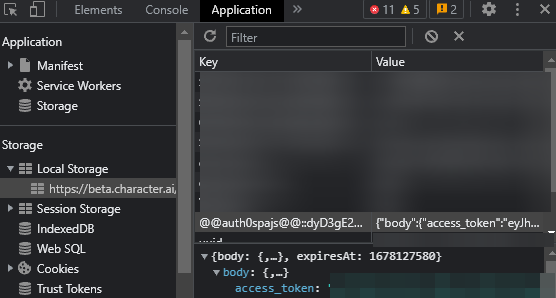
To get it, you can open your browser, go to the character.ai website in localStorage.
— To do so:
❒ Open the Character AI website in your browser
❒ Open the developer tools F12 and go to the Application tab.
❒ Go to the Storage section and click on Local Storage.
❒ Look for the @@auth0spajs@@::dyD3gE281MqgISG7FuIXYhL2WEknqZzv::https://auth0.character.ai/::openid profile email offline_access key.
❒ Open the body and copy the access token.
Node.js version
Most of the stuff was taken from another JavaScript repository:

1 maintainer

Metadata
1 maintainer
Release files for kirbacterai 0.0.3
For a detailed explanation of source distributions (sdists) and built distributions (wheels), please see the package formats documentation.
Source distribution (sdist)
| File | Size | Uploaded | Provenance | |
|---|---|---|---|---|
| kirbacterai-0.0.3.tar.gz | 7.6 kB | Without provenance | Details |
Built distribution (wheel)
| File | Interpreter | ABI | Platform | Reset |
|---|---|---|---|---|
| kirbacterai-0.0.3-py3-none-any.whl | Python 3 | none | any | Details |
Total release size: 14.7 kB
Release files / kirbacterai-0.0.3.tar.gz
| Download URL | kirbacterai-0.0.3.tar.gz |
|---|---|
| Size | 7.6 kB |
| Tags | Source |
|
SHA-256 checksum How to use checksums |
7e4868744c5f8afb81c803128d2a6cd56908a99cdf3df76db2dd5990d77bdb22
|
|
BLAKE2b-256 checksum How to use checksums |
17123eb50ff41c74375b4ad91f2badaa016d9aa0ad0c23cba5c6c95696ad3b2a
|
| Upload date | |
|
Uploaded using Trusted Publishing? What is trusted publishing? |
No |
| Uploaded via |
twine/4.0.2 CPython/3.9.13
|
Release files / kirbacterai-0.0.3-py3-none-any.whl
| Download URL | kirbacterai-0.0.3-py3-none-any.whl |
|---|---|
| Size | 7.1 kB |
| Tags | Python 3 |
|
SHA-256 checksum How to use checksums |
52cf8028ecdb5ddb94ce4d4242818d7677ce2fad95649ff1a77ebb6c6de95cde
|
|
BLAKE2b-256 checksum How to use checksums |
ef086b7cb346a963ed07493d1ddf4f5f40752e7a83bcbd11abaa04d1ec0c52c4
|
| Upload date | |
|
Uploaded using Trusted Publishing? What is trusted publishing? |
No |
| Uploaded via |
twine/4.0.2 CPython/3.9.13
|
Security for kirbacterai 0.0.3
Provenance
Provenance describes where a file came from. On PyPI, provenance is shared via attestations, which provide a verifiable record of the build or publishing details. View details, limitations and caveats.
No provenance found
None of the files in this release were uploaded with provenance metadata.
A note on package security
PyPI is a repository for distributing packages, not a service for auditing them. While third-party security researchers and our staff do their best to detect and remove malicious packages, PyPI cannot guarantee the quality, security or suitability of any given package.
To learn more about protecting yourself from malicious actors, visit our package security documentation.













