

Kitden
See and safely change what your AI coding agents load.
Claude Code, Codex and Cursor: every MCP server, skill, plugin, hook and marketplace on one local page.
Look at each change first, Apply it with a backup, Undo it any time.
uvx kitden
Why you want it
You use two or three AI coding tools. A few weeks in:
- a plugin loads twice, because Cursor quietly reads Claude Code's plugins;
- an MCP server you removed from one tool still runs in another;
- an agent edited its own settings, and you are not sure what changed.
The answers are spread over many JSON and TOML files. Kitden reads them all, shows them on one page, and changes a file only after you have seen the exact edit.
Kitden is for one developer or a small team. It runs on your Mac at 127.0.0.1, with no account
and no telemetry.
What you can do
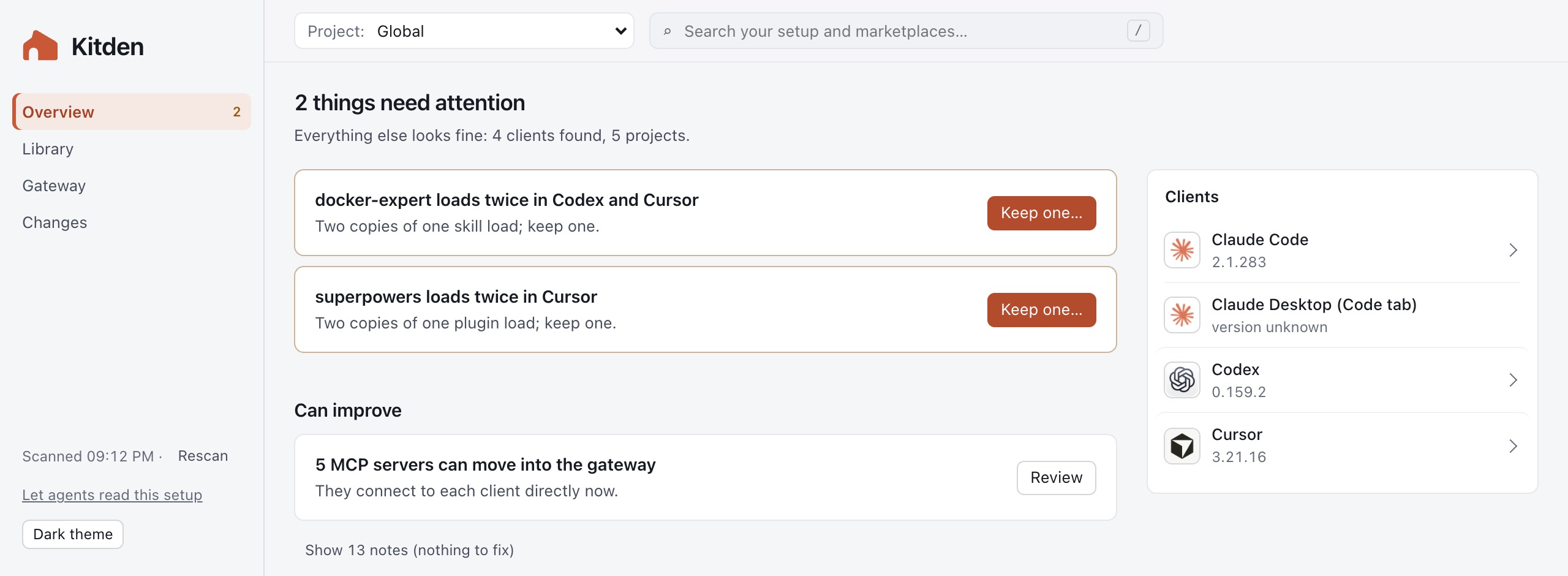
See what needs attention
Overview lists what needs attention, such as an item that loads twice, and what can improve, such as servers that could move into your gateway. Each one has a button that opens its fix. The clients Kitden found sit on the right.
See what loads where
Load map has one row per item and one column per client. Each cell says if the item loads, is off, goes through the gateway, or is not there. Tabs split MCP servers, plugins, skills, hooks and marketplaces. Pick a project at the top to see what loads in that folder.

Add plugins and skills
Discover searches the plugins and skills in the marketplaces already on your computer. Add one to Claude Code and Codex in one review. The review names every client the change reaches, including Cursor when it loads Claude Code's plugins. You can also add a marketplace from a folder or a GitHub link.

Use one gateway for every client
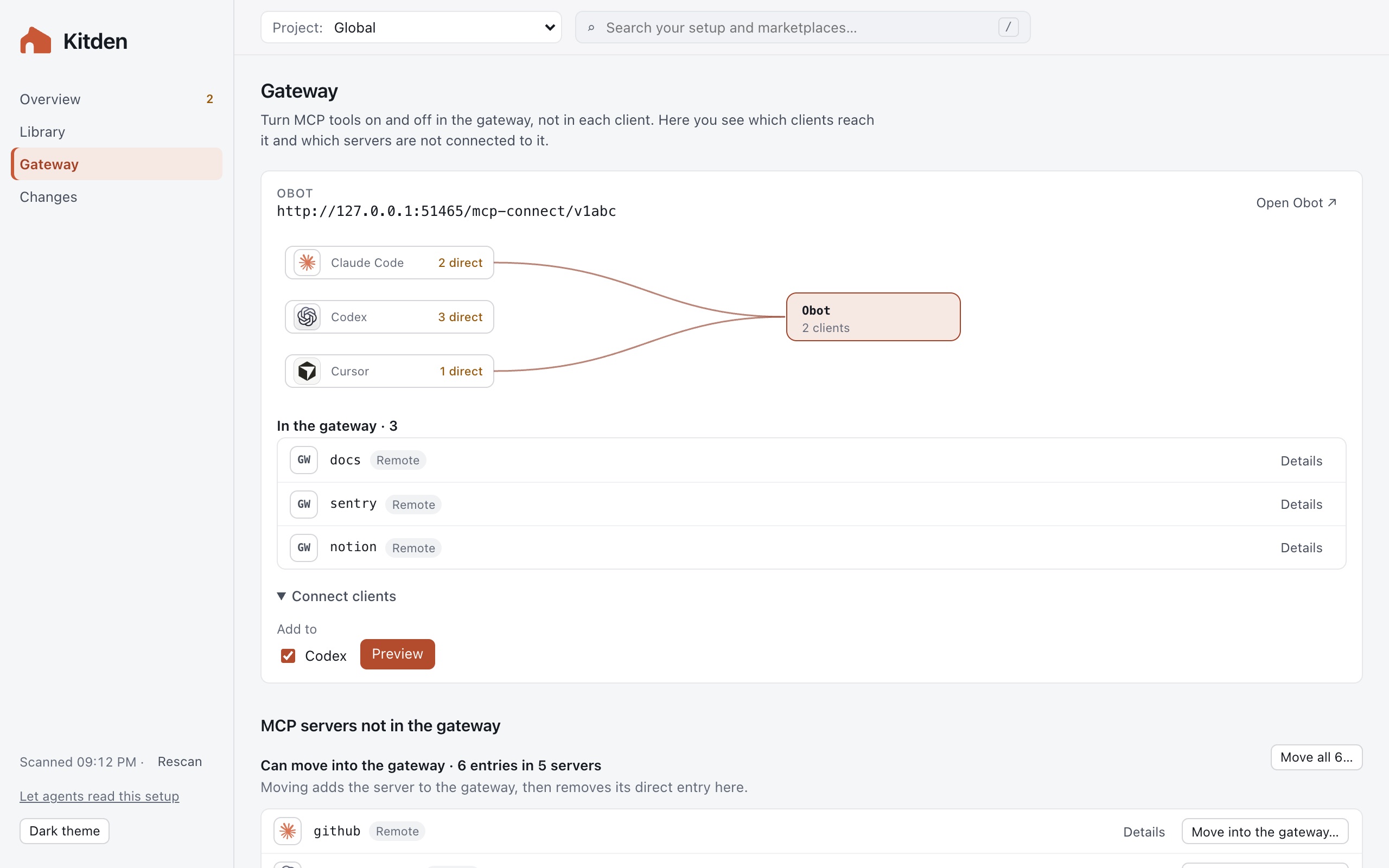
Gateway works with Obot (with OAuth sign-in) and MetaMCP. Connect your clients, see what the gateway holds and which servers go around it, and move direct servers into it one at a time or all at once. Switch every client to another gateway in one review. Click a client in the diagram to open its app.
Check every change before it is written
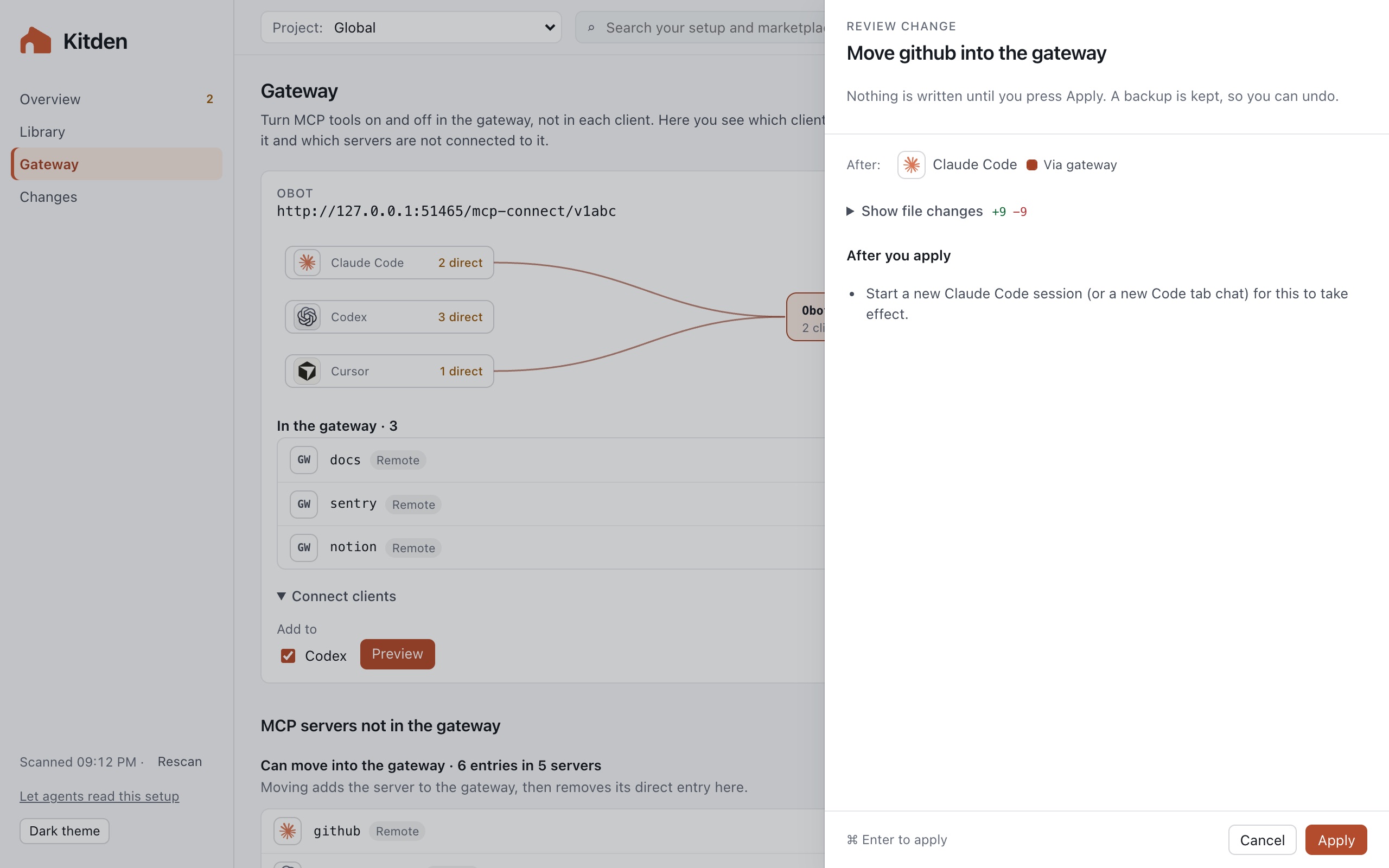
Every change opens a review first: the clients it reaches and the exact file change, with secrets hidden. Apply keeps a backup, writes the change and checks it. Changes keeps the history, with Undo and what to restart for a change to take effect.
Let your agents ask
Agents adds a read-only MCP server to Claude Code, Codex or Cursor, so you can ask your agent "show my setup". It cannot change anything.
Install
macOS. With uv:
uvx kitden
Without uv, one line installs uv and Kitden, then opens the page:
curl -LsSf https://raw.githubusercontent.com/KonstantinStarovoytov/kitden/main/install.sh | sh
From inside your agent:
| Claude Code | /plugin install kitden --marketplace KonstantinStarovoytov/kitden |
| Codex | codex plugin marketplace add KonstantinStarovoytov/kitden, then codex plugin add kitden@kitden |
| Cursor |  |
Then ask your agent "show my setup". Cursor also takes the plain link
cursor://anysphere.cursor-deeplink/mcp/install?name=kitden&config=eyJjb21tYW5kIjoia2l0ZGVuIiwiYXJncyI6WyJtY3AiXX0=.
Linux and Windows are not supported yet.
How it works
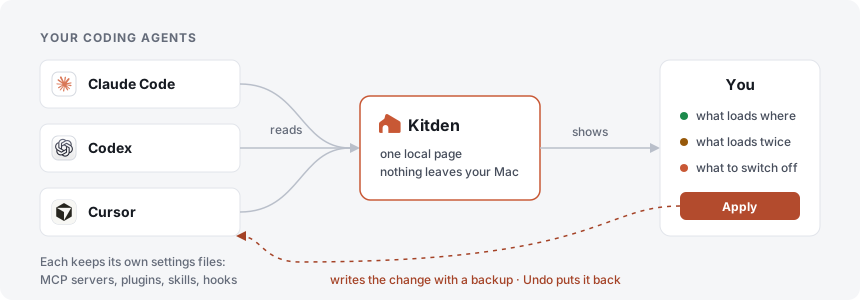
- Kitden reads your agents' settings files.
- It shows them on one page in your browser, at
127.0.0.1only. - You press Apply. Kitden backs the file up, writes the change and checks it. Undo brings the old file back. Backups stay for 30 days, and the newest 100 changes always keep theirs.
Secrets are never shown or logged. Kitden goes online only to reach the gateways you add, and to
read one marketplace file from raw.githubusercontent.com when you add a marketplace from a
GitHub link.
Roadmap
What is done and what comes next: ROADMAP.md. Ideas and bugs: open an issue.
More
1 maintainer

Metadata
1 maintainer
Release files for kitden 0.2.0
For a detailed explanation of source distributions (sdists) and built distributions (wheels), please see the package formats documentation.
Source distribution (sdist)
| File | Size | Uploaded | Provenance | |
|---|---|---|---|---|
| kitden-0.2.0.tar.gz | 191.1 kB | Without provenance | Details |
Built distribution (wheel)
| File | Interpreter | ABI | Platform | Reset |
|---|---|---|---|---|
| kitden-0.2.0-py3-none-any.whl | Python 3 | none | any | Details |
Total release size: 416.1 kB
Release files / kitden-0.2.0.tar.gz
| Download URL | kitden-0.2.0.tar.gz |
|---|---|
| Size | 191.1 kB |
| Tags | Source |
|
SHA-256 checksum How to use checksums |
04bdd9043d13e9e793366b360573988e8eb36ab4c959997c548b7ec9f23870da
|
|
BLAKE2b-256 checksum How to use checksums |
8c3d2ad30946fd636ca042939da12cfb7464224f5c76a9fc9c6c6ea8cf1e6cca
|
| Upload date | |
|
Uploaded using Trusted Publishing? What is trusted publishing? |
Yes |
| Uploaded via |
uv/0.10.10 {"installer":{"name":"uv","version":"0.10.10","subcommand":["publish"]},"python":null,"implementation":{"name":null,"version":null},"distro":{"name":"Ubuntu","version":"24.04","id":"noble","libc":null},"system":{"name":null,"release":null},"cpu":null,"openssl_version":null,"setuptools_version":null,"rustc_version":null,"ci":true}
|
Release files / kitden-0.2.0-py3-none-any.whl
| Download URL | kitden-0.2.0-py3-none-any.whl |
|---|---|
| Size | 225.0 kB |
| Tags | Python 3 |
|
SHA-256 checksum How to use checksums |
ffcbebad7dc860be847a713f2c4b70080a3da95df23d66b69339e455821edf2a
|
|
BLAKE2b-256 checksum How to use checksums |
7706726c981ab6c2fc67fde717672fabfbe7f08b39eea7bccfe283d364520acc
|
| Upload date | |
|
Uploaded using Trusted Publishing? What is trusted publishing? |
Yes |
| Uploaded via |
uv/0.10.10 {"installer":{"name":"uv","version":"0.10.10","subcommand":["publish"]},"python":null,"implementation":{"name":null,"version":null},"distro":{"name":"Ubuntu","version":"24.04","id":"noble","libc":null},"system":{"name":null,"release":null},"cpu":null,"openssl_version":null,"setuptools_version":null,"rustc_version":null,"ci":true}
|
Security for kitden 0.2.0
Provenance
Provenance describes where a file came from. On PyPI, provenance is shared via attestations, which provide a verifiable record of the build or publishing details. View details, limitations and caveats.
No provenance found
None of the files in this release were uploaded with provenance metadata.
A note on package security
PyPI is a repository for distributing packages, not a service for auditing them. While third-party security researchers and our staff do their best to detect and remove malicious packages, PyPI cannot guarantee the quality, security or suitability of any given package.














