
Kitsune
Bring your coding agent into Firefox—and keep working alongside it.
Kitsune lets AI agents like Claude Code, Codex, Pi, and OpenCode use the Firefox, Zen, or LibreWolf browser you already have open. Your sessions, cookies, and extensions stay in place. No Playwright, Chromium, or WebDriver required.
Research in background tabs, prepare form drafts, and continue browser tasks with an agent you already use—not a separate browser or built-in AI assistant.
Two principles guide every trade-off: the user's browser belongs to the user, and fewer, sharper tools. See Philosophy.
Why Kitsune?
- Work alongside your agent. Agent-created tabs open in the background. Writes to a tab you are actively using are held, and closing your own tabs requires a separate confirmation step. These protections reduce interference; OS-level clicks and site-opened popups still have focus and input limitations.
- Choose how much to delegate. Configure
KITSUNE_MODE=read,draft, oractto limit the available tools and bridge requests. Draft mode allows supported field input without click or submit tools; sites may still autosave edits. The default isact, not a restricted mode. See Task modes. - Recover without blindly repeating work. With the optional
parallelcapability, interrupted batch, parallel, and workflow calls can be resumed without resending successful writes. Uncertain writes require an observation before retrying. Checkpoints are temporary and do not survive a bridge restart.
What can it do?
- Research the web. Search, read pages, and summarize findings with links.
- Interact with websites. Click, type, select options, and fill forms—even on sites you're already signed into.
- Capture and extract. Take screenshots or turn page content into text and Markdown.
- Work across tabs. Keep research and tasks in separate tabs without replacing the page you're using.
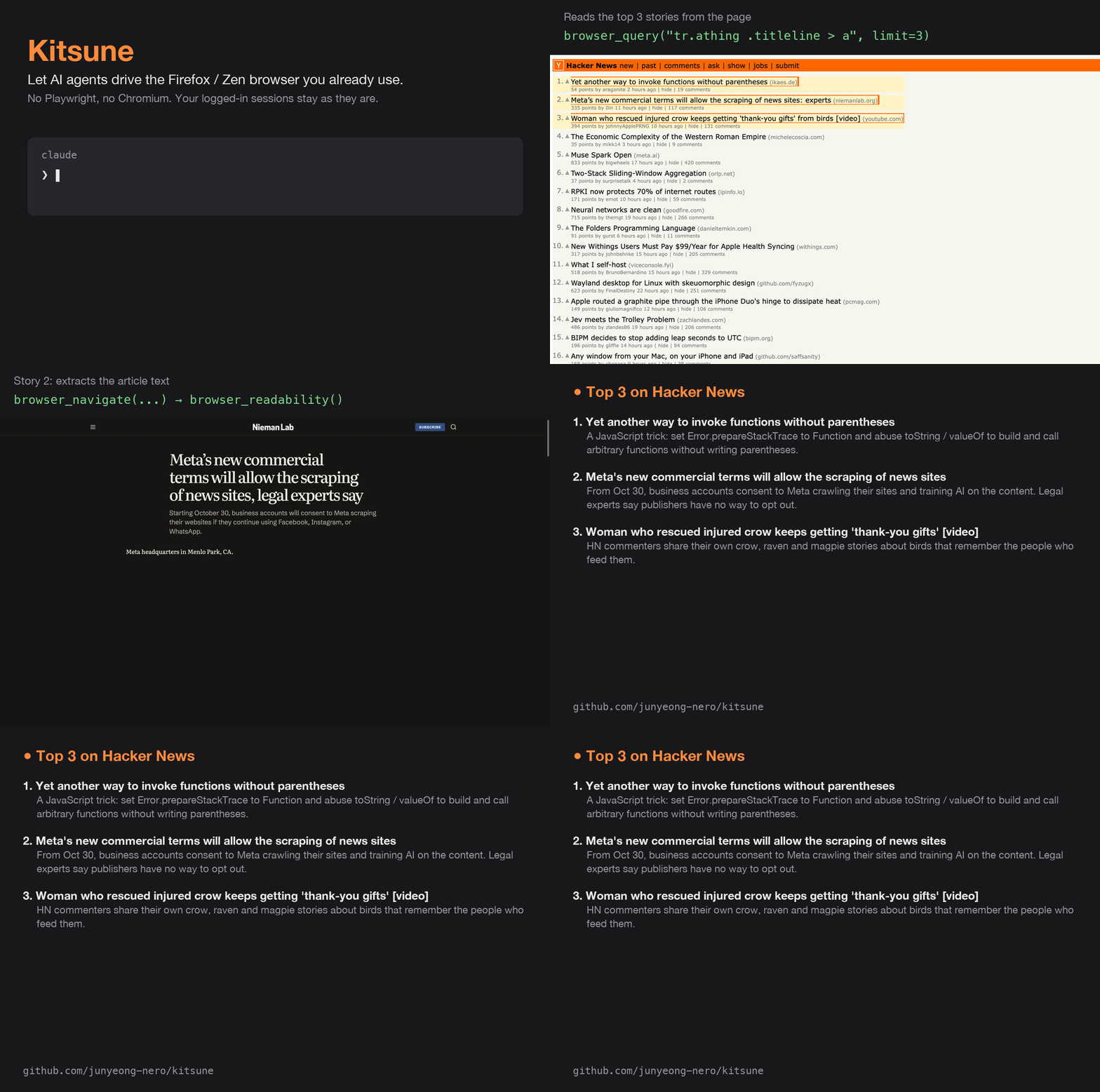
A real browser session, captured with Kitsune and sped up.
How do I use it?
-
Connect once. Install uv, then follow the MCP setup for your agent below. Install the browser extension in Firefox, Zen, or LibreWolf: the signed build installs once, while the developer build (needed for
browser_evaluate) is a temporary add-on. -
Keep your browser open. Kitsune starts its shared bridge automatically. Ask your agent to check the connection before your first task.
-
Ask in plain language. For example:
Research these three products in new background tabs and compare them with source links. Leave my current tab alone.
Inspect this page's form and fill a draft. Don't submit it yet.
Open Hacker News in a background tab and summarize the top three stories with links.
For an enforced draft-only tool surface, configure
KITSUNE_MODE=draftbefore starting the MCP client; asking in plain language does not change the mode.
Use a dedicated browser profile and only give access to accounts the agent needs. Ask for confirmation before sending, purchasing, or deleting anything. The opt-in ask-before-act policy makes the bridge hold submits, payment pages, JavaScript, and cookie access until the agent repeats the call with a confirmation token. That second step is not proof of human approval, and these controls do not prevent prompt injection. Read the security guidance before using sensitive accounts.
MCP setup
All clients launch the same local stdio server:
uvx --from kitsune-browser-mcp kitsune. Choose one setup method for each
client you use. Several clients can share the same bridge; keep their Kitsune
versions and install sources consistent.
CLI registration: Claude Code, Codex, and Pi
Claude Code — available in every project with --scope user:
claude mcp add --scope user kitsune -- uvx --from kitsune-browser-mcp kitsune
Codex CLI — registers the server in ~/.codex/config.toml:
codex mcp add kitsune -- uvx --from kitsune-browser-mcp kitsune
Pi — uses built-in MCP support with user-level configuration by default:
pi mcp add kitsune -- uvx --from kitsune-browser-mcp kitsune
pi mcp list
Add --local before kitsune to register Pi's server only for the current
project. In an already running Pi session, run /reload, then /mcp to inspect
the connection. If an MCP adapter extension overrides Pi's built-in support,
follow that extension's configuration instructions instead.
OpenCode
Merge this into ~/.config/opencode/opencode.json (global) or opencode.json
in your project root. OpenCode uses an mcp object and a command array, not
mcpServers:
{
  "$schema": "https://opencode.ai/config.json",
  "mcp": {
    "kitsune": {
      "type": "local",
      "command": ["uvx", "--from", "kitsune-browser-mcp", "kitsune"],
      "enabled": true
    }
  }
}
JSON configuration: Pi, Claude Desktop, and Cursor
These clients share the same mcpServers format. As an alternative to CLI
registration where available, merge the following entry into your client's
config; keep any existing servers:
| Client | Config file |
|---|---|
| Pi (built-in MCP) | ~/.pi/agent/mcp.json (user) or .pi/mcp.json (project; requires project trust) |
| Claude Desktop (macOS) | ~/Library/Application Support/Claude/claude_desktop_config.json |
| Cursor | ~/.cursor/mcp.json (global) or .cursor/mcp.json (project) |
{
  "mcpServers": {
    "kitsune": {
      "command": "uvx",
      "args": ["--from", "kitsune-browser-mcp", "kitsune"]
    }
  }
}
Restart or reconnect your client after configuring it, then ask it to list your tabs
(browser_tabs with action: "list"); an error's hint says what to fix. GUI apps may need the full path returned by
which uvx instead of uvx if they do not inherit your shell's PATH.
By default Kitsune publishes exactly Playwright MCP's
25 core tools (same names, descriptions and schemas), driving your own browser, so
prompts and clients written for Playwright MCP work unchanged. Kitsune's own tools
(page text, scrolling, connection status, policies, parallel tabs, ...) are opt-in
groups such as KITSUNE_CAPS=core,devtools
(see Core tools).
For Codex's TOML alternative, environment variables, version pinning, and upgrades, see Installation.
For the details: Tools · Configuration · Troubleshooting · Updating · API reference · Development
For architecture, product trade-offs, and the wider browser MCP landscape, see Positioning.
MIT · Based on ZenLink and ZenLink-MCP by Jay-Quan. Credits · License
1 maintainer

Metadata
1 maintainer
Release files for kitsune-browser-mcp 0.3.1
For a detailed explanation of source distributions (sdists) and built distributions (wheels), please see the package formats documentation.
Source distribution (sdist)
| File | Size | Uploaded | Provenance | |
|---|---|---|---|---|
| kitsune_browser_mcp-0.3.1.tar.gz | 361.9 kB | Without provenance | Details |
Built distribution (wheel)
| File | Interpreter | ABI | Platform | Reset |
|---|---|---|---|---|
| kitsune_browser_mcp-0.3.1-py3-none-any.whl | Python 3 | none | any | Details |
Total release size: 470.8 kB
Release files / kitsune_browser_mcp-0.3.1.tar.gz
| Download URL | kitsune_browser_mcp-0.3.1.tar.gz |
|---|---|
| Size | 361.9 kB |
| Tags | Source |
|
SHA-256 checksum How to use checksums |
b3a80b8b8e311d67c8793474899b15b97de328a8fbd1311d0ee87c510e2a3cb3
|
|
BLAKE2b-256 checksum How to use checksums |
02dd7889be7beb7d70315a3acfd3dc40068acc126d89607c95033789bcbd1575
|
| Upload date | |
|
Uploaded using Trusted Publishing? What is trusted publishing? |
Yes |
| Uploaded via |
uv/0.13.5 {"installer":{"name":"uv","version":"0.13.5","subcommand":["publish"]},"python":null,"implementation":{"name":null,"version":null},"distro":{"name":"Ubuntu","version":"24.04","id":"noble","libc":null},"system":{"name":null,"release":null},"cpu":null,"openssl_version":null,"setuptools_version":null,"rustc_version":null,"ci":true}
|
Release files / kitsune_browser_mcp-0.3.1-py3-none-any.whl
| Download URL | kitsune_browser_mcp-0.3.1-py3-none-any.whl |
|---|---|
| Size | 108.8 kB |
| Tags | Python 3 |
|
SHA-256 checksum How to use checksums |
78df3ef62215351b46858b25b0883ac1c745d2b579fb05670de4b75fb8bdcd70
|
|
BLAKE2b-256 checksum How to use checksums |
dd00fdc2789be8c9ae51131fb050ed10f84f9c71eb8b1f835dec72968d2f4165
|
| Upload date | |
|
Uploaded using Trusted Publishing? What is trusted publishing? |
Yes |
| Uploaded via |
uv/0.13.5 {"installer":{"name":"uv","version":"0.13.5","subcommand":["publish"]},"python":null,"implementation":{"name":null,"version":null},"distro":{"name":"Ubuntu","version":"24.04","id":"noble","libc":null},"system":{"name":null,"release":null},"cpu":null,"openssl_version":null,"setuptools_version":null,"rustc_version":null,"ci":true}
|
Security for kitsune-browser-mcp 0.3.1
Provenance
Provenance describes where a file came from. On PyPI, provenance is shared via attestations, which provide a verifiable record of the build or publishing details. View details, limitations and caveats.
No provenance found
None of the files in this release were uploaded with provenance metadata.
A note on package security
PyPI is a repository for distributing packages, not a service for auditing them. While third-party security researchers and our staff do their best to detect and remove malicious packages, PyPI cannot guarantee the quality, security or suitability of any given package.
To learn more about protecting yourself from malicious actors, visit our package security documentation.














