
A lightweight memory service for AI applications with pluggable backends.
Verified details
These details have been verified by PyPIProject links
GitHub Statistics
Maintainers

Project description





Unified Memory API for AI Applications - Cloud & Local
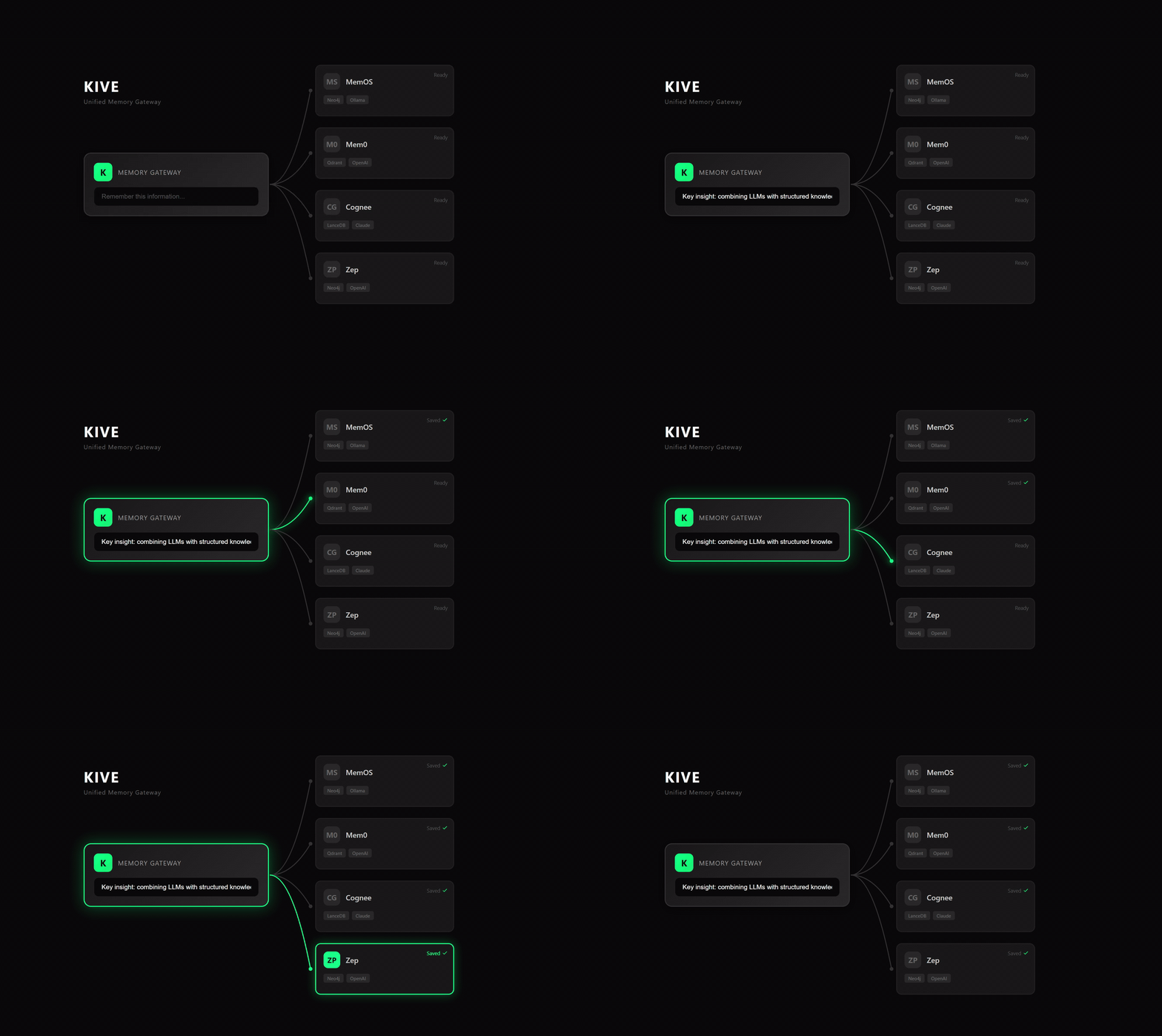
Kive provides a single, consistent interface to manage AI memories across cloud services and local deployments.
🌒 What is Kive?
Kive is not a memory engine - it's a universal adapter that unifies cloud and local memory services under one simple API.
- 🌱 One API, Multiple Backends - Switch between Mem0, Cognee, Zep, MemU, SuperMemory without changing code
- 🪴 Cloud & Local Support - Use managed cloud services or deploy locally with the same interface
- 🌿 Unified Operations - Same CRUD methods across all providers
- 🌾 Multi-Tenancy Built-in - Tenant, app, user, session isolation out of the box
- 🌳 Dual Usage Modes - Use as Python SDK for direct integration, or deploy as HTTP gateway for multi-language access
🌓 Core Features
🌱 Unified Initialization
One initialization pattern works for both cloud and local providers:
from kive import Memory

# Cloud Provider (Mem0 Cloud)
memory = Memory(
    "cloud/mem0",
    api_key="m0-xxx",
)

# Local Provider (Mem0 Local)
memory = Memory(
    "local/mem0",
    llm_provider="openai",
    llm_model="gpt-4",
    llm_api_key="YOUR_KEY",
    embedding_provider="openai",
    embedding_model="text-embedding-3-small",
    embedding_api_key="YOUR_KEY",
    vector_db_provider="chroma",
    graph_db_provider="kuzu",
)
🪴 Unified CRUD Operations
Same API regardless of cloud or local deployment:
# Add memory
result = await memory.add(
    content="Python is a programming language",
    user_id="user_123"
)

# Search memories
results = await memory.search(
    query="what is Python?",
    user_id="user_123",
    limit=10
)

# Get by ID
memo = await memory.get(memory_id="uuid-here")

# Update
updated = await memory.update(
    memory_id="uuid-here",
    content="Updated content"
)

# Delete
success = await memory.delete(memory_id="uuid-here")
🌔 Supported Memory Providers
🌿 Cloud Providers (7)
Managed services - just provide API key:
| Provider | Provider String | Installation | Example | Best For | Key Features |
|---|---|---|---|---|---|
| Mem0 | "cloud/mem0" |
pip install kive[mem0-cloud] |
mem0_backend.py | Fast vector search | Real-time queries, Auto-extraction |
| Zep | "cloud/zep" |
pip install kive[zep-cloud] |
zep_backend.py | Conversational AI | Session management, Fact extraction |
| SuperMemory | "cloud/supermemory" |
pip install kive[supermemory-cloud] |
supermemory_backend.py | Document memory | PDF/Web ingestion, Semantic search |
| Cognee | "cloud/cognee" |
pip install kive[cognee-cloud] |
cognee_backend.py | Knowledge graphs | Deep reasoning, Entity linking |
| Memobase | "cloud/memobase" |
pip install kive[memobase-cloud] |
memobase_backend.py | Personal memory | User profiles, Context building |
| Memos | "cloud/memos" |
pip install kive[memos-cloud] |
memos_backend.py | Factual memory | Fact extraction, Preference tracking |
| MemU | "cloud/memu" |
pip install kive[memu-cloud] |
memu_backend.py | Category memory | Auto-categorization, Summaries |
🌾 Local Providers (4)
Self-hosted - full control over data:
| Provider | Provider String | Installation | Example | Best For | Key Features |
|---|---|---|---|---|---|
| Mem0 | "local/mem0" |
pip install kive[mem0-local] |
mem0_backend.py | Fast vector search | ChromaDB + Kuzu, Local-first |
| Cognee | "local/cognee" |
pip install kive[cognee-local] |
cognee_backend.py | Knowledge graphs | Local graph DB, Batch processing |
| Graphiti | "local/graphiti" |
pip install kive[graphiti-local] |
graphiti_backend.py | Temporal graphs | Time-aware facts, Episodic memory |
| Memos | "local/memos" |
pip install kive[memos-local] |
memos_backend.py | Factual memory | Local fact extraction, Preference tracking |
🌕 Quick Start
Installation
# Basic installation
pip install kive

# Install specific cloud provider
pip install kive[mem0-cloud]      # Mem0 Cloud
pip install kive[zep-cloud]       # Zep Cloud
pip install kive[memobase-cloud]  # Memobase Cloud

# Install specific local provider
pip install kive[mem0-local]      # Mem0 Local
pip install kive[cognee-local]    # Cognee Local
pip install kive[graphiti-local]  # Graphiti Local

# Install all cloud providers
pip install kive[cloud]

# Install all local providers
pip install kive[local]

# Install everything
pip install kive[all]
Basic Usage
import asyncio
from kive import Memory

async def main():
    # Initialize memory (cloud or local)
    memory = Memory(
        "cloud/mem0",  # or "local/mem0"
        api_key="YOUR_API_KEY"
    )

    # Add memory
    result = await memory.add(
        content="Python is a programming language",
        user_id="user_123"
    )
    print(f"Added: {result.id}")

    # Search memories
    results = await memory.search(
        query="what is Python?",
        user_id="user_123"
    )

    for memo in results.results:
        print(f"- {memo.content}")

asyncio.run(main())
See complete examples:
🌖 Cloud vs Local
Cloud Provider Parameters
Required:
api_key- Provider API key
Optional:
base_url- Custom API endpointtenant_id- Organization/tenant ID for multi-tenancyapp_id- Project/application ID
memory = Memory(
    "cloud/mem0",
    api_key="m0-xxx",
    base_url="https://api.mem0.ai",  # Optional
    tenant_id="org_123",              # Optional
    app_id="project_456"              # Optional
)
Local Provider Parameters
Isolation:
tenant_id- Tenant ID for multi-tenancy isolationapp_id- Application ID for app-level isolation
LLM:
llm_provider- LLM provider (e.g., "openai", "bailian")llm_model- LLM model namellm_api_key- LLM API keyllm_base_url- LLM API base URL
Embedding:
embedding_provider- Embedding providerembedding_model- Embedding model nameembedding_api_key- Embedding API keyembedding_base_url- Embedding API base URLembedding_dimensions- Embedding dimensions
Vector DB:
vector_db_provider- Vector database provider (e.g., "chroma", "qdrant")vector_db_uri- Vector database connection URIvector_db_key- Vector database authentication key
Graph DB:
graph_db_provider- Graph database provider (e.g., "kuzu", "neo4j")graph_db_uri- Graph database connection URIgraph_db_username- Graph database usernamegraph_db_password- Graph database password
memory = Memory(
    "local/mem0",
    # LLM config
    llm_provider="bailian",
    llm_model="qwen-plus",
    llm_api_key="YOUR_DASHSCOPE_KEY",
    llm_base_url="https://dashscope.aliyuncs.com/compatible-mode/v1",
    # Embedding config
    embedding_provider="bailian",
    embedding_model="text-embedding-v3",
    embedding_api_key="YOUR_DASHSCOPE_KEY",
    embedding_base_url="https://dashscope.aliyuncs.com/compatible-mode/v1",
    embedding_dimensions=1024,
    # Vector DB config
    vector_db_provider="chroma",
    # Graph DB config
    graph_db_provider="kuzu",
    graph_db_uri=".kive/mem0.kuzu"
)
🌗 Unified Operations
Core API Methods
All providers support the same operations:
from kive import Memory

memory = Memory("cloud/mem0", api_key="YOUR_KEY")

# Add memory
result = await memory.add(
    content="Knowledge to remember",
    user_id="user_123"
)

# Search memories
results = await memory.search(
    query="search query",
    user_id="user_123",
    limit=10
)

# Get by ID
memo = await memory.get(memory_id="uuid-here")

# Update memory
updated = await memory.update(
    memory_id="uuid-here",
    content="Updated content"
)

# Delete memory
success = await memory.delete(memory_id="uuid-here")
Content Input Types
Kive supports multiple content types:
# Text content (most common)
await memory.add(
    content="Python is a powerful programming language",
    user_id="user_123"
)

# Conversation messages
await memory.add(
    content=[
        {"role": "user", "content": "What's the weather?"},
        {"role": "assistant", "content": "It's sunny and 25°C"}
    ],
    user_id="user_123"
)

# With metadata
await memory.add(
    content="Important meeting notes",
    metadata={
        "category": "work",
        "priority": "high",
        "tags": ["meeting", "project-alpha"]
    },
    user_id="user_123"
)
Multi-Tenancy & Context Parameters
Kive provides comprehensive context isolation:
# All operations support these context parameters
await memory.add(
    content="Your content here",

    # Organization level (B2B SaaS)
    tenant_id="acme_corp",

    # Application level (multi-product platforms)
    app_id="healthbot_v2",

    # AI agent level (multi-agent systems)
    ai_id="wellness_coach",

    # User level (required)
    user_id="user_10086",

    # Session level (conversation tracking)
    session_id="chat_abc123"
)
Search with Context
# Search user's personal memories
results = await memory.search(
    query="health preferences",
    user_id="user_123"
)

# Search organization-wide
results = await memory.search(
    query="company policies",
    tenant_id="acme_corp"
)
🌘 Memory Gateway Server
Kive includes a built-in FastAPI server that can act as a unified memory gateway, allowing you to expose multiple memory providers through a single HTTP API.
Why Use the Gateway?
- Multi-Provider Hub - Serve multiple memory backends through one endpoint
- Consistent REST API - Same HTTP interface for all providers
- Easy Integration - Connect any client application without provider-specific SDKs
- Flexible Deployment - Deploy as microservice, sidecar, or standalone gateway
Quick Start
import os
from dotenv import load_dotenv
from kive.providers.local import Mem0Local
from kive.providers.cloud import Mem0Cloud
from kive.server import Server

load_dotenv()

# Initialize providers
mem0_local = Mem0Local(
    llm_provider="bailian",
    llm_model="qwen-plus",
    llm_api_key=os.getenv("DASHSCOPE_API_KEY"),
    llm_base_url="https://dashscope.aliyuncs.com/compatible-mode/v1",
    embedding_provider="bailian",
    embedding_model="text-embedding-v3",
    embedding_api_key=os.getenv("DASHSCOPE_API_KEY"),
    embedding_base_url="https://dashscope.aliyuncs.com/compatible-mode/v1",
    embedding_dimensions=1024,
    vector_db_provider="chroma",
    graph_db_provider="kuzu",
    graph_db_uri=".kive/mem0.kuzu",
)

mem0_cloud = Mem0Cloud(
    api_key=os.getenv("MEM0_API_KEY"),
)

# Create gateway with multiple providers
# Keys are custom provider paths used in API requests
server = Server(
    providers={
        "local/mem0": mem0_local,    # Custom path for local Mem0
        "cloud/mem0": mem0_cloud,    # Custom path for cloud Mem0
    },
    host="0.0.0.0",
    port=12123
)

# Start server
server.run()
Using the Gateway
Once running, access your memory providers via HTTP:
# Add memory
curl -X POST http://localhost:12123/memories \
  -H "Content-Type: application/json" \
  -d '{
    "provider": "local/mem0",
    "content": "Python is a programming language",
    "user_id": "user_123"
  }'

# Search memories
curl -X POST http://localhost:12123/memories/search \
  -H "Content-Type: application/json" \
  -d '{
    "provider": "local/mem0",
    "query": "what is Python?",
    "user_id": "user_123"
  }'
See complete example: server_example.py
🌑 Is Kive for You?
Choose Kive if you:
✅ Need to support both cloud and local deployments
✅ Want to switch memory providers without code changes
✅ Need multi-tenancy and context isolation built-in
✅ Want a simple, unified API across 10+ providers
✅ Prefer to focus on building AI apps, not memory infrastructure
License
MIT License - see LICENSE for details.

Project details
Verified details
These details have been verified by PyPIProject links
GitHub Statistics
Maintainers
Release history Release notifications | RSS feed


Download files
Download the file for your platform. If you're not sure which to choose, learn more about installing packages.
Source Distribution
Built Distribution
Filter files by name, interpreter, ABI, and platform.
If you're not sure about the file name format, learn more about wheel file names.
Copy a direct link to the current filters
File details
Details for the file kive-0.2.0.tar.gz.
File metadata
- Download URL: kive-0.2.0.tar.gz
- Upload date:
- Size: 63.9 kB
- Tags: Source
- Uploaded using Trusted Publishing? Yes
- Uploaded via: twine/6.1.0 CPython/3.13.7
File hashes
| Algorithm | Hash digest | |
|---|---|---|
| SHA256 |
230406350bb9423b1075db04338083251d3bb3524eb19294fa39158708154aeb
|
|
| MD5 |
7b5477690c1ac9d8e77b677eebeac49a
|
|
| BLAKE2b-256 |
6a8f70a5de7fb5f4f475a9168ab0f8dd22a94aae660a0bae8b40c716715e866e
|
Provenance
The following attestation bundles were made for kive-0.2.0.tar.gz:
Publisher:
publish.yml on zhixiangxue/kive-ai
-
Statement:
-
Statement type:
https://in-toto.io/Statement/v1 -
Predicate type:
https://docs.pypi.org/attestations/publish/v1 -
Subject name:
kive-0.2.0.tar.gz -
Subject digest:
230406350bb9423b1075db04338083251d3bb3524eb19294fa39158708154aeb - Sigstore transparency entry: 763312725
- Sigstore integration time:
-
Permalink:
zhixiangxue/kive-ai@a95284cbf4cd5e4ae5d7bd6b9f36e7b9394c2f33 -
Branch / Tag:
refs/tags/0.2.0-beta.1 - Owner: https://github.com/zhixiangxue
-
Access:
public
-
Token Issuer:
https://token.actions.githubusercontent.com -
Runner Environment:
github-hosted -
Publication workflow:
publish.yml@a95284cbf4cd5e4ae5d7bd6b9f36e7b9394c2f33 -
Trigger Event:
release
-
Statement type:
File details
Details for the file kive-0.2.0-py3-none-any.whl.
File metadata
- Download URL: kive-0.2.0-py3-none-any.whl
- Upload date:
- Size: 78.5 kB
- Tags: Python 3
- Uploaded using Trusted Publishing? Yes
- Uploaded via: twine/6.1.0 CPython/3.13.7
File hashes
| Algorithm | Hash digest | |
|---|---|---|
| SHA256 |
dbab7a1fde306787cd4154f2a2402aa3328d238e100d80621cca079219123790
|
|
| MD5 |
f617d2c86e0c82db0beff9e690a31e65
|
|
| BLAKE2b-256 |
02ced9cb8f8fa8d29f5d12f4de8fec92ae41b4bc575462f1e263513af0977a17
|
Provenance
The following attestation bundles were made for kive-0.2.0-py3-none-any.whl:
Publisher:
publish.yml on zhixiangxue/kive-ai
-
Statement:
-
Statement type:
https://in-toto.io/Statement/v1 -
Predicate type:
https://docs.pypi.org/attestations/publish/v1 -
Subject name:
kive-0.2.0-py3-none-any.whl -
Subject digest:
dbab7a1fde306787cd4154f2a2402aa3328d238e100d80621cca079219123790 - Sigstore transparency entry: 763312726
- Sigstore integration time:
-
Permalink:
zhixiangxue/kive-ai@a95284cbf4cd5e4ae5d7bd6b9f36e7b9394c2f33 -
Branch / Tag:
refs/tags/0.2.0-beta.1 - Owner: https://github.com/zhixiangxue
-
Access:
public
-
Token Issuer:
https://token.actions.githubusercontent.com -
Runner Environment:
github-hosted -
Publication workflow:
publish.yml@a95284cbf4cd5e4ae5d7bd6b9f36e7b9394c2f33 -
Trigger Event:
release
-
Statement type:






