
Draggable
Inspired by:
- drag_n_drop (
Draggableis based on this, so reading its documentation may help you understandDraggable) - Flutter
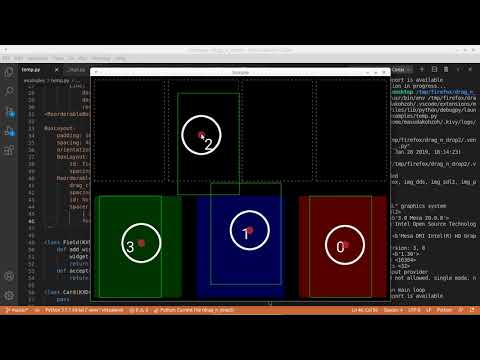
This flower adds a drag and drop functionality to layouts and widgets. There are 3 main components used to have drag and drop:
- The
KXDraggableBehavior. An equivalent of drag_n_drop'sDraggableObjectBehavior. - The
KXReorderableBehavior. An equivalent of drag_n_drop'sDraggableLayoutBehavior. - The
KXDroppableBehavior. An equivalent of Flutter'sDragTarget.
From now on, I use the term droppable to refer both KXReorderableBehavior and KXDroppableBehavior, and use the term draggable to refer KXDraggableBehavior.
Installation
Pin the minor version.
pip install "kivy_garden.draggable>=0.3,<0.4"
Main differences from drag_n_drop
- Drag is triggered by a long-press. More precisely, when a finger of the user
dropped inside a draggable, if the finger stays for
draggable.drag_timeoutmilli seconds without traveling more thandraggable.drag_distancepixels, it will be recognized as a dragging gesture. - Droppables can handle multiple drags simultaneously.
- Drag can be canceled by calling
draggable.drag_cancel(). - Nested
KXReorderableBehavioris not officially supported. It may or may not work depending on howdrag_classesanddrag_clsare set.
Flow
Once a drag has started, it will go through the following path.
stateDiagram-v2
    state cancelled? <<choice>>
    state on_a_droppable? <<choice>>
    state listed? <<choice>>
    state accepted? <<choice>>

    [*] --> on_drag_start
    on_drag_start --> cancelled?
    cancelled? --> on_a_droppable?: User lifted their finger up
    cancelled? --> on_drag_cancel: 'draggable.cancel()' was called before the user lifts their finger up

    on_a_droppable? --> listed?: Finger was on a droppable
    on_a_droppable? --> on_drag_fail: not on a droppable

    droppable_is_set: 'ctx.droppable' is set to the droppable
    listed? --> droppable_is_set: 'draggable.drag_cls' was listed in the 'droppable.drag_classes'
    listed? --> on_drag_fail: not listed

    droppable_is_set --> accepted?
    accepted? --> on_drag_succeed: Droppable accepted the drag ('droppable.accepts_drag()' returned True.)
    accepted? --> on_drag_fail

    on_drag_cancel --> on_drag_end
    on_drag_fail --> on_drag_end
    on_drag_succeed --> on_drag_end

    on_drag_end --> [*]
Important Change
Starting with version 0.3, on_drag_cancel may occur after on_drag_fail or on_drag_succeed if their default handler is an async function.
Cancellation
When your app switches a scene, you may want to cancel all ongoing drags.
ongoing_drags() and draggable.drag_cancel() are what you want.
from kivy_garden.draggable import ongoing_drags

def cancel_all_ongoing_drags():
    for draggable in ongoing_drags():
        draggable.drag_cancel()
Using other widgets as an emitter
Let's say you are creating a card game, and there is a deck on the screen. Say, you want the deck to emit a card when the user drops a finger on it, and want the card to follow the finger until the user lifts it up. In this situation, a widget that triggers a drag and a widget that is dragged are different. You can implement it as follows:
class Card(KXDraggableBehavior, Widget):
    pass


class Deck(Widget):
    def on_touch_down(self, touch):
        if self.collide_point(*touch.opos):
            Card(...).start_dragging_from_others_touch(self, touch)
Customization
What draggables do on_drag_succeed / on_drag_fail / on_drag_cancel are completely customizable.
For example, by default, when a drag fails, the draggable will go back to where it came from with little animation.
This is because the default handler of on_drag_fail is implemented as follows:
class KXDraggableBehavior:
    async def on_drag_fail(self, touch, ctx):
        await ak.anim_attrs(
            self, duration=.1,
            x=ctx.original_pos_win[0],
            y=ctx.original_pos_win[1],
        )
        restore_widget_state(self, ctx.original_state)
If you don't need the animation, and want the draggable to go back instantly, overwrite the handler as follows:
class MyDraggable(KXDraggableBehavior, Widget):
    def on_drag_fail(self, touch, ctx):
        restore_widget_state(self, ctx.original_state)
Or if you want the draggable to not go back, and want it to stay the current position, overwrite the handler as follows:
class MyDraggable(KXDraggableBehavior, Widget):
    def on_drag_fail(self, touch, ctx):
        pass
Another example: when a drag succeed, the draggable will become a child of droppable, by default. If you don't like it, and want the draggable to fade-out, overwrite the handler as follows:
class MyDraggable(KXDraggableBehavior, Widget):
    async def on_drag_succeed(self, touch, ctx):
        import asynckivy
        await asynckivy.anim_attrs(self, opacity=0)
        self.parent.remove_widget(self)
Just like that, you have free rein to change those behaviors.
But note that only the default handler of on_drag_succeed and on_drag_fail
can be an async function. Those two only.
You might say "What's the point of implementing a default handler as an async function,
when you can just launch any number of async functions from a regular function by using asynckivy.managed_start()?".
Well, if you use asynckivy.managed_start(), that task will run independently from the dragging process,
which means the draggable might fire on_drag_end and might start another drag while the task is still running.
If a default handler is an async function,
its code will be a part of dragging process and is guaranteed to be finished before on_drag_end gets fired.
License
This software is released under the terms of the MIT License.
1 maintainer

Metadata
1 maintainer
Release files for kivy-garden-draggable 0.3.0
For a detailed explanation of source distributions (sdists) and built distributions (wheels), please see the package formats documentation.
Source distribution (sdist)
| File | Size | Uploaded | |
|---|---|---|---|
| kivy_garden_draggable-0.3.0.tar.gz | 8.0 kB | Details |
Built distribution (wheel)
| File | Interpreter | ABI | Platform | Reset |
|---|---|---|---|---|
| kivy_garden_draggable-0.3.0-py3-none-any.whl | Python 3 | none | any | Details |
Total release size: 17.3 kB
Release files / kivy_garden_draggable-0.3.0.tar.gz
| Download URL | kivy_garden_draggable-0.3.0.tar.gz |
|---|---|
| Size | 8.0 kB |
| Tags | Source |
|
SHA-256 checksum How to use checksums |
7666ad7484e0b915a5d790f94d93ee47577050d71109109e92e48c4675b7c963
|
|
BLAKE2b-256 checksum How to use checksums |
edf786e7c5d6ee1bc603f191931d77ce687c13ede6003a95d4a70c4c60e84ac0
|
| Upload date | |
|
Uploaded using Trusted Publishing? What is trusted publishing? |
No |
| Uploaded via |
poetry/2.1.4 CPython/3.11.4 Linux/5.4.0-216-generic
|
Release files / kivy_garden_draggable-0.3.0-py3-none-any.whl
| Download URL | kivy_garden_draggable-0.3.0-py3-none-any.whl |
|---|---|
| Size | 9.3 kB |
| Tags | Python 3 |
|
SHA-256 checksum How to use checksums |
398de7ba718038a6b1a20b9e4b9c8ec90e60190f84f47eae97676e3a76205133
|
|
BLAKE2b-256 checksum How to use checksums |
dfa03988ad9a518be38aeb369990427ff40648db3415955cfac8f0f714097520
|
| Upload date | |
|
Uploaded using Trusted Publishing? What is trusted publishing? |
No |
| Uploaded via |
poetry/2.1.4 CPython/3.11.4 Linux/5.4.0-216-generic
|














