
Context and application menus for Kivy


Project description
Kivy Context Menu
Collection of classes for easy creating context and application menus.
Please see the garden instructions for how to use kivy garden flowers.
Flower information
Context Menu
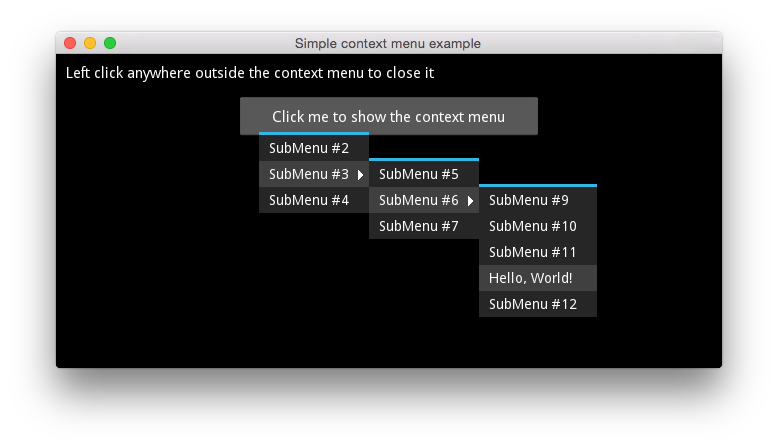
Context menu is represented by ContextMenu widget that wraps all menu items as ContextMenuTextItem widgets. Context menus can be nested, each ContextMenuTextItem can contain maximum one ContextMenu widget.
import kivy
from kivy.app import App
from kivy.lang import Builder
import kivy_garden.contextmenu

kv = """
FloatLayout:
    id: layout
    Label:
        pos: 10, self.parent.height - self.height - 10
        text: "Left click anywhere outside the context menu to close it"
        size_hint: None, None
        size: self.texture_size

    Button:
        size_hint: None, None
        pos_hint: {"center_x": 0.5, "center_y": 0.8 }
        size: 300, 40
        text: "Click me to show the context menu"
        on_release: context_menu.show(*app.root_window.mouse_pos)

    ContextMenu:
        id: context_menu
        visible: False
        cancel_handler_widget: layout

        ContextMenuTextItem:
            text: "SubMenu #2"
        ContextMenuTextItem:
            text: "SubMenu #3"
            ContextMenu:
                ContextMenuTextItem:
                    text: "SubMenu #5"
                ContextMenuTextItem:
                    text: "SubMenu #6"
                    ContextMenu:
                        ContextMenuTextItem:
                            text: "SubMenu #9"
                        ContextMenuTextItem:
                            text: "SubMenu #10"
                        ContextMenuTextItem:
                            text: "SubMenu #11"
                        ContextMenuTextItem:
                            text: "Hello, World!"
                            on_release: app.say_hello(self.text)
                        ContextMenuTextItem:
                            text: "SubMenu #12"
                ContextMenuTextItem:
                    text: "SubMenu #7"
        ContextMenuTextItem:
            text: "SubMenu #4"
"""

class MyApp(App):
    def build(self):
        self.title = 'Simple context menu example'
        return Builder.load_string(kv)

    def say_hello(self, text):
        print(text)
        self.root.ids['context_menu'].hide()

if __name__ == '__main__':
    MyApp().run()
Arrows that symbolize that an item has sub menu is created automatically. ContextMenuTextItem inherits from ButtonBehavior so you can use on_release to bind actions to it.
The root context menu can use cancel_handler_widget parameter. This adds on_touch_down event to it that closes the menu when you click anywhere outside the menu.
Application Menu
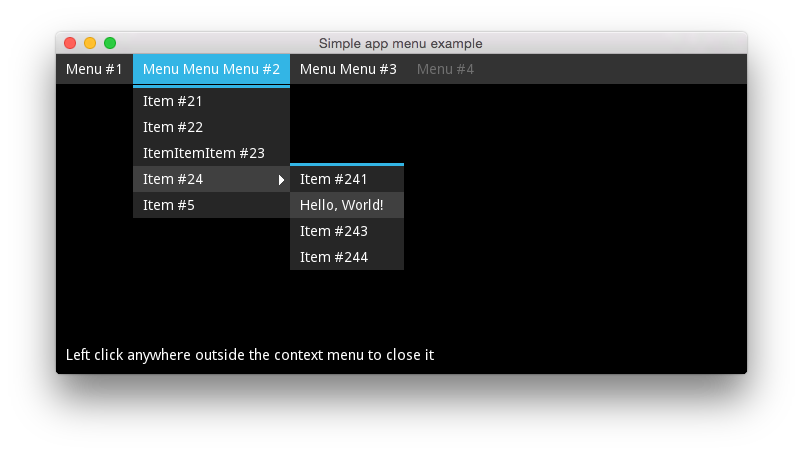
Creating application menus is very similar to context menus. Use AppMenu and AppMenuTextItem widgets to create the top level menu. Then each AppMenuTextItem can contain one ContextMenu widget as we saw above. AppMenuTextItem without ContextMenu are disabled by default
import kivy
from kivy.app import App
from kivy.lang import Builder
import kivy_garden.contextmenu

kv = """
FloatLayout:
    id: layout
    AppMenu:
        id: app_menu
        top: root.height
        cancel_handler_widget: layout

        AppMenuTextItem:
            text: "Menu #1"
            ContextMenu:
                ContextMenuTextItem:
                    text: "Item #11"
                ContextMenuTextItem:
                    text: "Item #12"
        AppMenuTextItem:
            text: "Menu Menu Menu #2"
            ContextMenu:
                ContextMenuTextItem:
                    text: "Item #21"
                ContextMenuTextItem:
                    text: "Item #22"
                ContextMenuTextItem:
                    text: "ItemItemItem #23"
                ContextMenuTextItem:
                    text: "Item #24"
                    ContextMenu:
                        ContextMenuTextItem:
                            text: "Item #241"
                        ContextMenuTextItem:
                            text: "Hello, World!"
                            on_release: app.say_hello(self.text)
                        # ...
                ContextMenuTextItem:
                    text: "Item #5"
        AppMenuTextItem:
            text: "Menu Menu #3"
            ContextMenu:
                ContextMenuTextItem:
                    text: "SubMenu #31"
                ContextMenuDivider:
                ContextMenuTextItem:
                    text: "SubMenu #32"
                # ...
        AppMenuTextItem:
            text: "Menu #4"
    # ...
    # The rest follows as usually
"""

class MyApp(App):
    def build(self):
        self.title = 'Simple app menu example'
        return Builder.load_string(kv)

    def say_hello(self, text):
        print(text)
        self.root.ids['app_menu'].close_all()

if __name__ == '__main__':
    MyApp().run()
Install
pip install kivy_garden.contextmenu
Usage
All classes
garden.contextmenu provides you with a set of classes and mixins for creating your own customised menu items for both context and application menus.
context_menu.AbstractMenu
Mixin class that represents basic functionality for all menus. It cannot be used by itself and needs to be extended with a layout. Provides cancel_handler_widget property. See AppMenu or ContextMenu.
context_menu.ContextMenu
Implementation of a context menu.
context_menu.AbstractMenuItem
Mixin class that represents a single menu item. Needs to be extended to be any useful. It's a base class for all menu items for both context and application menus.
If you want to extend this class you need to override the content_width property which tells the parent ContextMenu what is the expected width of this item. It needs to know this to set it's own width.
context_menu.ContextMenuItem
Single context menu item. Automatically draws an arrow if contains a ContextMenu children. If you want to create a custom menu item extend this class.
context_menu.AbstractMenuItemHoverable
Mixin class that makes any class that inherits ContextMenuItem to change background color on mouse hover.
context_menu.ContextMenuText
Menu item with Label widget without any extra functionality.
context_menu.ContextMenuDivider
Menu widget that splits two parts of a context/app menu.
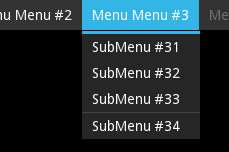
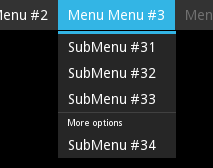
It also contains an instance of Label which is not visible if you don't set it any text.
ContextMenuTextItem:
    text: "SubMenu #33"
ContextMenuDivider:
    text: "More options"
ContextMenuTextItem:
    text: "SubMenu #34"
context_menu.ContextMenuTextItem
Menu item with text. You'll be most of the time just fine using this class for all your menu items. You can also see it used in all examples here. Contains a Label widget and copies text, font_size and color properties to it automatically.
app_menu.AppMenu
Application menu widget. By default it fills the entire parent's width.
app_menu.AppMenuTextItem
Application menu item width text. Contains a Label widget and copies text, font_size and color properties to it automatically.
Contributing
Check out our contribution guide and feel free to improve the flower.
License
This software is released under the terms of the MIT License. Please see the LICENSE.txt file.
Release history Release notifications | RSS feed


Download files
Download the file for your platform. If you're not sure which to choose, learn more about installing packages.
Source Distribution
Built Distribution
Filter files by name, interpreter, ABI, and platform.
If you're not sure about the file name format, learn more about wheel file names.
Copy a direct link to the current filters






