
FrostedGlass
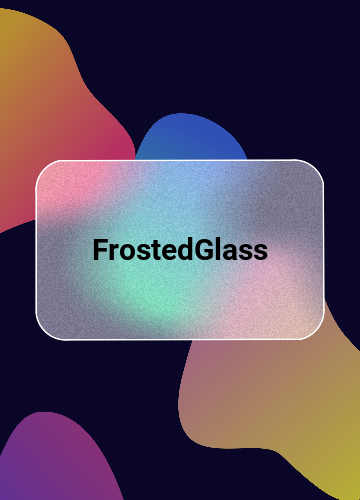
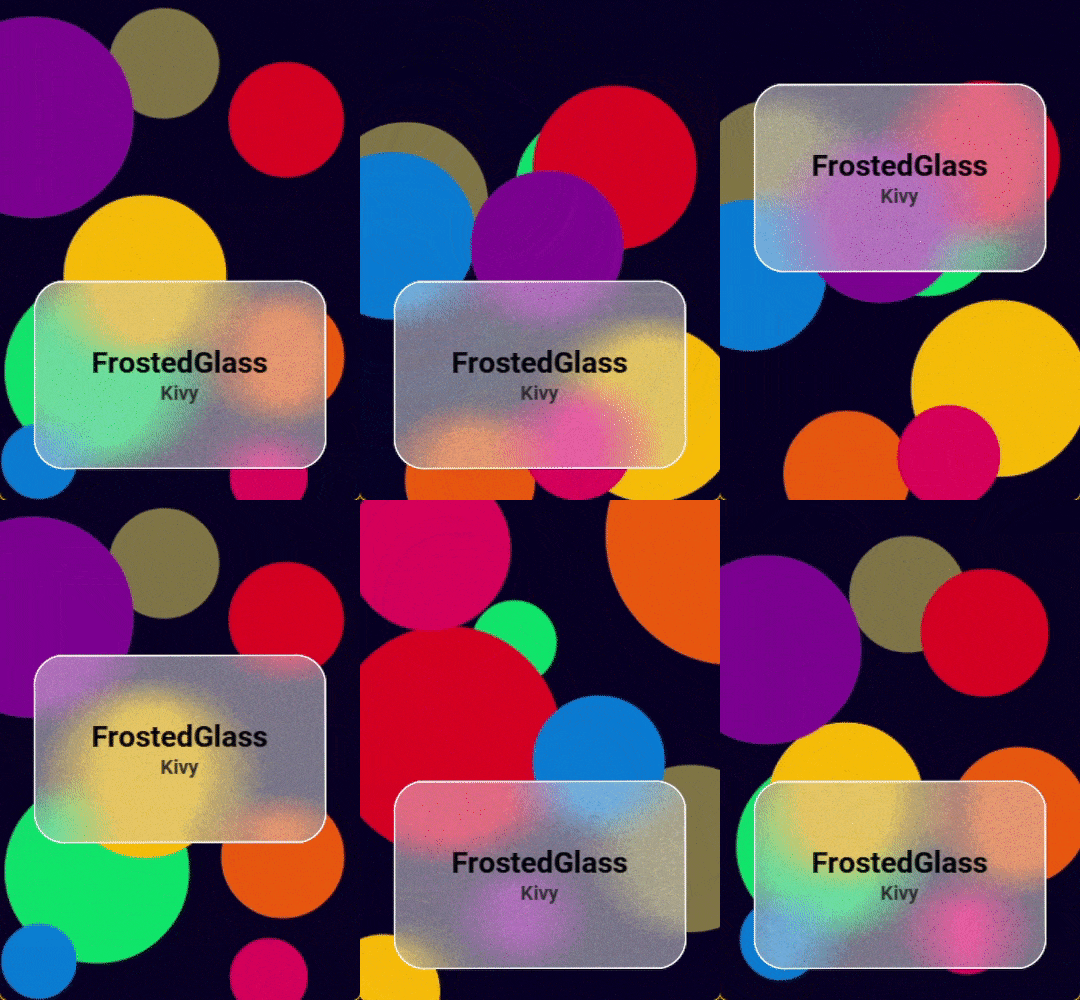
FrostedGlass is a widget with translucent frosted glass effect, that creates a context with the background behind it.
The effect created is based on the widget/layout passed in as the background. You can control the blur size, saturation, luminosity, overlay color, noise opacity, border radius and the outline (color and width).


Install
pip install kivy_garden.frostedglass
Import
python import:
from kivy_garden.frostedglass import FrostedGlass
or kvlang import:
#: import FrostedGlass kivy_garden.frostedglass
Usage
FrostedGlass will apply the effect to the background passed to it. Make sure you assign the correct id of the widget/layout that is behind FrostedGlass to the background property.
Example:

Image:
    id: bg_image
    pos_hint: {'center_x': 0.5, 'center_y': 0.5}
    source: 'kivy_logo.png'

FrostedGlass:
    pos_hint: {'center_x': 0.5, 'center_y': 0.5}
    size_hint: (None, None)
    size: (180, 130)
    background: bg_image
    blur_size: 20
    saturation: 1.0
    luminosity: 1.5
    overlay_color: "#FFB9008C"
    noise_opacity: 0.15
    border_radius:  dp(0), dp(100), dp(0), dp(100)
    outline_color: "#000000"
    outline_width: 1.2
    Label:
        text: 'FrostedGlass'
        pos_hint: {'center_x': 0.5, 'center_y': 0.5}
        bold: True
        color: 'black'
        font_size: dp(25)
FrostedGlass Showcase:
You can find the source code in the 🔷examples folder🔷
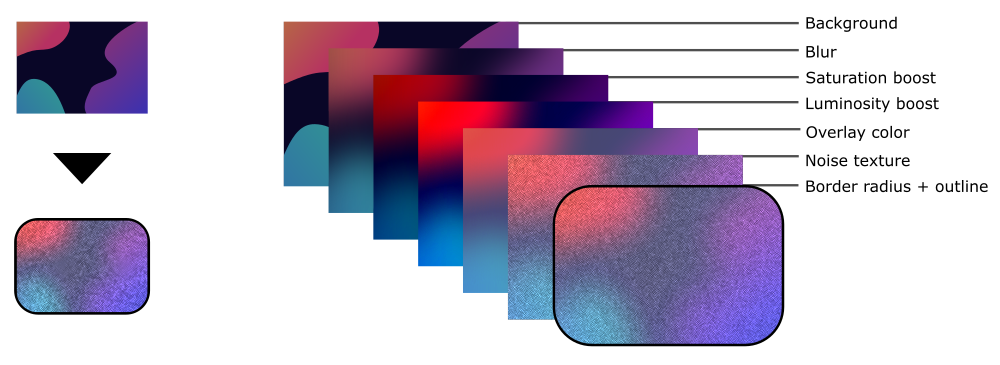
Overview of FrostedGlass creation process
To reach the final result of the FrostedGlass widget, the steps described in the image below are followed:
Features
FrostedGlass is efficient and makes internal optimizations to deliver the best performance while maintaining the quality of the effect, regardless of implementation, for all platforms supported by Kivy.
Overview:
- Automatic effect update, with auto bind to background properties.
- Updates effect only when needed. The effect update will only occur when some background or FrostedGlass property requires the update.
- Avoid unnecessary computation of the effect. If any FrostedGlass widget is not visible, it will not be updated.
- Full control over FrostedGlass properties. The widget is not limited to the frosted glass effect, it can be used simply as an option to achieve gaussian blur of some "background".
Guidelines
The FrostedGlass widget is designed to update the effect whenever there is a change to its properties or background properties that requires an effect update, to keep the effect in sync with the background.
But if it doesn't, you can call the update_effect() method manually to update the effect.
If calling the update_effect() method did not update the effect, you may need to call the refresh_effect() method.
API
background
Target widget/layout that will be used as a background to FrostedGlass. The recomended way to pass the widget is through the widget/layout id.
backgroundis defaults toNone.
blur_size
Size of the gaussian blur aplied to the background.
❗️Note: Do not pass relative values such as dp or sp. FrostedGlass already manages this automatically, according to the device's screen density.
blur_sizeis defaults to25.
saturation
Saturation boost that will be aplied to the background.
saturationis defaults to1.2.
luminosity
Luminosity boost that will be aplied to the background.
luminosityis defaults to1.3.
overlay_color
Color/tint overlay that will be aplied over the background.
overlay_coloris defaults to[0.5, 0.5, 0.5, 0.35].
noise_opacity
Opacity of the noise texture layer.
noise_opacityis a defaults to0.08.
border_radius
Specifies the radius used for the rounded corners clockwise: top-left, top-right, bottom-right, bottom-left.
border_radiusis defaults to[0, 0, 0, 0].
outline_color
Outline color.
outline_coloris defaults to[1, 1, 1, 1].
outline_width
Outline width.
outline_widthis defaults to1.
update_effect()
Updates the effect only once with each method call.
❗️Note: Use this method to update the effect only if FrostedGlass doesn't update automatically.
refresh_effect()
Updates the effect only once with each method call. Sould be used as an alternative, when
update_effect()doesn't update the effect totally.
❗️Note: Use this method to update the effect only if FrostedGlass doesn't update automatically and update_effect() was not enough to update the effect.
CI
Every push or pull request run the GitHub Action CI. It tests the code on various OS and also generates wheels that can be released on PyPI upon a tag. Docs are also generated and uploaded to the repo as well as artifacts of the CI.
Contributing
Check out our contribution guide and feel free to improve the FrostedGlass flower.
🔴 If you have a bug or an idea, create a report to help us improve or suggest an idea for this project by opening an issue
🔴 Every contribution is welcome and appreciated!!!
License
This software is released under the terms of the MIT License. Please see the LICENSE.txt file.
1 maintainer

Metadata
1 maintainer
Release files for kivy-garden.frostedglass 0.5.0
For a detailed explanation of source distributions (sdists) and built distributions (wheels), please see the package formats documentation.
Source distribution (sdist)
| File | Size | Uploaded | |
|---|---|---|---|
| kivy_garden.frostedglass-0.5.0.tar.gz | 12.2 kB | Details |
Built distribution (wheel)
| File | Interpreter | ABI | Platform | Reset |
|---|---|---|---|---|
| kivy_garden.frostedglass-0.5.0-py3-none-any.whl | Python 3 | none | any | Details |
Total release size: 22.7 kB
Release files / kivy_garden.frostedglass-0.5.0.tar.gz
| Download URL | kivy_garden.frostedglass-0.5.0.tar.gz |
|---|---|
| Size | 12.2 kB |
| Tags | Source |
|
SHA-256 checksum How to use checksums |
37fd67ce194ebbabf1596f67792352b5121a9609205c6666d3bd9c9cf69527ea
|
|
BLAKE2b-256 checksum How to use checksums |
8fde3c308be692e233125e4c00bf56296035fe05d581e447f1e8506e20eb6725
|
| Upload date | |
|
Uploaded using Trusted Publishing? What is trusted publishing? |
No |
| Uploaded via |
twine/4.0.2 CPython/3.10.6
|
Release files / kivy_garden.frostedglass-0.5.0-py3-none-any.whl
| Download URL | kivy_garden.frostedglass-0.5.0-py3-none-any.whl |
|---|---|
| Size | 10.5 kB |
| Tags | Python 3 |
|
SHA-256 checksum How to use checksums |
b201e46c72123334843011f86bb98d74b35ee60446084ee28f06c749bf3e96f3
|
|
BLAKE2b-256 checksum How to use checksums |
64fa941b67bfbd00fa20a2f29d4ff5a10da7ec613b042babb84b867a62203494
|
| Upload date | |
|
Uploaded using Trusted Publishing? What is trusted publishing? |
No |
| Uploaded via |
twine/4.0.2 CPython/3.10.6
|














