
Kjarni for Python
Run transformer models inside your Python program. Same output as PyTorch, without PyTorch, and no server.
Kjarni is a transformer inference library: embeddings, classification, reranking, semantic search, chat, speech to text, summarization, translation and photo search, running locally on CPU or GPU inside your process. No PyTorch, no ONNX Runtime, no model conversion.
pip install kjarni           # no dependencies at all
pip install kjarni[numpy]    # adds ndarray returns from encode_batch
import kjarni

embedder = kjarni.Embedder("minilm-l6-v2")
print(embedder.similarity("doctor", "physician"))  # 0.8598
print(embedder.similarity("doctor", "banana"))     # 0.3379
The model downloads on first use (about 90MB for minilm-l6-v2) and caches under
~/.cache/kjarni. Nothing leaves your machine.
Kjarni is a Rust inference engine. This package is a thin ctypes wrapper over the
same C ABI that the C#, Go, C++ and WebAssembly packages call, so there is one
implementation of every kernel and no second engine to drift from the first.
Why this instead of sentence-transformers
The vectors are the same. This is all-MiniLM-L6-v2 encoding "Hello world":
embedder.encode("Hello world")[:5]
# [-0.03447728, 0.03102318, 0.00673499, 0.02610899, -0.03936202]
# sentence-transformers, same model
# [-0.03447726, 0.03102319, 0.00673499, 0.02610895, -0.03936201]
Same weights, same output, without the multi-gigabyte dependency tree. The trade is scope: Kjarni implements BERT-style encoders, cross-encoders, Llama-family decoders, T5, BART and Whisper. For an arbitrary research model, use PyTorch.
Embeddings
embedder = kjarni.Embedder("minilm-l6-v2")

vector = embedder.encode("Hello world")
len(vector)          # 384
embedder.dim         # 384, a property rather than a call

vectors = embedder.encode_batch(["first", "second", "third"])
vectors.shape        # (3, 384) with numpy installed, else a list of lists
The package has no hard dependencies. encode_batch imports numpy on demand and
returns an ndarray when it is available, so it drops straight into whatever you
already use for vector math; without numpy it returns a list of lists and everything
else works unchanged. Vectors are normalised by default, which makes cosine
similarity a plain dot product.
Semantic search
Encode the documents once, encode the query at search time, sort by similarity:
This one uses numpy for the matrix multiply, so it wants kjarni[numpy]:
import kjarni, numpy as np

embedder = kjarni.Embedder("minilm-l6-v2")

docs = [
    "How do I reset my password?",
    "What is your refund policy?",
    "Do you ship internationally?",
    "How do I update my billing address?",
    "Where can I track my order?",
]

corpus = embedder.encode_batch(docs)
query = np.array(embedder.encode("I need to change my login credentials"))

for score, doc in sorted(zip(corpus @ query, docs), reverse=True):
    print(f"  {score:7.4f}  {doc}")
   0.5981  How do I reset my password?
   0.4067  How do I update my billing address?
   0.0767  Where can I track my order?
  -0.0027  What is your refund policy?
  -0.0451  Do you ship internationally?
"Change my login credentials" matches "reset my password" at 0.60 while sharing no words with it. That gap is the whole idea behind semantic search, and it is explained at length in Semantic Search in C#, which uses the same model and prints the same numbers.
Classification
classifier = kjarni.Classifier("roberta-sentiment")

for text in ["I love this product!", "Terrible quality, broke after one day."]:
    result = classifier.classify(text)
    print(f"  {result.label:<9} {result.score * 100:.1f}%  {text}")
  positive   98.5%  I love this product!
  negative   94.1%  Terrible quality, broke after one day.
classify_batch takes a list. result.top_k(2) gives the runners up, and
result.above_threshold(0.5) filters. There is more on model choice, emotion and
toxicity in Sentiment Analysis in C#.
Reranking
A cross-encoder reads the query and the document together rather than comparing two independently produced vectors. Slower, much more precise, and meant as a second pass over whatever the embeddings retrieved:
reranker = kjarni.Reranker()

docs = [
    "Machine learning is a subset of artificial intelligence.",
    "Deep learning uses neural networks with many layers.",
    "The weather today is sunny.",
]

for r in reranker.rerank("What is machine learning?", docs):
    print(f"  {r.score:9.4f}  {docs[r.index]}")
    10.5139  Machine learning is a subset of artificial intelligence.
    -5.5301  Deep learning uses neural networks with many layers.
   -11.1001  The weather today is sunny.
The scores are logits, not probabilities: what matters is the ordering and the size
of the gap. rerank returns indices into your list rather than copies of the text, so
whatever IDs and permissions came with your documents stay attached to them.
Build a Document Search Engine in C#
walks through combining keyword search, embeddings and reranking into one pipeline.
Indexing and search
For a corpus that outlives the process, Indexer builds an on-disk index and
Searcher queries it:
kjarni.Indexer().create("./docs", "index.kj")

searcher = kjarni.Searcher("index.kj")
for hit in searcher.search("how do I change my password", top_k=5):
    print(f"  {hit.score:.4f}  {hit.text}")
SearchMode selects keyword, semantic or hybrid retrieval, and the searcher can carry
a reranker for the second pass.
Chat
from kjarni import Chat

chat = Chat("qwen2.5-0.5b-instruct", quiet=True)
print(chat.send("What is the capital of France?"))

chat.stream("Write a haiku about Reykjavík.", lambda token: print(token, end="", flush=True))

convo = chat.conversation()          # keeps its own history
convo.send("Remember this: the secret word is banana.")
convo.send("What is the secret word?")

chat.send_with_history([("user", "My name is Anna."), ("assistant", "Hi Anna.")], "What is my name?")
Sampling settings are keyword arguments: temperature, top_k, top_p, min_p,
repetition_penalty, max_new_tokens, do_sample. Return False from a stream
callback to stop generating.
Speech, summaries, translation and photos
from kjarni import Transcriber, Summarizer, Translator, ImageIndex

t = Transcriber(language="en").transcribe_file("meeting.wav")
print(t.text, t.segments[0].start, t.segments[0].end)

print(Summarizer().summarize(article))

print(Translator(source="en", target="de").translate("The house is small."))  # Das Haus ist klein.

photos = ImageIndex()                # CLIP, downloaded on first use
photos.add_directory("Pictures")
for hit in photos.search("a red car", top_k=5):
    print(hit.path, hit.score)
photos.save("photos.idx")
Transcriber.transcribe(samples, sample_rate) takes mono PCM at any rate; a NumPy
float32 array or array("f") is passed without copying.
Choosing a model
| Model | Dimensions | Input limit | Notes |
|---|---|---|---|
minilm-l6-v2 |
384 | 256 tokens | Default. Fast, good quality per byte |
mpnet-base-v2 |
768 | 384 tokens | Higher quality, slower |
nomic-embed-text |
768 | 8192 tokens | Long documents, though trained at 2048 |
bge-m3 |
1024 | 8192 tokens | Large, multilingual |
Mind the input limit. minilm-l6-v2 reads 256 tokens, roughly 900 characters, and
silently drops the rest: no error, no warning, just a vector computed from the first
part of your text. If your documents are longer, chunk them or pick a longer window.
The cost is measured in
Your MiniLM Embeddings Are Probably Truncating at 256 Tokens.
Notes
Threading. Handles are not individually thread safe. Give each thread its own, or serialise calls. The engine already parallelises across cores inside a single call.
GPU. Pass device="gpu" to a constructor. It uses WebGPU (Vulkan, DirectX 12 or
Metal), so there is no CUDA toolkit to install, and the results match the CPU's.
Translator runs on the CPU only for now.
Errors. Failures raise kjarni.KjarniException, which carries the engine's message
and error code.
How fast it is
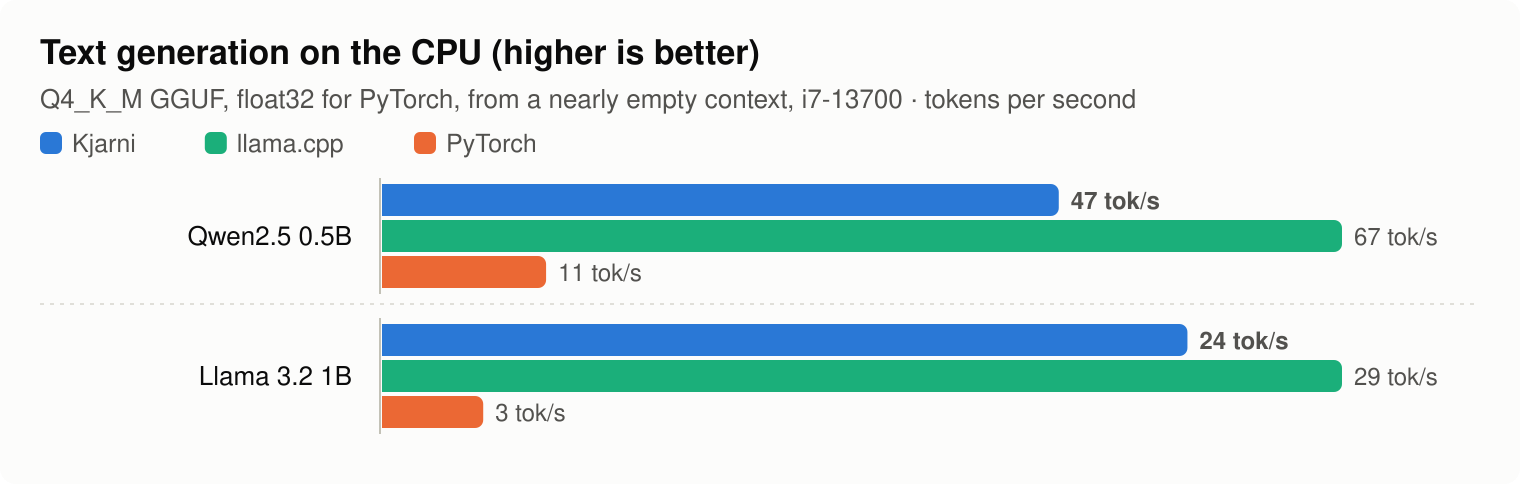
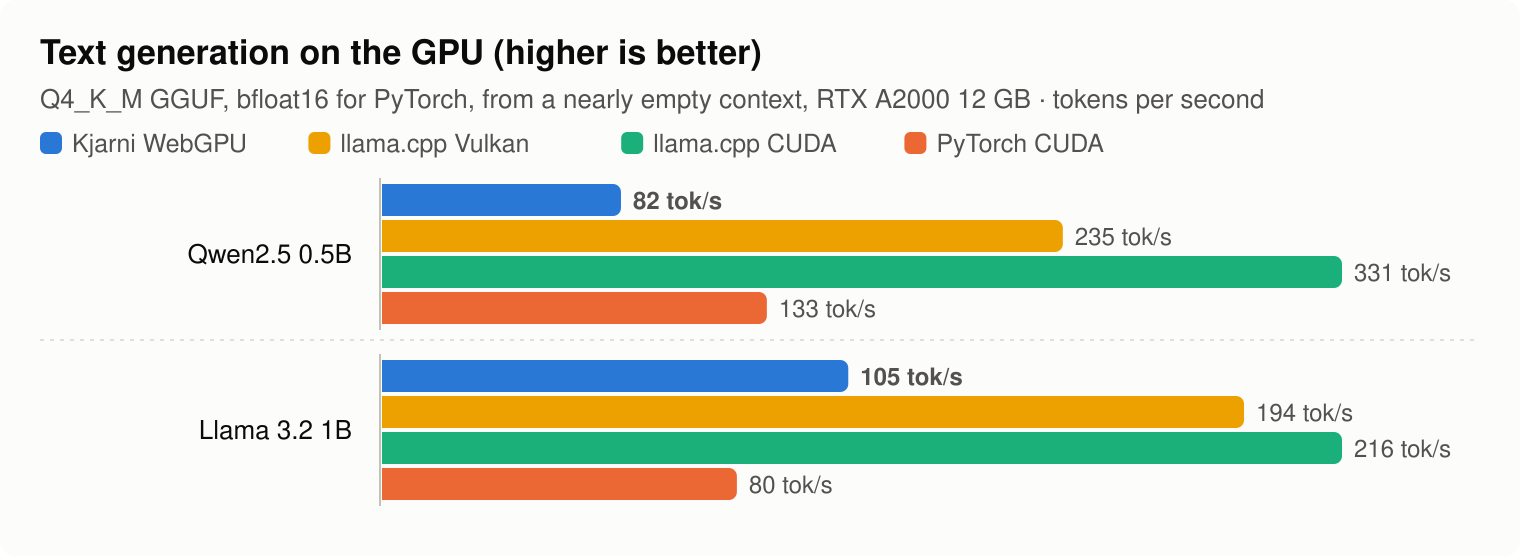
An i7-13700 and an RTX A2000 12 GB, each engine in its own process. On this NVIDIA card, engines using CUDA are well ahead of Kjarni's WebGPU; what WebGPU gives you is the same code on NVIDIA, AMD, Intel and Apple hardware with nothing to install.
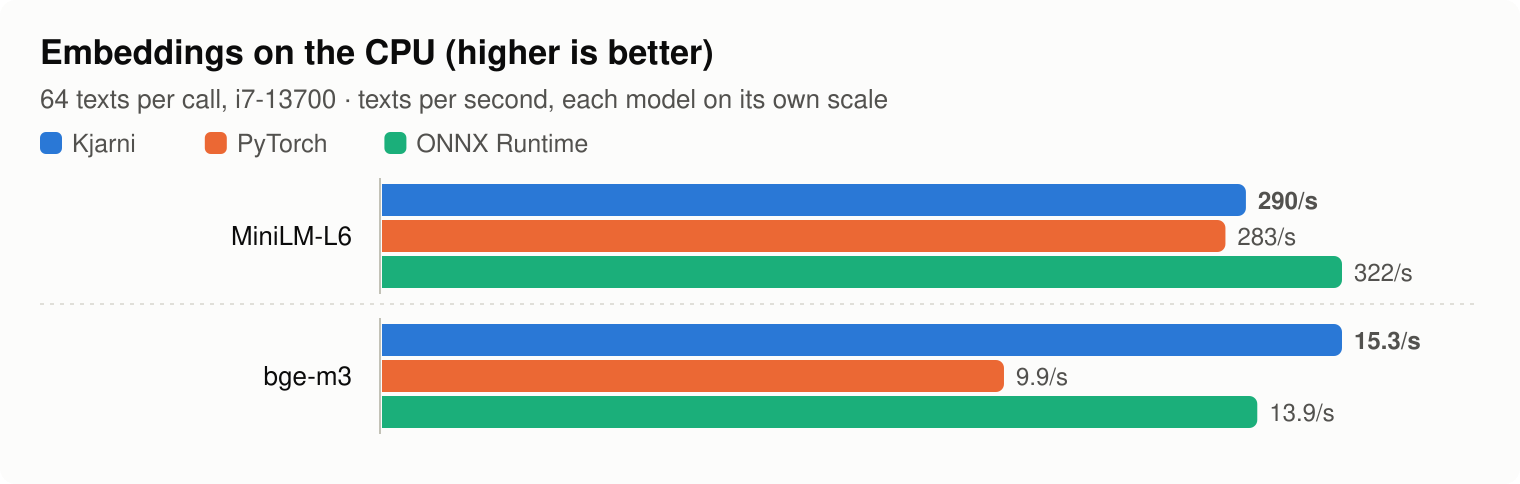
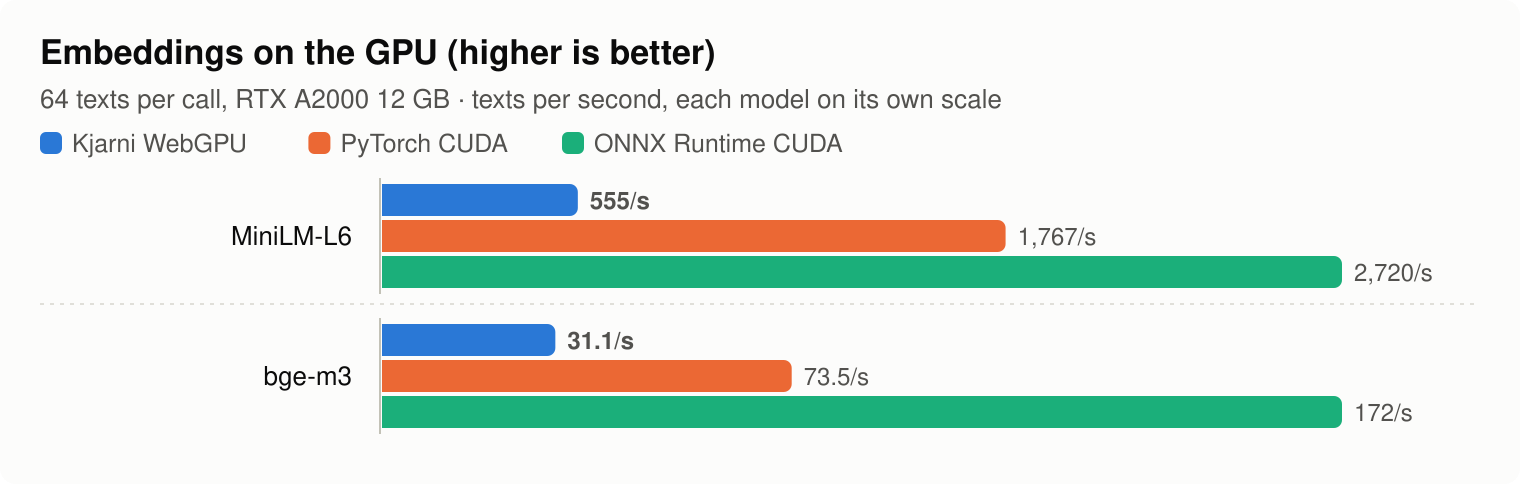
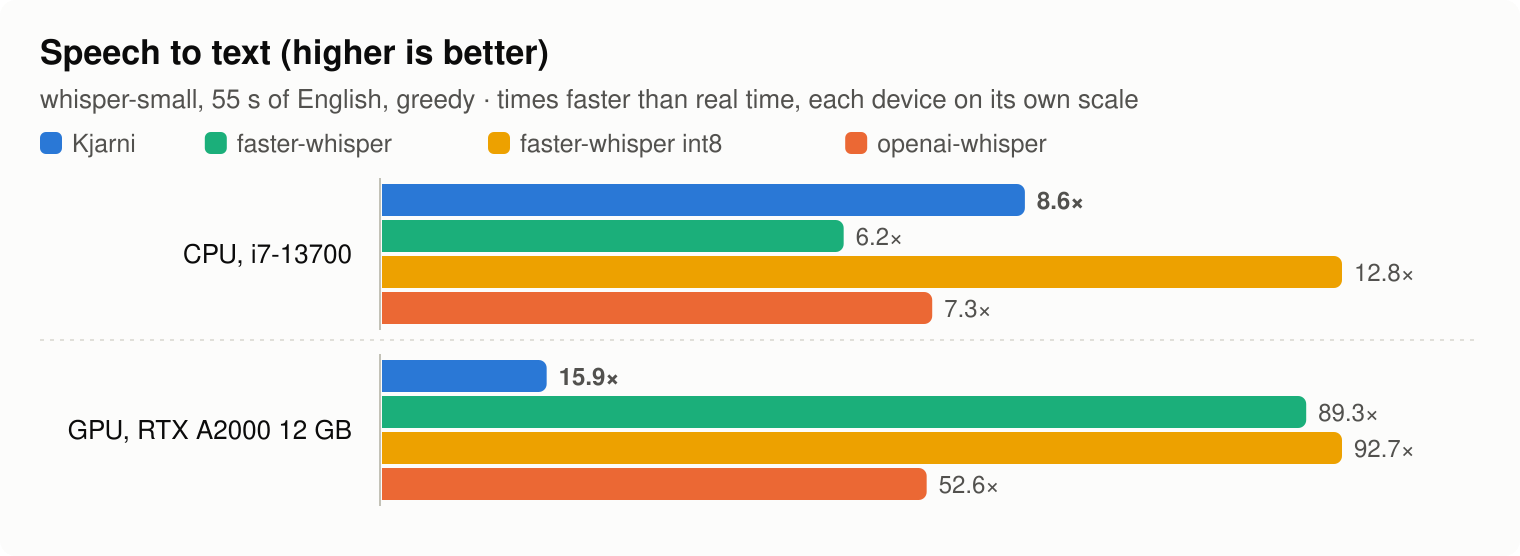
Calling through Python costs nothing measurable: one short MiniLM embedding takes 3.49 ms, against 3.44 ms calling the C ABI directly, a difference within run-to-run noise. Method and every number: BENCHMARKS.md.
The same engine elsewhere
There is one Rust engine behind all of these, and one set of kernels. The numbers on this page are the numbers the other packages print.
- kjarni.ai - documentation and worked examples
- GitHub - source, issues, releases
- NuGet - the same engine from C#
- npm - the same engine in the browser, via WebAssembly
- Go module - the same engine from Go
- Semantic Search in C++ - the C ABI this package wraps, used directly
- Why I Built a Native ML Inference Engine in Rust - what is underneath all of it
- ML from the Command Line - the same models as a UNIX tool
License
MIT or Apache-2.0.
1 maintainer

Metadata
1 maintainer
Release files for kjarni 0.4.4
For a detailed explanation of source distributions (sdists) and built distributions (wheels), please see the package formats documentation.
Built distributions (wheels)
| File | Actions Reset | |||
|---|---|---|---|---|
| kjarni-0.4.4-py3-none-win_amd64.whl | Python 3 | none | Windows x86-64 | Details for kjarni-0.4.4-py3-none-win_amd64.whl |
| kjarni-0.4.4-py3-none-manylinux_2_17_x86_64.whl | Python 3 | none | Linux glibc 2.17+ x86-64 | Details for kjarni-0.4.4-py3-none-manylinux_2_17_x86_64.whl |
| kjarni-0.4.4-py3-none-manylinux_2_17_aarch64.whl | Python 3 | none | Linux glibc 2.17+ ARM64 | Details for kjarni-0.4.4-py3-none-manylinux_2_17_aarch64.whl |
| kjarni-0.4.4-py3-none-macosx_11_0_arm64.whl | Python 3 | none | macOS 11.0+ ARM64 | Details for kjarni-0.4.4-py3-none-macosx_11_0_arm64.whl |
Total release size: 39.9 MB
Release files / kjarni-0.4.4-py3-none-win_amd64.whl
| Download URL | kjarni-0.4.4-py3-none-win_amd64.whl |
|---|---|
| Size | 10.8 MB |
| Tags | Python 3 Windows x86-64 |
|
SHA-256 checksum How to use checksums |
83699158b85995b57b78d74dd348ca790542799e94c2193616fc189b862ac34e
|
|
BLAKE2b-256 checksum How to use checksums |
6bd3b4c60494d6979f7931ffa80e9ae225606a08afb690f42f1b549ed1b5b594
|
| Upload date | |
|
Uploaded using Trusted Publishing? What is trusted publishing? |
No |
| Uploaded via |
twine/7.0.0 CPython/3.11.17
|
Release files / kjarni-0.4.4-py3-none-manylinux_2_17_x86_64.whl
| Download URL | kjarni-0.4.4-py3-none-manylinux_2_17_x86_64.whl |
|---|---|
| Size | 10.4 MB |
| Tags | Linux glibc 2.17+ x86-64 Python 3 |
|
SHA-256 checksum How to use checksums |
c60a4fd1c3bf38ded08791aac8a3afcc295b5a991654f39f07b6cf3f5295cb08
|
|
BLAKE2b-256 checksum How to use checksums |
60a791acc4f159840f7cbcb80b735f436e284e4bbc19f6621860b8ddd5865d13
|
| Upload date | |
|
Uploaded using Trusted Publishing? What is trusted publishing? |
No |
| Uploaded via |
twine/7.0.0 CPython/3.11.17
|
Release files / kjarni-0.4.4-py3-none-manylinux_2_17_aarch64.whl
| Download URL | kjarni-0.4.4-py3-none-manylinux_2_17_aarch64.whl |
|---|---|
| Size | 9.7 MB |
| Tags | Linux glibc 2.17+ ARM64 Python 3 |
|
SHA-256 checksum How to use checksums |
2cd1d35d811168f42b62e9b33cbd03be73fdfd296d17ecb1a4a53f7a0bb90651
|
|
BLAKE2b-256 checksum How to use checksums |
1a9771310fb4a8557032d6b08ed81fb7c99c51b980d3e3afb8249c4492dbf685
|
| Upload date | |
|
Uploaded using Trusted Publishing? What is trusted publishing? |
No |
| Uploaded via |
twine/7.0.0 CPython/3.11.17
|
Release files / kjarni-0.4.4-py3-none-macosx_11_0_arm64.whl
| Download URL | kjarni-0.4.4-py3-none-macosx_11_0_arm64.whl |
|---|---|
| Size | 9.0 MB |
| Tags | Python 3 macOS 11.0+ ARM64 |
|
SHA-256 checksum How to use checksums |
91d1651ab8cafe274efebb00e3e374d0295ee9279ecff6aedf61f88f88093bf7
|
|
BLAKE2b-256 checksum How to use checksums |
21c3dc899cbf58734e0ccae4c5fa45806e3e3edec71718fbed46a1e7caf45191
|
| Upload date | |
|
Uploaded using Trusted Publishing? What is trusted publishing? |
No |
| Uploaded via |
twine/7.0.0 CPython/3.11.18
|
Security for kjarni 0.4.4
Provenance
Provenance describes where a file came from. On PyPI, provenance is shared via attestations, which provide a verifiable record of the build or publishing details. View details, limitations and caveats.
No provenance found
None of the files in this release were uploaded with provenance metadata.
A note on package security
PyPI is a repository for distributing packages, not a service for auditing them. While third-party security researchers and our staff do their best to detect and remove malicious packages, PyPI cannot guarantee the quality, security or suitability of any given package.
To learn more about protecting yourself from malicious actors, visit our package security documentation.














