
KLayout-klink
klink is an AI-native control plane for KLayout. It turns a running KLayout GUI into a scriptable layout kernel that can be controlled from external Python processes, MCP clients, and AI agents.
📖 Documentation site (English; 中文 at the site root): https://klinkdev2026.github.io/klayout-klink/en/
Step-by-step illustrated tutorials — each one is a real run of a demo, drawn stage by stage in KLayout, with a screenshot and runnable code per step:
- Hall bar — geometry-first basics
- EBL wraparound — writefield constraints
- Neural-electrode array — parametric arrays + batch RPCs
- gdsfactory MZI — the gdsfactory bridge + drag-to-reroute
- Custom device → P&R → LVS — fit your own device into a digital place-and-route flow
- Probe-card padframe — pad ring + power net, two card modes
- Passive-device templates — IDC / spiral / SAW / BAW
The project is split into three layers:
klink: the external Python client, MCP bridge, routing/domain logic, and agent-facing workflows.klink_plugin: a thin KLayout-side RPC plugin that exposes selectedpyaand GUI operations.examples_klink/public,tests/public, anddocs/public: examples, validation, and release documentation.
The core Python package pulls in no third-party runtime libraries — its only declared dependencies are klink's own two Rust acceleration kernels, shipped as prebuilt wheels. Virtual environments, caches, build outputs, and local test artifacts are intentionally not part of a clean release.
Complete installation: Install Vestigraph in the same Python environment to enable the full Klink + Vestigraph feature set, including saved-layout history, HIST, and local agent history tools. python -m pip install vestigraph installs Vestigraph, the compatible klayout-klink, and the default Rust scanner.
What It Does
- Controls KLayout over local TCP RPC, with batch methods sized for generated layouts (thousands of shapes/instances/PCells per call).
- Reads layout, cell, layer, shape, view, selection, and method metadata.
- Creates and edits shapes, text, cells, instances, PCells, Ports, and Anchors.
- Regions & executable intent — circle an area with KLayout rulers, claim it as a Region marker, and generate validated, regenerable numbered arrays into it (obstacle-aware, text slots inside the unit cell, user-defined grid notations); fail-closed clean export strips all markers for delivery.
- Routes: tapered/steiner/damped/channel backends over Port/Anchor markers, plus a detailed-router → live LVS flow for custom-device circuits.
- Exposes KLayout operations as MCP tools through
klink-mcp, navigable withklink.find_tools; runs controlledpyasnippets as the escape hatch. - Remembers what you SEND: selections sent from the KLayout toolbar become durable ids an agent can resolve ("this area", "the one I just sent").
- Drives many KLayout sessions from one bridge and moves geometry between them with a dry-run-then-commit transfer.
- Records a working session — manual edits and RPC edits — into a replayable
Python script (plus a standalone
pyavariant). - Turns the same layout into pictures: process cross-sections and per-step
films from your own
.pyxsrecipe, a 3D model with a self-contained offline viewer page, SEM-style top views, and Blender renders — all driven by one visual-stack declaration you own. - Supports gdsfactory-oriented workflows, including Port markers, component
placement, routing, and klive-compatible
c.show()display. - Keeps the KLayout plugin thin while heavier logic runs in external Python.
What's New
0.6.0 — Vestigraph local history integration
klink 0.6.0 supports Vestigraph 0.2.0 local history through the existing extension registry. The full combined workflow requires Vestigraph installed in the Python environment that runs klink-mcp. Run klink plugin install, restart MCP for automatic tool discovery and companion registration, then restart KLayout and click HIST. Skill refinement requires an explicit experimental opt-in. See Using Vestigraph.
0.5.0 — Layout intent: circle a region, get a managed numbered array
Circle an area with KLayout's own rulers and claim it as a klink
Region; intent.prepare / intent.apply / intent.regenerate then
plan and commit numbered arrays into it — nothing is written until
confirmed, every copy carries a physical label from your own grid
notation (R{row}C{col}, {row:A}{col}, …), and regeneration refuses
to overwrite output you have hand-edited. layout.export_clean is the
fail-closed delivery exit (klink markers stripped, explicit layer
allowlist, re-read verification). The fabrication domain (site grids,
numbering schemes, marks, mask composition) joins the public release.
Details in the CHANGELOG.
0.4.0 — Imaging ships mechanism, never a look
BREAKING (imaging): the imaging exits no longer carry any built-in
appearance — a hardcoded sun energy or camera lens is the same category
of bug as a hardcoded layer number, and klink holds neither. Each exit
reads its style from a declaration you own (klink init scaffolds
starter styles to copy and edit); a missing declaration is an
instructive error naming the file to copy, never a silent default.
Details in the CHANGELOG.
0.3.0 — Imaging: cross-sections, 3D and SEM views from one declaration
New imaging domain: declare your stack once (klink_visual_stack_v1)
and get process cross-sections (headless klayout-pyxs engine, explicit
cut line, per-step films via # klink-step: recipe markers), a 3D model
with a SELF-CONTAINED interactive web viewer (offline single file,
per-layer color controls), SEM-style top views, and paper-grade Blender
renders where 2D-material layers appear as their atomic lattice
(graphene/MoS2) — all at 1:1 layout coordinates, all with deterministic
output contracts and machine-readable sidecars. Recipes and stacks stay
example-owned; heavy dependencies are optional with instructive install
errors. Details in the CHANGELOG.
0.2.0 — L-Edit bridge
klink now drives a running Tanner L-Edit
through a file-exchange RPC bridge: one source-loaded UPI macro (zero
compile, no sockets), full white-box readout (selections, whole cells with
property trees, ports, labels, the design's entire DRC rule table), and
T-Cells in both directions — read generator code, instance
programmatically with parameters, and write generated code back as a
native parametric T-Cell. Acceptance is byte-exact: a ported cell counts
only when every box matches L-Edit's own generated geometry. See
example_template/ledit_bridge/ after klink init, MCP domain
bridge_ledit, and the website guide.
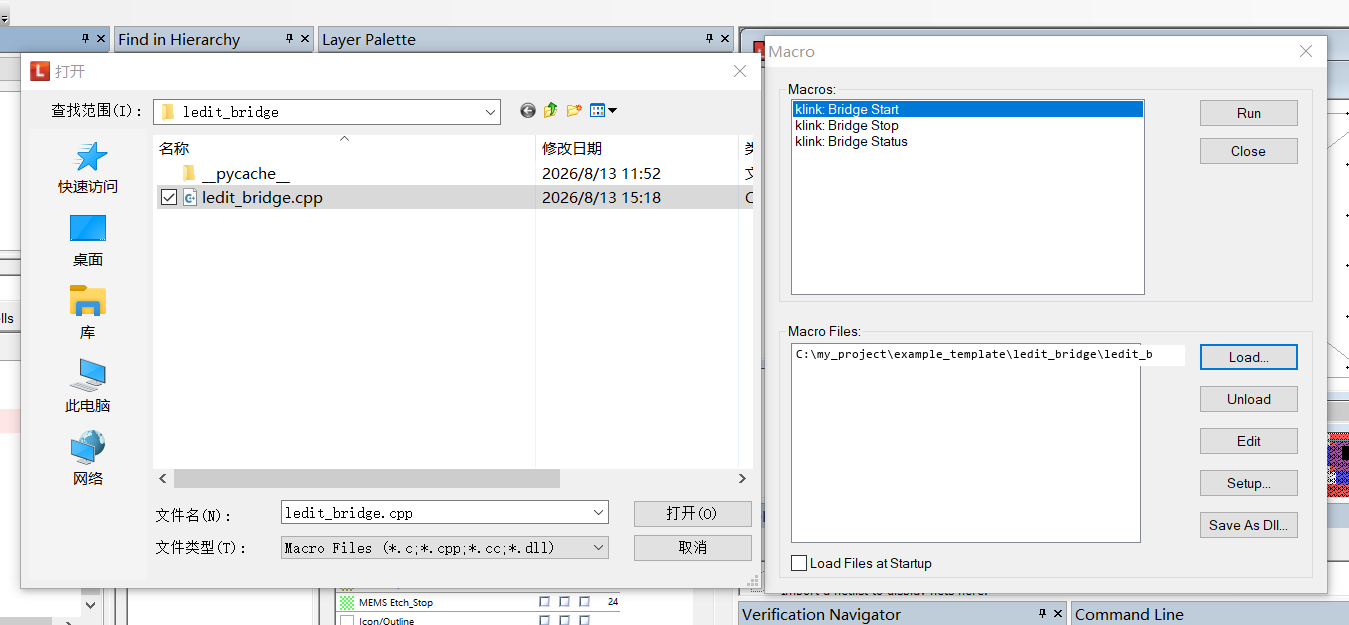
Connecting L-Edit to your agent: load the macro source once — the bridge starts polling immediately (Tools menu: klink Bridge Start/Stop/Status).
Earlier releases: see the CHANGELOG.
Repository Layout
klink/                  Python client, MCP bridge, and core logic
klink_plugin/           KLayout salt plugin
examples_klink/public/  Public, open-box-runnable example gallery
tests/public/           Public test suite (no KLayout required)
docs/public/            Release documentation
rust/                   Rust acceleration crates (klink_boxmaze, klink_trackmaze)
pyproject.toml          Python packaging configuration
README.md               English README
README.zh-CN.md         Chinese README
CLAUDE.md               Claude Code operating rules and project context
LICENSE                 Apache-2.0 license
THIRD_PARTY_NOTICES.md  Third-party notices
Requirements
- KLayout — the layout editor klink controls; for everything live this is
the core prerequisite. Install the standard desktop build from
https://www.klayout.de/build.html. klink is developed and tested against
KLayout 0.30.x; any recent official desktop build (whose macro environment
provides the
pyaQt bindings) should work. Purely offline workflows (the public test suite and the offline demos) run without it. - Python 3.10 or newer (the bundled Rust kernels ship abi3 stable-ABI wheels, covering CPython 3.10 and newer).
- Optional: Claude Code or another MCP client.
- Optional: gdsfactory, the
klayoutPython package, NumPy/OpenCV, or detector dependencies depending on the workflow.
Install the complete Klink + Vestigraph workflow
For the complete workflow, including saved-layout history, HIST, and local agent history tools, install Vestigraph into the same Python environment that runs klink-mcp:
python -m pip install "vestigraph>=0.2,<0.3"
klink plugin install
# restart the MCP client that runs klink-mcp
# restart KLayout, open a saved GDS/OASIS layout, then click HIST
python -m vestigraph doctor --integration
Vestigraph installs the compatible klayout-klink and vestigraph-scan-core dependencies. Rust scanning is enabled automatically when the native module is available. Restarting MCP discovers the history tools and registers the local companion. Use klink.status to list extensions and klink.find_tools with domain="vestigraph" to discover the tools. No separate MCP server or vestigraph setup step is needed.
Upgrade together: Stop any running Vestigraph service, upgrade compatible packages, run klink plugin install, then restart MCP and KLayout. History, evidence, skills, and exports stay in local user storage. Private skills are not included in the packages. See Using Vestigraph.
Install Python Package
For normal use, install the published package from PyPI:
python -m pip install klayout-klink
pip install klayout-klink installs klink and its two Rust acceleration
kernels (klink-boxmaze-rs + klink-trackmaze-rs) — klink's own code, shipped
as pre-built abi3 wheels for Linux / macOS / Windows on CPython 3.10+. You get the
fast path automatically; nothing else to do.
On a platform with no pre-built kernel wheel (an unusual OS / arch / Python), pip falls back to building the kernel from source, which needs a Rust toolchain (rustup). If you don't have one — or want the lightest possible install — use
pip install klayout-klink --no-depsfor the pure-Python core only: everything still works (the kernel has a pure-Python fallback), just slower on large place-and-route jobs.
Third-party scientific libraries (klayout, gdsfactory, numpy, …) are not bundled — install the ones a feature needs yourself, into the same interpreter:
python -m pip install klayout                          # offline DB / LVS extraction
python -m pip install gdsfactory                       # silicon-photonics routing
python -m pip install numpy opencv-python-headless     # nanodevice flake
python -m pip install scipy scikit-learn scikit-image  # flake detectors
When a feature needs a library that is missing, klink returns an error naming
the exact pip install command — you do not have to know these in advance.
From source (development only)
Use an editable install (-e) only when you are working on klink itself — it
points the package at your working tree so source edits take effect immediately.
Normal users do not need this.
Windows PowerShell:
git clone <repo-url> klink
cd klink
py -3.11 -m venv .venv
.\.venv\Scripts\Activate.ps1
python -m pip install -U pip
python -m pip install -e .
Linux / macOS:
git clone <repo-url> klink
cd klink
python3 -m venv .venv
source .venv/bin/activate
python -m pip install -U pip
python -m pip install -e .
Start a project
pip install gives you the klink CLI. Scaffold a project into a new empty
folder with klink init:
klink init mychip     # creates ./mychip (pdk.py, example_template/, recipes/, agent rules, MCP config)
cd mychip
klink init refuses a non-empty folder, so point it at a fresh name. Then open
the folder with your agent (Claude Code / Codex) and describe what you are
building — it fills in pdk.py + custom_devices/ from the matching recipe. The
scaffolded example_template/ holds copy-and-adapt starter demos, grouped into
nanodevice/, photonics/, passives/, and digital/; run one with
python example_template/<category>/<name>.py. The digital/ family does live
P&R + LVS, so it needs a running KLayout session (--port).
Once the project exists, start every new task with klink run new <slug> —
usually your agent runs this itself, since the project's own agent rules call
for it at the start of every task:
klink run new pad-ring-v2
This creates a dated runs/<date>_<slug>/ folder holding a
run.py driver stub (already importing pdk and toolbox), an out/ folder
for that task's artifacts, and a notes.md template (request / what was done /
verification evidence) — driver, output, and notes travel together. The folder
registers itself in the runs/INDEX.md ledger as "(in progress)" the moment
it is created, and that line collapses into a one-line summary plus PASS/FAIL
once the task finishes. Code that proves out in a run graduates into
custom_devices/toolbox/, the project's own reusable-tool package.
When you upgrade klink later, refresh those bundled starters without touching
your own work (pdk.py, custom_devices/, .klink/, out/, specs/ are
never changed):
python -m pip install -U klayout-klink
klink update mychip   # or run `klink update` from inside the project folder
Install KLayout Plugin
Prerequisite: KLayout itself must be installed first — get the desktop build for your OS from https://www.klayout.de/build.html.
klink_plugin is a KLayout salt package. The plugin ships inside the pip
package, so after pip install klayout-klink one command installs it — no
repository clone needed:
klink plugin install      # copies the bundled plugin into KLayout's salt/
klink plugin status       # shows installed vs bundled plugin versions
The salt directory is auto-detected per OS (%USERPROFILE%\KLayout\salt on
Windows, ~/.klayout/salt elsewhere, honouring KLAYOUT_HOME); pass
--salt-dir to override. Re-run klink plugin install after upgrading the
pip package so the plugin stays in lockstep with the client.
Once installed, KLayout autoruns pymacros/klink.lym and starts:
- klink RPC on
127.0.0.1:8765. If the port is busy, it tries the next ports up to8799. - a klive-compatible server on
127.0.0.1:8082for gdsfactory-stylec.show()workflows.
From a repository checkout you can instead copy the folder by hand — Windows:
cd path\to\klink
New-Item -ItemType Directory -Force -Path "$env:USERPROFILE\KLayout\salt" | Out-Null
Copy-Item -Path ".\klink_plugin" -Destination "$env:USERPROFILE\KLayout\salt\" -Recurse -Force
Linux / macOS:
cd /path/to/klink
mkdir -p ~/.klayout/salt
cp -R klink_plugin ~/.klayout/salt/
Either way the plugin ends up at <KLayout salt dir>/klink_plugin/ (the folder
that contains grain.xml).
Restart KLayout after installing the plugin, in editor mode: klayout -e
(or enable File > Setup > Application > Editing Mode > Use editing mode by
default). In viewer mode layouts are read-only and nothing can be undone,
so every klink write RPC is refused with ERR_VIEWER_MODE; klink.status
reports the mode under editor_mode. Each KLayout window runs its own
klink session: it binds the first free port in 8765–8799 and registers as
session klayout-<port>, so with several windows open there is one listener
per window (8765, 8766, …). A successful startup prints:
[klink.server] listening on 127.0.0.1:8765
When upgrading, close KLayout, run klink plugin install again (it replaces
the old copy — from a checkout, remove the old salt/klink_plugin and re-copy
instead), then restart KLayout.
Staying Current
klink ships improvements frequently, often driven directly by real user
feedback — being a few releases behind is the most common support trap.
Before starting a work session, run python -m klink.doctor: it checks
whether your install is behind the latest release on PyPI and, live against
KLayout, whether the plugin has fallen behind the Python package.
An update is three steps that must travel together:
python -m pip install -U klayout-klink   # 1. upgrade the Python package
klink plugin install                     # 2. sync the plugin, then restart KLayout (or reload the macro)
# 3. reconnect the MCP server so new tool schemas load
klink update <projectdir> separately refreshes a project's
example_template/ starters, leaving your own files untouched. The doctor's
PyPI probe is best-effort (2s timeout) and degrades to informational offline;
pass --no-latest to skip it outright.
Smoke Test
Start KLayout with the plugin loaded, then connect directly from Python:
from klink import KLinkClient

with KLinkClient() as c:
    print(c.ping(nonce=42))
    print(c.layout_info(verbosity="summary"))
If KLayout is listening on a non-default port:
from klink import KLinkClient

with KLinkClient(port=8766) as c:
    print(c.ping())
For a first end-to-end result with no external geometry, run one of the public
demos (see docs/public/demos.md):
python -m examples_klink.public.demos.nanodevice.ebl_wraparound # fully offline
Claude Code / MCP
After installing the Python package, klink-mcp is available as a command-line
entry point.
Install the agent skills and project memory files:
cd path\to\klink
klink-mcp --setup .
This installs or updates:
.claude/skills/klayout/SKILL.md
.claude/skills/klayout-gdsfactory/SKILL.md
CLAUDE.md
The same packaged skills can be installed for other agents. The shared
.agents/skills/ layout is used by Codex, Pi, and Kimi Code; Pi also accepts
.pi/skills/, and Kimi Code accepts .kimi-code/skills/:
klink-mcp --install-skills .agents/skills
# Optional agent-specific project layouts:
klink-mcp --install-skills .pi/skills
klink-mcp --install-skills .kimi-code/skills
Codex reads the project's AGENTS.md and discovers skills from the shared
.agents/skills/ directory. A klink init project already contains AGENTS.md;
for an existing project, copy the project template or add the relevant klink
rules to its own AGENTS.md rather than overwriting project instructions.
Pi discovers .agents/skills/ or .pi/skills/ after a new session. Kimi Code
discoveries include .agents/skills/ and .kimi-code/skills/; invoke a skill
with /skill:<name> when needed. Review skill files before enabling them.
Register the MCP server with your agent explicitly. Installing the Python package does not register an MCP server with Claude Code, Claude Desktop, Codex, or another client. Each client has its own configuration. The helper prints the command for the interpreter that owns your klink installation:
klink-mcp --register
For Claude Code, run the printed command from a terminal (not the /mcp chat command). The general form is:
claude mcp add klayout -- <klink-python> -m klink.mcp --profile read,write,verify,escape --session-id project-klink
Restart the client after registration. If the wrapper is unavailable, invoke klink.mcp with the same Python that has the package; python -m klink is not the MCP entry point.
Common profiles:
| Profile | Purpose |
|---|---|
read |
Read-only exploration: layout, cell, layer, shape, view, and selection queries. |
write |
Editing tools: create cells, layers, shapes, instances, PCells, and undo records. |
verify |
DRC / LVS verification tools. |
escape |
Escape-hatch tools such as exec.python. |
all |
Expose everything. |
Profiles can be combined:
python -m klink.mcp --profile read,write,verify,escape
Optional libraries must be installed into the same Python environment that
runs klink.mcp. For example, if gdsfactory tools report missing dependencies,
install gdsfactory into that same environment:
python -m pip install gdsfactory
Use the MCP klink.status tool to inspect the active interpreter, detected
capabilities, and KLayout connection state.
Tests
The public test suite is pure-Python and does not require KLayout:
python -m pytest -q tests/public
Integration tests (routing, LVS, recorder) need a live KLayout with the
klink_plugin loaded and are exercised in the development repository.
Troubleshooting
Connecting from Python fails
Check that:
- KLayout is running.
klink_pluginis installed in the KLayout salt directory (klink plugin statustells you).- KLayout was restarted after plugin installation.
- Port
8765is available, or use the actual session port such as8766. - Firewall or security software is not blocking localhost TCP.
MCP tools exist but return KLayout connection errors
The MCP server is running, but KLayout is not reachable. Start KLayout with the
plugin loaded, then call klink.reconnect or restart the MCP client. Use
klink.status to inspect the last connection error.
Write tools return ERR_VIEWER_MODE
KLayout was started in viewer mode (without -e), so its layouts are
read-only and no undo transaction can be opened. Close KLayout, start it with
klayout -e (or enable File > Setup > Application > Editing Mode), then
call klink.reconnect. Read-only tools keep working in viewer mode;
klink.status (editor_mode) and python -m klink.doctor show the current
mode.
gdsfactory or detector tools report missing dependencies
Install the missing library in the same environment used by the script or MCP server (the error names the exact one):
python -m pip install gdsfactory
python -m pip install scipy scikit-learn scikit-image
PowerShell blocks .venv activation
Allow script execution for the current PowerShell process:
Set-ExecutionPolicy -Scope Process -ExecutionPolicy Bypass
.\.venv\Scripts\Activate.ps1
Further Reading
docs/public/getting-started.md: install, configure, and first result.docs/public/architecture.md: the three tiers and the control path.docs/public/demos.md: the demos and what each requires.docs/public/control-plane.md: the typed RPC surface, the MCP tool catalogue, batch authoring.docs/public/interactive-workflows.md: SEND selection memory, multi-session transfer, the recorder.docs/public/api-stability.md: what counts as public API and the 0.x compatibility policy.docs/public/drc-lvs.md: writing and running DRC/LVS, including the profile-derived deck (profile.drc_script()).docs/public/drc-lvs-agent-handout.md: paste-to-agent recipe that teaches an agent to author KLayout DRC/LVS.docs/public/layout-intent.md: Regions from KLayout rulers, executable numbered arrays, and the fail-closed clean export.docs/public/plugin-packages.md: extend klink from your own pip package (klink.pluginsentry points).docs/public/25d-view.md: the native 2.5d (3D stack) view driven from your StackSpec + z table.CLAUDE.md: Claude Code operating rules and project context.klink/mcp/README.md: MCP bridge details.
Contributing
Contributions are welcome. A few project-specific rules keep klink coherent:
- Process purity.
klink/is pure mechanism and holds zero process data (no hardcoded layers, devices, DRC numbers, ports, or PDK instances). Process facts live in an example or userpdk.pyand are passed explicitly into the APIs. Do not add process constants toklink/. - One intention = one call. New agent-facing tools use one call per user
intention, errors that instruct (carry a
next_action), validate-before-mutate, and state persisted on disk. - Tests must pass. Run the public suite before sending a change:
python -m pytest -q tests/public. Routing/LVS changes count as done only on a live KLayout LVSmatch=True. - Byte-frozen router.
klink/routing/backends/flexdr/and the crate underrust/are byte-parity baselines — the Rust kernel is a speed-only port of the pure-Python reference. Do not alter them casually. - Preflight.
python -m klink.doctorchecks your interpreter, the plugin connection, and the client/plugin version handshake.
Open an issue or a pull request describing the change and how you verified it. Contributions are accepted under the project's Apache-2.0 license.
Want to contribute a PR, discuss a larger change, or co-develop a feature? Reach the maintainers at klinkdev2026@163.com (or open a GitHub issue).
Acknowledgements
klink builds on and borrows from excellent open-source work:
- KLayout — the layout editor and
pya/dbAPIs klink drives and embeds into. - OpenROAD (BSD-3-Clause)
— klink's routing engine contains faithful ports and concept adaptations of
OpenROAD's detailed router
drt(FlexDR / FlexPA / FlexGC) and global routergrt(FastRoute). - gdsfactory — the photonic
component and
route_bundlebackend behind the silicon-photonics workflows. - klive (MIT) — the display protocol
that klink's plugin reimplements on port 8082 so gdsfactory-style
Component.show()works unchanged. - KlayoutClaw (MIT) — nanodevice flake-detection priors and morphological mask helpers.
- Klayout-Router (MIT) — the EBL auto-patching idea behind the writefield patch generator.
- klayout_pyxs (MIT) — the
process cross-section ENGINE behind
imaging.xsection_run. klink uses it strictly as an import-only, version-pinned dependency (klayout-pyxs== 0.1.13); no code is vendored. klink contributes its own headless, coordinate-driven driver on top (the upstream flow is GUI/ruler-bound). klayout_pyxs is itself a Python port of Matthias Köfferlein's XSection project, whose concept this feature ultimately owes to. - model-viewer (BSD-3-Clause,
with MIT-licensed three.js parts) — the 3D web component VENDORED verbatim
(v3.5.0, license headers preserved) and inlined into the self-contained
viewer pages
imaging.render3dgenerates. - Blender / bpy (GPL-3) — the optional
headless renderer behind
imaging.blender; import-only at arm's length (pip install bpy, user-installed), never bundled. - trimesh (MIT) and shapely (BSD-3-Clause) — optional mesh/geometry libraries behind the 3D exits.
Relationship summary: ported (OpenROAD algorithms, with attribution),
vendored (model-viewer bundle, permissive licenses, notices kept),
import-only dependencies (KLayout, gdsfactory, klayout_pyxs, bpy, trimesh,
shapely — nothing copied into klink), protocol reimplementation (klive),
data/idea credits (KlayoutClaw priors, Klayout-Router patching idea).
Formal third-party copyright and license texts are in
THIRD_PARTY_NOTICES.md.
License
Apache-2.0. See LICENSE. Third-party components retain their own licenses; see
THIRD_PARTY_NOTICES.md.
1 maintainer

Metadata
1 maintainer
Release files for klayout-klink 0.6.4
For a detailed explanation of source distributions (sdists) and built distributions (wheels), please see the package formats documentation.
Source distribution (sdist)
| File | Size | Uploaded | Provenance | |
|---|---|---|---|---|
| klayout_klink-0.6.4.tar.gz | 1.3 MB | With provenance | Details |
Built distribution (wheel)
| File | Interpreter | ABI | Platform | Reset |
|---|---|---|---|---|
| klayout_klink-0.6.4-py3-none-any.whl | Python 3 | none | any | Details |
Total release size: 2.7 MB
Release files / klayout_klink-0.6.4.tar.gz
| Download URL | klayout_klink-0.6.4.tar.gz |
|---|---|
| Size | 1.3 MB |
| Tags | Source |
|
SHA-256 checksum How to use checksums |
528cd7dc5693193c1e00e7425c562b26442d464e256fd612f1d4d04be0320d66
|
|
BLAKE2b-256 checksum How to use checksums |
c4f0c6d07951070e0fd564e790321a44ee1ce6b21a5ebbc7987f1e808c8ace03
|
| Upload date | |
|
Uploaded using Trusted Publishing? What is trusted publishing? |
Yes |
| Uploaded via |
twine/7.0.0 CPython/3.13.14
|
Provenance
Provenance describes where a file came from. On PyPI, provenance is shared via attestations, which provide a verifiable record of the build or publishing details. View details, limitations and caveats.


PyPI Publish Attestation
PyPI verified that this artifact, at this checksum, originated from the publisher listed below.
Signed by GitHub Actions, verified by PyPI on Oct 8, 2026.
Transparency logRelease files / klayout_klink-0.6.4-py3-none-any.whl
| Download URL | klayout_klink-0.6.4-py3-none-any.whl |
|---|---|
| Size | 1.5 MB |
| Tags | Python 3 |
|
SHA-256 checksum How to use checksums |
f07d5324f9852f28f13fe10f74ea0cecf248d143738270a6fc77df16847753b8
|
|
BLAKE2b-256 checksum How to use checksums |
c15f225745371ed30a62a1b0df64ff84251f26712e645e587071dce053764053
|
| Upload date | |
|
Uploaded using Trusted Publishing? What is trusted publishing? |
Yes |
| Uploaded via |
twine/7.0.0 CPython/3.13.14
|
Provenance
Provenance describes where a file came from. On PyPI, provenance is shared via attestations, which provide a verifiable record of the build or publishing details. View details, limitations and caveats.
PyPI Publish Attestation
PyPI verified that this artifact, at this checksum, originated from the publisher listed below.
Signed by GitHub Actions, verified by PyPI on Oct 8, 2026.
Transparency logSecurity for klayout-klink 0.6.4
Provenance
Provenance describes where a file came from. On PyPI, provenance is shared via attestations, which provide a verifiable record of the build or publishing details. View details, limitations and caveats.
Full provenance
All 2 files in this release have been uploaded with provenance metadata.
Attestation for klayout_klink-0.6.4.tar.gz
PyPI Publish Attestation
PyPI verified that this artifact, at this checksum, originated from the publisher listed below.
Signed by GitHub Actions, verified by PyPI on Oct 8, 2026.
Transparency logA note on package security
PyPI is a repository for distributing packages, not a service for auditing them. While third-party security researchers and our staff do their best to detect and remove malicious packages, PyPI cannot guarantee the quality, security or suitability of any given package.














